If you type “Microsoft Dynamics 365 CRM pricing” into Google, you’ll land on Microsoft’s official pricing page. Three neatly arranged boxes: Sales Professional at $65, Sales Enterprise at $105, Sales Premium at $150 per user per month. It’s clean, it’s reassuring, and it feels like you’ve got your answer.
Except that licenses only represent between 20% and 35% of the real cost of a Dynamics project over three years. Everything else (implementation, integrations, data migration, training, change management, run, upgrades, license audits…) is invisible on the pricing page.
This article goes against the grain of content that simply paraphrases Microsoft plans. What we do instead:
- Give you the real catalog prices (because that’s where we have to start)
- Decode the licensing mechanisms that can make invoices vary by a factor of three for the same functional scope
- Map all the cost items that Microsoft doesn’t mention on its pricing page
- At the end, give you realistic TCO ranges for 3 types of company
One disclaimer upfront: for Dynamics 365, it’s strictly impossible to provide a serious cost estimate without scoping first. It’s one of the most powerful CRMs on the market, but it’s also the one whose final cost depends most on the quality of the integrator deploying it. At the end of this article, we’ll explain why having a specialized partner is not a comfort, but a methodological necessity for this product.
Sommaire
Total cost of Microsoft Dynamics 365 CRM – Summary Table
Before diving into the details, here’s the big picture. The ranges below are based on a structured mid-market project (20 to 30 Sales Enterprise users, a few Customer Service users, two or three standard integrations, moderate customization). The percentages reflect public TCO benchmarks and remain valid for most cloud CRM projects.
| Cost item | Share of TCO over 3 years | Mid-market range (20-30 users) |
|---|---|---|
| Microsoft licenses (Sales, Service, Team Members, Copilot) | 20 to 35% | $30,000 to $65,000 |
| Implementation and integration (scoping, configuration, connectors) | 35 to 50% | $50,000 to $120,000 |
| Training and change management | 5 to 10% | $10,000 to $25,000 |
| Run, support and upgrades | 15 to 25% | $30,000 to $60,000 |
| Estimated total TCO over 3 years | 100% | $140,000 to $285,000 |
The lesson of this table is simple: focusing solely on the “$105 per user per month” price of a Sales Enterprise license means underestimating the real cost by a factor of 3 to 5.
Get a customized Dynamics 365 quoteWith Dynamics 365, the only pricing that’s worth anything is the one that takes into account your scope, your integrations and your role matrix. Masao, a Microsoft Dynamics 365 integrator for over 20 years (member of the Microsoft Inner Circle, the top 1% of Microsoft partners worldwide), provides free quotes.
Microsoft Dynamics 365 catalog prices
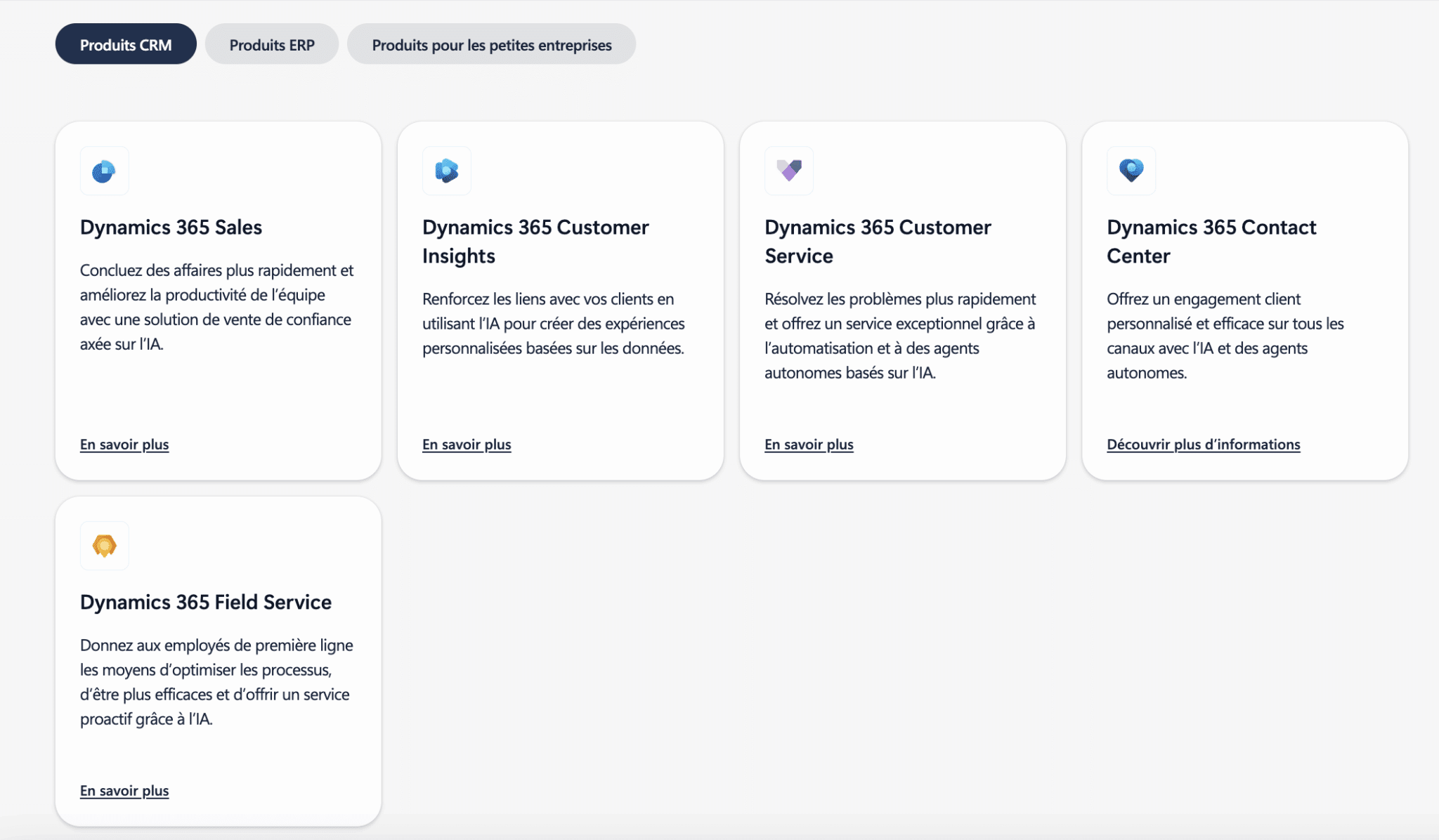
Microsoft groups its CRM bricks under the “Customer Engagement” scope of Dynamics 365, which includes:
- Sales (sales management)
- Customer Service
- Field Service
- Customer Insights (CDP and marketing)
- Contact Center (cloud contact center)
Each module is licensed separately, which means you only pay for the domains you actually use — but it makes it very difficult to read the overall cost.
A little background: after five years of stability, Microsoft applied an increase of between 9% and 17% on many Dynamics 365 modules from October 2024, as part of a broader repricing that reflects investments in AI and Copilot capabilities. Further targeted adjustments are expected from July 2026 on Microsoft 365 and certain Dynamics families. The prices below are current as of early 2026 but are subject to change.
Dynamics 365 Sales: the three editions
Microsoft’s official pricing page for Dynamics 365 Sales lists three main editions, billed in USD per user per month on an annual commitment basis.
| Edition | Price (annual commitment) | Functional scope | For whom |
|---|---|---|---|
| Sales Professional | $65 / user / month | Core CRM: leads, accounts, opportunities, quotes, orders, Microsoft 365 interoperability, standard reports and dashboards. | Small businesses with simple sales processes, teams of fewer than 30 reps, no need for advanced AI. |
| Sales Enterprise | $105 / user / month | All Professional features + advanced sales force automation, forecasting, territory management, conversational intelligence, and baseline Copilot capabilities (opportunity summaries, email and meeting support). | Structured SMBs and mid-market companies, multi-team environments, complex sales processes, need for analytics and generative AI. |
| Sales Premium | $150 / user / month | All Enterprise features + advanced sales intelligence (predictive scoring, relationship analytics, sales accelerator, extended Copilot capabilities). Minimum 10 users. | Mid-market and enterprise accounts with large sales forces, long cycles, and a need for predictive AI. |
| Microsoft Relationship Sales | On request | Sales Enterprise + LinkedIn Sales Navigator Advanced Plus. Minimum 10 users. | B2B sales teams focused on social selling and intensive LinkedIn prospecting. |
These prices include baseline Copilot capabilities (natural language insights, opportunity summaries, email support, draft responses), but advanced scenarios such as Copilot Studio agents are billed separately as Azure consumption. More on this below.
Dynamics 365 Customer Service and Contact Center
On the customer service side, the grid lists three editions plus a Contact Center cloud (CCaaS) offering.
| Product | Price (annual commitment) | Scope |
|---|---|---|
| Customer Service Professional | $50 / user / month | Case management, knowledge base, basic self-service, Microsoft 365 and Teams integration. |
| Customer Service Enterprise | $105 / user / month | Multi-session, advanced analytics, scheduling, AI functionalities, enhanced reporting. |
| Customer Service Premium | $195 / user / month | Customer Service Enterprise + embedded Contact Center and enhanced Copilot capabilities. Designed for advanced contact centers. |
| Dynamics 365 Contact Center | $110 / user / month (standard) | Full CCaaS with digital and voice channels, sellable as a Dynamics extension or as an add-on to another CRM (yes, including Salesforce). |
Active promotionA 40% discount on list price is available for Dynamics 365 Contact Center plans and Customer Service Premium from October 1, 2025 through June 30, 2026, via the Enterprise and CSP channels. It can’t be combined with other promotional offers, but it’s worth asking your partner about if contact center is on your roadmap.
Customer Insights: the marketing brick priced separately
The current Customer Insights offering combines the former Customer Insights Data (CDP) and the former Dynamics 365 Marketing (now Customer Insights Journeys).
Pricing is by volume, not by user:
- Packs of unified profiles for the CDP side
- Interaction packs or active marketing contacts for Journeys
As a reference point, Customer Insights starts at around $1,700 per tenant per month for the full license, or $1,000 per tenant per month as an attach license when coupled with another qualifying Dynamics 365 app. Exact amounts depend heavily on volume and on the partner channel.
In practice, you should expect to pay several thousand dollars per month for a structured B2B or B2C project. This is a cost item in its own right that must be budgeted separately, and it can weigh as heavily as Sales licenses on projects with a strong marketing automation focus.
Team Members licenses: the optimization everyone forgets
For occasional users who don’t need the full functional depth of Sales or Customer Service (consulting customer files, tracking activities, validating workflows), Microsoft offers significantly cheaper Team Members licenses:
- On the CRM side, the Dynamics 365 Team Members license is sold at around $8 per user per month
- On the ERP side, the Business Central Team Members license is priced similarly at $8 per user per month, with an annual commitment
These licenses are strictly governed by the Microsoft licensing guide: precise limits on entities created and updated, read perimeter, approval rights. Used improperly, they generate non-compliance risks during an audit. Used correctly, they can reduce licensing costs by 20 to 40% for non-sales profiles.
Watch out for auditsThe boundaries of what a Team Members license actually allows are famously fuzzy — and they shift with each update of Microsoft’s licensing guide. Organizations that over-assign Team Members licenses to active sales or service users are routinely caught during license audits and forced to true up at list price. Always have your roles/licenses matrix validated by someone who knows the current version of the guide.
The hidden mechanism that changes everything: the base + attach model
This is probably the most powerful optimization lever on Dynamics 365, and the one most CFOs discover too late.
Since 2019, Microsoft has offered a “base + attach” model that works as follows: each user must have a single “base” license (e.g. Sales Enterprise, Customer Service Enterprise or Finance) at full price, to which heavily discounted “attach” licenses for other Dynamics 365 applications can be added.
Concretely, for a rep who needs to use both Sales Enterprise and Customer Service Enterprise on a daily basis:
- A base Sales Enterprise license costs $105 per user per month
- An attached Customer Service Enterprise license costs around $20 per user per month
The gap is massive. Here’s how it looks on a team of 30 hybrid Sales + Service users.
| Configuration | Details | Annual license cost |
|---|---|---|
| Without optimization | 30 × Sales Enterprise ($105) + 30 × Customer Service Enterprise ($105) | ~ $75,600 / year |
| With base + attach | 30 × Sales Enterprise base ($105) + 30 × Customer Service Enterprise attach ($20) | ~ $45,000 / year |
| Annual savings | ~ $30,600 (-40%) |
Over three years, the difference represents almost $92,000. For the same company, with exactly the same functional rights.
The catch: base/attach combinations are strictly governed by the Microsoft licensing guide. Finance must remain in base when it coexists with CRM modules. Sales Enterprise can sometimes be attached to Customer Service Enterprise or Field Service, but not the other way around, depending on the case. And some “natural” combinations are simply not allowed. Building a proper roles/licenses matrix requires real product knowledge and some experience with Microsoft guides, which shift with each wave of updates.
Our takeThe roles/licenses matrix is the most profitable exercise in a Dynamics project. Done incorrectly, it can literally double the annual bill without adding anything to users’ experience. Done properly, it often pays for several days of scoping with an integrator. Systematically ask your partner to produce a costed comparison “with and without base/attach optimization”.
Direct Microsoft costs nobody talks about
On top of user licenses, a number of items billed directly by Microsoft add to the bill. These are rarely mentioned in sales presentations and often appear during the course of the project, or even after go-live.
#1 Dataverse storage and additional environments
Dynamics 365 CRM runs on the Dataverse platform, with storage quotas included per tenant and per user license (database, files, logs). Beyond these quotas, you need to purchase additional capacity packs, typically billed at around $40 per month per additional GB of database capacity and $2 per month per additional GB of file storage.
For an intensive CRM project (email history, heavy attachments, detailed call recordings via conversational intelligence), these costs become significant after 18 to 24 months of use.
Two best practices can help limit the damage:
- Anticipate volumes from day one (number of contacts, average attachment size, legal retention period)
- Optimize the data model by externalizing heavy files to SharePoint, which sits outside the Dataverse perimeter
On the environment side, licenses include a production environment and a certain number of sandboxes. Most projects exceed this quota (dev environment, UAT environment, training environment, pre-production environment) and must purchase additional sandboxes. Exact prices vary by contract type (Online, CSP, Enterprise Agreement) and aren’t always public.
#2 Copilot credits and AI agents: the item that’s about to explode
This is the hot topic of the moment, and the one most projects underestimate. The Copilot capabilities built into Sales and Customer Service include a baseline volume of credits (opportunity summaries, draft replies, conversational insights), but as soon as you want to activate Copilot Studio agents (lead qualification assistants, automated support agents, appointment scheduling agents), you switch to Azure consumption billed separately.
Microsoft offers two ways to purchase Copilot credits:
- A pre-purchase plan where you buy commitment units in advance, with up to a 20% discount compared with pay-as-you-go
- A classic pay-as-you-go mode, with no upfront commitment, billed at the end of the period based on actual consumption
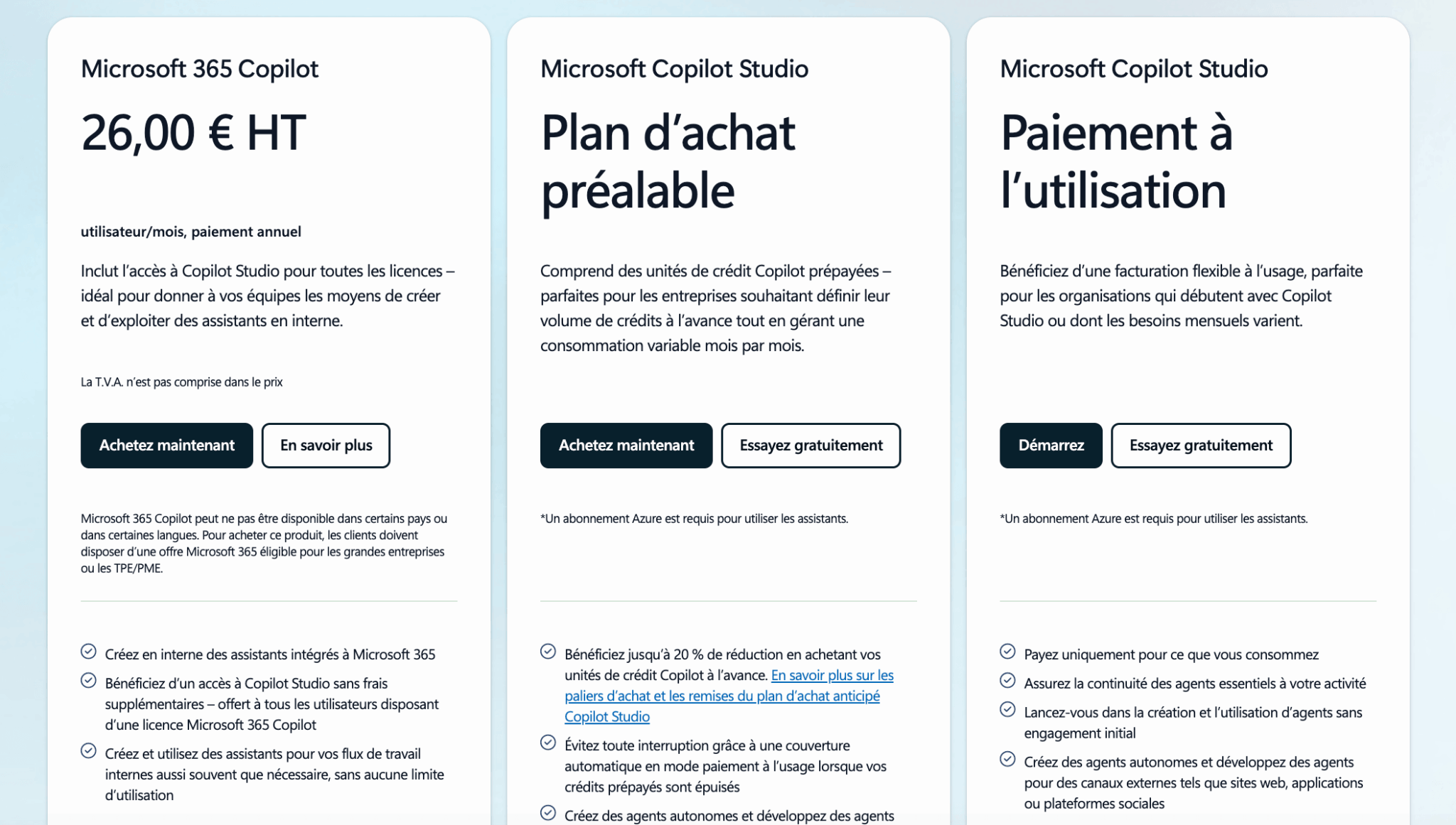
In both cases, an active Azure subscription is required. And in both cases, it’s an additional line item in your annual CRM budget, with significant volatility in the first few months (the time it takes to calibrate actual agent consumption).
This line will become a key one over the next 24 months. Every Dynamics integrator we’ve spoken to is making it the number one topic of discussion with their customers in 2026.
#3 The underlying Microsoft 365 ecosystem
A Dynamics 365 CRM project leans heavily on Microsoft 365 (Outlook, Teams, SharePoint, OneDrive, Power BI).
In practice, these licenses aren’t optional: without them, you lose half the added value of the CRM (email tracking in Outlook, Teams meetings recorded and summarized by Copilot, SharePoint document storage, Power BI dashboards).
As a reference point, Microsoft 365 rates in 2026 are around $6 per user per month for Business Basic, $22 for Business Premium, and $36 for M365 E3, with further increases expected from July 2026.
Even if these licenses aren’t always charged to the “CRM” line item in budgets, they’re part of the essential foundation for getting value out of Dynamics 365.
Microsoft Dynamics 365 implementation costs
This is the big one, and the one that marketing content most often avoids mentioning. On a typical Dynamics 365 project, implementation and integrations account for between 35% and 50% of the 3-year TCO — far more than the Microsoft licenses themselves.
#1 Dynamics consultant daily rates
Average daily rates for Microsoft Dynamics ERP/CRM consultants generally range between $800 and $2,200 per day, depending on seniority and geography.
Ranges by profile:
- Junior functional consultant: $800 to $1,100 per day
- Senior functional consultant or technical consultant: $1,200 to $1,600 per day
- Solution architect or Power Platform expert: $1,700 to $2,200 per day
On a Dynamics project, the mix of profiles is rarely homogeneous. Scoping and architecture require senior resources, recurring configuration can be delegated to supervised juniors, and technical integrations (API connectors, Power Automate, Azure Logic Apps) call for more specialized profiles.
#2 How many days does a Dynamics 365 project take?
This is a question no serious integrator will answer without scoping first, but here are the orders of magnitude we see on the market.
| Project type | Typical effort | Services budget |
|---|---|---|
| MVP / Quick Start Pack | 15 to 25 man-days | $10,000 to $20,000 |
| Median SMB project (Sales + Service, 1 or 2 integrations) | 50 to 80 man-days | $40,000 to $80,000 |
| Ambitious SMB project (Sales + Service + Marketing, ERP and BI integrations) | 100 to 180 man-days | $85,000 to $170,000 |
| Mid-market or multi-country enterprise project | 300+ man-days | $250,000 and up |
What makes costs vary:
- Functional scope (Sales only vs. Sales + Service + Marketing)
- Level of customization (standard forms vs. custom Power Apps)
- Number of integrations to be implemented
- Complexity of data migration
- How demanding the change management process is
#3 Integrations: the systematically underestimated item
Integrations are one of the biggest CRM TCO items, and probably the most volatile. In public 3-year benchmarks, they account for an average of 20-25% of total costs, as much as software licenses.
Among the most frequent integrations:
- Microsoft’s own ERPs — Business Central for SMBs, Finance and Supply Chain Management for mid-market and enterprise — which are supposed to dialogue well with Dynamics, but where each flow deserves a dedicated connector
- Third-party ERPs (SAP, Oracle, NetSuite, Sage), for which standard connectors exist but also plenty of edge cases
- Billing, e-commerce and website tools
- Non-Microsoft marketing tools (Mailchimp, HubSpot Marketing, Marketo, Pardot)
- BI (Power BI of course, but also Tableau, Qlik, Looker)
- Telephony and CCaaS solutions, as a complement or alternative to Dynamics 365 Contact Center
Costs vary massively: from a few days of work for a standard integration with an existing connector, to dozens of days for a custom bi-directional integration with complex business orchestrations. Typically, this is the item that explodes during the course of a project, when real needs surface.
#4 Data migration and cleansing
A successful CRM project involves migrating and cleansing existing data (contacts, accounts, opportunity histories, tickets, emails).
For an SMB, you should expect to pay between $2,500 and $12,000 for outsourced data migration and quality work, depending on the number of sources and the need for deduplication.
The hidden cost here is internal time. Preparing, validating and enriching data mobilizes sales and marketing teams for several weeks: extraction from legacy systems, classification, addition of missing fields, validation by segment, etc.
This time is never billed by the integrator, but it represents a real opportunity cost that’s systematically underestimated in initial budgets.
Training and adoption: 10% of TCO but 100% of ROI
Training budgets are systematically underestimated, even though they have a major impact on the ROI of a CRM project.
Training and change management represent on average 10% of the total project cost — between $6,000 and $25,000 for an SMB, and several tens of thousands of dollars for a mid-market or enterprise project.
Typical items to budget for:
- End-user onboarding workshops (sales reps, service advisors, managers), often held face-to-face over 1 or 2 half-days per group
- Training for key administrators and super-users, who will then take over in-house to manage ongoing configuration
- Change management support: internal communication, local support, documentation, e-learning, manager coaching on new processes
On top of these external costs billed by the integrator, there’s the internal opportunity cost: a Dynamics 365 project mobilizes teams intensively for several months (sponsors, sales management, marketing, support, IT, business product owners). Several days a week for key roles, over 6 to 12 months. Failing to anticipate this cost leads to under-resourced projects on the customer side, with rushed decisions and a real risk of adoption failure.
Recurring costs: run, maintenance and upgrades
Once a project has gone live, the clock never stops ticking. Most companies set up a support contract with their integrator or a specialized partner to handle incidents, manage new releases and ship minor evolutions.
#1 Application support and ongoing maintenance
Support generally takes the form of a fixed monthly fee or a credit of prepaid days (typically 2 to 5 days per month, depending on the size of the deployment), representing 10 to 20% of the license budget, or several thousand dollars per year for small teams. Maintenance and upgrades average 15% of total TCO.
For Dynamics 365, these costs also include managing Microsoft’s two major annual updates, which can require regression testing and sometimes customization adjustments, particularly on custom forms and Power Automate automations.
#2 Functional upgrades and incremental projects
A CRM rarely evolves in a “one shot” fashion. New ideas emerge after the first few months of use:
- New business processes
- Integration with additional tools
- New KPIs and dashboards
- Additional automation
- User requests surfaced through super-users
For Dynamics 365, the Microsoft roadmap is constantly adding new capabilities (Copilot, AI agents, connectors, industry modules), which generate both opportunities and additional configuration requirements.
A good rule of thumb is to set aside an annual evolution budget of 20-30% of the initial project budget, over the lifetime of the CRM. Projects that don’t plan for this end up stuck on their delivered version and are perceived as “outdated” by users after 18 to 24 months.
#3 Licensing and compliance audits
The Dynamics 365 licensing model being what it is (base/attach, Team Members, functional limits, coexistence with Business Central or Finance), many organizations periodically run internal or external audits to check compliance and optimize costs.
These engagements typically involve rebalancing (replacing full licenses with Team Members), base/attach conversions, or remediation when certain uses exceed the rights of the licenses in place.
A modest cost relative to the overall budget, but one that needs to be anticipated — particularly for mid-market and enterprise customers whose scope changes rapidly.
Three quantified TCO scenarios over 3 years
To wrap up the numbers section, here are 3-year TCO ranges for three types of company. These orders of magnitude are indicative and must be adapted to each project’s context, but they give a realistic vision of the budgets to plan for. They include licenses, implementation, integration, training and run.
| Cost item | Small business (5 Sales Pro users) | Structured SMB (20 Sales Ent + 10 CS Pro) | Mid-market / enterprise (50+ multi-module users) |
|---|---|---|---|
| Microsoft licenses over 3 years | ~ $12,000 | ~ $95,000 to $115,000 | $250,000 and up |
| Implementation and integration | $4,000 to $10,000 | $50,000 to $100,000 | $250,000 to $600,000+ |
| Training and adoption | $2,000 to $4,000 | $12,000 to $25,000 | $50,000 and up |
| Run and evolutions over 3 years | $4,000 to $8,000 | $30,000 to $60,000 | $120,000 and up |
| Estimated total TCO over 3 years | $22,000 to $34,000 | $187,000 to $300,000 | $670,000 to $1.2M+ |
| Annualized cost per user | ~ $1,500 to $2,300 / user / year | ~ $2,100 to $3,300 / user / year | ~ $4,500 to $8,000 / user / year |
This table surfaces several interesting insights:
- First, the annualized cost per user increases with project size, whereas intuition would suggest the opposite. The reason is simple: the more complex the project, the bigger the share of integration and change management costs, while the scale benefit on licenses remains limited.
- Second, across all segments, licenses never represent more than 35% to 40% of TCO.
- Finally, the gap between the upper and lower limits of each scenario directly reflects the scope and quality of the initial scoping: for the same company profile, the bill can literally be doubled depending on the methodological choices made.
Cost of your Microsoft Dynamics 365 project: why you should request a custom quote
All the variables we’ve just reviewed (edition mix, base/attach optimization, Customer Insights scope, ERP and BI integrations, Dataverse volume, Copilot ambition, level of customization, internal workload) interact with each other in a non-linear way.
With Dynamics 365 more than with any other CRM on the market, two seemingly identical projects can end up with TCOs that differ by a factor of two.
It’s not a sales excuse — it’s a product reality.
Microsoft itself acknowledges this complexity in its pricing information: the official pricing page specifies that displayed prices are for information only and may differ from the actual invoiced price depending on currency, country, partner channel, contract (Online, CSP, Enterprise Agreement) and current promotions.
The practical consequence is clear: any serious cost estimate requires a scoping exercise with a Microsoft Dynamics 365 integrator, who will challenge your role matrix, check possible base/attach optimizations, size integrations against your current stack, and estimate the data migration effort. Relying on the public grid to budget a project means guaranteeing a 50 to 100% overrun.
Why we recommend Masao
We reviewed several European Microsoft Dynamics integrators, and Masao clearly stood out on several criteria that matter for this type of project.
First, pure experience: 20+ years on Dynamics, more than 400 CRM projects deployed, and around 100 Microsoft Dynamics consultants on the team. It’s not a boutique, but it’s also not a generalist consulting firm that “also” has a Dynamics practice. It’s a company that does just that, and has seen every possible configuration come through the door.
Second, Microsoft recognition: Masao has been a member of the Inner Circle for Microsoft Business Applications since 2017, which corresponds to the top 1% of Microsoft partners worldwide on the Dynamics scope.
This status isn’t handed out lightly. It reflects business volume, deployment quality, and customer satisfaction measured over time.
On scope, Masao covers all the bricks you’ll need to arbitrate between:
- Dynamics 365 Sales
- Customer Service
- Customer Insights
- Field Service
- Power Platform
- Copilot
This matters, because with Dynamics, the right partner is as much the one who can tell you “no, you don’t need this brick” as the one who can implement it.
Finally, they offer a D365 MVP Pack designed to get you up and running quickly with a controlled scope, which is typically the best approach for SMBs who want to master their first Dynamics invoice and expand gradually. And they have strong vertical specializations (banking and insurance, mutuals, retail, healthcare, education) that save considerable time when your business imposes regulatory constraints or very specific processes.
Get a customized Dynamics 365 quoteMasao provides no-obligation quotes, with an optimized roles/licenses matrix and a realistic estimate of the implementation effort. This is probably the best way to start on a sound budget basis, rather than relying on Microsoft’s catalog ranges.
Frequently asked questions about the cost of Microsoft Dynamics 365 CRM
How much does Dynamics 365 Sales cost per user?
Microsoft Dynamics 365 Sales is available in three editions as of early 2026: Sales Professional at $65 per user per month, Sales Enterprise at $105 per user per month, and Sales Premium at $150 per user per month (minimum 10 users). These prices are based on an annual commitment with upfront payment. A Microsoft Relationship Sales option (Sales Enterprise + LinkedIn Sales Navigator) is available on request.
Is Dynamics 365 cheaper than Salesforce?
On paper, yes. A Sales Enterprise license at $105 per month is meaningfully cheaper than an equivalent Salesforce Sales Cloud Enterprise license. But this raw comparison doesn’t mean much: on a CRM project, the license cost gap is quickly absorbed by differences in implementation, integration and adoption. Depending on your existing stack, your level of Microsoft maturity and your partner ecosystem, the trade-off can go either way. For a more complete picture, see our full review of Microsoft Dynamics 365 and our deep dive on the real cost of Salesforce.
How much does implementing Dynamics 365 cost for an SMB?
For a typical SMB (20 to 30 users, Sales + Customer Service scope, two or three standard integrations, moderate customization), you should expect to pay between $40,000 and $80,000 for initial implementation services. More ambitious projects (full ERP integration, marketing automation via Customer Insights, custom Power Apps development) can run from $85,000 to $170,000. “MVP” or “quick start” packages offered by some integrators can bring the initial investment down to under $20,000 for a deliberately reduced scope.
Do I have to go through a Microsoft Dynamics integrator?
Technically, no. You can purchase licenses directly from Microsoft and deploy in-house. In practice, this is rarely a good idea unless you already have an experienced Dynamics team. The complexity of licensing (base/attach, Team Members, authorized combinations), the finesse of Dataverse and Power Platform configuration, and the criticality of change management mean that self-managed Dynamics projects almost always end up costing more than projects run with a partner.
Are Team Members licenses enough for my sales force?
No. Team Members licenses are strictly regulated by Microsoft’s licensing guide: they allow reading, limited updating of certain entities, and workflow approval — but they don’t allow full sales cycle management (opportunity creation, pipeline management, quote generation). They’re ideal for non-sales profiles who need to consult or validate information in the CRM (cross-functional managers, finance teams, legal teams), but an active sales rep needs a Sales Professional or Sales Enterprise license.
How much does Copilot cost in Dynamics 365?
Baseline Copilot capabilities (opportunity summaries, email drafts, meeting assistance, conversational insights) are included in Sales Enterprise and Sales Premium at no additional cost. On the other hand, advanced Copilot Studio agent scenarios (lead qualification assistants, automated support agents) consume Copilot credits billed separately as Azure consumption, either pay-as-you-go or via a pre-purchase plan that offers up to a 20% discount. An active Azure subscription is required in both cases.
Are there any promotions on Dynamics 365 in 2026?
Yes. Microsoft periodically applies targeted discounts via its CSP partner network and Enterprise Agreement contracts. In particular, a 40% promotion runs on Customer Service Premium and certain Contact Center plans from October 1, 2025 through June 30, 2026. Vertical discounts (nonprofit, education) and volume discounts are also negotiable case by case. Your integrator is typically the best entry point for identifying current commercial windows.
Key takeaways
Microsoft Dynamics 365 CRM can be very competitive on a cost-per-user basis if you exploit the optimization levers intelligently: base/attach model for hybrid profiles, Team Members licenses for occasional users, and a sensible choice between Professional, Enterprise and Premium based on real needs.
But the economic success of a Dynamics project is never based on the public price grid. It’s about the quality of the initial scoping, mastery of integrations, investment in adoption, and the ability to generate tangible ROI (sales productivity, customer satisfaction, conversion rates, retention).
The golden rule: with Dynamics 365, a catalog quote is just false reassurance. The only quote that counts is the one you get from a partner who knows the product and has taken the time to understand your context. Everything else is guesswork — and guesswork always ends up being expensive.
Going further
Start on a sound budget basis with MasaoRather than building your budget on Microsoft’s catalog grid (and discovering the real figures mid-project), take 30 minutes with Masao’s team. You’ll walk away with an optimized roles/licenses matrix, a realistic effort estimate, and a clear view of your 3-year TCO. It’s free, no-obligation, and probably the best hour you’ll invest in your Dynamics 365 project.