

- Expérience utilisateur très intuitive, type Notion
- Fonctionnalités de personnalisation poussée

Notre avis sur Attio
Avec son interface intuitive façon Notion et ses fonctionnalités avancées, Attio bouscule les codes des CRM traditionnels. Ultra flexible et personnalisable, c'est l'outil rêvé pour les startups en quête d'un CRM qui grandit avec elles. On apprécie la générosité du plan gratuit et du programme dédié aux jeunes pousses. En revanche, l'outil manque encore de maturité sur certains points comme les intégrations.
Mis à jour le
10
min
Mon avis en bref
Avis clients
- Certaines fonctionnalités encore limitées (reporting, mobile...)
- Intégrations moins nombreuses que les mastodontes du marché
- Conception différente sans objet "transaction" qui demande un temps d'adaptation
Idéal pour les startups et scale-ups cherchant un CRM hautement personnalisable qui s'adapte à leur croissance.
À partir de 34€ par utilisateur et par mois
Plan gratuit jusqu'à 3 utilisateurs et essai gratuit 14 jours


En bref
4.8 / 5
À partir de 34€ par utilisateur et par mois
Plan gratuit jusqu'à 3 utilisateurs et essai gratuit 14 jours
Attio
Sommaire
Launched in 2021, Attio is the new kid on the CRM block.
Founded by serial entrepreneurs who have themselves suffered from the limitations of traditional CRM, Attio aims to reinvent customer relationship management.
The idea is to offer an ultra-flexible tool that adapts to each company’s business processes.
Gone are the days of useless fields, imposed workflows and customizations that require weeks of development.
With its Notion-inspired, no-code interface, Attio lets you design the CRM of your dreams in just a few clicks.
But is Attio the perfect CRM?
Its youth can be felt on certain points, such as the still limited integrations and the absence of advanced sales reporting functionalities.
Its approach can also be disconcerting at first, as it’s so far removed from classic CRM operation.
In this comprehensive Attio review, we tell you everything you need to know about this promising newcomer.
It’ll help you decide whether Attio is the right CRM to support your business growth!
Benchmark des logiciels CRM
Simplifiez votre choix de logiciel CRM avec le Benchmark Salesdorado ! 🚀 Choisir le […]
Accéder à la ressourceSommaire
My opinion of Attio in a nutshell
| Perimeter | Score | My opinion |
|---|---|---|
| Overall rating | 4 | Attio is a highly promising CRM for startups looking for flexibility. Its modern approach and customization features make it a unique tool. It still needs to mature, but its development is clearly worth watching. |
| Ease of use | 4,5 | With its Notion-style interface, Attio is very easy to learn. Creating pipelines and adding custom fields is just a few clicks away. A real treat compared to traditional CRMs. |
| Ease of implementation | 4 | Implementation is fairly quick for a CRM. Allow a few hours to configure your pipelines and import your data. |
| Customer service | 3,5 | Customer support is responsive and attentive. On the other hand, documentation is still a little light and mainly in English. More needs to be done on French-language resources. |
| Integrations | 3 | This is Attio’s weak point to date. Native integrations are limited compared to giants like Salesforce. It is often necessary to use Zapier, which adds to costs. |
| Quality/Price ratio | 4 | Value for money is excellent for startups, thanks to the free plan for up to 3 users. Beyond that, rates are similar to our competitors. |
The main advantages and disadvantages of Attio CRM
The benefits of Attio CRM :
- An ultra-intuitive Notion-style interface.
It’s easy to get to grips with, especially when compared to complex Salesforce CRMs.
You can create contacts, companies and deals in the blink of an eye. - Extensive customization options.
Custom fields, tailor-made sales pipelines, automations… Attio adapts to your business processes, not the other way around.
A real plus for agile startups.
The disadvantages of Attio CRM :
- Some limitations due to its youth.
The tool does not yet offer advanced reporting or sales analytics.
Its mobile app is also fairly basic.
Areas for improvement in the years to come. - A limited ecosystem of third-party applications.
Attio relies heavily on Zapier to compensate for the lack of native integrations.
But using a third-party tool adds complexity and cost.
We can’t wait for Attio to flesh out its connection possibilities. - A different conception that can be disorientating.
For those accustomed to classic CRMs, the absence of a “transaction” object may be regrettable.
Attio’s proprietary operating logic takes some getting used to.
Try Attio for free Attio offers a generous free plan for up to 3 users.
It’s the perfect opportunity to try out this next-generation CRM and see if it suits your needs.
It’s the perfect opportunity to try out this next-generation CRM and see if it suits your needs.
Trouver le bon CRM en quelques clics
Essayez notre moteur de recommendation pour shortlister les 3 logiciels les plus adaptés à votre besoin
Attio CRM: Overview of functional scope
Contact and company management
Contact and company management is at the heart of Attio, as it is of all CRM software.
Each contact record can be fully customized with the fields you need, without limit.
You can add attributes specific to your business in just a few clicks, to qualify your prospects according to your own criteria.
You can easily import your existing data into Attio via CSV files or by connecting your mailbox.
You can synchronize your contacts from your existing CRM or address book.
The tool then automatically deduplicates andenriches the information. 
All e-mail exchanges, notes taken or tasks planned are centralized on the card.
This gives you a complete history, updated in real time.
Timelines let you see the latest activities at a glance. 

The search engine also makes it easy to find a person or a company.
The Salesdorado Attio review stands out for its flexibility in managing contacts and companies.
The intuitive Notion-style interface and unlimited customization possibilities make it a great tool for startups in need of a flexible CRM.
Customized sales pipelines
No more rigid, imposed pipelines.
With Attio, you create your own deal stages and statuses – the ones that fit YOUR sales process.
You can qualify your opportunities as you see fit, without being restricted by predefined fields.
Attention Think carefully about your pipelines before you create them.
Once your deals are in, it will be more complicated to change everything.
Take the time to model your sales processes and challenge them with your teams before getting started.
The Kanban-style pipeline view allows you to visually monitor the progress of each deal.
At a glance, you can see where your deals are, which ones are blocked and what needs to be prioritized.
You can easily drag and drop a deal from one stage to another.  Each pipeline has its own parameters.
You can define triggers and automated actions at each stage, to boost productivity.
For example, you can automatically send an e-mail to the customer when a deal reaches the “Proposal sent” stage.
Sales targets and forecasts are natively integrated.
You can set an amount and estimated closing date for each deal, and track your performance in real time.
Advanced reporting gives you a clear view of the state of your pipeline at all times. 
Salesdorado’s opinion One of Attio’s strong points is the extensive customization of sales pipelines.
This flexibility enables each company to model its own sales processes, without being constrained by pre-established structures.
But be sure to think through your pipelines carefully before implementing them, because modifications after the fact are always a pain.
Team collaboration and communication
Attio has been designed to facilitate teamwork and centralize information.
Within the same space, you can create discussions around a contact, a company or a deal.
No more scattered exchanges via e-mail or external chat.
All information is directly in the CRM.
You can easily mention your collaborators to get their attention.
Everyone can leave a comment, share a note or a useful document.
All exchanges are saved and time-stamped to keep a clear history.
The tool also lets you assign tasks to your collaborators.
In just one click, create missions and track their progress.
Smart notifications alert you to tasks that are due or overdue.
You get an overview of who needs to do what, without missing a beat.  Tracking external communications with customers is also simplified.
All emails exchanged are automatically reported in the CRM and associated with the right contact.
This gives your team access to a complete history of all interactions, for enhanced customer knowledge.
Be sure to define the rules of the game in terms of internal communication within Attio.
Who can see what, who can comment where… Having a clear framework will help you avoid abuses and ensure your teams adopt Attio.
Sales reporting and analytics
Attio offers simple yet effective reporting, focused on your pipeline’s key metrics.
Native, customizable dashboards give you a real-time view of the state of your sales.
You can track the volume and amount of deals per stage, the average time to close a deal, or the conversion rate of your pipeline.
All these indicators help you to quickly identify your strengths and areas for improvement. 
You can track who generates the most revenue, who closes the fastest or who has the best conversion rate.
These insights are key to challenging and stimulating your teams.
You can also create your own customized reports, cross-referencing data according to your specific needs.
The possibilities are vast: analyzing the best sources of leads, tracking sales by region or customer type, etc.
Predictive analytics, still in beta, will soon be enhanced.
It will enable you to obtain ever more reliable sales forecasts and optimize your pipeline accordingly.
An exciting roadmap, which will fill a gap for data-driven teams.
Salesdorado’s advice Think of your reporting in terms of your business objectives.
Which indicators really count for your business?
Focus on those first.
You can always enrich your dashboards later.
Automation and data security
Automation is at the heart of Attio.
Many time-consuming and repetitive tasks can be automated to make life easier and more productive for your sales staff.
Workflows can be set up in just a few clicks, using customized triggers and actions.
Examples: automatic assignment of new leads to the right sales rep according to rules, sending follow-up emails after a proposal, status updates if the customer opens an offer, etc.
These “recipes” are easy to configure, even for non-technical staff, thanks to the no-code interface.
And to take things a step further, Attio has an open, well-documented API.
This means you can connect the CRM to your in-house tools and develop your own integrations.
When it comes to security and compliance, Attio makes no compromises.
All your data is encrypted, stored and backed up on secure servers (AWS).
Security audits are carried out regularly, and the best market standards are applied (RGPD compliance, CCPA, ISO 27001, etc.).
You retain total control over your data and user access.
Roles can be assigned to each team member to define their permissions (read/write/administrator).
This guarantees the confidentiality of sensitive information.
Trouver le bon CRM en quelques clics
Essayez notre moteur de recommendation pour shortlister les 3 logiciels les plus adaptés à votre besoin
Attio CRM customer support: what’s it worth?
Customer support is an essential criterion when choosing CRM software.
At Attio, support is premium, whatever the size of the client company.
A chat function integrated directly into the tool enables users to contact the support team directly and obtain a rapid response.
Most requests are dealt with in just a few hours, with concrete solutions tailored to your needs.
The technical teams are quick to respond, and don’t hesitate to go in-depth on complex issues.
For more basic questions, an online help center features numerous articles, organized by theme.
You’ll find precise answers to your questions about CRM functionalities, accompanied by screenshots and explanatory videos. 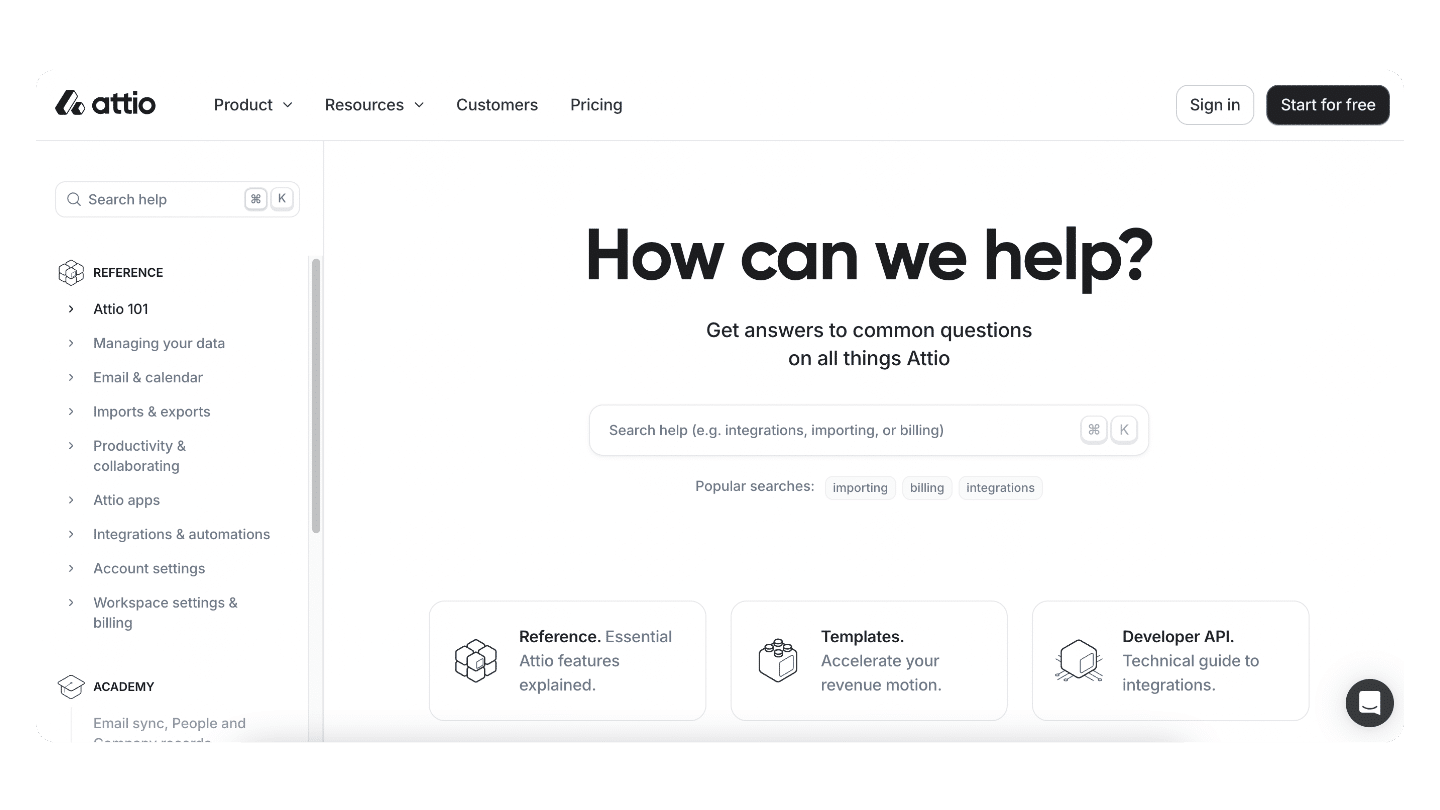
They enable users to rapidly upgrade their skills.
Finally, we appreciate the proactive help resources directly integrated into the tool.
When you use a feature for the first time, contextual tooltips appear to guide you step by step.
It’s a great way to get up to speed quickly, without even having to ask for support!
The only drawback is that most of the resources are still in English.
Articles are beginning to be translated into French, but there’s still a long way to go.
An effort is still needed to fully conquer the French-speaking market.
Despite this point, Attio’s customer support is impressive in its quality and responsiveness.
What remains to be done is to confirm Attio’s ability to maintain this high level of service over the long term!
Salesdorado’s opinion Attio’s customer support is responsive and of the highest quality, a major asset for a fast-growing CRM.
Proactive help resources and integrated chat make it easy to get started.
The only downside remains the predominance of English in the documentation…
Customer reviews of Attio CRM
Overall, Attio CRM user reviews are very positive, with an average rating of 4.7 on G2.
- Attio users particularly appreciate the tool’s flexibility, ease of use and intuitive interface, often compared to Notion.
- The ability to fully customize pipelines and fields is seen as a big plus.
Users point out that Attio adapts perfectly to their business processes, where other CRMs impose a rigid structure. - Automatic data enrichment is also a strong point raised in several reviews.
The time saved is significant, and the additional data (sales, number of employees, etc.) is considered very useful for better qualifying prospects.
In terms of areas for improvement, some lament the lack of native integrations, particularly with emailing tools, which forces users to use Zapier.
The absence of a mobile app is also pointed out, as are reporting functionalities that are still limited compared to behemoths like Salesforce.
But on the whole, users seem won over.
Shortcomings are pointed out here and there, but the pace of improvements and the quality of support suggest that the tool still has plenty of room for improvement.
Stay tuned!
Attio CRM prices
A generous free plan
Attio boasts one of the most generous free plans on the market.
With up to 3 users, you can enjoy the majority of the tool’s features without paying a cent.
The only limits concern the number of integrations via Zapier (5 max) and certain advanced automation and reporting options.
But if you want to discover the tool and adopt it in a small team, this free package does the job perfectly.
It’s an excellent way to test Attio in real-life conditions before paying for it.
Rates within the market average
Beyond 3 users, Attio operates on a per-seat (= per-user) pricing model, with 3 paying packages. 
- The first starts at €29/user/month.
It gives access to all the basic CRM functions: contact and company management, personalized pipelines, team collaboration, email and calendar integrations, etc. - To unlock the more advanced options, you need to upgrade to the “Pro” plan at €59/user/month.
This allows you to create roles and access privileges to better secure your data, as well as benefit from priority customer support. - Finally, for companies with specific needs (SSO, annual invoicing, dedicated onboarding, etc.), an “Enterprise” plan is available on request.
On the whole, Attio’s pricing structure is in line with the market average, and even less expensive than some competitors on an equivalent basis.
Try Attio for free Attio offers a generous free plan for up to 3 users.
It’s the perfect opportunity to try out this next-generation CRM and see if it suits your needs.
It’s the perfect opportunity to try out this next-generation CRM and see if it suits your needs.
Trouver le bon CRM en quelques clics
Essayez notre moteur de recommendation pour shortlister les 3 logiciels les plus adaptés à votre besoin