If you’ve ever tried to set up a serious LinkedIn prospecting stack, you know the problem: one tool for LinkedIn automation, another for data enrichment, a third for email sequences and Zapier in the middle to try and get everyone talking.
We inevitably end up with shaky integrations, data that gets lost along the way and exploding setup times.
That’s exactly the problem Closely claims to solve. This all-in-one platform, launched in 2020, combines LinkedIn automation, B2B data enrichment and AI agents for the qualification and execution of multi-channel campaigns. All in a single interface. No Zapier to configure, no tools to stack.
The promise is seductive. But does it really hold up in practice, or is it just another tool that does “a bit of everything” without excelling anywhere?
In this review, we take a closer look at Closely’s real strengths, its practical limitations and, above all: for whom this tool really makes sense (spoiler: not for everyone).
The best way to find out if Closely is right for you is to try it out. The interface is intuitive and quick to learn, so you’ll have a clear idea in just a few hours.
Sommaire
Our opinion of Closely in brief
| Perimeter | Score | Our opinion |
|---|---|---|
| Overall rating | 4,3 | Closely is a solid LinkedIn prospecting platform that delivers on its “all-in-one” promise. The tool is most relevant for agencies and teams who want to unify LinkedIn and email without stacking solutions. Less relevant for email-first strategies or advanced analytics needs. |
| LinkedIn automation & security | 4,4 | This is Closely’s core business. The “human-like” approach, with random delays and intelligent limits, works: zero bans reported by users, even after months of intensive use. A real strength in the face of riskier competitors. |
| AI agents & personalization | 4,3 | Closely’s real differentiator. AI agents go beyond simple templating: autonomous company search, automatic ICP qualification, contextual message generation. It’s a game-changer for teams who want to scale without sacrificing personalization. |
| Data enrichment | 4,1 | Cascading engine (30+ sources) with two-step verification delivers 95%+ email accuracy. Very solid. On the other hand, telephone number verification tops out at 65%, a point to keep in mind if cold calling is part of your arsenal. |
| Multi-channel campaigns | 4,0 | The native LinkedIn + Email merge in a single sequence is a real time-saver. Smart deadlines and engagement-based actions work well. One downside: daily email limits (50/day on Starter) can hold back high volumes. |
| Inbox Hub & collaboration | 3,9 | A single inbox for all channels, with team assignment and collision avoidance. Very useful for agencies managing multiple customer accounts. The interface is clear, even if it falls short of a true CRM in terms of relationship management. |
| Analytics & reporting | 3,5 | Dashboards cover the essentials: acceptance rates, responses, booked meetings, performance comparisons by rep. Sufficient for campaign management, but clearly limited for teams requiring advanced reporting or fine-tuned attribution. |
| CRM integrations | 3,8 | Native integrations with HubSpot, Salesforce and Pipedrive do the job. A few synchronization bugs reported by users on the forums (HubSpot duplicates in particular), but nothing blocking. For really advanced workflows, you’ll need custom webhooks. |
| Value for money | 4,3 | Starting at €49/month, Closely is aggressively positioned against Lemlist (€69). The real plus: pricing by credits rather than by headquarters, which clearly benefits agencies and multi-account teams. |
The best way to find out if Closely is right for you is to try it out. The interface is intuitive and quick to learn, so you’ll have a clear idea in just a few hours.
Closely’s main advantages & disadvantages
- The all-in-one solution that keeps its promises: LinkedIn automation, enrichment, AI agents, multi-channel sequences, Inbox Hub, all in the same interface. In concrete terms, this means zero Zapier integration to maintain, and data that truly flows between bricks. For those who have already spent hours debugging workflows between 4 tools, this is good news.
- AI agents that do the research for you: Closely’s AI doesn’t just fill in variables {firstName}. It fetches company information (technology used, current recruitment, news), automatically qualifies it in relation to your KPI and generates messages with context. The kind of task that takes 15 minutes per prospect when done by hand.
- Zero stress on LinkedIn security: Closely’s “human-like” approach (random delays, gradual ramp-up, intelligent limits) works. No reports of bans from users, even after months of use. That’s quite a change from the cold sweat you get with some competitors…
- Time-saving email enrichment: 95%+ email accuracy thanks to two-step verification. When one source fails, another automatically takes over. Fewer bounces, less time wasted cleaning up lists.
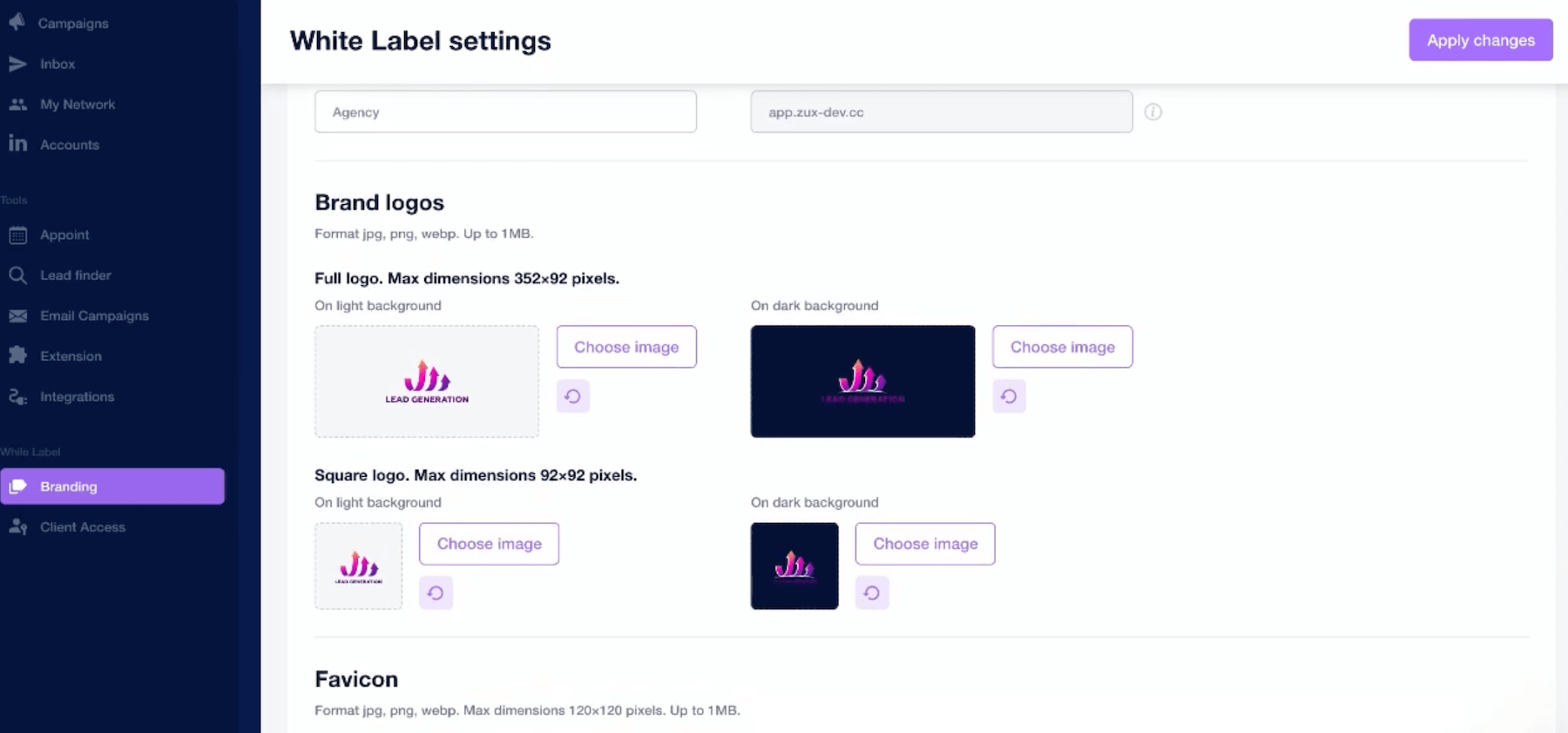
- Designed with agencies in mind from the outset: free white-label, native multi-account management (up to 10+), pricing per credit rather than per seat. If you manage several customers or several LinkedIn accounts in parallel, the business model is clearly more advantageous than that of the competition.
- Pricing that doesn’t hurt: from €49/month, Closely offers good value for money. And the higher plans remain reasonable for what they offer.
- 50 emails/day on the Starter plan will quickly get you stuck: if you’ve got volume, this limit will quickly get in the way. You need to move up to higher levels to really use the tool.
- There are a few bugs in the integrations: custom variables sometimes skip, duplicates in HubSpot synchronization, and a temperamental BCC. Nothing dramatic, but you should check your campaigns before launching them.
- Analytics do the minimum: acceptance rates, responses, booked meetings, the essentials are there, but if you’re looking for fine attribution or detailed reporting, you’ll need to supplement with something else.
- Phone number verification isn’t the same: only 65% accuracy, compared with 95% for emails. If cold calling is part of your arsenal, keep a dedicated validation tool at the ready.
- Less relevant for email-first strategies: Closely is designed for LinkedIn + Email, not Email + LinkedIn. For email-centric campaigns with landing pages, personalized videos or advanced warming, Lemlist stays ahead.
The best way to find out if Closely is right for you is to try it out. The interface is intuitive and quick to learn, so you’ll have a clear idea in just a few hours.
Closely’s key features
Closely brings together a number of components in a single platform. The idea is to cover the entire outbound prospecting cycle (from list building to response management) without having to juggle several tools.
Let’s see what it’s like in practice.
LinkedIn automation (the historical foundation)
This is where Closely started, and it remains the core of the product. The tool automates all the classic LinkedIn actions: personalized connection requests, profile visits, follow-up messages, InMails, likes on publications.

So far, nothing revolutionary – most LinkedIn automation tools do the same thing. What sets Closely apart is its approach to security.
The problem with LinkedIn automation is the risk of getting banned. LinkedIn doesn’t like robots, and tools that send actions at regular intervals (a connection every 3 minutes, for example) often end up triggering alerts.
Closely gets around this with what they call a“human-like” approach: random delays between actions, limits that adjust according to context (more active on weekdays, less on weekends) and a warm-up mode that gradually ramps up on new accounts.
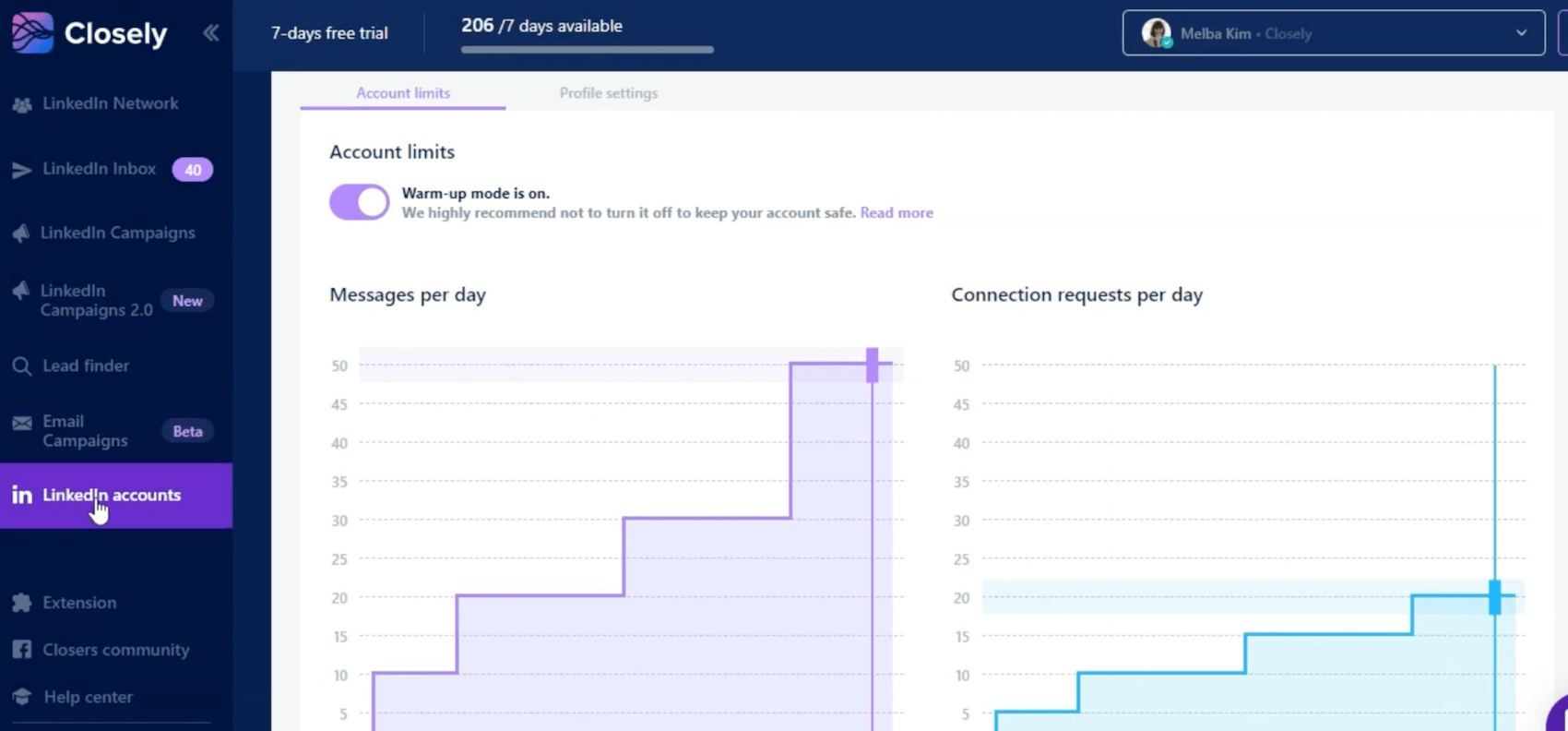
Does it work? User feedback has been reassuring: no cases of banning have been reported, even after several months of intensive use. That’s a powerful argument when you consider that a banned LinkedIn account means months of networking work gone up in smoke…
Closely’s LinkedIn automation does the job without taking any risks. It’s not the most aggressive tool on the market (and that’s all to the good), but it allows you to maintain a steady pace of prospecting without stress. If you’re looking to send 500 connections a day, move on. If you want clean, sustainable LinkedIn prospecting, it’s solid.
AI agents for autonomous prospecting
This is where Closely really stands out from the competition. Most SDR tools offer AI to generate messages – basically, enhanced templating with dynamic variables. Closely goes a step further with what they call “AI Sales Agents”.
The idea is to automate not only the sending of messages, but also all the upstream research and qualification work:
- Automatically qualify your leads according to your KPI. You define your criteria (industry, company size, location, etc.), and the AI scores each prospect to tell you whether or not it’s a good match.
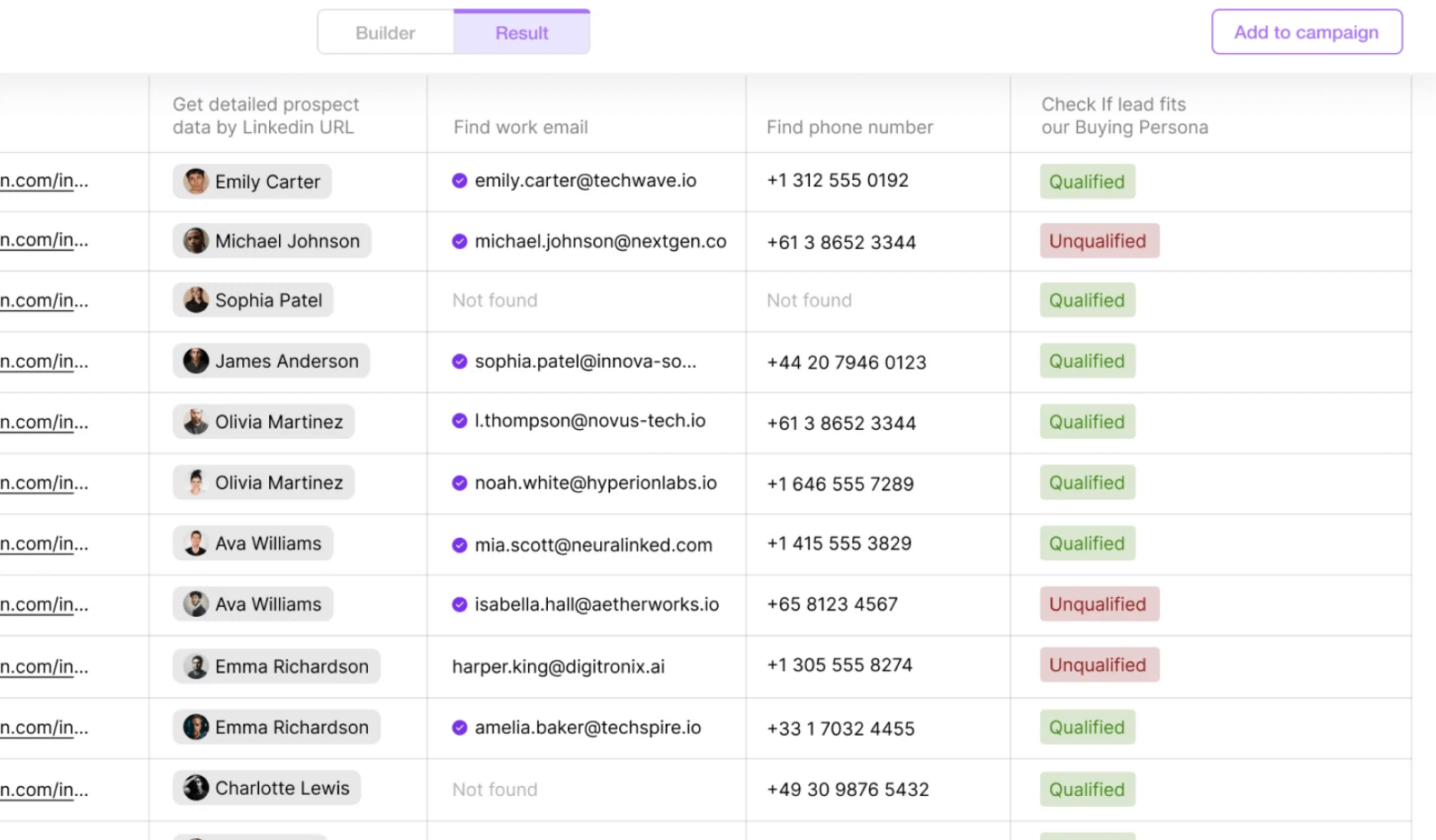
- Real-time company search. The AI fetches information from the web: technology stack in use, current recruitments, recent fund-raising, company news.
- Generate truly personalized messages. Not just “Hello {firstName}”, but messages that integrate real-life context: a prospect’s recent LinkedIn post, a change of position, a piece of company news. The result sounds less like “mass mailing” and more like “I did my research before contacting you”.
Does AI completely replace human work? No. The messages generated remain drafts that need to be reread and adjusted. But the time savings are real: from 15 minutes of research per prospect to just a few seconds.
Closely’s AI agents are probably the feature that most justifies the investment. For teams who do high-volume prospecting but want to keep a minimum of personalization, it’s a real time-saver.
Real-time data enrichment
Closely integrates its own enrichment engine, eliminating the need for third-party tools such as Dropcontact or Clearbit. The tool claims access to over 140 million B2B contacts and combines more than 30 different data sources.
The principle is simple: you import a list of prospects (or create one directly in Closely), and the tool automatically enriches the profiles with the missing data: e-mails, telephone numbers, job titles, company size, sector, etc.
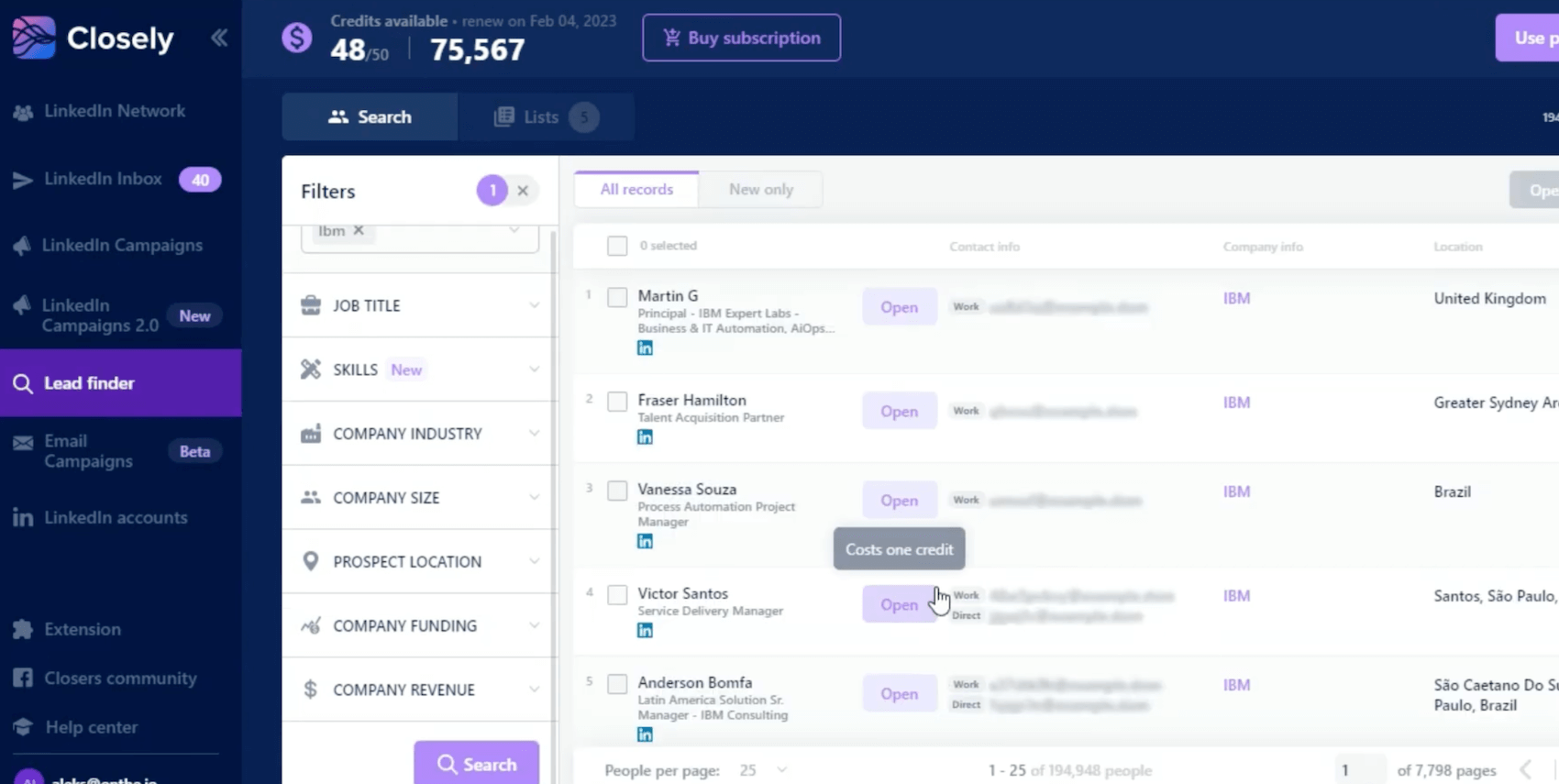
What makes the difference is the cascade verification system. If one source fails to find a prospect’s email, another automatically takes over. According to Closely, this results in a match rate of over 95% on emails, with two-step verification to limit bounces.
The downside is telephone numbers. Accuracy falls to around 65%, which is fine, but insufficient if cold calling is central to your strategy. In this case, it’s best to keep a dedicated validation tool on hand.
LinkedIn + Email multi-channel campaigns
This is one of Closely’s strong selling points: the ability to combine LinkedIn and email in a single sequence, without having to configure external integration.
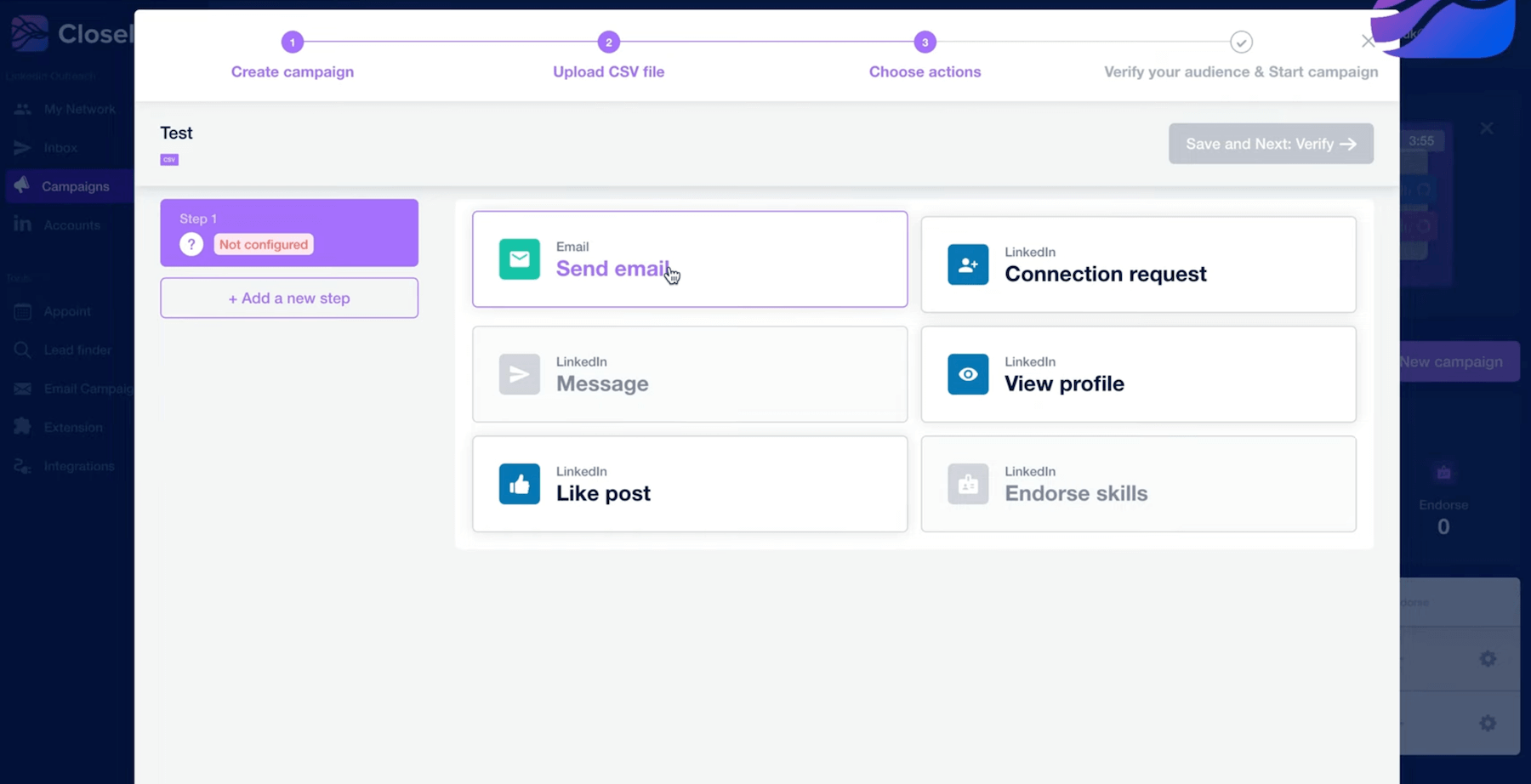
In concrete terms, you can create scenarios that automatically follow one another: LinkedIn connection request → wait X days → LinkedIn message if accepted / email if refused → email reminder → follow-up LinkedIn message, etc. All controlled from a single interface, with intelligent timeframes that adapt to the prospect’s engagement.

The tool also offers behavior-based triggers: if the prospect visits your profile, opens an email or likes one of your posts, the sequence can adapt automatically. It’s more refined than a simple linear sequence of actions.

On the email side, Closely lets you connect directly to your Gmail or Outlook accounts, so there’s no need to use a third-party mailing tool. A/B tests are integrated to identify the messages that perform best.
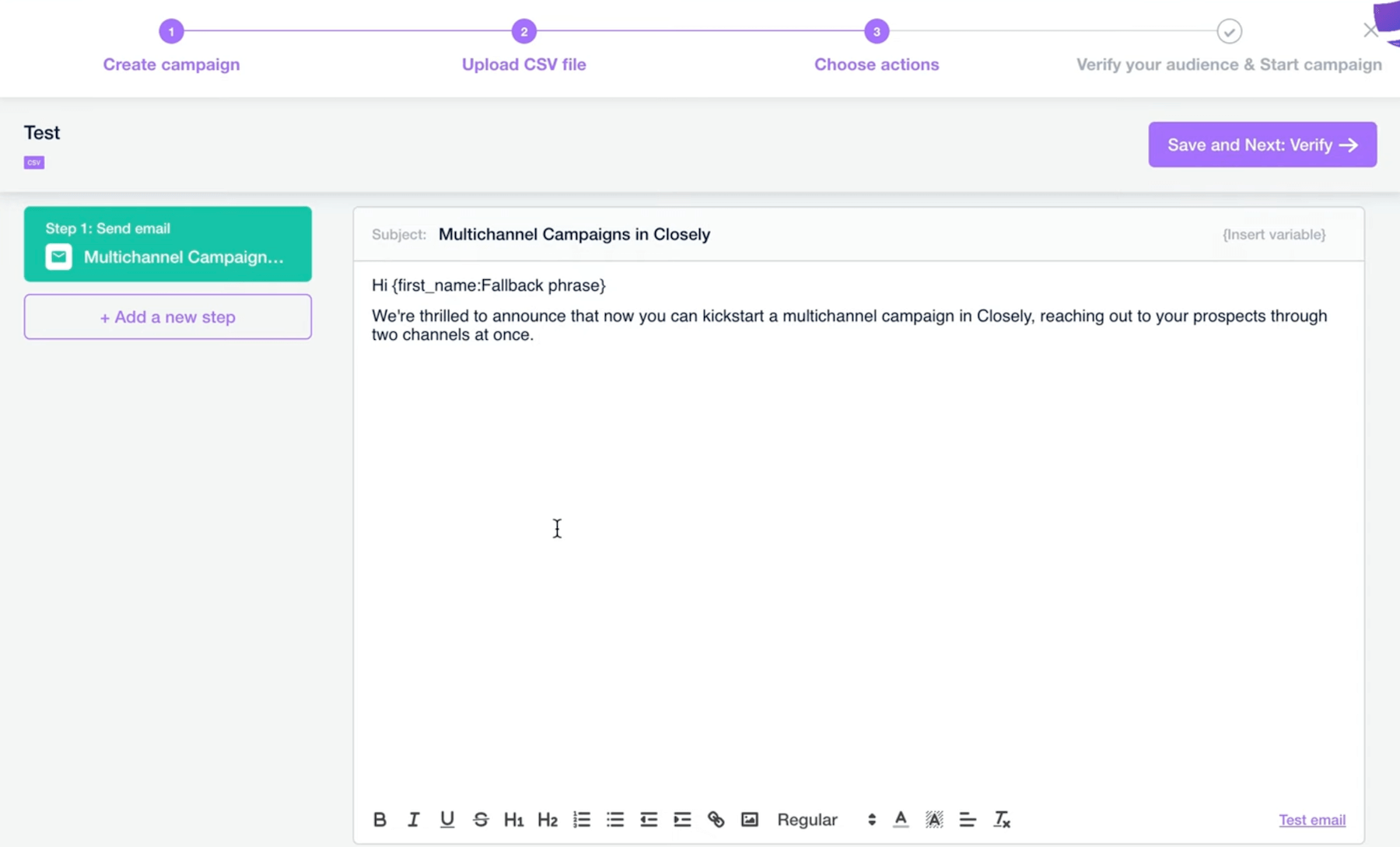
The main limit is the volume of emails on the lower plans. 50 emails/day on the Starter plan can get stuck quickly if you have several campaigns running in parallel.
Inbox Hub: centralized conversation management
Closely offers an Inbox Hub that centralizes everything: LinkedIn DMs, InMails, email replies – all in a single inbox.
The benefits are twofold. Firstly, you no longer have to switch back and forth between LinkedIn, your mailbox and your prospecting tool to keep track of conversations. Secondly, for teams, it lets you assign conversations to specific members, with tags and shared response templates.

A nice touch: collision avoidance. When a team member consults a conversation, the others can see that it’s been “taken”, thus avoiding duplicate replies, which are very unattractive to prospects.
The Inbox Hub synchronizes with the main CRMs (HubSpot, Salesforce, Pipedrive), so you can keep track of exchanges directly in your sales management tool.
The Inbox Hub is a feature that may seem insignificant on paper, but it really does change the way teams work. For agencies managing several customer accounts, it’s almost indispensable. For a solo user, it’s mainly a gain in comfort – appreciable, but not critical.
CRM and workflow integrations
Closely offers native integrations with the market’s leading CRMs: HubSpot, Salesforce, Pipedrive…The idea is to automatically synchronize contacts, conversations and engagement data with your sales management tool.
In concrete terms, when a prospect responds to one of your sequences, the information goes back into the CRM with all the context: history of exchanges, channel used, stage of the sequence. This avoids manual data entry and loss of information between tools.

For more advanced workflows, Closely offers webhooks and custom integrations, as well as a Zapier connection for cases not covered natively. Google Sheets export is also available for those who prefer to work with spreadsheets.
CRM integrations do the job for most use cases. If you’re on HubSpot or Pipedrive, synchronization works well (apart from a few bugs). For really complex workflows or less common CRMs, plan to use webhooks or Zapier.
Analytics and reporting
Closely offers dashboards to monitor the performance of your campaigns: connection acceptance rate, response rate to messages and InMails, meetings booked, pipeline generated.
You can also compare performance between team members and identify which messages work best via built-in A/B testing.
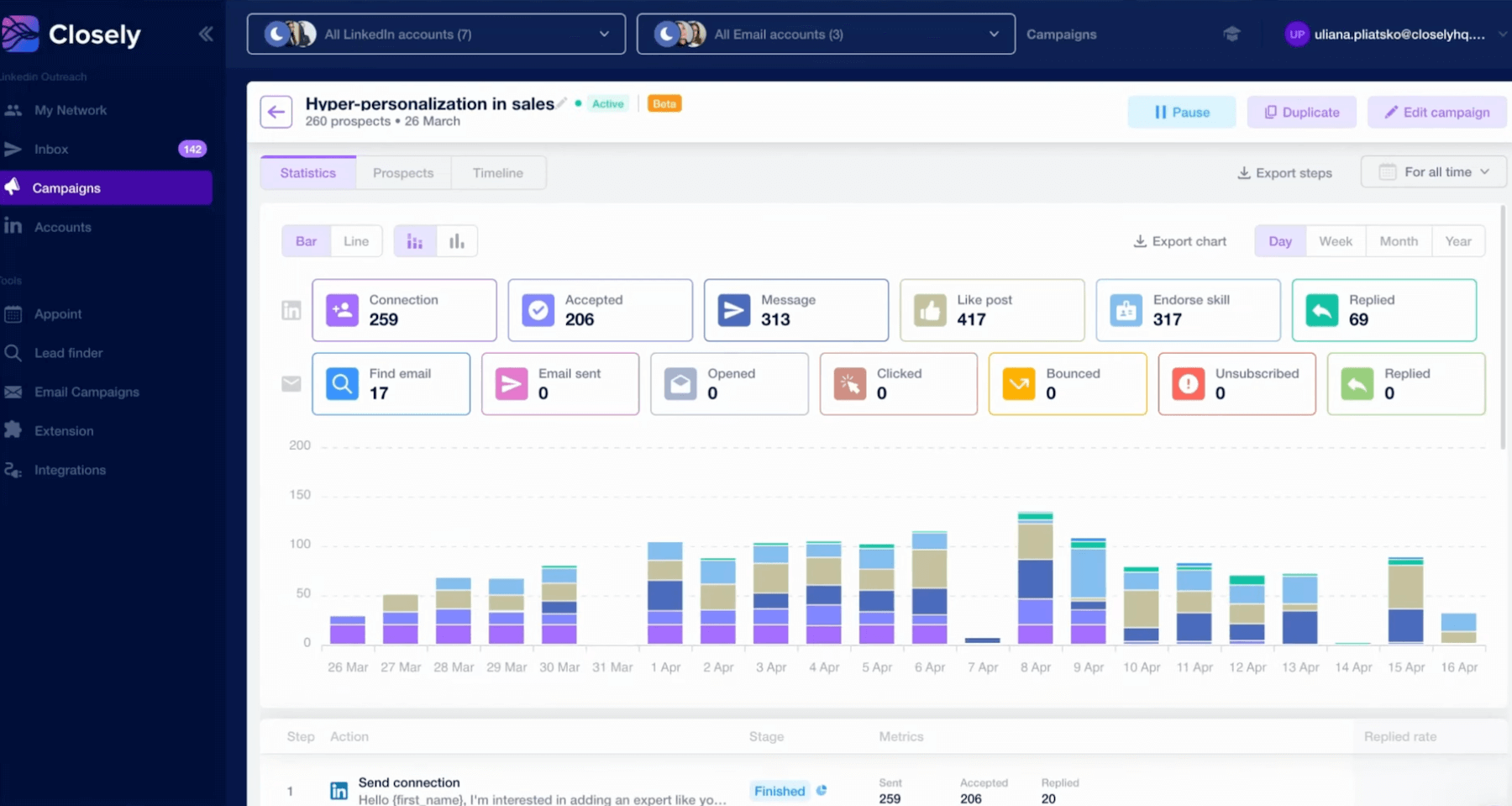
It’s enough to manage your campaigns on a day-to-day basis and adjust what’s not working. On the other hand, if you’re looking for advanced analytics (multi-touch attribution, detailed audience analysis, fine-grained ROI reporting), Closely will seem limited. The tool covers the essentials, nothing more.
For teams who need to prove the ROI of their LinkedIn actions in a granular way, you’ll need to supplement this with a dedicated tool, or export the data for analysis elsewhere.
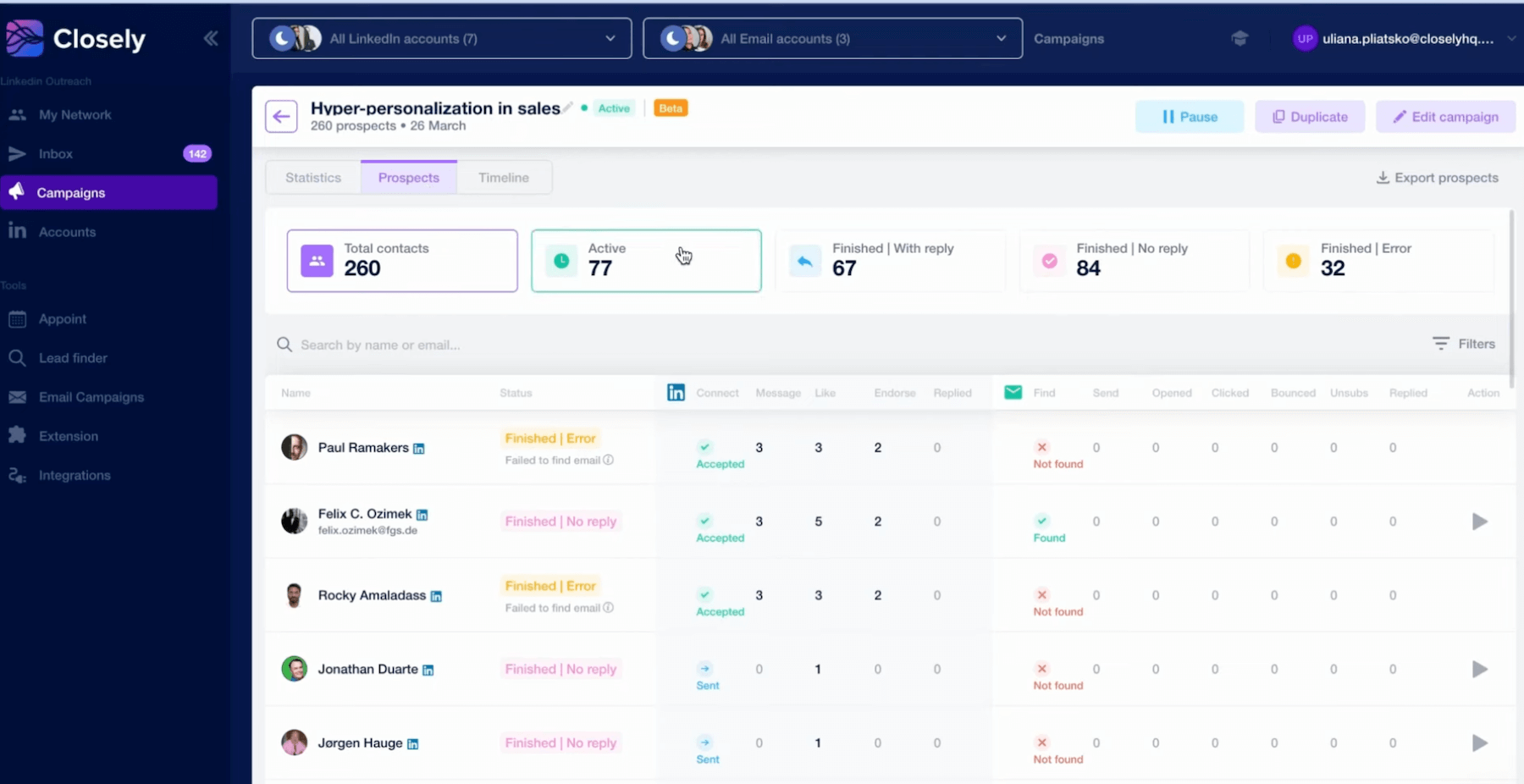
Closely’s analytics are honest: they cover what you need to optimize your campaigns, without claiming to do more. For 80% of users, this will suffice. The remaining 20% (data-driven teams, detailed executive reporting) will need to supplement.
The best way to find out if Closely is right for you is to try it out. The interface is intuitive and quick to learn – you’ll have a clear idea within a few hours.
Support, documentation & community
Closely offers decent online documentation, with guides covering the main functionalities: creating campaigns, configuring sequences, setting up CRM integrations. It’s in English only, but it’s clear and well-organized. Enough to get you through the classic use cases.

On the support side, the level of service depends on your plan:
- On Starter, you have access to email support… expect a response within a few hours.
- Growth and Essential plans give access to more responsive support.
- Essential users benefit from a dedicated customer success manager for onboarding and follow-up.
Closely does not (yet) have a very active user community, such as Slack or a dedicated forum. If you’re looking to exchange ideas with other users or find shared campaign templates, you’ll have to turn to more general growth/sales communities.
Closely prices & value for money
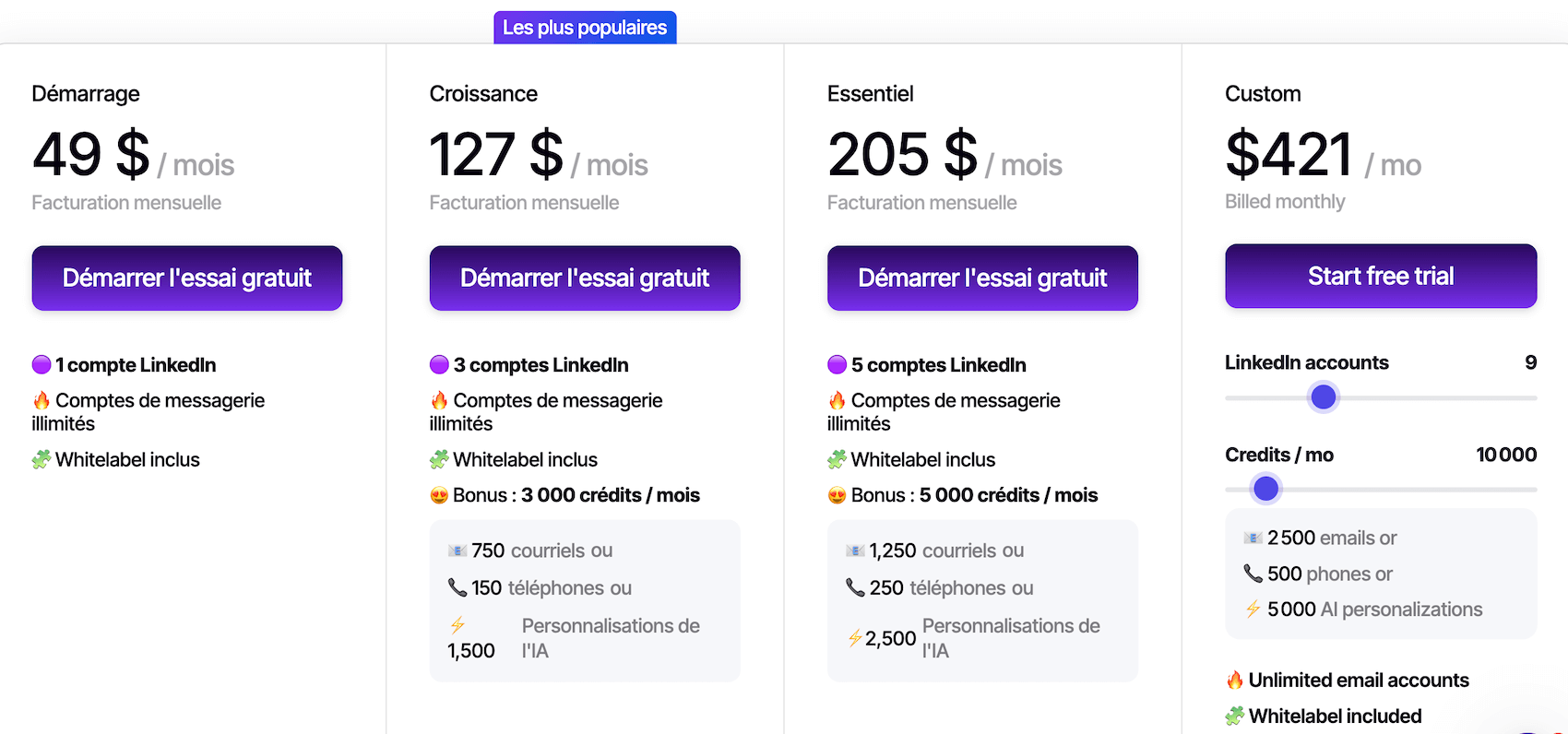
Closely offers a progressive fee structure, with plans to suit freelancers ranging from solo contractors to multi-account agencies.
Here are the details:
| Plan | Monthly price | LinkedIn accounts | What’s included | Who is it for? |
|---|---|---|---|---|
| Starter | 49$/month | 1 | 250 profiles/month, 50 emails/day, basic Inbox Hub, standard filters, email support | Freelancers, consultants, solo prospectors just starting out |
| Growth | 127$/month | 3 | 1,000 profiles/month, complete database, email finder, full Inbox Hub, CRM integrations | SMEs, small sales teams looking to scale |
| Essential | 205$/month | 10+ | Unlimited profiles, team dashboards, white-label, priority support, dedicated customer success | Agencies, structured B2B teams, recruiters |
| Custom | Made to measure | Customized | Dedicated account manager, custom SLA, custom features | Large organizations, large-scale deployments |
An important point: Closely operates on a credit system rather than a per-seat pricing system.
Closely vs. the competition: where does it stand?
To situate Closely in the landscape, here’s how it stands up to the main alternatives:
- Closely vs. Lemlist (from €69/month): Lemlist is more email-first, with advanced features (personalized videos, landing pages, warming). If your strategy relies primarily on email, with LinkedIn as a complement, Lemlist stays ahead. If it’s the other way around (LinkedIn + Email), Closely may be more interesting.
- Closely vs. Expandi (€99/month per account): Expandi is a pure LinkedIn player, with no enrichment or native email. More expensive per unit and less reassuring feedback on account security. Closely offers more features for less money, especially if you manage several accounts.
- Closely vs. Waalaxy (from €19/month): Waalaxy is more accessible for beginners, with a very simple interface. But email integration is basic, and per-seat pricing quickly becomes costly for teams. Closely is more complete, Waalaxy simpler.
- Closely vs. PhantomBuster (from €69/month): PhantomBuster is a highly flexible scraping and automation tool, but one that requires technical skills. Closely is a turnkey solution, while PhantomBuster is aimed at more tech-savvy profiles who want a tailor-made solution.
Try CloselyThe best way to find out if Closely is right for you is to try it out. The interface is intuitive and quick to learn, you’ll have a clear idea within a few hours.