The real pain for sales teams isn’t poor note-taking in meetings, it’s the 20 minutes that follow each call: re-entering into HubSpot or Salesforce what has just been said, finding the objections raised, filling in the “next step” fields, copying and pasting action items into Slack or Asana. Five calls a day, that’s almost two hours lost to manual data entry for each sales rep.
Fathom tackles this problem head-on. Not by “taking notes for you” (the usual pitch of all AI notetakers), but by automatically synchronizing everything said in your CRM, with the right fields, the right contacts, the right opportunities. The summary is ready within 30 seconds of the end of the meeting. The CRM is updated without human intervention.
It’s this precise positioning ( = a business productivity tool that tackles CRM input, not just note-taking) that explains why Fathom is today the most installed AI notetaker on the Zoom Marketplace and HubSpot Marketplace, with 6,500 reviews at 5/5 on G2. Not bad…
We’ve analyzed the tool in depth: features, pricing, real-world limitations, comparison with alternatives. Here’s our full review of Fathom.
Sommaire
Our opinion on Fathom in a nutshell
| Perimeter | Score | Our opinion |
|---|---|---|
| Overall rating | 4,5 / 5 | The best AI notetaker on the market for B2B sales teams. Really generous free plan, native automatic CRM sync with HubSpot and Salesforce, 30-second summaries. The limitations (visible bot, no mobile app, no file import) are real, but don’t impact the central use case, which is perfectly mastered. |
| Transcription accuracy | 4,5 / 5 | 90-95% accuracy depending on audio quality and accents. Speaker identification, clickable transcription that links to the exact moment of recording. Slight degradation with strong accents or in noisy environments. |
| Abstract quality IA | 4,3 / 5 | 14+ templates adapted to sales methodologies (SPICED, MEDDPICC, BANT), summary ready in 30 seconds, customizable. May lack nuance in complex meetings or highly implicit exchanges. |
| CRM integration | 4,7 / 5 | Native bidirectional synchronization with HubSpot and Salesforce on paid plans. Automatic mapping of custom fields. This is Fathom’s major strength compared to all its competitors. |
| Quality-price ratio | 4,8 / 5 | Free plan with unlimited recordings and transcriptions, no time restrictions. The best free plan on the market. The $25/user Business Plan is the most relevant for sales teams with CRM. |
| Easy to handle | 4,8 / 5 | 5 minutes to get up and running. Desktop app installation + “auto-record all meetings” configuration and off you go. The interface is sober and the learning curve almost non-existent. |
Try Fathom for free
Fathom offers a permanent free plan with unlimited recordings and transcriptions, with no credit card required. A great way to test the tool in real-life conditions before considering a paid plan.
What exactly is Fathom?
Fathom is an AI meeting assistant launched in 2020 by Richard White, an entrepreneur who had already founded UserVoice, a well-known product feedback platform in the SaaS world. The initial idea is simple: enable participants to be fully present in a conversation without spending half the time taking notes or looking at their screens.
The company’s growth has been spectacular. Between 2022 and 2024, revenues multiplied by 90 and usage by 20. In September 2024, Fathom raised $17 million in Series A funding, including $2 million from its own users via the Wefunder platform, a sign of a particularly committed fan base.
The company also benefits from Zoom’s strategic support via the Zoom Apps Fund (which partly explains its status as the most installed tool on the Zoom Marketplace).
Today, Fathom has over 500,000 users, a 5/5 rating on G2 (6,500 reviews) and the title of #1 product satisfaction awarded by G2 in 2024. These figures are exceptional, even allowing for the fact that very satisfied users of a free tool naturally tend to leave good reviews…
Fathom’s strategy is clearly one of Product-Led Growth: offer a free plan generous enough to create individual adoption, then monetize on team, coaching and CRM integration features. This is the model that has made HubSpot, Notion and many other SaaS companies successful, and Fathom applies it very well in its category.
Fathom’s key features
Recording and transcription: the foundation
Fathom works on all three major videoconference tools: Zoom, Google Meet and Microsoft Teams. But the detail that makes all the difference is that Fathom integrates into desktop applications as well as browser versions. Indeed, most AI note-taking tools only work in the browser. Fathom, on the other hand, runs directly in the Zoom or Teams application installed on your machine, offering a much more stable experience.
Transcription supports 38 languages, with an estimated accuracy of between 90 and 95% depending on audio quality and accents. In practice, the result is clean on standard meetings in French or English. We did notice a few errors on very strong accents or in noisy environments, but nothing that requires systematic replay.
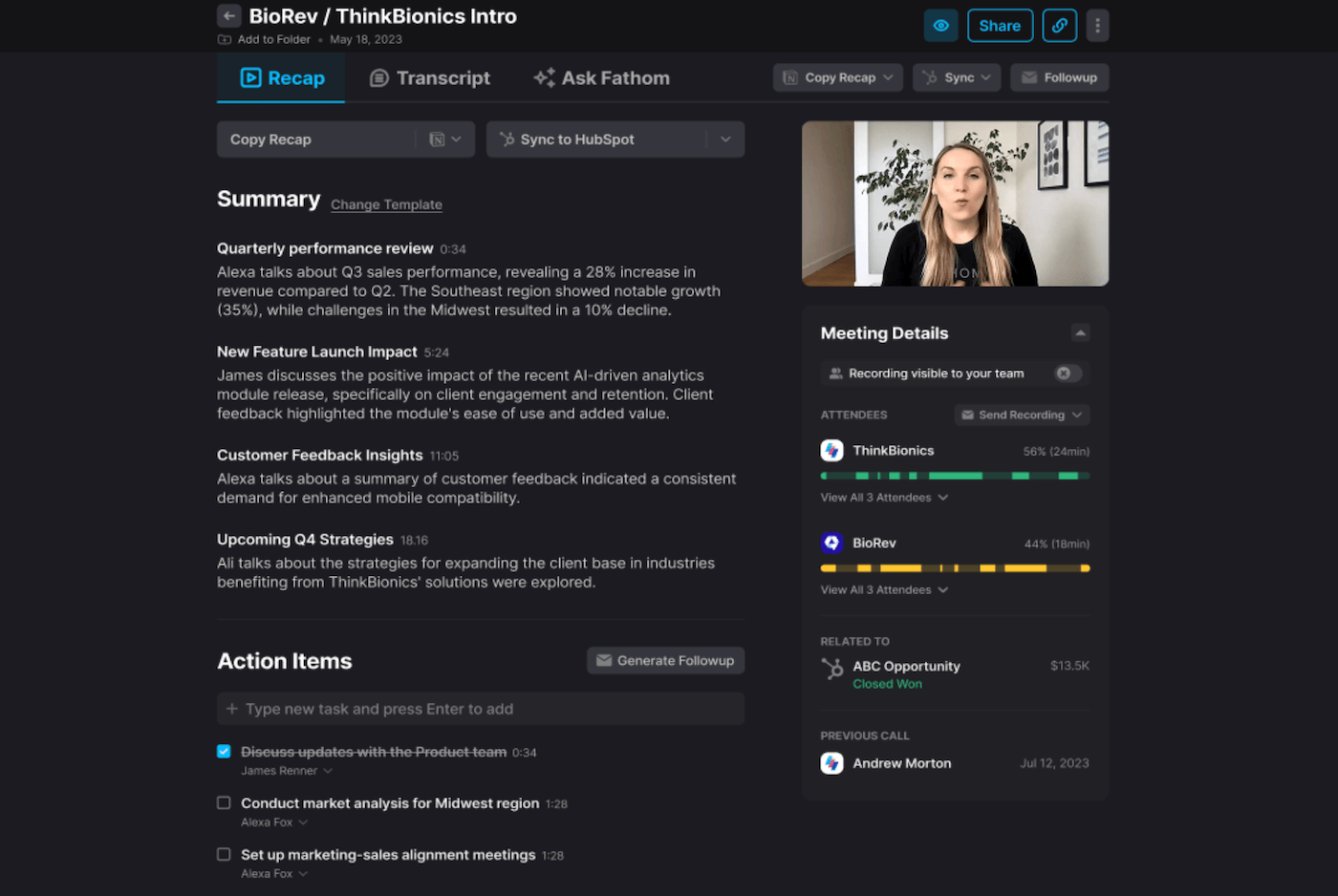
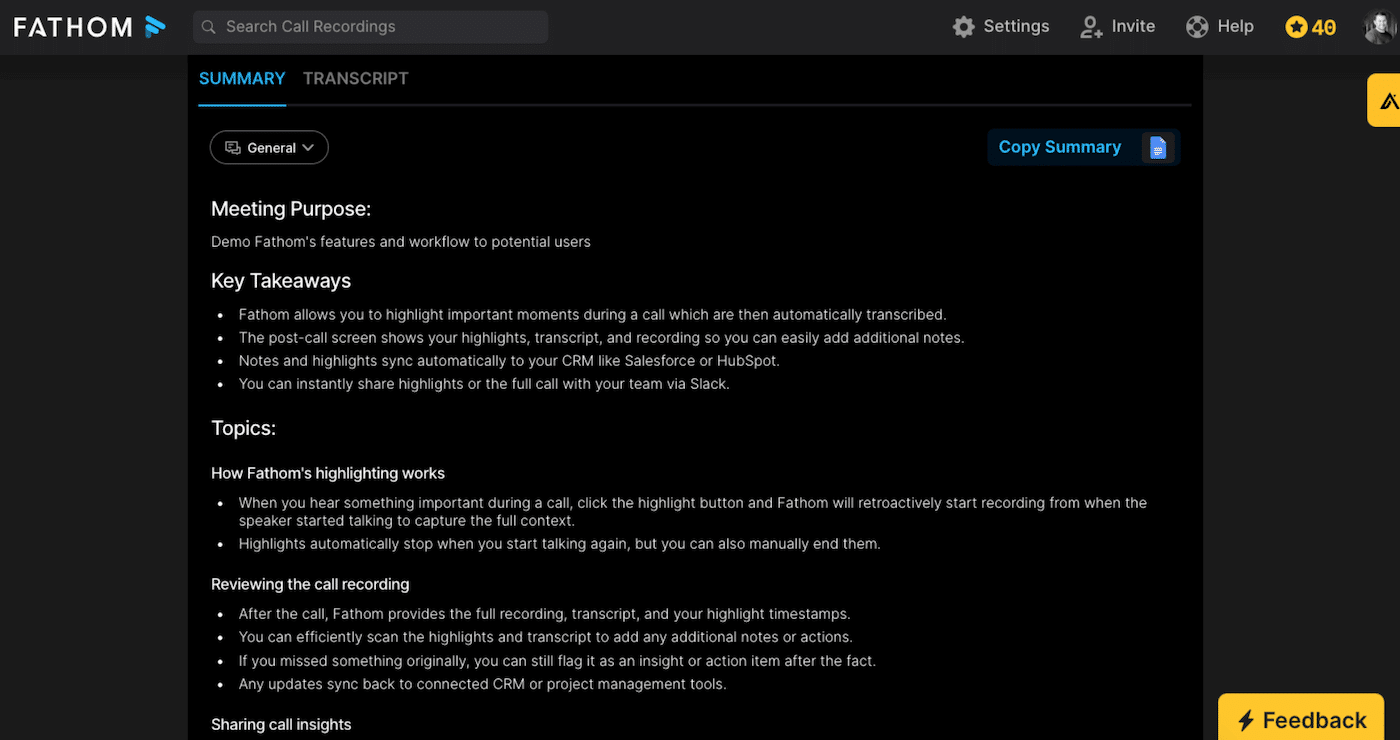
What really sets the Fathom transcript apart is that it’s entirely clickable. Each sentence in the transcript links directly to the exact moment in the video recording. If you miss something in the summary, just click and you’re immediately at the right second in the video. It’s simple, but highly effective for finding a precise point without having to scroll through 45 minutes of footage.
Recordings and transcriptions are unlimited, even on the free plan, which is a real differentiator compared to Otter (300 min/month free) or Fireflies (storage limit). For a salesperson who makes 4 to 6 calls a day, this is essential.
Salesdorado’s opinion
Transcription is the foundation, but that’s not where Fathom really makes the difference. All serious AI notetakers transcribe correctly today, let’s be honest. Fathom’s real value lies in what comes after transcription: structured summaries and (above all) automatic CRM synchronization, as we shall see.
IA summaries and templates: 30 seconds after the end of the meeting
This is one of the main strengths of the tool: the summary is available in less than 30 seconds after the last participant has hung up. Not 5 minutes, not 15 minutes: 30 seconds.
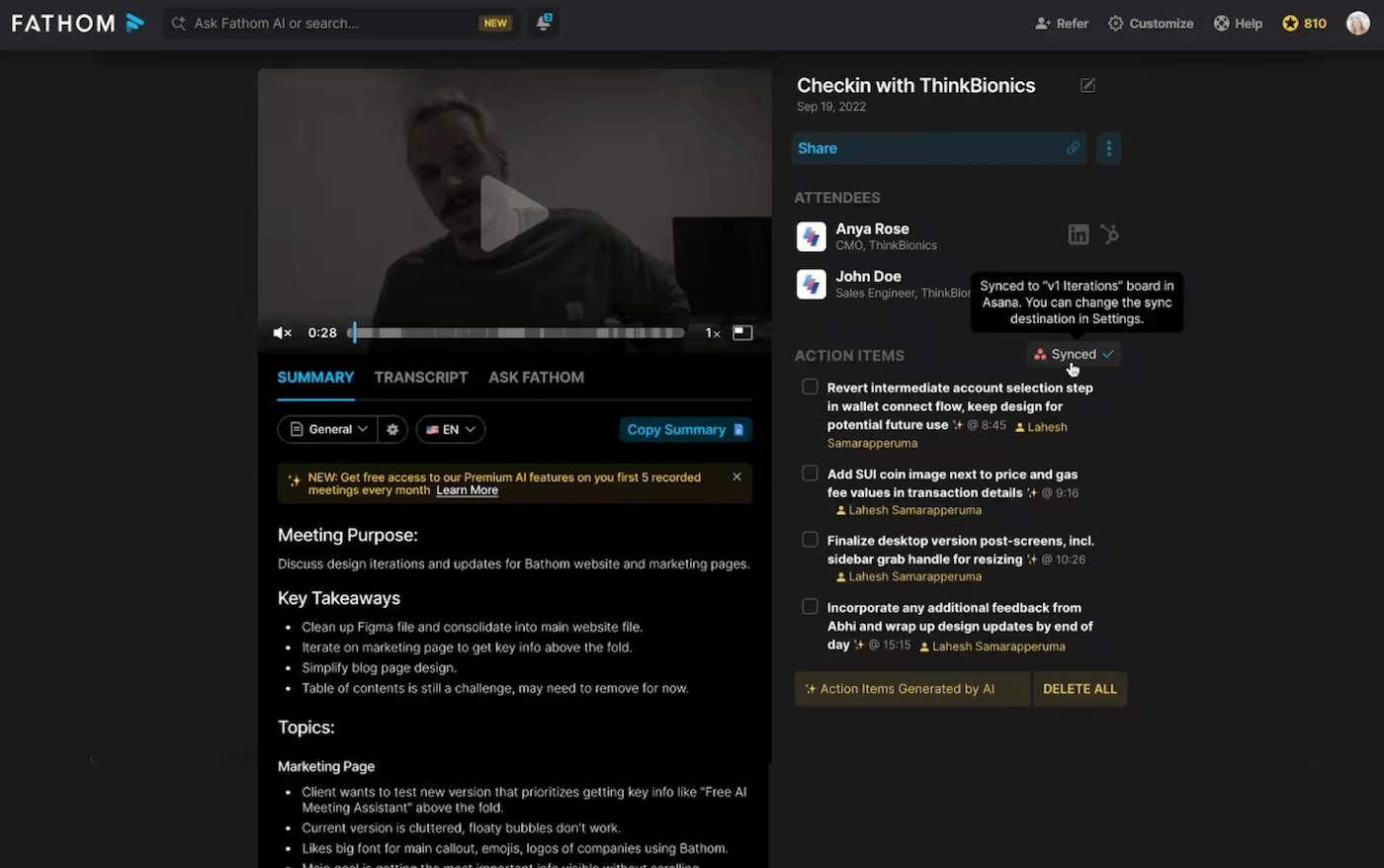
The summary includes key points, decisions taken, action items and a TL;DR for quick reviews. But what sets Fathom apart is the library of templates adapted to specific methodologies:
- Sales: SPICED, MEDDPICC, BANT, Demo format, Discovery format
- Customer Success: QBR templates, renewal templates, incident tracking templates
- HR: candidate interview templates, onboarding templates, 360° feedback templates
- General: chronological format, Q&A, general summary, action items only
If no template suits your needs, you can create your own: define the sections you want, the level of detail, the tone. This template becomes your standard for all future meetings of the same type.
The “Ask Fathom” feature completes the package: you can ask questions in natural language about the content of a meeting (“What were the objections to the price?”, “What did the prospect say about the timing of the project?”, “Summarize the next steps in 3 points”). On the business side, this functionality extends to all team meetings: you can search for trends or mentions of a competitor on all your recorded calls.
Highlights: capture important moments without interrupting the conversation
This is the feature most favored by advanced users, and it’s well worth a closer look.
During a call, when someone says something important (be it a key objection, a strong buying signal or strategic information), you click on the Highlight button in the Fathom panel. The tool automatically captures the moment, moving back slightly so as not to cut off the beginning of the sentence.
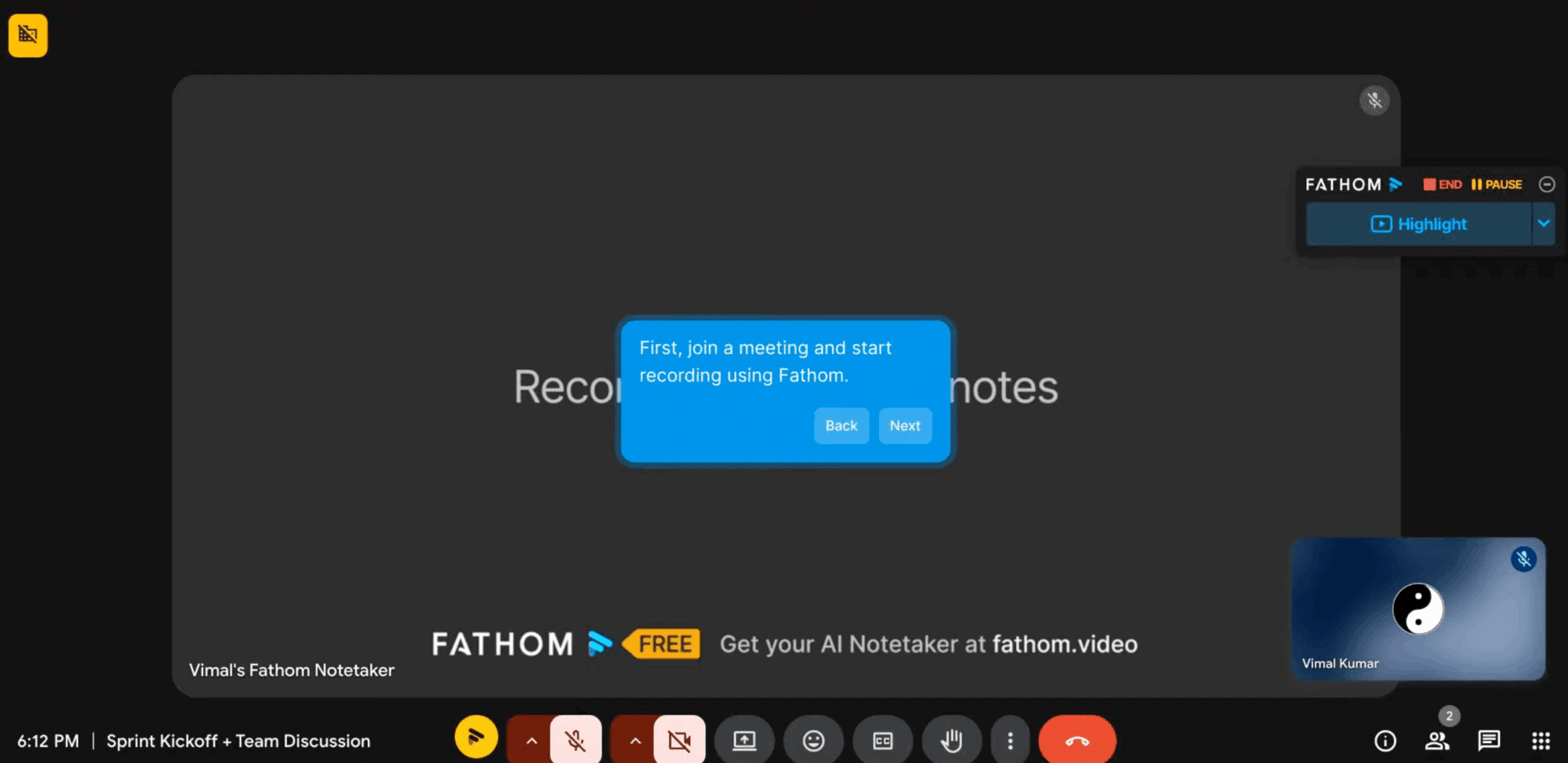
These highlights can be named manually or self-named by the AI. They can be compiled into playlists to easily share the “voice of the customer” with the product or marketing team, without sending a 45-minute recording hoping someone will take the time to listen.
Highlights can be marked as internal, so that external participants do not see them in the shared summary. You can freely annotate what you think is important, without it being passed on to the prospect or customer. It’s all pretty neat.
Automatic CRM sync: the real game-changer for sales teams
This is where Fathom takes on a different dimension from all its competitors positioned in the “AI note-taking” arena. On the Team and Business fronts, Fathom synchronizes bidirectionally with HubSpot and Salesforce.
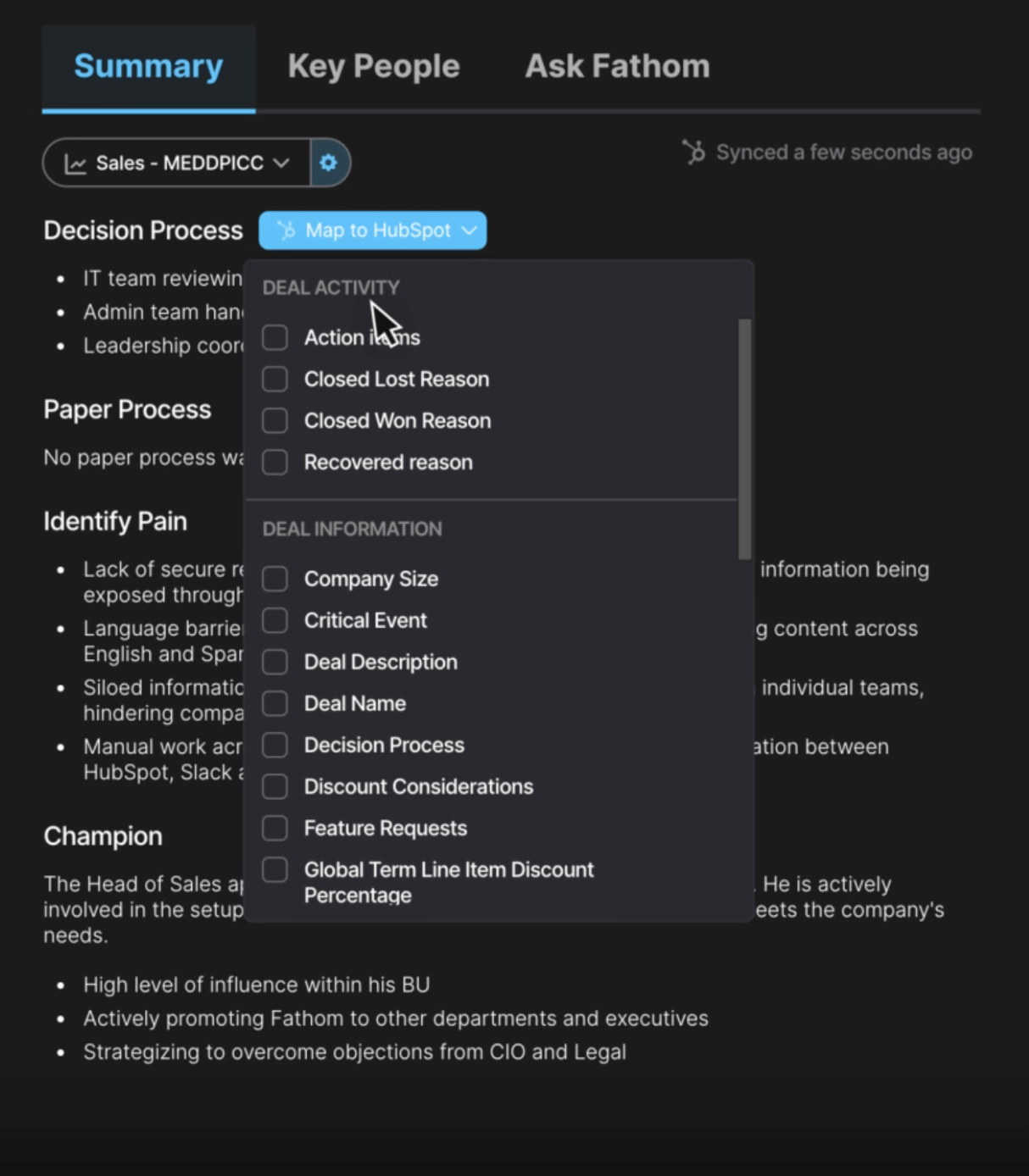
In concrete terms, after a discovery call with a prospect :
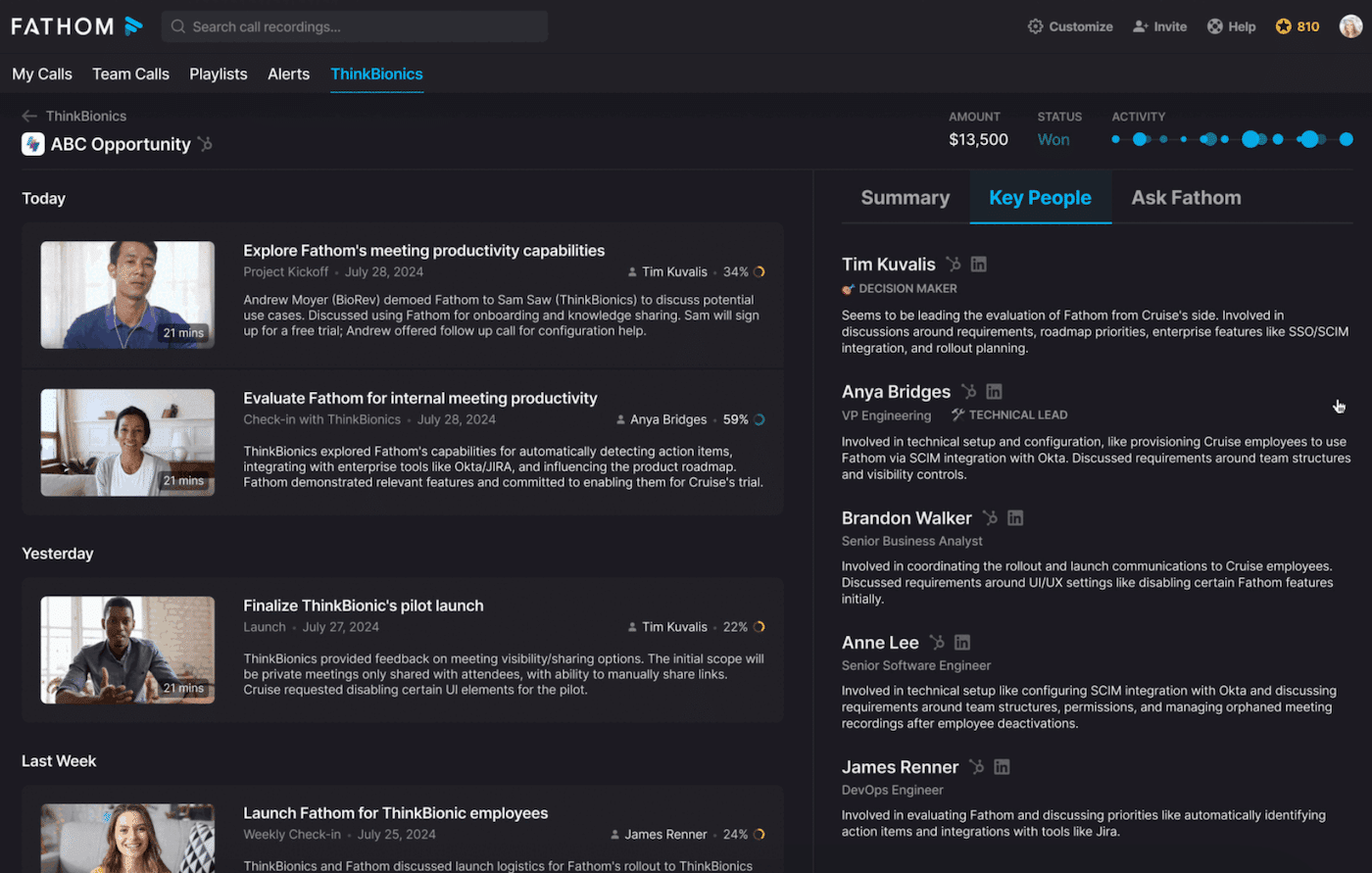
- Summary and transcript are automatically attached to the contact record in HubSpot or Salesforce
- Action items are created in CRM with the right owners
- Customized fields (identified budget, decision-makers, timeline, objections) are automatically filled in based on information extracted from the call.
- The deal moves to the right stage of the pipeline if a decision has been made
For SDR/account executive teams with several calls a day, the time savings are immediately visible. A team of 30 sales reps saving 20 minutes of CRM data entry per meeting represents around 10 hours saved per day for the whole team. This is the calculation that Fathom puts forward in its sales pitch against Gong, and frankly, it’s an honest one.
Note that Fathom also connects natively to Slack (automatic summary sharing in a dedicated channel), Notion, Asana and Zapier (available on all plans since September 2025, opening up access to 5,000+ apps).
Salesdorado’s opinion
If you have a sales team that makes 5+ calls a week on Zoom or Teams and uses HubSpot or Salesforce, the ROI calculation is favorable right from the $20/user business plan. Manual CRM post-call entry is one of the most time-consuming and least valued activities for sales teams. Fathom eliminates it.
Deal View and AI Scorecards: features for managers and RevOps
On the business side, Fathom goes beyond individual assistance to offer team management tools:
- Deal View consolidates all conversations and interactions related to a specific sales opportunity. A manager can see at a glance all the times a deal has been raised, the decisions made at each stage, the promises made to the prospect. It’s a lightweight alternative to Revenue Intelligence platforms like Gong or Clari. Less powerful, certainly, but far more accessible.

- AI Scorecards automatically evaluate sales performance according to predefined criteria: speaking time, number of monologues, questions asked, active listening. A manager can quickly identify who talks too much, who doesn’t ask enough questions, who has mastered the sales methodologies taught. It’s a concrete coaching tool, without having to listen to hours of recordings.
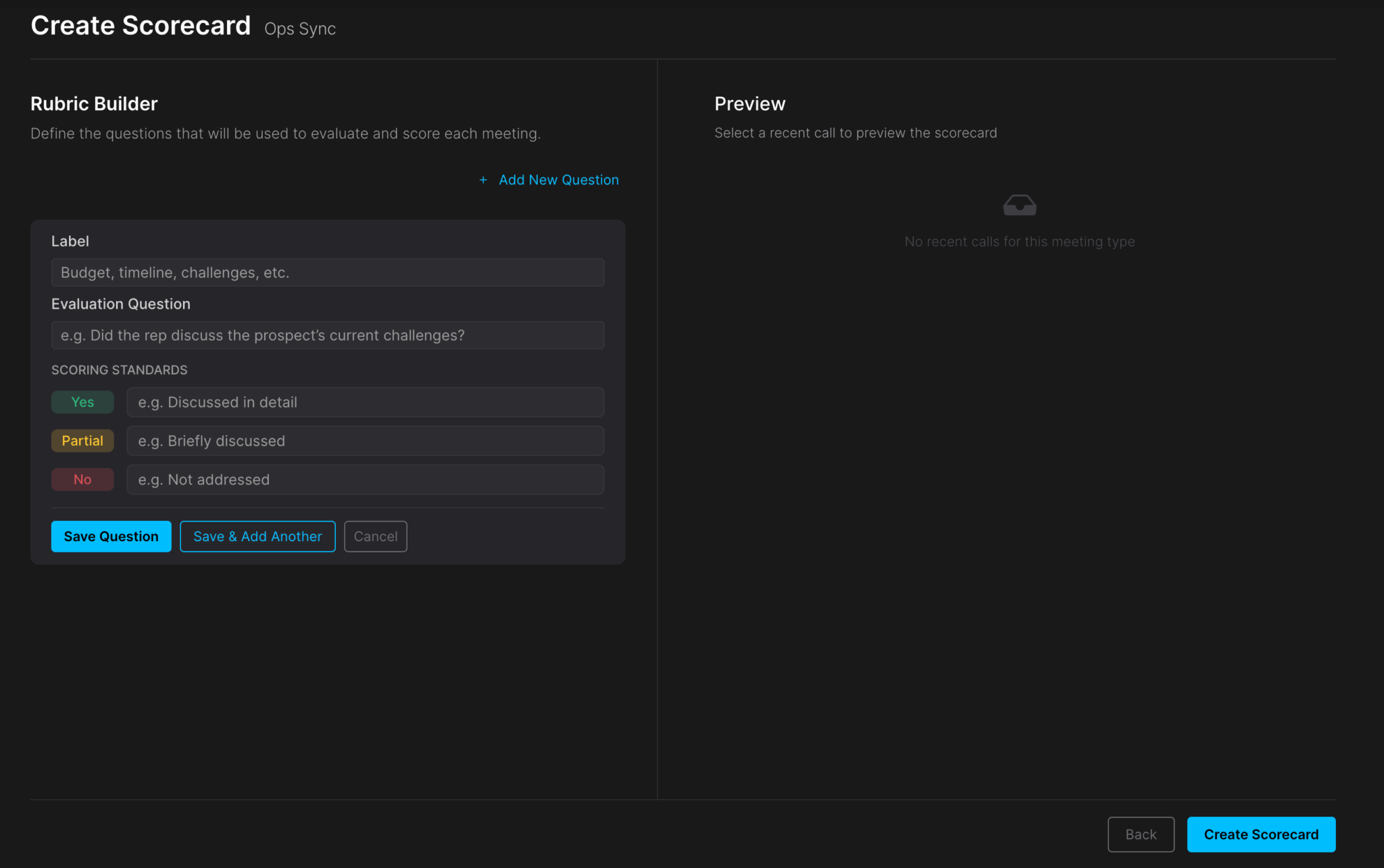
These features compete directly with Gong and Chorus in the RevOps segment. Fathom does not yet have the analytical depth of these platforms, but the price differential is considerable, and Fathom is even offering a migration package for Gong customers (Business Plan offered until the end of the existing Gong contract).
Fathom rates: how much does it really cost?
| Plan | Price (annual billing) | What’s included | Who it’s for |
|---|---|---|---|
| Free | 0 $ | Unlimited recordings and transcriptions, 5 AI summaries/month, highlights, sharing | Independent, light use, tool testing |
| Premium | 16 / user / month | Unlimited AI summaries, AI action items, Ask Fathom, advanced templates, banner bot removal | Solo professionals with intensive use |
| Team | 15 / user / month (min. 2 users) | All Premium + shared team folders, shared playlists, personalized vocabulary, SSO | Teams who want to share records between colleagues |
| Business | 25 / user / month (min. 2 users) | All Team + deep CRM sync (custom fields), Deal View, AI Scorecards, coaching metrics, Account-Wide Ask Fathom | Sales teams with HubSpot or Salesforce |
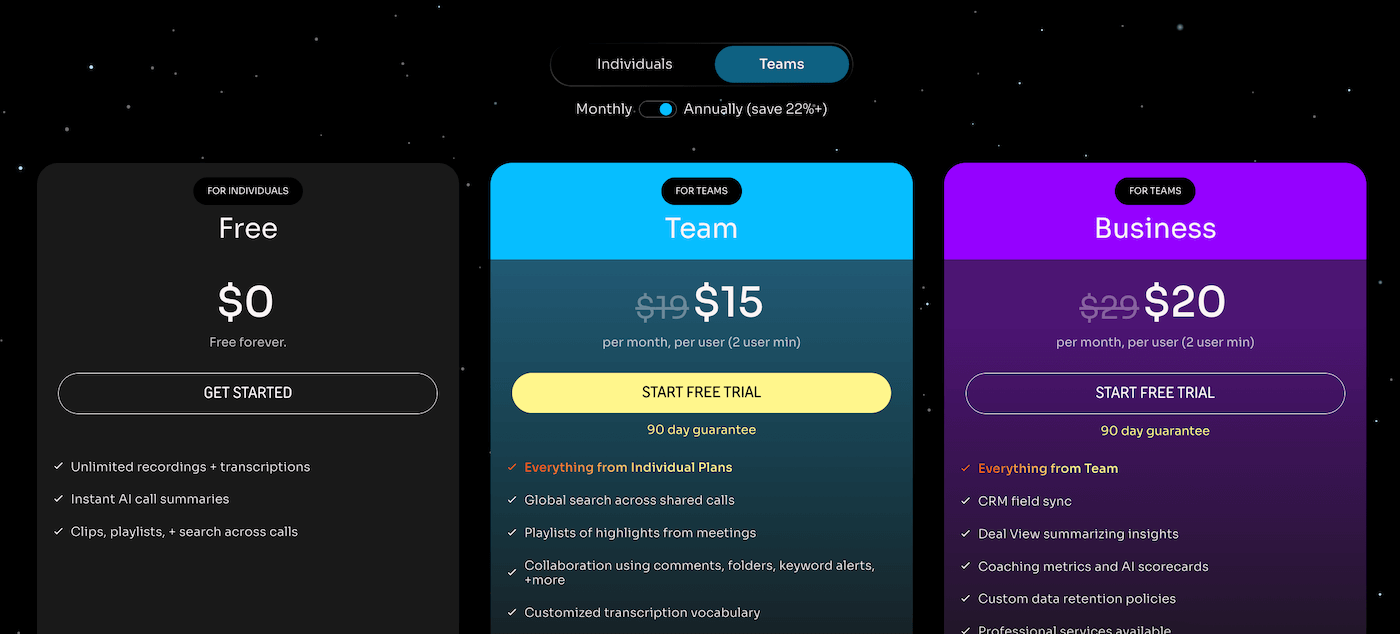
Salesdorado’s opinionThe free plan is really usable for light individual use, but the limit of 5 IA summaries per month quickly becomes noticeable for anyone doing more than one meeting a day. For freelancers with few calls, it’s enough. For an active sales team, the Business plan at $20/user is the right choice: this is where full CRM sync and coaching tools become accessible. Beware of the Team plan: it costs $15/user but doesn’t give access to personalized CRM fields, so the jump to Business for an extra $5 is justified if you use HubSpot or Salesforce.
What we like (and don’t like)
- Truly unlimited free plan on the essentials: recordings and transcriptions with no restrictions on duration or volume, where all competitors cap at free.
- 30 seconds to get the summary: no waiting, no asynchronous processing. It’s there when you need it, before the next call.
- Native automatic CRM sync: HubSpot and Salesforce, with custom field mapping. Best-in-class in this respect.
- Contextualized sales templates (SPICED, MEDDPICC, BANT…). As a result, you don’t get generic summaries, but structures adapted to your sales methodologies.
- Internal highlights, for annotating what matters without external participants seeing it. A rare feature (we’ve never seen it before…), and very useful in a sales context.
- Full-text search of all meetings, to find out in 5 seconds what a prospect said 3 weeks ago, without having to listen to the recording again.
- Desktop app Zoom and Teams: Fathom works in installed applications, not just in the browser. Welcome!
- SOC2 Type II, HIPAA, RGPD certified: Fathom is 100% compliant.
- Bot visible in the meeting: “Fathom Notetaker” appears in the list of participants. In sensitive commercial negotiations or with customers who are very concerned about confidentiality, this is a real hindrance. The bot-free version is announced on the roadmap, but not yet available at the time of writing.
- No native mobile application: impossible to record from a smartphone. Field or traveling sales reps can’t use it outside of video meetings. Otter and Fireflies are ahead of the game on this point.
- No import of existing audio/video files: Fathom only transcribes live meetings on supported platforms. To transcribe a pre-existing recording, you’ll need to use another tool.
- The free plan is less generous than it sounds: 5 AI summaries per month is quickly outdated. Recordings are unlimited, but the real value of the tool comes from the summaries, and that’s something you have to pay for beyond 5 meetings.
Who is Fathom really for?
Fathom is for you if :
- You have a sales team that makes demos, discovery apples or customer success calls on Zoom, Teams or Meet.
- You use HubSpot or Salesforce and want to eliminate manual post-call entry
- You want to give your managers visibility over call quality without listening to hours of recordings.
- If you’re looking for a truly functional free plan to get you started without obligation
- Your meetings are essentially held by videoconference from a computer (no critical mobile requirements).
- You need to meet serious compliance requirements (SOC2, HIPAA, RGPD)
Skip it if :
- Your important meetings are face-to-face: Fathom does not work outside video meetings on supported platforms.
- You need to import and transcribe existing recordings (podcasts, webinars, interviews produced before adopting the tool)
- Your customers or prospects are very sensitive to the presence of a recorder (legal, medical or financial sectors where the issue of consent to recording is critical).
- Your sales force works mainly from a smartphone or in the field
- You need advanced conversational analysis (real-time talk ratio, advanced sentiment analysis, market intelligence): in this case, Gong or Chorus are more complete
Our verdict on Fathom
Fathom has built up an undisputed leadership position in a specific niche: AI notetaker for B2B sales teams who want to eliminate post-call CRM data entry. In this field, it has no direct competitor capable of matching it in terms of features/price ratio.
Transcription is reliable, summaries are fast, sales templates are relevant. But what really sets Fathom apart in the competitive landscape is the depth of its integration with HubSpot and Salesforce, an integration that doesn’t just paste a summary into a contact comment, but fills in the right fields, at the right opportunity, without anyone having to touch a keyboard.
The limitations are real (no mobile, visible bot, no file import…) but they don’t impact the main use case for which Fathom was designed. If you hold your sales meetings on Zoom or Teams from your computer and use HubSpot or Salesforce, these limitations probably don’t concern you.
Start with the free plan: unlimited recordings and transcriptions are all you need to get the idea. Upgrade to Business when you want to activate full CRM sync.
Our final verdict
Fathom is the obvious choice for B2B sales teams who want to reclaim time lost in post-meeting CRM data entry. Start with the free plan, there’s no reason not to give it a try.