On Monday morning, your sales rep announces over video that a major prospect is ready to sign. The summary of the meeting? Nowhere, except in the heads of those who were connected. On Tuesday, your technical director asks a question by email. One colleague answers in Slack, another by phone. On Wednesday, no one knows what decision has been made. Friday, the prospect calls back, but the sales rep is on leave and no one can trace the conversation.
This scenario is common to all SMEs. Your team is communicating in 4 or 5 places at the same time (email, chat, video, phone, WhatsApp), and none of these places contains the complete image.
The result is measurable: according to a Grammarly/Harris Poll study, professionals spend an average of 88% of their working week communicating. A significant proportion of this time is wasted searching for information in the wrong channel, repeating what has already been said elsewhere, or reconstructing the context of a conversation that no-one has documented.
In this article, we set out to map the communication channels of an SME, and compare the solutions on the market for centralizing everything in a single space.
Sommaire
The 5 communication channels of an SME (and what falls between the cracks)
The problem isn’t that your SME has too many tools, it’s that it has too many types of exchange scattered in too many places.
Here are the 5 channels found in almost every SME with 10 to 50 employees, along with what gets lost at each seam.
#1 Email: indispensable, but a black hole
Email remains the mainstay of formal communication. It’s the channel for the contract sent to the customer, the brief shared with the agency, the meeting minutes (when someone thinks of writing them…). It’s universal, traceable and everyone knows how to use it.
But in an SME, internal emails are mixed with customer emails, newsletters, SaaS notifications and spam. Your sales manager may have the critical information in his inbox, somewhere between a supplier invoice and a Black Friday promo. And good luck finding the right email six months later, when the subject line was “Re: Re: Re: quick point”.
The other structural problem with email: information asymmetries. Those who are copied see the exchange. The others don’t. When someone belatedly forwards a thread of 47 messages, no one takes the time to reread everything.
#2 Chat (Slack, Teams): fast, but volatile
Slack and Teams have transformed internal communication in SMEs. Exchanges are faster, more informal and better organized by channel. For everyday questions (“does anyone have the number of customer X?”, “is the 2pm meeting still on?”), it’s unbeatable.
But the cat has two major problems:
- The first is volatility: important conversations drown in the flow. A decision made in a thread on Tuesday morning is invisible on Friday. Finding a specific exchange in Slack is often more complicated than searching for an email, because the volume is much higher and the structure less formal.
- The second is the pressure to react. Constant notifications create an artificial sense of urgency. The result has been documented: it’s the “Slack fatigue” described by BPI France, a mixture of information overload and pressure to respond immediately, even when the subject doesn’t warrant it. In some SMEs, employees spend more time monitoring their Slack channels than working on their projects.
#3 Video (Zoom, Meet): effective in the moment, ineffective for traceability
Videoconferencing has become a reflex, especially since Covid. Meetings move fast, decisions are made, next steps are agreed. And then…you hang up and everything disappears.
The problem with visio is traceability. Who took the notes? Where are they stored? Does everyone have the same understanding of what was decided? In most SMEs, meeting minutes are either non-existent or hastily written up in a Google Doc that no-one will ever re-open. Commitments made over video become phantom tasks that nobody follows up.
This is precisely where AI changes the game: tools that automatically transcribe and summarize videoconferences eliminate this black hole. More on this below.
#4 The telephone: a total blind spot
It’s a paradox: the telephone is still the most widely used channel for critical commercial exchanges (prospect calls, negotiations, follow-ups), and it’s also the least traced channel.
The call is not recorded, the content is not transcribed and the decision is not noted anywhere in the CRM (unless the sales rep takes the time to do it manually, which rarely happens).
For an SME, this is a concrete problem:
- When a sales rep leaves the company, all his telephone conversation history goes with him.
- When a prospect calls back and meets a colleague, nobody knows what was discussed.
IP telephony solutions such as Aircall or Ringover solve part of the problem (recording, history), but they create a 5th silo: call data lives in a separate tool from CRM software, chat and project management.
#5 WhatsApp/SMS: the shadow IT of internal communication
In theory, nobody uses WhatsApp for work. In practice, it’s often the channel for emergencies (“the customer’s calling back, can someone take this?”), conversations with field teams and informal exchanges that escape archiving.
The problem is twofold:
- Firstly, there’s no traceability on the company side: the messages are on employees’ personal phones.
- Secondly, there’s no integration with work tools: information shared on WhatsApp will never show up in CRM or project tracking.
Salesdorado’s opinionThe problem isn’t the tools in isolation. Slack is great for chat. Zoom is great for video. Aircall is excellent for telephony. The problem is the seam between the channels. This is where information gets lost: when it goes from a phone call to an email, from a chat to a report, from a visio to a task. It’s this seam that needs to be eliminated.
What centralizing communication channels means: 4 before-and-after scenarios
Rather than theorizing, here’s what it looks like in practice when all communication channels live in the same space.
Scenario 1: Sales rep and manager follow up a prospect
Before (dispersed channels): The sales rep calls the prospect from his mobile. The call is not recorded. He sends a quick summary via Slack to his manager. The manager responds by email with questions. The sales rep fills in the CRM two days later, from memory, with partial information. When the prospect calls back, the operator can’t find any context.
After (unified communications space): The sales rep calls from the CRM-integrated telephony system. The call is automatically recorded and transcribed by the AI. The summary (key points, objections, next steps) is posted in the CRM deal feed. The manager sees it instantly and comments directly. If the prospect calls back, any colleague can see the complete history with a single click.
Scenario 2: The weekly team meeting
Before : Visio on Zoom. Someone shares their screen, someone else takes notes in a Google Doc. Decided actions are listed at the bottom of the doc. The following week, nobody knows what has or hasn’t been done. The notes doc is nowhere to be found in Drive.
After : Integrated Visio with real-time AI transcription. At the end of the meeting, AI generates a structured summary that automatically posts to the team’s news feed. Identified actions are transformed into tasks assigned to the right people, with deadlines. The following week, everyone can see the progress without having to open another tool.
Scenario 3: The arrival of a new employee
Before: The manager sends an email with links to Slack, Zoom, Asana, the CRM, Google Drive. The newbie spends 2 days creating accounts, figuring out which channel to ask questions in and asking 3 times “where do you find proposal templates?”. Information is everywhere and nowhere.
After : Only one account to create. The new member has immediate access to the directory, team conversations, current projects, shared files and CRM. He sees the news feed with the latest announcements. Team welcome messages are in the same space as his first tasks.
Scenario 4: Coordination with field teams
Before: The field team communicates via WhatsApp (site photos, reports, questions). The office manager tries to transfer the information to the tracking tool. Photos get lost in the phone gallery. The customer calls to ask for an update, but no one knows how to answer.
After : The field team uses the platform’s mobile app. Photos, messages and reports go into the same space as project tracking. The manager sees everything in real time. The customer calls: we open his file and get the full context.
AttentionCentralization doesn’t mean forcing everything into a single channel. You still need several types of communication (instantaneous, asynchronous, formal, informal). The challenge is to ensure that these types coexist in the same space and share the same context, not to force everyone to communicate only via chat.
Solutions for centralizing internal communications in SMEs
#1 Bitrix24: the platform that covers all channels in a single space
Bitrix24 is the most comprehensive solution in this selection for centralizing internal communications in SMEs. It’s the only platform that natively combines all 5 channels (chat, visio, telephony, news feed, email) in a single space, with integrated CRM and project management.
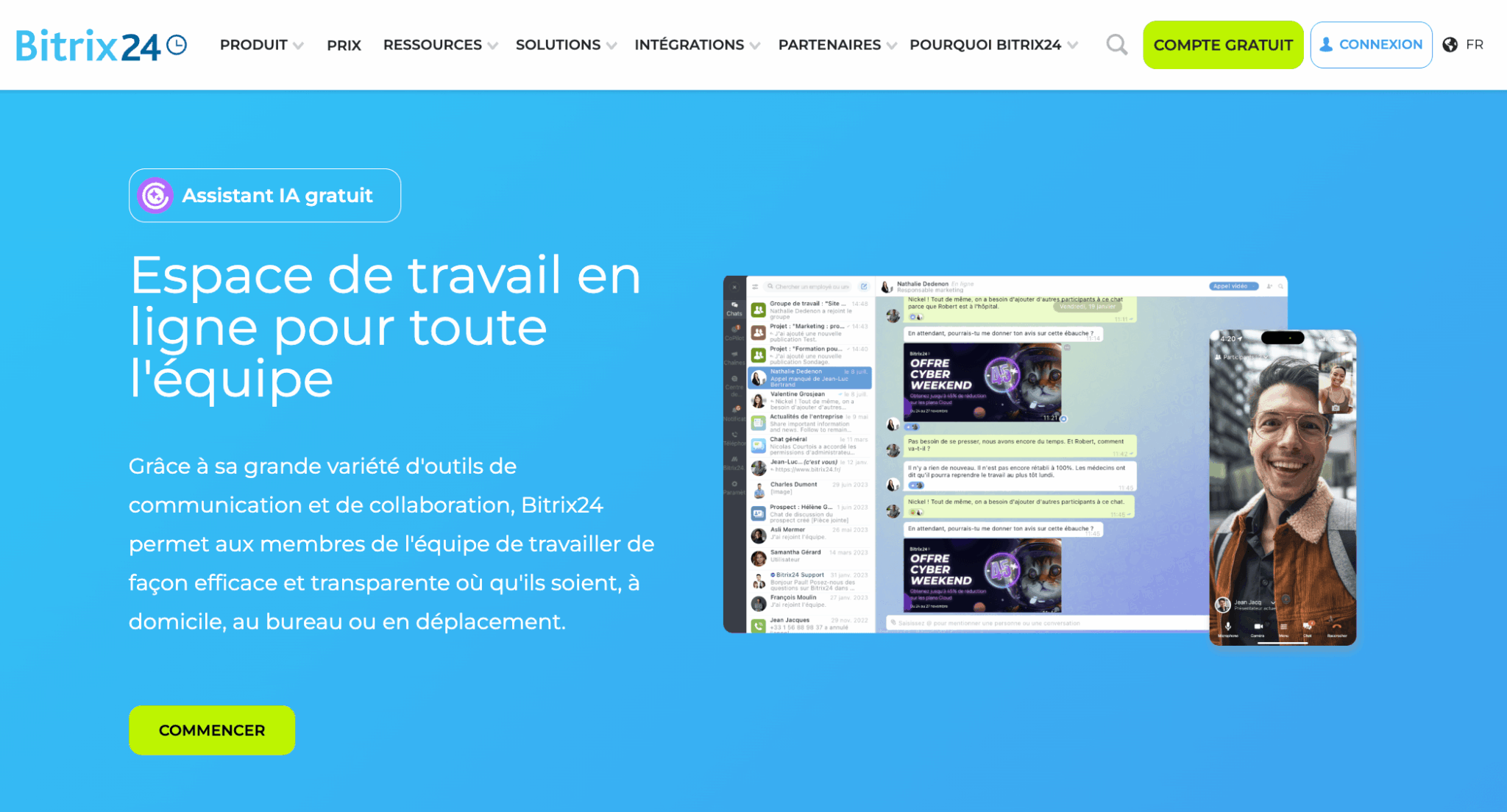
- Internal chat and messaging: Bitrix24 offers an integrated messenger with private conversations, groups and thematic channels (like Slack). Each project and workgroup has its own discussion space. The difference with Slack: messages are natively linked to tasks, CRM deals and files.
- Video conferencing with AI : Integrated video calls (no need for Zoom), with a key feature: CoPilot Follow-Up. AI transcribes the meeting in real time, generates a structured summary and automatically suggests tasks arising from the discussion. It’s the end of meeting minutes that nobody writes.
- Integrated telephony : Bitrix24 offers SIP telephony integrated with call recording, automatic transcription by CoPilot and auto-filling of CRM fields. The sales rep makes the call from Bitrix24, and the entire history is attached to the contact without manipulation.
- Corporate news feed : An internal social network (like a LinkedIn feed, but private) where management can post announcements, teams can share updates, and employees can react. This is the top-down, cross-functional channel that Slack lacks (where everything is horizontal).
- Speech analytics: AI analyzes sales calls, compares them with defined sales scripts and provides a compliance score with recommendations. It’s as much a communication tool as a sales coaching tool.
Rates : Free plan (unlimited users, basic functionality). Basic Plan at €49/month for 5 users and Standard Plan at €99/month for 50 users, including all communication features and CoPilot AI.
- The only one to cover all 5 channels natively: chat + visio + telephony + news feed + email in a single space. No competitor does this at this price.
- AI that bridges the gap: CoPilot transcribes calls, summarizes visios and creates associated tasks. This is exactly what eliminates the seams between channels.
- Native link with CRM: conversations don’t float around in a vacuum. Each exchange can be linked to a contact, deal or project.
- Flat-rate pricing: €49/month for 5 users or €99/month for 50 users, all channels included. No per-user billing.
- Chat is functional but less fluid than Slack: Slack’s messaging experience remains superior in terms of UX, responsiveness and third-party integrations.
- The learning curve: many modules = many things to discover. Allow 1 to 2 weeks for the team to get up to speed.
- Video is less stable than Zoom/Meet for large meetings: for meetings of 5-10 people, it’s fine. Beyond that, Zoom is more reliable.
Try Bitrix24 for free
Bitrix24 offers a free plan with no user limit. Try out chat, video, telephony and news feed in a single area, with no commitment.
Try Bitrix24 for free
Bitrix24 offers a free plan with no user limit and a 15-day trial of premium features. Test the centralization of all your channels in a single space.
#2 Microsoft Teams: the standard for SMEs in the Microsoft ecosystem
If your SMB already uses Microsoft 365, Teams is the natural choice for internal communication. Chat is solid, visio is reliable (even for large meetings) and integration with Word, Excel and SharePoint is seamless.
What Teams does well: channel chat and private conversations, video conferencing (up to 300 participants), file sharing directly in conversations and a rich ecosystem of third-party applications. Teams “channels” work like Slack’s, with customizable tabs per channel.
What’s missing for an SME: no integrated CRM (you need Dynamics 365, which is expensive and complex), no native telephony without the Teams Phone add-on (a significant extra cost) and the corporate news feed is limited (Viva Engage, ex-Yammer, is a separate product). To truly centralize communication, you’ll need to add 2-3 additional tools.
Rates: included in Microsoft 365 Business Basic at €5.20/user/month. Teams Phone from €8.70/user/month extra.
#3 Slack: the king of chat (but only chat)
Let’s be honest: Slack offers the best instant messaging experience on the market. The UX is impeccable, the integrations are countless and the search is powerful. For day-to-day exchanges, there’s nothing else like it.
But Slack isn’t a complete communications solution. Huddles (audio/video calls) are basic and do not replace Zoom. No integrated telephony. No top-down news feed (Slack is horizontal by nature). No CRM. And the per-user pricing model (€8.25 to €18/user/month) drives up the bill for SMBs of 20+ people.
Slack is therefore an excellent chat tool, but not a complete internal communications platform. To truly centralize, you’ll still need to complement it with a Zoom, a telephony tool and a CRM.
#4 Google Workspace (Chat + Meet): correct but basic
Google Chat and Google Meet are part of Google Workspace, making them accessible to all SMEs that use Gmail and Drive. The advantage: you don’t need to install any additional tools, as everything is in the same ecosystem as your emails and documents.
Limitations: Google Chat lags far behind Slack (fewer features, less fluid UX, limited integrations). Google Meet is okay for visio, but without native AI transcription (Gemini is starting to offer summaries, but it’s still limited). No telephony. No internal social network.
The verdict: a suitable “default” option for SMEs that don’t want to add another tool, but far from a unified communications solution.
#5 Talkspirit: the sovereign French alternative
Talkspirit deserves a mention for French SMEs looking for a sovereign platform. This French publisher offers a complete workspace with chat, video, news feed, project management and document sharing, with data hosted in Europe (ISO 27001 certified).
Strengths: a streamlined interface, fast learning curve, and an assertive “digital workplace for SMEs” positioning. The company news feed is particularly well suited to top-down communication.
Limitations: no integrated CRM, no native telephony and a much more limited ecosystem of integrations than Teams or Slack. For an SMB that wants to link its communications to its CRM, you’ll have to complete the picture.
Comparison: which tool covers which channels?
| Channel | Bitrix24 | Teams | Slack | Google Workspace | Talkspirit |
|---|---|---|---|---|---|
| Chat / messaging | Yes (channels, groups, threads) | Yes (very good) | Yes (the best) | Yes (basic) | Yes |
| Videoconferencing | Yes (native) | Yes (very good) | Huddles (basic) | Google Meet | Yes |
| IA meeting transcript | Yes (CoPilot Follow-Up) | Yes (Copilot, premium plan) | No | Partial (Gemini) | No |
| Integrated telephony | Yes (SIP + IA transcription) | Pay-per-use add-on (Teams Phone) | No | No | No |
| News feed / internal social network | Yes (Company feed) | Viva Engage (separate) | No | No | Yes (very good) |
| Native CRM link | Yes (integrated CRM) | Dynamics 365 (expensive) | Via integrations | No | No |
| Complete mobile app | Yes | Yes | Yes | Yes | Yes |
| Price (30 users) | 99/month (50-user package) | 150-500€/month | 200-300€/month | 150-400€/month | 150-300€/month |
Salesdorado’s opinionThe picture is clear: Bitrix24 is the only one to tick all the boxes– chat + visio + telephony + news feed + CRM – in a single flat-rate subscription. Other solutions excel on 1 or 2 channels, but leave gaps that need to be filled with additional tools. If your priority is to eliminate the seams between communication channels, this is the most logical solution for an SME.
Try Bitrix24 for free
Bitrix24 offers a free plan with no user limit and a 15-day trial of premium features. Test the centralization of all your channels in a single space.
5 rules for centralizing your SME’s internal communications without provoking a mutiny
Changing a team’s communication habits means touching on something deeply rooted.
Here are the mistakes to avoid and the best practices that work:
- Start with the cat, not with everything at once. Chat is the easiest channel to migrate because it’s the most frequent and the most visible. If your team adopts the new platform’s internal chat, the rest will naturally follow (visio, file sharing, then telephony and CRM).
- Define clear rules of use. “We use chat for quick questions. News feed for announcements. Email only for external exchanges. Calls for sensitive subjects.” Without these rules, you’ll reproduce the chaos in a new tool.
- Let the old and the new cohabit for 2 to 3 weeks. Don’t switch off Slack the day you activate Bitrix24. Announce a switchover date, leave a transition period, and deactivate the old tool only when adoption is real.
- Identify 2-3 “champions” in the team. Profiles at ease with the tools, who will test first and train their colleagues. Peer adoption is 3 times more effective than generic training imposed by management.
- Measure the result. After 1 month, take a look at the volume of internal e-mails (which should drop by 30-50%), the average time taken to retrieve information and the rate of CRM completed after calls (which should increase significantly if telephony is integrated). These are the indicators that prove that centralization works.