If you’re comparing HubSpot and Pipedrive, it’s probably because you’re trying to decide which one is better at managing a sales pipeline. Bad news…or rather good news: in this particular area, both are excellent. Pipedrive and HubSpot CRM both know how to organize deals, track tasks and give a clear view of your sales tunnel. So that’s not the real question.
The real question is: when is an excellent sales CRM no longer enough for your organization? As long as your needs are limited to advancing opportunities, both tools do the job, and the choice is based on preference and budget. However, as soon as you want to align your sales and marketing teams, retain your customers over time or circulate data between your departments, the game changes. This is precisely the tipping point where HubSpot has the advantage, because its CRM is just the gateway to a complete ecosystem.
In this article, we honestly compare the two solutions, feature by feature, price by price. We also tell you clearly when Pipedrive is still the best choice, and when HubSpot is the most appropriate option to support your growth.
Sommaire
HubSpot vs Pipedrive at a glance: summary table
| Solution | HubSpot | Pipedrive |
|---|---|---|
| Ideal for | Teams who want a solid sales CRM and the ability to extend to marketing, service and data without changing tools | Sales teams with a strong sales orientation, established processes and little dependence on marketing |
| Philosophy | All-in-one platform built around a central CRM | CRM focused on opportunities and sales activity |
| Our opinion | A full-featured commercial CRM that becomes formidable as soon as the other HubSpot bricks are connected. The ideal gateway for a growing organization | A lightweight, highly intuitive solution designed for sales force adoption, with an excellent user experience |
| Highlights |
|
|
| Weak points |
|
|
| Free trial | Free tools for life, then try out paid features | 14-day free trial |
HubSpot offers free CRM tools for life, with no time limit, to manage your contacts and pipeline. Enough to give you a real feel for the platform before switching to a paid plan.
HubSpot Sales Hub: our analysis in brief
HubSpot is a comprehensive sales CRM, but reducing HubSpot to its Sales Hub alone misses the point. Its strength lies in a simple principle: the CRM serves as a foundation, and you graft onto it exactly the bricks you need, when you need them.
In concrete terms, you can start with sales CRM alone, then plug in marketing automation, customer service or content management without ever migrating or reconciling your data. Everything is based on the same contact database. This is what changes everything when an organization grows: marketing sees what sales does, and customer service sees the sales history.
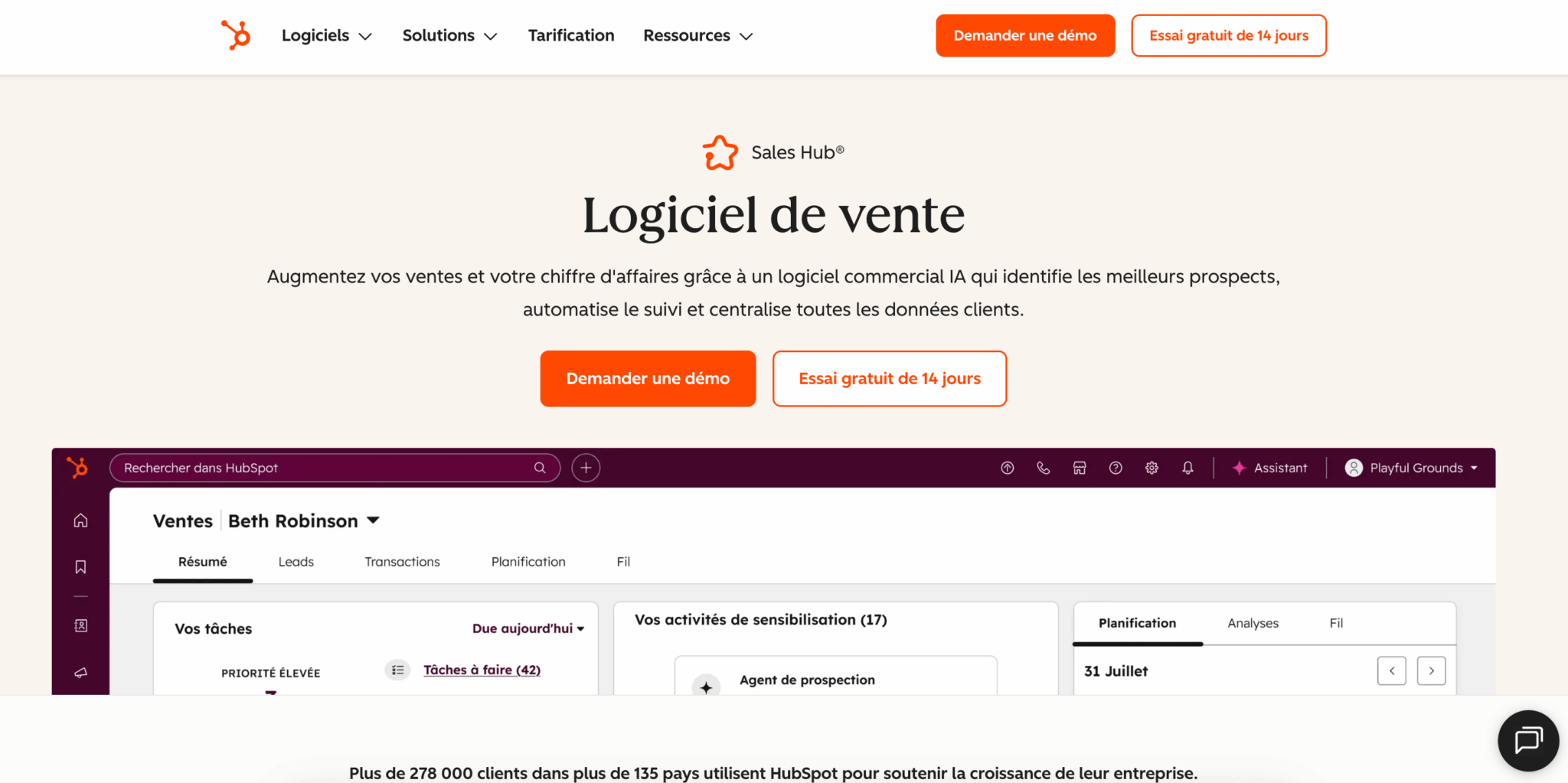
When it comes to pure pipeline management, HubSpot is second to none. The tool offers customizable pipelines, comprehensive task tracking and a clear view of your opportunities. On the Pro side, you get access to the automated sequences, workflows and lead scoring that really make the difference to sales productivity.
Since 2024, HubSpot has abolished the minimum number of seats on the Pro and Enterprise plans. Before, you had to buy a pack of five licenses to access Pro. Today, a team of two or three salespeople can take advantage of all the automations right from the first user. This is a major change that makes advanced functionalities accessible much earlier.
Salesdorado tip
If you’re still hesitating between Pro and Enterprise, keep in mind that the Enterprise plan is not a premium Pro. It mainly unlocks custom objects, team hierarchies and granular permissions. If you don’t have these precise needs, the Pro plan does the same commercial job for a much lighter budget.
Pipedrive: our analysis in brief
Pipedrive is one of the best sales CRMs on the market. It’s a tool designed by salespeople for salespeople, built around a central idea: activity-based selling. Everything starts with the pipeline.
Its main asset is the user experience. The Kanban view is superb and easy to read. You can move deals around with a simple drag-and-drop. A new salesperson is up and running in one or two days, whereas other CRMs take weeks to get used to. Pipedrive also integrates its AI Sales Assistant in every respect.
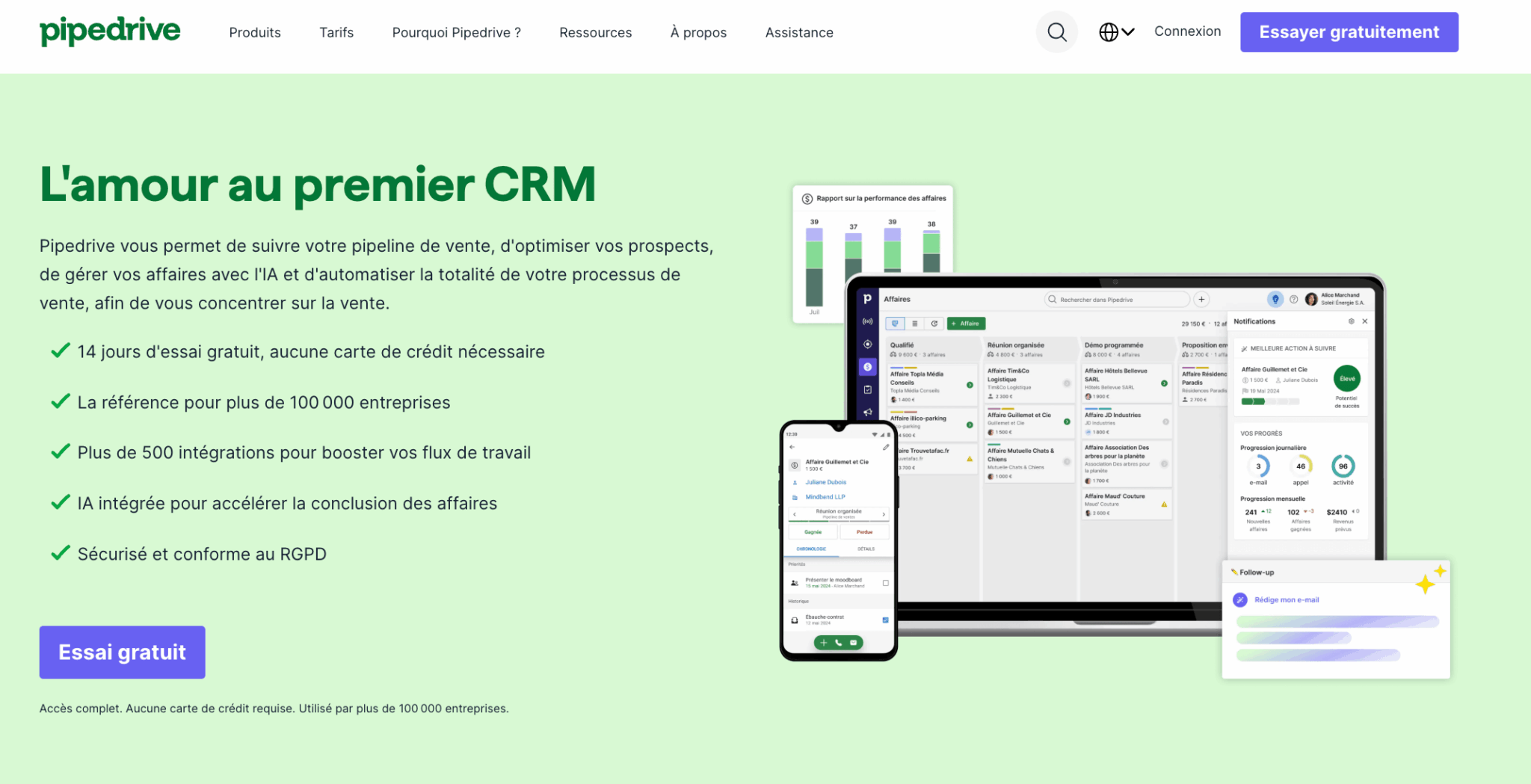
But Pipedrive is perfectly aware of its positioning: it’s not trying to be HubSpot or Salesforce. It’s an excellent sales CRM, period. Its marketing functionalities remain light (even with the Campaigns add-on) and the tool is not intended to cover customer service or data management on the scale of an entire organization. For a 100% sales team looking for a simple, effective tool, this is often the best choice. For an organization with a broader vision, the limit is quickly reached.
My advice
Pipedrive’s introductory price is misleading. The €14 Lite plan doesn’t give you access to automation, which only starts on the Growth plan. If you want to synchronize your emails and automate your reminders, you should look at Growth, not Lite. Make your calculations before committing yourself.
The real tipping point between HubSpot and Pipedrive
We’re very familiar with both of these tools, and we’d like to give you our take on the market.
It’s not a question of which one manages a pipeline better, because both are very good at that. It’s a question of knowing where your organization is and where it wants to go.
If your needs boil down to managing a flow of opportunities, tracking follow-ups and keeping a clear view of your sales tunnel, then Pipedrive and HubSpot are both suitable. The choice will be based on your teams’ preference and your budget. Many sales teams never need to go any further, and that’s just fine.
The changeover occurs:
- When your organization goes beyond sales.
- When your marketing needs to feed the pipeline with qualified leads and measure what happens to them.
- When your customer service department needs access to sales history to better retain your accounts.
- When your data must remain consistent throughout the customer journey.
At this point, a single-function CRM forces you to stack third-party tools and multiply connectors.
This is where HubSpot’s ecosystem logic comes into its own. The moment Pipedrive gets you stuck isn’t the moment it becomes bad, it’s the moment your organization becomes too integrated for a tool focused on sales alone. If you’re anticipating strong growth or needs that extend beyond sales, switching to HubSpot from the outset saves you a painful CRM migration later on.
Try both to see for yourself
The best way to decide is often to try. However intuitive they may be, your teams are bound to have a preference. Once you’ve established this preference, you can estimate the real cost and make an informed decision.
HubSpot vs Pipedrive: functional scope
Pipeline and sales task management
It’s Pipedrive’s favorite playground, and deservedly so. The interface is built around deals that progress from opportunity to win/lose. You view all your tunnels at once, spot the ones that are performing well and move opportunities with a drag-and-drop.
The Kanban view is one of the most pleasant on the market:
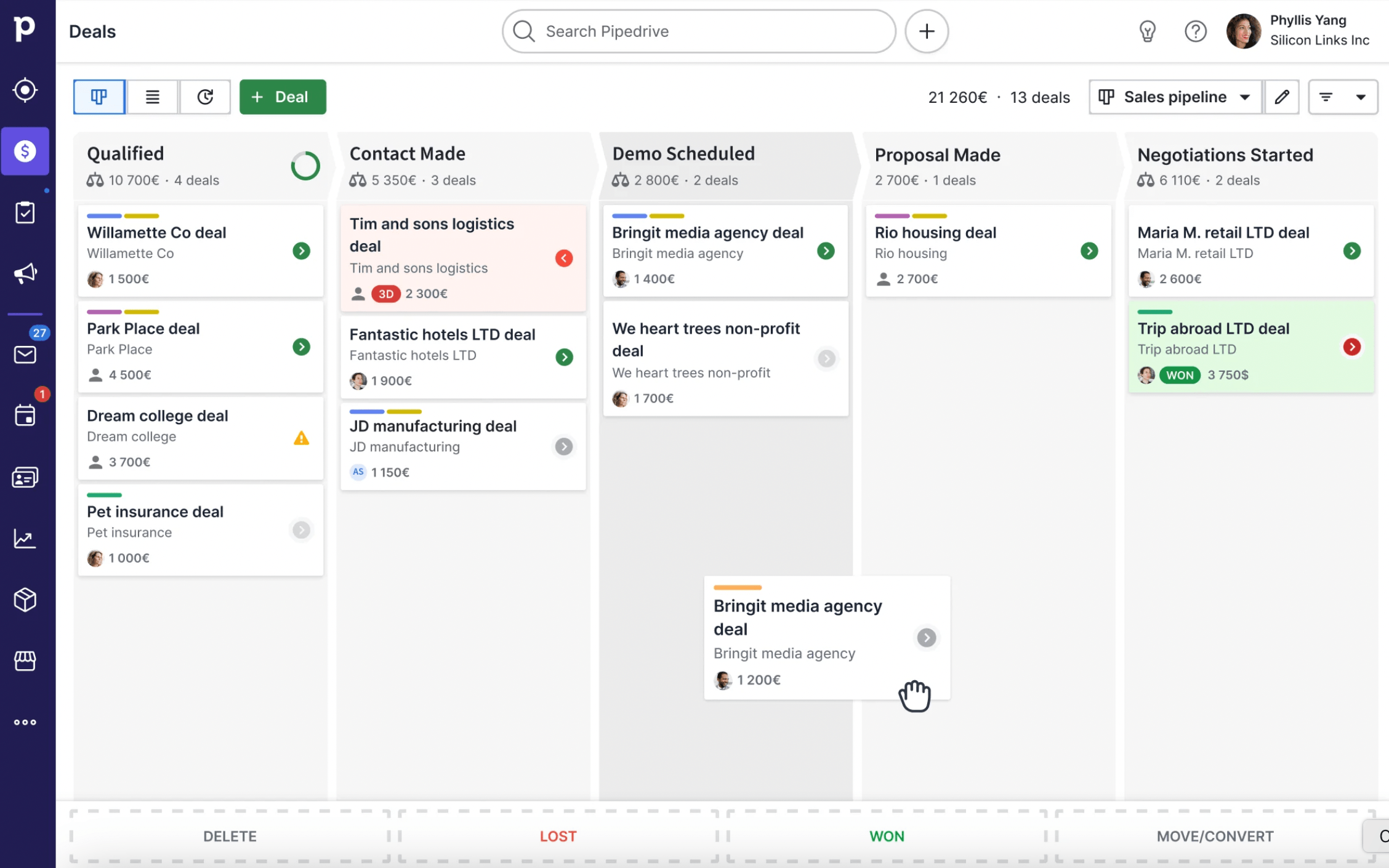
HubSpot also offers advanced pipeline management. You create customized pipelines, track your tasks and keep a clear overview of your opportunities. The interface is a little denser than Pipedrive’s, because it displays more contextual information on each contact. It’s a different bias: Pipedrive relies on visual purity, HubSpot on the richness of the file.
In short, both manage a pipeline very well. If you’re looking for a purely visual experience and quick learning curve, Pipedrive has the edge. If you want a solid pipeline backed by an extensible CRM, HubSpot compares perfectly.
Contact management
Pipedrive’s contact sheets are clear and legible, with few default fields. This is in keeping with its philosophy: get to the point so as not to slow down the salesperson. The contact chronology screen helps to identify which people should be given priority for follow-up.
HubSpot’s contact sheets are richer, with a large number of customizable fields and an automatically recorded activity history.
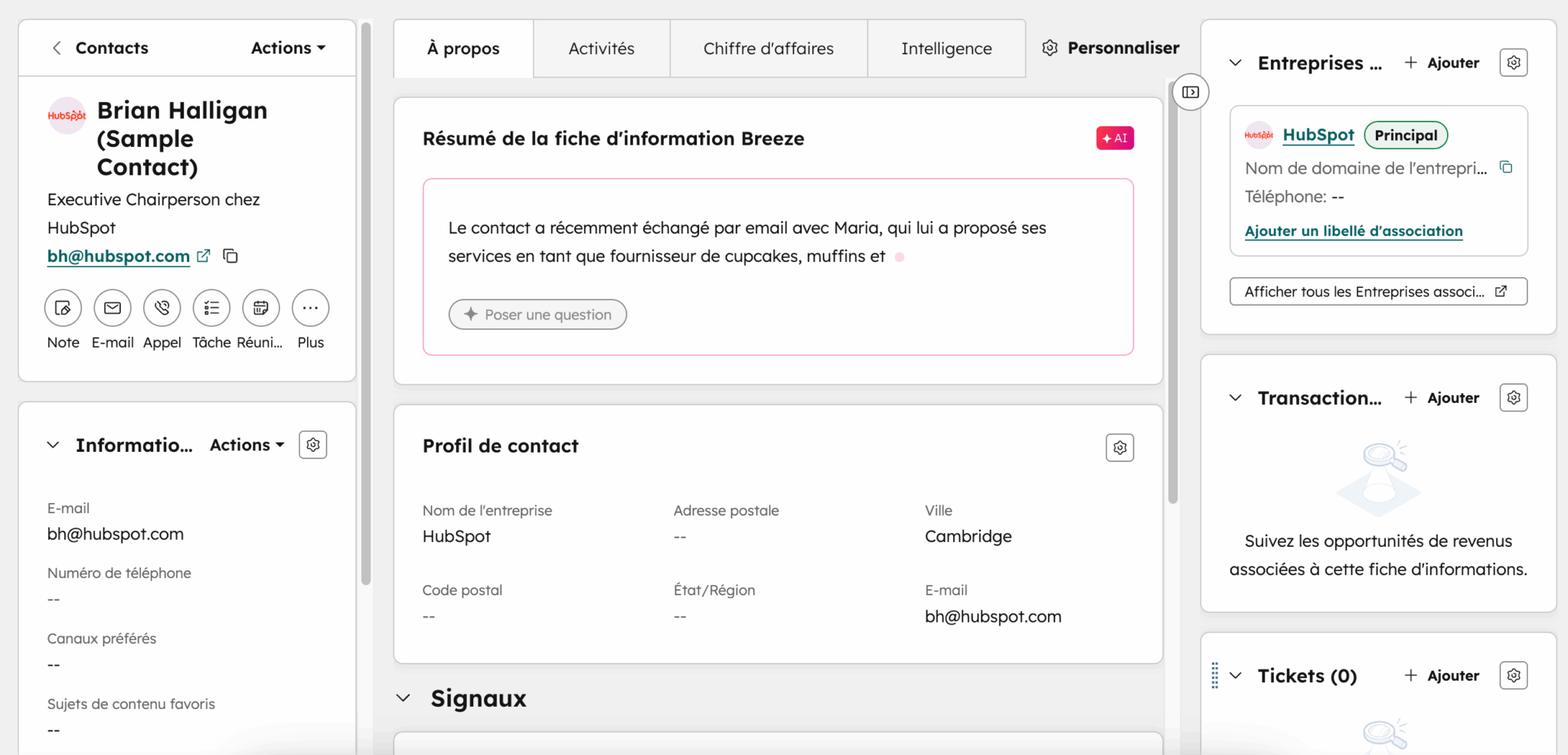
They are a little less streamlined than on Pipedrive, but they open the door to much more advanced automation and segmentation strategies. You can store millions of contacts and companies without blocking limits. This is typically the kind of depth that is useless for a small team, but becomes indispensable as soon as you industrialize your prospecting.
Lead generation
Pipedrive lets you add a lead generation form, chat and appointment setting via its LeadBooster add-on. This add-on, now included in the Premium and Ultimate plans, also provides access to a prospecting database. The Web Visitors add-on, meanwhile, identifies the companies that visit your site, for around €41 per month.
HubSpot natively integrates forms, chat and appointment setting, right from the free tools. You can retrieve the origin of your prospects’ visits and their behavior on your site. For detailed history and advanced tracking, you’ll need to upgrade to a paid plan, but the free base is already generous and linked directly to the CRM.
The Salesdorado gift
HubSpot offers a full range of free tools for capturing leads directly in your CRM: forms, live chat, appointment setting. So you can start feeding your pipeline without spending a cent.
Automation and lead scoring
Automation is one of HubSpot’s key differentiators. The platform makes it possible to build very powerful workflows, especially when the sales CRM is coupled with HubSpot’s marketing automation.
A prospect fills in a form, receives an email sequence, is assigned a score and lands in your team’s correct queue, all without manual intervention. Lead scoring and sequences are unlocked on the Pro plan.
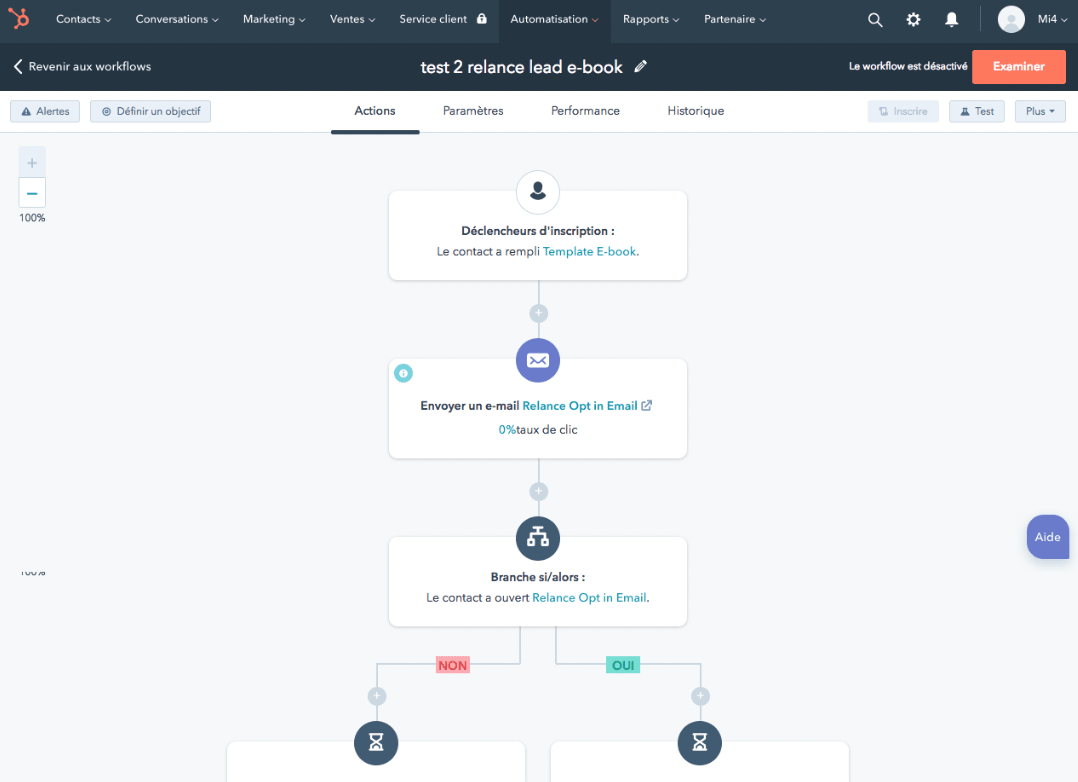
Pipedrive offers a lighter but well thought-out automation solution, accessible from the Growth plan. You create workflows triggered by a step change or the opening of an email, and send campaigns via the Campaigns add-on.

It’s great for the needs of a sales team, but doesn’t play in the same league as HubSpot when it comes to orchestrating marketing and sales together. For more complex needs, you’ll need to connect Pipedrive to an external marketing automation tool.
Reporting and forecasting
Pipedrive offers accessible, easy-to-use reporting. You click on each statistical card to explore the data: opportunities launched, won, lost, pipeline conversion analysis. It’s efficient and affordable, but a little rigid when you want to fine-tune it.
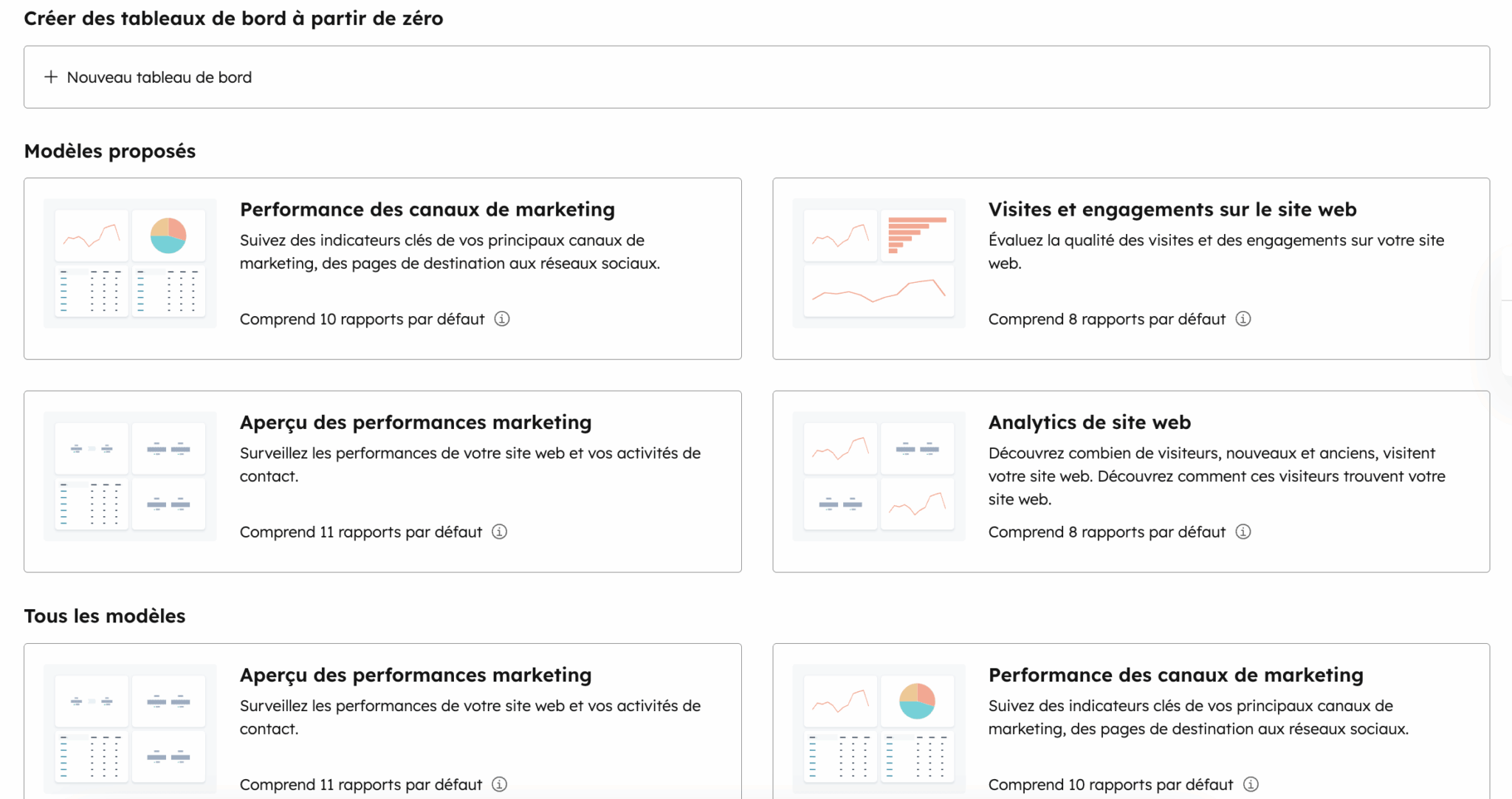
HubSpot offers much deeper reporting capabilities, especially if you’re running multiple bricks of the platform. You can trace the entire customer journey, with tables dedicated to sales, marketing and service. Forecasting, with forecast categories and automatic weighting, starts with the Pro plan. This is one of the great advantages of an all-in-one CRM: your forecasts are based on truly unified data, not on files that are reconciled after the fact.
Artificial intelligence: Breeze takes on Pipedrive AI
HubSpot has unified all its AI capabilities under the Breeze brand, which has replaced the former ChatSpot. Breeze is available in :
- A conversational assistant that writes, summarizes and queries your CRM in natural language.
- Autonomous agents capable of performing complete tasks, like the prospecting agent.
The beauty of Breeze is that it’s based directly on your actual CRM data, with no context to re-enter.
Pipedrive AI, on the other hand, focuses on simplicity and availability. All its AI functionalities are accessible in every respect, at no extra cost: sales assistant that prioritizes deals, email editor, thread summarizer. It’s not as ambitious as Breeze in terms of orchestration, but it’s immediately useful, and without price complexity. Two philosophies consistent with the positioning of each tool.
HubSpot vs Pipedrive: pricing
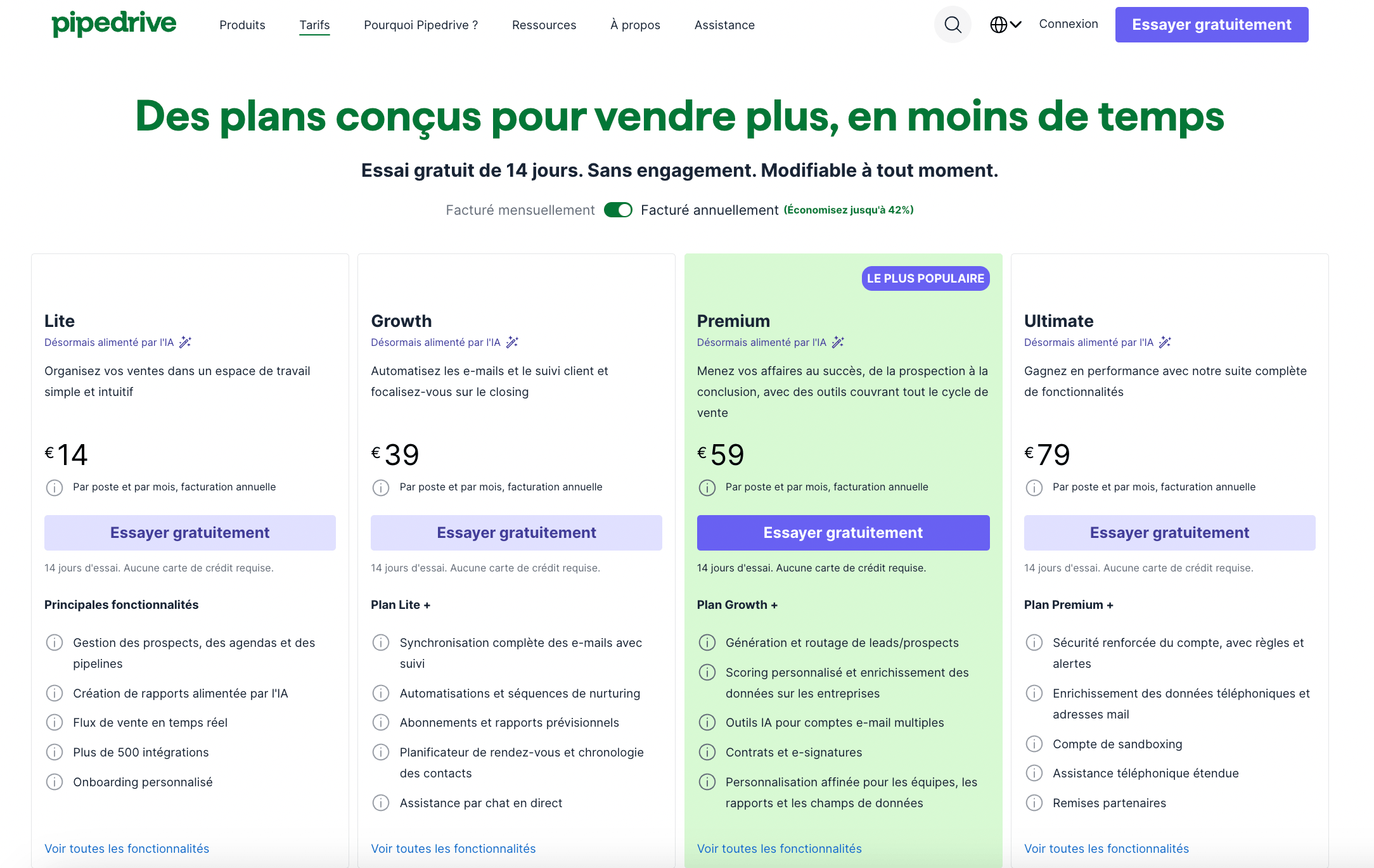
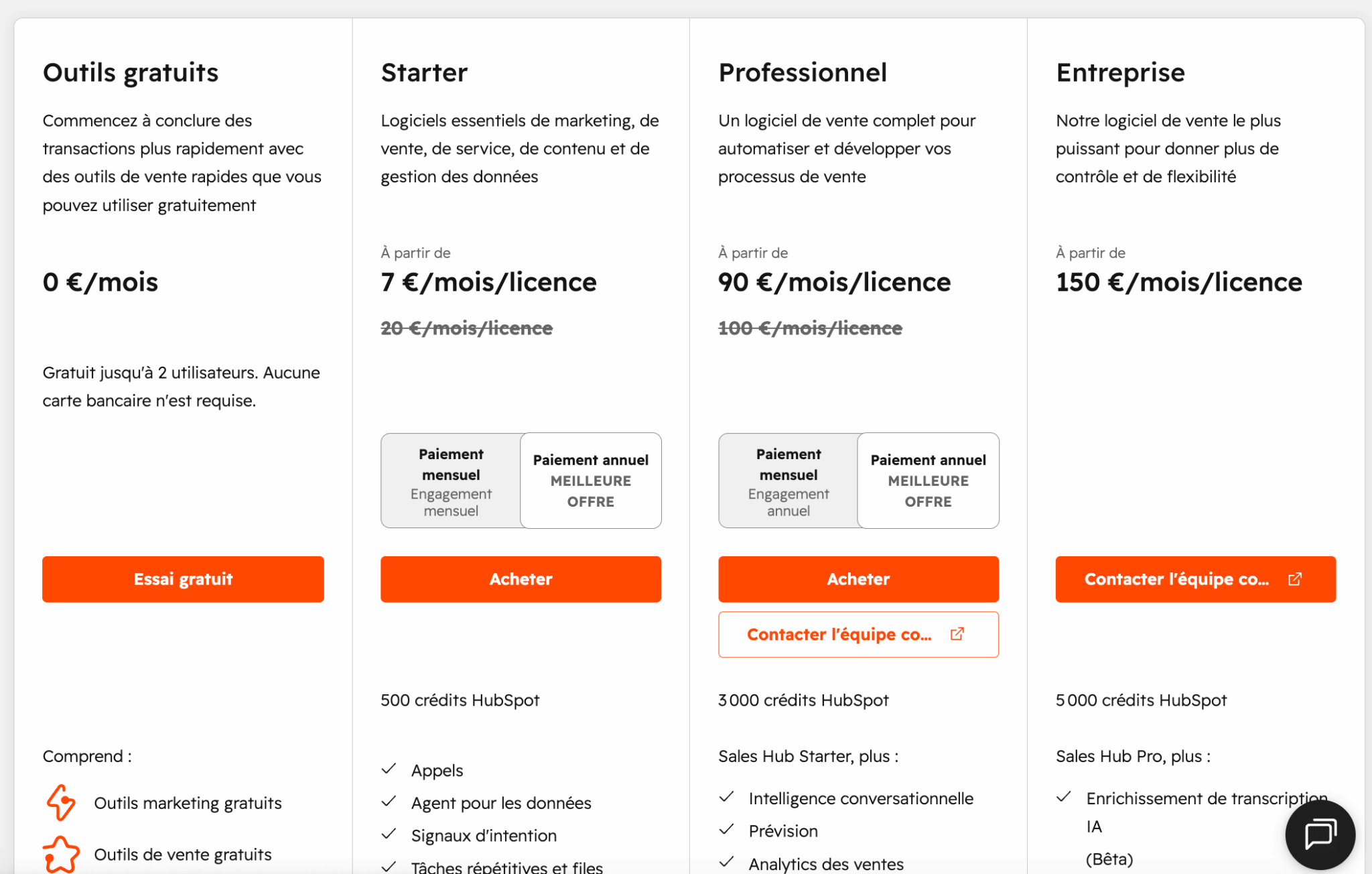
| Solution | HubSpot Sales Hub | Pipedrive |
|---|---|---|
| Entry price | Free tools for life, then Starter at 7€ / month / license | Lite at €14 / station / month (annual billing), without free plan |
| Intermediate plan | Professional at 90€ / month / license (automation, sequences, forecasting) | Growth at €39 / seat / month (automation, email sync) |
| Advanced plan | Enterprise at €150 / month / license (custom objects, granular permissions) | Premium at €59 and Ultimate at €79 / workstation / month |
| Additional costs | Onboarding mandatory for the Pro plan (approx. €1,500 for the first year) | Add-ons Campaigns (from €13.33) and Web Visitors (from €41) per company |
Pipedrive’s entry-level prices are very competitive, but beware of the introductory price. The €14 Lite plan offers neither automation nor advanced email synchronization. For a team that really wants to automate, the €39 Growth plan is a realistic starting point. The Campaigns and Web Visitors add-ons are billed on a per-company basis, which remains reasonable but adds to the final bill.
HubSpot offers free CRM tools for life, perfect for getting started, then a Starter plan at €7 per license to structure your sales. The real jump comes with the €90 Pro plan, which unlocks automation, sequences and forecasting. You’ll need to factor in the mandatory onboarding for the first year.
My advice
The classic budget trap on HubSpot is to put all your users in paid seats. Your sales people need a complete Sales Seat, but a manager who mainly consults dashboards can often make do with a much cheaper Core Seat. On a team of fifteen people, a good distribution of seat types can save several thousand euros a year.
Salesdorado’s opinion
If you only think in terms of cost per item within the sales perimeter, Pipedrive is automatically less expensive. But this calculation overlooks the essential point: with HubSpot, free CRM lets you add marketing, service and data without changing tools or paying for integration again. For a growing organization, the total cost of ownership is often in HubSpot’s favor over the medium term.
For whom HubSpot, for whom Pipedrive?
Choose Pipedrive if :
- Your team is highly sales-oriented, with well-established sales processes.
- You want a tool that your sales force can adopt in just two days, without extensive training.
- Visual pipeline management is your top priority
- You have little or no marketing needs and no ambition to cover customer service in the same tool
Choose HubSpot if :
- You want an excellent sales CRM that can also grow with you
- You anticipate needs beyond sales: marketing, service, data, etc.
- Aligning your sales and marketing teams is a key challenge
- You’d rather invest once in a scalable platform than pile on third-party tools as you grow
Both are excellent CRM tools. If you’re looking for the best tool for managing a pipeline and nothing else, test both and let your teams decide on user-friendliness. If you’re looking for a platform capable of supporting the growth of your entire organization, HubSpot is the most relevant choice over the long term.
HubSpot offers free CRM tools for life, with no time limit and no credit card. The best way to check for yourself whether the platform matches your business needs and growth prospects.