



- Contacts: recognize them by email, and also store their LinkedIn URL. When a person changes employers, their email changes, but their LinkedIn URL stays the same.
- Companies: recognize them by domain, and in France add the SIREN, which doesn’t change when the company changes its name, website or domain.
- Several matches: don’t let the tool choose alone, have them validated.
- Business fields: lock what the team fills in by hand.
- Before writing: preview creations, updates and changed fields.
At first, feeding HubSpot is simple. You import prospects, they don’t exist yet, HubSpot creates them and all is well. Then, a few months of prospecting later, a good share of the accounts you’re targeting are already in there. You have to create the new ones and update the old ones, and that’s where it gets stuck.
To update HubSpot without creating duplicates, you have to recognize every contact and every company before writing to the CRM. A contact is found by email, then by LinkedIn URL if they’ve changed employers. A company is found by domain, then, in France, by SIREN number. When several matches are possible, a person should decide rather than the tool. And before any import, you need to know how many objects will be created or modified, and which fields will change.
Except that people often forget to mention that:
- HubSpot automatically recognizes a contact only by email, and a company only by domain. A new address, a company entered without a website or as acme.fr instead of acme.com, and you have a duplicate.
- The duplicate is only half the risk. The other half is the update that overwrites a field your team depends on, like a reworked headcount used to split accounts between salespeople.
- Even prospecting SaaS tools avoided the subject for a long time. We combed through their documentation and interviewed Alexis Martel, cofounder and COO of Pharow, whose team rebuilt its CRM export around this problem.
HubSpot deduplication: why a database fills up with duplicates
A HubSpot database degrades because several sources create contacts and companies in it, each with its own way of recognizing what already exists. And those rules aren’t the same from one source to the next.
Mathilde Buisine, Sales Ops at GrowthRoom, an agency that opens up CRMs all year round for its projects, summed it up during a webinar co-hosted with Pharow: “Deduplication is a mandatory step, in 100% of cases.” The measurements Pharow published on its customers’ synced CRMs point the same way.
Key figures
- 43% of the Pharow customers studied have more than 10% duplicate companies in their CRM.
- 9% of companies are duplicates at the median customer.
- 53% of the companies in the median customer’s CRM are ambiguous: they could match several real companies.
- 78% of the companies in the analyzed scope are recognized by Pharow, excluding closed or excluded companies.
MethodologyMeasurements taken by Pharow on the CRMs of its customers synced with the platform, in September 2026, and published on its blog. Pharow doesn’t publish the number of accounts studied. “At the median customer” refers to the value of the customer in the middle of the distribution. A duplicate is a company in the CRM that corresponds to the same real company as another one; an ambiguous company is one whose information could designate several real companies; a recognized company is a CRM company linked to a company in the Pharow database. These figures describe the CRMs of Pharow customers, not all HubSpot CRMs.
Five entry points produce duplicates
- CSV imports. Without an email or other unique identifier in the file, each row becomes a new contact. Same logic for a company imported without a domain.
- Manual entry. With no domain filled in, the acronym, the legal name and the trade name each create their own company.
- Integrations. This is the blind spot: according to HubSpot’s documentation, companies created through the API, including by third-party apps, aren’t deduplicated by domain. Any tool that pushes companies has to do its own recognition.
- Automatic association. The “Create and associate companies with contacts” setting creates a company per email domain, subdomains included. A contact at acme.io while the company is registered as acme.com, and a second company appears.
- Job changes. New employer, new email: to HubSpot, that’s a new person. According to HubSpot, citing a MarketingSherpa study, B2B data decays by about 22.5% per year.
For cleaning up your existing records, our guide to customer data deduplication lays out the basics.
Updating HubSpot: recognize before you write
Updating HubSpot doesn’t mean reimporting a newer file on top of the old one. For each prospect, you first have to find the contact or company that already exists in the CRM. Only then do you choose what to change: the job title that changed, yes; the account owner, no. If the first step fails, the second writes in the wrong place.
| Situation in HubSpot | What to do | Risk if you get it wrong |
|---|---|---|
| No match | Create | Low |
| A single reliable match (same email, same domain) | Update | Overwriting a field the team fills in by hand |
| Several matches, or a single weak one (same name, nothing else) | Have a human decide | Updating the wrong company, or creating a duplicate |
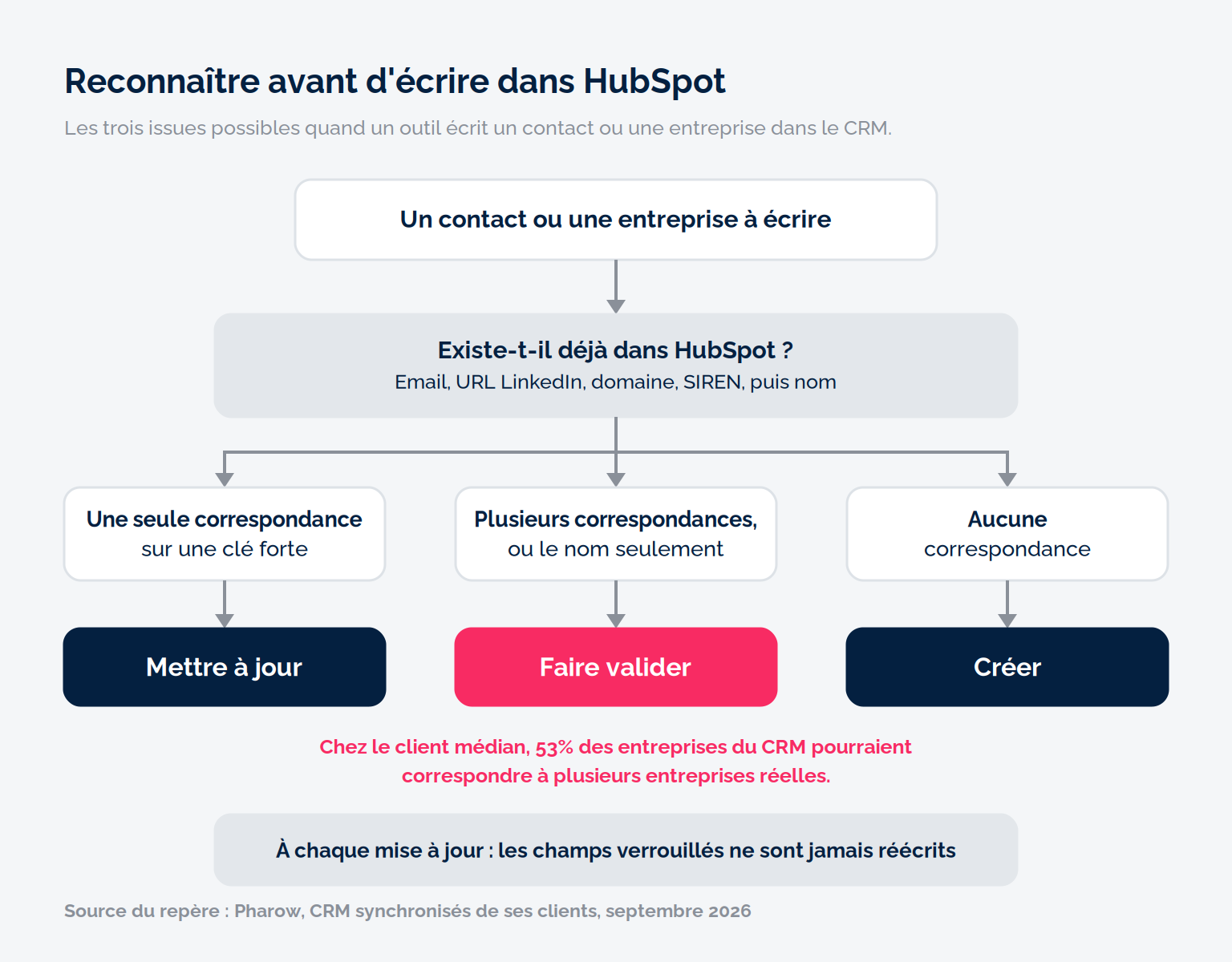
This third case is far from marginal: at the median customer, 53% of CRM companies could match, according to Pharow’s analysis criteria, several real companies (a “Pharmacie de la gare”, for example). These aren’t duplicates, but companies that can’t be linked with certainty using only the information in the CRM.
And a HubSpot import can’t hesitate. Depending on the option chosen, it updates what it recognizes and creates the rest, or it ignores rows that fall outside the scope (create only, update only). And if several companies already share the same domain, the row errors out.
The mistake to avoidCounting on merging to fix a badly prepared import. HubSpot’s duplicate management tool requires a Professional or Enterprise subscription, bulk merging a Data Hub Professional or Enterprise, and a merge can’t be undone. Better to stop the problem at the door.
Matching keys: email, LinkedIn URL, domain, SIREN
No single field is enough to reliably find a contact or company in your CRM. So you try several fields in order, from most to least reliable, and a weak match is only accepted once someone has validated it. A match is called strong when the field in principle designates a single object, and weak when only the name matches. Email and SIREN are the most reliable; domain and LinkedIn URL are almost as reliable, but need one more check when they’re shared by a group or its subsidiaries.
| Key | Object | What it recognizes well | Where it fails |
|---|---|---|---|
| Work email | Contact | The same person in the same job | Changes with the employer; a person can have several addresses |
| LinkedIn URL | Contact | The same person, including after a job change | Often missing from the CRM; URL spelling variants |
| Domain name | Company | The same company, however its name is spelled | Domain shared by several subsidiaries; multiple domains; subdomains |
| Company LinkedIn URL | Company | The company as it presents itself on LinkedIn | Group page, local pages, companies with no page |
| SIREN | Company | The legal entity, in a stable way | Says nothing about the website or brand; absent from most HubSpot databases |
| First + last name, company name | Both | On their own, not much | Namesakes, acronyms, variants |
For contacts: email, then LinkedIn URL
Email breaks at the very moment the data gets interesting: the job change. The LinkedIn URL, on the other hand, follows the person. Store it in a dedicated property as soon as a tool provides it, and normalize it (no parameters or trailing slash) so it can serve as a key.
For companies: the domain and its traps
The domain is the best general-purpose key, and it’s HubSpot’s. Its traps are well known:
- Shared domains. A group can run several subsidiaries on one website.
- Multiple domains. The same company can exist as .fr and .com. In HubSpot, you can add secondary domains to a company, and the import takes them into account when deduplicating. Tools can also compare the second-level domain (the “salesdorado” in salesdorado.com).
- Subdomains. A strict comparison treats them as different companies.
Why does SIREN change the game in France?
Yes: in France, the SIREN number can serve as a unique company identifier in HubSpot, provided you store it in a dedicated property configured as unique. It identifies the legal entity regardless of its trade name, website or LinkedIn page. It can be checked in a few seconds on the Annuaire des Entreprises.
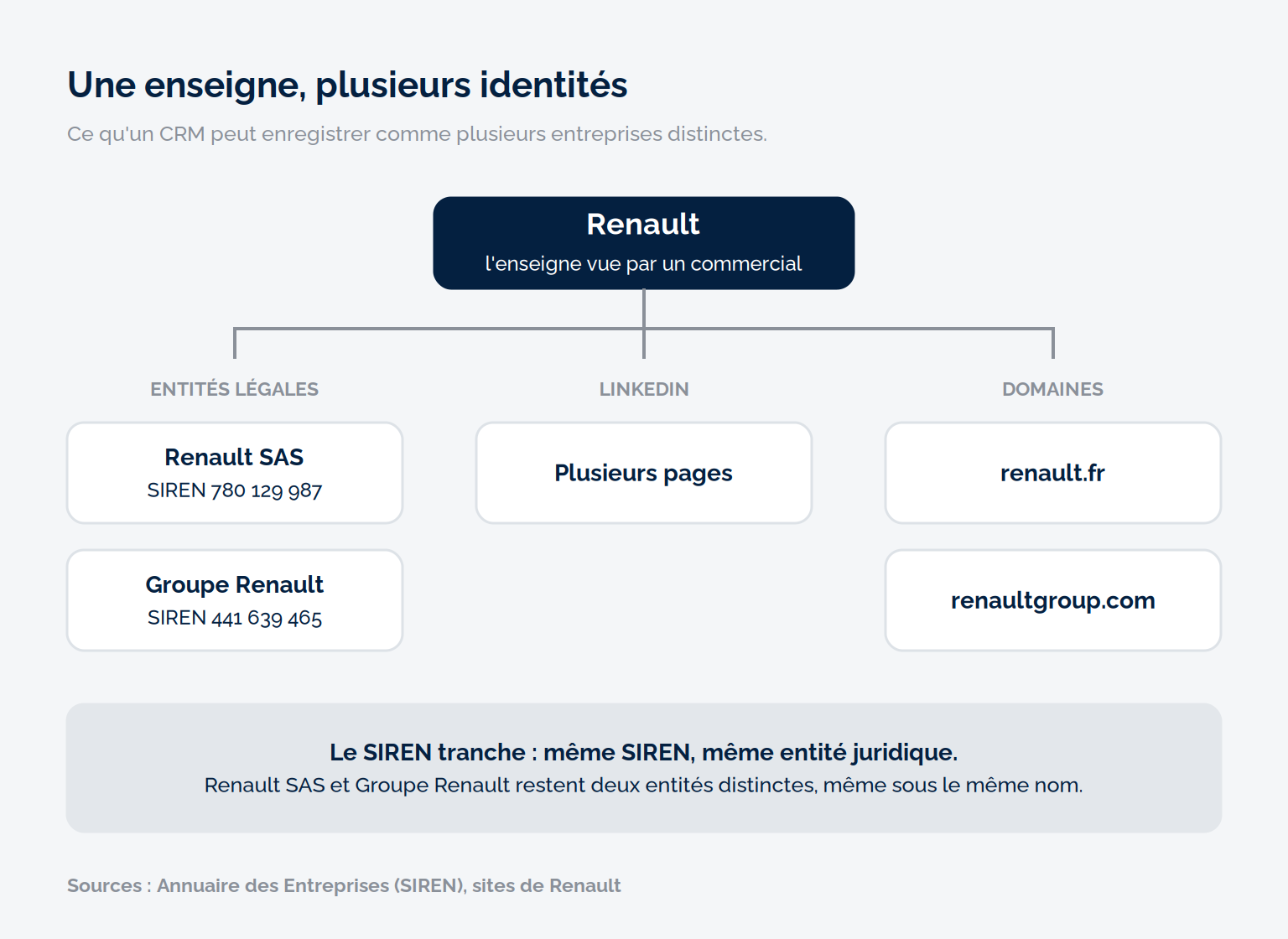
Renault is a good example. Behind the brand there are at least two legal entities (Renault SAS, SIREN 780 129 987, and Groupe Renault, SIREN 441 639 465), several LinkedIn pages and several domains, including renault.fr and renaultgroup.com. If one salesperson enters “Renault”, another renault.fr and a third the URL of one of the group’s LinkedIn pages, the CRM sees three companies, with no way of telling which are the same.
With the SIREN, the question is settled. If two records carry the same SIREN, they designate the same legal entity, whatever name or domain was entered. And Renault SAS and Groupe Renault remain identified as two distinct entities, even though they share the same name. It’s then up to you to decide whether your CRM tracks them as two accounts or as a single group.
Its limit is very concrete: HubSpot has no default SIREN property, and most databases don’t contain one. You first have to associate it with the right website and the right LinkedIn page.
The Salesdorado tipCreate a SIREN property on your companies and check “Require unique values for this property” when you create it: the option can only be turned on at that moment. HubSpot accepts up to ten unique-value properties per object, and you can then choose this property as the unique identifier at import, instead of the domain.
Unique fields and locked fields: what you overwrite, what you protect
A unique field is for recognizing, a locked field is for not overwriting. The two are decided separately, and confusing them means losing one of the two protections.
When two objects can’t share the same value, any object arriving with that value becomes an update. In HubSpot, contact email and company domain are native deduplication keys; SIREN or LinkedIn URL go through a custom property configured as unique. Never a name alone.
Locking is the other half of the subject. On import, HubSpot by default updates all mapped properties, meaning those linked to a column in the file. Leaving a field unmapped protects it, but new companies then arrive without it. The behavior to aim for is finer: a field filled in at creation, but never rewritten during an update. HubSpot import allows this: in the advanced options, “Prevent property overwrite” adds a “Don’t overwrite” checkbox property by property. An existing record that has, or has had, a value for that property keeps it.
| Field | Used for recognition? | Locked? | Why |
|---|---|---|---|
| Email (contact) | Yes, native HubSpot deduplication key | No | Native key |
| Domain (company) | Yes, native HubSpot deduplication key | No | Main company key |
| SIREN | Yes, through a unique custom property | Your choice | Stable over time |
| Headcount reworked by the team | No | Yes | Used to split accounts |
| Contact or company owner | No | Yes | Sales decision |
| Job title | No | No | Has to reflect reality |
The simple rule: whatever the team has decided gets locked, whatever the market changes gets updated.
The contact who changes companies: keep or replace the association?
When a contact changes employers, the question isn’t technical: do you want a CRM that keeps history, or a CRM that describes today’s situation? “When we designed our export, requests were split roughly evenly between the two. That’s why we made it an option, not a rule,” explains Alexis Martel.
Keep the old company. The contact stays associated with their former employer as well as the new one. You keep the history, and a contact who has moved to a new account is often a way in. In HubSpot, association labels (Professional or Enterprise subscription) are used to mark the former relationship.
Replace the association. The contact is detached from the old company. Your account lists stay accurate, and nobody sends a sequence to someone who no longer works there.
In both cases, you first have to recognize the person, so you need their LinkedIn URL. And decide on the option once for the whole team.
Preview before writing to the CRM
Before any bulk write, you need to be able to answer three questions: how many objects will be created, how many will be modified, and which fields will change value. If you can’t answer them, don’t write.
Without a dedicated tool, HubSpot documents a method itself:
- Export your contacts or companies with their record ID and at least one property present in the external file.
- Cross-reference the two files with a VLOOKUP.
- Split into two imports: an update file with IDs, a creation file without IDs.
It’s tedious but reliable: according to HubSpot, when the record ID is present in the file, it takes precedence over any other identifier. Then check that the number of creations makes sense, spot matches that rely on the name alone, and run a small batch before the rest.
Pharow, Apollo, Cognism: what the tools actually do when they write to HubSpot
The tools that push data into HubSpot all offer field-level update rules, but not with the same precision. What really separates them is who recognizes what already exists, with which keys, and what happens in case of doubt. We went through their documentation against the criteria above.
| Situation | HubSpot import | Apollo | Cognism | Pharow |
|---|---|---|---|---|
| The contact already exists with the same email | Update | No duplicate: update, or logged error | Recognized, then admin-set rule: create or update | Update; creation impossible since email is unique |
| The contact has changed companies (new email) | New contact | Not documented | Not documented | Recognized by LinkedIn URL |
| The company exists under another domain (acme.fr, acme.com) | New company, unless the other domain is declared as a secondary domain | Same domain required: the company is pushed as new | Duplicate case documented by Cognism | Recognized by SIREN, LinkedIn URL or second-level domain |
| Several CRM companies match | Row errors out | Linked to one of them at random | Not documented | Export blocked until you choose |
| A field the team fills in by hand | Overwritten if mapped, unless “Don’t overwrite” is checked | Field-level rule: fill if empty or overwrite | Field-level rule: only if empty or always overwrite | Locked field: filled at creation, never rewritten |
“Not documented” cells mean the tool’s documentation doesn’t describe the case, not that it handles it badly. For a broader comparison, see our comparison of Pharow, Cognism, Sales Navigator and Apollo.
Apollo: automatic, on a database it assumes is clean
Apollo rereads HubSpot at regular intervals, with no guaranteed delay, and automatically updates the records it knows. Its sync settings documentation spells out the edge cases: a contact can be pushed without an email if the push conditions don’t require an email status, pushing a contact also pushes its company if it isn’t in HubSpot, and if several HubSpot companies match, Apollo links the contact to one of them at random. It doesn’t merge existing duplicates and recommends deduplicating HubSpot before connecting the integration.
The risk: on a CRM that already contains duplicates or domain variants, a contact ends up on the wrong company, or doesn’t get pushed at all. On a clean database, Apollo needs no day-to-day intervention.
Cognism: a rule set once by the admin
Cognism imports contacts and companies from HubSpot and reads their email, name, domain and owner to match records, according to its documentation. On export, rules defined by the admin decide, for all exports, whether to create or update. Cognism also documents the automatic association trap and recommends leaving company creation to a single system.
The risk: domain variants, which Cognism itself flags, and one rule applied to every case, safe or not. On the other hand, the behavior is uniform and predictable.
Pharow: recognize, update and let the user arbitrate ambiguous cases
Pharow is a B2B prospecting tool focused on French companies. Its CRM export played it safe for a long time. “Our export to HubSpot refused on principle to touch a contact or company already in the CRM,” admits Alexis Martel. “It was safe, but in June 2025, 67% of our active paying users connected to HubSpot weren’t exporting to their CRM, and the vast majority were going through a CSV file.”
Export 2.0, shipped in late August 2026 for HubSpot and Pipedrive, changes the logic: it updates the contacts and companies it recognizes instead of setting them aside. It relies on a CRM sync that recognizes names, websites, LinkedIn URLs and past positions, tries the keys in the order described above, and displays the field on which each match occurred.
Before validating, the user previews every creation and every modification, and locked fields are never rewritten. A single strong match: the update is preselected. Several, or only weak matches: the export waits for the user’s decision. On a field declared unique (the email imposed by HubSpot, the domain, the SIREN or the company LinkedIn URL), creation is forbidden.
The hardest part is the database that makes this possible: linking each SIREN to its websites and LinkedIn pages, a link that doesn’t exist ready-made anywhere. “The matching overhaul took four months, and the export built on it is the hardest development we’ve carried out since we started,” adds Alexis Martel. On its customers’ synced CRMs (September 2026), Pharow says it recognizes 78% of the companies in its scope, excluding closed or excluded companies.
The limits: some companies remain unmatched, uncertain cases need a decision, the export is capped at 500 objects, and only HubSpot and Pipedrive are covered. The tool is designed for updating as you prospect, not for cleaning an existing database in one go. Our full Pharow review covers the rest of the platform.
The five-step method, on a typical case
Take a typical case: your team comes back from a trade show with a list of prospects, and some of these companies are already in HubSpot. Here’s the order to follow before writing anything.
- Recognize. Look up each contact by email, then by LinkedIn URL, and each company by domain (primary and secondary), then by SIREN.
- Decide. A single strong match: update. Several matches, or name only: someone decides. None: create. Companies noted at the booth with only their name therefore need validation before any creation or update.
- Protect. Before importing, lock what the team has decided: owner, status, reworked headcount.
- Check. Preview the number of creations and updates and the fields that change, then run a small batch.
- Write. Launch the import or export, then go through the errors: each one flags a missing or duplicate key.
Our take: which tool for which state of your database?
To update HubSpot without duplicates, the tool matters less than the keys and rules you set before writing. The right choice depends above all on the state of your database.
A clean database, with one exact domain per company and contacts with emails: HubSpot alone, Apollo or Cognism may be enough. The choice then depends mainly on the level of automation and the sync rules you need.
A database that already contains duplicates: clean up your existing records first. A tool that copies your HubSpot also copies its duplicates.
A mixed database of French companies (subsidiaries, multiple domains, companies registered under several names): recognition by SIREN and LinkedIn, with arbitration of doubtful cases, like Pharow’s, limits errors where simple keys fall short. At the cost of a few decisions and an export limited to 500 objects.
Salesdorado’s takeBefore connecting any prospecting tool to HubSpot, open the object settings and check the automatic association of contacts with companies. It takes five minutes, and it’s one of the causes of company duplicates that vendors document themselves.
The questions we get over and over.
Does HubSpot automatically detect duplicates?
Yes, on two keys. HubSpot automatically deduplicates contacts by email address and companies by domain name during imports and form submissions; when a company is entered manually, it flags the one that already exists. Companies created through the API or by a third-party app aren’t deduplicated by domain. The duplicate management tool, which suggests pairs to merge, requires a Professional or Enterprise subscription.
How do you avoid duplicates during a CSV import into HubSpot?
Include a unique identifier for each row in the file: the email for contacts, the domain for companies, or the record ID exported from HubSpot. Without an identifier, each row becomes a new record. To separate creations from updates, export your records with their ID, cross-reference them with your file, then run two separate imports.
What is the best key to identify a company in HubSpot?
The domain is HubSpot’s native key and the most common one. In France, the SIREN complements it: it identifies the legal entity regardless of its name, website or LinkedIn page, and distinguishes two subsidiaries that share a website. To use it, create a SIREN property configured as unique when you create it.
Which tool should you use to update HubSpot without duplicates on French companies?
It all depends on the state of your database. On a clean database, with one exact domain per company and contacts with emails, HubSpot alone, Apollo or Cognism are enough. On a mixed database of French companies (subsidiaries, multiple domains, companies registered under several names), recognition by SIREN and LinkedIn URL with arbitration of doubtful cases, like Pharow’s, limits errors. In return, the Pharow export is capped at 500 objects and covers only HubSpot and Pipedrive.
Does Apollo create duplicates in HubSpot?
Apollo doesn’t recreate a contact whose email already exists, or a company whose domain already exists, according to its documentation. However, it only recognizes a company by the same domain, can push contacts without an email depending on the push conditions, and links a contact at random when several HubSpot companies match. It recommends deduplicating HubSpot before connecting the integration.



What the community says.