The tool in detail
noCRM after real-world use: feature scope, integrations, pricing and concrete limits.
noCRM was built on a single value proposition: simplicity. Not feature depth, not analytical power: simplicity. It has been the heart of the software since 2014, it explains its name, and it is also the reason you still won’t find a single artificial intelligence feature in it, when all its competitors make AI their main selling point.
The trade-off is owned: no marketing, no scoring, no data enrichment. You will need a second tool.
Acquired by Groupe Positive in September 2023, noCRM has since changed its interface. We wanted to see what that integration had really transformed, and the first answer is reassuring: the triple menu Leads, Opportunities and Clients is still there, exactly where it was.
So what has moved? Does the tool still keep its promise? And who is it for today?
Here is our full review of noCRM.
The anti-CRM, twelve years on
The product’s original name said it all: « You Don’t Need A CRM ». It remained the website address for years.
The story is worth telling because it explains the product. Sunny Paris and Güven Urganci founded the company in 2013 and launched the tool in early 2014. Before that, they were selling Yoolink, their enterprise social network, using a classic CRM. The conclusion they drew was brutal: the tool took up a huge amount of their time in data entry and didn’t help them win deals.
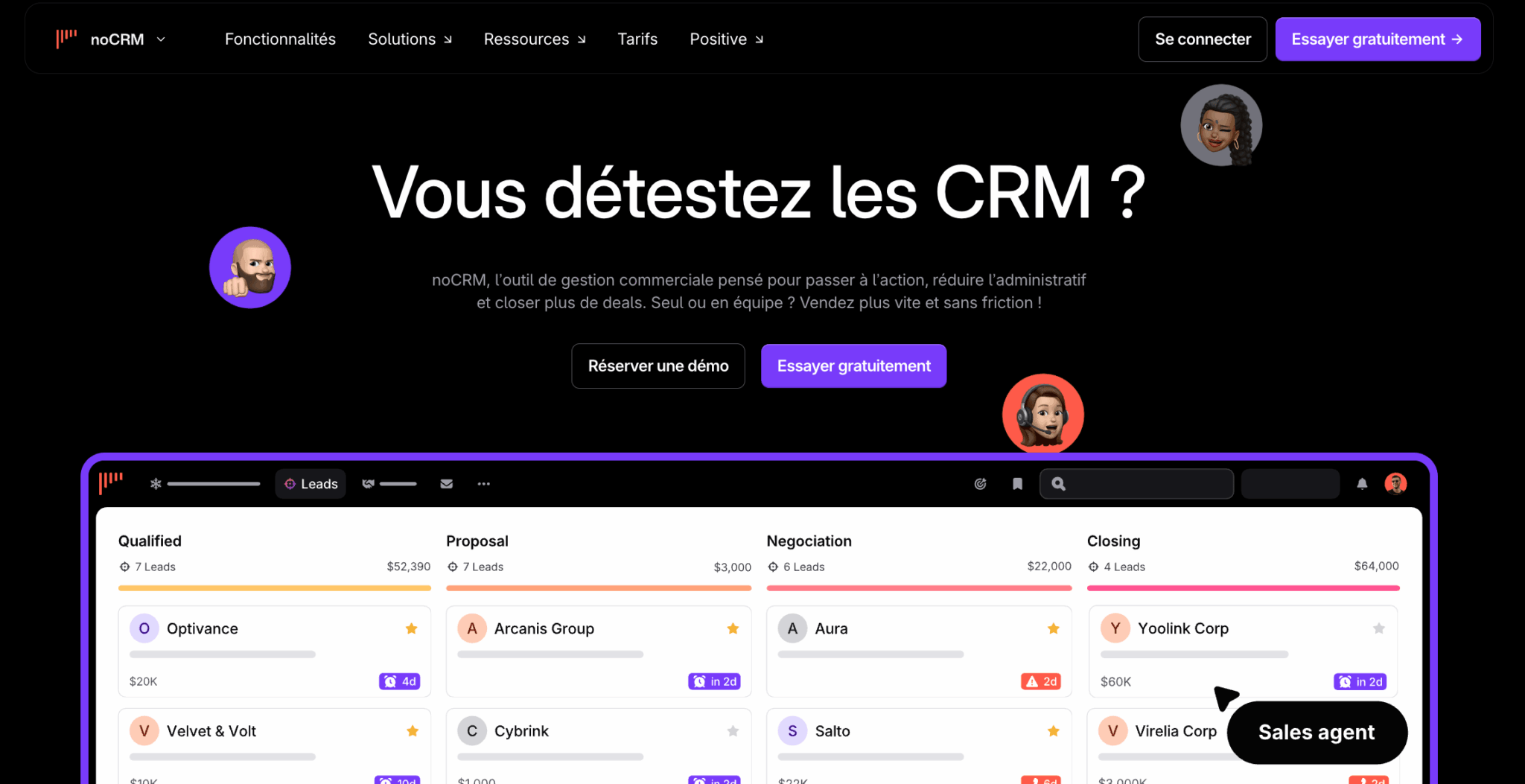
Hence the positioning, claimed for twelve years now, at the opposite end from CRMs that slow salespeople down.
A rarely mentioned and yet telling detail: noCRM grew for ten years without raising a single euro. Offices opened in New York, Milan and Berlin, an app translated into seven languages, a presence in more than eighty countries, all of it self-funded.
Then, in September 2023, came the acquisition by Groupe Positive, a software vendor from Lille that had just raised one hundred and ten million euros.
What the acquisition changed
The veneer, mostly. The brand became Positive noCRM, the legal entity is now called Positive Group France and the head office moved from Paris to Hem, in the Lille metropolitan area, at the group’s address.
The plans were renamed, several times in fact. All subscribers also get cross-discounts on the other products of the Positive family.
What it didn’t change
The product itself, and that’s the good news. noCRM has not been merged, nor restricted, nor turned into a module of a broader suite.
The interface has indeed been refreshed, with a dark navigation bar and airier screens than before. But the architecture hasn’t moved an inch. The triple menu Leads, Opportunities and Clients still structures the tool the same way, and a long-time user finds their bearings within seconds.
noCRM is not part of the Positive Suite commercial bundle, which groups four other solutions from the group, and it hasn’t (yet) received Uma, the AI assistant the vendor is rolling out everywhere else, notably in Positive User, formerly Sarbacane.
Kept away from the group strategy, then. For a tool whose promise rests on refusing feature overload, that’s rather reassuring.
The question noCRM asks you before any other
Account creation takes two screens. The second asks neither your industry, nor your company size, nor your average sales cycle.
It asks how you get in touch with your prospects.
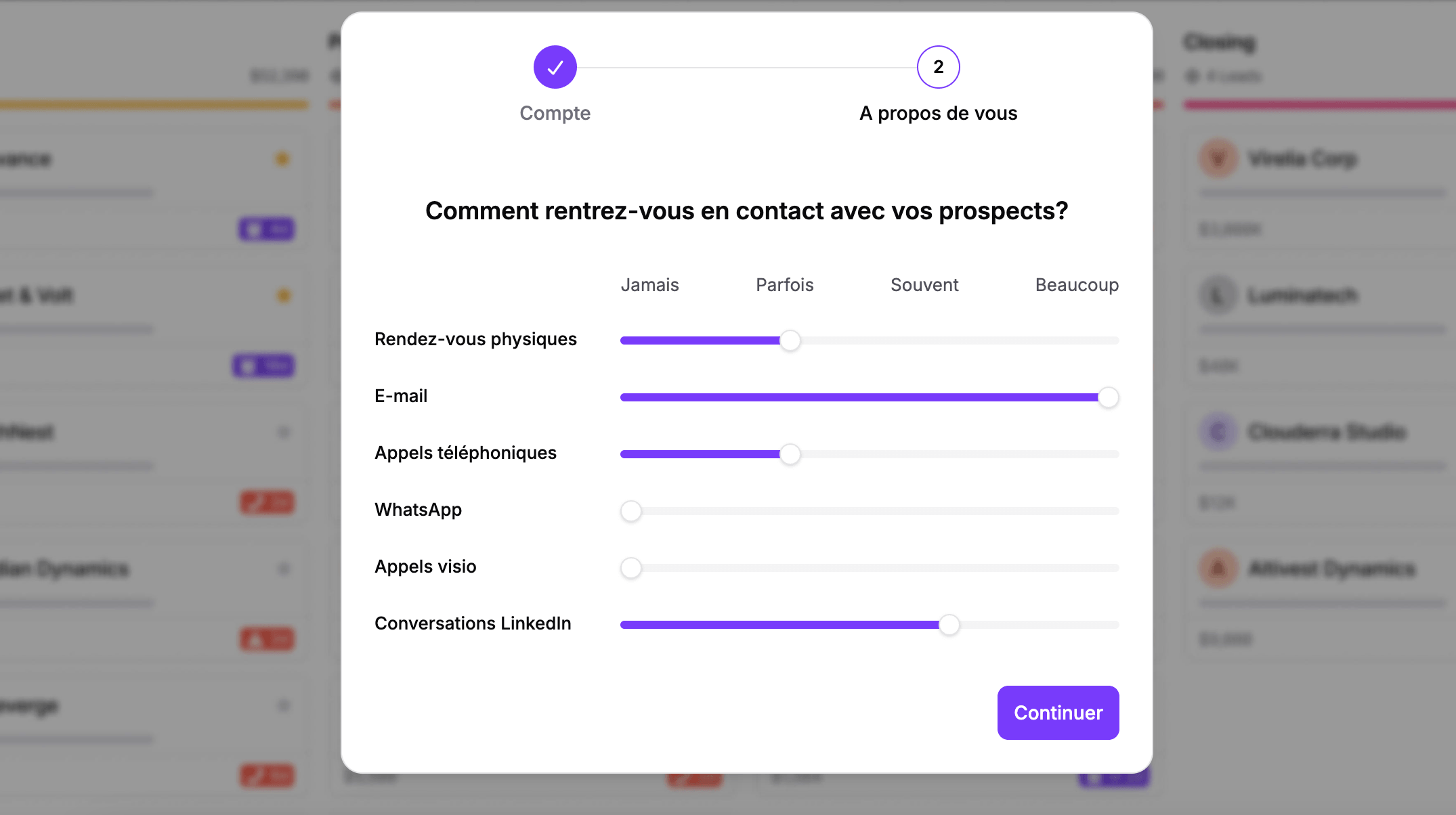
Six sliders to set from « never » to « a lot »: in-person meetings, email, phone calls, WhatsApp, video calls and LinkedIn conversations. The tool configures itself from that answer.
You then land on an empty pipeline, with a single invitation on screen.
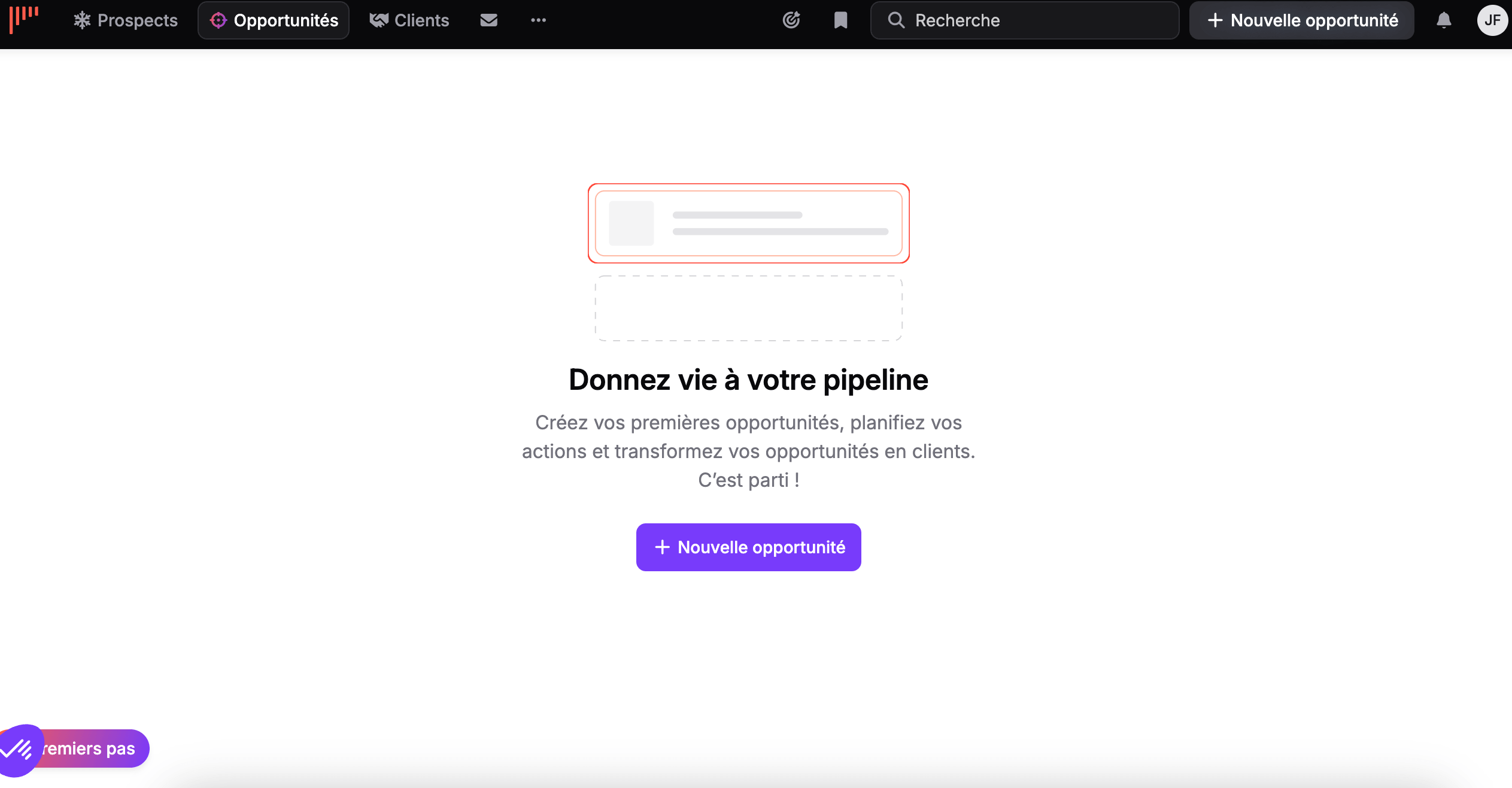
No dashboard to configure, no fields to create, no fifteen-step wizard. One button.
Salesdorado’s takeThis onboarding screen is worth every sales pitch. A piece of software that asks for your contact channel rather than your industry is not a customer data management tool. It is a sales execution tool, and that is the lens to keep in mind for what follows.
Step 1: the prospecting list
It is the first building block. At noCRM, it is deliberately separate from the pipeline.
A prospecting list is a list of cold contacts that you will qualify before deciding whether they deserve to enter your sales funnel. Two ways to create one:
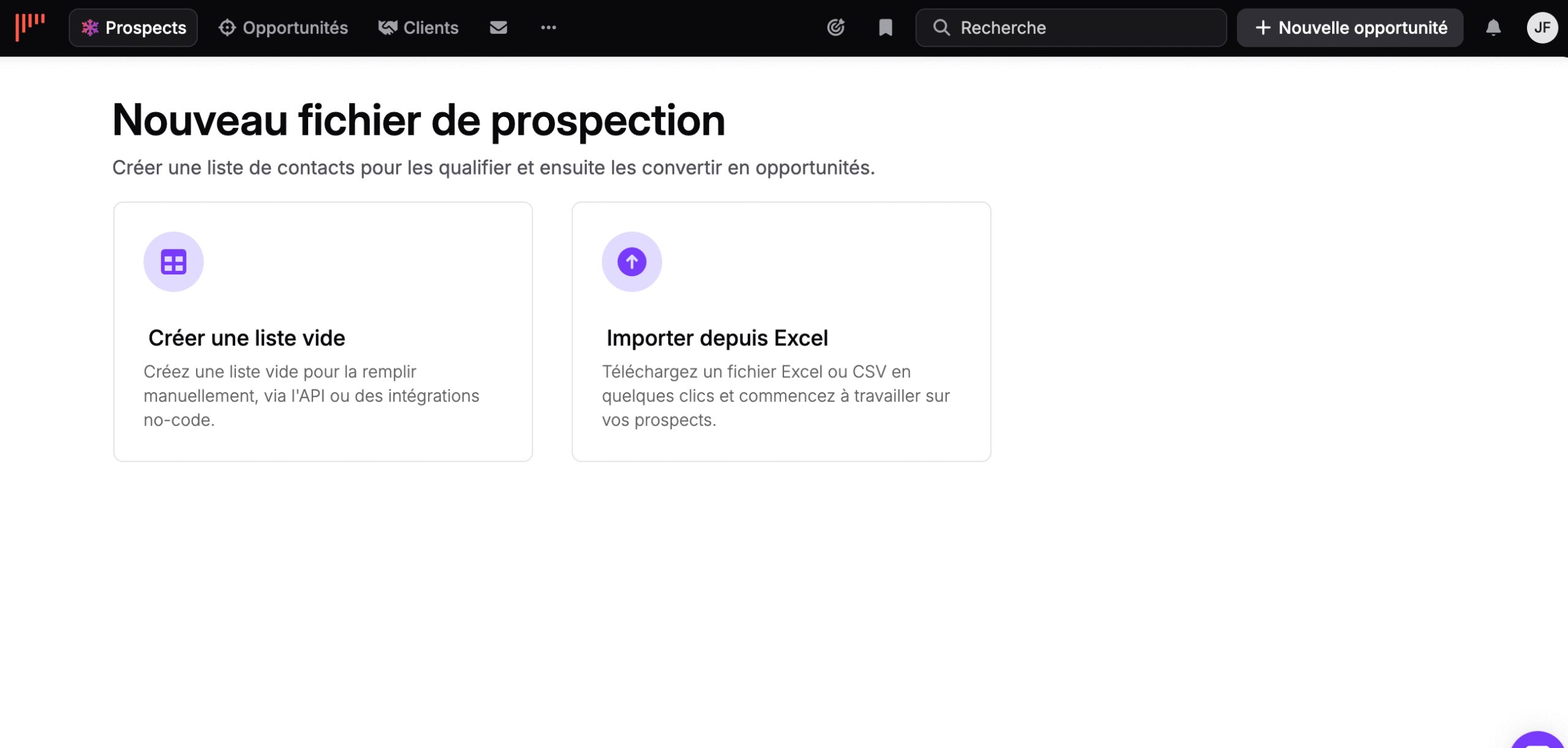
The empty list is filled in by hand, through the API or through no-code integrations. Excel or CSV import covers the most common case.
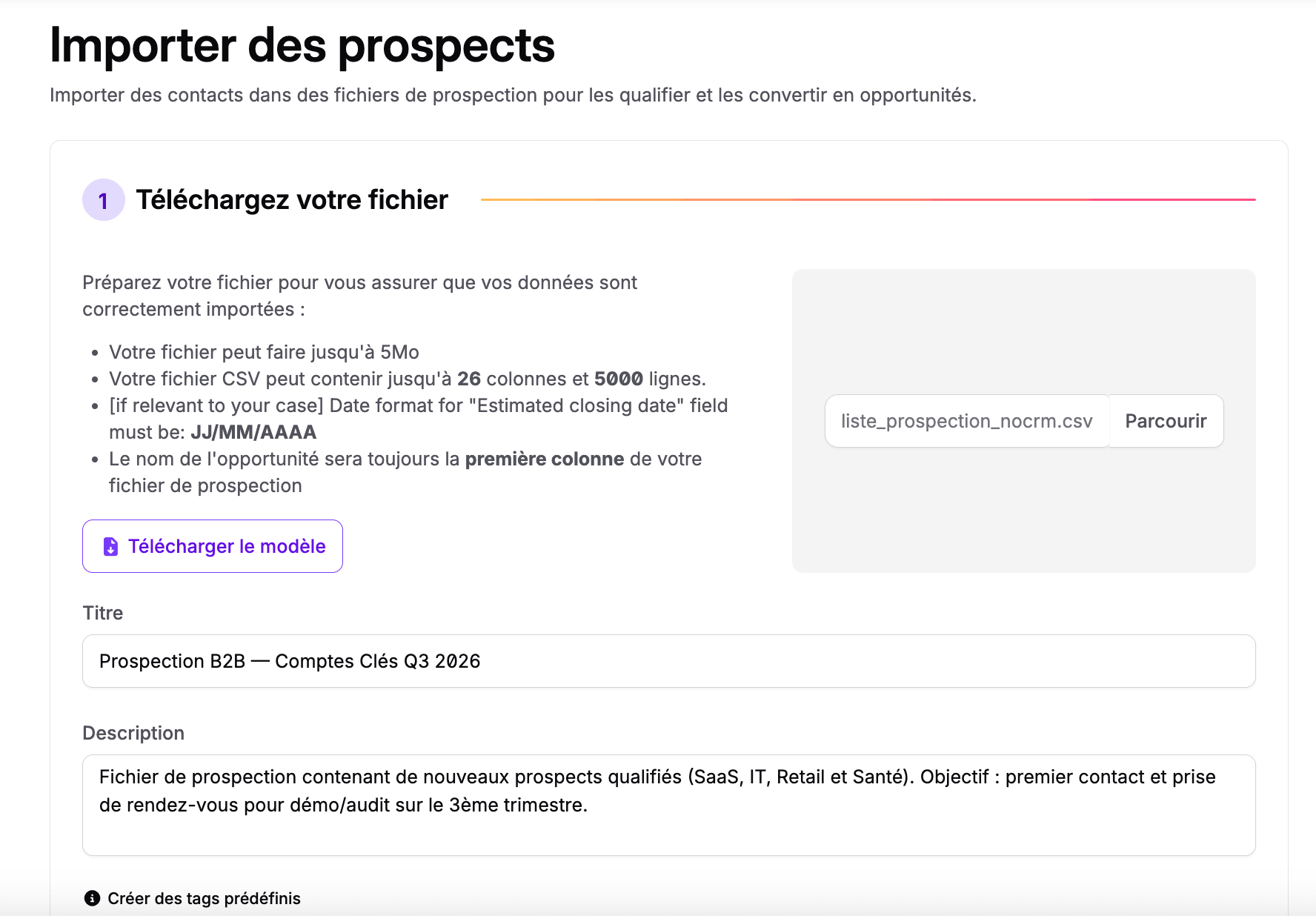
The import screen states its limits clearly, which avoids bad surprises: 5 MB per file, 26 columns and 5,000 rows maximum. A template can be downloaded, and the first column always becomes the name of the opportunity.
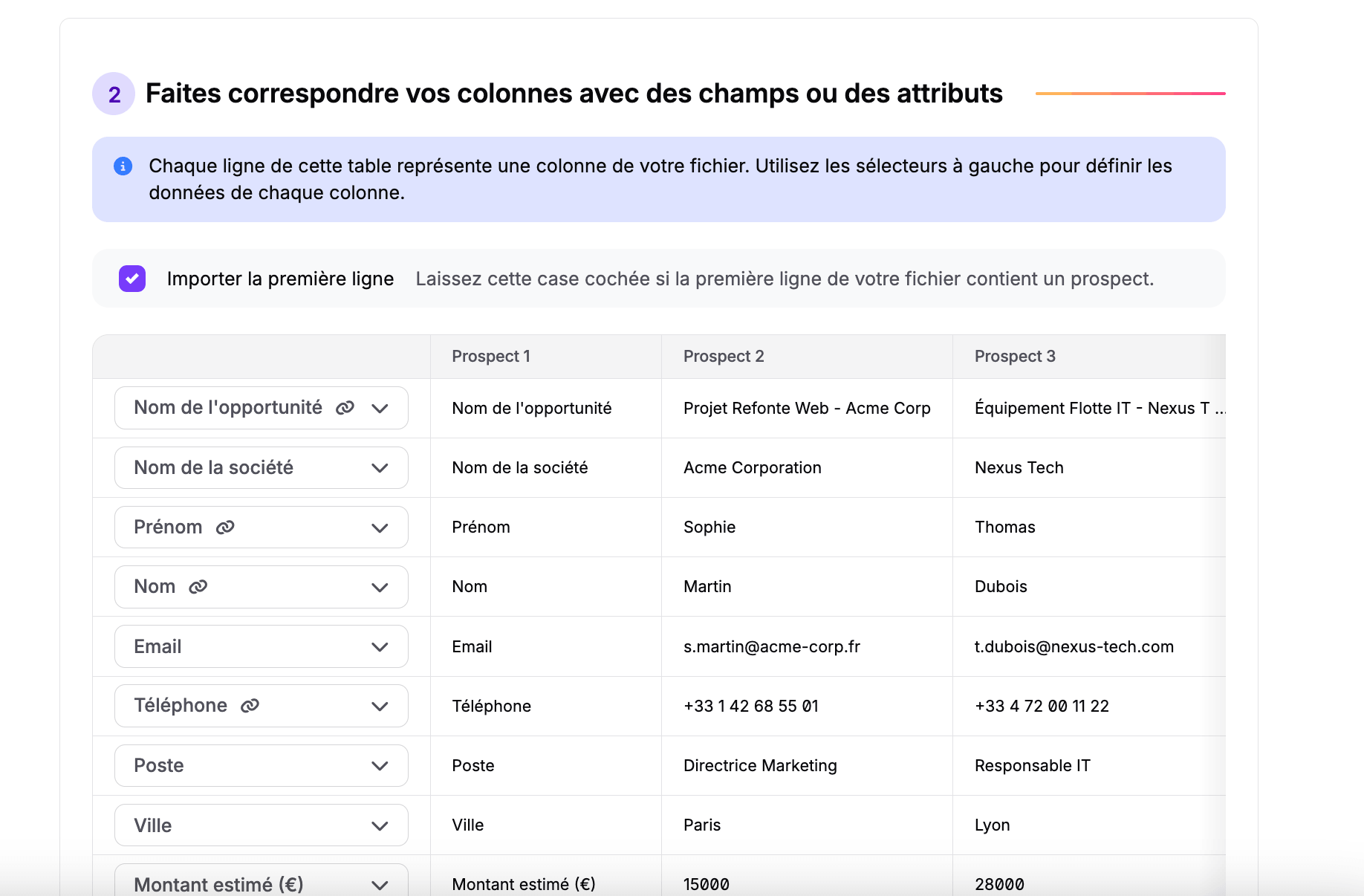
Next comes column mapping, with a preview of the first three leads to check that nothing is shifted.
The result is a spreadsheet. Owned as such, and that is precisely what works.
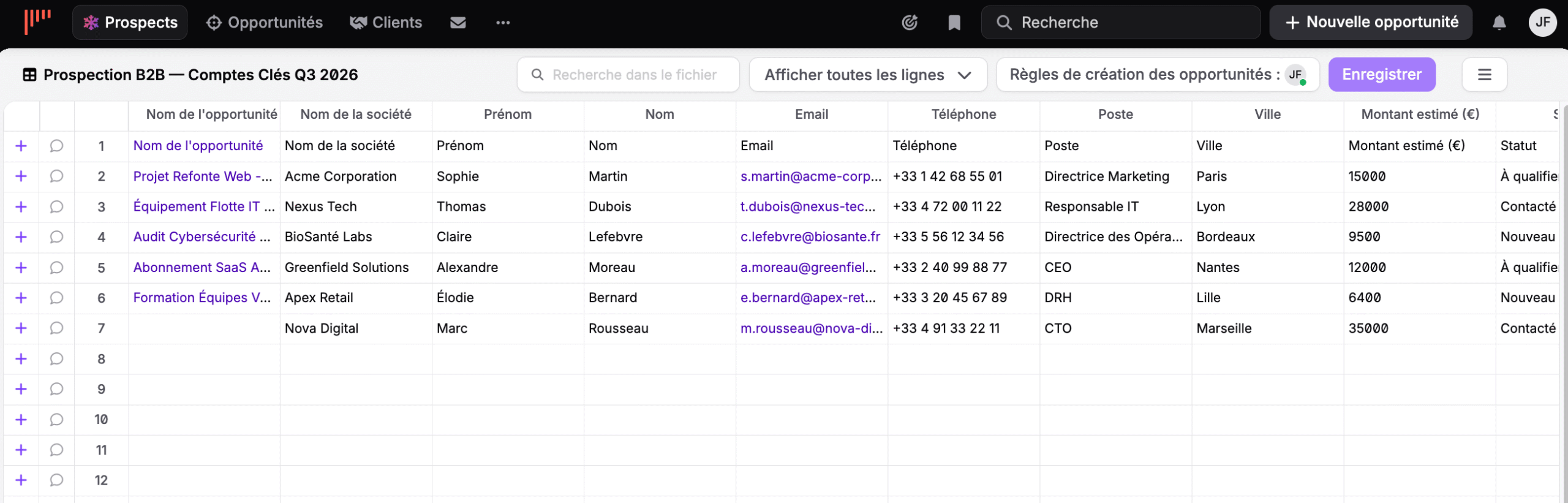
Each row carries its own status, such as new, to qualify or contacted. You search the list, you filter, you comment row by row. A discreet button at the top of the screen deserves attention: the opportunity creation rules, which determine how a qualified lead moves into the pipeline and who it is assigned to.
It’s an Excel file, only much better and without the version problems every team that still works this way knows too well. If you are starting from scratch, our free prospecting lists make a good import base.
The calling chain: scripts, campaigns and telephony
This is what noCRM has built without making noise about it, and what really sets it apart today. The kanban no longer differentiates anyone. The calling chain does.
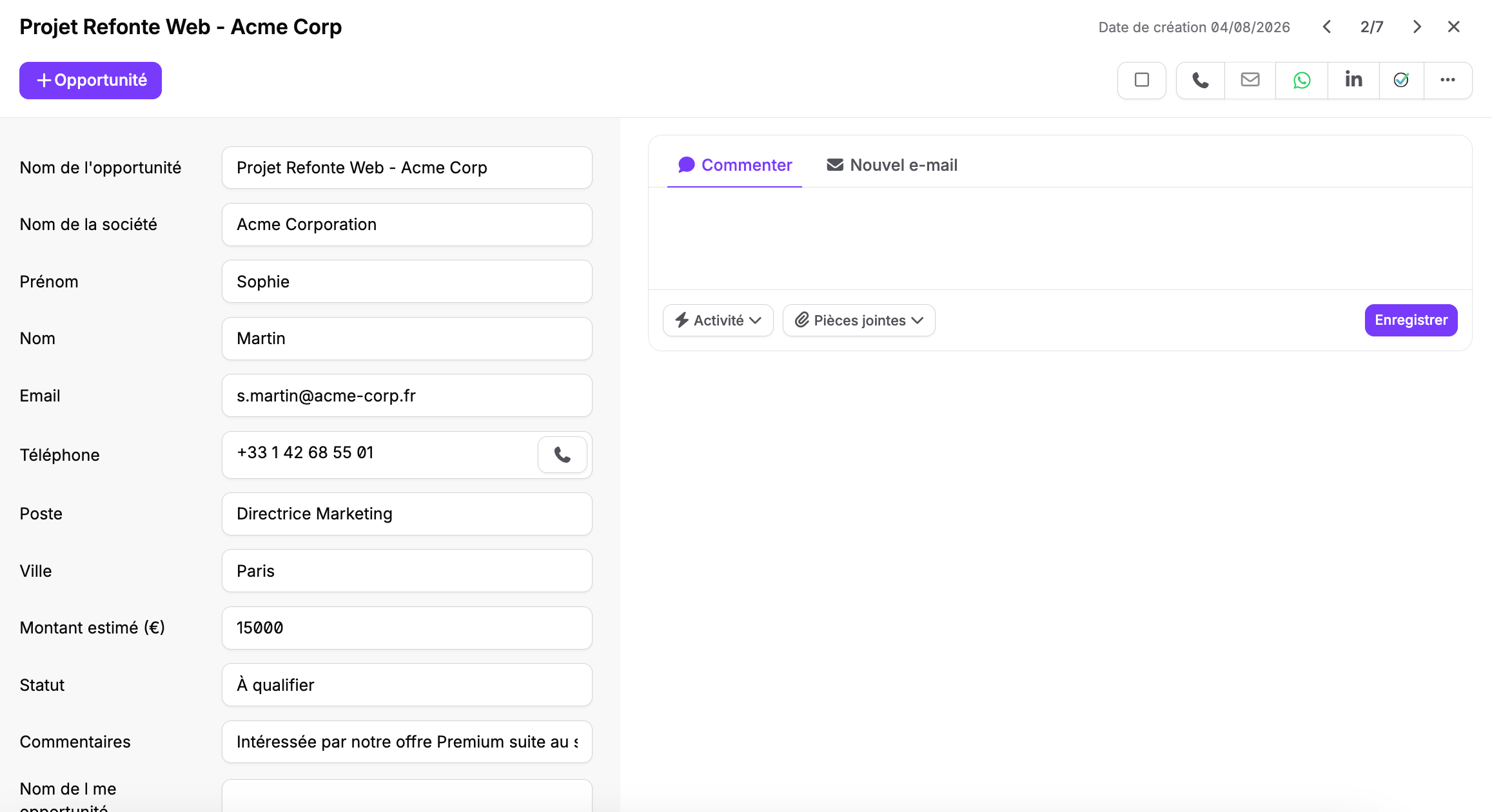
Look at the counter at the top right of the record. Two of seven, with arrows. You move from one lead to the next without ever going back to the list. For someone who makes sixty calls a day, this detail is worth more than ten features.
The action bar gives access to phone, email, WhatsApp and LinkedIn. The Opportunity button converts the qualified lead into a line in the pipeline.
The call script generator
You build your script by dragging blocks, from scratch or from industry templates covering B2B, real estate, insurance, and web and media agencies.
The script then shows up in the lead record during the call, with the qualification questions to ask. Answers are entered as the conversation goes.
Worth noting: the tool is free and accessible even without a noCRM account. It is, however, not available on mobile. To build your call outlines, our sales script examples will save you time.
Call campaigns
Reserved for the Dream plan, they hand out leads one by one from a prospecting list to your agents, based on filters and calling rules. The salesperson no longer chooses who to call: they receive their queue.
That is how telesales and lead generation teams work. Few tools in this range offer it.
Telephony
noCRM doesn’t provide the line, it connects to it. The integrations cover CloudTalk, JustCall, Aircall, RingCentral, Ringover and KrispCall.
You get one-click calling from the record, call recording, then summaries and transcriptions on the Dream plan. Note that the latter come from the telephony partner, not from noCRM. Our Aircall review covers one of these solutions in detail.
Step 2: the opportunity
A qualified lead becomes an opportunity. The creation modal fits on one screen.
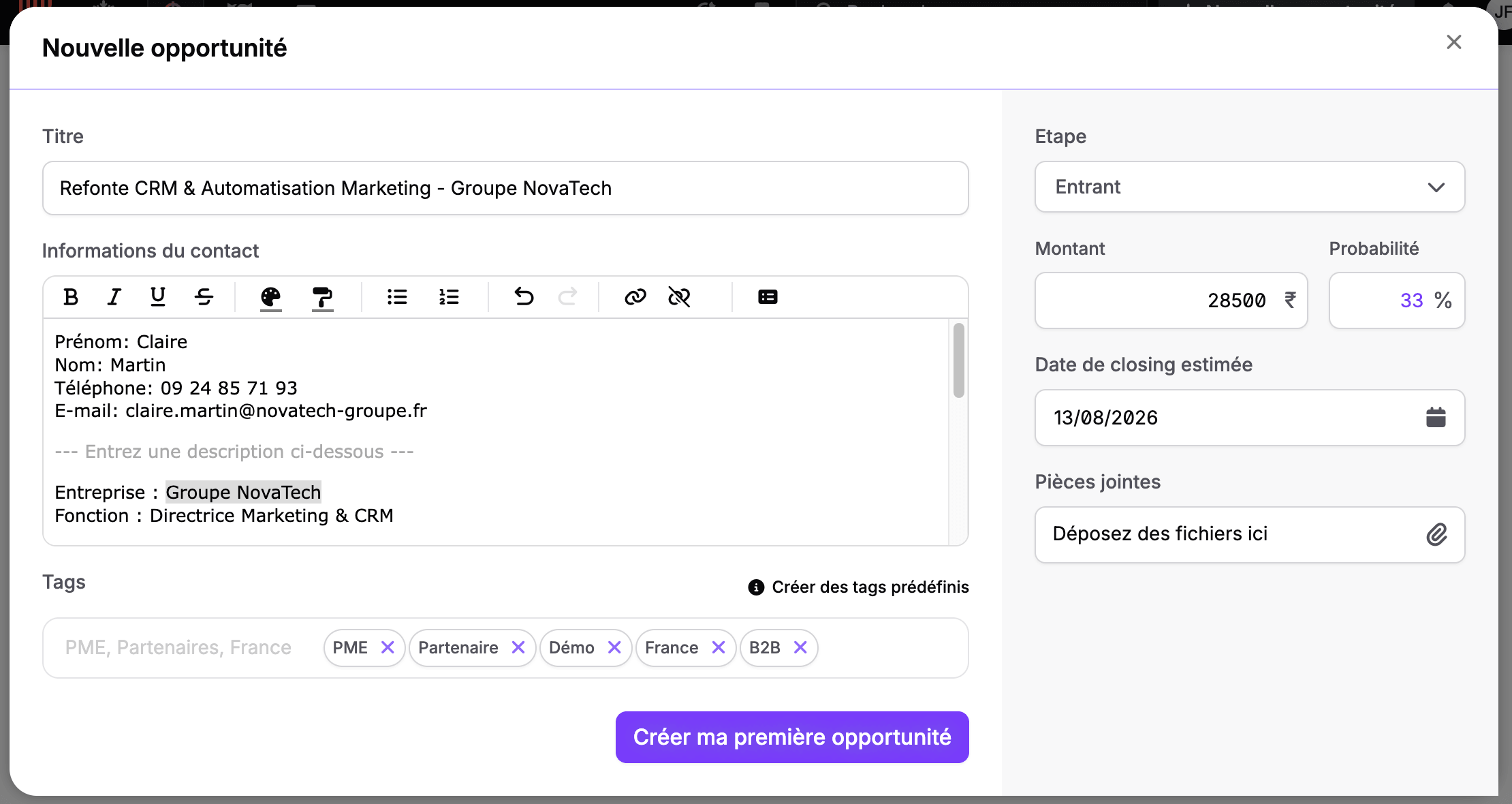
On the right, the steering data: funnel stage, amount, probability, estimated closing date, attachments. On the left, the title, the tags and the contact information.
And this is where a design decision comes into play that you need to understand before choosing this tool. The contact information is not structured fields, it is a free text block with a rich text editor. You paste an email signature, you format it if you feel like it, you move on.
It is formidably fast to fill in. It is also the reason why you will never be able to segment your opportunities by contact role or by company size. Structured fields exist at the prospecting list level, not at the opportunity level.
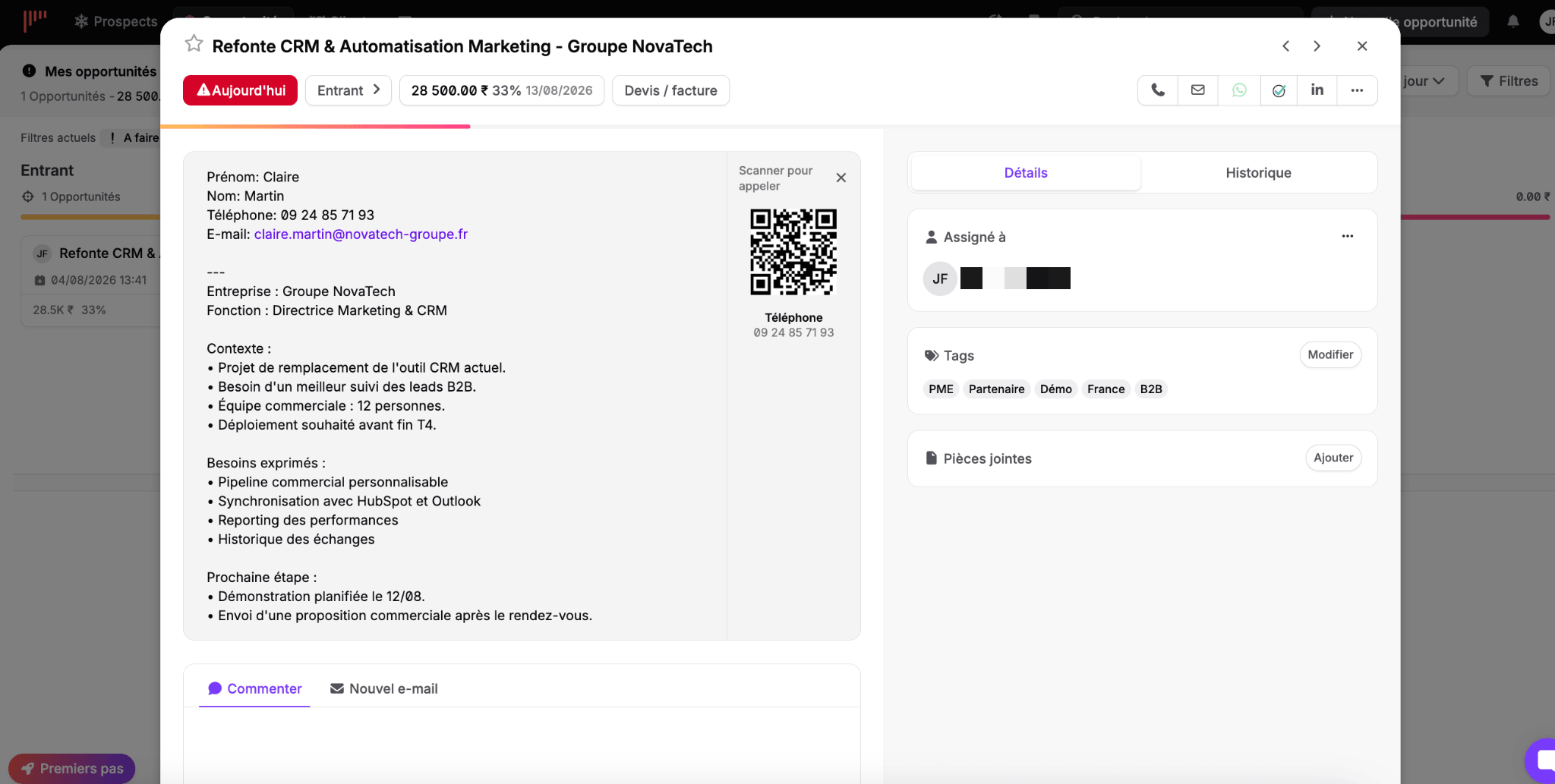
The created record gathers everything needed to move forward. The red due-date badge dominates the screen, ahead of the amount itself. A QR code lets you dial the number from your phone. The Details and History tabs separate the current state from what happened before, and a Quote or invoice button sits in the middle of the header.
The downside of free textIf your sales strategy relies on fine-grained analysis by segment, persona or vertical, this lack of structured fields at the opportunity level will be a blocker. Check this point during the trial, before importing your database. It is a design decision, not a gap that will be filled in a future version.
Step 3: the pipeline and the next action
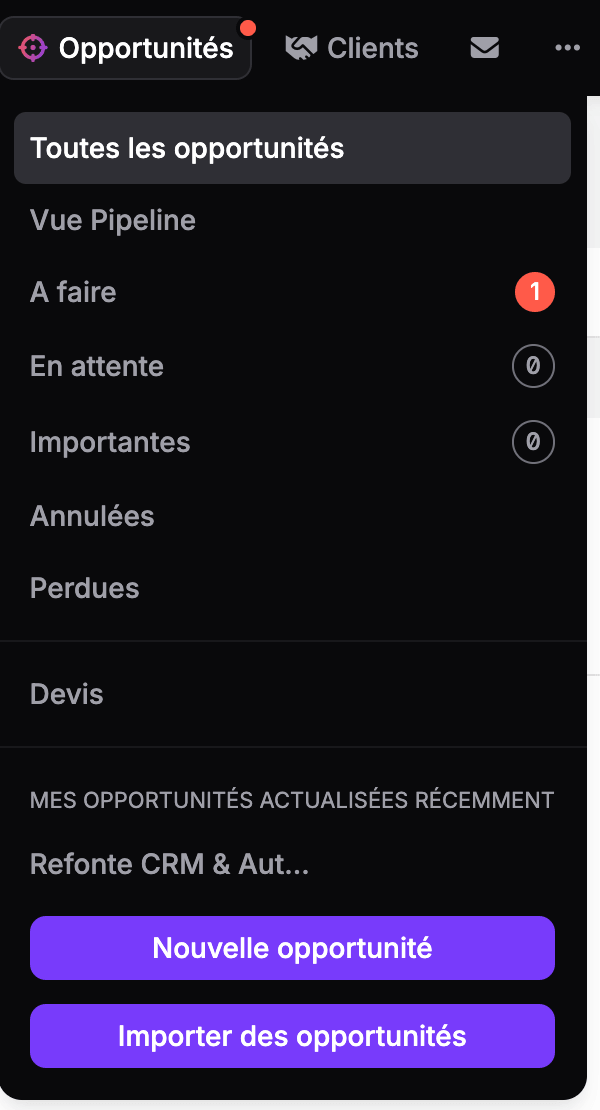
The Opportunities menu sets the tone. Even before the pipeline view, it lists action statuses.
To do, standby, important, cancelled, lost. With a red counter on the deals that need an action today.
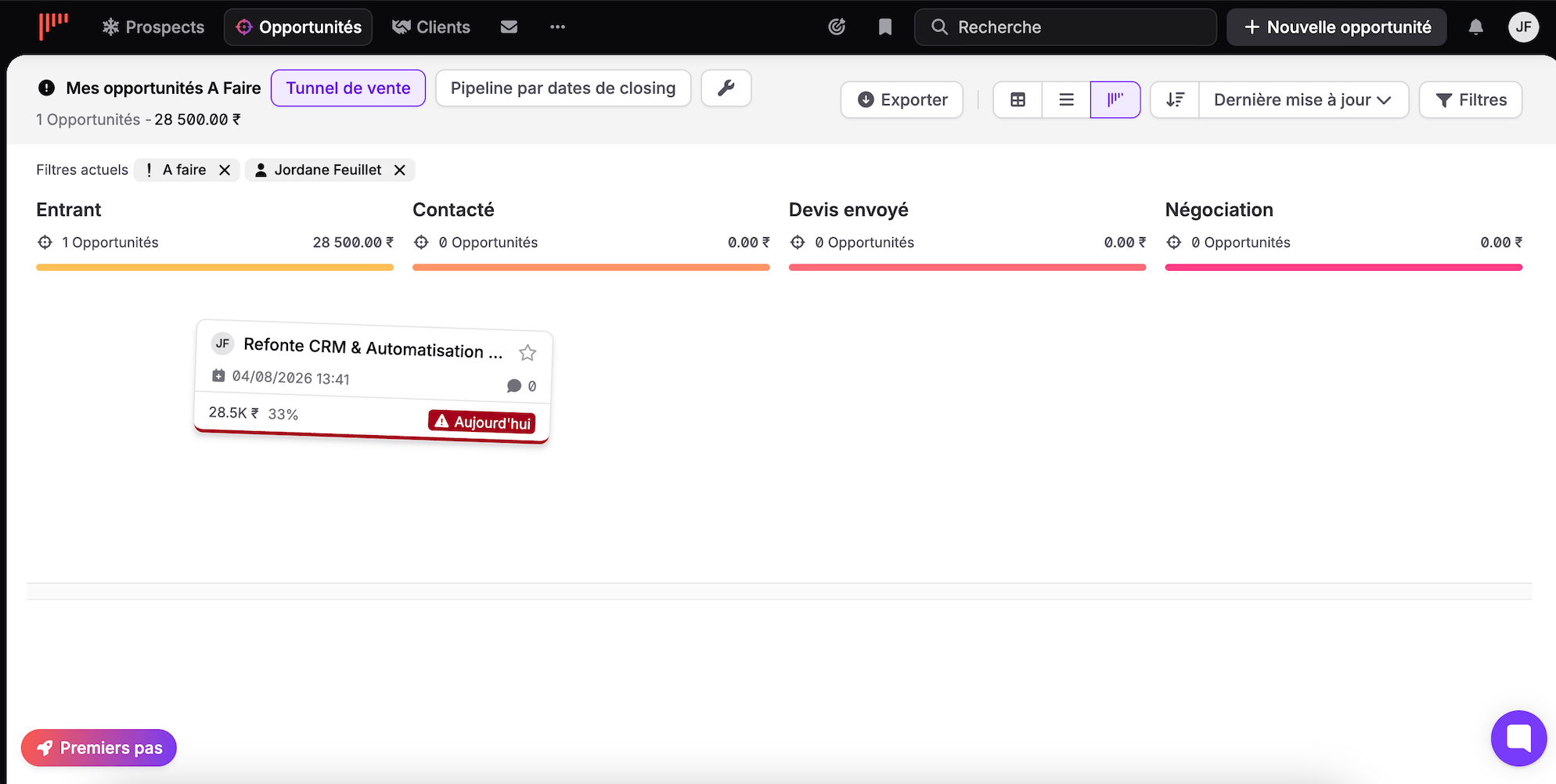
The sales funnel follows the kanban principle, with customizable stages, a counter and a cumulative amount per column. Each card carries its due-date badge. Three display modes coexist, as a table, a list or columns, and everything can be exported.
The second view is more interesting and far less common.
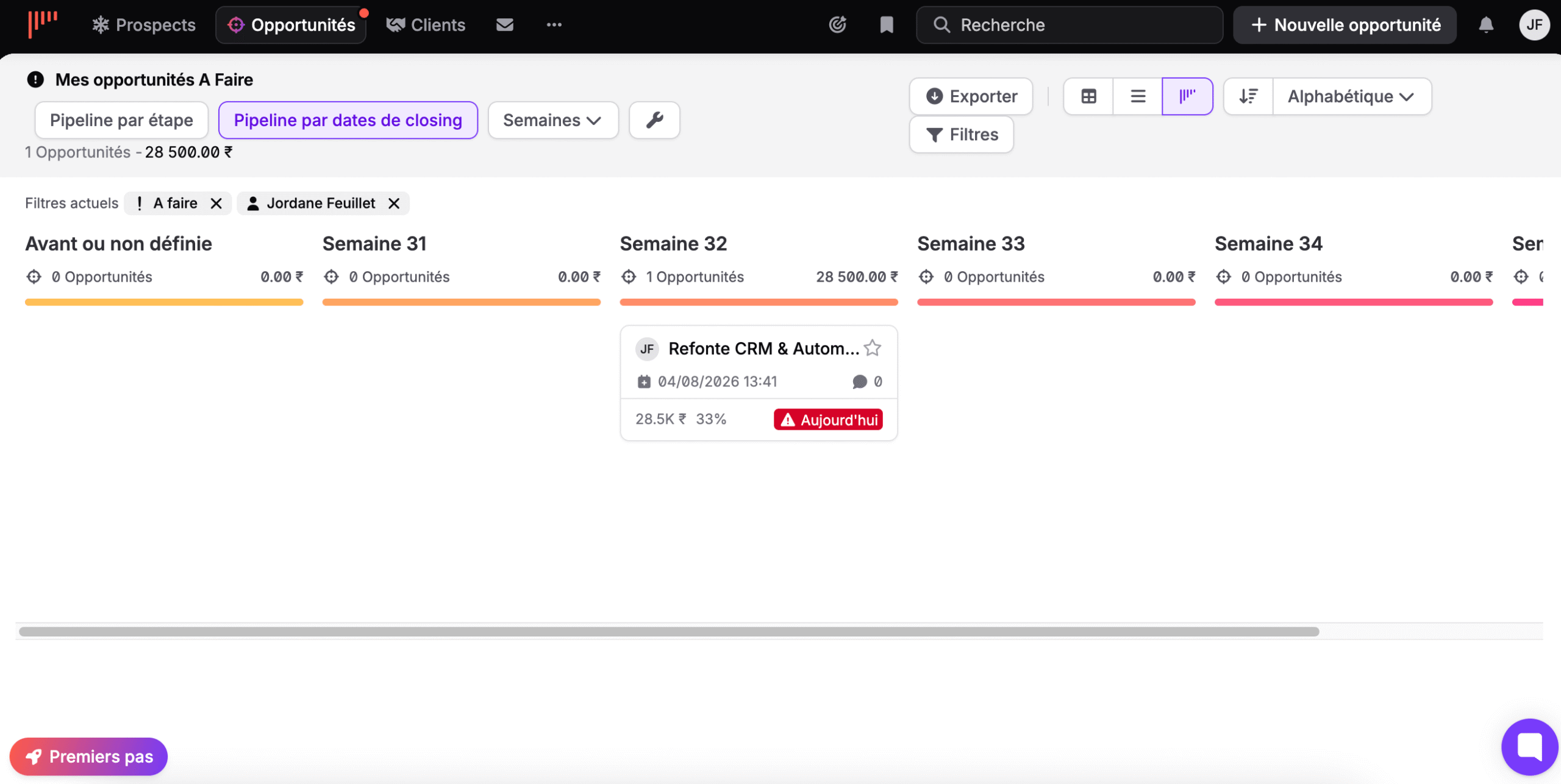
Here, the columns are no longer stages but calendar weeks, with a first column for deals with no date. You no longer look at where your deals stand, you look at when they land. To build a forecast or prepare a monthly review, it says a lot more. Our sales pipeline guide explains this logic in detail.
Filters round it all off.
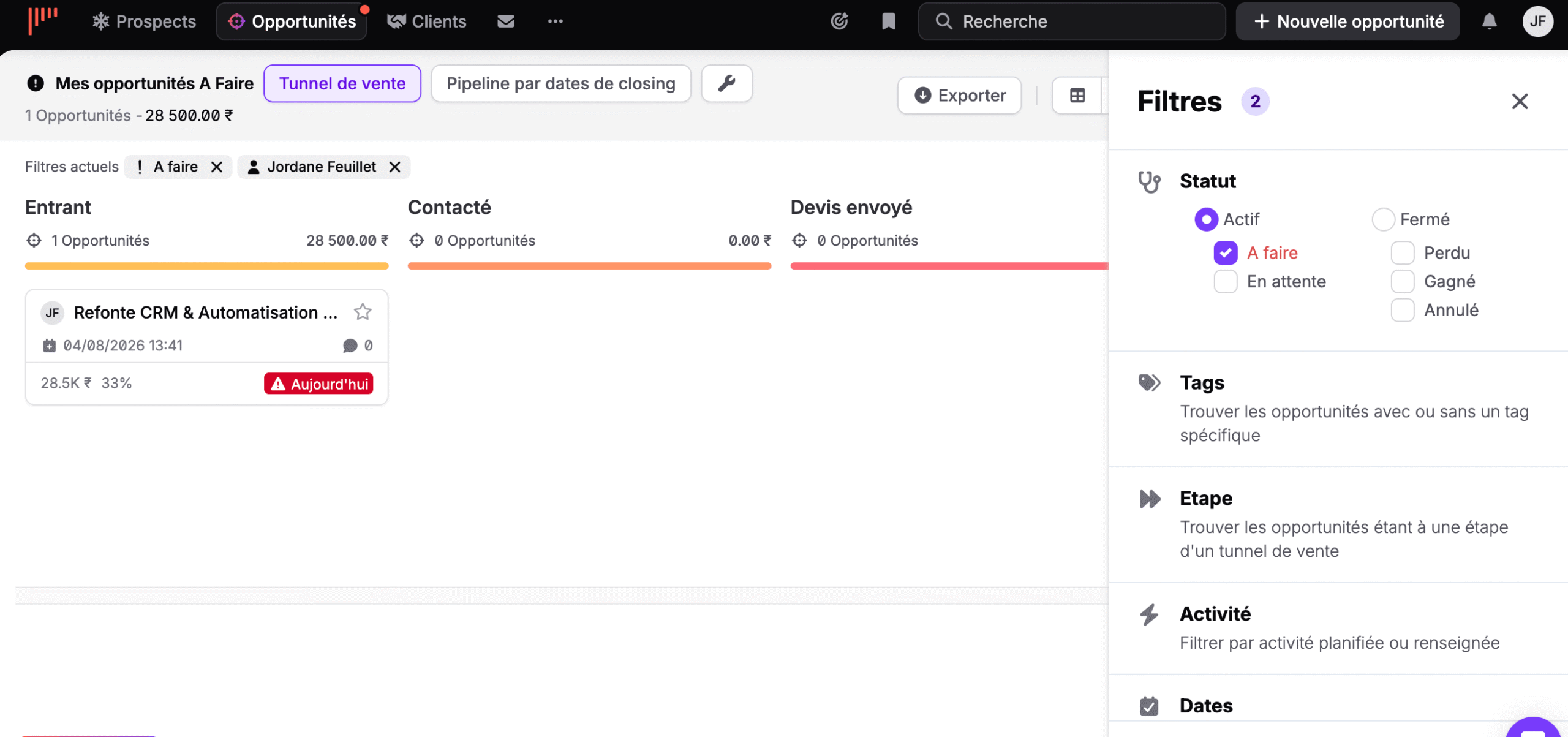
Status first, with the distinction between active and closed, then to do, standby, won, lost and cancelled. Then tags, stage, planned or logged activity, and dates. Active filters stay displayed as chips above the pipeline, which saves you from wondering why the total doesn’t match anything.
The morning briefing, or discipline as a system
If you had to remember just one screen to understand noCRM’s philosophy, it would be the notifications screen.
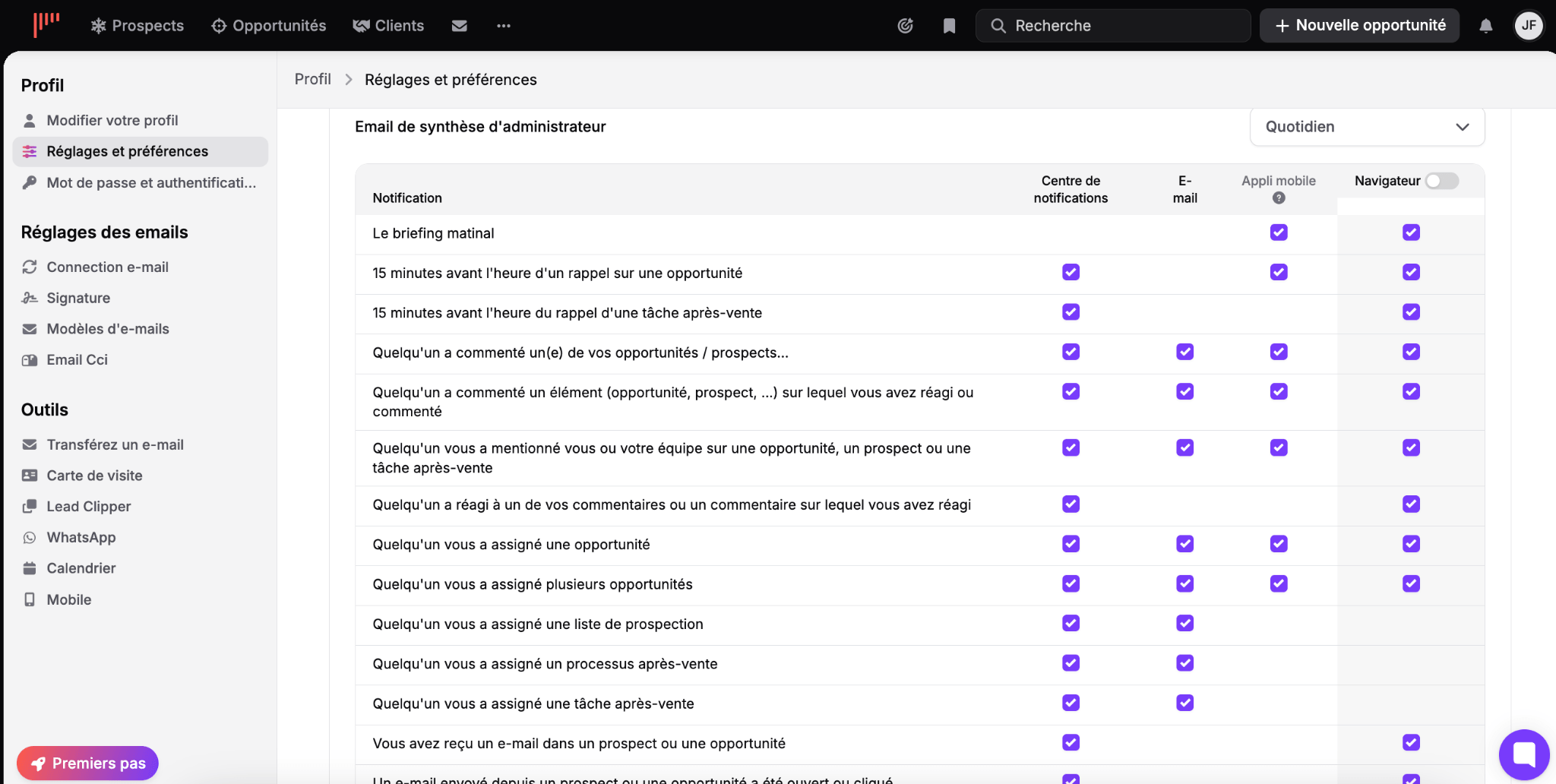
Fourteen event types, each one switchable independently on four channels: notification center, email, mobile app and browser. Plus a daily summary email for the administrator.
And at the very top of the list, before reminders and mentions, a line that sums up the whole product: the morning briefing.
A piece of software that wakes you up with your call list for the day is not a customer relationship management tool. It’s a foreman.
The rest of the setup follows the same logic:
- Reminder fifteen minutes before an opportunity is due.
- Reminder fifteen minutes before an after-sales task.
- Notification when an email sent from a record is opened or clicked.
- Alert on every assignment, whether it’s an opportunity, a prospecting list or an after-sales process.
On top of that comes a discreet but real collaborative layer: comments, mentions of a person or a team, reactions.
Step 4: quote, invoice and client file
This is what has changed the most since our last test. noCRM no longer stops at the signature.
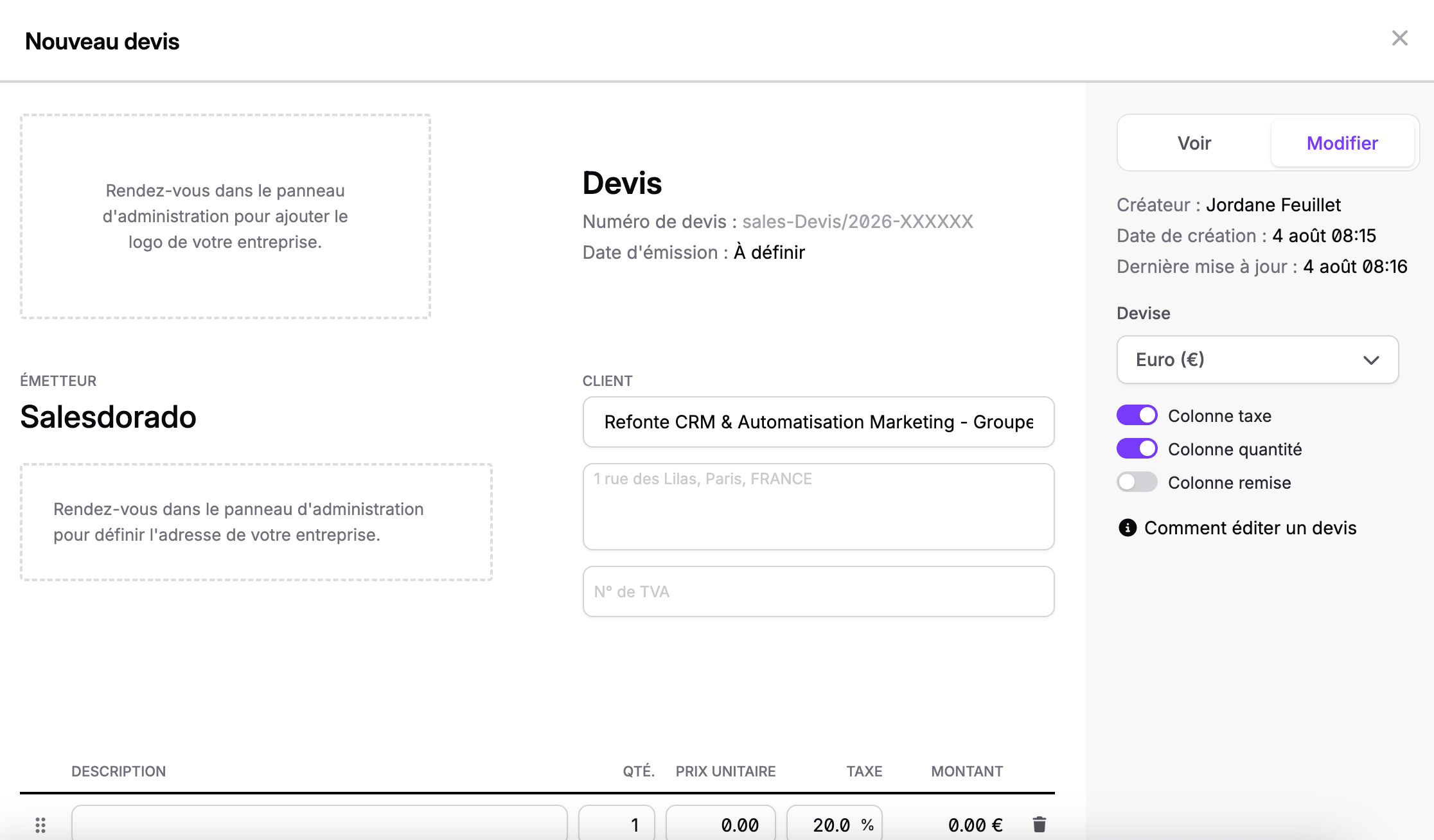
The quote is created directly from the opportunity header. Automatic numbering, issuer and client blocks with VAT number, a currency selector, and columns you switch on as needed depending on whether you invoice with tax, quantity or discount.
The whole covers quotes, invoices, down payments and credit notes. A dashboard tracks statuses, and automations can be triggered depending on the state of a document. If you want to compare, our free quote software roundup gives you reference points.
Above opportunities, a third level has appeared: the client file.
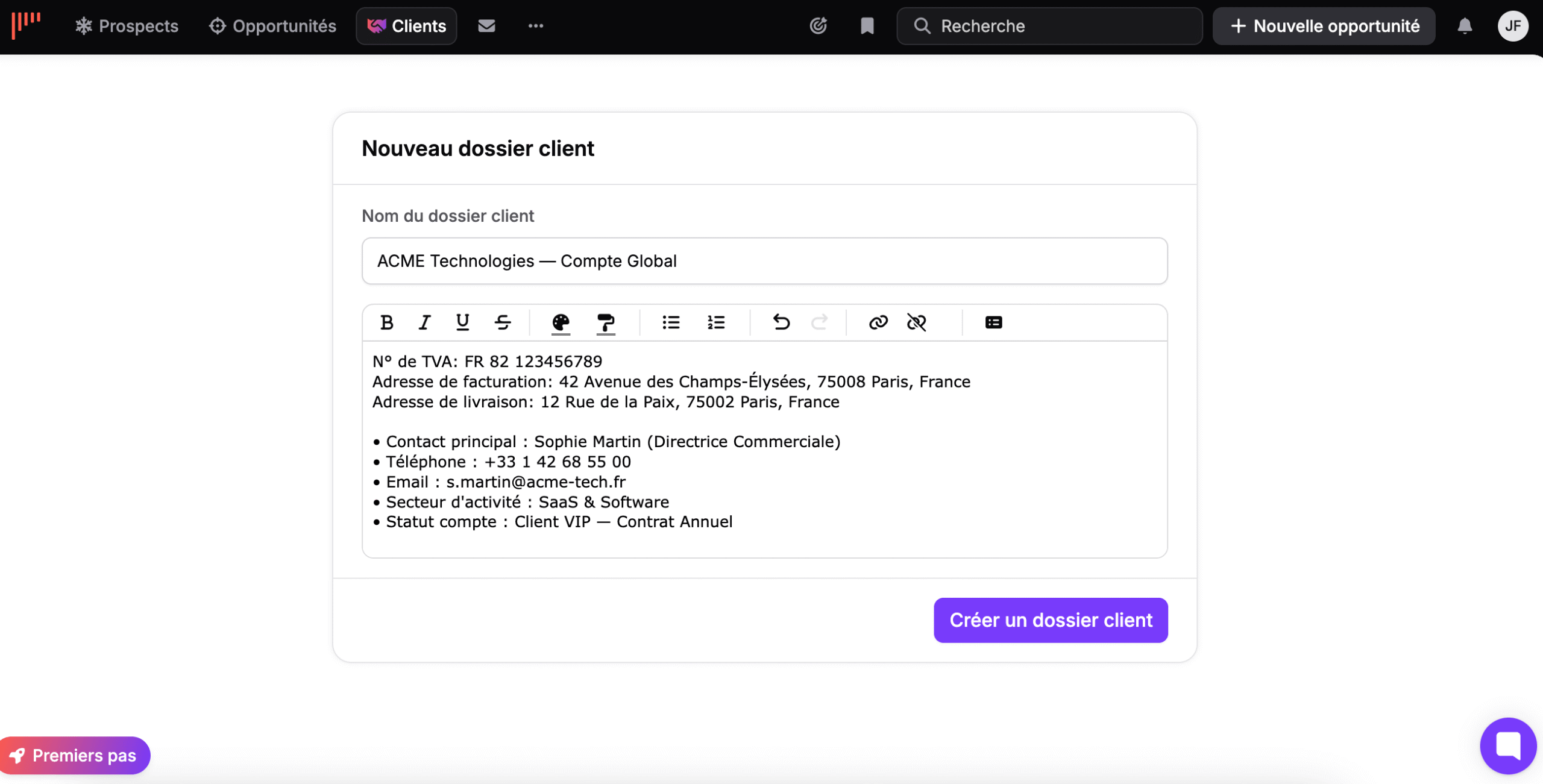
It groups several deals under the same account, with the VAT number, billing and delivery addresses, and the main contact’s details.
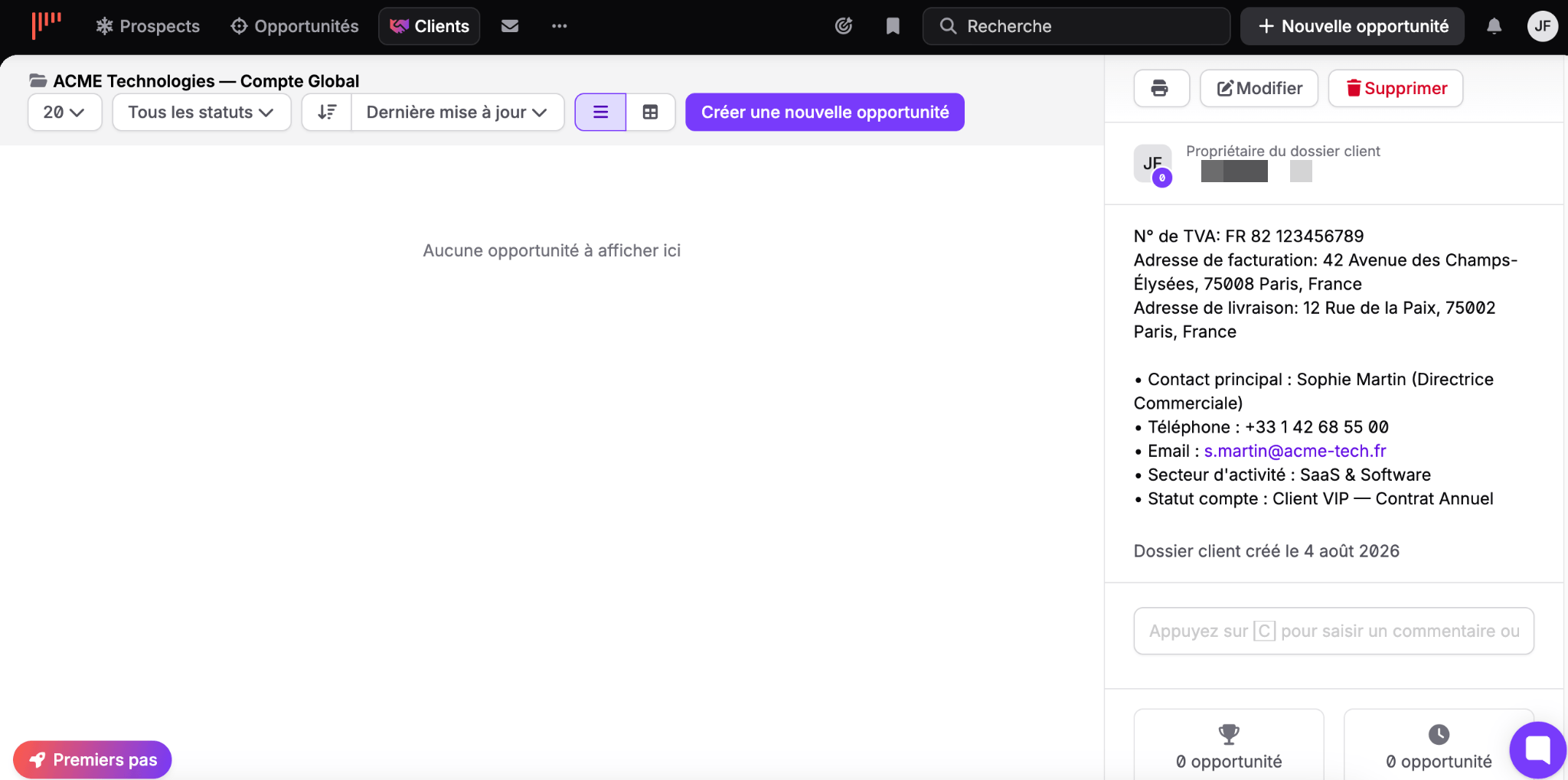
The view shows the file owner and the counters of won and ongoing opportunities, and lets you open a new deal without leaving the screen. For a company that sells several times to the same client, it’s the missing building block.
Here again, the content of the file is a free text block. Consistent with the rest, with the same consequence.
Reporting: ten reports in three families
We expected a light statistics section. It is much richer than that.
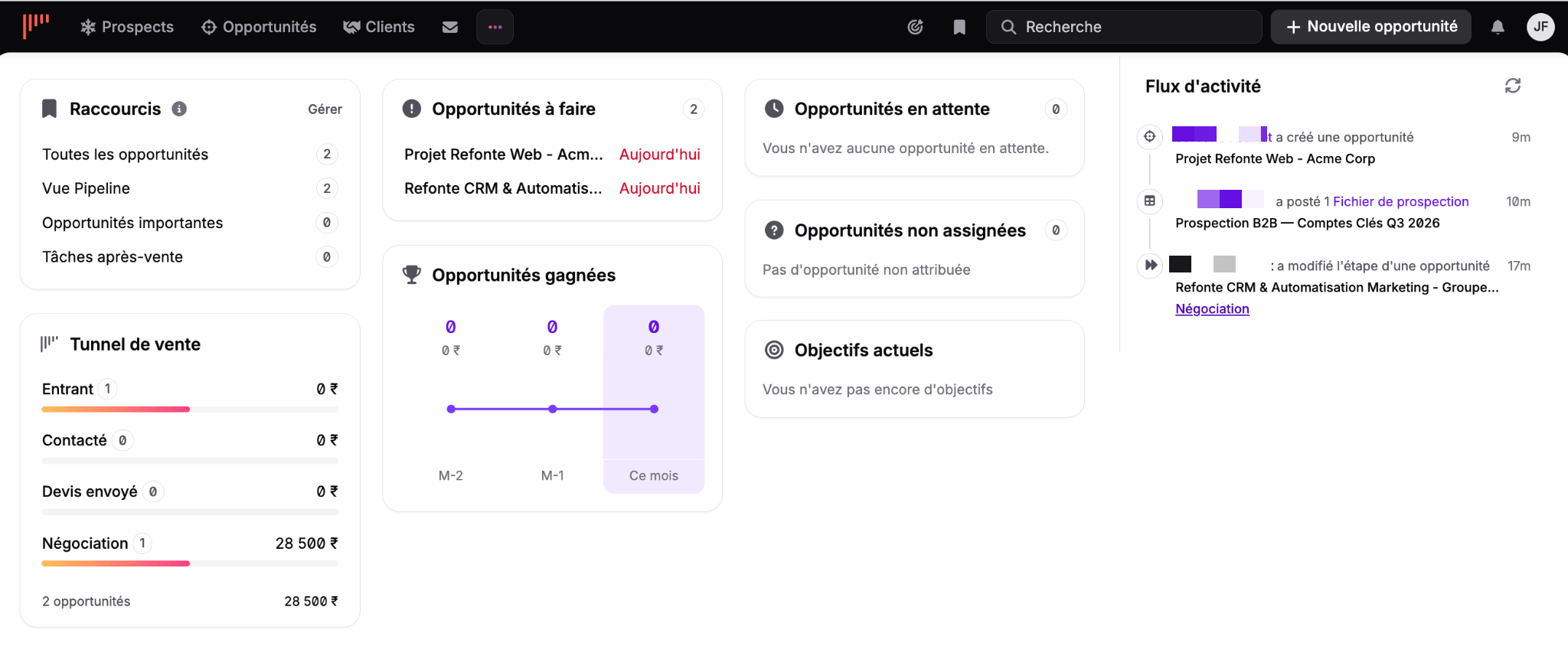
The dashboard fits on one screen, without scrolling. The sales funnel on the left with amounts per stage, the opportunities to do in the middle with their due dates in red, and the team’s activity feed on the right.
One widget is worth pointing out to managers: unassigned opportunities. It’s the safety net that ensures no lead sits idle without an owner.
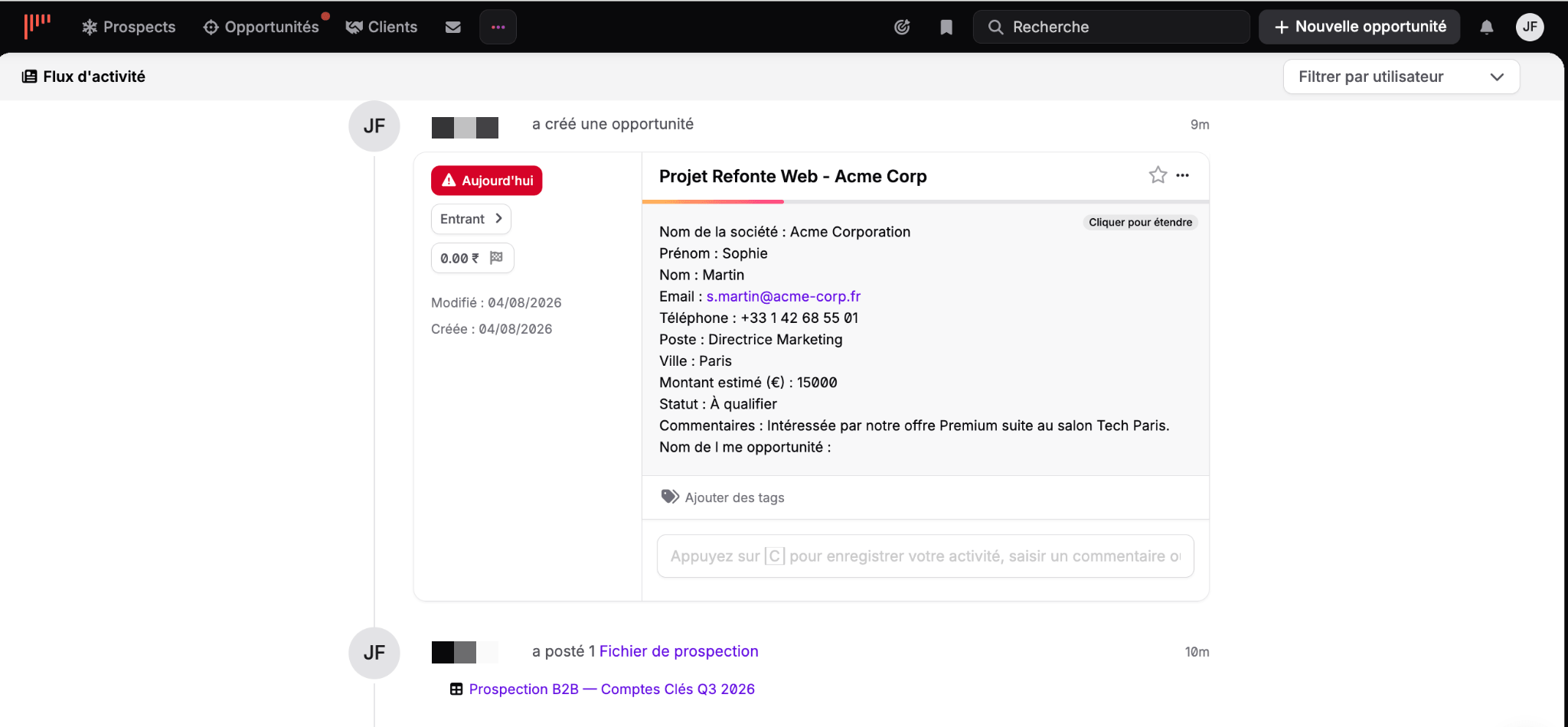
The activity feed can be viewed full page and filtered by user. Each action is timestamped, with the card of the item concerned directly accessible.
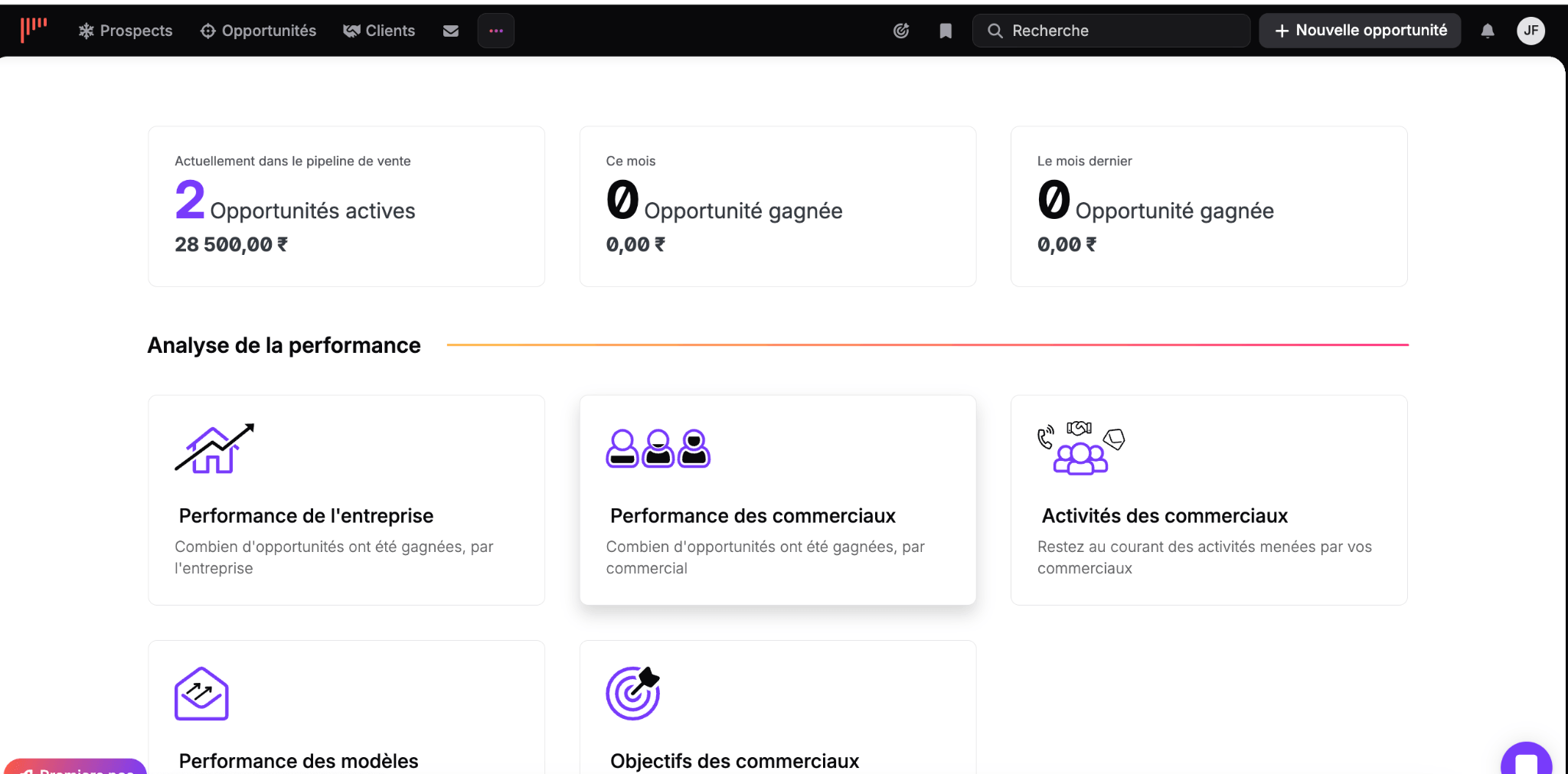
Statistics fall into three families:
- Performance analysis covers the company, the salespeople, their activities, goals and email templates. That last report is a pleasant surprise: it tells you which template converts best.
- Pipeline analysis groups active opportunities, pipeline performance, forecasts and opportunity performance.
- Prospecting analysis, finally, measures the yield of each list.
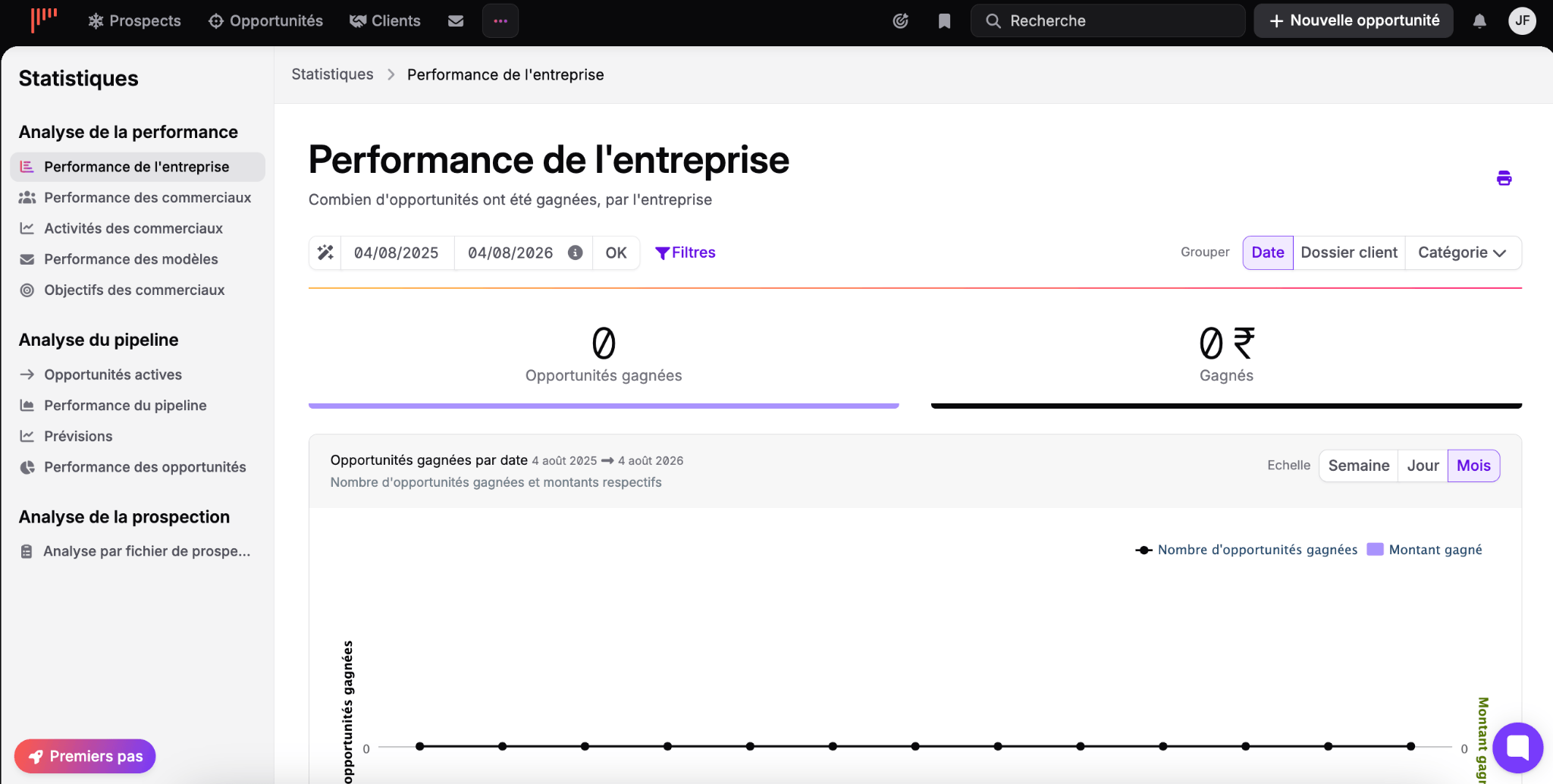
Each report can be filtered on a date range, grouped by date, by client file or by category, and displayed by day, week or month. Printing is built in, which still comes in handy for a board meeting. Our sales reporting tools put these features in context.
Side tools and integrations
noCRM automates almost nothing. It makes one exception.
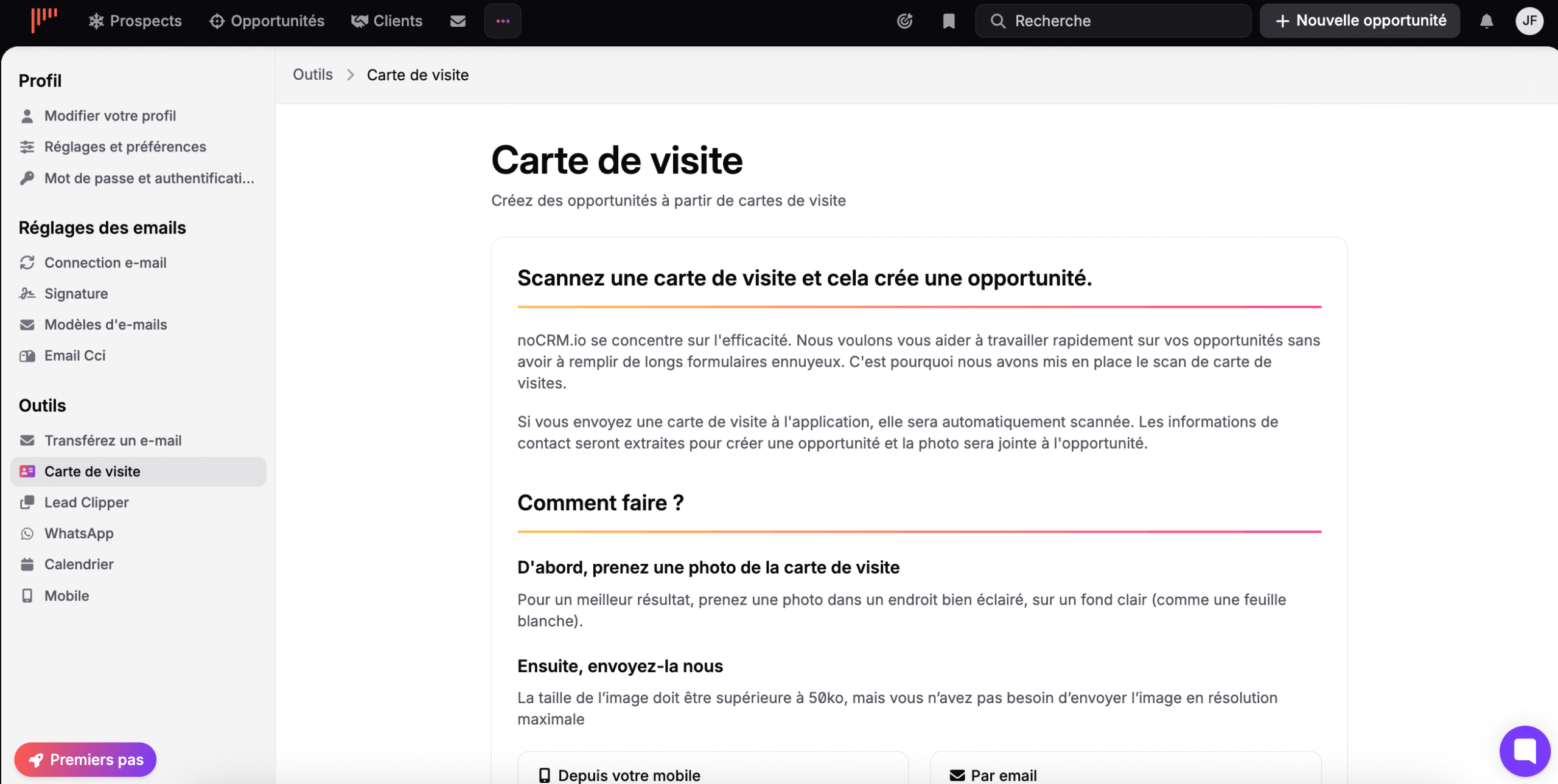
You take a picture of a business card, send it from your phone or by email, and the app extracts the contact details, creates the opportunity and attaches the photo. The vendor’s stated rationale is explicit: work fast on your opportunities without having to fill in long, boring forms.
The only thing noCRM automates is data entry. Never the selling.
The other tools follow the same intent:
- Lead Clipper captures a lead from the browser.
- Email forwarding creates an opportunity by forwarding a message.
- The BCC email archives your exchanges effortlessly.
- The mobile app works offline, which matters for field salespeople.
On the connector side, the old criticism about weak integrations no longer holds. Telephony is well covered, emailing opens up to Positive User (formerly Sarbacane), rapidmail, Waalaxy and ActiveCampaign among others, and accounting goes through QuickBooks or FreshBooks. Beyond that, Zapier and Make give access to several thousand automations, and the API remains well documented.
Managing a team with noCRM
The team features deserve a closer look, because they determine which plan to choose.
By default, noCRM only knows two user levels, administrator and user. The intermediate team manager level only exists on the Dream plan, and you still have to switch it on manually in the admin panel.
On that same plan only, you get team creation with the option of belonging to several, privacy settings that decide who can view and reassign other people’s leads, and statistics filterable by team.
Sales goals deserve a special mention. You choose between a revenue goal, such as closing fifty thousand euros over the quarter, and an activity goal, such as ten calls a day and eight meetings a week.
That second model sums up the product’s whole philosophy. You don’t steer the result, you steer the actions that lead to it. It’s also the most reliable way to coach a junior salesperson.
Salesdorado’s tipAsk yourself the question upfront rather than when the invoice arrives: do you need an intermediate management level, automatic lead assignment and team reports? If so, your plan is Dream, and you need to budget for it from the start. If you are two or three autonomous salespeople, Expert is more than enough.
noCRM pricing
Three plans, billed per user:
| Plan | Starter | Expert | Dream |
|---|---|---|---|
| No commitment | €19 / user / month | €29 / user / month | €39 / user / month |
| Annual commitment | €11 / user / month | €22 / user / month | €33 / user / month |
| Actual saving | 42% | 24% | 15% |
| Leads and pipelines | 500 leads, 1 pipeline | Unlimited | Unlimited |
| Custom fields | 4 maximum | Unlimited | Unlimited |
| Quotes and invoices | No | Yes | Yes |
| Email sync | BCC | BCC | Two-way |
| WhatsApp and VoIP | No | No | Yes |
| Team management and automations | No | No | Yes |
| Native integrations | – | Limited | Unlimited |
Since its acquisition, noCRM has been part of the Positive group: the subscription gives access to discounts on the group’s other tools, such as Signitic or Surfer, and two free months on Corporama.
Two remarks on this pricing grid:
- The Starter plan is reserved for new customers and capped at 500 leads in a single pipeline, with no quotes and no integrations. It’s not really an entry point, it’s an extended trial. The first tier that is actually usable solo is Expert.
- The annual discount then shrinks as you go up, and that’s counter-intuitive. It reaches 42% on the most limited plan, but drops to 15% on Dream. In other words, a one-year commitment saves little where it costs the most.
Do the math before you commitFor a team of four salespeople on Dream, the annual commitment comes to €1,584 versus €1,872 on monthly billing. The €288 difference over the year doesn’t necessarily justify locking yourself in for twelve months if you are still discovering the tool. Also note that all users on the same account must be on the same plan.
On the security side, the vendor states development and hosting in the European Union, GDPR compliance, encryption of connections and of data at rest, real-time replication with daily backups, and an annual security audit carried out by a third party.
Support is included in all plans, with a knowledge base, tutorials, chat and email. Dream adds priority support, phone assistance and personalized onboarding from five users. To put these amounts in perspective, our analysis of the real cost of a CRM gives orders of magnitude.