If you evaluate Unify by comparing it to your current cold emailing tool, you’ll find it outrageous: expect to pay around $21,000 a year, whereas Instantly or Smartlead costs you 10 times less. Yet companies like Perplexity and Cursor have signed up. They aren’t crazy; they’re just not making the same comparison.
Unify should be compared to the total cost of a junior SDR or that of a GTM engineer who spends their days maintaining a combination of Clay, Smartlead, and intent tools. That’s the tool’s core promise: to detect a buying signal, qualify the account using an AI agent, find the right contacts, enrich their profiles, reach out to them, and sync everything into your CRM, all without any human intervention between the signal and the email being sent.
So we evaluated Unify the same way we would evaluate a new hire: what it can actually do on its own, what it will never be able to do, its true cost once all the options are factored in, and the type of team for which the investment pays off. Here’s our full review.
Sommaire
Our Review of Unify: A Summary
| Perimeter | Score | Our opinion |
|---|---|---|
| Overall rating | 4,3 | Unify is undoubtedly the most sophisticated outbound platform on the market, offering buy signals, AI agents, lead generation, sequences, and CRM synchronization all in a single system. The product itself is remarkable, but its price point means it’s best suited for teams that already have a robust pipeline ready to scale. |
| Plays and Automation | 4,7 | The visual workflow builder is the standout feature. You can link together triggers, AI qualification, lead generation, and sequences in just a few minutes, whereas an equivalent stack would require weeks of integration. |
| Signals and Data | 4,2 | Unify enables you to identify website visitors (Waterfall 6sense, Clearbit, Demandbase), job title changes, and custom signals generated by AI. It’s truly comprehensive, though its data coverage is less advanced in the French market. |
| Deliverability | 4.5 | The entire email delivery infrastructure (including Gmail mailboxes created and warmed up by Unify, bounce checking before sending, domain rotation, and more) is managed with a level of integration that is very rare in the market. |
| Quality-price ratio | 3,8 | A minimum of $1,740/month, billed annually, for a single user included. The credit system makes it difficult to predict the cost. It’s an excellent investment if you fit the profile, but out of reach for others. |
| Support and Onboarding | 4,3 | You’ll receive guided onboarding from the very start, a dedicated Slack channel, and a growth consultant on the Enterprise plan. Unify adopts a highly supportive model, consistent with its positioning. |
Unify offers an interactive product tour and a personalized demo so you can evaluate the tool for your own use cases before committing.
An “outbound machine,” not just another cold-email tool
The easiest way to understand Unify is to watch a workflow run from start to finish.
Let’s take the textbook example that the publisher itself highlights: leveraging visitors to your pricing page.
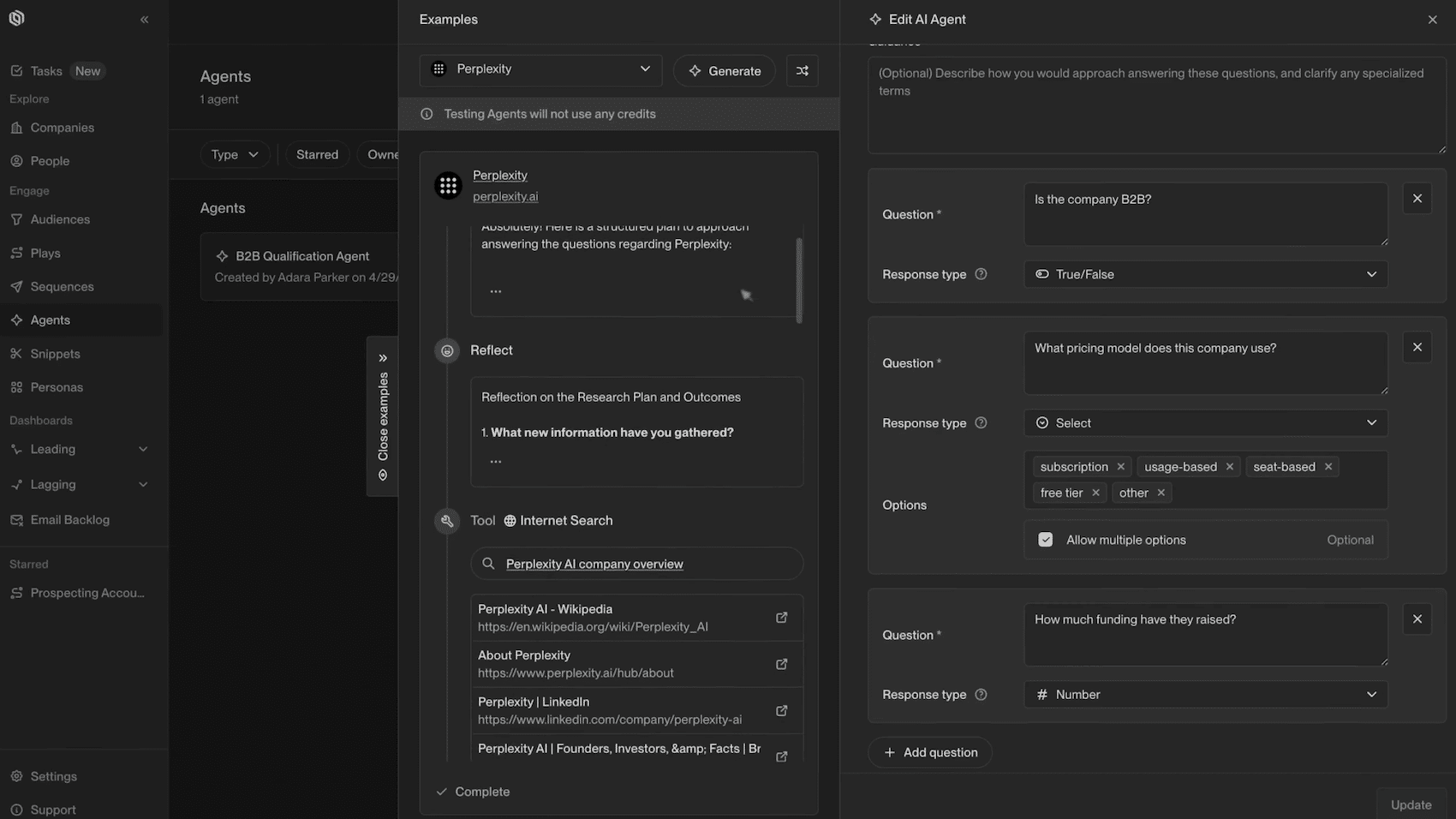
Someone visits your pricing page. Unify identifies their company (and often the person themselves) using a cascade of identity providers (Unify Intent, 6sense, Clearbit, Demandbase, Snitcher). An AI agent then takes over and verifies your qualification criteria:
- Is the company a B2B business?
- Has it raised funds in the last twelve months?
The agent browses the web in real time and answers with “true” or “false.”
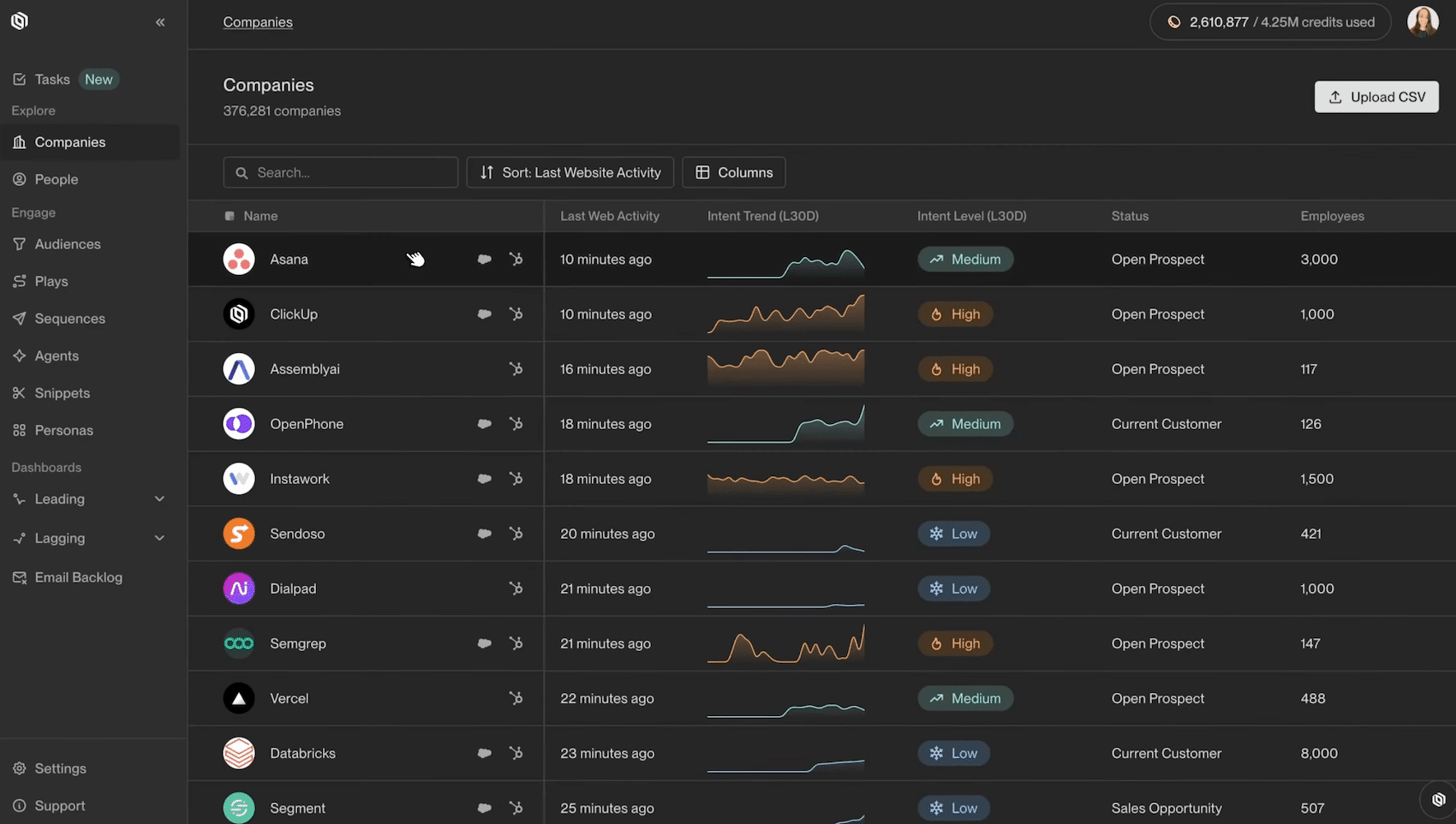
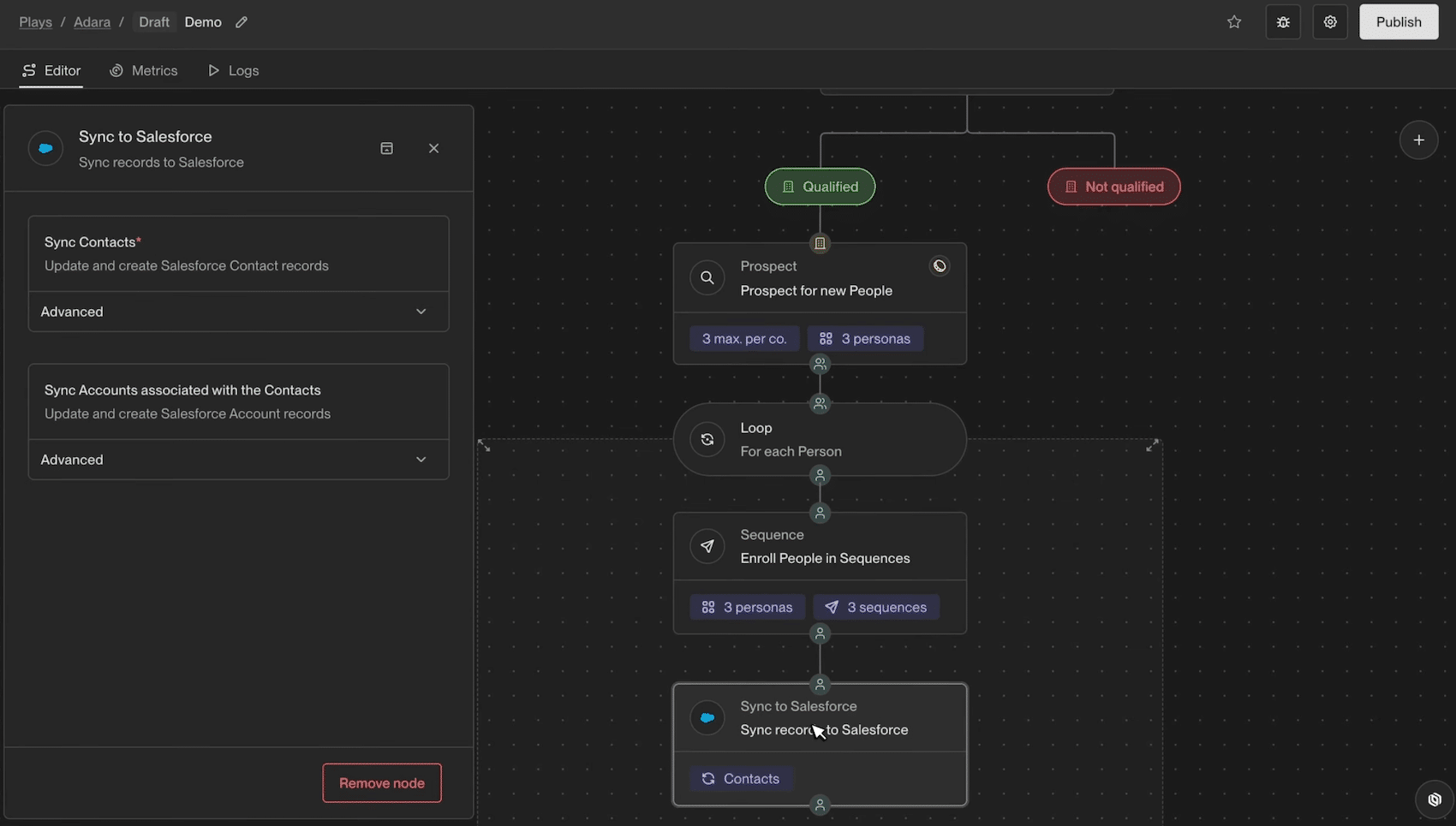
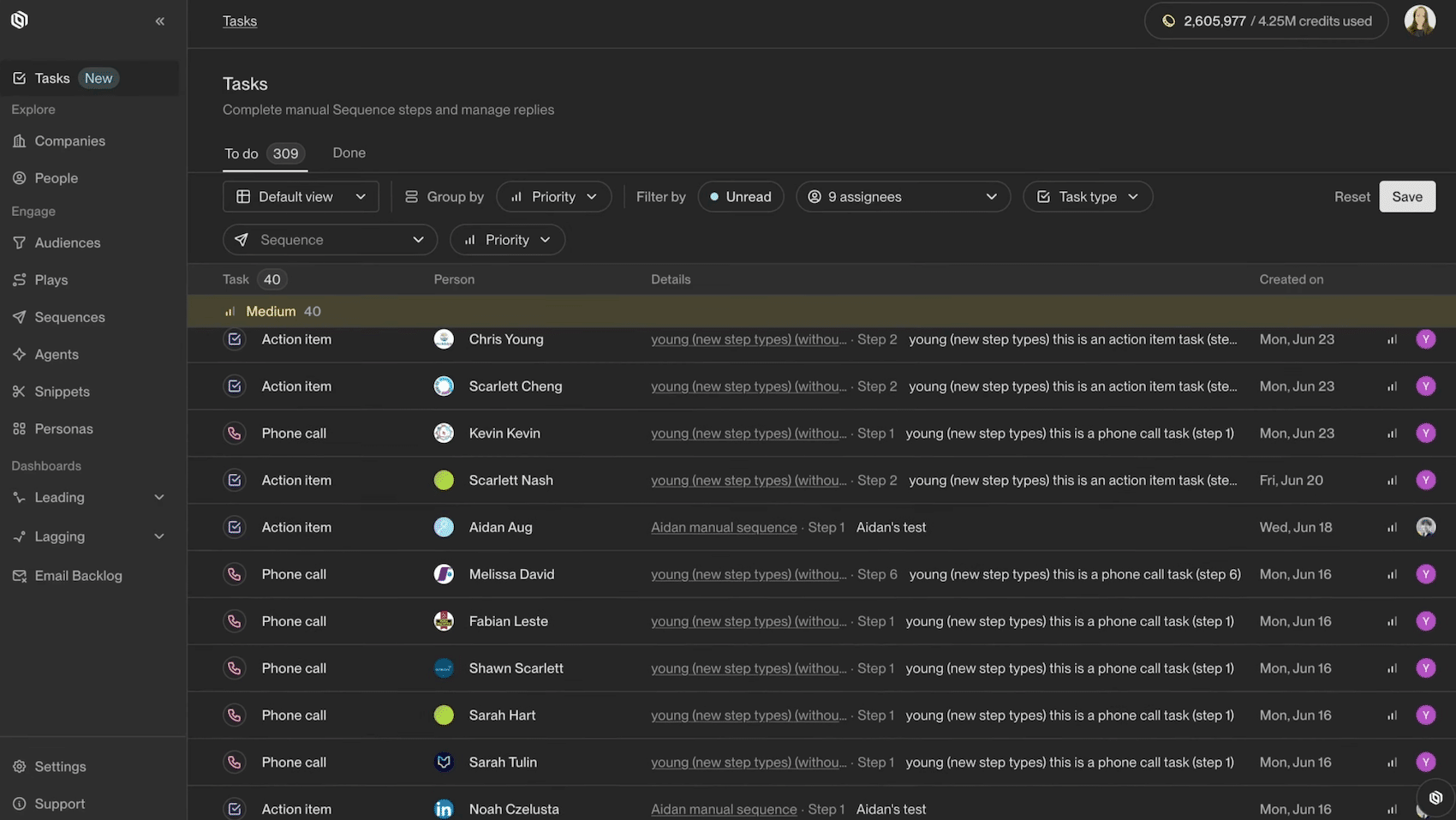
If the account qualifies, a prospecting node identifies the right people within that account based on your personas, for example, demand-generation-focused Heads of Marketing. These contacts are automatically enriched, enrolled in an email sequence tailored to their persona, and then synced to Salesforce or HubSpot.
All of this is built in a visual builder in canvas mode and then runs automatically. The prospect showed interest at 9:47 a.m. and receives a relevant email later that day.
This is what fundamentally sets Unify apart from traditional cold-emailing tools: the latter run sequences on lists that you build manually. Unify also handles the upstream process, that is, deciding who to contact and when, based on business signals detected in real time. The company calls this “warm outbound”: outbound prospecting, but triggered by a sign of interest rather than sent cold to a list .
Signals: The Fuel for the Machine
Unify organizes its triggers into three categories:
#1 Native Signals
These are the behaviors detected directly by Unify:
- Page views (pricing, documentation, demo).
- Email subscription.
- UTM parameters for your paid campaigns.
- Job changes.
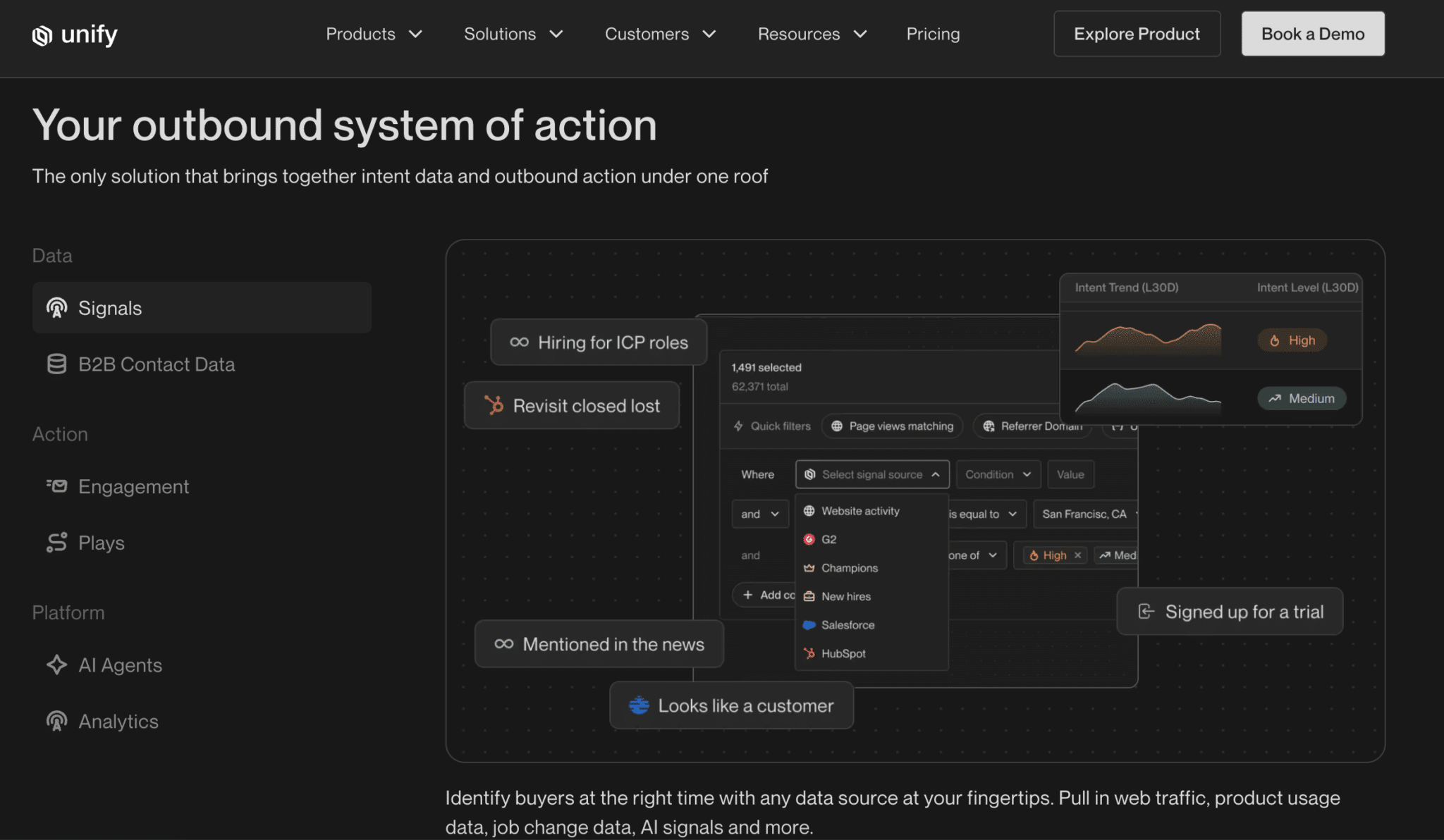
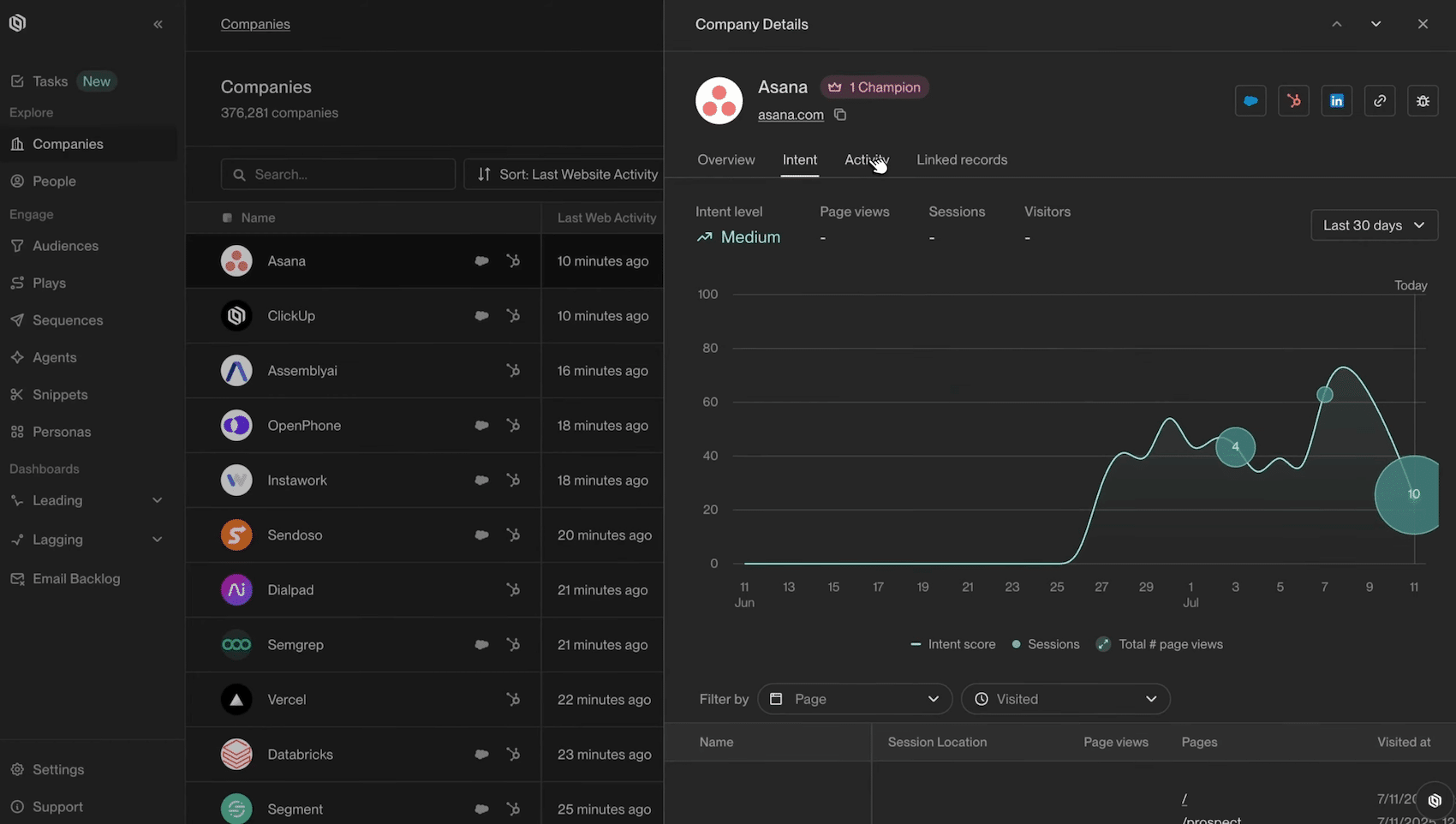
The most powerful feature is the identification of web visitors, at the company level (with a reported match rate of over 75%) and at the individual level when possible. Each account receives an intent score that can be viewed in the Companies tab, along with a complete history of pages viewed. We covered this topic in detail in our article on identifying anonymous visitors in B2B.
#2 Imported signals
In particular:
- Lists of trade show participants.
- Exports Sales Navigator.
- Scraped files.
You upload a CSV file to Unify, which automatically populates missing contact information and makes the data immediately usable in a Play. This is very convenient for one-time campaigns.
#3 “Infinity Signals”
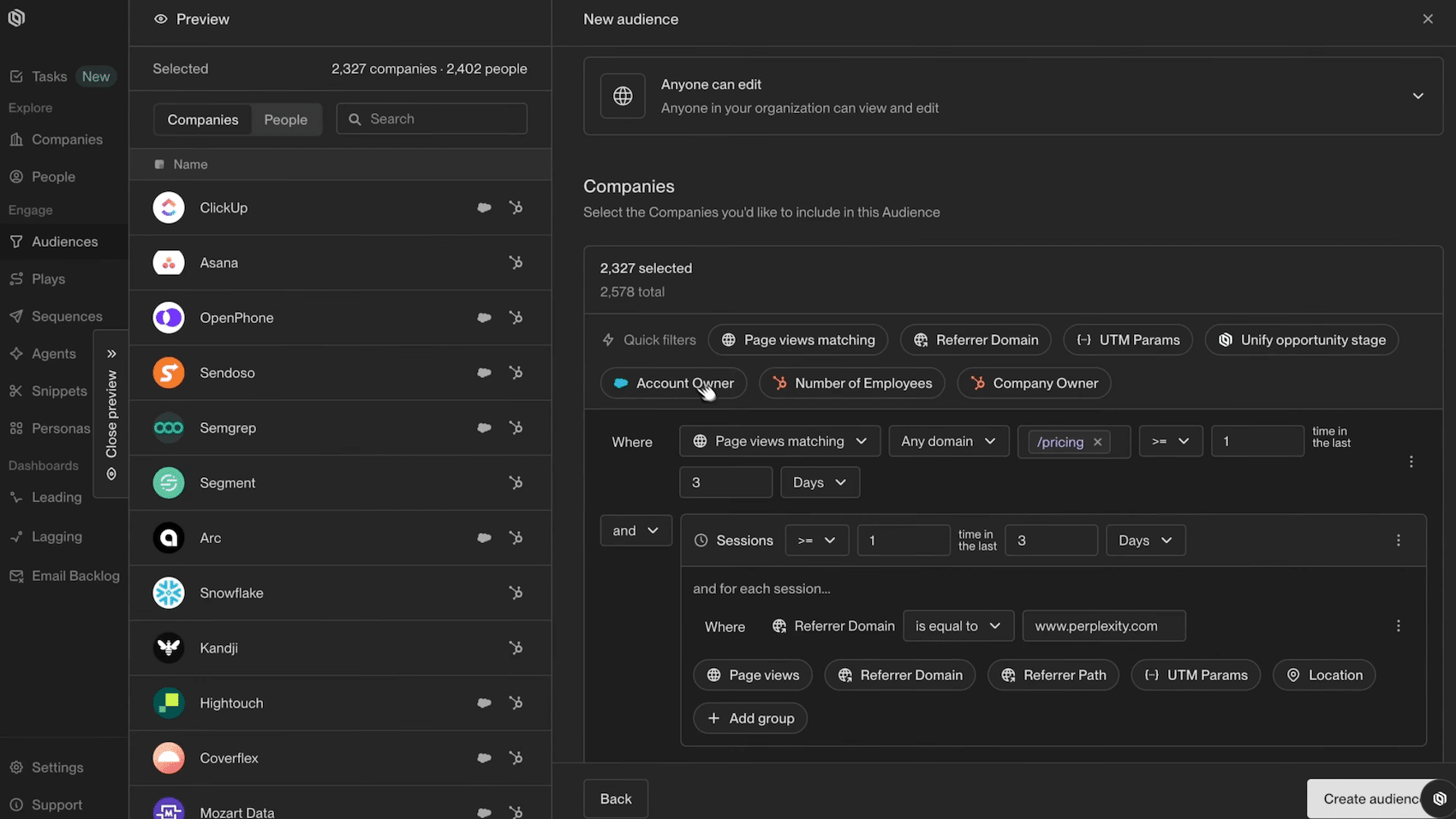
This is the most innovative part: you describe in natural language what you want to monitor on your target accounts (“Is this company hiring salespeople?”, “Has it been mentioned in the press?”, “Is it using my competitor’s technology?”) and an AI agent runs in the background to detect these events.
The agent searches the web, scrapes websites, analyzes news feeds, and even PDFs. Each detection can trigger a Play. In practice, this allows you to create custom signals that don’t exist in any database on the market.
Identifying visitors on an individual basis relies on identity resolution techniques that raise concerns under the GDPR. If your visitors are based in Europe, have your legal counsel review the system before enabling this feature at the individual level, and, if necessary, limit identification to the company level, which is much less sensitive.
Plays and AI Agents: Where Unify Outperforms the Competition
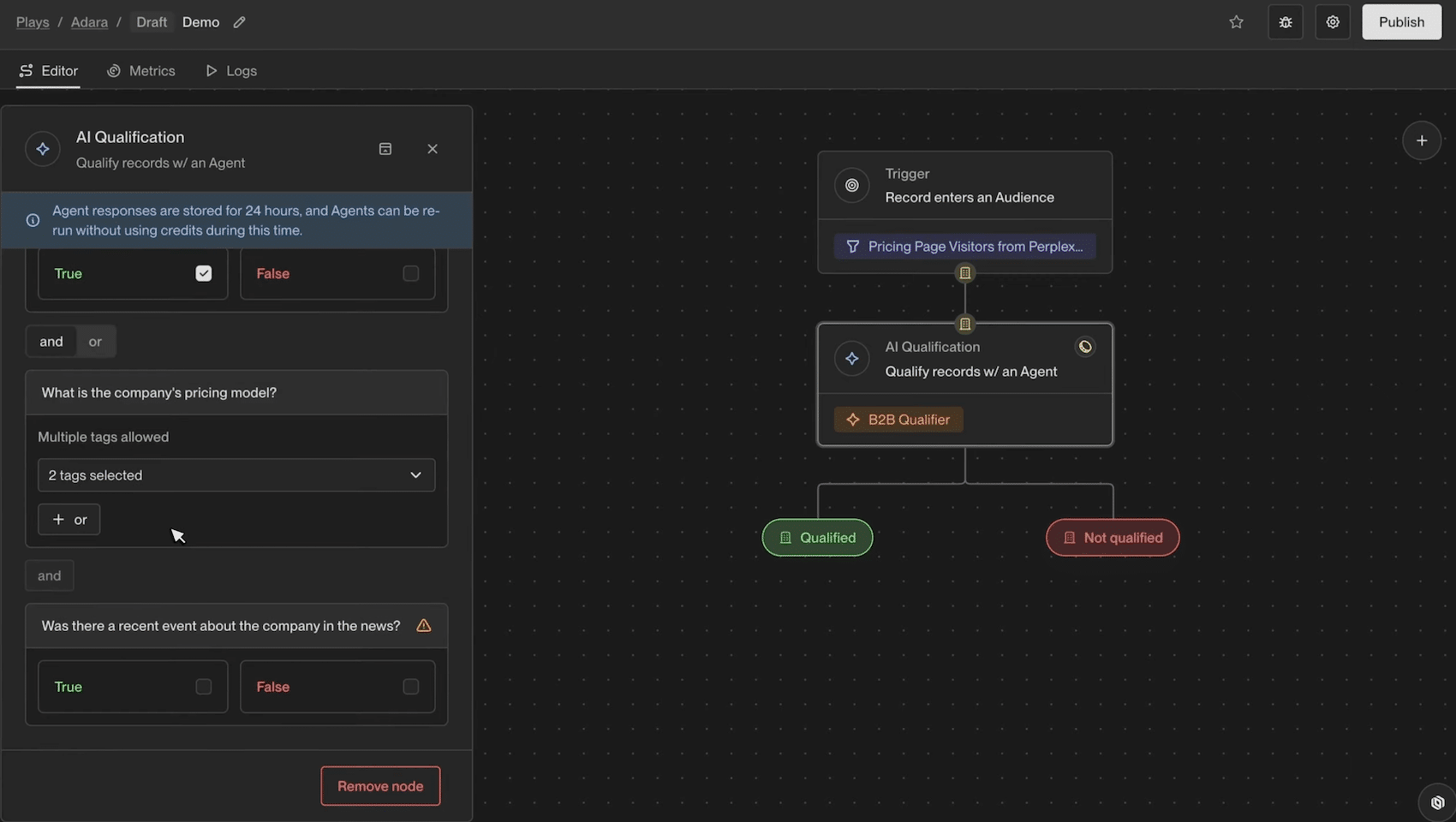
Plays are the driving force behind the tool. In the builder, you assemble “nodes”:
- A trigger (being added to an audience, changing roles, updating a CRM field).
- Qualification steps performed by an AI agent.
- A lead generation tool to find contacts that match your personas.
- A sequence node with conditional routing (CMOs receive the CMO sequence, and VP Sales receive the Sales sequence).
- A CRM synchronization node.
In addition, there are more advanced features such as webhooks, multi-path A/B tests, and Slack alerts.
Two things stood out to us during use:
- First, agent transparency. When an AI agent flags an account, Unify displays its full line of reasoning: the pages viewed, the information extracted, and the logic used to reach a conclusion. This is a far cry from a “black box,” and it’s essential for building trust in a system that decides who to contact on your behalf.
- Next, the speed of implementation. Building the equivalent of a Play using a custom stack (Clay for data enrichment, an intent tool, Smartlead for sending, and Zapier to tie it all together) takes weeks and requires technical expertise to maintain the entire system. In Unify, the workflow described at the beginning of this article can be set up in less than an hour.
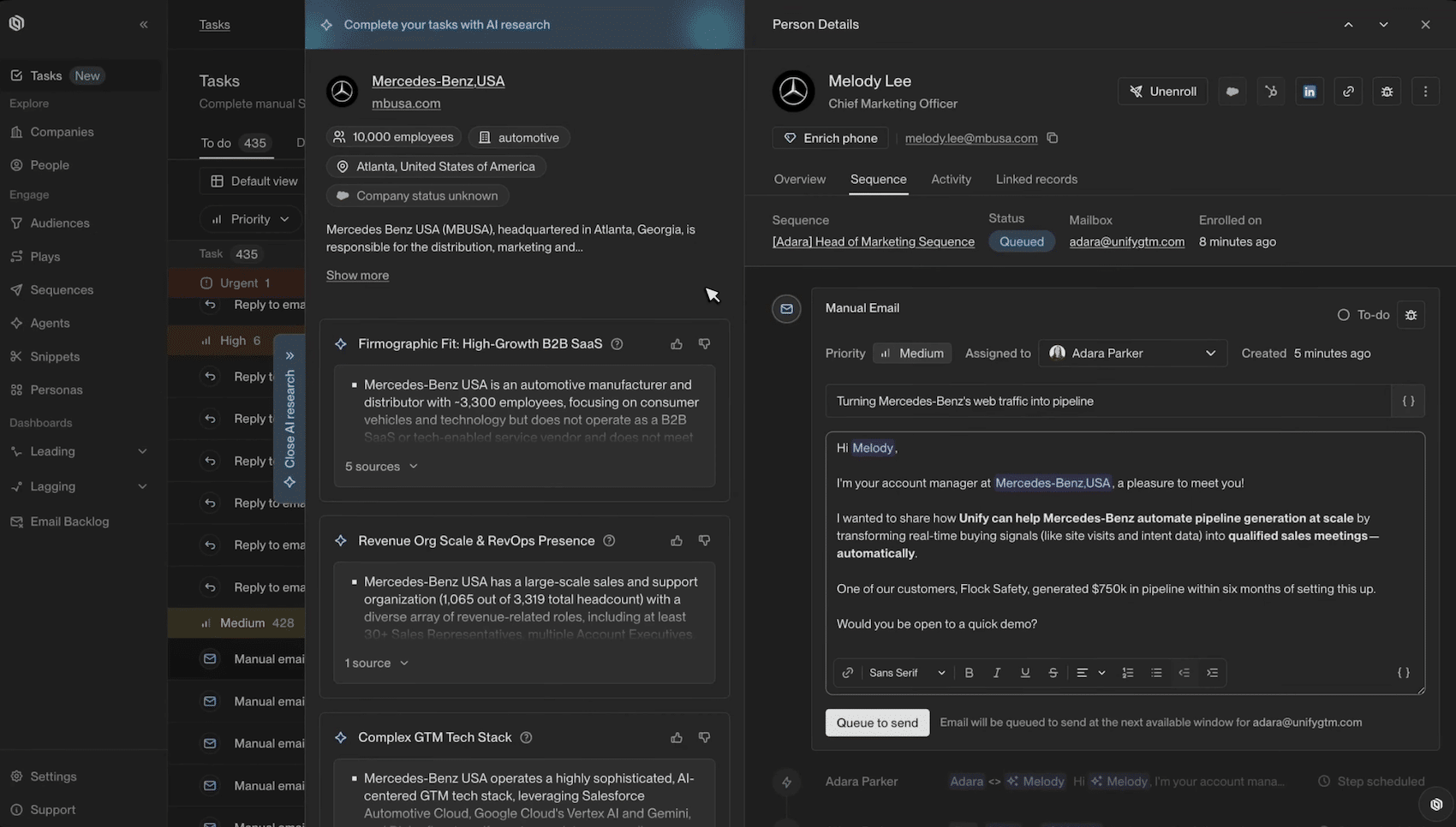
On the messaging side, agents are also used to personalize emails at scale by combining contact data, CRM data, and web search results. The result is still AI-generated personalization, with its limitations: plan to refine your prompts and snippets to avoid the “obviously machine-written email” effect. Our tips on personalizing B2B prospecting emails apply fully here.
Unify’s true value isn’t in any one specific feature, but in the fact that everything is in one place. No integrations to debug, no data lost between tools, and clear pipeline attribution generated by each Play. That’s exactly what a pieced-together tech stack can’t do properly.
Data, Enrichment, and Managed Deliverability
When it comes to data, Unify doesn’t rely on a proprietary database but rather on a data enrichment pipeline that queries more than 30 providers to find email addresses and phone numbers, without you having to manage a single API key.
It’s a clever approach: by aggregating data from multiple vendors, the coverage is automatically better than that of any single source on its own. This is the same principle we describe in our comparison of B2B data enrichment solutions.
The usual caveat is that these waterfalls are optimized for the U.S. market; be sure to test their coverage on your French or European target audiences before committing, ideally using a representative sample of 200 or 300 accounts.
Deliverability is another key component of the infrastructure. Unify creates managed Gmail mailboxes for you, automatically warms them up over 21 days, verifies each address at the time of sending (the provider claims to prevent 75% of bounces upfront), and distributes volumes across multiple healthy domains with health reports for each domain.
In other words, the tool natively incorporates the features you’d expect from Warmy or Lemwarm and saves you from having to set up your own sending infrastructure. If you’re interested in this topic, our comprehensive guide to email deliverability explains the mechanisms involved.
Pricing: The True Cost of Unify
This is the section that causes controversy, so let’s be specific:
| Map | Price | Credits / year | Users included | Managed mailboxes |
|---|---|---|---|---|
| Growth | Starting at $1,740/month, billed annually | 50,000 | 1 (then $100/month per seat) | 8 (then $25/month per mailbox) |
| Pro | Based on a quote | 200,000 | 2 | 20 |
| Enterprise | Based on a quote | 600,000 | 5 | 40 |
There are three points you should keep in mind:
- The credit system. Each action uses credits in real time: for example, enriching an email costs 2 credits per contact, and AI agent searches have their own pricing. The 50,000 annual credits included in the Growth plan run out quickly if you run agents on large volumes of accounts, and additional credits can be purchased on demand. Your actual bill will therefore depend on your usage and not just on your subscription.
- The Commitment. Billing is annual: the actual upfront cost for the Growth plan is approximately $21,000, paid in a single lump sum, before any additional seats or mailboxes. For a team of 3 users with a few extra mailboxes, the cost exceeds $25,000 per year.
- The calculation to be made. Based on the full cost of an SDR At the entry level (€45,000 to €60,000 all-in in France, not including management and tools), Unify becomes a viable option once it automates a significant portion of the prospecting work. But this calculation only works if the system has enough data to work with: qualified web traffic to identify, a sufficient volume of target accounts to trigger signals regularly, and an average order value that justifies the investment. Below an ACV (Annual Contract Value) of €10,000, achieving a return on investment becomes very difficult.
Before committing, ask to test the data coverage on a sample of your target European accounts. This is the best way to determine the actual value the tool will provide you.
What we like (and don’t like)
- Vertical integration: signals, AI qualification, lead generation, sequences, deliverability, and CRM synchronization, all in a single system. The time savings compared to a pieced-together stack are massive.
- Infinity Signals: Creating a custom signal using natural language (one that no other database on the market offers) is changing the way we think about lead generation.
- Transparency of AI agents: the full reasoning behind each decision is available for review. We believe this is essential for auditing a system that makes decisions on your behalf.
- Managed deliverability: mailboxes created and warmed up by the tool, bounce protection at the time of sending, domain rotation… A true infrastructure, not just a cosmetic feature.
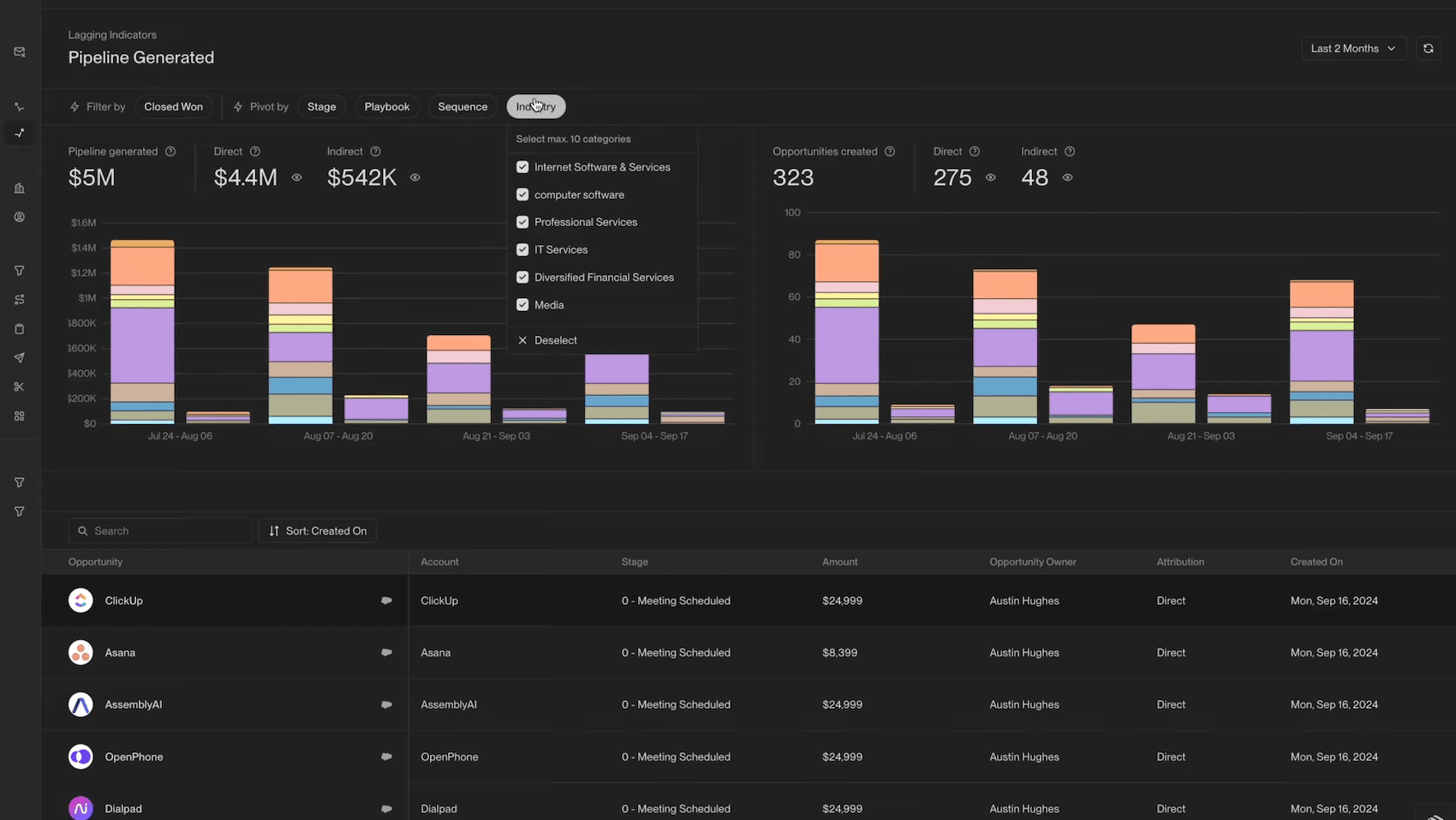
- Pipeline allocation: Each Play has its own dashboard showing the opportunities it has generated. Now we finally know what’s bringing in revenue.
- The price: approximately $21,000 per year for a minimum commitment, with one user included. The additional seat at $100 per month is a bit steep.
- The lack of transparency regarding power consumption: it is difficult to estimate actual power consumption until the machine has been running for a few months.
- European coverage: The data and signals are optimized for the U.S. market and are generally less effective in the European market (though we haven’t conducted any in-depth testing on this).
- Dependence on traffic: Without qualified web traffic or a sufficient volume of target accounts, the signals aren’t triggered and the system runs idle.
Unify vs. Clay: Which Tool Should You Choose?
For most teams considering Unify, the real alternative is Clay, possibly supplemented by a presentation tool like Smartlead.
The two tools embody two opposing philosophies:
- Clay is a development environment: an ultra-flexible spreadsheet interface, over 100 data providers and the freedom to build exactly the workflow you want. This freedom comes at a price: complexity. You need someone who’s comfortable with workflows to get the most out of it, and someone to maintain the whole system over the long term. Many teams have a half-configured Clay instance that’s just sitting there unused.
- Unify is a turnkey system and is designed as such. Intent signals are native (6sense, Clearbit, website visits, job changes); email delivery is integrated with managed deliverability; and workflows can be set up in hours rather than weeks. On the other hand, you work within the framework defined by the tool, with less flexibility than with Clay when dealing with complex cases.
The deciding factor is primarily a people-oriented one. If you have a GTM engineer or a technical ops professional who enjoys building things, Clay offers more power for significantly less (plans start at $167/month). If you want your sales team to leverage buying signals without relying on a technical specialist, Unify is designed specifically for that. Note that the two sometimes work together: some Unify customers keep Clay for exploratory cold campaigns and reserve Unify for automated warm outbound outreach.
And if your needs are simpler, that is, a contact database and sequences without the signaling layer, an Apollo covers the essentials at a fraction of the price.
Our verdict: Who is Unify designed for?
Unify is right for you if:
- You are a B2B scale-up with a lifetime value (LTV) of more than €10,000 and a sales cycle where timing is critical
- Your website is already generating a significant amount of qualified traffic that you are not leveraging commercially
- Want to set up a signal-driven outbound strategy without hiring a GTM engineer or using five different tools?
- You have the budget for a five-figure annual commitment and the patience to let the machine learn for a few months
Skip it if :
- Looking for a cold emailing tool? Smartlead and Instantly do the job very well for 10 to 20 times less.
- Your market is primarily French: data coverage will be poorer, and a tool like Pharow will be much more useful for French data.
- Do you have an in-house technical expert who loves to build things? Clay will give you more flexibility at a much lower cost.
- If your number of target accounts is limited or your site doesn’t have any traffic yet, the bot won’t have anything to work with
Final rating: 4.3/5. Unify is probably the best outbound system on the market and certainly the most expensive to start with.
The tool delivers on its core promise (turning purchase signals into sales conversations without human intervention) with a level of integration that neither Clay nor traditional sales engagement platforms can match.
That leaves the economic equation: this is an investment on par with recruitment costs, which is only justified if you have the traffic, the volume of potential customers, and the average order value to sustain it. Do the math before the demo, not after.
Unify is designed for B2B teams that have a real pipeline to streamline and the budget for recruitment to invest. If this applies to you, request a demo and ask for a coverage test on your target European accounts.