



- Transaction software knows where a property stands, rarely where a relationship stands: that is the layer HubSpot adds.
- The strong point is automatic follow-ups: after a viewing, before a listing agreement expires, six months after a signature.
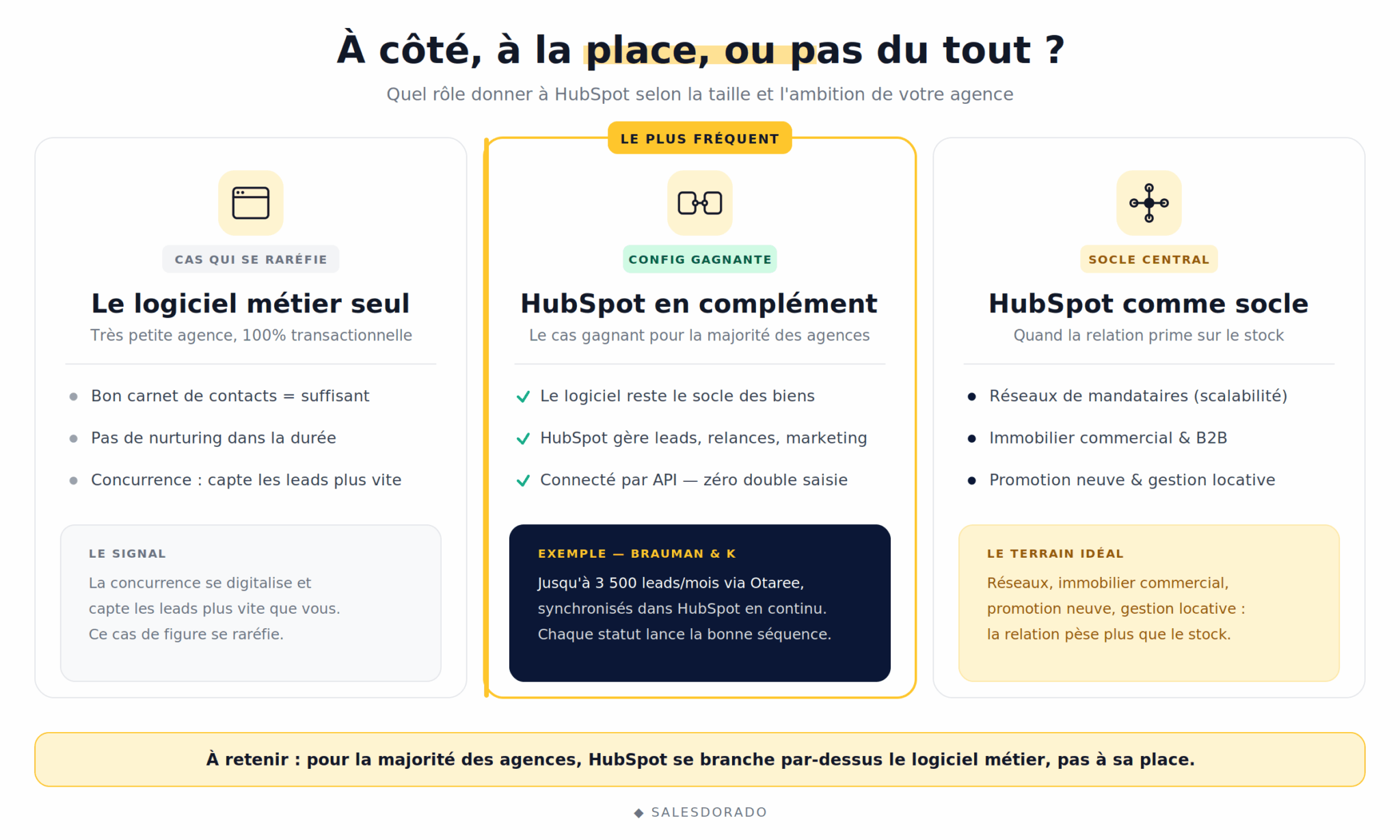
- For most agencies, HubSpot plugs in on top of industry software, not in its place.
- Networks of independent agents, commercial real estate, new-build development and property management can make it their central CRM.
- Start on the free CRM, move to Starter for follow-ups, and to Pro when lead scoring is justified.
Most agencies looking for a real estate CRM are actually looking for listing and transaction management software: an Apimo, a Modelo (formerly Netty), a Hektor, built to manage a stock of properties and publish listings.
These tools do that job very well.
But they are weak exactly where your revenue is decided, managing the relationship over time: the seller you will need to follow up with in eighteen months, yesterday’s client who could become a property management mandate or a referral, and so on. That is precisely the gap HubSpot fills, not by replacing your industry software, but by taking on the relationship layer it neglects.
So can HubSpot CRM really manage a real estate cycle end to end, from first contact to signature? Should you run it alongside your transaction software, or can it become your main platform? And at which plan does the bill get serious? We dug into the question for residential agencies and networks. Here is our full review.
Our review of HubSpot CRM for real estate in brief
| Area | Score | Our take |
|---|---|---|
| Overall rating | 4.3/5 | HubSpot is not real estate software in the strict sense, but it is one of the best tools for structuring client relationships over long cycles. An excellent choice for agencies and networks that want to stop losing leads in a spreadsheet. |
| Sales cycle management | 4.6 | Fully customizable pipeline, mapped to your stages: prospecting, listing agreement, viewing, offer, preliminary sale agreement, signature. You link seller and buyer to the same deal, with all the property details. |
| Follow-up automation | 4.5 | The real strength. You can set up post-viewing follow-ups, alerts when a listing agreement is about to expire, follow-up emails six months after a signature, and more. This is where HubSpot pulls ahead of transaction software. |
| Coexistence with industry software | 4.1 | HubSpot CRM connects to industry software such as Apimo or Otaree, via API or a connector. Setup takes some work at the start, but it eliminates double entry. |
| Mobility in the field | 3.8 | The iOS and Android app does the job for checking a record or logging a call. It is less suited, however, to the 100% field agent than some industry tools. |
| Value for money | 3.8 | The free CRM is unbeatable for getting started. But the Pro plan (€90 per month per license) pushes the bill up as soon as you want lead scoring and sequences. |
HubSpot’s free CRMHubSpot’s CRM comes in a free version, with no time limit, for up to 2 users and 1,000 contacts. Enough to test contact management and your pipeline before you even consider a paid plan.
The real CRM problem in real estate (and why your industry software doesn’t solve it)
Real estate transaction software does a precise job: it manages your stock of properties, your listing agreements, the matching between a request and a listing, distribution to the portals, and sometimes the tracking of private-seller ads.
On that ground, an Apimo or a Hektor is excellent and HubSpot does not claim to compete.
The problem lies elsewhere. When it comes to following a lead over time, most agencies fall back on an Excel file or an overflowing inbox. Sales follow-up becomes a memory exercise and, in real estate, that memory is expensive.
Why? Because, structurally, cycles are long and repeat purchases are rare. A seller can hesitate for eighteen months before signing a listing agreement and a buyer sometimes takes two years to make a move. In the meantime, you should be keeping that relationship warm, which is what we call lead nurturing, but without a tool, nobody really does it.
This is exactly where you lose value: a listing agreement expires without anyone noticing, a hot prospect is forgotten in the week after a viewing, and so on. These lapses are not details, because in a business where one transaction is worth several thousand euros in commission, every missed follow-up is a sale that goes to the competitor across the street.
This is not a property management problem. It is a relationship problem, a relationship management problem.
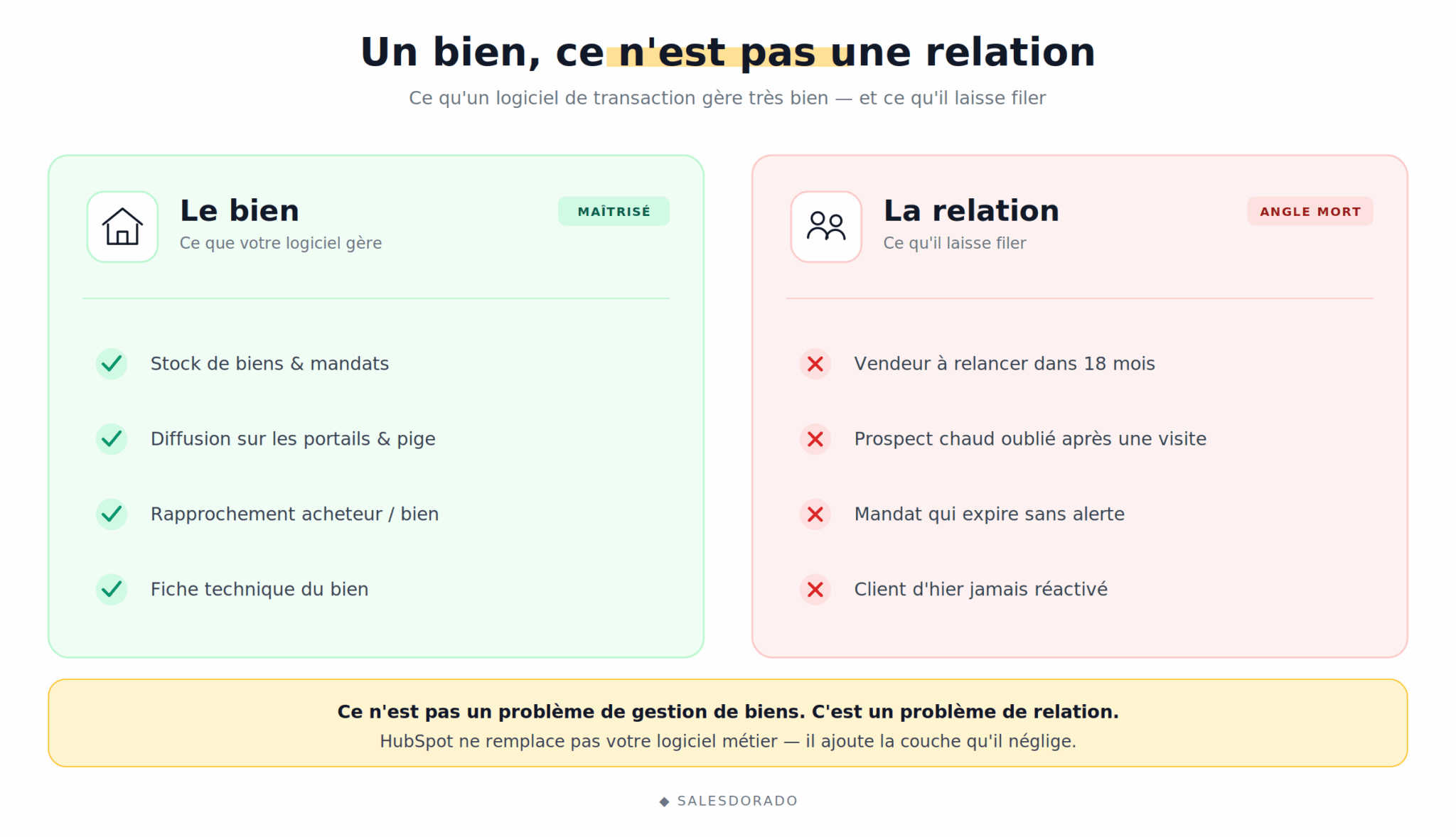
Watch outTransaction software is not a customer relationship tool. It knows where a property stands, rarely where a relationship stands. If your prospect follow-up still lives in a spreadsheet, it is not your industry software you should throw out: it is a relationship layer you need to add on top. And this is where HubSpot CRM makes sense.
What HubSpot CRM actually does for a real estate agency
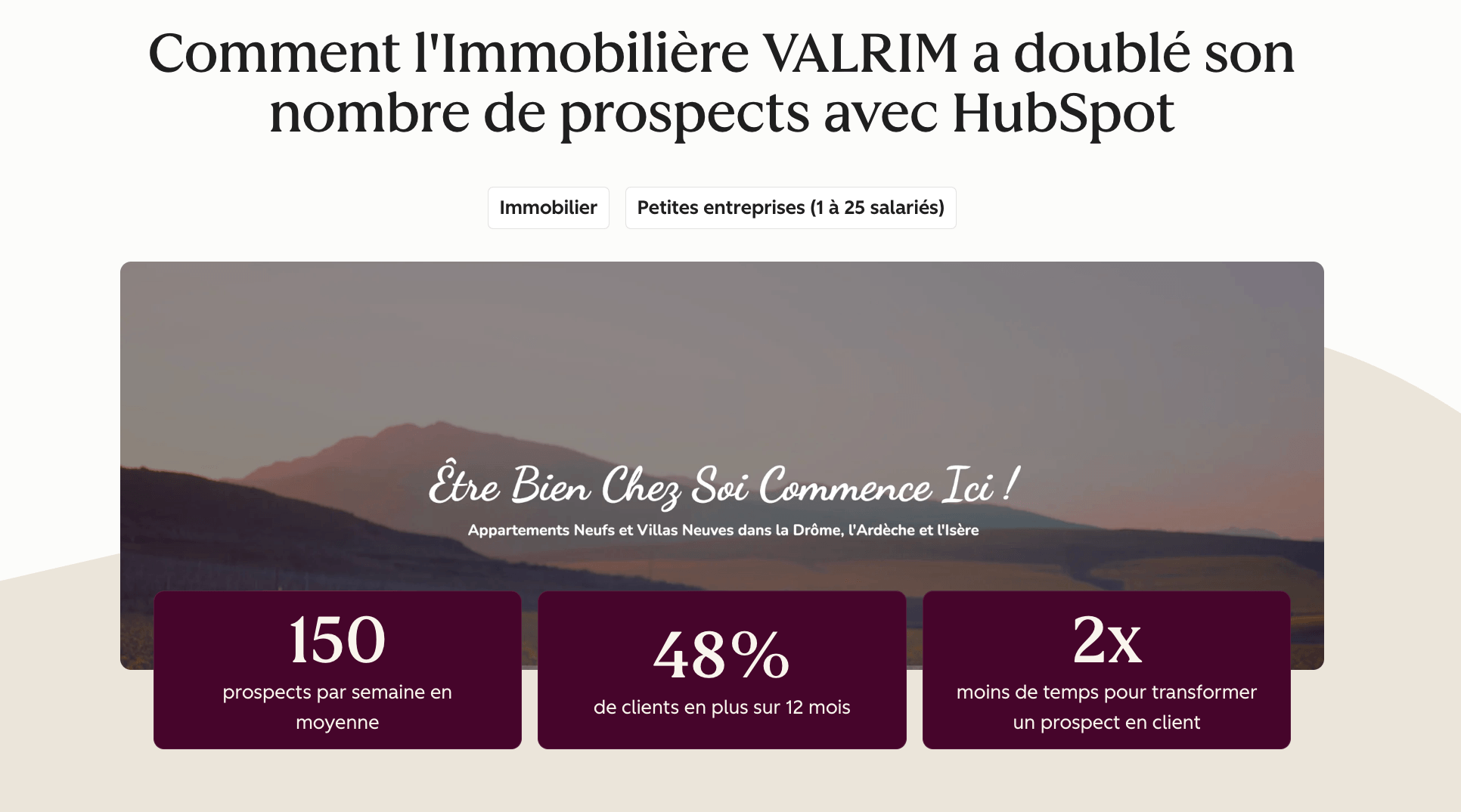
Let’s look at how HubSpot tackles this weak link. The vendor highlights cases such as Immobilière VALRIM, which reportedly halved its sales cycle and gained 48% more clients in one year. These are vendor figures, to be taken with caution. But the mechanics behind them are solid and that is what really counts.
1. A pipeline mapped to your real estate cycle
HubSpot lets you build a pipeline that follows your stages exactly: prospecting, listing agreement, viewing, offer, preliminary sale agreement, final deed. Each deal carries its own custom properties: property address, budget, target area, listing agreement status, commission amount. You attach the seller and the buyer to that same deal and the entire history stays in one place.
The gain is twofold:
- The agency manager sees potential revenue at each stage in real time, without waiting for a spreadsheet updated the following week.
- When an agent takes over a colleague’s file, they immediately know where the relationship stands, without breaking anything in the follow-up.
To go further on setup, we detail the steps in our guide to structuring a sales pipeline with HubSpot.
2. Automating prospect and client follow-ups
This is the heart of the matter. HubSpot workflows take over everything a swamped agent ends up forgetting.
Here are a few concrete scenarios you can apply directly to an agency:
- After each viewing, a follow-up email goes out automatically to collect the prospect’s impressions. If they don’t reply within three days, the agent gets a notification to step back in.
- As a listing agreement nears expiry, a reminder triggers a check-in with the seller before it is too late.
- Six months after a signature, an email offers the new owner a property management service. A one-off client becomes a recurring relationship.
- As soon as a lead crosses an engagement threshold, an alert notifies the right agent internally.
None of these messages turns the relationship into a robot’s job. They are there so nothing slips through, and so your agents can focus their energy on calls and negotiations. This type of scenario also turns your past clients into a source of revenue, exactly in the spirit of customer retention applied to real estate.
3. Lead scoring to work only the hot prospects
Not all leads have the same value and an agent does not have time to treat them all with the same energy.
HubSpot’s lead scoring assigns a score to each contact based on their actual actions: the listings they view, the forms they fill in, and so on. A prospect who comes back to the same listing three times in a week automatically rises to the top of the pile.
The result: your agents call the people who are ready to move first, not the next line in a file. We explain the full mechanics in our article on lead scoring.
4. Breeze, the AI that prepares your meetings
Breeze, the AI assistant built into HubSpot, draws on the data in each contact record to save you admin time. Before a meeting, it gathers a prospect’s complete history and pulls out talking points. It can also write a first draft of a follow-up email after a viewing.
Nothing magical about it. Just time recovered from paperwork and reinvested in the human relationship, which remains decisive in a transaction. We tested the tool in detail in our article on Breeze, HubSpot’s AI.
Salesdorado’s tipDon’t build ten workflows in the first month. Start with three automations at most: for example, the post-viewing follow-up, the listing expiry alert and the agent notification. Stabilize them, measure, then add variants by property type. A badly tuned automation annoys your prospects more than it converts them.
Start with the free CRMAll these features can be turned on gradually. You can start with the free CRM and plug in automations later, with no painful overhaul.
HubSpot alongside your real estate software, or instead of it?
Ultimately, that is the real question.
The answer depends on your structure. Let’s start by laying out the strengths of each:
| Criterion | HubSpot CRM | Specialized transaction software |
|---|---|---|
| Managing property stock and listing agreements | Basic, via custom properties | Excellent, it is their core business |
| Distribution to portals and private-seller ad tracking | No | Yes, built in |
| Buyer / property matching | Manual or via segmentation | Automatic |
| Follow-up automation | Very advanced (workflows, sequences) | Limited, often absent |
| Nurturing over long cycles | Excellent | Weak |
| Lead scoring | Yes, based on behavior | Rare |
| Sales reporting | Complete dashboards | Variable, often rigid |
| Ecosystem and integrations | Very broad (WhatsApp, Zoom, Teams, Stripe) | Closed around the trade |
The table makes it plain: the two simply don’t play in the same category.
Which leads to three very different scenarios:
1. Industry software alone may be enough
If you are a very small, purely transactional agency, with no real ambition to follow up over time, your industry software and a good address book can still hold up.
But this case is getting rarer, as the competition goes digital and captures leads faster than you do…
2. HubSpot as a complement, the most common case
This is the winning setup for most real estate agencies.
Your transaction software remains the reference for properties and listing agreements. HubSpot sits on top to handle leads, follow-ups and marketing, all connected via API.
A telling example: the agency Brauman & K (read the full case study here), which specializes in new-build property, receives between 3,000 and 3,500 leads per month through its industry software, Otaree. Each lead is automatically synced to HubSpot and each status change triggers the right email sequence. In short: no more manual exports and no more prospects going cold while waiting for a forgotten follow-up.
3. HubSpot as the main platform
For some organizations, HubSpot can become the central CRM outright. We have 3 cases in mind:
- Networks of independent agents, where collaboration between agents and scalability matter more than fine-grained management of a physical stock.
- Commercial real estate and B2B, HubSpot’s home turf, where cycles are long and highly relationship-driven.
- New-build development and property management, where cross-selling and post-signature follow-up weigh heavily in revenue.
For a tool-by-tool comparison of solutions dedicated to real estate, we have a full article: our comparison of real estate CRMs.
How much does HubSpot cost for a real estate agency?
Short answer: from €0 to €90 per month per license for an agency that really uses automation. The details matter, because it is the Pro plan that unlocks the features most useful to real estate.
HubSpot now bills for a single platform, per license. The prices below are for annual billing.
| HubSpot plan | Price | What it unlocks for an agency |
|---|---|---|
| Free CRM | €0 | Up to 2 users and 1,000 contacts: pipeline, email tracking, forms, landing pages, chat, mobile app. Enough for a clean start. |
| Starter | €20 / license / month | Simple automations, segmentation, targeted email campaigns, removal of HubSpot branding from chat and meeting links. Up to 10 users. |
| Pro | €90 / license / month | Lead scoring, sequences, advanced workflows, custom reports, custom objects. The tier where the relationship layer becomes truly automated. |
| Enterprise | €175 / license / month | Governance (multi-level team organization, sandbox account), fine-grained control of access and changes. For large networks. |
Two points to keep in mind:
- AI agents consume HubSpot credits: 5,000 per month are included in Starter, 10,000 in Pro and 15,000 in Enterprise. Beyond that, you have to buy more, and the bill can climb fast.
- If you are a young company, the HubSpot for Startups program offers up to 90% off the first year of a new Pro or Enterprise subscription, subject to eligibility.
Salesdorado’s tipDon’t pay before you need to. Start on the free CRM. Move to Starter the day manual follow-ups become your bottleneck. Only switch to Pro when lead scoring and sequences are justified by your volume. We break down the full pricing grid in our article on HubSpot’s cost and dissect exactly what the free version of HubSpot covers.
Our verdict: is HubSpot right for your real estate agency?
HubSpot is the tool that manages precisely what real estate software manages badly: the client relationship, over time.
HubSpot is right for you if:
- You lose leads in Excel files or scattered inboxes.
- Your sales cycles are long and require real follow-up over time.
- You want to automate your follow-ups without losing the human touch.
- You are a network, a developer or a commercial real estate player and collaboration between agents matters as much as property management.
Look elsewhere if:
- You mainly want to distribute listings to portals and manage a stock of properties: for that, you still need industry software.
- Your agents work almost exclusively in the field and demand a full-featured mobile app.
- You are a very small, purely transactional agency with no need for nurturing.
Final rating: 4.3/5. HubSpot will not replace your transaction software and that is not its purpose. But to stop letting sales slip away for lack of follow-up, it is today the best relationship layer you can plug into your business. The free CRM lets you check that with no commitment. For a complete test of the platform beyond real estate, here is our detailed review of HubSpot.
Our recommendationFor an agency or network that wants to structure its client relationships, HubSpot is the obvious choice. Start with the free CRM, set up your first automatic follow-ups and watch how many opportunities you stop missing.
The questions we get over and over.
Is HubSpot suitable for a real estate agency?
Yes. HubSpot suits both residential and commercial agencies. It centralizes buyer and seller contacts, structures the pipeline from first contact to signature and automates follow-ups. Its flexibility lets you adapt it to the specifics of the trade, even though it does not replace listing distribution software.
Does HubSpot replace real estate transaction software?
Not completely. HubSpot handles neither distribution to portals nor automatic matching between a buyer and a property. The most effective setup is to keep your industry software for stock and listing agreements and plug HubSpot in on top for client relationships and follow-ups.
Is HubSpot CRM free for a real estate agency?
Yes, the base CRM is free, with no time limit, for up to 2 users and 1,000 contacts. It covers contacts, pipeline, emails, forms and a mobile app. Automations require at least the Starter plan, at €20 per month per license, and lead scoring requires the Pro plan, at €90.
Which HubSpot plan should a real estate agency choose?
The free CRM is enough to get started. The Starter plan (€20 per month per license) unlocks follow-up automation. The Pro plan (€90) adds lead scoring and sequences, useful as soon as your lead volume grows. Start small and move up according to your real needs.



What the community says.