


- Draw up a detailed content plan so that your LinkedIn marketing strategy has the best chance of making an impact: don’t rush in without any preparation.
- Identify the ad formats that best suit your strategy. You may find that a combination of different formats works better depending on your campaign.
- Make sure your marketing messages target the right people based on a complete content plan, and run frequent A/B tests so that your campaign ads always hit their mark.
- Use LinkedIn’s analytics features to identify the successes (or failures) of your marketing plan, adjusting and changing settings where needed, while picking up useful insights you can roll out in future campaigns.
- Keep an eye on your budget and don’t be afraid of LinkedIn’s auction process. Although bids can look expensive, the platform’s conversion rates are higher than those of other platforms.
Lately, a number of B2B marketers have been worried about their ability to generate leads on social media. On top of that, the recent changes made to the Facebook and Twitter algorithms to improve the user experience somewhat limit the organic reach of brand posts. But don’t panic! LinkedIn is a gold mine for generating leads, promoting content and driving traffic to company websites. We put together this complete guide to perfect your B2B marketing strategy on LinkedIn.
Why is LinkedIn B2B marketing perfect for brands?
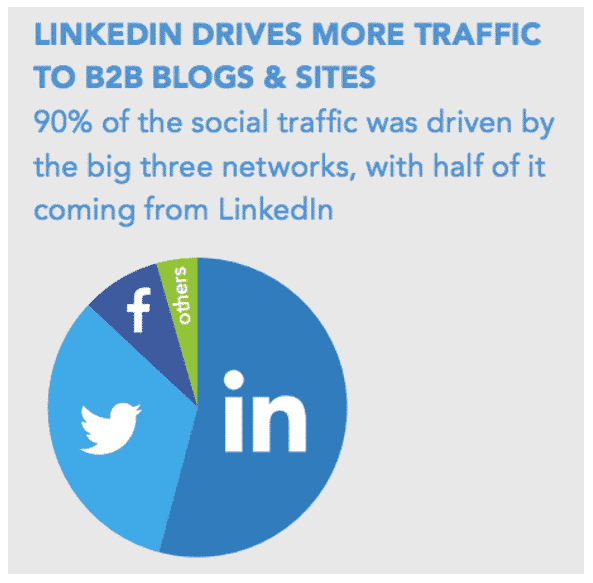
“Prospectors” are already tapping into LinkedIn’s B2B marketing potential:
- LinkedIn drives 64% of the social media traffic to corporate websites.
- 93% of B2B marketers now consider LinkedIn the most effective site for generating leads.
The platform has also announced a 60% increase in its engagement rate.
LinkedIn Ads, to go further, faster
LinkedIn has added features to its already powerful marketing offer, so that B2B marketers can reach prospects.
In particular, the social network lets you filter your searches more precisely and target your posts effectively thanks to user data. LinkedIn has also rolled out a powerful new video ad format and new content options, becoming more than ever a benchmark among B2B marketing platforms.
B2B marketing best practices on LinkedIn?
LinkedIn’s main rule for businesses is this: think before you act.
First, it is essential that you have filled in the basics of your LinkedIn company page.
Second, roll out a strategy so that your marketing efforts stay focused on your end goal.
“The lack of a clear strategy is the biggest mistake. Users sign up for LinkedIn, but they have no precise plan for how they are going to use it.”
– Steve Phillip, LinkedIn expert
Train your teams
Make sure your team is well informed about the services LinkedIn offers.
You can use this article as a starting point, but don’t forget to dig deeper, and consider training to make sure everyone is on the same wavelength when it comes to LinkedIn’s B2B marketing capabilities.
Stay focused
Once the initial excitement of your LinkedIn presence has worn off (and it often does), it is common to lose momentum if you don’t get results quickly. It is essential to realize that, like any marketing undertaking, the B2B marketing process on LinkedIn takes time to develop and settle in before it pays back your investment.
Identify the decision-makers
Spell out precisely who you want to connect with on LinkedIn. Think about the industry, the location, the job titles of the decision-makers, and so on.
Design your content strategy around what interests your prospects and the added value you bring them.
Define a strategy
Make sure you create a roadmap for every aspect of your LinkedIn marketing strategy, stating how, what and when to post.

Also make a point of downloading LinkedIn’s content marketing toolkit, which bundles ready-to-fill templates (content calendar, content audit, distribution plan) and an SEO checklist to help you with your B2B marketing strategy on LinkedIn.
Be prepared
According to Joe Pulizzi of the Content Marketing Institute, marketers with a documented strategy are four times more effective, yet only 28% of marketers have a documented content marketing strategy. You will find a useful resource on the subject by following this link.
Our guide to making a LinkedIn marketing campaign a success
1. Make sure your content is relevant: your content should show how your product or service has helped client companies.
2. Don’t be too sales-focused: make 50% of your content about your brand, and 25% about your industry.
3. Show your human side: devote 25% of your content to topics that matter to you personally, so that people see you as an individual and not just as a pawn of a faceless company.
4. Make sure you post content regularly: posting at least once a day is recommended, but whatever frequency you choose, stick to it and publish content regularly.

5. Get your employees involved: make sure other employees comment on and share the content you publish – this can considerably widen your organic reach.
6. Use keywords: in the “Specialties” section of your LinkedIn company page, add keywords related to your business so that they show up in the related search results.
7. Identify your prospects: use LinkedIn’s powerful search tools to locate potential buyers and figure out what they need, and so target your LinkedIn ad campaigns more closely.
8. Track the engagement rate: use your company’s analytics page to identify your best-performing posts, to help you build future content strategies (see the LinkedIn insights & LinkedIn analytics section below).
How do you get the most out of your LinkedIn marketing campaigns?
From text ads to sponsored video ads or Message ads, LinkedIn offers marketers a wide range of possibilities, all accessible through LinkedIn Campaign Manager.
The platform also offers extremely powerful analytics and targeting tools, turning LinkedIn into a formidable marketing tool.
But which LinkedIn advertising options are actually available, and why should you roll them out?
LinkedIn Text Ads
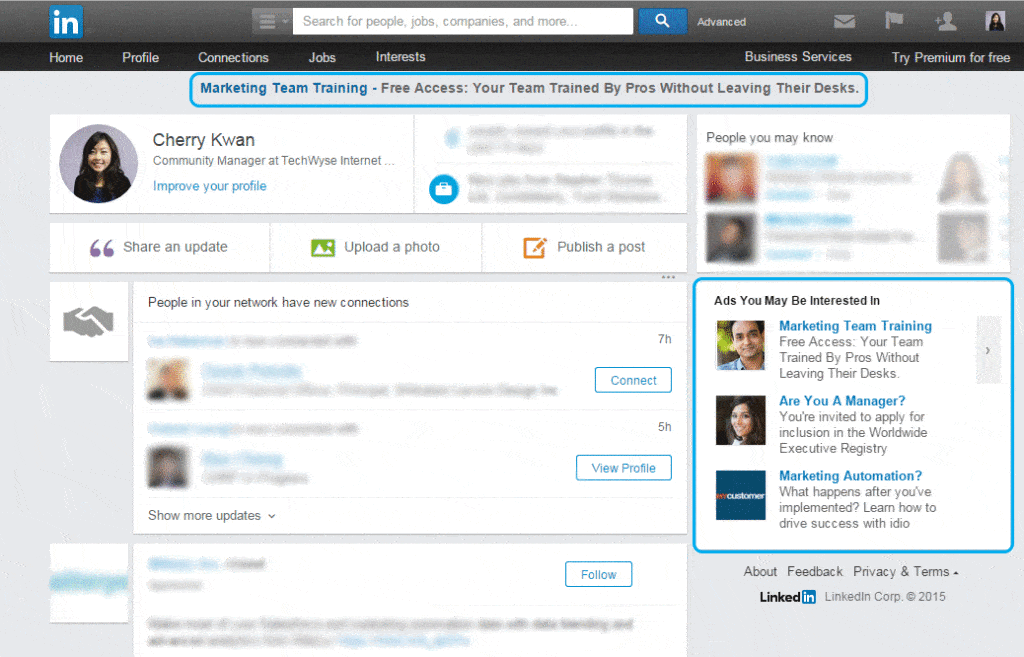
LinkedIn text ads appear in the right-hand column of LinkedIn desktop pages and include short ad copy, along with a small optional image. Source: LinkedIn Business
What? A basic but effective ad, with an optional 100×100 image, a headline of 25 characters maximum and a description of 75 characters maximum.
Why? Ideal for targeting specific audiences, recruiting candidates and increasing traffic to your website / landing pages.
LinkedIn best practices
- Grab your audience’s attention with headlines that address them directly and make a clear value offer.
- Don’t sell your products / services directly: help, educate and inform before you sell.
- Always add an image, as it generates 20% more clicks. Also use profile photos, as they work better than logos or objects.
- Make sure your call-to-action is clear and well written, and that it includes keywords specific to your target.
- If possible, include your company name in your offer, to build brand awareness among those who don’t click on your LinkedIn ad and who will therefore be counted as “impressions”.
- Create a dedicated landing page for the text ad that reflects the brand strategy, messaging and the right offers. Don’t settle for letting your prospect land on your home page and leave again.
LinkedIn Sponsored Content

LinkedIn Sponsored Content is essentially a regular post that you boost with an advertising budget. Source: LinkedIn
What? It is generally a promotion of the company page, with an introduction of 150 characters maximum or less, a headline of 70 characters maximum and a recommended 1200 × 628 image to increase the CTR.
Why? Ideal for growing your number of followers, proving your credibility, raising awareness of events and generating leads.
LinkedIn best practices
- Speak directly to your target audience in the headline: according to a LinkedIn study, the CTR is 19% higher and the conversion rate 53% higher.
- Make sure your headline is accurate and contains statistics wherever possible. Shorter content leads to an 18% increase in engagement, while using statistics generates 162% more impressions.
- Create a strong call-to-action so that the audience understands how to act once they have digested your content.
- Turn on Lead Gen Forms: they gather a member’s profile data, such as job title, contact details and so on, pulling them into a single form that the member can then send you in a single click (they also open from Conversation ads, see below).
LinkedIn Message ads and Conversation ads
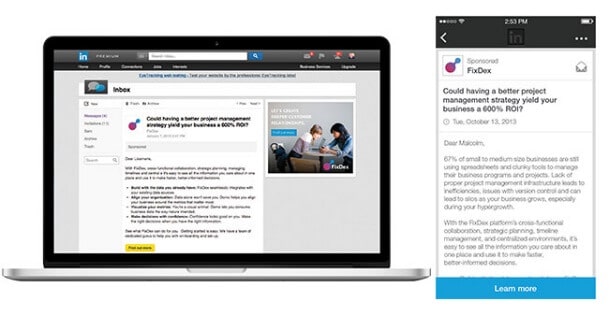
Message ads, formerly Sponsored InMail, deliver a personalized private message to the LinkedIn inbox of targeted members. Source: LinkedIn
What? A private message, sent on behalf of a sender you pick, straight into the LinkedIn inbox of your targets: a subject line (60 characters maximum), body copy (1,500 characters maximum), a call-to-action button (20 characters maximum) and, optionally on desktop, a 300 × 250 banner. Message ads carry a single call-to-action. Conversation ads offer several, leading to a landing page, a Lead Gen Form or the next message in the exchange. In Europe (EEA and Switzerland), only members who opted in to these sponsored messages receive them.
Why? Ideal for personalized invitations to events and webinars, for promoting downloadable content such as white papers, and for speaking directly to targeted prospects.
LinkedIn best practices
- Send your message from the profile of a company employee, not from the company page, to make your message more human. This approach can increase open rates by 16%.
- Make sure the sender’s job title is linked to your offer, for more credibility and relevance. If you are sending an IT-related message, send it from the IT manager or another technical employee.
- Include relevant links in your body copy and add a separate call-to-action. This can increase the click-through rate by 21%.
- Make sure your body copy is short and relevant to the person you are sending it to, and make sure you stay personal throughout your message. Also remember that body copy under 500 characters has a 46% higher CTR.
More than 85% of LinkedIn engagement comes from mobile devices: make sure all your landing pages and messages are optimized for mobile devices, whatever ad format you use.
LinkedIn Dynamic Ads
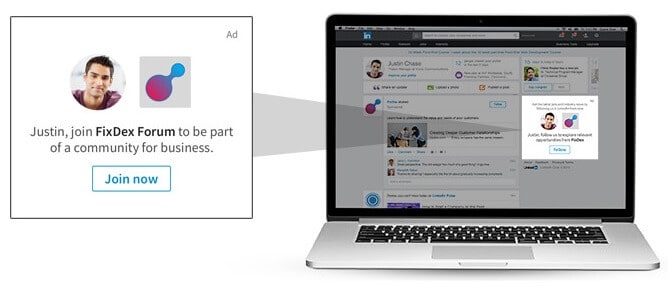
LinkedIn Dynamic Ads adapt dynamically to each user who sees them. Source: LinkedIn
What? An ad that dynamically changes its content and image depending on the person targeted.
Why? Ideal for attracting new followers to your company page and highlighting targeted job offers based on users’ career history.
LinkedIn best practices
- Turn on the option that displays the profile photo of the person viewing your ad. This will show their photo next to yours, which will produce click-through and conversion rates 100% higher.
- Don’t use your company logo as your profile photo. Instead, replace it with the face of the person who will communicate with users if they click on it. You can also try using an image related to your theme to draw attention to your ad.
LinkedIn Video Ads
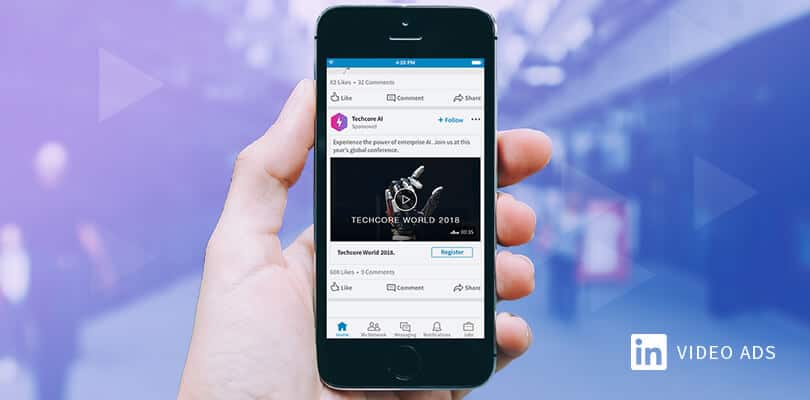
LinkedIn video ads appear in users’ feeds and autoplay on mute by default. Source: LinkedIn
What? A video ad (at last!) that plays automatically in members’ feeds without sound, but gives viewers the option to turn the sound on if they want to.
Why? Ideal for building brand awareness through storytelling, positioning your brand as an expert, showcasing products or services, and promoting events and webinars.
LinkedIn best practices
- Keep your LinkedIn video ads under 30 seconds: according to an internal LinkedIn report, ads of 30 seconds or less see a 200% increase in view completion rate.
- Make sure you get your main message across in the first 10 seconds: viewers have a limited attention span.
- Expect exceptions to the rules above! For example, “Generation Z” is more patient and will watch longer videos if you describe a product in detail or a more complex story. The best practice is to run tests to find the ideal length.
- If your budget allows, polish your video by adding text, effects and so on to make it more impactful.
LinkedIn targeting and segmentation
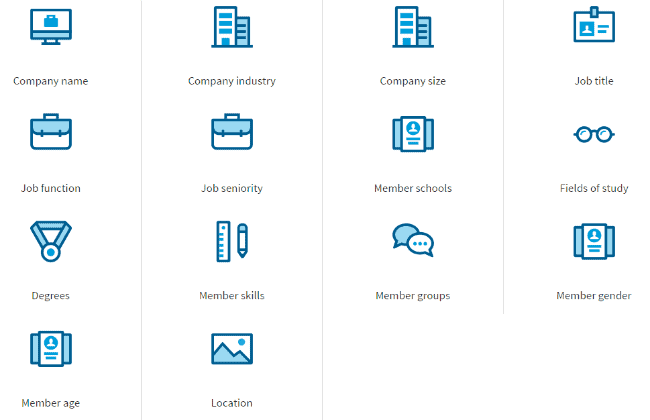
LinkedIn lets you target users based on a large number of criteria. Source: LinkedIn Business via Marketing Mojo
With so many ad formats available, the question is how to roll out your LinkedIn ads effectively so that they find their audience.
LinkedIn offers a wide range of targeting and segmentation tools that let marketers explore the specifics of different profiles and build tailor-made campaigns.
LinkedIn recommends choosing two targeting options for individual campaigns with a location.
The platform offers classic targeting options such as gender, age and so on, but with a host of additional options:
Company name • industry • company size • followers • job title • seniority • years of experience • and much more.
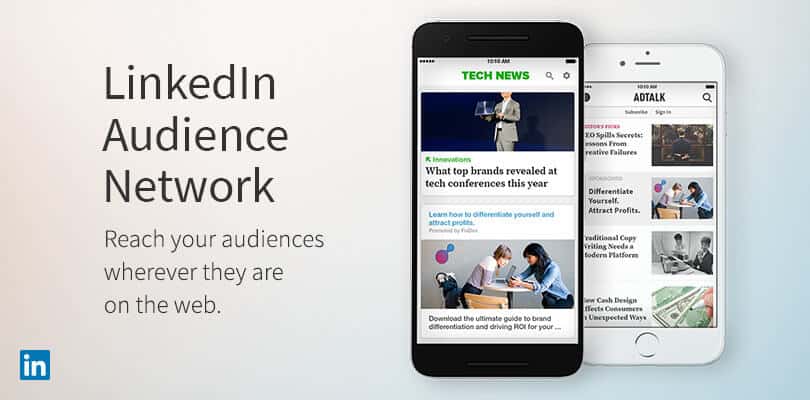
Audience Network, another powerful targeting option, lets marketers serve ads to LinkedIn users while they browse other websites. Source: LinkedIn Business
Marketers can also use LinkedIn’s Audience Network feature to reach an audience beyond LinkedIn’s borders, by serving Sponsored Content to a network of vetted publishers.
But what is perhaps most exciting for marketers is LinkedIn Matched Audiences, an advertising service that offers three powerful features for targeting and retargeting on LinkedIn.
First, there are two main targeting options: account targeting, which makes it possible to target individual decision-makers in specific companies, and contact targeting, which lets a company import CRM contacts or use mailing lists, then target the decision-makers found in those companies.
Finally, marketers can retarget visitors to companies’ websites to push lead generation rates even higher.
Conversion rates rise by 32% when LinkedIn account targeting is used.
Time to test
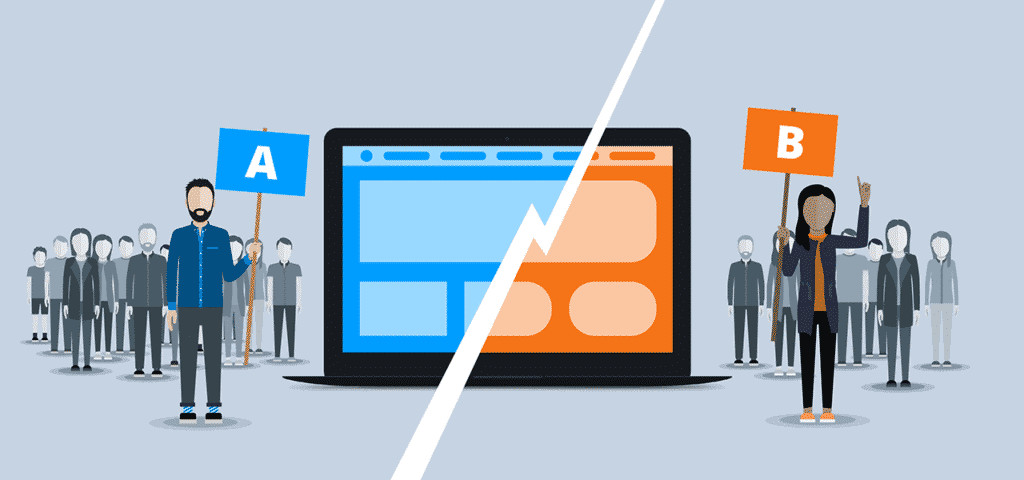
Having great content and an effective targeting strategy is only the first half of the journey.
The other half?
Test your LinkedIn marketing and advertising campaigns to give them every chance of performing. A few tips:
- Strike the right balance between targeting your audience too narrowly and aiming too wide. Use A/B tests to find your ideal balance.
- For each ad, consider creating two or three versions to find out which performs best. Remember to test different variables in the ads to make sure you get meaningful results. For example, test two different images, then two headlines, and so on.
- Pause your worst-performing ad every one to two weeks and replace it with a new one. This will help increase your ad’s relevance score.
LinkedIn insights & LinkedIn analytics
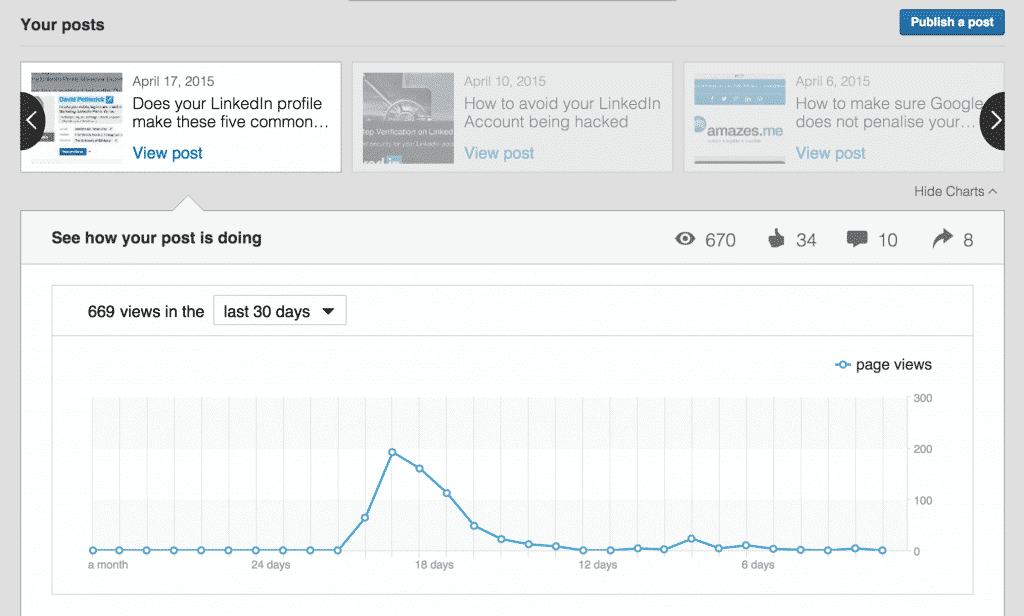
LinkedIn has plenty of analytics to explore, from content performance indicators to follower growth trends. Source: LinkedIn Blog
To help marketers, LinkedIn offers an analytics service for company pages, to analyze the performance of campaigns and posts in depth.
LinkedIn analytics tells you the number of clicks, the engagement rate and the key trends that can help you in the future.
LinkedIn insights lets you analyze the job titles held by your audience and identify their demographics, their seniority, their job function, as well as the size of their company and their industry.
From there, you can identify your best-performing ads and the areas where your content can improve. The data you get on your audience can be added to your content plan to feed your next campaigns.
It is this level of detail, when fully exploited, that makes LinkedIn B2B marketing so powerful.
More information on LinkedIn analytics by following this link.
So, how much do LinkedIn ads cost?
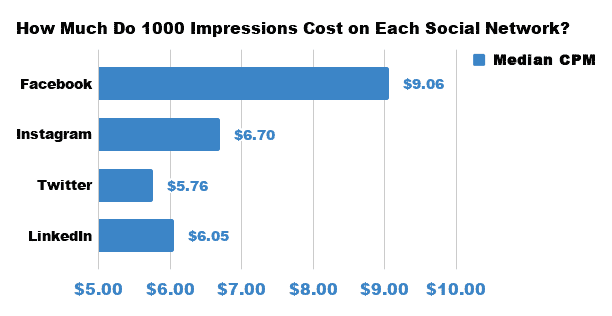
While LinkedIn’s average CPC is fairly high, the average CPM on LinkedIn is lower than on many other social networks. Source: How much do social media ads cost?
The large number of options available raises the following question: what is the price to pay for a real advertising campaign on LinkedIn?
As is often the case with other social platforms, there is no truly fixed cost. It uses an auction system that lets you serve self-service ads with different cost types:
- Cost per click (CPC, ideal for generating traffic and leads)
- Cost per 1,000 impressions (CPM, ideal for building brand awareness)
- Cost per view (CPV, ideal for increasing LinkedIn video views)
- The exception? Message ads and Conversation ads, billed per send.
Choose the method you prefer, then take part in LinkedIn’s auction process. This will determine which advertisers, among those who targeted the same audience, will have the honor of seeing their ad appear in users’ news feeds.
The higher your bid and your relevance score (based on engagement rates and many other variables), the better the chance that your bid wins.
Keep in mind that LinkedIn’s CPC price is generally higher than on other platforms.
The good news?
Conversion rates are higher too. According to specific client data from Seer, the average CPC on Google AdWords was 2.56 USD, against 12.88 USD on LinkedIn, but conversion rates on LinkedIn were higher, at 0.77% compared with 0.65% for AdWords.
On top of that, LinkedIn generates more B2B leads than Facebook or Twitter.
This means that if you are looking for the best-performing platform for B2B lead generation, LinkedIn should be your priority.
Budget questions
You can set your own budget and bids, and schedule your posts on LinkedIn. If you need to stop your advertising, you can do so whenever you want. This means you stay in control of your results at all times.
The questions we get over and over.
What ad formats does LinkedIn Ads offer?
Text ads, Sponsored Content, Message ads and Conversation ads, Dynamic Ads and video ads, all accessible through LinkedIn Campaign Manager.
How are LinkedIn ads billed?
Through an auction system, at cost per click (CPC), cost per 1,000 impressions (CPM) or cost per view (CPV). Message ads and Conversation ads are billed per send. The higher the bid and the relevance score, the better the ad’s chances of being served.
Is LinkedIn Ads more expensive than Google Ads?
Per click, yes: according to client data from Seer, the average CPC was 2.56 USD on Google AdWords against 12.88 USD on LinkedIn. Conversion rates, on the other hand, were higher on LinkedIn, 0.77% against 0.65%.
What targeting options does LinkedIn offer?
Company name, industry, company size, job title, seniority or years of experience. With Matched Audiences, you can also target specific accounts, import CRM contacts and retarget visitors to your website.
How long should a LinkedIn video ad be?
Under 30 seconds: according to an internal LinkedIn report, these ads see a 200% increase in view completion rate. The main message has to get across in the first 10 seconds.



What the community says.