The principle of a sales pipeline hasn’t changed in 20 years. Leads are identified, qualified, proposed, negotiated and signed. On paper, it’s exactly the same as it was in 2005. But the way we do it has changed radically in 5 years. AI that transcribes and summarizes your calls, automations that move deals forward without manual intervention, predictive scoring that prioritizes your leads, alerts that detect stagnating opportunities: none of this existed (or was accessible to VSEs and SMEs) even 3 years ago.
The problem is that 80% of French SMEs still have a sales pipeline that resembles an Excel file or a shared Trello. Milestones are blurred, transitions are manual, sales people spend more time administering the pipe than selling, and the CRM is half-empty because nobody has the time to fill it in after each call. The result: the manager has no visibility of what’s really going on in the sales tunnel.
This article doesn’t rehash the “what is a sales pipeline” course. For that, we already have a comprehensive guide on the subject. Instead, we focus on a more actionable question: in concrete terms, what should a modern sales pipeline look like in 2026 when you’re a VSE/SME, and how can you equip it so that it almost runs itself?
Sommaire
What has really changed in a commercial pipeline in 2026?
There are 5 concrete breakthroughs that are changing the way you pilot a sales pipeline when you’re a small team.
#1 CRM fills itself (or almost fills itself)
This is probably the most significant change for a small business. For years, the #1 problem with small-team CRM has been simple: nobody fills it in. The sales rep gets off a call, has 12 other things to do, and the deal sheet remains as it was this morning.
Your company ends up with a half-empty CRM, information in the heads of sales reps rather than in the system, and a pipeline that doesn’t reflect reality.
Conversational AI has solved this problem. Today, a phone call made from the CRM is automatically transcribed, summarized, and the deal sheet fields filled in without anyone typing a line. A videoconference is summarized at the end of the meeting, commitments made are identified and associated tasks are created automatically. The salesperson validates in 30 seconds what used to take 15 minutes.
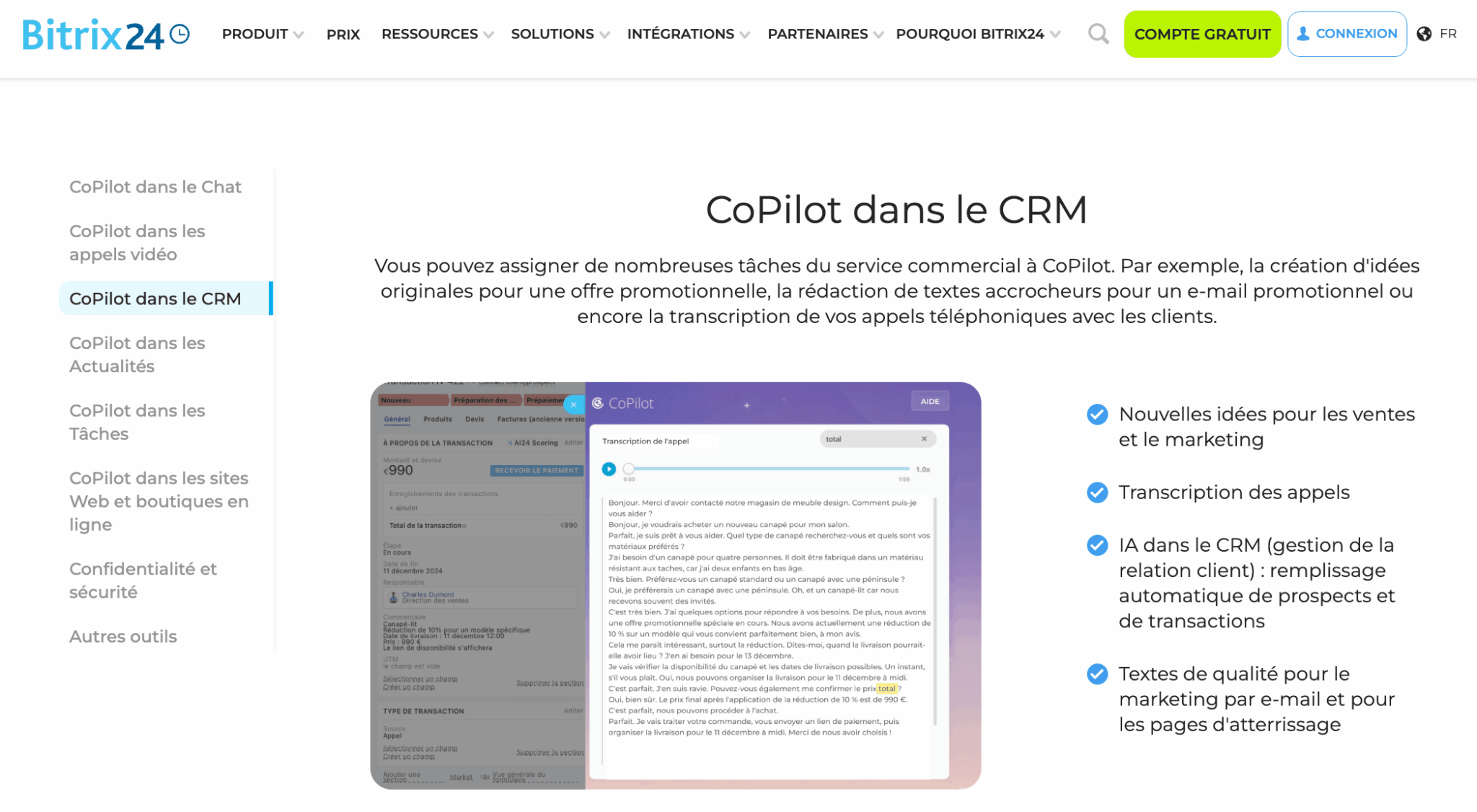
It’s the end of the false dilemma between “doing your job” and “filling the CRM“. And it’s what makes everything else possible: without reliable data in the pipe, none of the other breaks work.
Test AI call transcription with Bitrix24
Bitrix24 offers CoPilot, an AI assistant that automatically transcribes your phone calls and video conferences, generates a structured summary, and fills in CRM fields without manual intervention. This is exactly what turns a poorly informed pipeline into a reliable one. Available as of the free plan.
#2 Automated transitions between steps
Before: the salesperson manually moves the deal from one stage to another in his tool. And he forgets every other time.
Now: automations detect triggers (quotation sent, first call made, electronic signature received) and move the deal forward without intervention.
In concrete terms :
- When the sales rep sends a quote from the CRM, the deal automatically goes to the “Proposal sent” stage.
- When the customer signs the quote electronically, the deal goes to “Won”, the invoice is created, the team is notified in chat and onboarding starts. No human action in between.
It’s technically trivial, but it changes the very nature of the pipeline: it’s no longer an a posteriori reflection of what the sales rep has done, it becomes the orchestration system that drives the activity.
#3 Stagnant deals are detected automatically
The concept of “deal rotting” has been popularized by Pipedrive: when a deal has had no activity for X days (often 14, 30 or 60 depending on the stage), the system alerts the salesperson and manager. It’s a simple feature, but it changes everything for a small business where nobody has the time to do a rigorous pipe review every week.
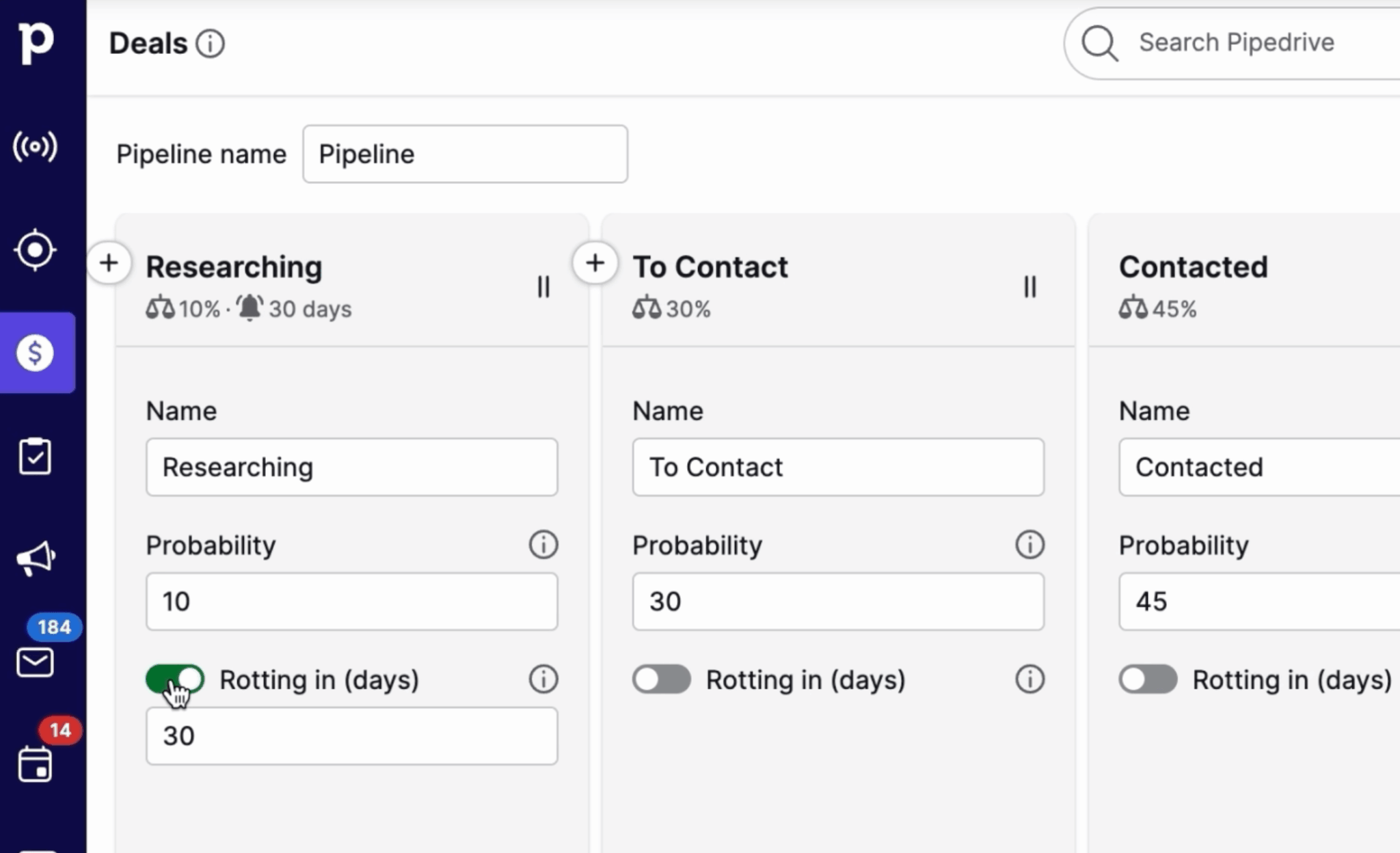
Without an automatic alert, a stagnant deal disappears off the radar. The sales rep moves on, and 3 months later you discover that you’ve lost an opportunity that could have been saved with a simple reminder at the right time. With an automatic alert, the sales rep receives a notification in his feed and can decide within 30 seconds whether to relaunch, archive or move on.
Modern CRMs, like Bitrix24, go a step further: not only do they detect the rotting deal, but they propose a personalized draft follow-up email based on the context of the deal (last exchange, identified blocking point, current stage).
#4 AI prioritizes leads for you
Lead scoring is not new. What is new is that it is finally becoming accessible and useful for small and medium-sized businesses. For a long time, scoring was either theoretical (complicated rules that nobody applied), or reserved for large teams with lots of data.
In 2026, AI :
- Analyze your history of deals won and lost.
- Identify the characteristics that distinguish one from another (sector, size, behavior, lead source).
- Applies an automatic score to each new lead.
Sales reps immediately know which leads to prioritize.
For a very small business, the transition is tangible: we move away from the “I process leads in the order they arrive” mode to the “I process the right leads first” mode. This mechanically means 20 to 30% more sales at constant effort.
#5 Sales actions are suggested in real time
“This deal hasn’t had any activity for 5 days, here’s a draft of a personalized reminder email.”
“This prospect looks like 3 deals you won last year, prioritize him.”
“This morning’s call contains a price objection, here’s how your best sales people have responded to it on similar deals.”
AI becomes a sales coach integrated into the CRM. For a junior salesperson in a very small business, it’s an enormous progress gas pedal. For a senior salesperson, it means less repetitive thinking about “what to do next”. It’s a win-win situation.
Salesdorado’s opinionThe most important thing to remember is that these 5 breakthroughs aren’t just for big sales teams. They are now accessible to small and medium-sized businesses with 3 sales reps, for just a few dozen euros per month per user. The problem is no longer technical or budgetary. It’s inertia: 80% of VSEs and SMEs will be using their CRM in 2026 as they did in 2018. Those who turn the corner now will soon have a head start in terms of market share.
What a modern sales pipeline looks like for small businesses
Here’s a 6-stage pipeline model that works for the vast majority of B2B SMEs. Each stage has a clear entry criterion, a sales action to take and what AI and automations can do for you.
Step 1: Inbound lead
Entry criterion: a new contact enters the CRM, via any channel (website form, chat, telephone, LinkedIn, trade show, referral).
Sales action: none. This is the capture stage, not the qualification stage.
What needs to be automated: the creation of the contact form. No more manual data entry. The web form creates the lead. Telephony creates the record as soon as an incoming call arrives from an unknown number. LinkedIn integration enriches the information available. On-site chat qualifies the visitor and creates the lead if relevant.
Exit criterion: the contact has been identified as being within the target (company size, sector, geography). This is a “cold” qualification, based on available data, not on an exchange.
Step 2: Qualified lead
Entry criteria: the lead corresponds to the criteria of your target profile (MQL or SQL) and has been assigned to a sales rep.
Sales action: first contact (telephone call or qualifying email). The aim is not to sell, but to understand the need and qualify the opportunity.
What needs to be automated :
- Automatic lead allocation to the right sales rep according to rules (sector, geography, size)
- Transcription and summary of the call by the AI
- Automatic filling of the deal sheet after the call (identified needs, budget, decision-makers)
- Predictive scoring: AI proposes a conversion probability score based on lead characteristics
Exit criteria: the need is confirmed, the budget exists, and a discovery meeting is scheduled. This is the “hot” qualification, based on exchange.
Stage 3: Discovery
Entry criteria: a discovery appointment is scheduled.
Sales action: conduct the discovery conversation, gain an in-depth understanding of the need, identify stakeholders, validate decision criteria. Classic frameworks: BANT, MEDDIC, or more recently modernized versions.
What needs to be automated :
- Automatic appointment reminder (24h and 1h before)
- Real-time video transcription
- Structured summary of the meeting at the end of the call (key points, commitments, next steps)
- Automatic creation of follow-up tasks identified in the conversation
- Automatically send a report to the prospect after the meeting
Output criteria: the scope is clear, the decision-makers have been identified, and an estimate will be prepared.
Step 4: Proposal sent
Entry criteria: a quotation or sales proposal is being prepared.
Sales action: drafting of sales proposal, sending for electronic signature, follow-up.
What needs to be automated :
- Quote generation from CRM (templates pre-filled with deal data)
- Sending by electronic signature (Yousign, DocuSign…)
- Tracking of quote opening: who opened it, how many times, on which pages
- Automatic alert if the quote has not been opened within 48 hours
- Automatic transition from the deal to the next step when the quote is signed
Exit criterion: prospect has reacted (questions, negotiation, validation, or explicit refusal).
Step 5: Negotiation
Entry criterion: the prospect has shown an interest, but there are still points to discuss (price, conditions, scope).
Sales action: conducting negotiations, defending margins, making strategic concessions.
What needs to be automated :
- AI analysis of concessions usually made on similar deals won
- Suggestions for future exchanges (reminder, counter-proposal)
- Alert if negotiation drags on beyond a defined threshold
Exit criteria: agreement or refusal.
Step 6: Won / Lost
If won: full automation. Create invoice, trigger customer onboarding, notify team in chat, automatically calculate commission, update performance indicators.
If lost: provide the reason for failure (to feed future scoring), send an automatic “break-off” email to keep the door open, place the prospect in a nurturing pipeline for follow-up in 6 months.
AttentionThe temptation is always to add steps to “keep up”. This is the classic mistake. More than 6 or 7 steps for a small business is unmanageable. It’s also the best way to keep a poorly-informed pipeline, because nobody ever knows at which stage to put a deal. Keep it simple. If you’re hesitating between 6 and 8 stages, take 6.
How can you equip each stage of your sales pipeline?
Theoretical pipelines are good. Practical tools are better. Here’s how to cover every need with the right tools.
Capture leads without manual input
The rule is simple: if a sales rep has to create a contact sheet by hand, you’ve lost. Lead sources must be natively connected to CRM.
- Web forms: all forms on your site (contact, demo, resource download) should automatically create a lead in CRM, with source and context.
- Integrated telephony: an incoming call from an unknown number automatically creates the record. An outgoing call automatically attaches the activity to the contact.
- LinkedIn: leads collected on LinkedIn (Sales Navigator, Lead Gen forms) must be fed back into the CRM via native integration or a connector.
- On-site chat: a chatbot or live chat that qualifies visitors and creates leads if relevant.
Qualify leads automatically
Manual scoring doesn’t work for small businesses. Either you have an automatic system, or you prioritize “by feel”. For scoring that makes sense, read our guide to building a lead scoring strategy.
The central idea: combine explicit criteria (size, sector, geography) and behavioral criteria (site visits, email opens, demo requests) to produce a unique score for each lead.
AI does this better than your manual rules, because it continuously adapts to the deals you win and lose. The more deals you close, the more accurate the scoring becomes.
Document interactions effortlessly
This is the game changer. AI transcription of calls and visios, coupled with automatic CRM filling, removes the main friction that prevented pipelines from being reliable.
Today, any modern CRM for SMEs offers this functionality for just a few euros per user per month. If your current tool doesn’t, it’s time for a change.
Bitrix24: a self-documenting pipeline
Integrated SIP telephony with recording and transcription, video conferencing with automatic summary (CoPilot Follow-Up), automatic creation of tasks after each meeting, filling in of deals sheets from conversations : Bitrix24 covers all your needs for €99/month for 50 users. Free 15-day trial, no credit card required.
Advance deals automatically
Automation workflows are the skeleton of your pipeline. When a condition is met (quote sent, signature received, deal stalled), an action is triggered (step change, notification, task creation, email sent). No more manual action to move the pipeline forward.
To go further on this subject, our guide to sales automation tools details the best approaches for SMEs.
Detecting stagnant deals
Deal rotting” (see above) has become a standard feature. Configure thresholds by stage (a deal in “Proposal sent” that stagnates for 14 days is urgent, a deal in “Qualified lead” that stagnates for 30 days is less so) and let the system alert you automatically.
Visualize and analyze
Kanban view of the pipeline, automatic forecasting (link to our guide to sales forecasting methods), conversion rate per stage, average time per stage, deal velocity: everything is calculated automatically by modern CRMs.
To find out more, see our guide to building an effective sales dashboard.
The 6 classic mistakes made by small businesses (and how to avoid them)
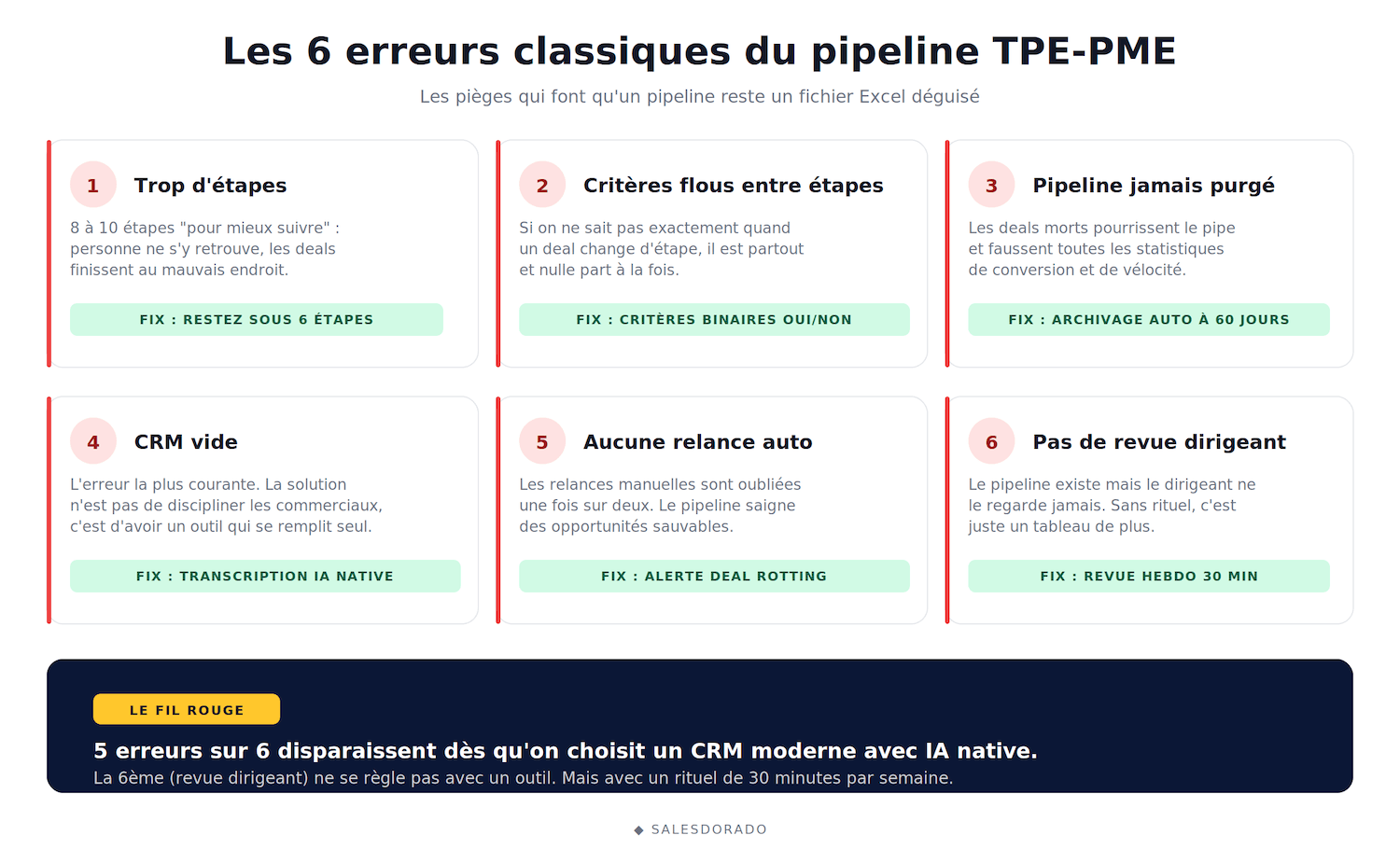
- Too many steps in the pipeline. 8 to 10 steps “for better follow-up” = no one can find their way around. Sales reps put deals in the wrong place, statistics are wrong and the manager no longer understands his own pipeline. Stay below 6 steps. If you have 8 today, merge 2 of them.
- No clear criteria between stages. If your sales reps don’t know exactly when a deal moves from one stage to another, the deal is everywhere and nowhere. Define objective, binary criteria: “the quotation has been sent YES/NO”, “a discovery meeting has been scheduled YES/NO”. No more ambiguity.
- The pipeline is never purged. Dead deals rot the pipeline and distort all statistics. Simple rule: if nothing has happened on a deal for 60 days, we archive it (keeping the history). If the customer comes back, we reopen. Better than letting it rot.
- The CRM is empty because nobody fills it. The most common mistake. The solution isn’t to discipline sales reps or organize “CRM meetings”. The solution is to use a tool that fills itself (AI call transcription, automation). If your CRM depends on the daily goodwill of your sales reps, it will be empty.
- No automated reminders. Manual reminders are forgotten every other time. This is the minimum to automate: if a deal hasn’t had any activity for X days, automatic alert or email reminder.
- No executive visibility. The pipeline exists but the manager never looks at it. The weekly 30-minute pipeline review is non-negotiable. It’s the time to identify stagnant deals, help sales people unblock situations and adjust priorities. Without this routine, the pipeline is just another chart.
Tools for managing a modern pipeline in small businesses
Which CRM to choose for a 2026 pipeline? We’ve already got a detailed comparison in our guide to B2B CRM software, but here are the 5 options that stand out for small businesses.
#1 Bitrix24: the most complete low-budget solution for VSEs and SMEs
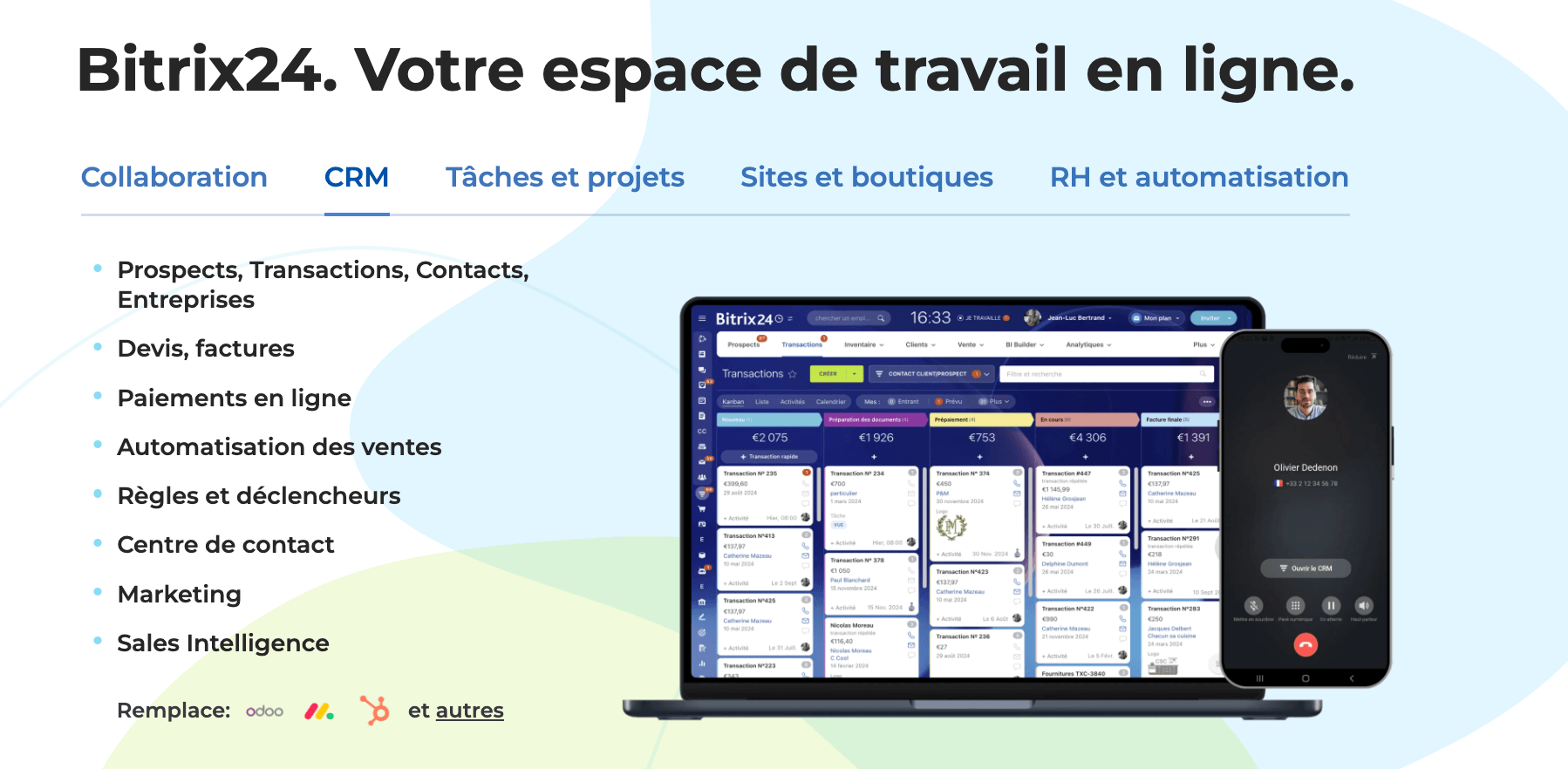
Bitrix24 is our top recommendation for SMBs who want a modern pipeline without blowing their budget. The platform combines CRM, integrated telephony with AI transcription (CoPilot), video conferencing with automatic summarization (CoPilot Follow-Up), automation workflows and team chat in a single flat-rate subscription.
All this from €49/month for 5 users (Basic plan) and €99/month for 50 users (Standard plan). For a small business with 3 sales reps, this is unbeatable. For a small or medium-sized business wanting to obtain the equivalent by assembling Pipedrive + Aircall + Zoom + Make, count on 4 to 5 times this price.
Try Bitrix24 for free
Bitrix24 offers a free plan with no user limit and a 15-day trial of premium features. Test a complete pipeline with telephony, visio and AI before you commit.
#2 HubSpot CRM: the easiest way to get started
HubSpot CRM offers the best free plan on the market. It’s the ideal entry point for small businesses just starting out, who want to structure their pipe without investing right away. The UX is impeccable, IA Breeze features are advanced, and the integrated marketing ecosystem (Marketing Hub) is unrivalled.
The only downside is that the most useful features (advanced workflows, predictive scoring) are on the Pro pay-as-you-go plans, which start at around €90/user/month. It goes up fast as you grow…
#3 Pipedrive: the most visually oriented pipeline
Pipedrive is built around the visual pipeline. It’s the reference tool for sales reps who want to see their pipe in Kanban and drag-and-drop their deals forward. The AI Sales Assistant is efficient for next-best-action recommendations, and the “deal rotting” concept that detects stagnant deals is native. From €14/user/month.
#4 Sellsy: the complete French option
Sellsy is a French suite that combines CRM, quotations, invoicing and sales management. For a French SME that wants to manage everything in a single sovereign tool (and appreciates having the same editor for piping and invoicing), this is an excellent option. Entry plan from 29€/user/month.
5 steps from pipeline 2018 to pipeline 2026
Today, you have an old-generation pipeline (Excel, Trello, or a poorly configured and misused CRM).
Here’s how to switch over in 5 steps, without breaking what’s working:
- Map your current pipeline. List your current stages, the criteria for passing them and calculate your conversion rates step by step over the last 6 months. You’ll probably discover that certain stages have never been used, that the criteria for passage are unclear, and that the conversion rate on a specific stage is abnormally low.
- Simplify (6 steps maximum). Merging redundant steps, and deleting those that are just for show. Define an objective, binary entry and exit criterion for each step you keep. If you hesitate between keeping or deleting a step, delete it.
- Choose a modern tool. Not necessarily the most expensive, but one that offers at least: AI call transcription, automation workflows, stagnant deals alert, lead scoring. If your current tool doesn’t have any of these features, it’s time to change.
- Activate automations one by one. Not all at once. Start with automatic reminders (the simplest and most profitable). Then transitions between stages (quotation sent > “Proposal” stage). Then scoring. Then automatic task creation after visio. One new automation per week for a month is the right pace.
- Measure and adjust. Deal velocity (how many days on average to go from lead to closed won), conversion rate per stage, number of stagnant deals. Monthly review of these 3 indicators. If velocity improves and the number of stagnant deals decreases, you’re on the right track.
Salesdorado tip
The biggest mistake in modernizing your pipeline is trying to revolutionize everything at once. Migrating the tool, redesigning the steps, training the team, activating all the automations: if you do all this at once, you’ll create more chaos than value. Proceed in stages of 2 to 3 weeks. Stabilize each stage before moving on to the next.