



- Only some of your emails are not getting through: an ISP has probably blacklisted you. No emails delivered at all: your email service provider is blocking you.
- A 90% acceptance rate can hide a 10% open rate: look at the open rate by ISP.
- Switching from a shared IP to a dedicated IP, which costs more, only makes sense if your current reputation is bad.
- SPF, DKIM and DMARC authenticate your sends and limit the spoofing of your domain name.
- Targeting, subject line and content drive reader engagement, and therefore sender reputation.
Do you have questions about email deliverability? This guide is here to answer them.
What is email deliverability
Email deliverability is the ability of the emails you send to reach their recipients’ inbox without a hitch. Under the definition used by ISPs (Internet Service Providers, a term that covers more broadly email address providers such as Gmail, Hotmail, Orange…), deliverability only measures the percentage of sent emails that reached their recipient, without telling apart the messages landing in spam from those landing in the inbox.
In this guide, we will use a different definition of email deliverability: the percentage of sent emails that reached their recipient’s main inbox, not counting those landing in spam. Because after all, isn’t what good marketers care about most knowing how many prospects actually see their emails in their inbox?
Between the moment it is sent and the moment it is received, an email’s journey is like a show jumping course. But what are the different factors that make this course harder or easier?
Email deliverability: how does it work?
At this stage, it seems important to clearly understand the steps an email goes through when it is sent.
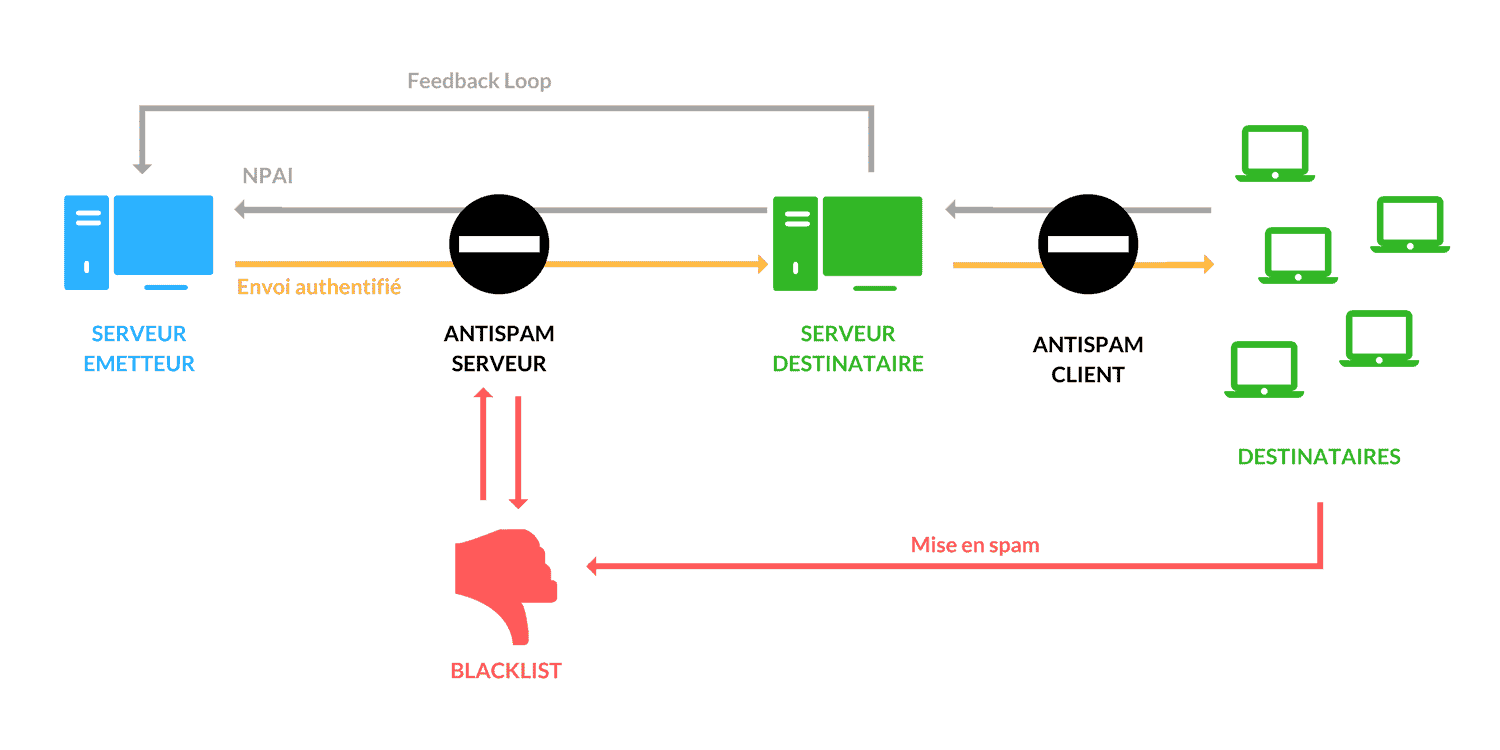
- When the sending server sends an email, the email goes through the server’s antispam, which checks that the message does not come from a blacklisted address and that previous sends went through properly.
- Once the email reaches the recipient’s server, that server can return an undeliverable message (also called a “bounce”) to indicate that the address does not exist, and therefore that the email cannot be delivered.
- If the email has made it through these first steps, the server then passes it on to the recipients. During this handoff, it goes through the client antispam, which analyzes the content of the message (HTML code, text, images).
- If it is not considered spam, and the recipient does not return a bounce (for example when the mailbox is full), the email finally lands in the recipient’s inbox.
- If a reader decides, after reading the email, that it should have been classified as spam, they can mark it as spam themselves. That action then has a direct impact on the blacklist of the ISP concerned.
- To track and handle the various complaints about its emails, the sender can get access to the feedback loop of the different ISPs. It can then analyze which type of readers complain about its emails, and remove them from its lists ahead of its next sends.
So we have gone through the whole obstacle course your emails have to clear to reach their destination.
In the rest of this guide, we will look at the various aspects of deliverability, at how ISPs tell good senders from bad ones, and at what every marketer can do to make sure their campaigns reach the recipients’ inbox.
Having deliverability problems?
If you are reading this guide, chances are you are having deliverability problems with your emails. So before walking you through all the best practices to follow, we will present the solutions you can apply in the short and medium term to improve that deliverability.
Short-term steps
Case 1: you are blacklisted by an ISP
If only some of your emails are not delivered, it is very likely that some ISPs are blacklisting you.
This means they will systematically block your domain or sending address, and your recipients will no longer receive your emails.
- Check your email deliverability rate by ISP and compare it with your average deliverability rate to detect a blacklisting.
- If that is the case, clean your email database (we recommend Emailable (ex-DataValidation) for that) and contact the ISPs individually to sort out the situation.
Case 2: you are blocked by your email service provider
If none of your emails were delivered, it means your email service provider has blocked you, after a high bounce rate for example.
If this happens, you will also have to prove your good faith to your provider and give it guarantees that your deliverability will improve so that it agrees to lift the block. After all, it has no interest in tarnishing its reputation by letting a lot of SPAM go out through it.
- Narrow your customer segmentation to the people who opened your emails in the last 30 days, look at the open rate by ISP, and remove from your list the contacts who have not opened anything in more than 18 months.
Medium-term steps
Analyze your metrics by ISP
A common mistake is to think that the email deliverability rate amounts to the ISP accepting your email.
That is not the case. It is entirely possible to have a 90% acceptance rate but a 10% open rate, because all the rest of your sends will have gone to SPAM.
So you need to think of email deliverability as the email reaching its recipient, and not the spam folder.
- Remember to look at the open rate by ISP and compare it with the average open rate to detect possible deliverability problems.
Work on segmentation structurally and iteratively
It is not said often enough, but segmenting your mailing lists is a key element if you want to fix deliverability problems in the long run.
It is crucial to adapt your sending frequency and your content to each group of customers and to its needs.
You will then send fewer emails to those who cannot handle too much pressure, and they will not report you as SPAM.
- Run segmentation tests regularly, playing with different attributes of your customer lists.
Email deliverability best practices
Want to go further than just solving deliverability problems? Let’s look together at the best practices to adopt to make sure your emails reach their destination.
The technical setup you need for good email deliverability
1. Choose between a shared or a dedicated IP address
Email services keep a close eye on the reputation of IP addresses. To optimize your email deliverability, you need to make sure your address keeps a good reputation. In email marketing, you can use two types of IP addresses:
Shared IP address
An IP address used by several senders.
- Advantage: a more affordable price
- Drawback: your reputation depends on the practices of the other senders
Dedicated IP address
An IP address used by a single sender.
- Advantage: you alone control your reputation
- Drawback: a higher price with no guarantee of better performance than a shared IP with a good reputation
So the choice between a shared and a dedicated IP address depends a lot on their reputation. If you are on a shared IP address, switching to a more expensive dedicated IP address only makes sense if your current reputation is bad. To find out what your current reputation is and decide whether or not you need to switch, we recommend this article on the methods for checking your sender reputation.
2. The SPF, DKIM and DMARC protocols
SPF (Sender Policy Framework)
This protocol checks that the server used for sending does match the domain name shown, which limits identity spoofing. To comply with this protocol, you need to publish a TXT record on the DNS server of your domain name. This record will list the IP addresses authorized to send emails with your domain name.
DKIM (DomainKeys Identified Mail)
This protocol associates a domain name with a message by adding a digital signature to the message header. DKIM thus checks both that the domain name has not been spoofed and that the message was not altered in transit. To set up a DKIM signature, you need to:
- Create a 1024-bit RSA private key / public key pair
- Publish the public key in your domain’s DNS
- Configure the sending of your messages so they are encoded with the private key
DMARC (Domain-based Message Authentication, Reporting and Conformance)
This protocol builds on SPF and DKIM: it checks that the domain shown in the “From” field is the one SPF or DKIM authenticated. It generates reports on these tests, so you receive the authentication results of your sends. The recipient’s mail service also knows how it should handle emails that failed the identification test.
Since February 2024, it is no longer optional for high volumes. Above 5,000 emails a day to Gmail addresses, Google requires:
- SPF, DKIM and DMARC on the sending domain. A DMARC policy of p=none is enough, but the domain in the “From” field must be aligned with the SPF or DKIM domain;
- one-click unsubscribe (List-Unsubscribe header, RFC 8058) on marketing emails, plus a visible unsubscribe link in the message;
- a spam complaint rate below 0.3% in Postmaster Tools. The target to hold is 0.1%.
Yahoo applies the same rules to its bulk senders, and also asks you to honor every unsubscribe within 2 days.
To go further on these topics and be able to use these protocols, you can read this article on why SPF, DKIM and DMARC matter.
Deliverability, an eminently marketing job
As you have understood, the reputation of your IP has a strong influence on your deliverability. But deliverability also depends on the reputation of your domain and on your sender score. To group these three notions together, we talk about sender reputation.
This sender reputation is directly tied to your readers’ engagement with your messages. Open rate, click rate and reply rate are the parameters to improve to reach your end goal: generating engagement.
1. Target the right people
In email marketing, knowing your target well is vital. It lets you address only the people who really match your content or your offer, and also adapt your messages.
Good targeting means making sure that all the contacts on your list are potentially interested in what you have to offer them, and therefore more likely to open your message, read it or reply to it.
But knowing your target also lets you give it the right pressure (sending frequency). If the pressure is too high for your reader, they will not read all the emails they get from you, and their engagement will automatically suffer.
Finally, it is also important to remove bounces and to clean your mailing lists regularly with a tool like UseBouncer.
2. Work on your subject line
An email’s subject line is the first shop window of your message (and more broadly of your company) for your prospects. It is the main reason the message will be opened or not. Optimizing it means directly influencing the open rate of your emails.
There are a number of best practices to follow: do not leave the subject line empty, avoid words in capital letters and the overuse of exclamation and question marks, and do not use vocabulary directly tied to selling. The subject line should make it clear that you are trying to bring value to the person you are writing to.
To pique the recipient’s curiosity a little more, adding personalization elements to the subject line can considerably increase the open rate. Who wouldn’t be tempted to open an email that mentions the name of their company, for example?
3. Take care of your content
Producing content that brings value to the reader, well formatted and pleasant to read, is how you make sure they enjoy it and therefore how much they interact with your message (click or reply).
Keep an eye, though, on your content’s ratio of text to HTML code: a bad ratio could penalize the email when it goes through the antispam. Also avoid inserting large or too many images, as well as attachments.
As with the subject line, this content can also be enriched by personalizing it for the recipient. Adding the contact’s name or another piece of their information to your message piques their curiosity and so encourages a more careful read.
Finally, don’t forget to leave the reader a way to unsubscribe from your contact list in your message.
To learn more about the best marketing practices for looking after your deliverability, we recommend reading this article on the 24 ways to get past spam filters.
The best email deliverability tools
To round off this guide on email deliverability and these four steps for solving problems, we have picked a selection of tools for you to optimize your emails and your deliverability rate.
We will present tools to:
- Monitor your deliverability rate
- Clean your contact lists
- Optimize the code of your emails
Monitor your email deliverability
Bad deliverability is not inevitable: there are tools that let you check your setup and your reputation before you send your campaigns.
SenderScore
- Monitor the reputation of your sending domain name
SendForensics
- Test the deliverability of your emails
- Compare your deliverability with your industry average
SparkPost (now Bird Email)
- Checks your email server setup (DKIM, SPF…)
Clean your customer database
Another important parameter to take into account, and one often unknown to the general public, is whether all the email addresses of your recipients actually exist.
Sending emails to recipients who do not exist will often cost you money and will lower your deliverability rate.
Worse, it can damage the reputation of your sending domain name. So it is crucial to test whether the email addresses on your contact list exist.
Emailable (ex-DataValidation)
- Checks whether an email address exists
MailTester
- Checks whether an email address exists
Tools to optimize the content and code of your emails
It may not be obvious at first, but the HTML code hidden behind each of your emails has a direct influence on your deliverability rate, and it is not always the same as the code used for a web page.
Redundancy, or using code that some email clients do not support, are common pitfalls to avoid at all costs.
PreMailer
- Paste your HTML or enter a URL
- Compresses and optimizes the code for email
- Add parameters to URLs in bulk
HTML to text
- Convert HTML into text
- Increases deliverability
- By MailChimp
CSS Inliner
- By MailChimp
- Paste your HTML code, get your styles inline
- Lets you inject email-optimized styling
The questions we get over and over.
What is email deliverability?
It is the ability of the emails you send to reach their recipients’ inbox. ISPs measure it as the percentage of emails that reached their recipient, spam included. This guide only counts the emails that landed in the main inbox, without those that landed in spam.
What should you do if an ISP has blacklisted you?
Check your deliverability rate by ISP and compare it with your average rate to detect a blacklisting. If that is the case, clean your email database and contact the ISPs individually to sort out the situation.
Should you choose a shared or a dedicated IP address?
A shared IP costs less, but your reputation depends on the practices of the other senders. A dedicated IP puts you alone in control of your reputation, for a higher price and with no guarantee of better performance than a shared IP with a good reputation. Switching only makes sense if your current reputation is bad.
What are SPF, DKIM and DMARC for?
SPF checks that the sending server matches the domain name shown. DKIM associates a domain name with the message through a digital signature, and checks that the domain has not been spoofed and that the message has not been altered. DMARC builds on both: it checks that the domain shown in the “From” field is the one they authenticated, generates reports on their tests and tells the recipient’s mail service how to handle the emails that fail. Since 2024, Gmail and Yahoo require it above 5,000 sends a day.
Why check that the addresses on your contact list exist?
Sending emails to recipients who do not exist often costs money, lowers the deliverability rate and can damage the reputation of your sending domain name.



What the community says.