


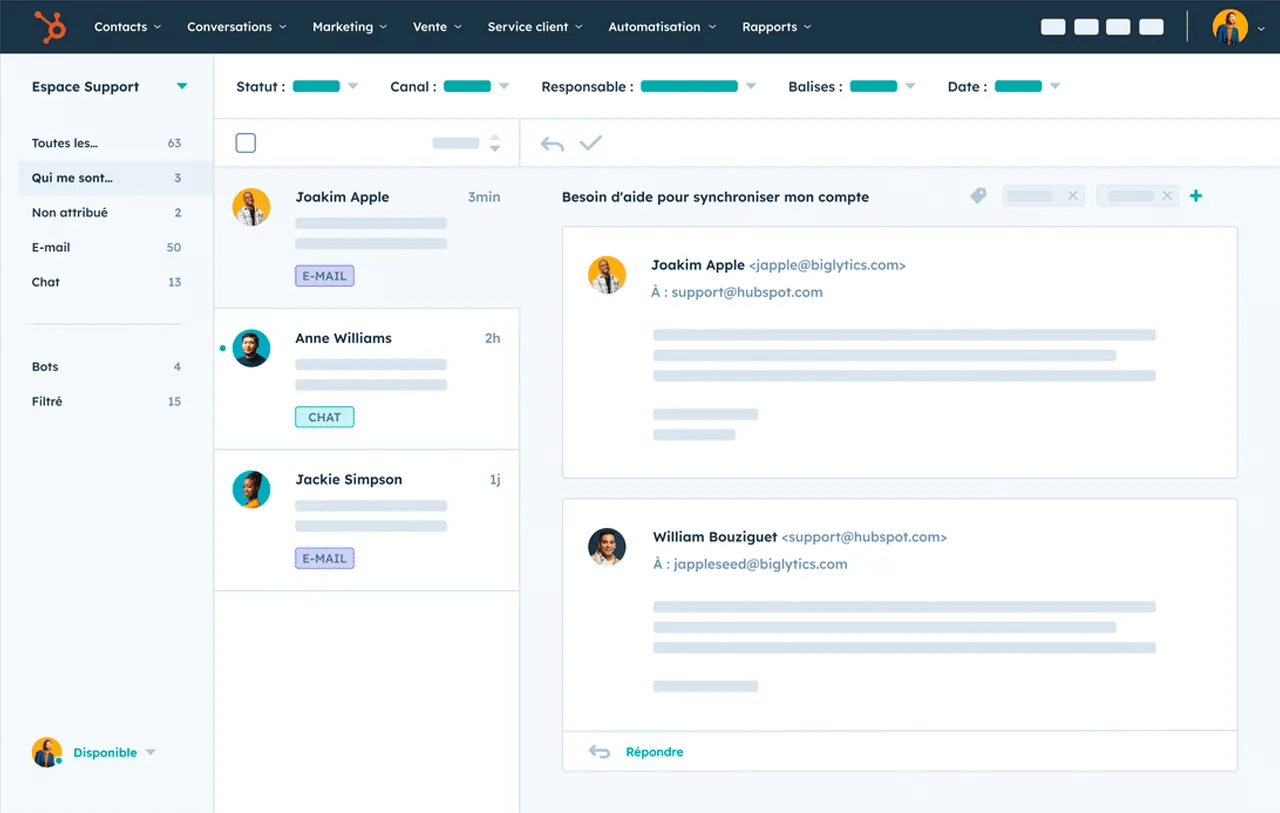
- A shared inbox brings together email, chat, social media, WhatsApp and phone via Aircall or Ringover.
- Each department can have its own ticket pipeline, with its own statuses and custom fields.
- Workflows assign, prioritize and escalate tickets automatically, to meet SLAs.
- Dashboards track open tickets, response time, first contact resolution rate and NPS.
- The free edition covers ticket management and the shared inbox; smart assignment is reserved for the Enterprise edition.
HubSpot’s ticketing system transforms how you manage customer support by centralizing every request in a single, intuitive interface. Built into HubSpot CRM, this solution helps you track every customer interaction, prioritize urgent cases and automate processes to deliver an optimal customer experience. Let’s see how this platform can help you with your customer relationships.
Try HubSpotYou can try HubSpot and Breeze AI for free.
Centralize and organize requests efficiently
The strength of your CRM’s ticketing feature lies in its ability to unify all your customer communication channels. No more requests scattered across different tools: your team gets a complete overview to handle each ticket with the responsiveness customers expect.
A shared inbox for every channel (email, chat, social media, phone…)
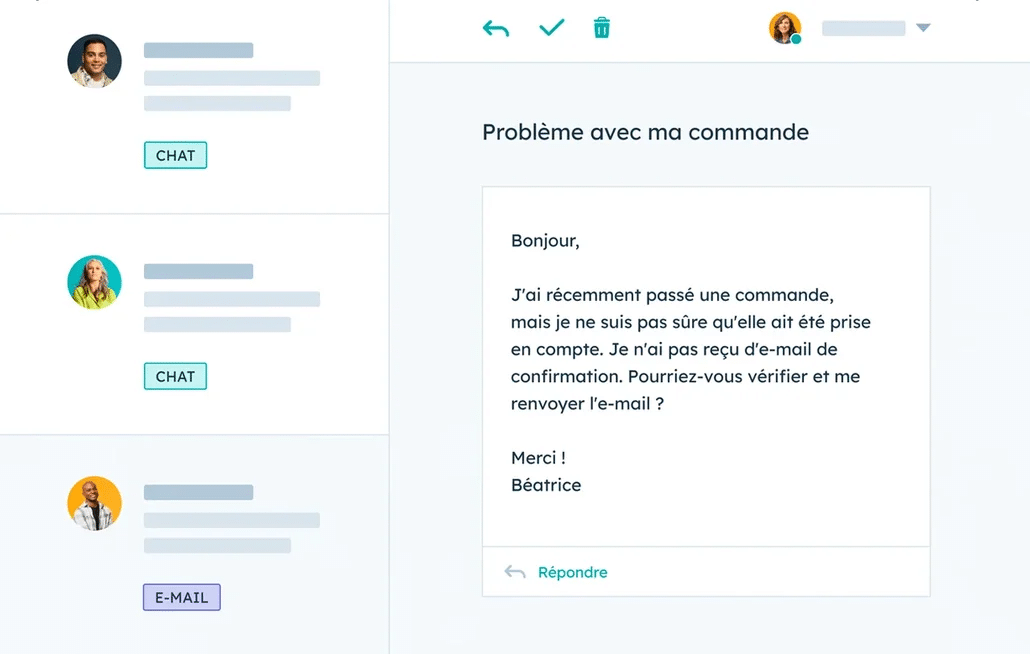
The collaborative inbox in HubSpot Service Hub helps teams work together on customer support. It automatically centralizes every request, whether it comes from email, Facebook messages, WhatsApp, the live chat on your website or even phone calls through the Aircall or Ringover integrations.
Your support team works from a unified interface where each new ticket appears with its source channel clearly identified. This centralization prevents duplicates and ensures no customer request goes unnoticed. If a customer contacts you first by email and then by chat, HubSpot automatically links these interactions to the same contact in your CRM database.
The concrete benefit? Your agents no longer need to juggle several applications. They can reply to an email from Gmail, handle a WhatsApp message and manage a chat request without leaving the same interface. According to HubSpot customer feedback, this approach improves productivity by 40% on average.
Custom pipelines by department: after-sales, IT, billing, etc.
The software gives you the flexibility to create several pipelines suited to your organization. Each department can define its own handling process, with custom statuses that match its operational reality.
Take the example of a SaaS companythe IT pipeline could include the statuses “New”, “Technical analysis”, “Development”, “Testing” and “Resolved”, while the billing pipeline would rather follow “Received”, “Verification”, “Accounting approval” and “Processed”. This customization lets each team track its tickets according to its usual way of working.
The ticket creation feature also lets you define custom fields specific to each pipeline. The IT team can add fields such as “Software version” or “Browser used”, while the sales team could include “Amount involved” or “Contract type”. This granularity improves the quality of handling and speeds up resolution.
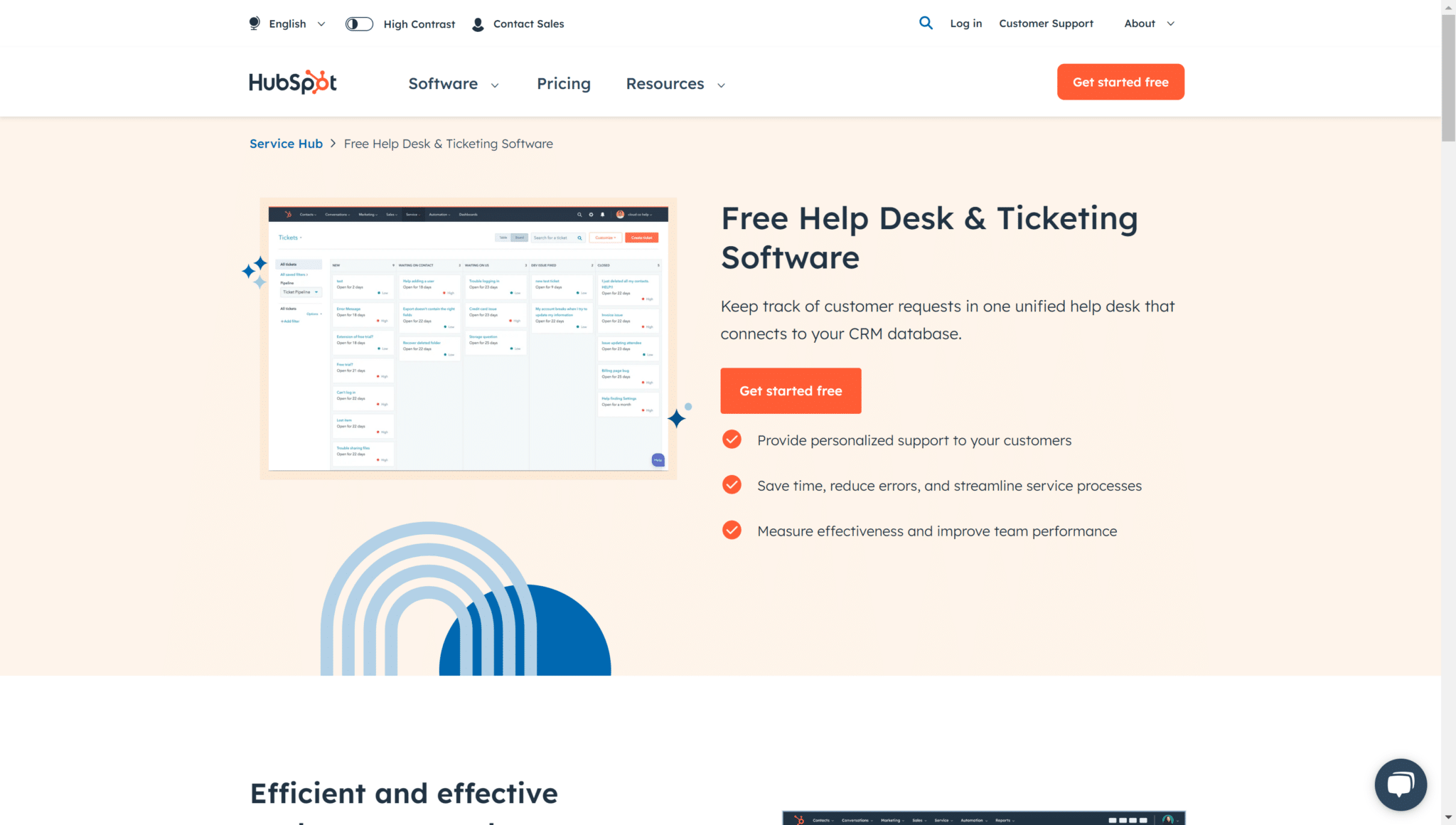
Kanban view to visualize ticket progress
The Kanban view turns your ticket management into a visual, interactive dashboard. Each column represents a status in your pipeline, and you can move tickets from one stage to the next with a simple drag and drop. This visual approach makes team coordination easier and helps spot bottlenecks.
In this view, each ticket card shows the key information: customer name, priority, due date and assigned agent. You can filter by assignee, priority or date to adapt the display to your current needs.
The user experience is particularly polished: colors change according to priority (red for high, orange for medium, green for low), and visual indicators flag overdue tickets. This intuitive interface lets even new team members get up to speed with the ticketing system quickly.
Automate ticket management and prioritization
Automation is one of the biggest advantages of HubSpot’s ticketing system. By defining smart rules, you free your team from repetitive tasks so it can focus on solving customer problems.
Automatic assignment based on rules and workflows
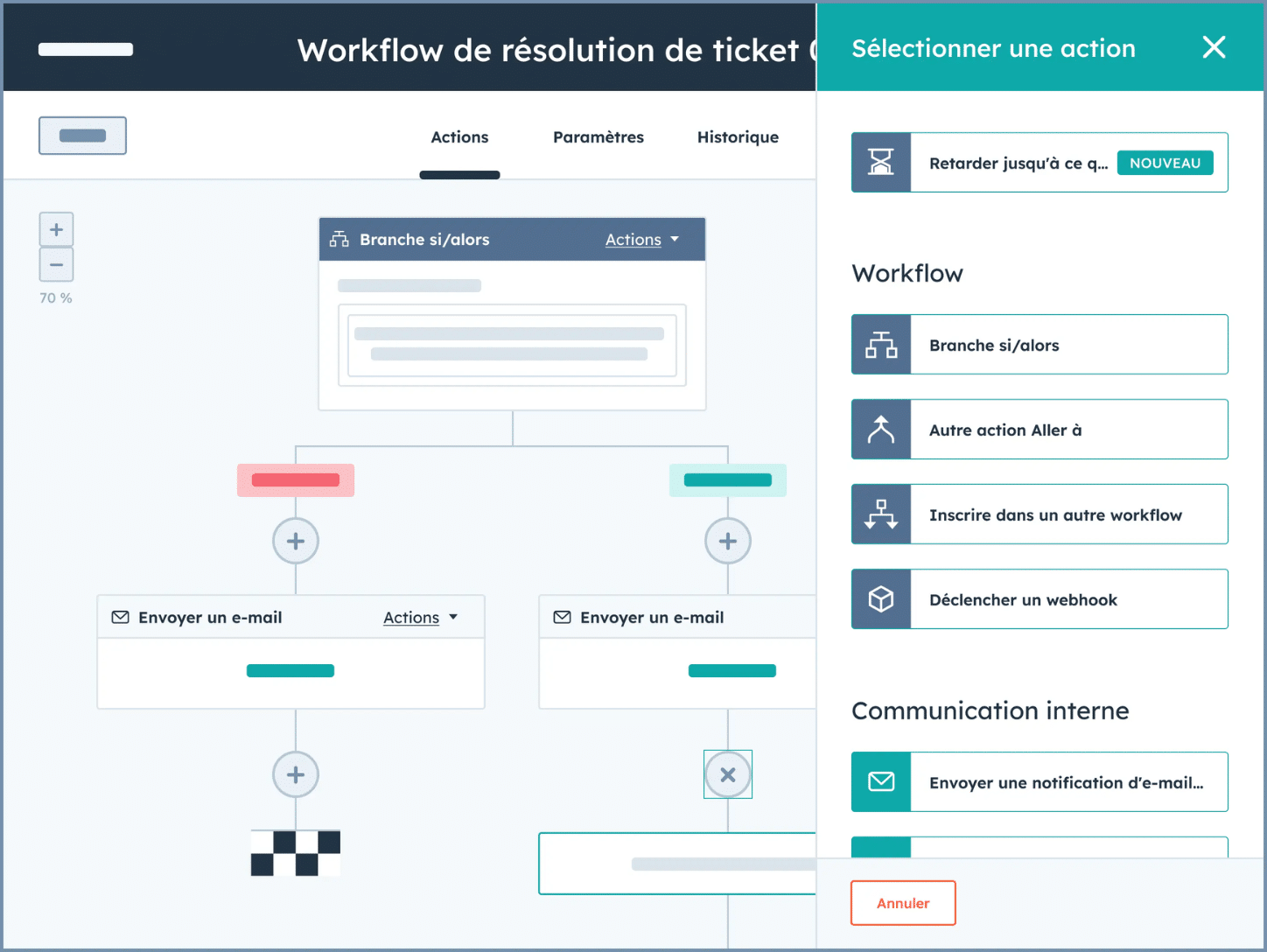
HubSpot workflows turn ticket assignment into a fully automated process. You can define rules based on the message content, the source, the customer type or even the history of previous interactions.
Here is a concrete example of automationall tickets containing the words “bug” or “error” are automatically assigned to the technical team, while those mentioning “invoice” or “payment” are routed to the accounting department. Premium customers can be automatically assigned to your senior agents, guaranteeing a level of service that matches their status.
This management automation goes further with the option to create automatic escalations. If a ticket remains unanswered for more than 2 hours, it can be automatically reassigned to the team manager with an urgent notification. This feature ensures your SLAs (service level agreements) are met even during a temporary overload.
Ticket ranking by priority: high, medium, low
The prioritization system is classic and simple. It helps you handle requests according to their real urgency. This feature automatically analyzes several criteria to set the priority: customer type, reported severity, keywords in the message and interaction history.
Priority can be set manually by your agents or automatically through workflows. For example, you can make all tickets from Enterprise customers automatically receive high priority, while standard documentation requests stay at low priority.
The visual interface makes priorities easy to identify: each ticket displays a clear color code, and you can sort your view to bring urgent cases to the top of the list. This organization improves response time by 60% on average, because your agents naturally handle the right requests at the right time.
Smart routing based on skills, workload and content
HubSpot Service’s smart routing analyzes the content of each ticket to send it to the best-qualified agent. This feature takes into account each team member’s declared skills, their current workload and their resolution history.
A practical example: a ticket mentioning “API integration” will automatically be routed to your developer, even if it isn’t explicitly assigned to technical support. The system learns from previous resolutions to refine its recommendations over time.
This built-in artificial intelligence also balances the workload. If one of your technical agents already has 15 open tickets, the system will send the new request to a qualified but less busy colleague. This distribution optimizes customer satisfaction while keeping your team balanced.
Track, collaborate and improve customer satisfaction
Collaboration and tracking are fundamental pillars of the modern customer experience. HubSpot provides the tools you need to keep the customer relationship smooth and transparent at every stage of the support process.
Detailed ticket tracking with built-in CRM history
Native integration with the CRM side gives your agents a complete view of each customer. When a ticket comes in, the agent immediately accesses the full history of previous orders, resolved tickets, marketing interactions and even sales notes.
This wealth of information transforms the quality of support. Instead of asking the customer to explain their situation again, the agent can say: “I see you had a similar problem last month with your billing module. Is the previous solution still working?” This personalized approach improves the customer experience and speeds up resolution.
Ticket tracking also includes a detailed timeline of every interaction: who did what, when, and with what results. This traceability makes handovers between agents easier and helps identify patterns in recurring problems. Your managers can then analyze processes and pinpoint areas for improvement.
Cross-team collaboration through notifications and comments
Cross-team collaboration becomes smooth thanks to internal comments and smart notifications. Your agents can mention colleagues with @name directly in a ticket, triggering a targeted notification without cluttering the whole team.
This feature is particularly important for complex cases that require several areas of expertise. A support agent can easily consult the technical team through an internal comment, receive the answer in the same thread, then pass the solution on to the customer. The customer only sees the final answer, but your company’s collective expertise contributed to resolving it.
Notifications can be configured to your preferences: immediate email, daily digest, or in-app notification only. This flexibility avoids information overload while keeping everyone informed about what concerns them. The Slack integration even lets you receive notifications directly in your team channels.
Automated surveys (NPS, CSAT) and self-service customer portal
Automating satisfaction surveys turns feedback collection into a systematic, non-intrusive process. HubSpot can automatically send a CSAT survey after each ticket is resolved, or schedule quarterly NPS surveys to measure overall satisfaction.
The self-service customer portal improves the user experience by letting customers find answers instantly. They can browse an organized knowledge base, track the status of their existing tickets and even create new tickets directly from the portal. This autonomy reduces your team’s workload while providing 24/7 availability.
The knowledge base grows automatically from resolved tickets. When your team solves a recurring problem, you can turn the solution into a help desk article in a few clicks. This approach builds on your internal expertise to create a customer resource that is always up to date and relevant.
Measure performance and optimize support
Performance measurement drives the continuous improvement of your customer service. HubSpot provides the analytics tools you need to turn your support data into actionable insights.
SLA tracking and custom alerts
HubSpot’s SLA system helps you define and meet your service commitments. You can set different targets depending on the customer type: 2 hours response time for Enterprise customers, 24 hours for Standard customers. The system automatically tracks these metrics and alerts your teams before targets are missed.
Custom alerts let you react proactively to critical situations. If the average response time exceeds your target, or if a strategic customer has been waiting too long for an answer, you receive an immediate notification. This vigilance protects your reputation and maintains customer trust.
SLA compliance analysis generates detailed reports on your performance. You can identify the teams, request types or periods where targets are less well met. This data guides your improvement decisions: additional training, hiring, or process review.
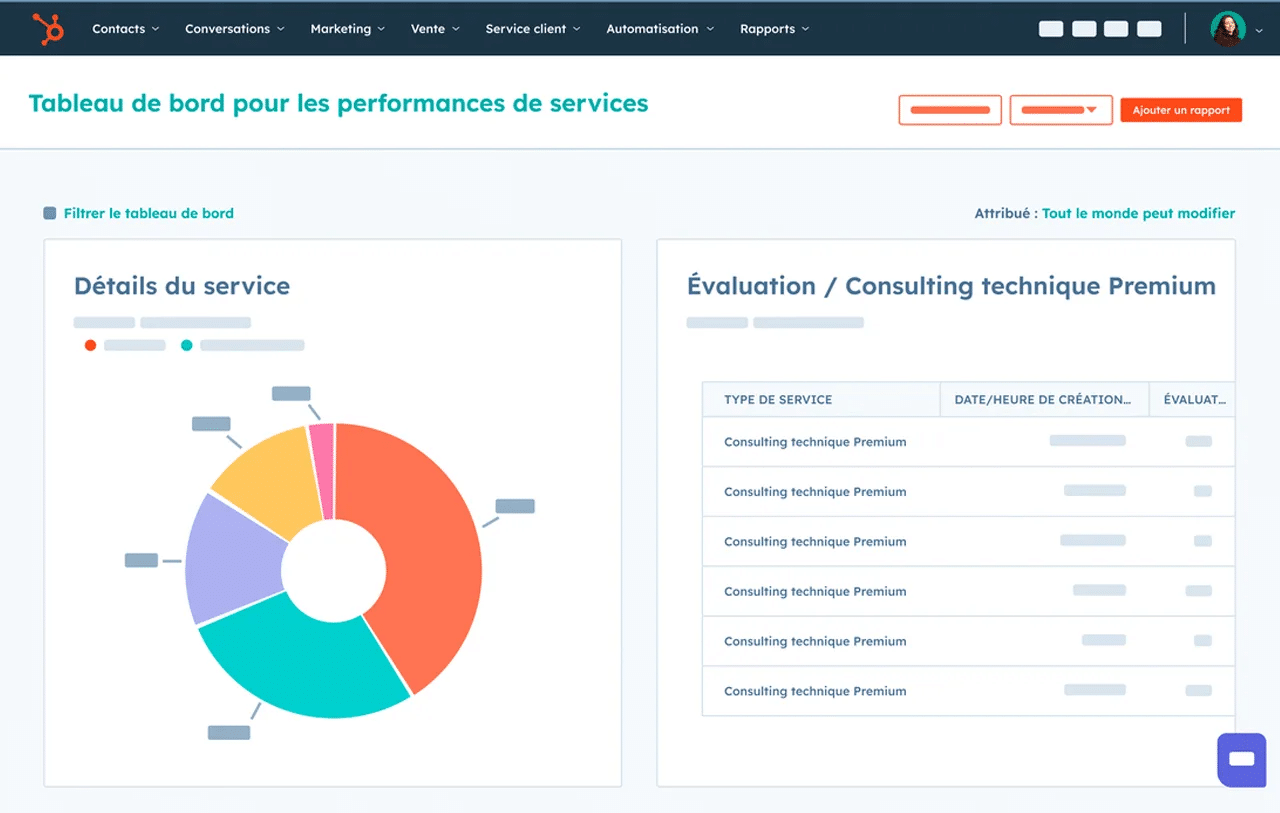
Dynamic dashboards and KPI analysis (response time, NPS, resolution rate…)
Dashboards turn your ticketing data into clear, actionable visualizations. You can track the metrics that matter in real time:
- number of open tickets
- average response time
- first contact resolution rate and NPS trend
These dashboards can be customized to your needs: an overview for leadership, detailed metrics for managers, individual indicators for agents. Each level of the hierarchy accesses the information relevant to its role.
Comparative analysis deepens your understanding of performance. You can compare results between teams, between periods, or between request types. This level of detail reveals valuable insights: which team excels at certain types of problems? What are the recurring activity peaks? How can the workload be optimized?
Identifying recurring requests to improve your offering
Analyzing ticket patterns reveals opportunities to improve your product and communication. HubSpot helps you identify requests that come up frequently, such as recurring bugs, questions about certain features, or specific usability difficulties.
If 20% of your tickets concern the same feature, it may be a sign that it needs a redesign or better documentation. This data-driven approach steers your product investments toward the improvements that will have the most impact on customers.
Trend reports also identify successes to build on. If a new feature generates a lot of questions but also a lot of enthusiasm, you can adapt your marketing strategy to promote it better. This feedback loop between support and marketing optimizes your overall business strategy.
Native integrations: Slack, WhatsApp, Intercom, Jira, Aircall…
HubSpot’s native integrations connect your existing tool ecosystem without technical friction.
- The Slack integration lets your teams receive ticket notifications directly in their work channels, making asynchronous collaboration easier.
- The WhatsApp integration turns your messaging app into a professional support channel. Your customers can contact you via WhatsApp Business, and their messages appear as tickets in your HubSpot interface. This approach meets today’s expectations for instant communication while keeping professional traceability.
- The Jira integration connects your support to product development. When a ticket reveals a bug, you can automatically create a linked Jira issue, making it easier to track the fix. This synchronization improves communication between teams and speeds up the resolution of complex technical problems.
Try HubSpotYou can try HubSpot and Breeze AI for free.
Chatbot and AI agent support to automate answers
HubSpot chatbots automate first-level support by instantly answering frequently asked questions. These virtual agents can qualify requests, collect the necessary information and create pre-filled tickets for your human agents.
Artificial intelligence goes further by suggesting answers based on your knowledge base and previous resolutions. When an agent handles a ticket, the system automatically suggests relevant articles or similar answers that have been used successfully. This assistance speeds up resolution and makes the quality of answers more consistent.
Chatbot configuration remains accessible even without technical skills. You define conversational flows through a visual interface, test the paths and adjust based on feedback. This simplicity opens up the use of AI in customer support, even for teams without dedicated technical resources.
Editions suited to every need
The HubSpot Service Hub range fits every company size with four distinct editions. The free edition offers basic features such as ticket management, the shared inbox and contact forms. This option is a perfect fit for startups and small teams just starting to structure their support.
The Starter edition adds pipeline customization and basic automation, ideal for SMBs that want to organize their support without a major investment. The Pro edition includes advanced automation, complex workflows and satisfaction surveys, meeting the needs of growing companies.
The Enterprise edition unlocks the most sophisticated features. It includes smart assignment, advanced analytics, premium integrations and dedicated support. This edition supports large organizations with their large-scale support challenges. This tiered approach lets you start simple and scale as your needs evolve.
Is HubSpot ticketing right for you?
HubSpot’s ticketing system stands out as a complete solution for transforming how you manage customer support. The platform unifies all your communication channels, automates repetitive processes and provides the analytics you need to keep improving your service.
The companies that benefit most from this solution share certain characteristics: they manage several support channels, want to improve their responsiveness to customers and want to centralize their data in a single CRM. If your team wastes time juggling different tools or if you lack visibility into your support performance, HubSpot ticketing will deliver immediate value.
The strength of this solution lies in its native integration with the HubSpot ecosystem. Your support data automatically enriches your CRM, your marketing teams better understand customer pain points, and your sales teams have a complete history for their interactions. This synergy turns your support into a competitive advantage.
To evaluate this solution in your context, start with the free edition, which will let you test the basic features. You can then move up to the paid editions as your growth requires. This gradual approach minimizes risk while giving you the opportunity to measure the concrete impact on your customer relationships.
The questions we get over and over.
What is HubSpot ticketing?
It is the support ticket management system of HubSpot Service Hub. Built into the CRM, it centralizes customer requests from every channel, organizes them into pipelines and automates their handling.
Which channels does HubSpot ticketing centralize?
Email, Facebook and WhatsApp messages, website live chat and phone calls through the Aircall or Ringover integrations.
How does HubSpot prioritize tickets?
Each ticket has a high, medium or low priority, set manually by the agent or automatically by a workflow, for example based on the customer type or keywords in the message.
What are the HubSpot Service Hub editions?
Four editions: Free (ticket management, shared inbox, forms), Starter (custom pipelines, basic automation), Pro (advanced automation, satisfaction surveys) and Enterprise (smart assignment, advanced analytics, dedicated support).
Which tools does HubSpot ticketing integrate with?
Natively with Slack for notifications, WhatsApp Business as a support channel and Jira to create an issue linked to a ticket that reveals a bug.



What the community says.