



- CPQ comes down to three steps: configure the products to the customer’s needs, calculate the price, issue the quote and manage the customer’s agreement.
- Not only dedicated software: Stripe or Pennylane can also be considered CPQ tools.
- Tiers, volume discounts or promotions quickly complicate the price calculation, hence its automation, at least in Excel.
- Connected to the CRM and the ERP, a CPQ chains together quote signature, order, invoice and revenue recognition.
- Salesforce CPQ & Billing has four plans, from €75 per user per month to quote-based offers.
CPQ (for Configure, Price, Quote) is one of the most fundamental steps in the sales process, but it is also one of the most complex – in particular because it involves a lot of collaboration with other departments.
In this article, we go over how to assess a CPQ process, why you should optimize it, and all the related concepts.
CPQ: definition
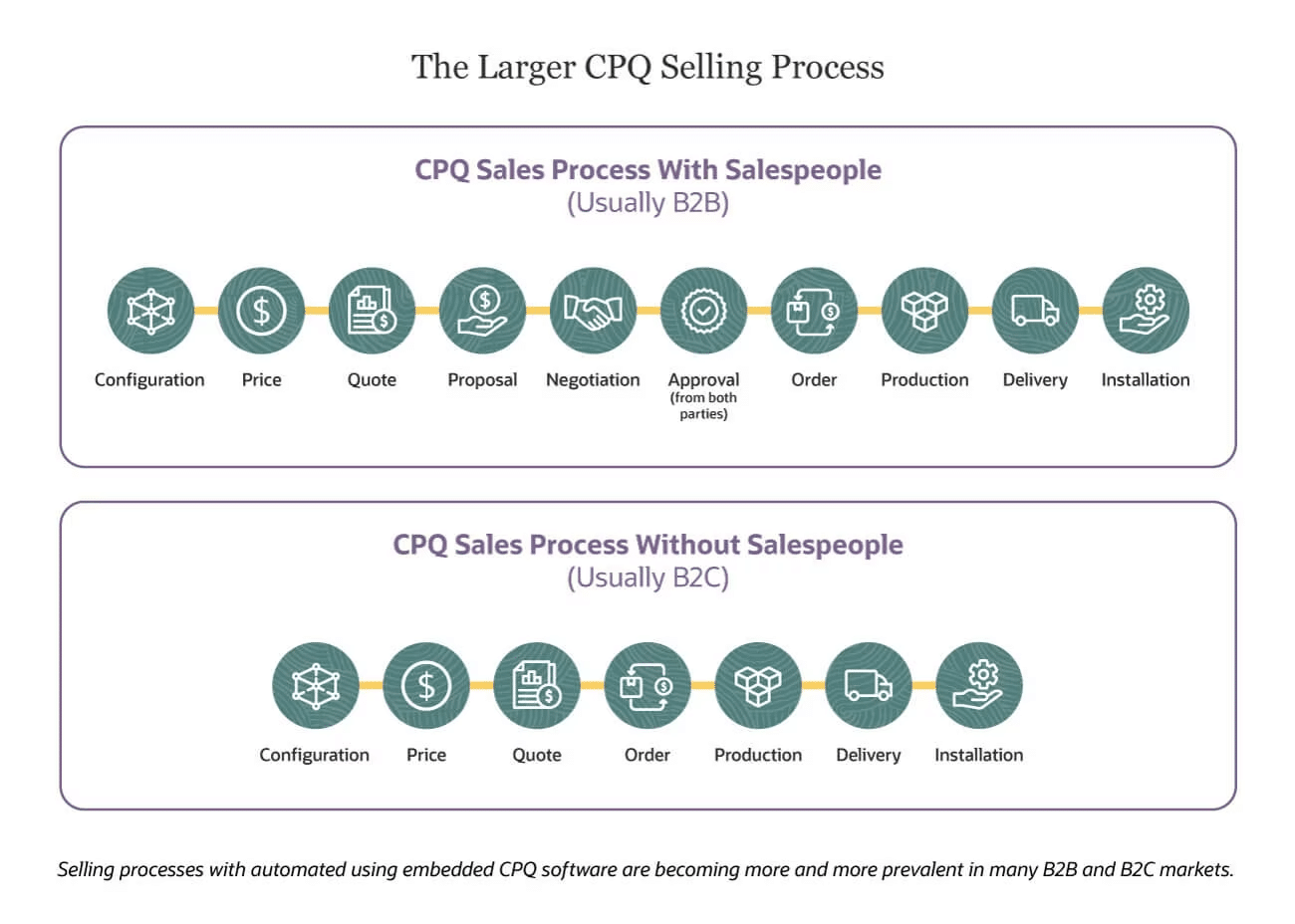
CPQ stands for Configure, Price, Quote and covers all the business processes used to offer a quote to a customer. The process consists of configuring one or more products, to turn the needs expressed by the customer into a list of products, a price, and ultimately a quote.
In practice, the term CPQ often refers to software that automates this part, more or less integrated with CRM software. But CPQ does not refer only to tools and to selling complex products.
Stripe, for example, can be considered a CPQ tool. You define products, you define more or fewer configuration options (by the customer directly or by yourself in the back office), you can create subscriptions, issue payment links, and manage a whole set of subscriptions through Stripe alone.
An accounting tool like Pennylane can also be considered a CPQ tool.
The more complex the products sold, the more critical CPQ processes become, to secure a healthy margin on every contract, limit errors, and cut the time between the discovery and needs-assessment phase and the negotiation.
Configuration
Somewhat complex products usually have several parameters that affect the price. For example, if you buy a license from Salesforce, you will need to determine:
- The plan – which mostly depends on the features required.
- The number of licenses – which mostly depends on the terms of sale and the company’s expected growth.
- The number of API calls – which mostly depends on the integration and the extensions chosen
- The storage volume – which depends… on a lot of things
Once all that is settled, you still have to determine how it will change over the billing period. With annual billing, you need to set the conditions for adding or removing licenses, moving up a tier on API call volume, storage volume, and so on.
Price
This is the step where you add up and multiply products and unit prices to get an overall price, for example an annual budget.
If the price is linear, everyone manages fairly easily. But if there are tiers, volume discounts, promotions, or prices that change over time – for example with the EUR/USD exchange rate – it gets much more complicated very quickly. Especially if the customer wants to simulate several scenarios before making a decision.
In practice, this step is very generally fully automated, at the very least with Excel files, and at best with dedicated software.
Quote
Issuing the quote itself is no small task: it has to include all the terms of sale, etc., and if every quote had to be written by hand, errors would be frequent.
But the real issue in quote management is managing the customer’s agreement. You can offer the customer an electronic signature, automatically move the opportunity to closed/won in your CRM, kick off billing processes, etc.
When does CPQ become indispensable?
Using a CPQ tool can be worthwhile to optimize your processes and, in particular, to get a clear picture of your entire revenue cycle. CPQ is, for example, indispensable to leverage the sales processes of your best sellers or to set up standardized pricing. It lets you, for example, offer prices your customers are likely to accept.
A CPQ tool is also key if you want to simplify how your products are sold, and you can also use it to give your customers information about optional features.
Other features may be useful to you, such as collaborating on quotes with team members if you want to speed up quote delivery, creating approval triggers to keep excessive discounts in check, or building your own proposal templates.
If you want to keep an eye on the proposal emails you send, the CPQ tool will also tell you when your customers open them.
The benefits of a good CPQ process
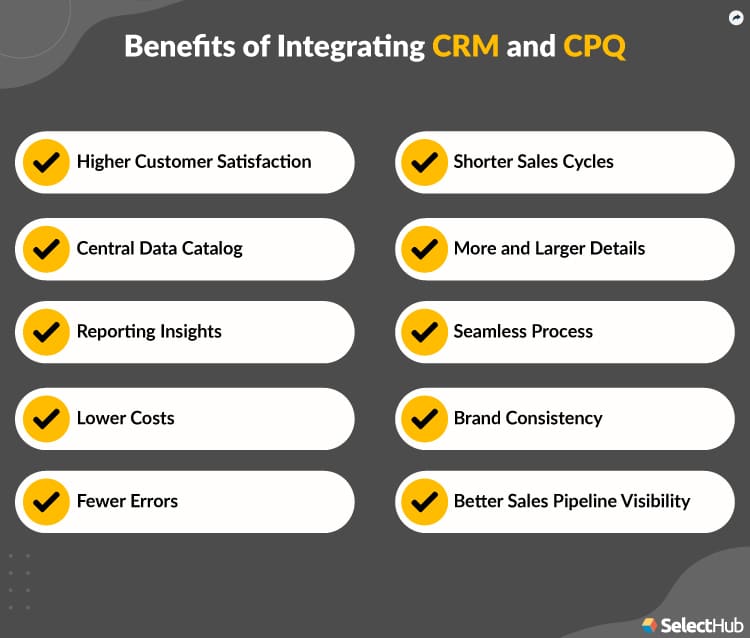
1. A CPQ tool increases sales by providing accurate quotes
A good CPQ process should help you increase sales by offering your buyer detailed, complete quotes that neither you nor they need to modify. At the same time, it builds trust in your company.
A CPQ also has the advantage of configuring prices that meet customer needs and of making the quotes you send more accurate.
2. Adding CPQ to the CRM increases profitability
Adding a CPQ to your CRM will make your company more efficient but, above all, increase your revenue. According to Jim Dickie, co-founder of CSO Insights, and a study on sales performance optimization covering more than 1,000 companies worldwide, this is, for 68% of them, the main reason that drives companies to adopt a CPQ tool. The study shows that when companies decided to add a CPQ tool to their core CRM, revenue increased considerably.
3. CPQ speeds up the sales process
A CPQ also speeds up your sales process, thanks both to faster quote delivery and to an increase in approval time. And that is indispensable to succeed in this field! The CPQ tool notably helps you guard against unforeseen circumstances, such as a lack of budget or a change in the customer’s expectations.
For example, Cloudera’s quoting process is three times faster than before CPQ was implemented. Domino Printing Sciences, a Salesforce CPQ user, saw its quotes delivered 80% faster. So it is very useful for keeping several deals from getting stuck in your sales pipeline.
4. Integrating a CPQ tool with other sales technologies standardizes processes
Within an organization, sales, finance, legal, development, etc., are often fairly siloed entities. CPQ software helps the different departments communicate better with each other and standardize processes.
It is particularly useful for avoiding errors and making sure things are done properly at the right time. For example, with a CPQ tool, a customer signing the quote automatically generates an order, then the sending of an invoice, revenue recognition and order fulfillment.
CPQ software can also integrate with your enterprise resource planning systems (ERP), which streamlines the process even further. With this tool, sales and operations are directly linked and everyone can follow how the process is progressing. In concrete terms, it lets you respond very quickly to customer requests. The data is also very useful for fine-tuning the company’s decisions and meeting the needs expressed by customers.
5. A CPQ tool helps departments collaborate and build accurate quotes
One of the main advantages of CPQ software is that the whole company can be involved. Each department can step into a process, which improves efficiency and avoids, for example, selling a configuration that is not viable from a financial or legal standpoint.
CPQ also lets product experts determine the best configurations for a product, instead of sales reps doing it on their own. Configurations are entered directly into the CPQ system and sales reps only have to offer the various possible options to customers.
CPQ is therefore aimed at the whole company, and you can even use CPQ analytics to identify trends.
Salesforce CPQ & Billing
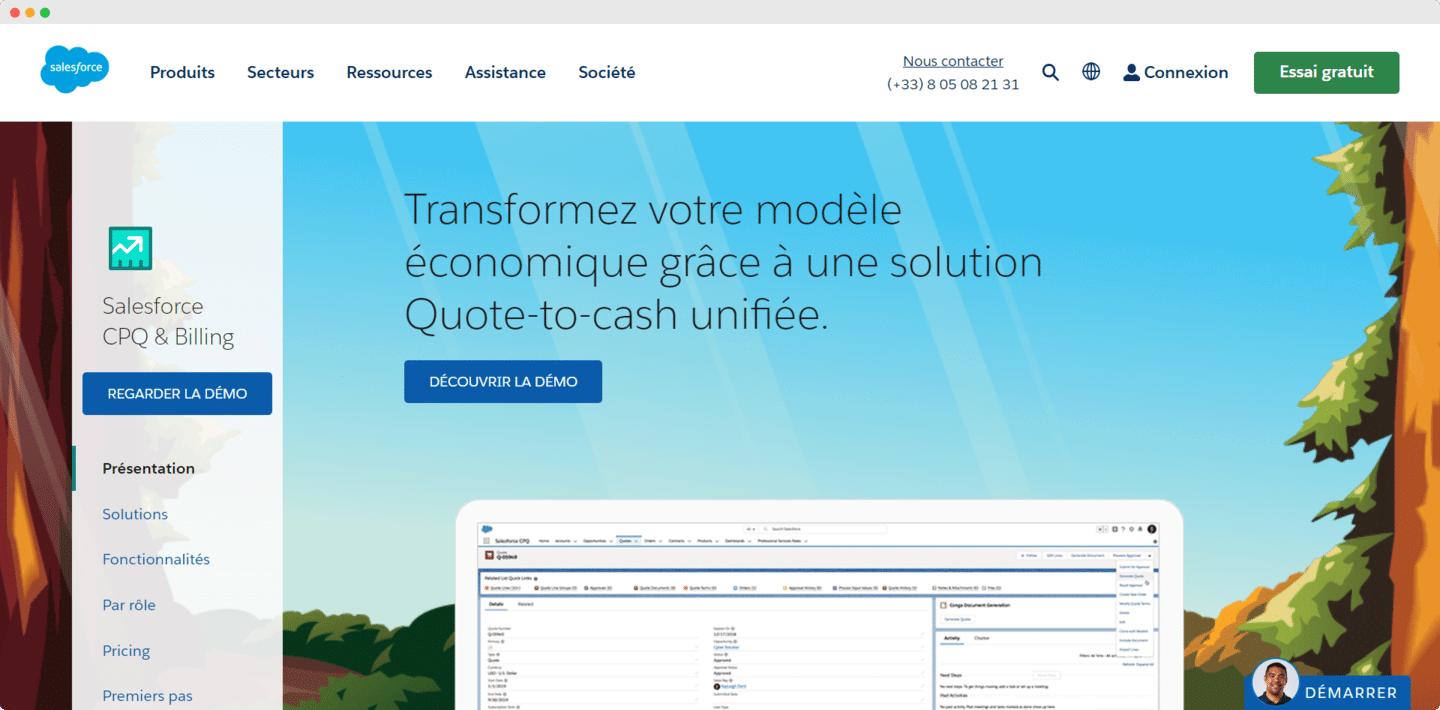
The term CPQ was largely popularized by the product of the same name published by Salesforce. Salesforce CPQ&Billing gives you all the benefits of using a CPQ. This tool lets you create customer solutions with preconfigured or custom offers, model deal scenarios, or refine your pricing using market intelligence.
To manage recurring revenue, Salesforce CPQ&Billing offers subscription and usage-based billing options to shape quotes around your customers’ needs. For example, you can automate contract amendments or automatically create renewal opportunities.
Finally, this tool unifies sales and finance activities by streamlining the Quote-to-cash solution and removing the silos between front office and back office. The CPQ will let you, for example, automate order acceptance or automatically group all charges onto a single unified invoice per customer.
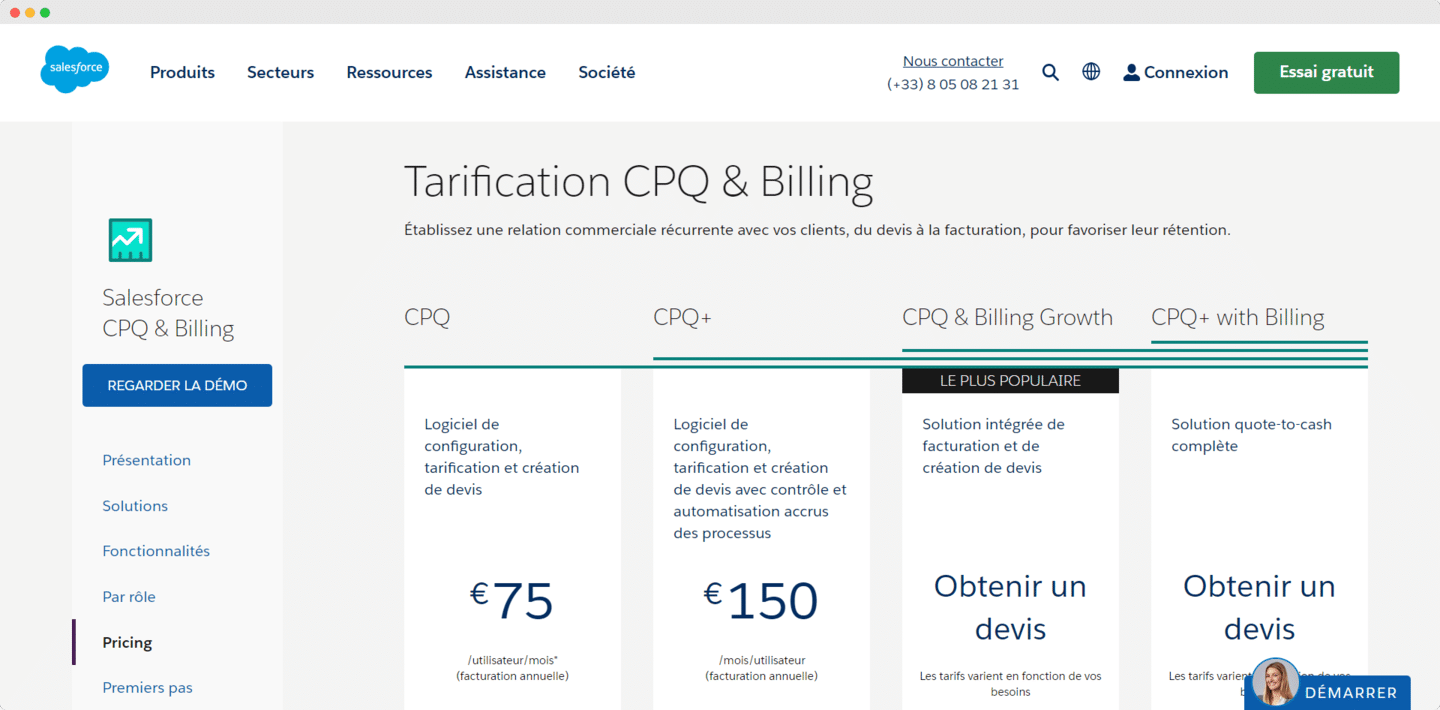
Salesforce offers several pricing options for its CPQ&Billing tool:
- The CPQ plan at €75 per user per month. It offers configuration, pricing and quote creation features.
- The CPQ+ plan at €150 per user per month. This plan offers the same features as the CPQ plan, but with greater control and automation of processes.
- The CPQ&Billing Growth plan, whose pricing varies according to needs. This plan offers an integrated billing and quote creation solution.
- The CPQ+ with Billing plan is a complete quote-to-cash solution, whose pricing varies according to needs.
The questions we get over and over.
What does CPQ stand for?
CPQ stands for Configure, Price, Quote. It covers all the business processes used to offer a quote to a customer: configuring one or more products to turn the needs expressed by the customer into a list of products, a price and a quote.
Is Stripe a CPQ tool?
It can be considered one: you define products and more or fewer configuration options, create subscriptions, issue payment links and manage a whole set of subscriptions. An accounting tool like Pennylane can also be considered a CPQ tool.
When does a CPQ tool become indispensable?
To leverage the sales processes of your best sellers, set up standardized pricing or simplify how your products are sold. The more complex the products sold, the more critical CPQ processes become.
What are the benefits of a CPQ connected to the CRM?
Accurate, complete quotes, a faster sales process, standardized processes across sales, finance and legal, and departments that collaborate on the configurations offered to customers.
How much does Salesforce CPQ cost?
The CPQ plan costs €75 per user per month, the CPQ+ plan €150. The CPQ & Billing Growth and CPQ+ with Billing plans have pricing that varies according to needs.



What the community says.