





Kaspr, Lusha and Datagma are 3 reference tools for getting your prospects’ phone numbers. We compared them for you: size and reliability of the database, ways of getting numbers, integrations and price per number found.
Database quality and size
Kaspr: over 200 million profiles
Kaspr claims contact details for over 200 million profiles, which means over 500 million phone numbers and email addresses. One of the strongest arguments Kaspr puts forward on its website is data reliability. Kaspr checks each of its 150 data sources at the very moment the user makes a request. The data is updated in real time. Kaspr says it never sells outdated data. Based on the tests we ran, the promise seems to hold.
The database is clearly Kaspr’s strong point. Its coverage of the US market is excellent, but the database is just as rich for European and Asian markets. Kaspr benefits here from belonging to the Cognism group, a giant of data enrichment aimed at large companies.
Lusha: over 515 million contacts
Lusha’s database holds over 515 million verified contacts and 29 million companies. Its reliability is reputed to be slightly below what Kaspr offers. The vendor itself claims 98% accuracy on emails and 86% on phone numbers (85% in the United States).
Lusha highlights its commitment to regulatory compliance. Lusha is ISO 27701 certified, for example, one of the highest privacy and security standards in the world. At least, that is what the website says. When you go through customer reviews, you find that missing or weak GDPR compliance is a recurring criticism of Lusha.
Datagma: numbers searched in real time
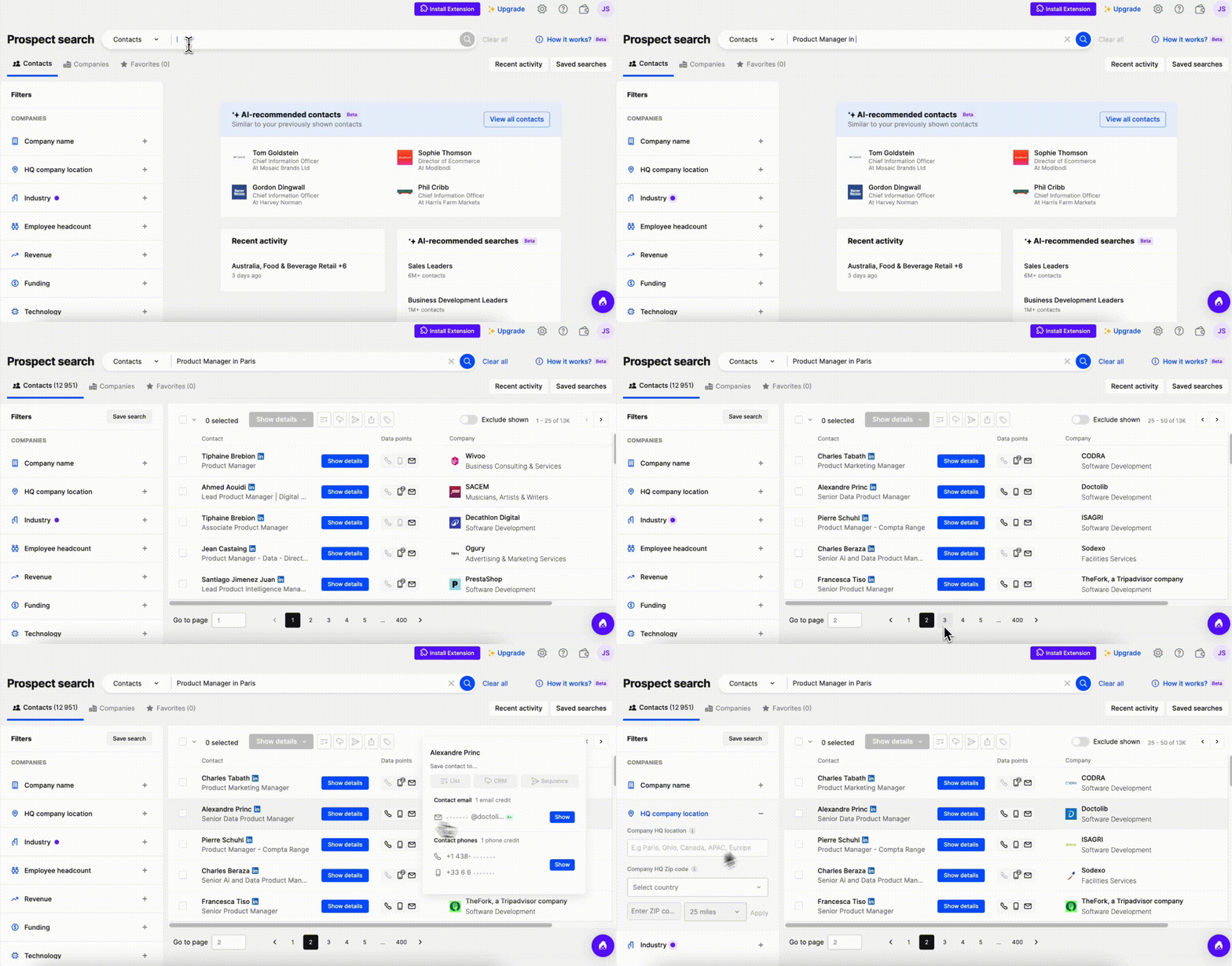
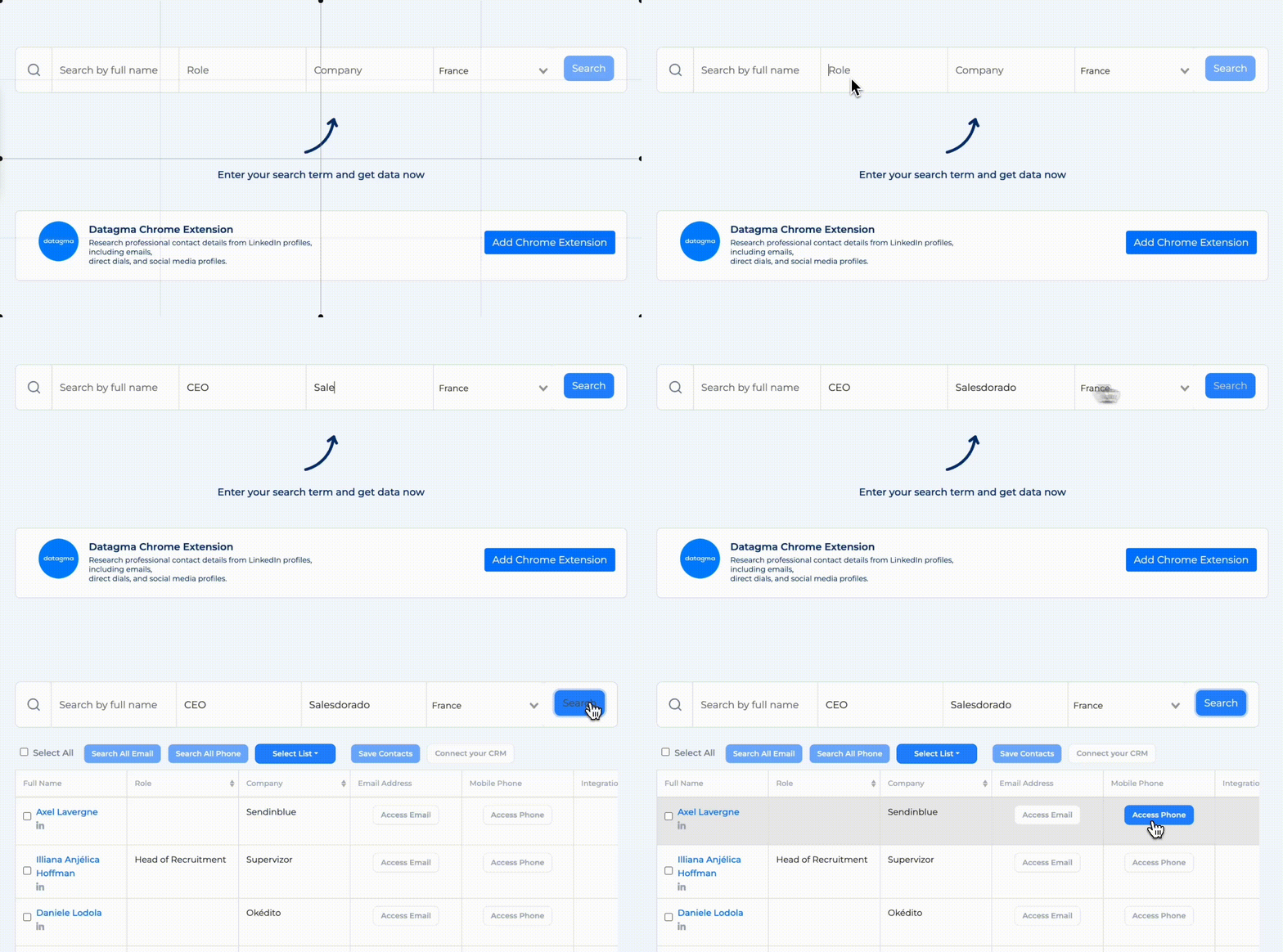
Datagma works in a more unusual way. It relies on no database. All the data you get from Datagma is extracted from the internet in real time. In plain terms, if your prospect’s phone number isn’t available somewhere on the internet or on social networks (starting with LinkedIn and Sales Navigator, obviously), Datagma won’t be the one to give it to you. Datagma only relies on publicly accessible sources.
That is also why, in Datagma’s interface, the filtering options are fairly limited: full name, company, role, location. It is a long way from what Lusha offers, as you can see in the screen just above.
How to get phone numbers
The 3 tools use more or less the same methods to get phone numbers:
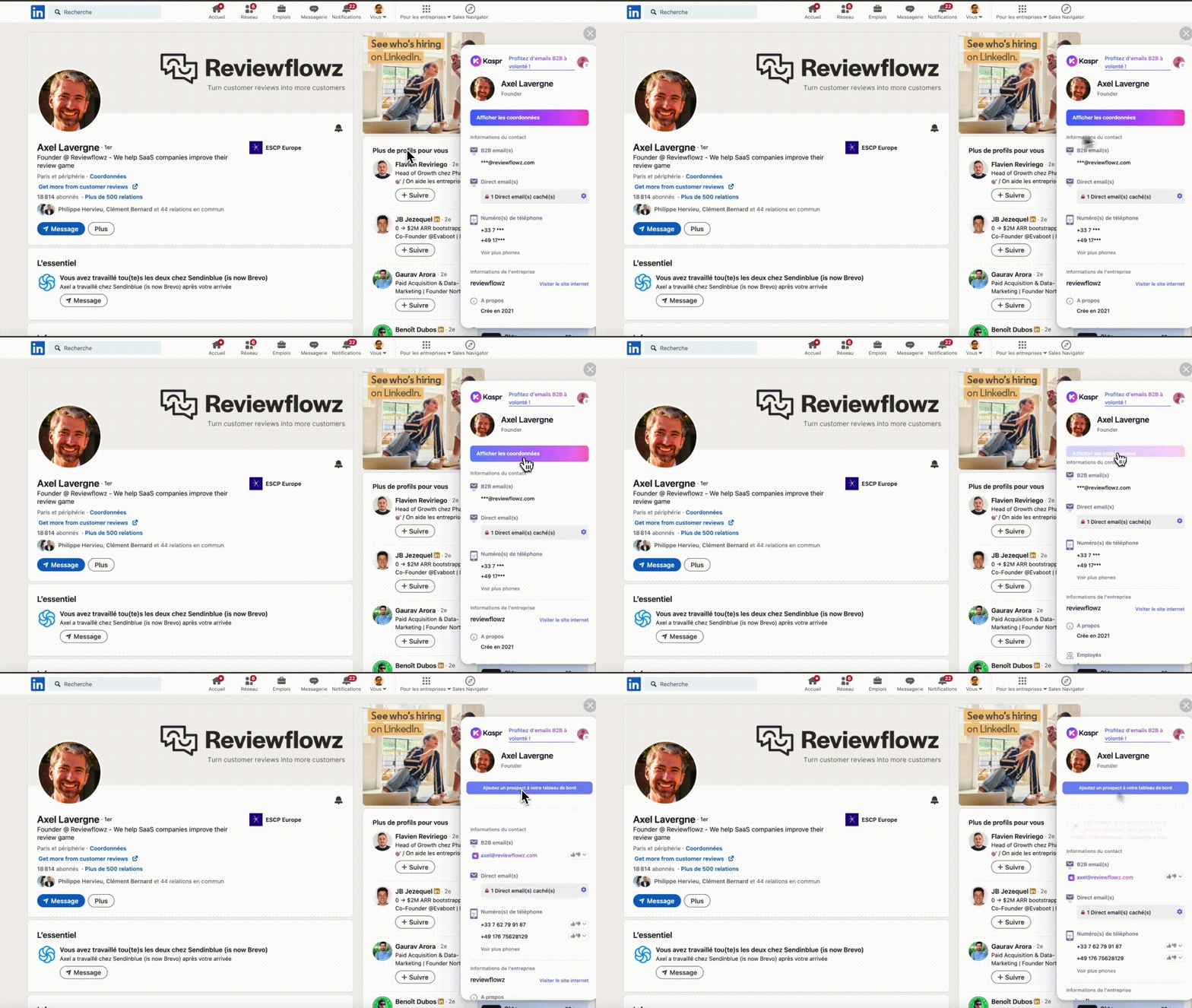
- The Chrome extension for LinkedIn, which makes your prospects’ phone numbers visible on LinkedIn. Kaspr, Lusha and Datagma all offer a similar Chrome extension. It lets you get a prospect’s phone number from their LinkedIn page and then import that number into your prospecting tool. You can also use the Chrome extension to collect phone numbers from Sales Navigator. Kaspr has the most advanced extension, since it also lets you get the phone number directly from a LinkedIn post, a group or an event page (so without having to visit the profile page).

- The Chrome extension for websites. Lusha’s Chrome extension works on LinkedIn, but also on your prospects’ websites. In plain terms, you visit a prospect’s website, activate the extension, and get the phone numbers of the people working at the company. This isn’t possible with the Kaspr and Datagma Chrome extensions.
- You can also import a list of prospects (in csv format) into Kaspr, Lusha or Datagma and ask the tool to enrich the prospecting file with the missing phone numbers. But watch out: there are volume limits that vary by plan. With Kaspr’s Starter plan, you are limited to 3 files of 500 rows per month. At Lusha, CSV file enrichment starts with the Pro plan. Datagma has no limits (well, there is one: 50,000 rows, which is generous).
- The API lets you use Kaspr, Lusha and Datagma directly to enrich your CRM. In practice, instead of enriching your prospects in Kaspr (for example) and then syncing the enriched data into your CRM, you can run the enrichment straight from your CRM. All 3 tools offer an API, but not on the same terms: Datagma includes it in all its plans, free included, Lusha from the Pro plan, and Kaspr provides it on request, with limited access on Starter. Integrations (which we will cover in a moment) serve the same purpose as the API: they let you enrich your CRM from within your CRM, in one click.
Integrations
Kaspr
Kaspr offers connectors with:
- CRM: Salesforce, HubSpot, Pipedrive, Lemlist, Brevo, Zoho.
- Telephony: Aircall and Ringover.
- Zapier, which is a kind of meta-integration, since Zapier lets you connect Kaspr to tools Kaspr hasn’t built connectors for: Google Sheets, Sellsy, ClickUp, etc.
All Kaspr users have access to these connectors, including users on the free plan, except Zapier, which is reserved for paid plans.
Lusha
Lusha offers connectors with well-known CRMs:
- Salesforce
- HubSpot
- Pipedrive
- Zoho
A few other connectors are available:
- Zapier
- Outlook
- Gmail
- Salesloft
- Bullhorn
Datagma
Datagma offers a narrower library of connectors, geared toward automation and enrichment tools:
- Clay
- Zapier
- Make
- n8n
- HubSpot
- Salesforce
- Lemlist and Instantly
The Zapier, Make and n8n connectors, not to mention the API, largely get around these limitations.
Pricing
Kaspr: between €0.40 and €0.45 per phone number found
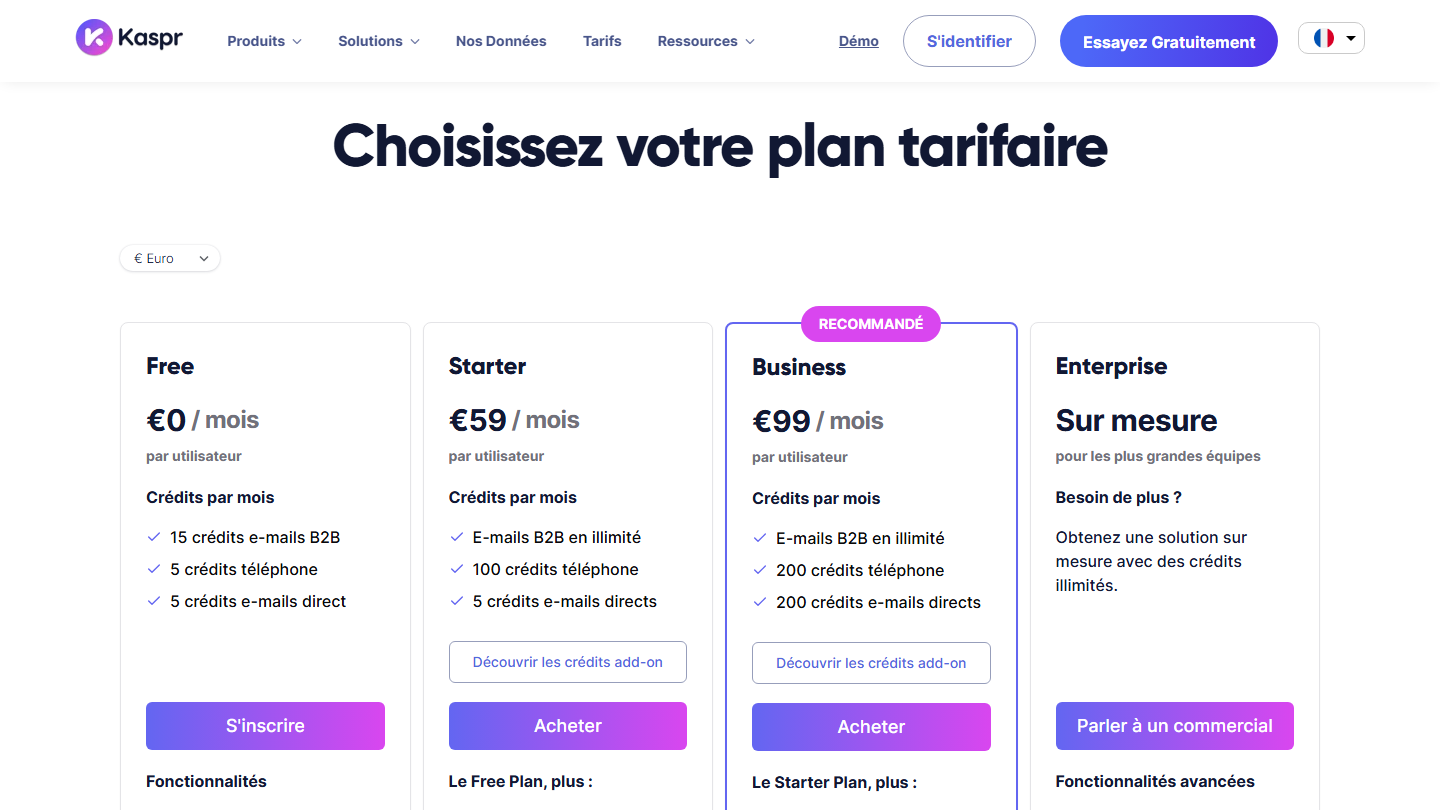
Kaspr offers 4 plans:
We have:
- A free plan, which lets you find 5 phone numbers per month (and 15 B2B emails).
- A Starter plan, at €45 per user per month billed annually (€59 monthly), which lets you find up to 1,200 phone numbers per year, or 100 per month. That works out to €0.45 per number.
- A Business plan at €79 per user per month billed annually (€99 monthly), which lets you find 2,400 numbers per year, or 200 per month, for a price per phone number found of €0.40.
- An Enterprise plan, custom, with unlimited credits for the largest teams.
Extra credits can be bought at any time, from €0.35 to €0.20 per credit depending on volume. B2B emails are unlimited from the Starter plan: that is Kaspr’s argument against Lusha and Datagma, which count every email.
On the API side, access is on request: limited on Starter (20 requests per hour), wider on Business (250 requests per hour).
Lusha: between $0.44 and $0.47 per phone number found
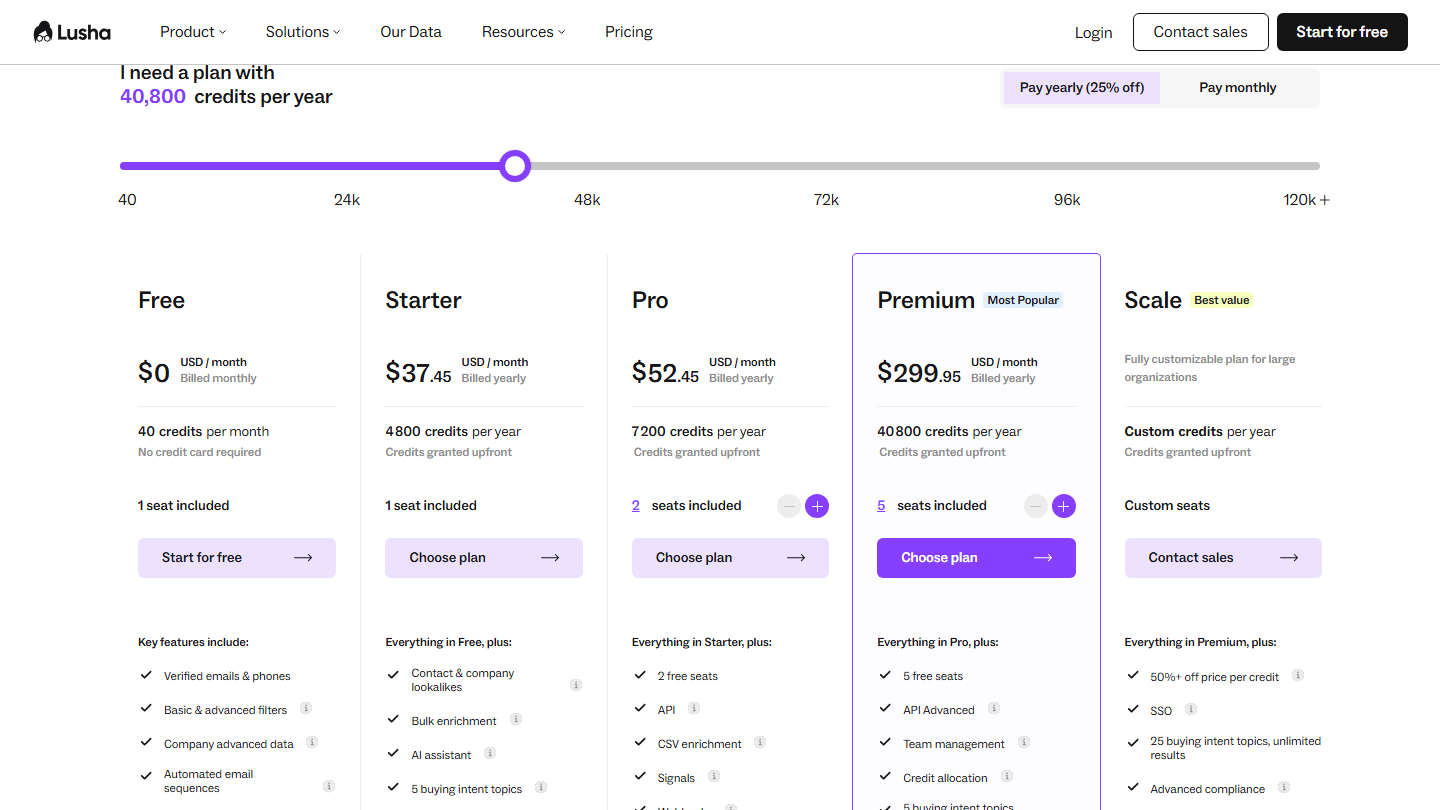
Lusha offers 5 plans, with a credit system: an email costs 1 credit, a phone number 5 credits.
- A free plan, with 40 credits per month, or 8 phone numbers (or 40 emails). Handy for testing the tool and its ability to find your prospects’ phone numbers.
- A Starter plan, with 1 seat, at $37.45 per month billed annually for 4,800 credits per year, or up to 960 phone numbers. That is $0.47 per phone number.
- A Pro plan, with 2 seats included, at $52.45 per month billed annually for 7,200 credits per year. It adds the API and CSV file enrichment. The price per number drops to $0.44.
- A Premium plan, with 5 seats, at $299.95 per month billed annually for 40,800 credits per year. It adds the advanced API and team management. Still $0.44 per number.
- There is also a Scale plan, on request, for companies that need more than 5 seats, with a price per credit reduced by more than half.
So there are 3 pricing variables:
- Enrichment volumes (number of emails found or verified, number of phone numbers).
- The number of seats, which determines the type of plan: Starter, Pro or Premium.
- The feature scope. The Pro plan, for example, gives access to the API and CSV enrichment, the Premium plan to team management.
On price per phone number found, Lusha is on par with Kaspr. But every email also uses a credit, and volume discounts stay low until you move to the Scale plan. That is an important difference with our third and last tool: Datagma.
Another key point: the 25% discount is reserved for annual billing.
Datagma: between $0.28 and $0.49 per phone number found
Datagma works like its two competitors, with plans and credits: an email costs 1 credit, a phone number 30 credits.
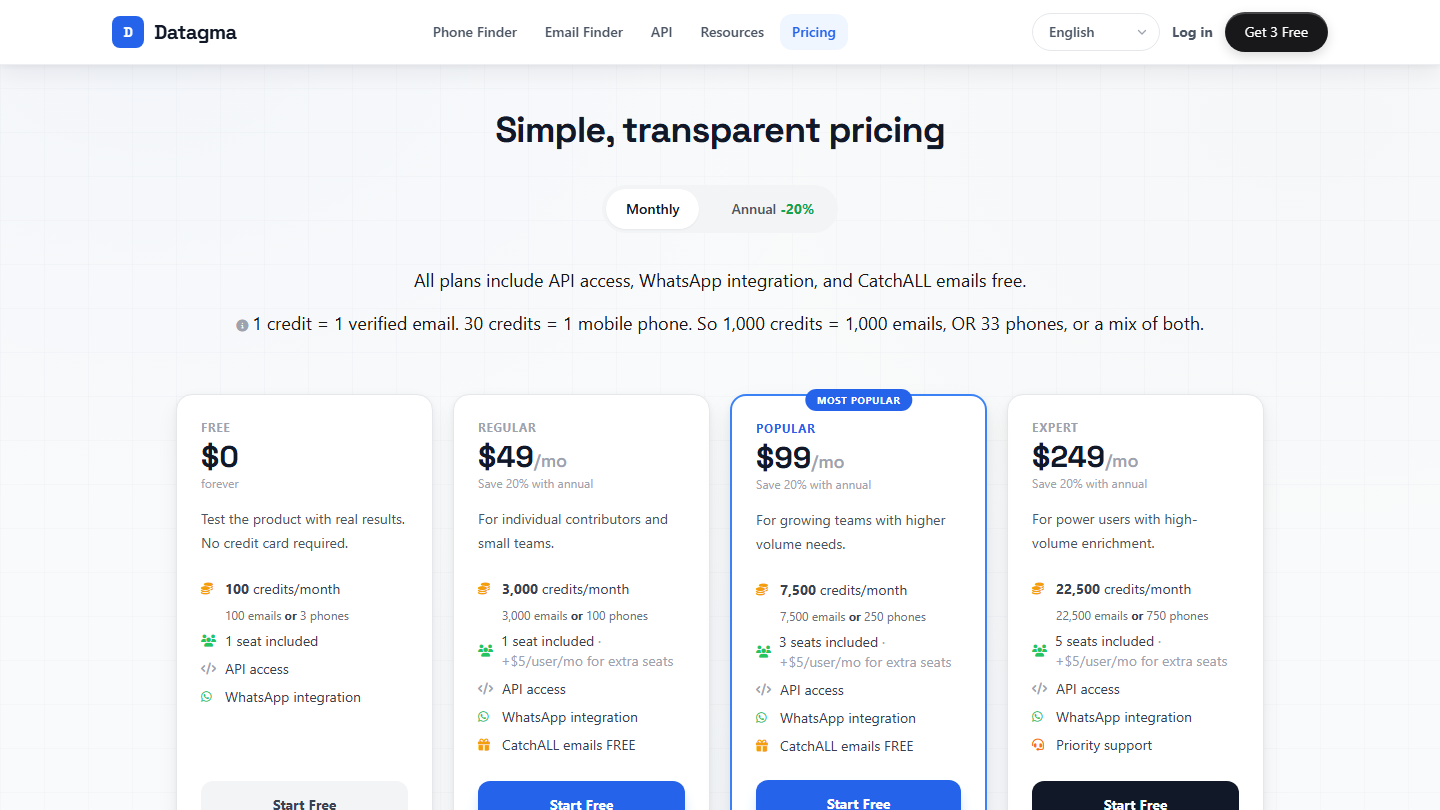
Datagma offers 5 plans:
- A free plan, with 100 credits per month, which lets you find 3 phone numbers (or 100 emails). You will hit the limit very quickly. This plan is mostly designed for testing the tool. It might do for freelancers who only occasionally look for prospects’ phone numbers…
- The Regular plan at $49 per month ($39 billed annually) lets you find 100 phone numbers per month, with 1 user. That is $0.49 per number found ($0.39 annually).
- The Popular plan at $99 per month ($79 billed annually) lets you find 250 numbers per month, with 3 users. That is $0.40 per number ($0.32 annually).
- The Expert plan at $249 per month ($209 billed annually) lets you find 750 numbers per month, with 5 users. That is $0.33 per number ($0.28 annually).
- Datagma also offers a custom Enterprise plan, beyond 750 numbers per month.
The API and CSV file import are included in all plans, and no credit is deducted when Datagma finds nothing. As with Lusha, you can cancel your subscription at any time: Datagma bills monthly, with no commitment, and unused credits roll over for 12 months.