The tool in detail
LinkedHelper after real-world use: feature scope, integrations, pricing and concrete limits.
LinkedHelper is a LinkedIn automation tool with one distinctive trait: it is a desktop application. Unlike Chrome extensions or cloud-based tools, this approach makes it easier for LinkedHelper to stay under LinkedIn’s radar, provided you use it carefully, of course 🙂
In this article, we walk you through LinkedHelper’s features, pricing and user reviews.
LinkedHelper: the key features
Automate your actions on LinkedIn
Automation is THE core feature of LinkedHelper. The tasks you can automate include:
- Following profiles
- Visiting profiles
- Removing contacts
- Adding and removing tags
- Sending personalized messages
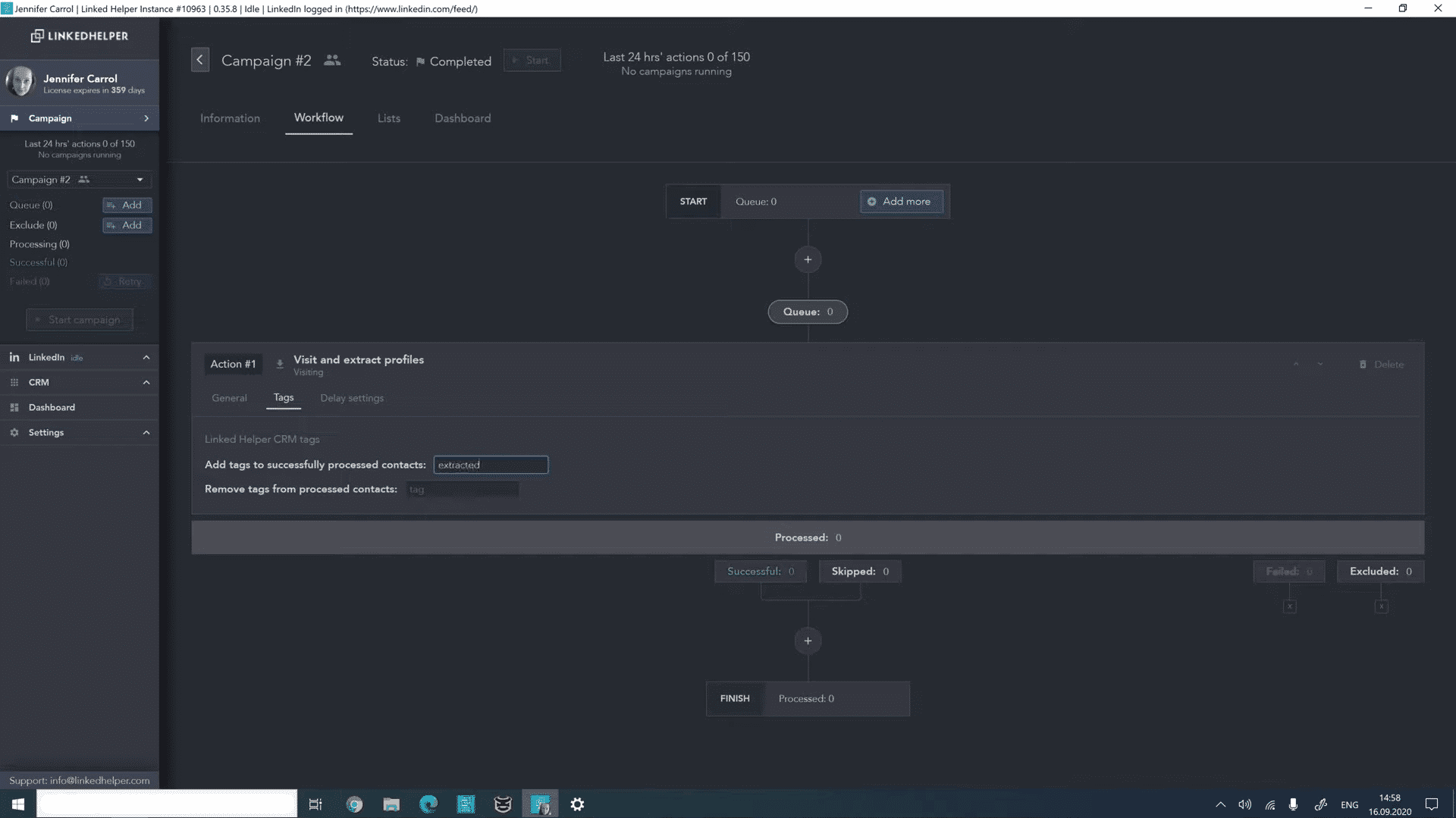
LinkedHelper’s strength lies in its ability to mimic human behavior, with the aim of making lead generation easier.
Prospecting on LinkedIn
LinkedHelper lets you build message sequences where the replies you receive are automatically sent to your CRM software, through a native integration or Zapier.
With LinkedHelper, you can personalize your messages to improve your acceptance rate. Adding built-in or custom variables helps a lot, especially when they come with « IF, THEN, ELSE » instructions.
Once the messages are sent (they are not capped), you can export all your contacts as a CSV file to enrich your database. A powerful and effective LinkedIn prospecting tool.
Salesdorado’s tipWe strongly recommend personalizing a few elements of your message. Also, remember to take over at the right moment so that several automated messages don’t go out after your first contact.
Contact management: a real LinkedIn CRM
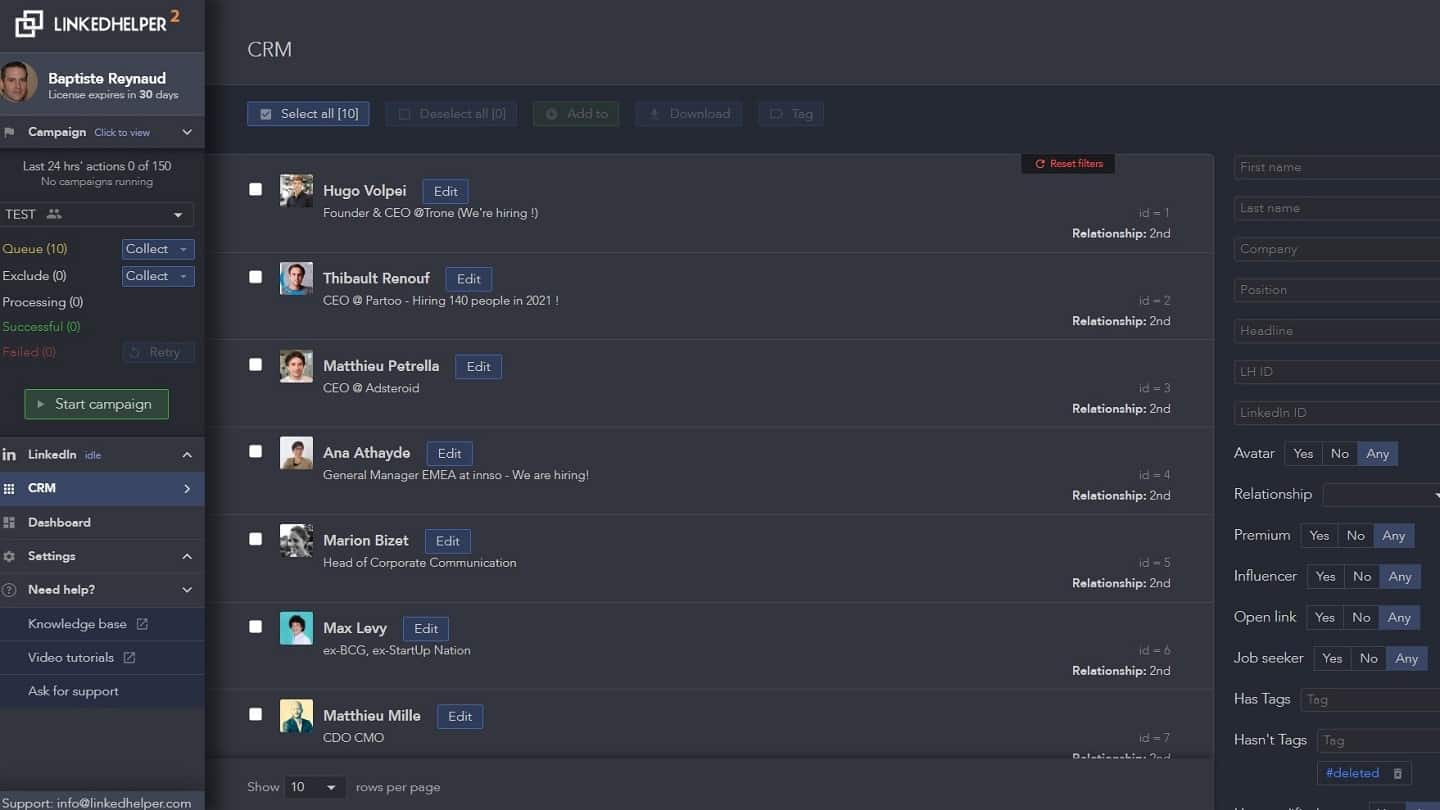
LinkedHelper has a built-in tool that retrieves contact information and exports it to a CSV file. The goal here is to build a highly targeted mailing list. A real built-in CRM!
By adding all this information to LinkedHelper’s built-in CRM, your LinkedIn marketing campaigns reach an impressive level of personalization, with no tedious work involved.
Multi-account management
With LinkedHelper, you can use one license to:
- Manage several LinkedIn accounts, but not at the same time,
- Or you can buy several licenses (one per account) to manage all your LinkedIn accounts at the same time.
It’s a valuable feature for growth hacking agencies, lead generation agencies, or personal branding agencies.
Even small sales teams can adopt this feature to streamline how they collaborate and save precious time.
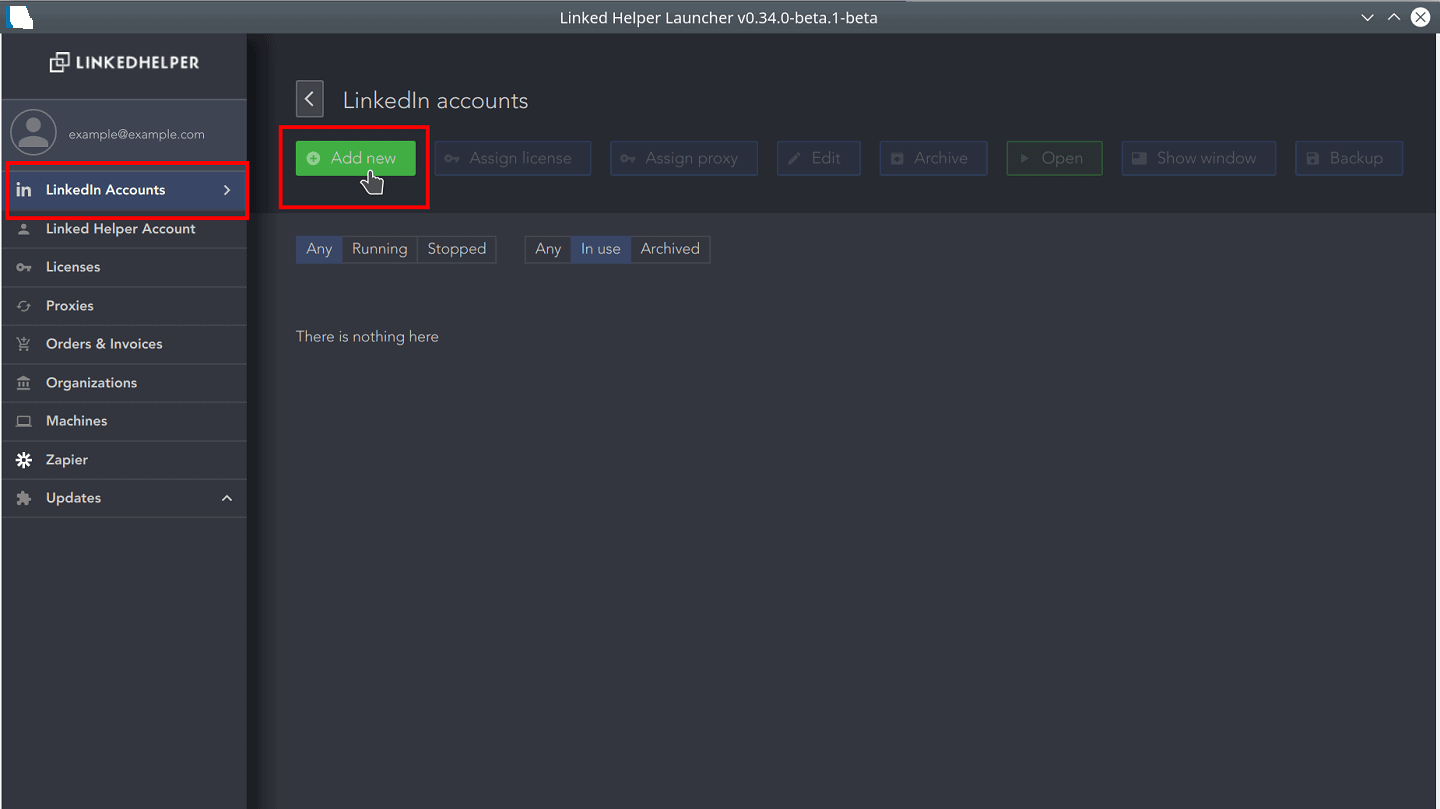
Adding a new account is easy. Just go to the « LinkedIn Accounts » section, click « Add New » and log in to the LinkedIn account.
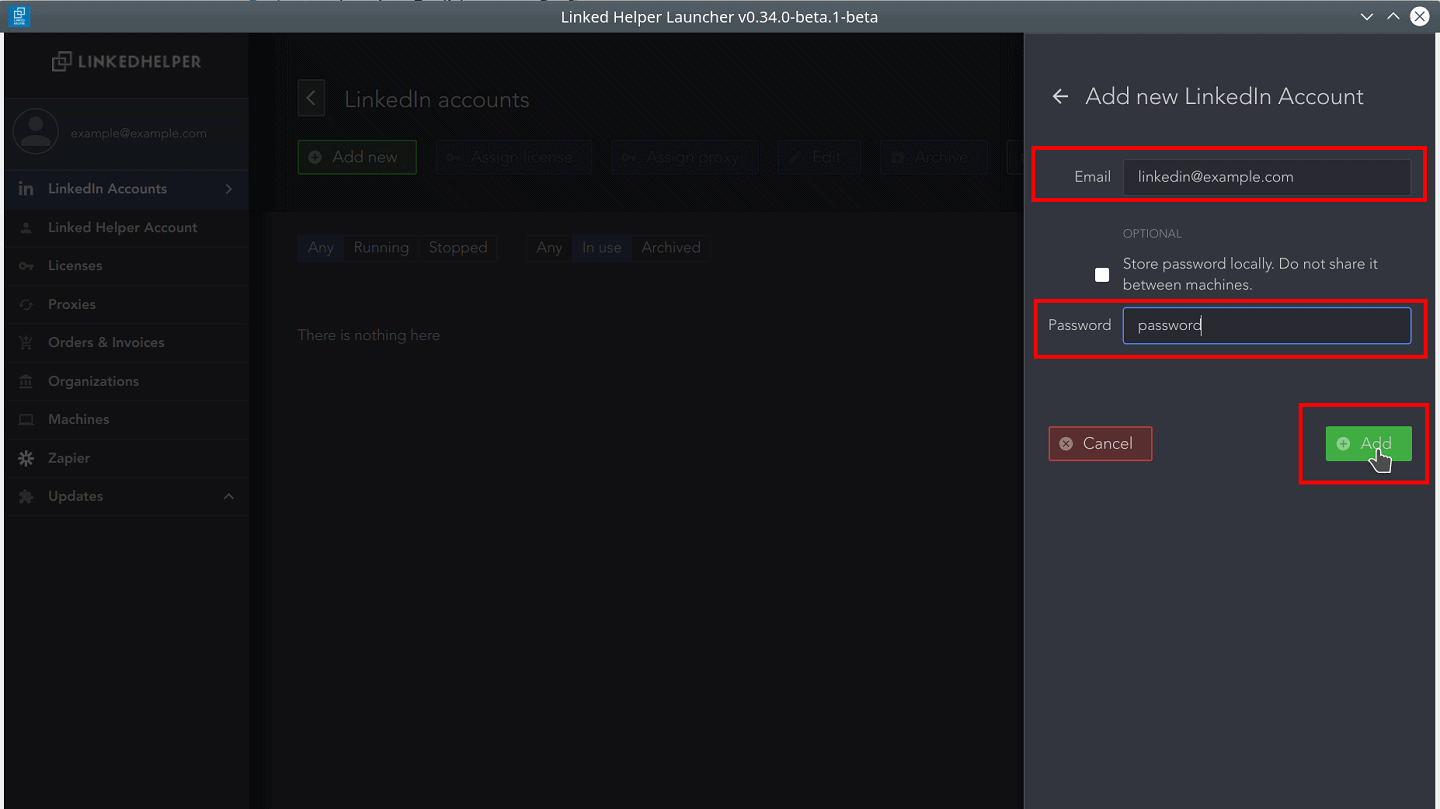
LinkedHelper also offers separate workspaces for each client or project, with roles and access levels, and the option to invite a client with view-only access.
Salesdorado’s takeA very useful feature if you want to centralize your LinkedIn prospecting actions and get your whole sales team pulling in the same direction!
Is LinkedHelper easy to use?
LinkedHelper has a lot of features and plenty of customization options, ideal for automating your actions on LinkedIn.
In terms of features and customization options, Linked Helper is very rich. That’s ideal if you want tight control over the automation of your LinkedIn prospecting (for example, the number of people you connect with, how often you connect, and advanced rules for sending messages), but it inevitably comes at the expense of ease of use.
So the learning curve can be intimidating, especially for a beginner in LinkedIn automation. Fortunately, plenty of videos and a fairly rich FAQ section help you get started.
What are the risks of using LinkedHelper?
LinkedHelper is a desktop application, installed directly on your computer. That makes it harder for LinkedIn to detect that you are using a LinkedIn automation tool. The application mimics human behavior and caps daily actions in order to respect the rules set by LinkedIn.
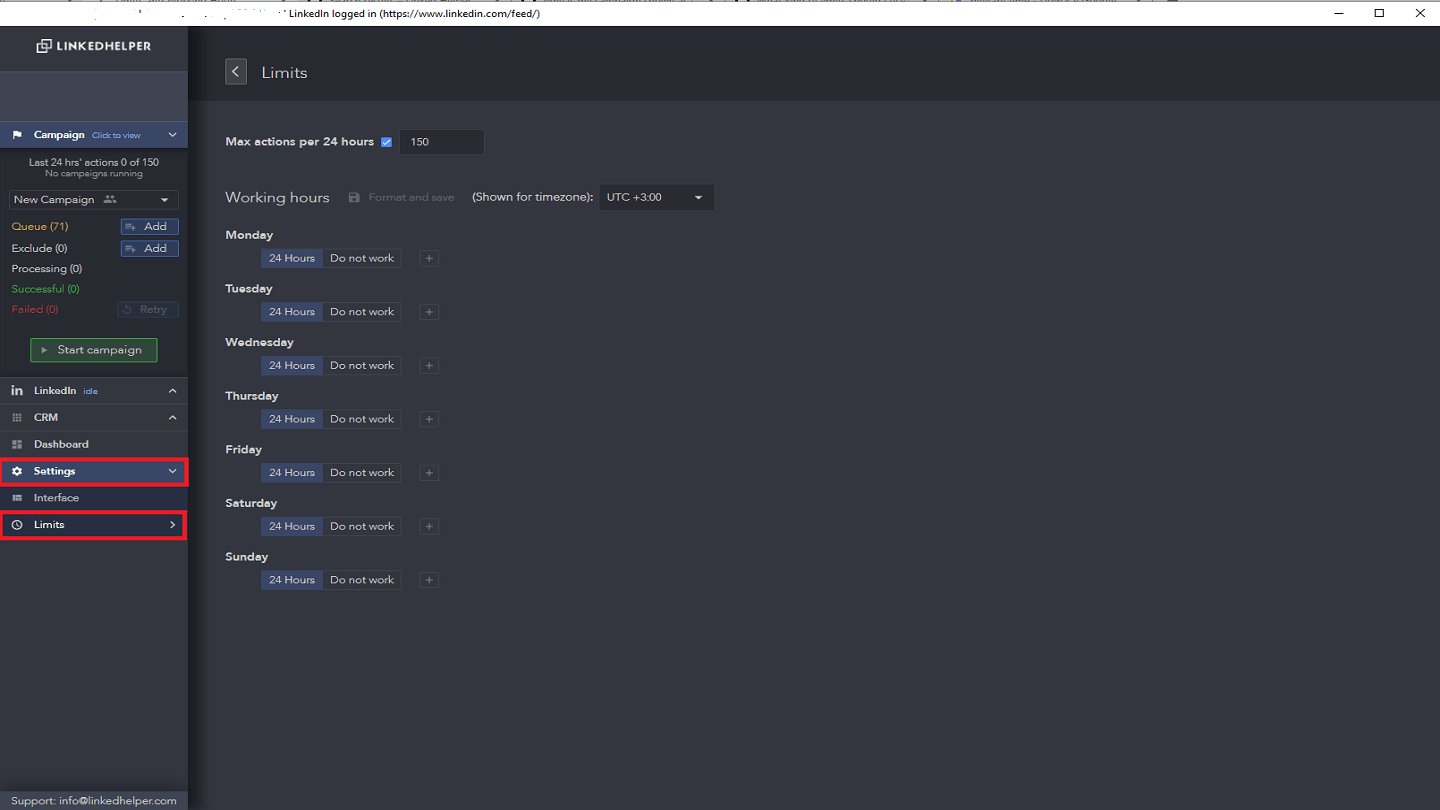
For even finer control over each action, LinkedHelper offers a « Limits » section where you can set how often things get sent: for example, 50 messages, 50 invitations, 40 profile follows, etc.
LinkedIn closely monitors the activity on your account. Sending connection requests in bulk acts as a red flag for the social network. We advise keeping daily invitations between 50 and 70.
Don’t forget that, more often than not, the problems that can happen on LinkedIn aren’t caused by the tools, but by overusing them.
Salesdorado’s takeLinkedHelper isn’t a plugin, it’s a desktop application you download to your computer. Using the « limits » section, you can set how often the automated actions run and so limit the negative signals sent to LinkedIn.
LinkedHelper pricing
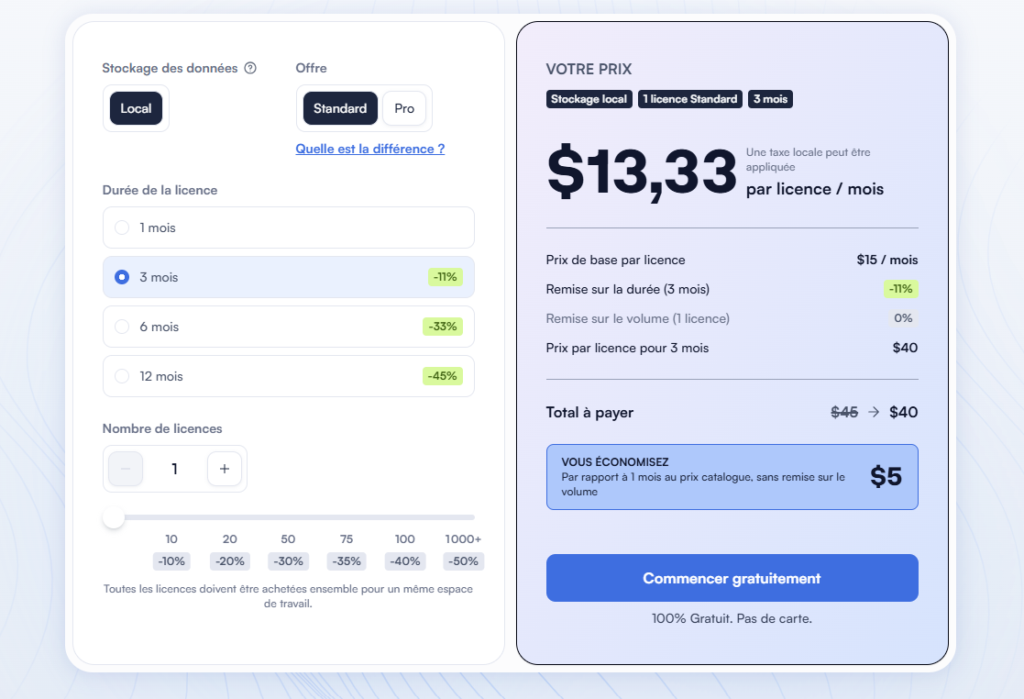
LinkedHelper’s price now depends on four criteria: the plan, how your data is stored, the commitment period and the number of licenses.
- The Standard plan costs $15 per month with no commitment, $13.33 per month over 3 months ($40 in total), $10 over 6 months ($60) and $8.25 over 12 months ($99), with local storage. It gives access to every feature, AI included, but caps a dozen or so advanced actions at 20 per day: messages to group or event members, likes and comments, sending to your CRM…
- The Pro plan lifts those caps, adds message history export to your CRM, and includes about five times more enrichment credits and twice as many AI credits.
- Cloud storage, from $16.50 per month over a year, keeps your data on LinkedHelper’s servers. You get your workspace back from any device, with automatic backups and easier sharing with your team. The automation itself still runs from your computer.
Volume discounts start at 10 licenses (-10%) and go up to -50% beyond 1,000, and they stack with the term discount. One license equals one LinkedIn account: you can’t use it on two accounts at the same time, but you can transfer it from one account to another at any time.
Salesdorado’s takeLinkedHelper is still an affordable tool, with an entry price that remains unbeatable. Make your choice before you pay, because you can’t move from Standard to Pro mid-license, or from local to cloud storage. Make the most of the 14-day free trial, which gives access to the full Pro plan, with no credit card.