



- Click “Contact info” on a LinkedIn profile: the email is there in one case out of 10 or 15, more often for senior profiles.
- If you’re already connected to your target, exporting your LinkedIn contacts (“Connections”) often gives you their address.
- A mutual connection can send an intro email for you: it’s the method that gets the most replies.
- Freelancers and service professions: look for their personal website or their Google Maps listing.
- To save time, an email finder Chrome extension: Apollo for small needs, Findymail for large volumes.
Finding someone’s email today is almost always possible.
In practice, there aren’t 50 ways to do it:
- In the best case, your target has left their email address lying around somewhere. For example, axel@salesdorado.com is written in several places on this site, so if you’re looking for my email, you’ll find it pretty easily.
- In a slightly more complicated case, someone else at the same company has left their email address lying around somewhere. Say we find the address a.lavergne@salesforce.com: we now know how email addresses are built at Salesforce. So we can contact anyone at Salesforce.
In this second case, it’s much easier to use what’s called an “email finder”, which does this at scale and saves you from searching for 50 people’s emails to find one.
And in the first case, an email finder saves you a fair amount of time, but it’s really not always necessary. The real added value there is that you have a single process, which lets you outsource and move fast.
That’s about it.
The rest is grunt-work tricks that never work.
So in this article, I’ve listed 8 methods for finding anyone’s email address, in order of simplicity. That means the first options cost more than the last ones, but they’re also much faster.
If you have more time than money, or if you’re curious and want to know how all this works, stay at the top. And if your time earns you more doing something other than hunting for emails, start from the bottom.
Finding email addresses in bulk
I’m deliberately not covering “bulk email finding” in this article – that is, the case where you have a list of contacts (in Excel, as a CSV, on LinkedIn, …) and want to enrich it automatically with email addresses.
What works for finding one email works for finding 100, but in practice, the use case is a bit different.
If you’re looking for a list of emails of “marketing freelancers” rather than the email of “Mr XYZ”, I’d rather recommend our article on the 10 best email finders in France, or, at a higher level, our comparison of B2B database providers in France.
Read alsoTop 10 email finders in France
Finding someone’s preferred contact email
Going back to my first case, people most often leave their email address lying around when they want to be contacted.
It is, by far, the easiest way to find someone’s address.
1. On LinkedIn
On LinkedIn, you may not know it, but there’s a thing called “Contact info”.
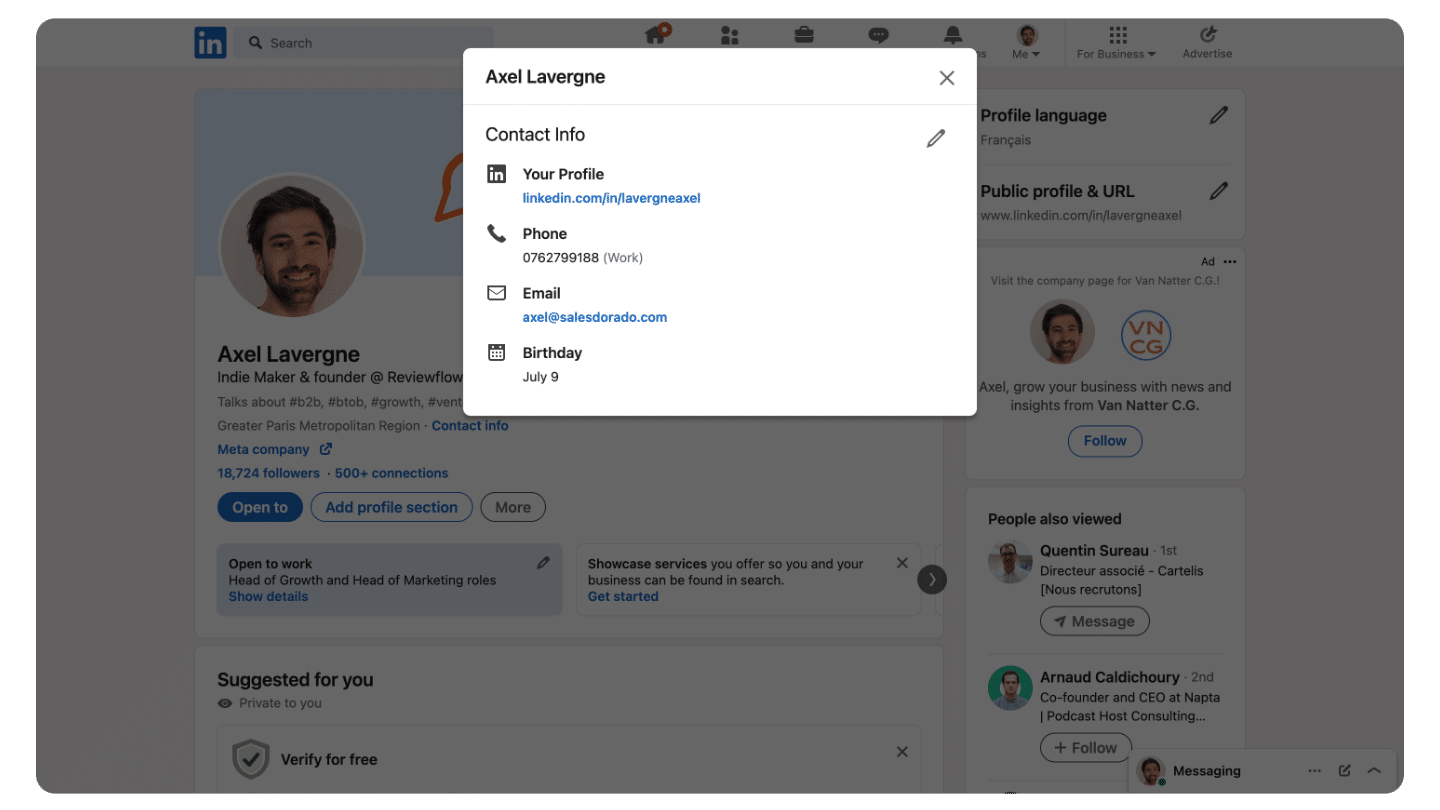
In one case out of 10 or 15, you’ll find your target’s email there.
Either it was left there on purpose – it happens, especially with fairly senior profiles who spend time mentoring, investing, etc. That’s a treat, because you’re contacting someone at an address they’ve set aside for this kind of outreach.
Or it’s the result of one of LinkedIn’s profile enrichment campaigns, which it has been running regularly for years. You can actually see on my screenshot that they’re inviting me to upload my ID card to get a badge (Verify now). Always more.
The takeaway: the probability of finding an email address there rises significantly with your target’s age, and clicking “Contact info” costs you nothing.
2. On LinkedIn, take two
If you’re already connected to your target, you can get their email fairly easily by exporting your LinkedIn contacts.
This is no longer something people fill in explicitly, but rather a box to uncheck for those who have had an account for a while – here too, the longer your target has been on LinkedIn, the easier it will be.
To do this, go to this page, choose “Connections” and you’ll receive a nice fresh CSV with all your contacts.
All that’s left is to find the right one and see whether the email is filled in.
3. On LinkedIn, take three
Even more effective on LinkedIn, you can find the connections you share with your target. And ask them to introduce you.
If you want to increase your chances of getting a reply, this is formidable.
Once you’ve found the list of your mutual connections, all that’s left is to contact the ones closest to you and ask them for an intro email.
Results guaranteed.
4. Personal websites
Continuing with the idea of finding emails where people want to be found, Google Maps is a gold mine.
If you’re targeting designers, developers, or more generally independent freelancers in highly digital professions, you have a good chance of finding personal websites with a portfolio, client references, and … a contact page.
Either a form, or an email.
Or both.
Either way, you’ll be read.
The easiest way is to type your target’s full name into Google. If that’s not enough, you can add keywords such as their job, their company name, etc. You’ll usually land very quickly on a dedicated site or a profile on a platform site with contact details.
5. Google Maps
Google Maps is the personal-website equivalent for every service profession tied to a physical location. That’s … a lot of them. And here too, Google has been doing a monstrous amount of work for about ten years to get everyone to build a storefront on Google Maps. Including door to door. And it works.
If you type the name of a tradesperson or an independent professional into Google Maps, you’ll almost always find them.
And in most cases, there will be a contact email, or better, a phone number.
The lesson: if you dig a little with this idea in mind – where would I want to be seen and contacted if I were my prospect – it’s usually fairly simple to find a contact.
But we don’t always have time to search.
Fortunately, most email finders on the market have an unavoidable feature for this use case: the Google Chrome extension.
Finding someone’s email with a Google Chrome extension
OK, first of all, if you work on Safari, you need to switch tools and move to Chrome. There are Safari solutions but they’re all rubbish.
Next, let’s be clear-eyed: these features are paid. But most email finders have a free plan that lets you retrieve a few emails per month.
In theory, you could create an account with every email finder out there, ignore the nice entrepreneurs and developers who do all this for you, and surf the free plans. If you rarely look for email addresses, it’s worth considering.
If you’re on a sales team, frankly it’s not very advisable: you’ll spend more time struggling than selling, and save 500 euros a year at most. As with phone numbers, I recommend Zeliq, which is extremely effective for business emails thanks to its many aggregated data providers and its AI that maximizes the chances of getting the right email. On top of its platform, Zeliq also has a Chrome extension that lets you retrieve email addresses.
Get 15% off ZeliqUse the code SALESDORADO15 when buying a subscription to get 15% off for one year.
You can create a free account to test it, and buy whenever you want with these codes. But don’t wait for them to change their minds!
6. On LinkedIn
On LinkedIn, my favorite is Apollo.
I get 50 free credits per month, and I can fire off my emails directly from the extension, with the prospect’s LinkedIn profile right in front of me.
In terms of comfort, it’s brilliant.
But in terms of performance, it’s not unusual for Apollo to fail to find an email. The database isn’t really the most complete, especially in France.
If I’m prospecting a lot, I almost always switch to Findymail.
Findymail is a made-in-France email finder that provides everything you need to do B2B sales properly. They only provide valid emails, and coverage is far better than Apollo’s.
Roughly speaking, if you need emails fairly rarely, Apollo, and if you need a lot of emails, Findymail. Especially since, if your usage is fairly intensive, the feature I’ll talk about next will be very valuable.
7. On LinkedIn Sales Navigator
If you’re looking for something really solid to find emails every time and at a larger scale, I now almost always recommend Findymail.
It’s not a low-cost email finder, but it has everything you need to do B2B sales properly, and to stop wasting time on invalid addresses, Gmail addresses, etc.
To extract leads from Sales Navigator, they also have a Chrome extension that lets you export Sales Navigator lead lists and enrich them on the fly with business emails.
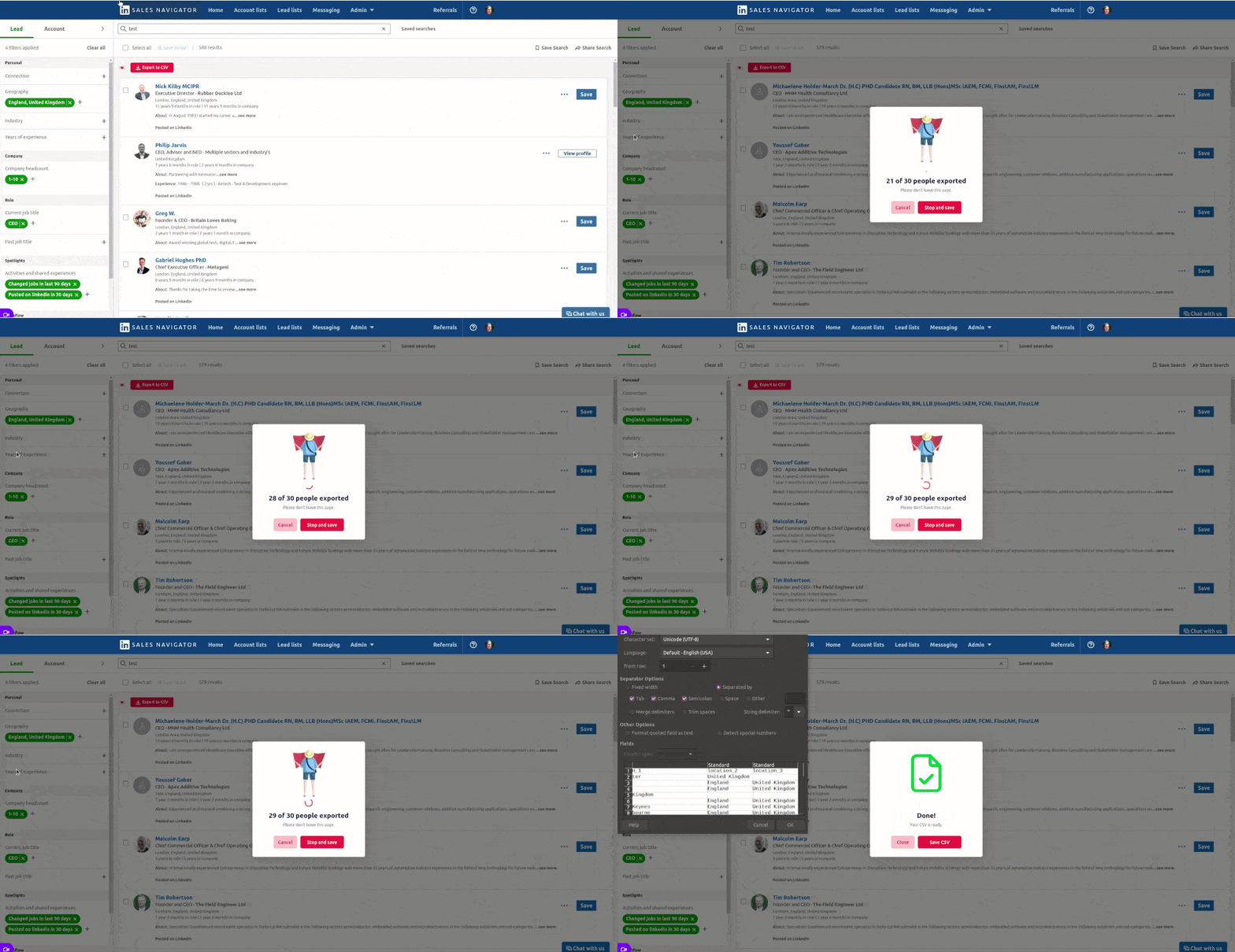
Basically, you run your Sales Nav search, you click Export, and you get a CSV with all your leads, fresh and ready to be contacted.
For 50€ per month.
Hard to be more efficient. You can try Findymail for free up to 100 credits with this link.
Fun fact: you can do the same with a search on … Apollo, which lets you search its proprietary database for free. Full circle.
8. On Google Maps
If your targets aren’t on LinkedIn but have a strong presence on Google Maps, you can look at scrap.io instead
The principle is pretty much the same as with Findymail: you run your search on scrap.io, and you can export a list of leads enriched with their emails, phone numbers, and a whole bunch of other stuff. One credit is deducted for each exported lead. You can filter on just about every criterion imaginable to prepare a well-targeted export.
Paid plans start at 49€ / month, but you can try it for free for up to 7 days, 100 exported leads and / or 50 searches by following this link.
Email finder or manual search?
I went over this a bit quickly in the intro. In this article, we covered targeted search, done “by hand”.
To build lead lists to contact at scale from cold emailing tools, there are much more effective tools and methods. We cover them in our selection of the best email finders in France.
But in reality, behind this question, it’s the whole prospecting process that’s at stake.
In the world where you do everything by hand, you have to do bespoke work. Craftsmanship. Goldsmithing.
Every email is crafted, with the prospect’s LinkedIn profile in front of you. You think about the best hook, you spend a bit of time, and you aim for very high reply rates.
In that case, it’s much simpler to do your research somewhat organically, by hand, and to have a Chrome extension in case you don’t come across an email while looking for a smart hook, a mutual contact or a pretext for reaching out.
It’s a way of working I use a lot personally. For example, when I want to contact the people who visited reviewflowz. I still have fairly little traffic so I want to be targeted, and above all these are fairly qualified targets so I want to maximize my chances of making contact.
The opposite approach is to build lead lists – more or less targeted – and rely much more on volume to get results.
Either you have a target limited in volume that you want to work as well as you can, or you have a large target and you want to do volume.
But you can’t do both.
Even with AI and whatever else, it’s as plain as the nose on your face.
The key is to stand firm on this when you launch a campaign. If you try to mix the two, you’ll fail.
The questions we get over and over.
Where can I find someone’s email address on LinkedIn?
In the “Contact info” section of their profile, where you’ll find your target’s email in one case out of 10 or 15. If you’re already connected to them, you can also export your LinkedIn contacts by choosing “Connections”: you receive a CSV with all your contacts.
How do I find the email of a tradesperson or an independent professional?
Type their name into Google Maps: you’ll almost always find them, and in most cases there will be a contact email, or better, a phone number.
Can you find emails for free with an email finder?
Email finder Chrome extensions are paid, but most have a free plan that lets you retrieve a few emails per month. If you rarely look for email addresses, it’s worth considering. For a sales team, it’s not very advisable.
Apollo or Findymail to find emails?
Apollo if you need emails fairly rarely: 50 free credits per month, but the database isn’t the most complete, especially in France. Findymail if you have large needs: it only provides valid emails and its coverage is far better.
Should you look for emails by hand or with an email finder?
Either you have a target limited in volume that you want to work as well as you can, and you search by hand with a Chrome extension as backup. Or you have a large target and you build lead lists to do volume. But you can’t do both.



What the community says.