The tool in detail
Livestorm after real-world use: feature scope, integrations, pricing and concrete limits.
How do you run a webinar simply and intuitively for your customers, prospects or colleagues? We give you our detailed review of a very intuitive, high-performing solution: Livestorm.
Want to compare this tool with the other solutions on the market? Read our comparison of webinar hosting software.
We are happy to introduce a 100% French solution, adopted by many companies, in France and abroad. Livestorm is an all-in-one platform that lets you streamline the organization and management of your webinars. For your customer training sessions, your demos and your communication sessions, Livestorm lets you generate more leads and qualify them. A valuable tool for marketing and sales teams, notably thanks to its advanced analytics.
Livestorm’s analytics and data enrichment give you a better understanding of attendee behavior, their profile, their registration source and their engagement throughout the webinar.
The criteria in detail
Ease of use
Livestorm stands out with an extremely pleasant interface, both for the organizer and for the webinar attendee. Your attendees don’t need to install any software on their computer to take part, they can simply register through their browser. The webinar interface itself is very user-friendly, and every section is easy to reach during the live session (the chat and the questions in particular).
Customer service
Customer service offers personalized support to launch your first webinar, then proves very responsive in answering all your questions, and the support is multilingual. In our case, we contacted customer service for details on pricing and got a clear, concise answer in under 3 hours.
Depth of features
The tool was designed for organizing and hosting your webinars. So you get the must-have features, such as:
- Real-time HD video stream and screen sharing
- Option to watch the video again
- Landing page and registration management by email
But Livestorm also gives you access to more advanced features:
- Post-webinar analytics tools (the lead dashboard showing who asked questions, registered, attended)
- Audience segmentation
- Native integrations with CRMs and marketing tools
- Lead enrichment
Livestorm also offers on-demand and automated webinars, live subtitles, and AI options to translate your live sessions in real time or turn your replays into content.
Integration
The tool integrates with the main business applications:
- Salesforce
- Google Ads & Analytics
- HubSpot
- Pipedrive
- …
HubSpot and Zapier are available from the Pro plan. Salesforce, Marketo, Pardot, Microsoft Dynamics and Brevo are reserved for the Enterprise plan.
The Zapier connectivity in particular is excellent: it lets you send data from Livestorm to any other application in the Zapier directory (more than 1000).
We do regret, however, that many B2B CRMs & marketing automation tools are missing, such as ActiveCampaign, which you will find in our selection of the best free CRM software.
If you have the time and the skills to work on a custom integration, the Webhook feature lets you use Livestorm’s data like an API.
Value for money
Livestorm has overhauled its model: no more monthly subscriptions by number of attendees, it is now an annual pack of credits. Each person who attends a session, live, as a replay or on demand, uses one credit. No-show registrants and your team members are not counted.
So there are 2 plans:
- Pro: from €2.50 per attendee, for example €1,000 a year for 400 attendees. It includes sessions of up to 4 hours, unlimited events, recordings and team members, as well as the most common integrations such as HubSpot and Zapier.
- Enterprise: on quote. It adds sessions of up to 12 hours, the advanced integrations (Salesforce, Marketo, Pardot, Microsoft Dynamics, Brevo), custom reports, a dedicated Customer Success Manager and VIP support with an SLA.
The model is fairer if you run webinars irregularly, since you never pay for no-shows. On the other hand, it requires you to forecast your annual volume: once the quota is reached, new attendees can no longer join your sessions unless you move up to a bigger pack.
Feature details
1. Registration landing page
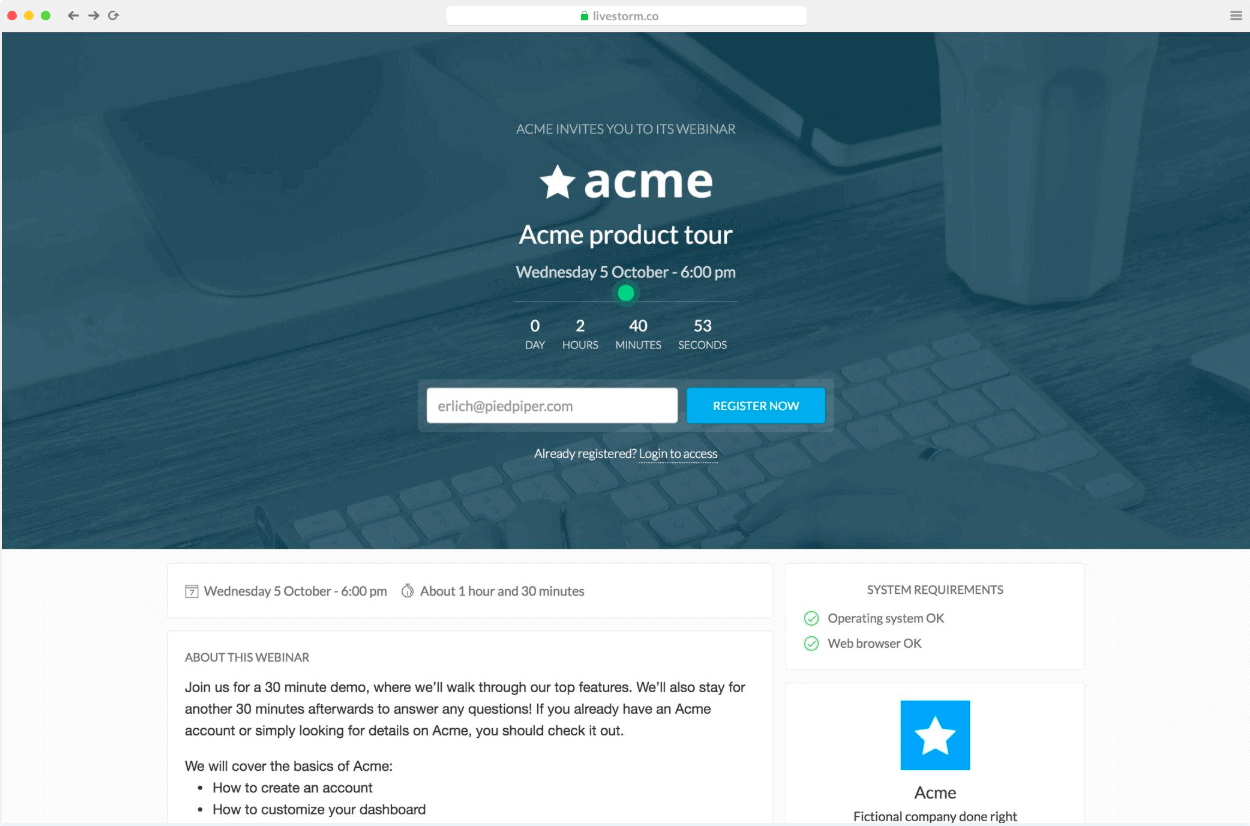
The registration landing page matters a lot, because it is the page where your potential customers will sign up for your webinar. The goal is to build a page optimized for conversion. A simple, effective page so that your prospects don’t miss your webinar.
Once again, Livestorm makes this step of the process much simpler. By going to the “Optional settings” section, you will be able to:
- Through the “Registration” section: set the information required to register for your webinar. Adding fields can help you get to know your audience better.
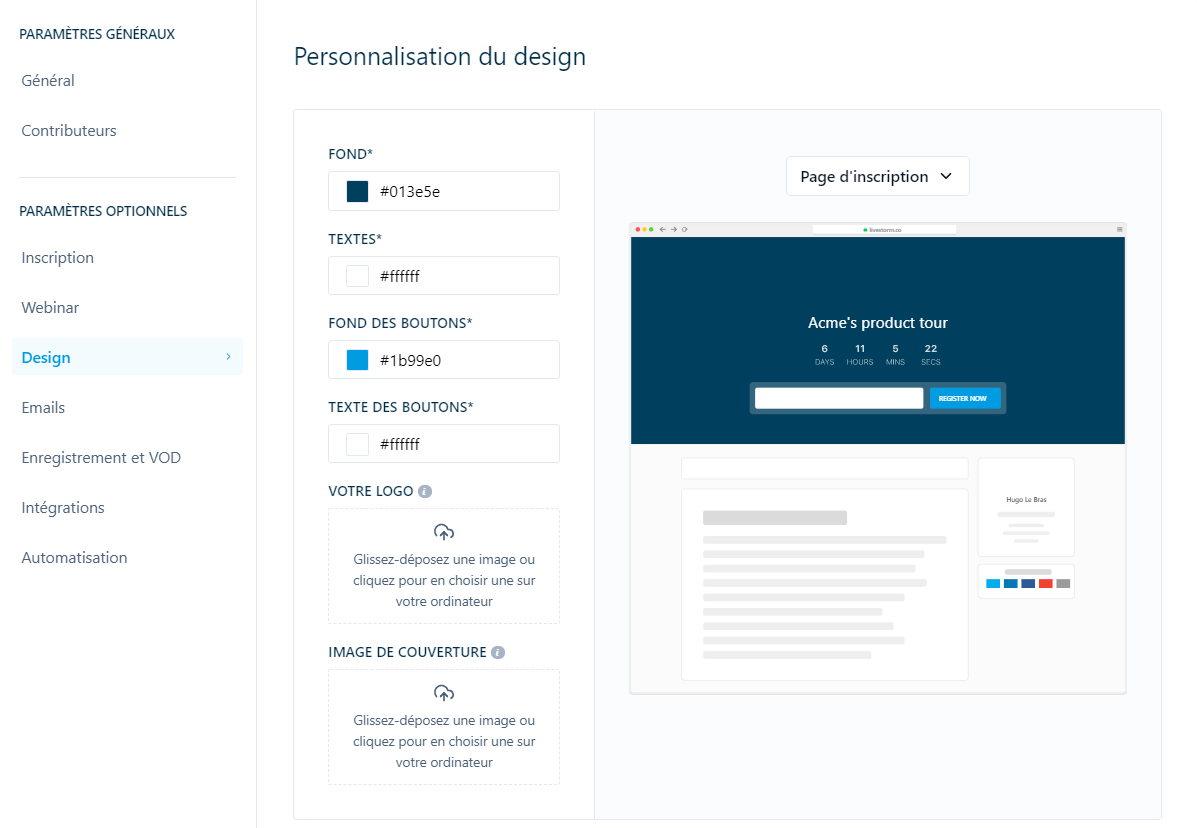
- Through the “Design” section (below): build a custom landing page in your company’s colors by adding your logo and the colors that match your branding. You can also choose the cover image to fit the theme of your webinar.
2. Reminder emails
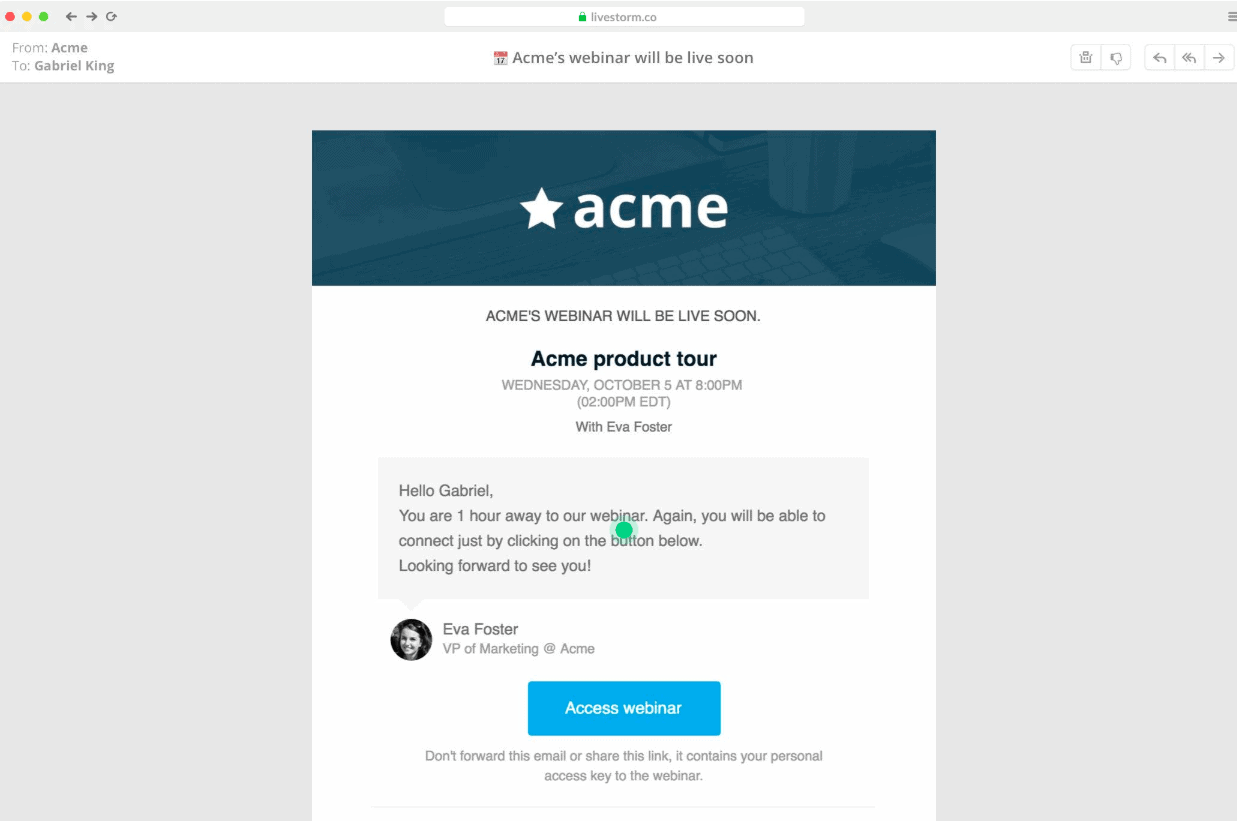
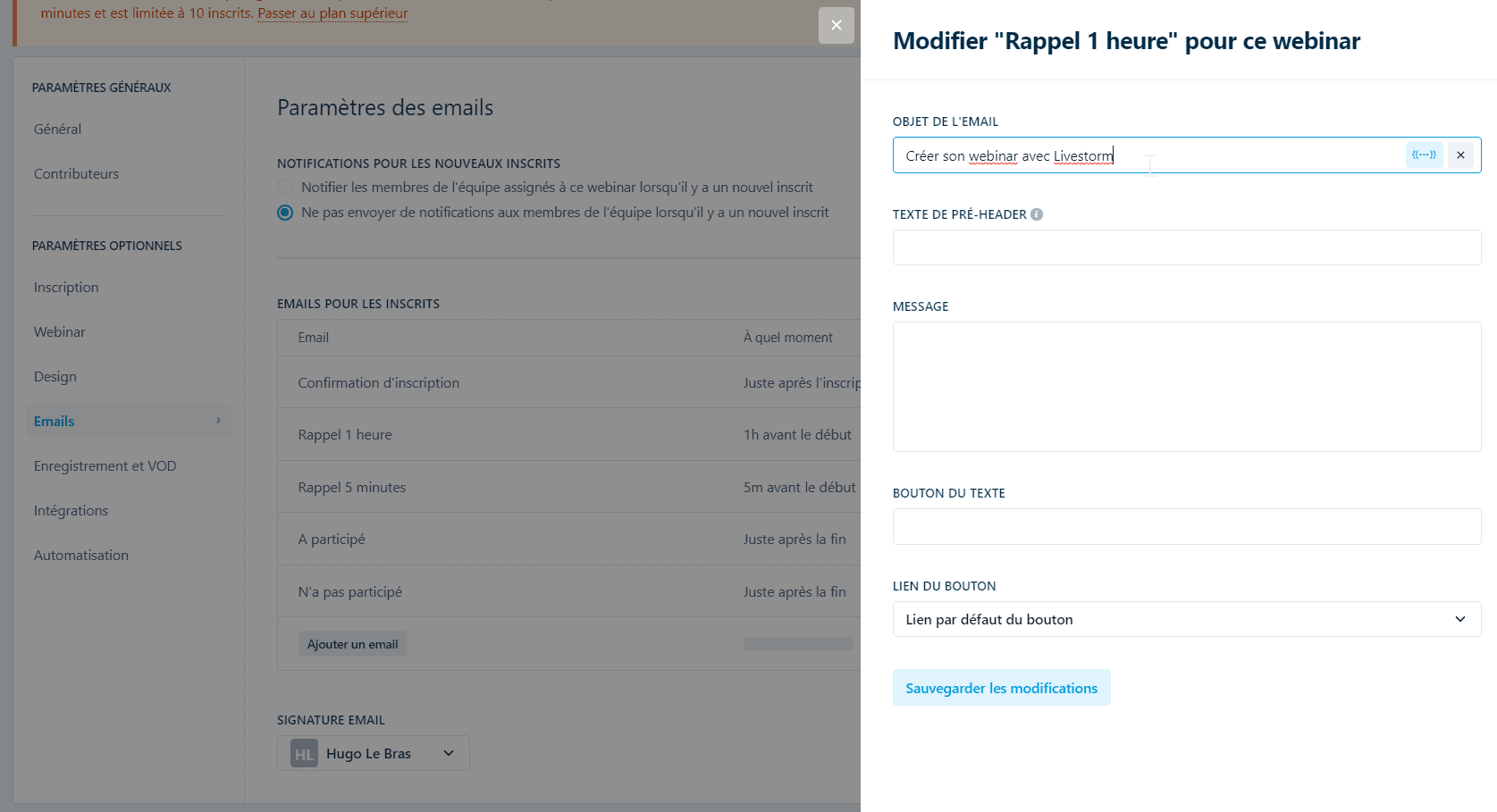
Another step you need to pay attention to so that your future customers attend your webinars. Livestorm handles notifications and reminders, from registration to the last reminder shortly before your session starts. These reminders are essential to maximize your attendance rate.
Here again, the platform proves very intuitive. Still in “Optional settings”, go to the “Emails” section. Livestorm helps you set up an effective email sequence for your attendees’ registration and reminders. You can edit the content of each email by clicking “Preview or edit” then “Edit content”, as shown below.
3. Reporting
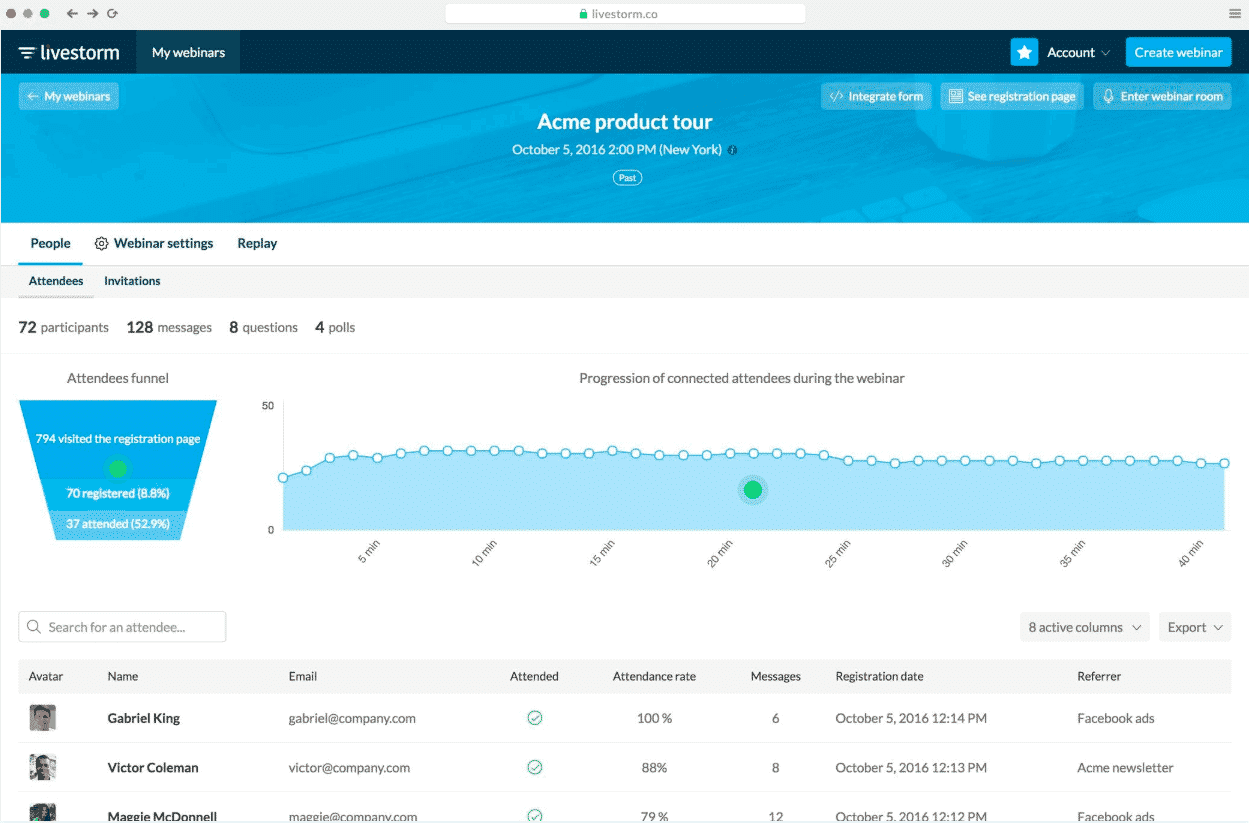
This is one of the main reasons we love this tool. Livestorm gives you very advanced information on your attendees’ behavior. This information will be valuable for improving the content and organization of your webinars. Take the time to understand this data to generate more qualified leads, offer suitable content and increase your conversion.
Want to learn more about lead generation? Read our complete guide on the subject!
So you will know:
- Which channel your prospect registered from (Facebook ads,…)
- To what extent your registrants actually attend the webinar
- Whether they ask questions
- What they thought of the webinar
- …
This advanced data, and the simplified interface that makes it easy to understand, are the real strength of Livestorm.
On top of helping you generate qualified leads, the tool also lets you enrich each lead with LinkedIn data. This lets you identify, among other things, each attendee’s job title and company, and so score your leads. You will make life much easier for your sales teams, who can then contact the hottest leads.
To learn more about lead qualification, read our guide.
4. The webinar itself
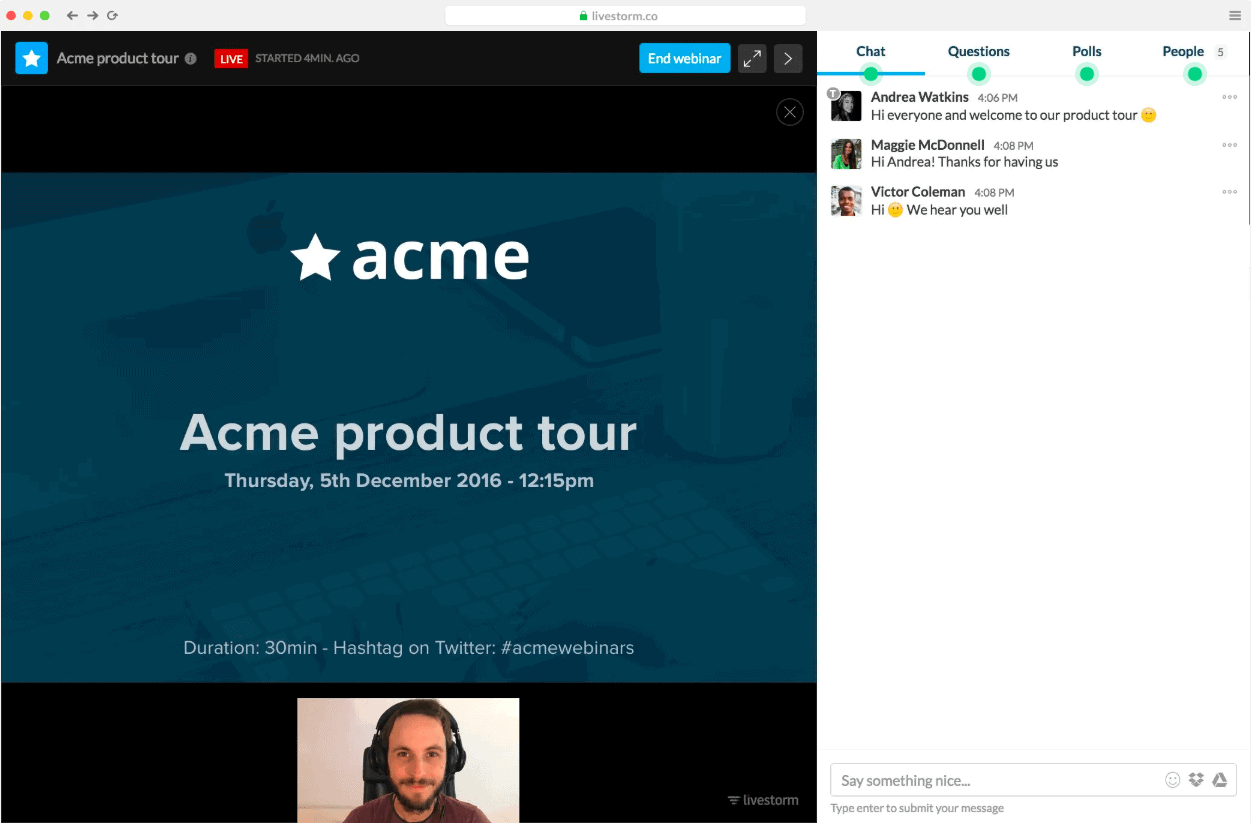
The platform is sturdy and reliable: you can run webinars with a large number of attendees without fearing technical problems. That matters if you don’t want to lose face in front of potential customers.
During the webinar, the chat is a very handy feature: you can invite anyone to speak by bringing them “on stage” to ask a question, or when you present a project as a team.
You have access to the list of attendees and to all the questions in real time, as well as after the webinar.
5. The replay
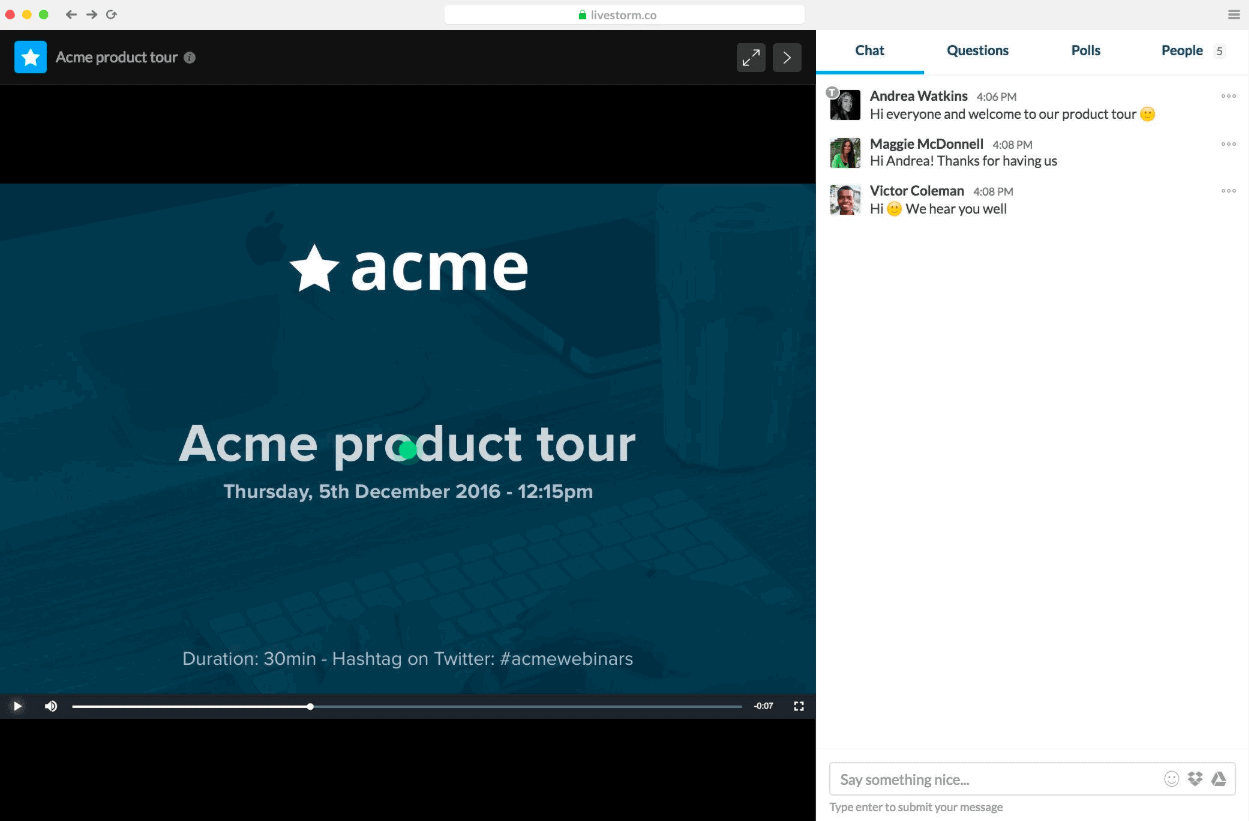
Here too, the tool is designed to help you generate more leads!
The webinar remains available as a replay afterwards, so you can share it with people who could not attend, for example. It is an excellent way to keep capturing leads even once the live session is over.