



- The cost of a CRM project adds up the price of the software and its setup, which costs roughly one year of licenses.
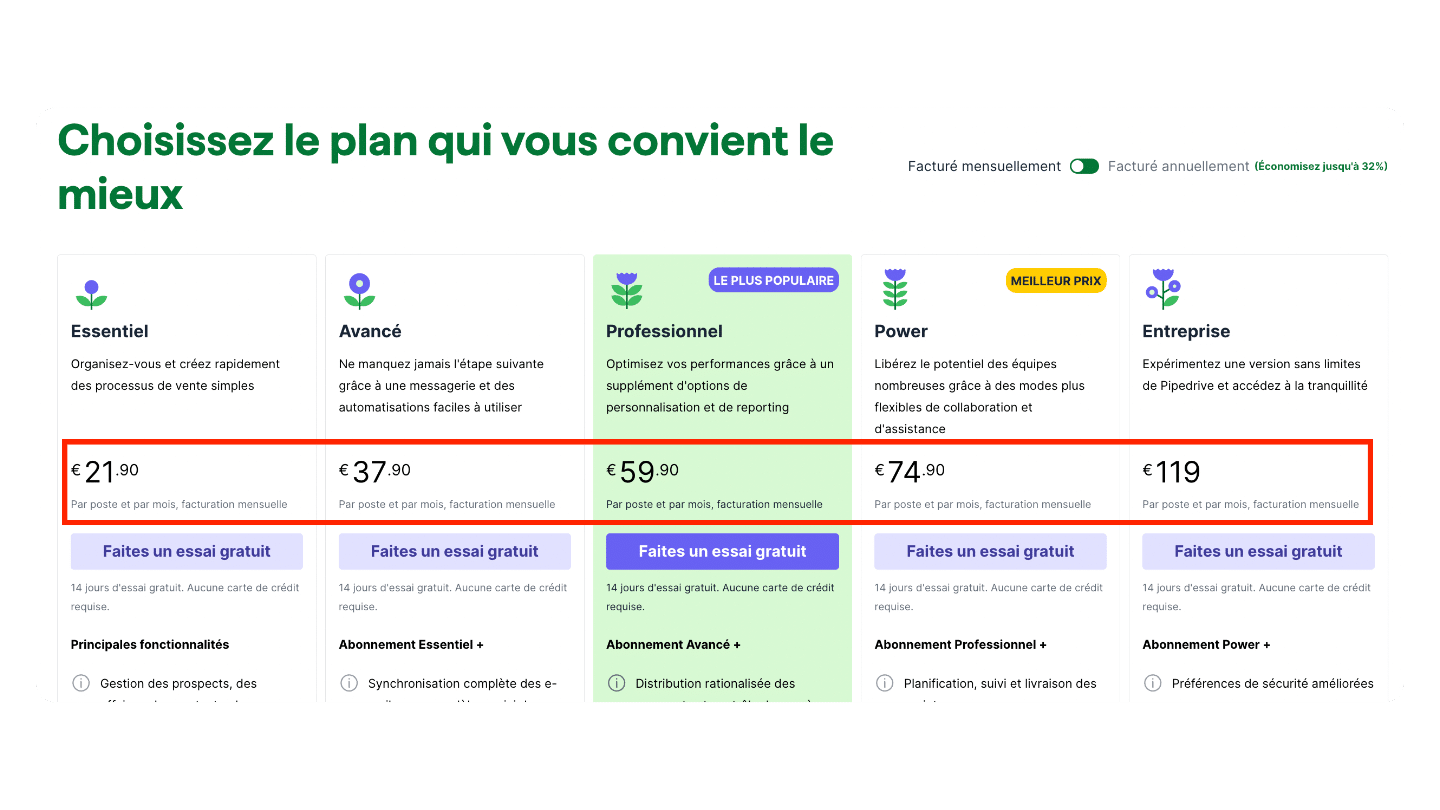
- Licenses are paid per user per month, from €15 to €150 depending on the chosen plan.
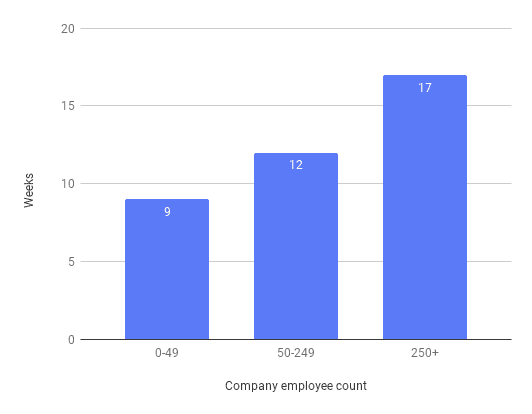
- Selection costs nothing with the vendor, but it takes your teams’ time: 11 weeks on average.
- Data cleansing and migration, configuration, documentation and integration with other tools make up most of the deployment cost.
- Ask your questions before signing: dashboards, custom fields and pipelines, renewal terms and paid modules often hide fees.
The cost of CRM software ranges from 2,000 euros to 200,000 euros a year. Yes, you read that right. The gap comes down to the variety of players on the CRM software market. There’s a world of difference between CRMs for very small businesses (Axonaut, Monday) and the CRM suites built for large corporations (Salesforce & Co). The number of users also has a big impact on the final license price, since it’s the main variable vendors use.
On top of that, never lose sight of the fact that the cost of a CRM project isn’t limited to the license price of the CRM software. People far too often overlook the non-license costs. Yet between the selection cost, the integration and maintenance costs and the hidden costs, the bill can quickly get steep.
To help you find your way, this article covers:
- The average cost of a CRM project (and of CRM software) depending on whether you’re a very small business, an SMB or a large company.
- The pricing variables CRM vendors use to calculate license prices.
- The non-license costs you really need to plan for in a CRM project.
How much does a CRM project cost?
The cost of a CRM project is the cost of the CRM software plus the cost of setting it up. Setting up CRM software costs roughly as much as one year of the software.
The cost of the project mainly depends on the size of your company, the number of users of the software and how complex your needs are – and the three are obviously linked. In a nutshell:
- For light needs with around ten users, expect between €15,000 and €20,000 in the first year and around €5,000 in the following years.
- For more advanced needs, with around fifty users, expect rather between €60,000 and €80,000 in the first year, then around €40,000 a year.
- Lastly, for more complex organizations with more than 150 users, expect between €350,000 & €500,000 in the first year, then at least €200,000 / year.
| Simple needs | Intermediate needs | Advanced needs | |
|---|---|---|---|
| Definition | For very small businesses & small SMBs looking for an easy-to-use CRM to keep better track of their leads. We assume 10 users here. | For more advanced SMBs looking for a real lead management solution, with advanced reporting. We assume 50 users here. | For the most advanced SMBs, mid-sized companies and large groups looking to standardize the customer experience across several channels, teams and sometimes franchises. We assume 150 users here. |
| CRM software selection | 6,500 | 15,000 | 50,000 |
| CRM software price | €2,000 / year | €30,000 / year | €200,000 / year |
| CRM software setup | 5,000 | €15,000 | €65,000 |
| Training | 2,500 | 6,000 | 30,000 |
| Maintenance | 2,500 | 10,000 | 35,000 |
| Total cost, year 1 | €18,500 | €76,000 | €380,000 |
| Total cost, year 2 | €4,500 | €40,000 | €235,000 |
How is the price of CRM software calculated?
The vast majority of CRM software vendors use the subscription business model: you use the CRM software in exchange for a subscription, usually paid monthly. On top of this subscription come all sorts of services (professional services) offered during the deployment and operation phases.
Here are the two main variables vendors use to calculate subscription prices:
- Number of users. CRM software is billed per user per month. The more employees need to use the software, and the bigger your sales force, the higher the price of the CRM software. The price per user usually goes down as volume goes up. This variable is typical of sales management and business management software (but, on the other hand, very rarely used by marketing software vendors).
- Features and modules. The price per user is set by the plan you choose. CRM software vendors all offer several plans. Each plan (or tier) stands out by a more or less advanced level of features and included services. If you go for the basic plan, you’ll only get the basic features and a limited level of support. To access the advanced features (reporting, automations…) and premium support, you’ll have to go for the higher plans.
SaaS or On Premise?In this article we focus on “SaaS” CRM software, which is by far the dominant model. A SaaS (Software as a Service) is online software sold as a service and billed by usage (subscription). The SaaS model offers more flexibility in terms of customization and payment options. SaaS software also has the advantage of being accessible online and easier to integrate with other tools (plug and play). But there’s another model, “On Premise” CRMs: you buy the software (usually for a large sum), and it’s then up to you to host it locally, maintain it and update it. This “historical” model is in decline today.
To sum up: sales CRMs are therefore very largely billed by usage. The more features you use and the more users you have, the higher the license price. Depending on the plan chosen, the price per user ranges from 15 to 150 euros. You get the price of your subscription by multiplying this price per user by the number of users:
- If you have 10 users and a subscription at €16 per user per month, you end up with €2,000 in licenses per year.
- If you have 150 users and a subscription at €110 per user per month, you end up with the €200,000 figure shown in the summary table earlier.
But that’s not all. CRM software vendors don’t just sell products (the software), they also sell services, some of which are unavoidable and can add up to a far from negligible sum. They mainly cover:
- Installing the software: configuration, customization, integration, connecting data sources, etc.
- Training your teams on the software.
- Access to a VIP level of support (dedicated account manager).
- Maintaining the software during the operation phase. Vendors usually offer annual packages whose price depends on the level of maintenance offered.
A few more remarks on CRM software pricing:
- CRM vendors usually offer two options: a monthly subscription or an annual subscription. The annual subscription very often comes with a substantial discount. A few vendors, very rare ones, offer quarterly subscriptions.
- Some vendors offer products (solutions, connectors…) that complement the CRM software. These products are billed on top of the subscription to the main software. For example, if you choose Monday CRM, the other products of the Monday suite are of course not included in the subscription. You’ll have to subscribe to each product separately or as a bundle (packages).
- Important: we’re only talking about sales CRM software here. If you’re looking for a marketing automation platform, we invite you to check out this article by Cartelis. It gives precise figures on the costs of “marketing CRMs”.
- Depending on the CRM and your preferences, integrating the software and training users can be handled by the vendor or by an integrator (usually with the vendor’s support).
What is the cheapest CRM?Mid-market CRM software, suited to the needs of very small businesses or small SMBs, costs a few dozen euros per month per user. In this category, Freshsales is one of the cheapest CRMs, with an entry-level plan at €9 per month per user. Bear in mind there’s also free CRM software, some of which can be a perfect fit if your needs are simple (we’ve picked the 15 best free CRMs for you).
Let’s say it again: the cost of CRM software isn’t limited to the plans you pay the software vendor. Let’s now get into the detail of the non-license cost categories mentioned earlier in the table:
- Selecting the CRM software.
- Implementing the software.
- Training users.
- Maintenance.
1. How much does selecting CRM software cost?
On average, companies spend 11 weeks selecting a CRM.
But that’s only an average: it depends on the size of the company. Companies with more than 250 employees take almost 2x longer to select a system than those with fewer than 50 employees.
While selecting your sales CRM won’t cost anything “directly” with a vendor, it will however cost your teams time: it’s an expense item to plan for.
Choosing a sales CRM is obviously an essential step because it lets you qualify your company’s CRM needs, expectations and goals: you define the main use cases, deduce the target features the software will need to offer, build a requirements document, benchmark several CRM vendors, etc.
Also worth readingCRM comparison: the 10 best CRM software for B2B companies
3 tips to successfully select your CRM software:
- Identify between 1 and 3 people in your organization in charge of talking to CRM vendors, so that not every employee ends up spending time with the different vendors. Having a clear requirements document, or failing that a precise idea of what you want, will also save time in the discussions.
- At the end of your research, shortlist 3 to 4 CRM vendors, no more. Ask each one for a demo and test each piece of software. Check whether or not all your teams’ needs are covered. Build an evaluation grid, with the list of all your criteria, to compare each of the shortlisted solutions and be able to identify the best one.
- Hold internal meetings. Selecting the CRM shouldn’t just be management’s business. All the end users of the sales CRM (marketing, sales, customer service, etc.) must be consulted and have their say. It’s the best way to maximize CRM adoption after implementation.
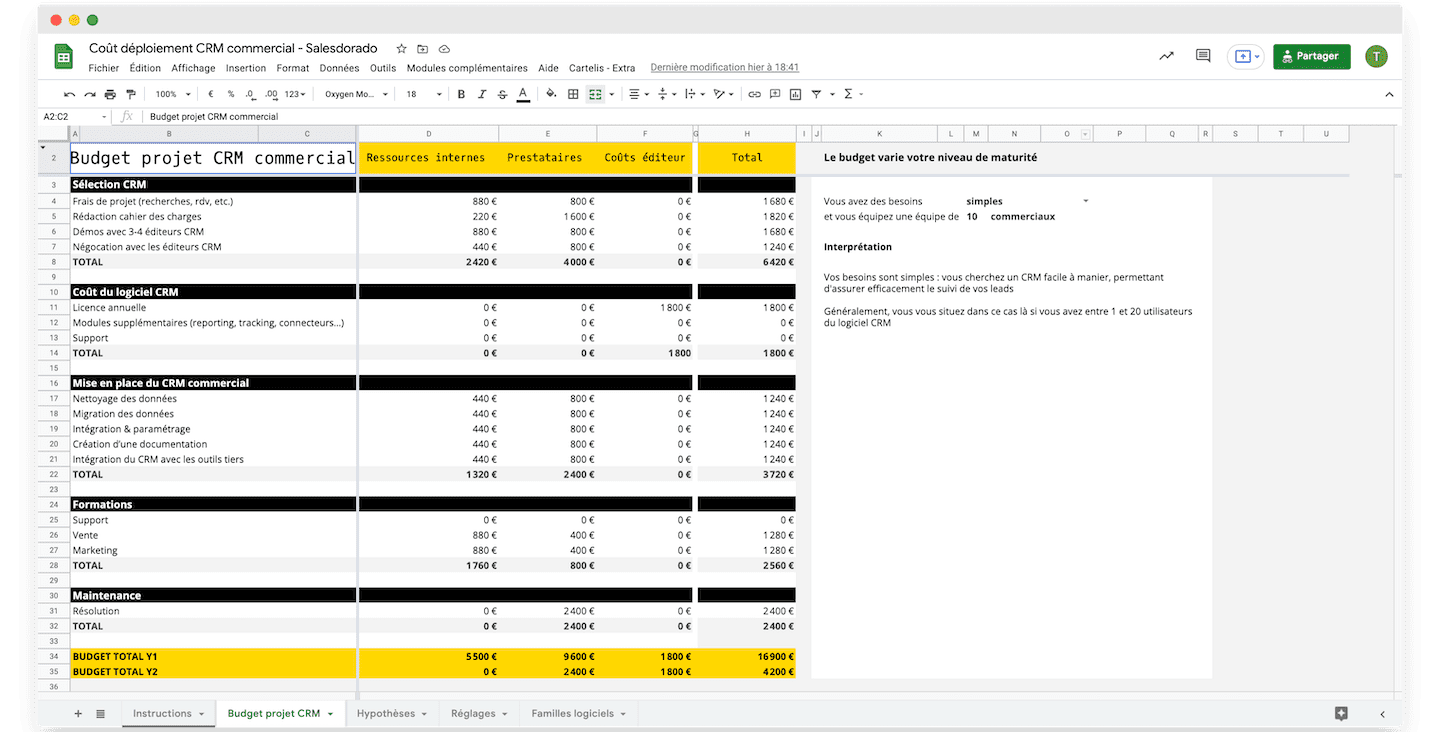
CRM project cost estimation fileWe’ve put together a simulator that breaks down every cost item to help you estimate the budget of your CRM project. It’s free, and it’s right here 👇
2. How much does it cost to deploy CRM software?
Whatever CRM solution you choose and however complex it is, keep in mind that you’re going to roll out, across the organization, a tool that every employee dealing with customers will depend on in one way or another.
It’s a real challenge. The biggest risk is poor adoption. Teams have their habits. Implementing a CRM means changing the way they work, sometimes deeply. Poorly implemented, a sales CRM can have a very negative impact on team productivity, on the quality of service delivered to customers and even on the company’s profits.
There’s a rule that recommends investing as much in implementation support as the annual cost of the sales CRM subscription. If your subscription costs 1,500 euros a year, you should invest the same amount in implementation support – by hiring a CRM consultant.
The costs of implementing sales CRM software roughly break down into these items:
- Data cleansing
- CRM data migration
- Configuring and setting up the software
- Writing detailed documentation
- Integration with your company’s software environment
1. Data cleansing
You’ll probably need to bring together data from several sources: files managed by sales reps, databases used by marketing, data from accounting, from e-commerce, etc.
There’s inevitably some data cleansing to do, deduplication in particular.
To bring all this data together in a single file, you first need to identify the important data and their sources, then call on a database management expert to centralize all this data in the file.
2. Data migration
Once all your data has been put together in a single database, you need to load it into your new sales CRM software.
If the file is in .xls format, this step is fairly simple. But chances are you’ll need to load the data into the system using different formats.
To know which data to load, where to load it and how to do it successfully, you’ll most likely need advice from the vendor or the help of a CRM consultant.
3. Configuring and setting up the software
It’s probably one of the most important pieces of the puzzle.
At first sight, the CRM software may seem right for your company out of the box. But you’ll very quickly realize that the dashboards, for example, which you find very well designed, don’t include all the information you need. You’ll see that settings and adjustments are needed to run your own customer dialogue.
You have to implement the specifics of how you manage your customer relationships in the software. For that, it can be a good idea to call on an outside consultant, who will be able to advise you on which features to turn on, which data fields to use, which processes to set up to manage and automate your reporting, etc.
You need to strike the right balance between simplicity and completeness. Too many data fields and too many new procedures to absorb will put off the software’s users.
We recommend a pragmatic, step-by-step approach: start by implementing the priority features and specifications, and roll out the rest as you go.
4. Writing documentation
If you customize the CRM software, the documentation provided by the vendor will no longer be enough.
The idea is to create a document, a “user guide”, that helps CRM users easily understand the procedures and how roles, tasks and responsibilities are split between the different users. It speeds up CRM adoption by the teams.
This documentation will need to be updated regularly, to include changes in features or processes as they happen. The document must be easy for employees to access.
5. Integrating the CRM with your software environment
You also need to connect your CRM to your other systems (ERP, CMS, marketing tools, customer service tools, etc.) using connectors or APIs.
This requires fairly advanced technical skills that even some consultants don’t have. Here again, you can opt for a gradual integration, for example by prioritizing the integration with the CMS at first.
Salesdorado’s tipIf you take too long to clean your data and migrate it into the CRM, half of your customer data may well be out of date by the end of the process. That can turn out to be very costly for the company. The ideal process: gather the most recent data from the most important sources and merge them together before loading them into the CRM as quickly as possible.
3. How much does it cost to train your teams to use the CRM?
Why train your teams?
As we’ve already mentioned, the biggest risk in this deployment process is that it ends in poor adoption, because teams have their habits and may find it hard to change the way they work. To avoid jeopardizing the substantial investment you’re making to roll out this tool, training is a must.
It also helps make sure the main procedures are properly understood and avoids the productivity drops that often come with rolling out a new tool at first.
Which teams should you train?
On average, nearly half of a company’s employees use its CRM system.
Once again, this figure varies enormously depending on company size: the results of SoftwarePath’s 2021 CRM report show that companies with fewer than 50 employees have a much higher percentage of employees using their CRM system. Conversely, companies with more than 250 employees only have 15.33% of their employees using their CRM.
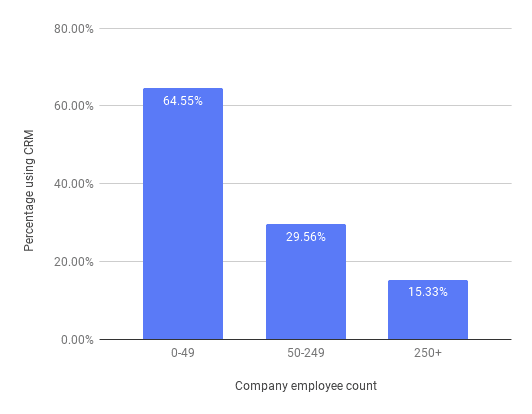
Based on this data, a company with 40 employees should have around 26 CRM users in the business. According to SoftwarePath’s CRM pricing data, it can expect to spend $780 per month or $9,360 per year on its system.
By comparison, a company with 400 employees would have around 61 CRM users. The monthly cost of their CRM would come to $1,830 per month or $21,960 per year for their system.
Watch outCRM software is meant for every team in a company, not just the sales team. So it’s important to plan training tailored to the different teams. For example:
- One training session that shows sales reps how to manage the pipeline
- Another training session, for marketers, that explains how to handle lead management.
How should you train them?
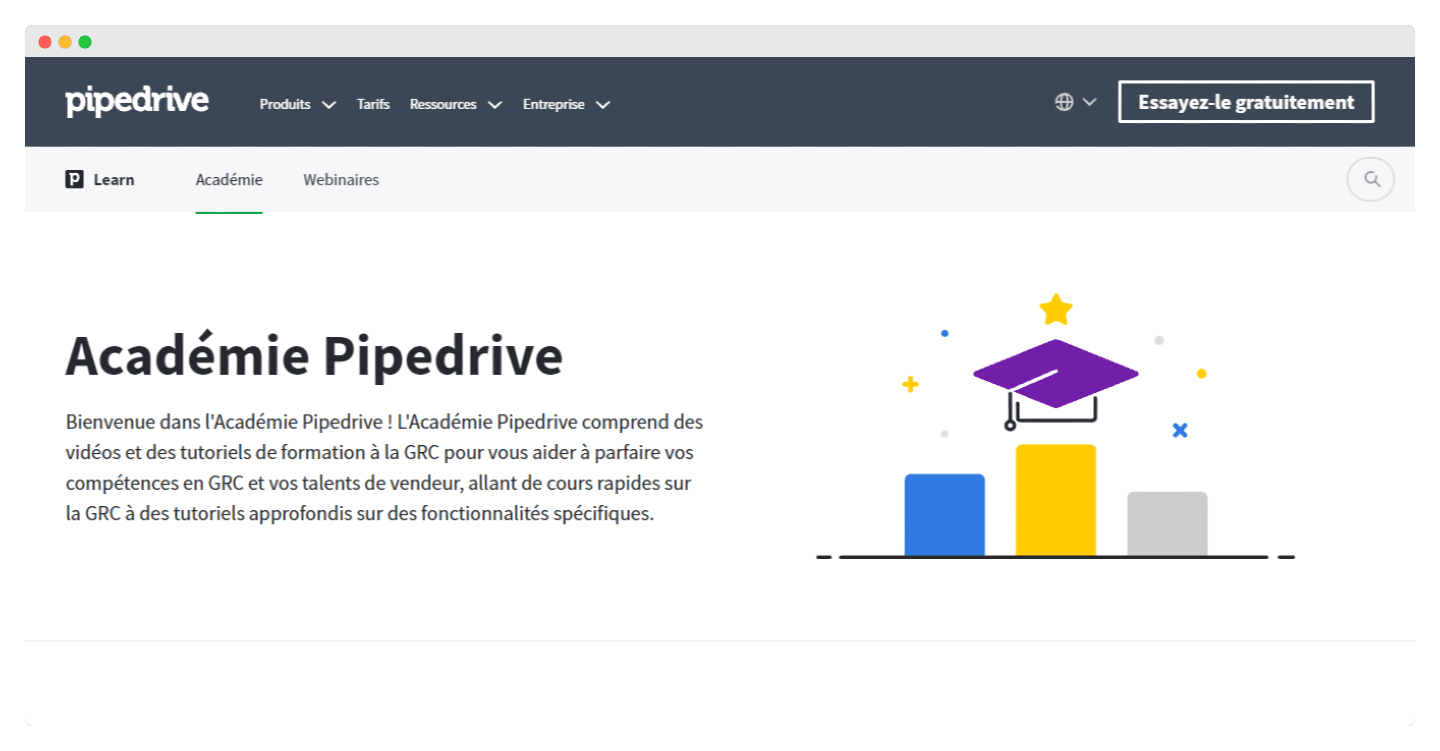
Some vendors offer training, as is the case with the Pipedrive CRM, which offers an “Academy”:
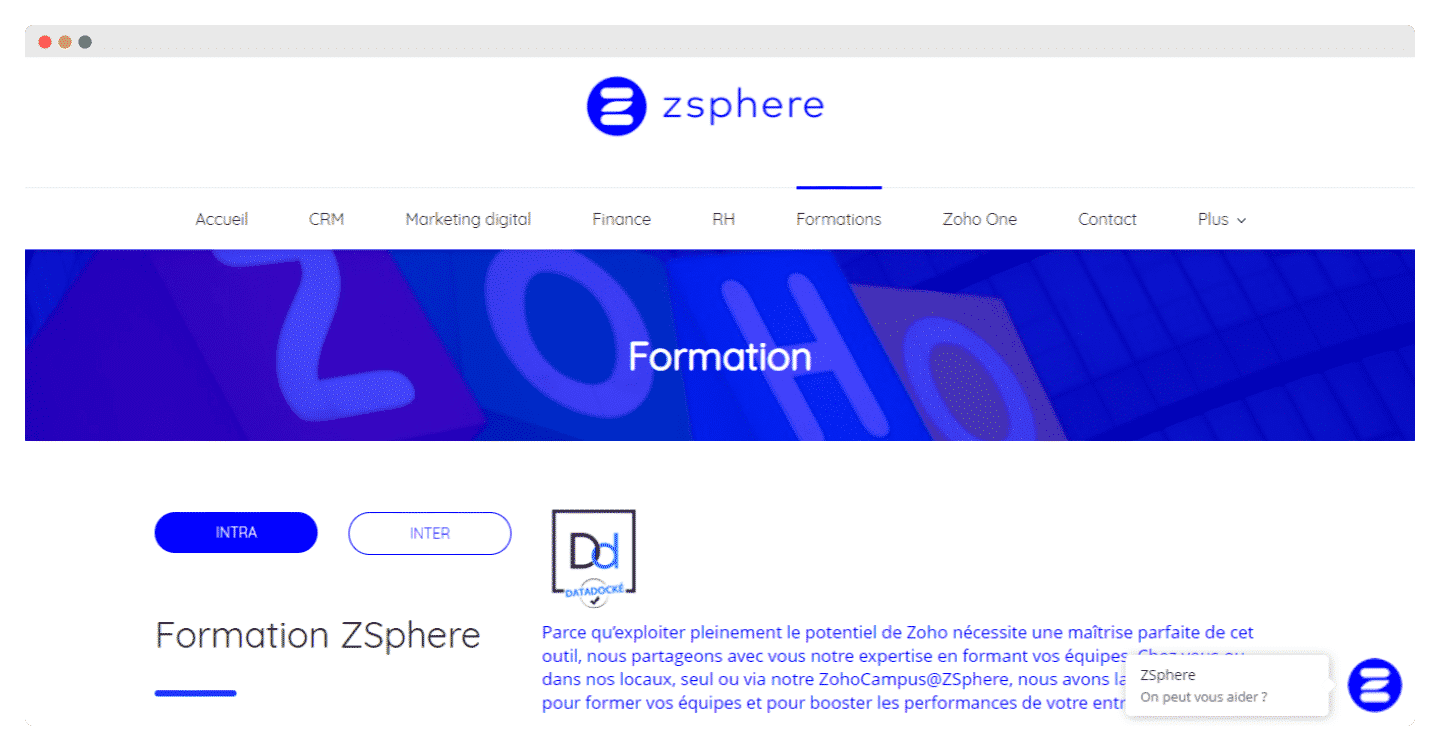
You can also call on a CRM consultant skilled in your software or on an accredited training organization. For example, ZSphere, the specialist Zoho integrator: this team of specialized consultants offers to guide companies through the integration of Zoho CRM.
Once again, whichever option you go for, don’t overlook the cost of training your teams and the time spent organizing it: looking for providers, discussions, hiring, organizing the training days and of course the training itself!
4. What are the maintenance costs of a CRM?
Outages & bugs
A CRM crash is without a doubt the highest cost item, if it happens. You need to keep the risks of crashes, bugs, data loss, etc. to a minimum by putting an effective maintenance setup in place.
If you choose a SaaS sales CRM solution, the maintenance of your system is partly handled by the vendor.
In that case, check the guarantees the vendor offers in terms of system backup:
- How often is your data automatically backed up?
- What are the options for manual backups?
- Has the vendor you chose suffered outages?
- If so, how long do the outages last on average?
- If you go for licensed software, ask the platform’s customers about their experience of the software and its “stability”?
Upgrades
A good CRM tool must be flexible and scalable. Over time (hopefully), you’re going to grow, your company will expand, and with it the wish:
- To add new data sources
- To access more advanced features
- To integrate new tools
These upgrades need to be planned for the years following the deployment of your tool.
CRM project cost estimation fileWe’ve put together a simulator that breaks down every cost item to help you estimate the budget of your CRM project. It’s free, and it’s right here 👇
What are the hidden costs of a CRM?
There can be hidden costs at every stage of the sales CRM project. You need to identify them from the moment you buy.
Sometimes the “cost per user” is stated directly, or the plan includes a set number of users. If you can’t find either, you need to ask the vendor.
Customizing your CRM software
- Custom dashboards: How many dashboards can you create before being charged? Are there limits on what you can include? Do you get training or support?
- Custom pipelines: How many pipelines can you create? Is there a limit to the size of a pipeline?
- Custom fields: Is there a limit to the number of custom fields you can add?
- Custom user permissions: To what extent can you manage your team’s access?
Minimum contract terms
They’re almost never mentioned when the price is set or during negotiations, unless you explicitly ask.
- Named user or concurrent user: is pricing based on the number of CRM users or on the total number of employees?
- Renewal cycle: Is there a minimum for renewals? Does your contract include automatic renewal or an automatic upgrade?
- Security: Who is liable in the event of a breach? Are there minimum security measures you must provide?
CRM add-on prices
Integrations, analytics, reports or intelligence features: they’re usually advertised during the buying process, but hidden behind paywalls once you’ve paid.
Some CRM vendors offer add-ons to give you this option, which may be free or paid.
| Examples of free modules | Paid add-ons |
|---|---|
| Native integrations with other tools | Third-party integrations |
| Basic reports and analytics | Advanced reports and analytics |
| Basic dashboard customization | Advanced dashboard customization |
| Artificial intelligence or machine learning capabilities |
There are 2 reasons behind the hidden fees of CRM software: vendors aren’t entirely honest about their prices and customers don’t ask enough questions. Don’t hesitate to ask plenty of questions up front to clear up the points above.
Who handles the implementation?
Depending on how mature your sales organization is, you’ll turn to a more or less advanced solution, and therefore one that is more or less “heavy” to deploy.
For small projects: the vendor itself
For a “light” solution, vendors often provide all or part of the integration. Software like Pipedrive or ActiveCampaign helps you (at the very least) with data migration and may even go as far as offering free migration services or migration at very attractive rates.
For bigger projects: a CRM integrator
For more advanced sales organizations (more users, features, data sources, etc.), integrating the software usually goes through an integrator who is an expert in the chosen CRM solution. In that case, the setup takes time and doesn’t rest on technical integration alone.
Going furtherCheck out our comparison of French CRM integrators, with a complete guide on the subject.
For the biggest projects, it’s also very valuable to bring in a CRM consultant. They step in to:
- Support your team in structuring business needs
- Support the software vendor in setting up the tool
- Define the data models that are relevant to your organization
- Optimize the integration of the software with your existing stack
The cost of this support depends on the complexity of your setup, the CRM software chosen and your existing tools. Note that it’s quite valuable to involve a consultant early in the selection process to frame the project properly.
In both cases (small projects, large-scale projects), you must factor in that your teams will inevitably be involved and that this cost has to be planned for. So there’s no way to consider a completely free deployment.
Going furtherFind all our articles on sales CRMs:
- Articles & resources on CRM
- The comparison of the best CRM software
- Our selection of CRM integrators
The questions we get over and over.
How much does a CRM project cost in the first year?
For light needs with around ten users, between €15,000 and €20,000 in the first year and around €5,000 in the following years. With around fifty users, between €60,000 and €80,000, then around €40,000 a year. Above 150 users, between €350,000 and €500,000, then at least €200,000 a year.
How is the price of CRM software calculated?
It depends on two variables: the number of users, since a CRM is billed per user per month, and the chosen plan, which sets the features and level of support included. You get the subscription price by multiplying the price per user by the number of users.
How much should you invest in implementing a CRM?
One rule recommends investing as much in implementation support as the annual cost of the CRM subscription. For a subscription of 1,500 euros a year, plan the same amount for support.
What are the hidden costs of a CRM?
Customization (dashboards, pipelines, fields and permissions), contract terms (named or concurrent users, renewal cycle, security) and paid add-ons such as third-party integrations or advanced reports.
Who handles the implementation of a CRM?
For small projects, the vendor itself, which often provides all or part of the integration. For bigger projects, an integrator who is an expert in the chosen solution, and for the largest ones a CRM consultant.



What the community says.