

Logo Videoask

Our review of Videoask, the video version of Typeform

The form turned video conversation, by Typeform.

Salesdorado
4.3 /5
1 test
G2
4.5 /5
14 reviews
Capterra
4.8 /5
70 reviews
Trustpilot
2.6 /5
4 reviews
Weighted average 4.10/5 4 combined reviews
Price
Free with 20 minutes per month, then $27 per month

The verdict in 30 seconds

Videoask is an effective tool for turning a form into a more engaging experience. The video format makes exchanges more authentic and improves the quality of feedback, especially in use cases where trust and the relationship come first. The interface is very intuitive and the creation flows are clear: simple flows take a few minutes to set up, and heavily branched scenarios call for a bit more method but stay manageable without technical skills. Support is responsive and the documentation well designed.

The limits are clear. Analytics remain too shallow for advanced needs, the native integration ecosystem is thin, and per-minute billing quickly becomes restrictive as soon as the flow of responses grows. In short, an original, well-thought-out solution, to use where the face-and-voice effect can really make a difference.

+ What we liked
  • A genuinely effective format. Where a standard form stays cold and impersonal, Videoask turns the experience into a conversation. Answers feel more personal, more sincere and far more usable for qualifying a lead, understanding a candidate or collecting a customer testimonial.
  • Plenty of flexibility for respondents. Being able to choose between video, audio or text makes the experience much smoother and raises the completion rate: some people are comfortable in front of a camera, others prefer to write.
  • Multiple use cases that speak to marketing, sales or HR teams: video customer testimonials, qualification before a meeting, interactive mini-surveys, candidate pre-screening. In all these contexts, the human effect of the format drives engagement up.
  • Easy to plug into your tool stack: it connects to Zapier or webhooks in two clicks and offers handy connectors such as Calendly, which lets you turn a qualification into an immediate meeting booking.
  • A smooth experience for the collecting team too: automatic transcriptions of video or audio answers save a lot of time, and the interface shows where users drop off in the flow.
  • You get up to speed instantly: the drag-and-drop visual editor lets you build a complete flow in a few minutes without a technical background, and a template gallery already covers the most common use cases.
− The downsides
  • A pricing model that can quickly weigh on you. Per-minute billing is easy to understand but hard to forecast when response volume climbs, and the free version is so limited that it is mostly good for testing.
  • Integrations still too limited. Zapier and webhooks cover a lot of cases, but the native ecosystem is thin: to connect cleanly to a CRM like HubSpot or Salesforce, you often end up hacking things together through the API, which is not always stable.
  • Analytics that are too basic. The tool provides transcriptions and drop-off tracking, but no segmentation by acquisition channel and no direct measurement of impact on conversions. You have to export the data to another tool to get serious insights.
  • A few technical constraints on the respondent side: no back button in the flow, a 10 MB limit per file upload and recordings capped at two minutes by default.
  • Design customization still limited. You can add your branding, but you cannot go very far in code or fine-grained layout. For a pixel-perfect result or an invisible embed in a website, there is little room.
  • No bulk contact import: you can track and enrich the profiles you collect, and even import them from Typeform, but you cannot upload a CSV file.

Who it is for

★ Go for it if...

Anyone looking to humanize their forms and boost engagement at specific collection points, at reasonable volumes. It is a simple, effective and fairly rare building block for this kind of use case: video customer testimonials, qualifying a prospect before a meeting, interactive mini-surveys, candidate pre-screening or an interactive FAQ. The format speaks to marketing teams as much as to sales and HR.

⌘ Skip it if...

Avoid it if you need to handle very large volumes of responses, if you need advanced analytics or solid native integrations with your CRM. In those cases, the per-minute model quickly becomes restrictive, and there are more specialized alternatives: Vocal Video for testimonials, Hirevire for high-volume recruiting, Bonjoro for one-to-one.

Scores per criterion

  • Overall rating 4.3
  • Ease of use 4.6
  • Integrations 4.0
  • Analytics 3.3
  • Value for money 3.7
  • Support 4.2

The tool in detail

Videoask after real-world use: feature scope, integrations, pricing and concrete limits.

Videoask is a tool built by Typeform that turns a standard form into an asynchronous video questionnaire. Each question is asked on video, and respondents choose how to answer: on video, by audio or in writing. The idea can look like a gimmick at first, but the tool ended up winning us over.

The value is immediate at touchpoints where the relationship matters: collecting customer testimonials, qualifying a prospect before a meeting, pre-screening candidates, running a mini-survey or offering an interactive FAQ. The experience is polished, setup is quick and the respondent journey is fairly smooth.

Videoask is not meant to replace recruiting software or a full insights platform. It is a lightweight building block that does one thing well: putting a face and a voice on a form to drive engagement.

How Videoask works in 3 minutes

Videoask follows the logic of a form, but each question is embodied by a video. You record, or upload, short videos in which you ask your questions, and the user chooses how to reply: video, audio or text.
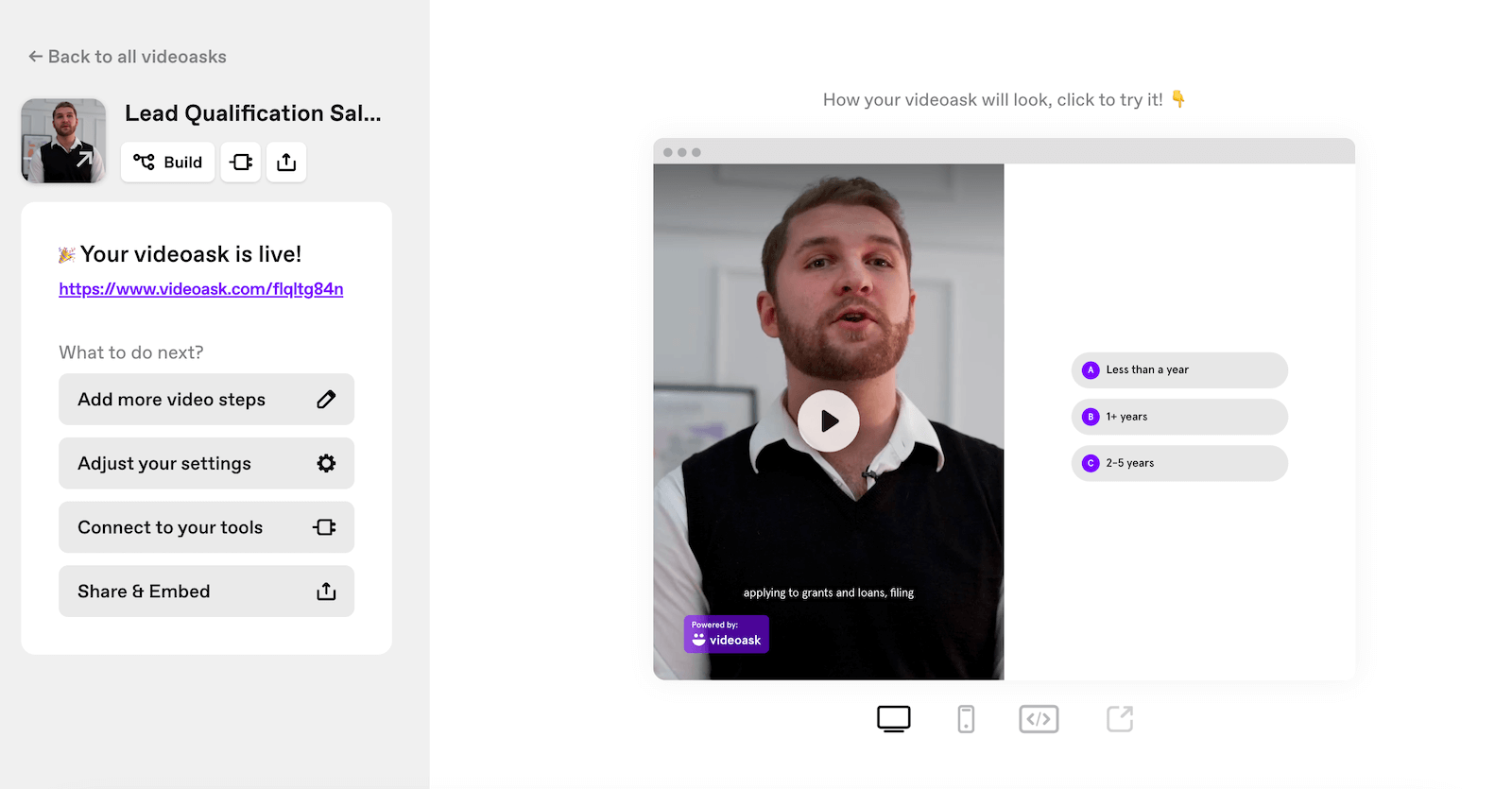
Creating a flow in Videoask

Flows are built in a drag-and-drop visual editor. You assemble your steps, define the answer options, buttons, fields, media, and add conditional logic to tailor the rest of the flow to the answers. Even without a technical background, you can build a complete flow in a few minutes.
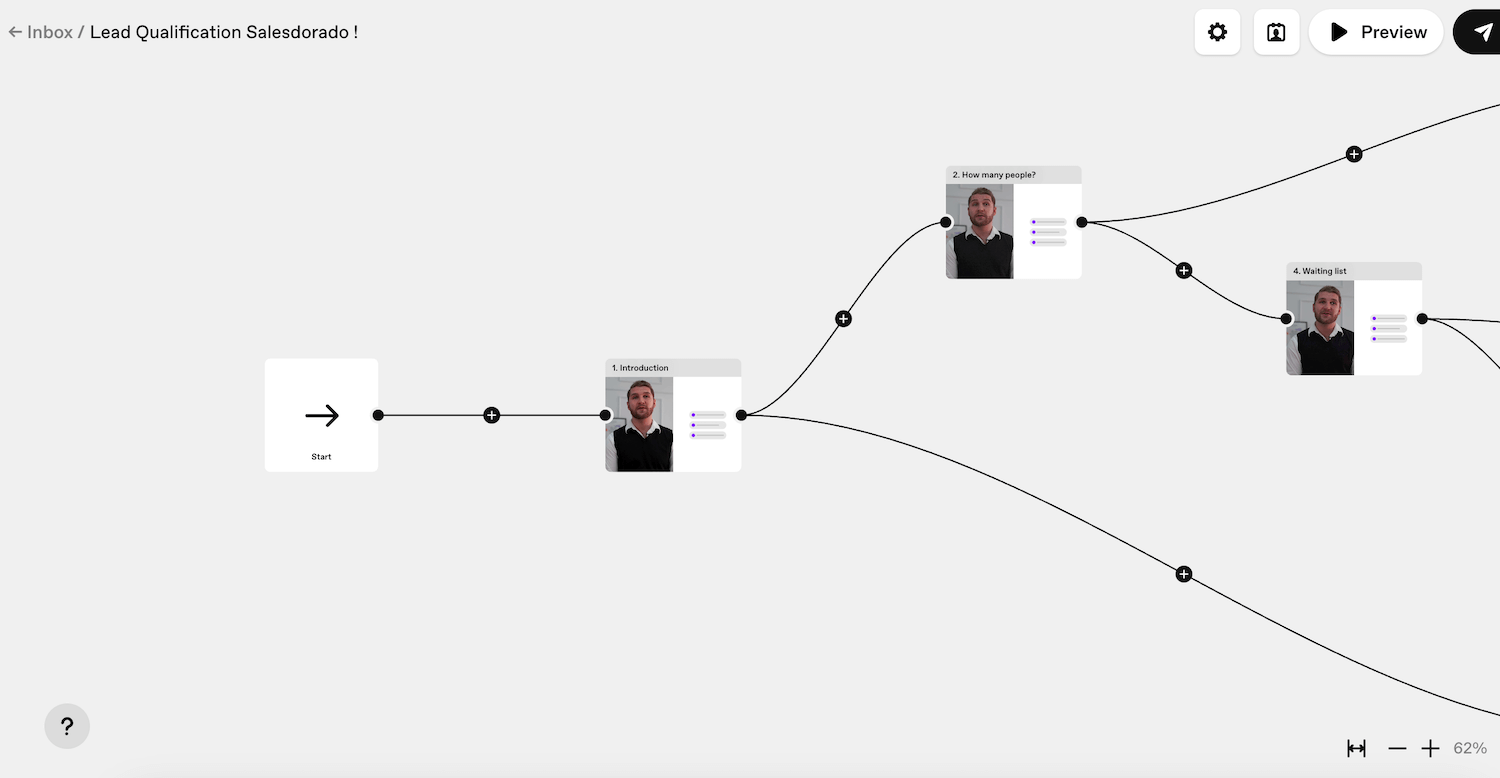
Editing a Videoask flow in the visual editor

To speed things up, Videoask offers a gallery of ready-to-use templates, some designed for sales teams: lead qualification, contact forms, customer testimonial collection, candidate pre-screening, event onboarding. Just adapt them to your context and launch the campaign. You can also build the flow from scratch.
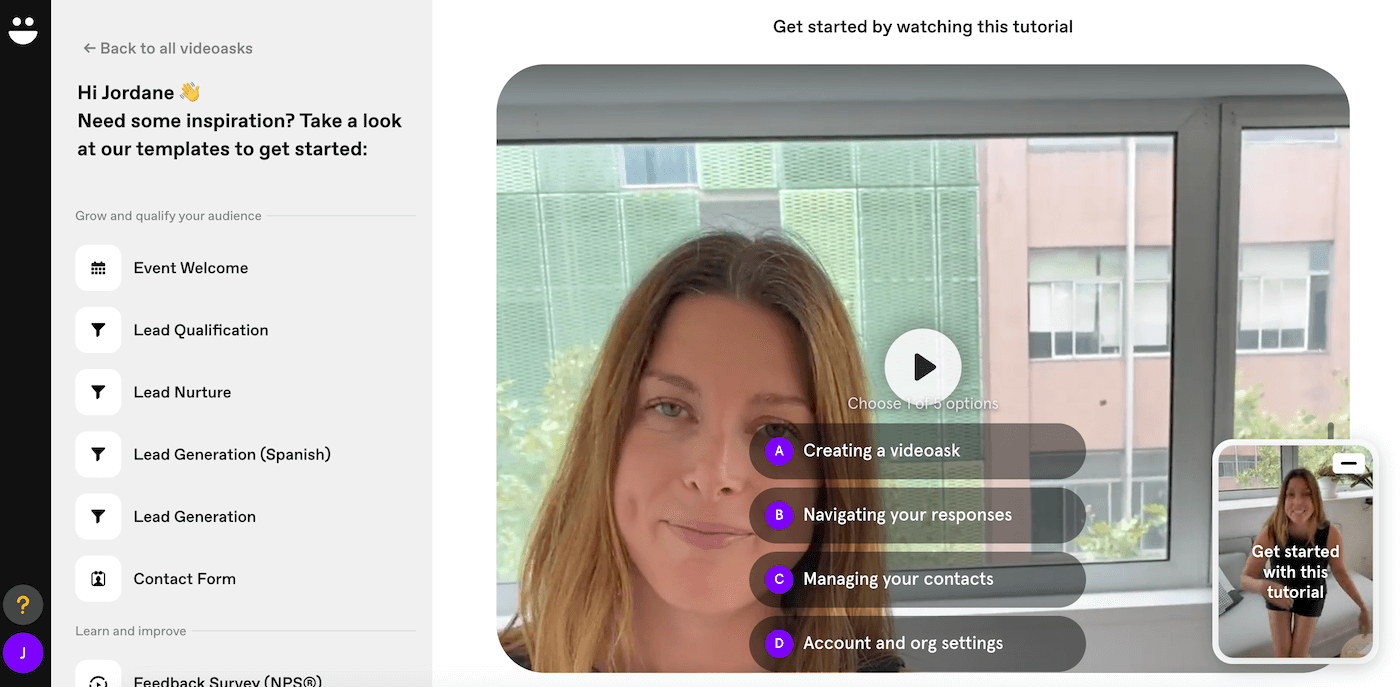
Videoask flow templates for sales teams

Once the video form is ready, you can share it by link, send it by email or embed it as a widget on your website. Responses land in a centralized inbox, with automatic transcription for audio and video answers. You can sort, filter and export to your usual tools, CRM, recruiting software or customer service, via Zapier, API or webhooks.
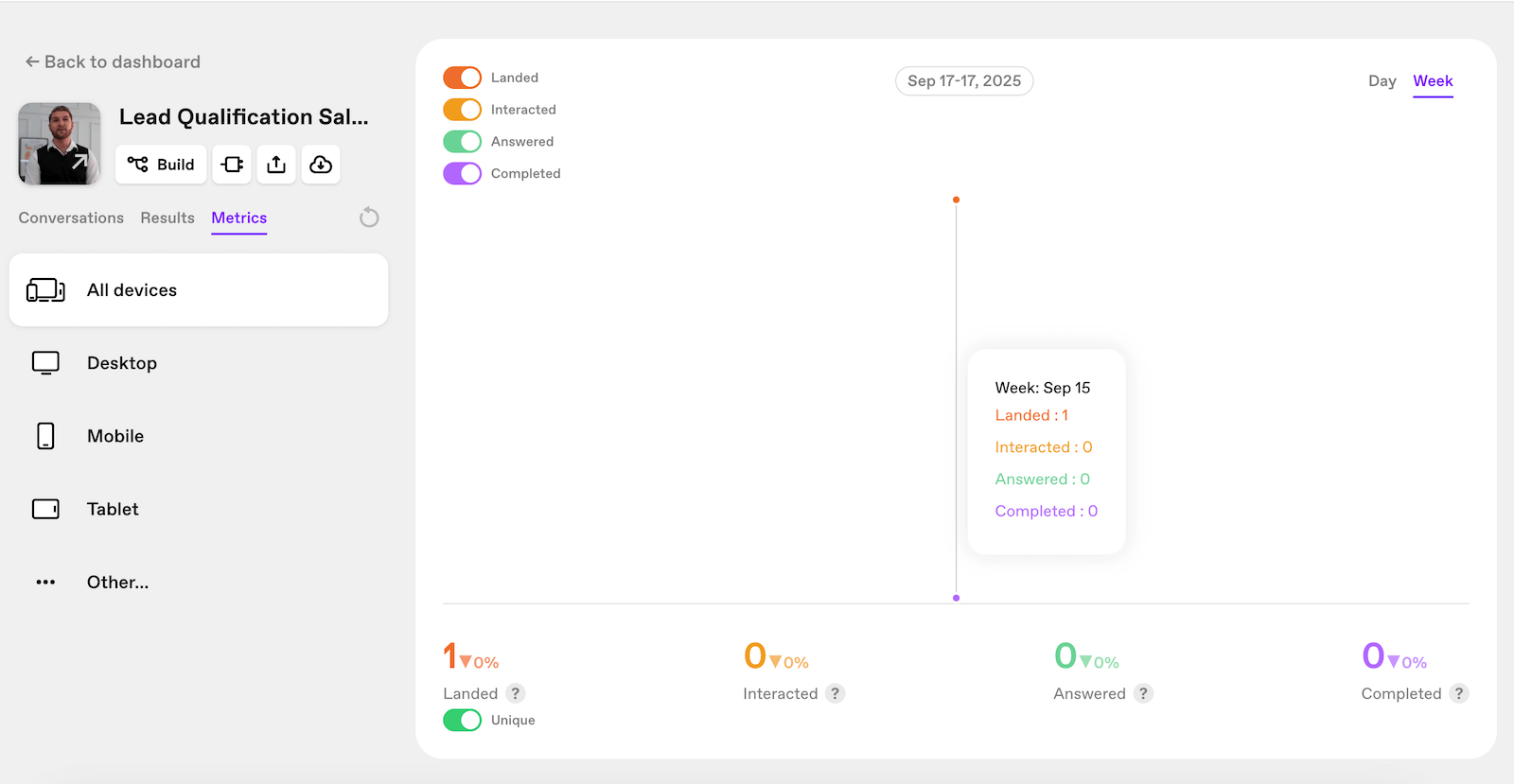
Response and drop-off analytics screen in Videoask

Videoask also includes contact management. The interface lets you track and enrich the profiles you collect, and even import your contacts directly from Typeform. On the other hand, you still cannot bulk upload a CSV file, which is a real shame.

On the respondent side, the experience is designed to be as smooth as possible. No account needed, no technical friction: you click, pick your reply channel and you are done. The result: flows that feel more like a conversation than a rigid questionnaire, with a direct impact on completion rate.

Plans and pricing

Videoask runs on a simple model: each plan includes a set volume of video and audio minutes processed per month, with features that expand as you move up the range. The price therefore depends on usage, meaning the number of minutes, and on the features you use.

Here is an overview of the available plans:

Plan Price (annual) Included minutes Key features Best for
Start $0 / month 20 minutes / month 3 steps per video, 3 users maximum, mandatory Videoask branding Testing the tool or running a very limited one-off experiment
Grow $27 / month 100 minutes / month Unlimited steps, up to 5 users, integrations (API, webhooks, Zapier), NPS, live calls Freelancers or small teams that want to roll out Videoask across several use cases
Brand $46 / month 200 minutes / month White label with custom domain, up to 10 users, priority support, AI chatbot SMBs and marketing teams that want a professional look and fully custom branding
Enterprise Custom quote Custom volume Adjustable minutes and seats, advanced security, dedicated support Large organizations with high volumes and governance requirements

Note that every minute of video or audio generated, by you or by your respondents, is counted. The model works well as long as you stay at reasonable volumes, but it can become restrictive as soon as interactions multiply.

Specs

Vendor
Typeform. Videoask is its asynchronous video questionnaire tool
Concept
Each question is asked on video, respondents choose to answer by video, audio or in writing, without creating an account
Building
Drag-and-drop visual editor, answer options (buttons, fields, media), conditional logic, gallery of ready-to-use templates
Distribution
Share by link, send by email or embed as a widget on a website
Responses
Centralized inbox, automatic transcription of audio and video answers, sorting, filters and export
Contacts
Tracking and enrichment of collected profiles, import from Typeform. No bulk CSV import
Integrations
Zapier, webhooks, API and a few connectors including Calendly. Limited native ecosystem
Analytics
Transcriptions and drop-off tracking. No segmentation by acquisition channel or measurement of impact on conversions
Technical limits
No back button in the flow, 10 MB per file upload, recordings capped at two minutes by default
Billing
Per minute of video or audio generated, by the sender as well as the respondent
Pricing
Start free (20 minutes per month), Grow at $27 (100 minutes), Brand at $46 (200 minutes, white label), Enterprise on custom quote. Prices billed annually

3 alternatives to know

If Videoask isn't the right fit, here's what we'd look at if we were you.

  • Logo Typeform
    Typeform 4.6 Free version limited to 10 responses per month, then from $28 per month billed annually
    The conversational form that asks one question at a time, and that people actually finish.
    See review
  • Logo Jotform
    Jotform 4.3 Free, then from €34 per month billed annually
    The bootstrapped form builder that adds payments, signatures and workflows to the package.
    See review
  • Loom 4.4 Free up to 25 videos, then $15 per user per month
    The screen recorder that became a reflex: one video, one link, comments inside it.
    See review

Verified user reviews

Reviews collected through our partner program, work emails verified.

★ No reviews yet

Do you use Videoask every day? Be the first to share your review with the Salesdorado community.

Share my review

Share my review of Videoask

All reviews are checked and the work email verified before publishing. Just 5 minutes.

★ Work email required
Your rating *
Click to rate (0.5 step)

By submitting, you agree to publish your review (first name + initial, role). Email is never published.

Our methodology

Videoask is software we have had the chance to use for some of our clients. Beyond its video-specific features, Videoask covers the basics of marketing automation.

Maxime Ben Bouaziz
Written by
Maxime Ben Bouaziz, CEO, Salesdorado, AI & Sales Tech

Expert in sales tools, CRM and B2B sales automation. Tests and breaks down prospecting, data enrichment and generative AI solutions to help marketing and sales teams build their stack.

Published on October 14, 2026, updated on November 16, 2026, reading 3 min
