


- Einstein GPT merges Salesforce’s generative AI with OpenAI’s, following a partnership signed in March 2023.
- Einstein GPT is an add-on, included in Sales Cloud from the Unlimited plan.
- Einstein Copilot suggests actions based on your customer data, but it is reserved for Data Cloud users.
- Copilot Studio brings together Prompt Builder, Skills Builder and Model Builder to customize Copilot.
- The Trust Layer keeps customer data in the Salesforce cloud thanks to data masking and toxicity detection.
Salesforce is without a doubt the CRM software vendor furthest ahead on AI. Salesforce’s artificial intelligence, called Einstein, is already deployed across every application in the suite, whether Sales Cloud, Service Cloud or Marketing Cloud.
Einstein’s goal is simple: save users time, help them make better decisions and make them smarter (“Reveal the Einstein in you”). But what does it look like, and how does it actually work?
If you want to learn more about Einstein and the main use cases of Salesforce’s AI tools, this article is for you.
Einstein GPT, Salesforce’s generative artificial intelligence
Einstein GPT is Salesforce’s generative artificial intelligence. As its name suggests, it merges Salesforce’s generative AI with OpenAI’s. The two organizations signed a partnership in March 2023.
Einstein GPT therefore combines the AI models Salesforce develops in-house with the models offered by OpenAI.
Einstein GPT is deployed in every Salesforce application: Sales Cloud, of course, but also Service Cloud, Marketing Cloud, Ecommerce Cloud, Tableau, etc. It lets users make requests in natural language directly in the application interface. The use cases are many, they vary, and each application has its own.
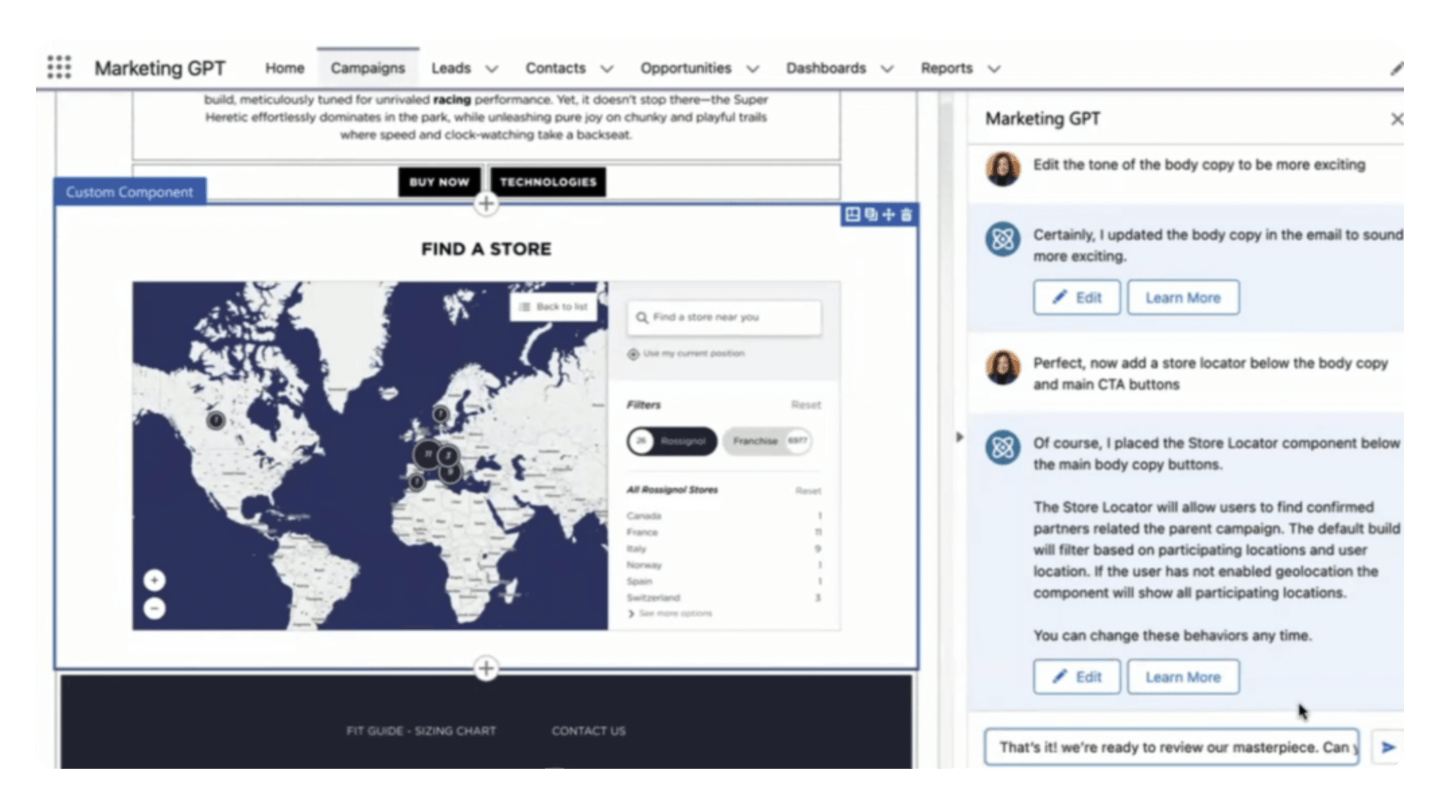
In Marketing Cloud, for example, Einstein GPT can be used to generate landing pages, write emails, etc. Einstein GPT is designed to help users produce content and automate certain tasks.
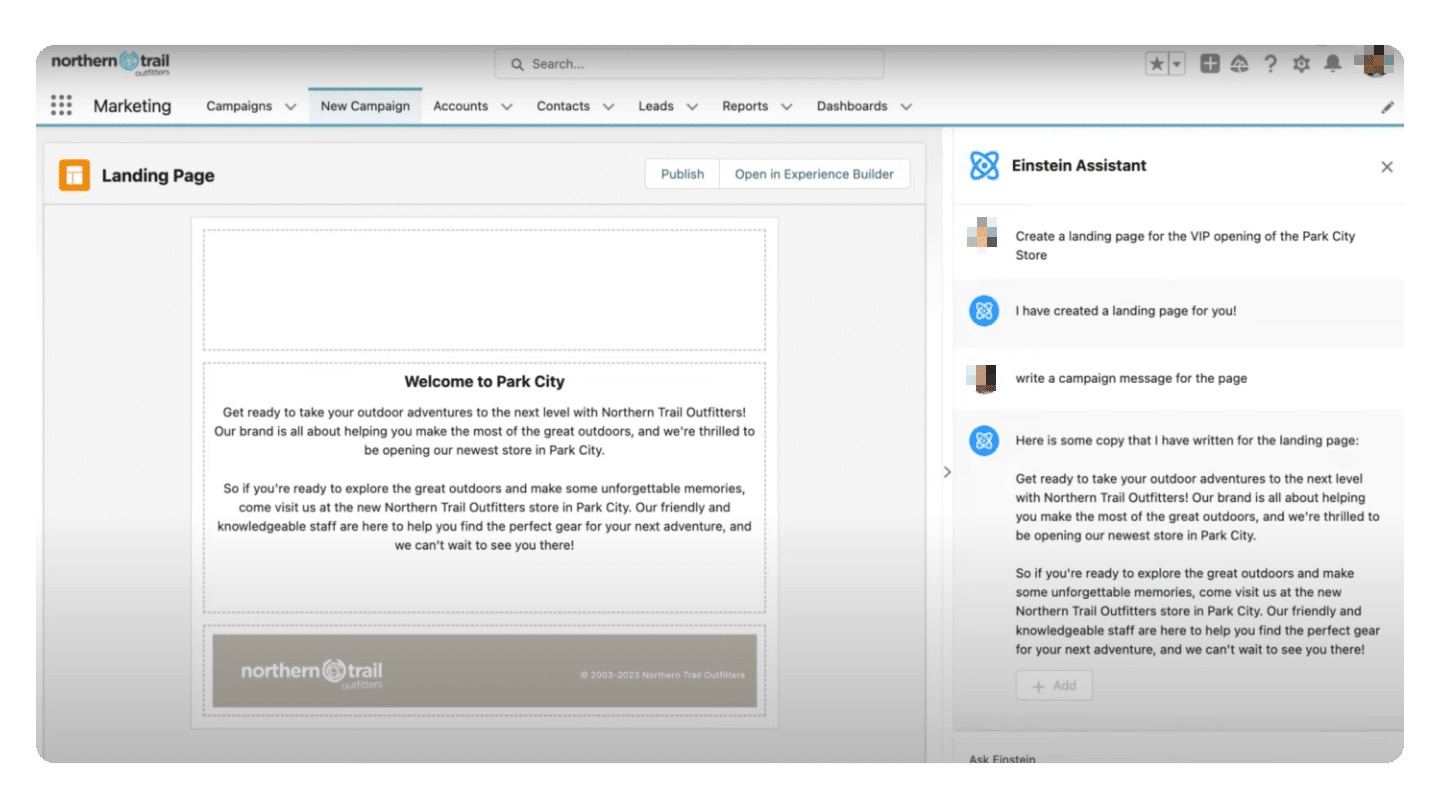
Einstein GPT feeds on the data used in the models (Salesforce’s and OpenAI’s), but also on your company’s customer data, provided of course that it is stored in Salesforce.
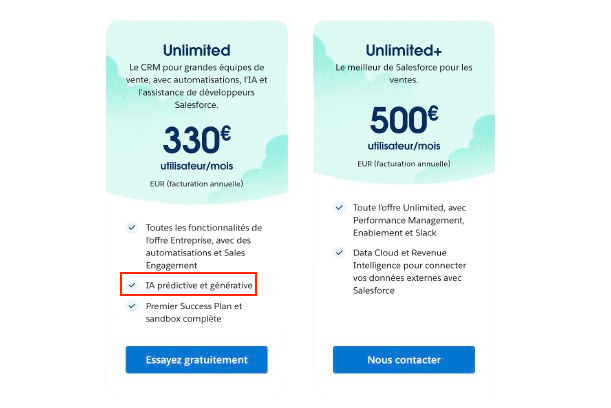
Einstein GPT is sold as an add-on (prices not public), but it is included in the most expensive subscription plans. In Sales Cloud, for example, Einstein GPT is included from the “Unlimited” plan at €330 per user per month.
Going furtherFor more details on Salesforce plans and pricing, we’ve prepared an article that covers the whole subject: How much does Salesforce (really) cost?
Salesforce Copilot, an intelligent assistant built into every Salesforce application
At its 2023 annual conference, Salesforce announced the launch of Einstein Copilot, an intelligent assistant built natively into the user interface of every product in the suite.
Einstein Copilot goes further than Einstein GPT and is, in a way, its advanced version. Not only can you ask it questions, it can also run proactive analyses, suggest actions and make recommendations based on your customer data. Salesforce Copilot is designed to help companies make better decisions and structure their action plans.
Copilot is part of the Einstein 1 platform, which brings together Salesforce’s AI features and Data Cloud, Salesforce’s data platform. Only Data Cloud users can use Copilot.
Discover Einstein for freeTo get to know Einstein better, Salesforce offers a free demo. It’s the best way to explore the main AI use cases in Salesforce applications in more depth.
Copilot Studio, a tool for deploying your own AI-based applications
Einstein Copilot Studio is the suite of tools that lets companies build and deploy their own AI-based applications. Copilot Studio lets you customize (“fine-tune”) Copilot with your own prompts, “skills” and AI models.
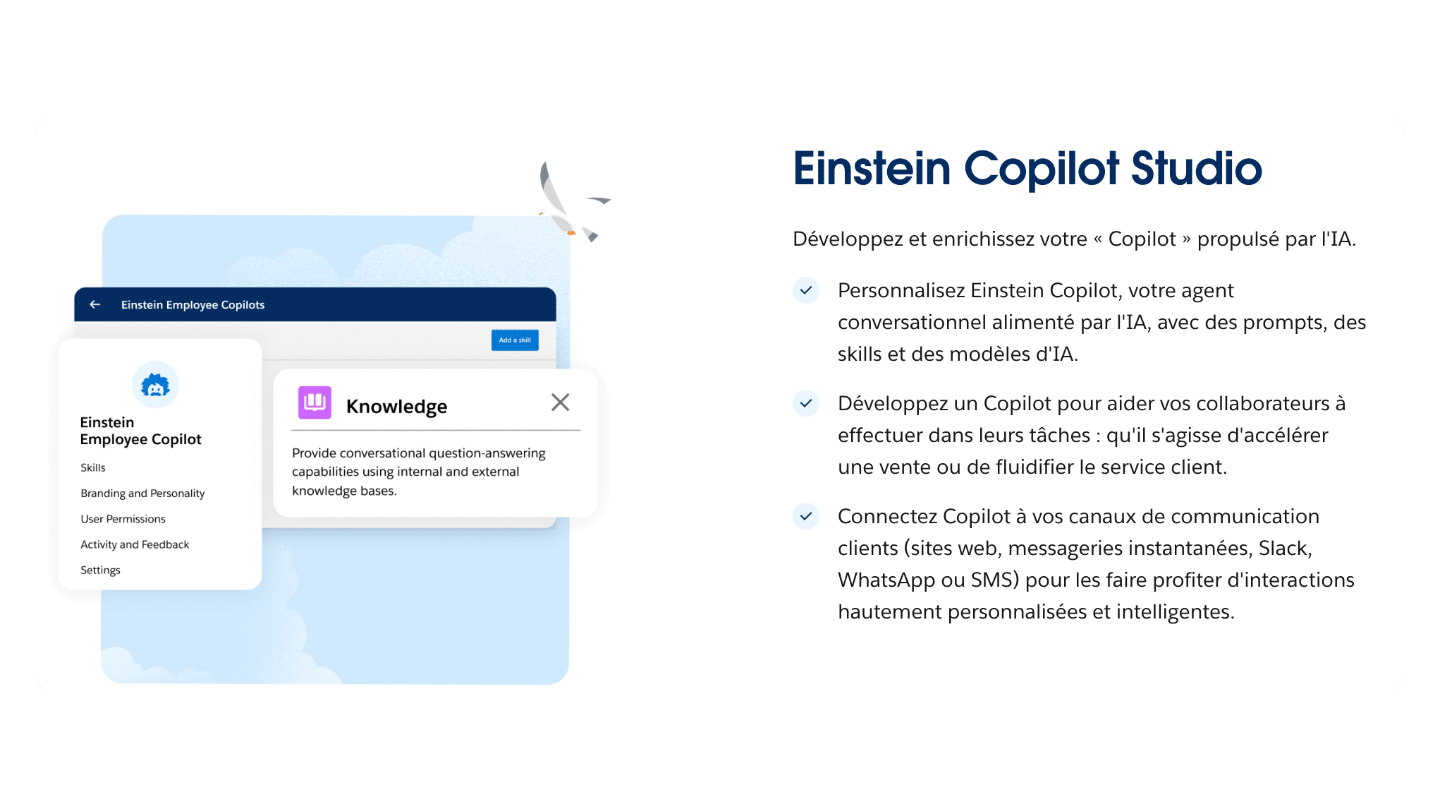
Copilot Studio includes 3 components:
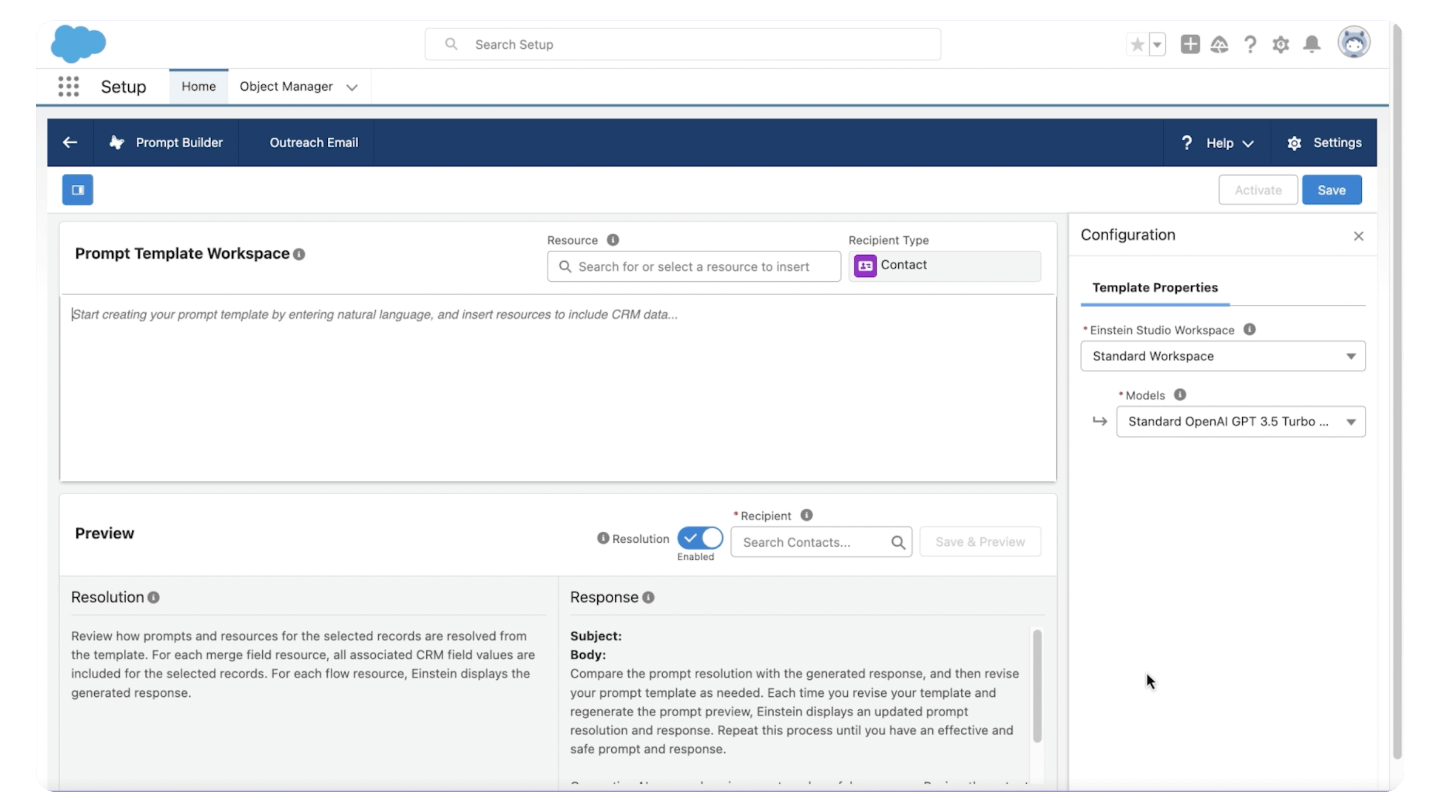
- Prompt Builder. This feature lets you edit prompt templates to fine-tune Copilot. If you use ChatGPT, it’s the equivalent of GPTs. The interface is 100% no-code.
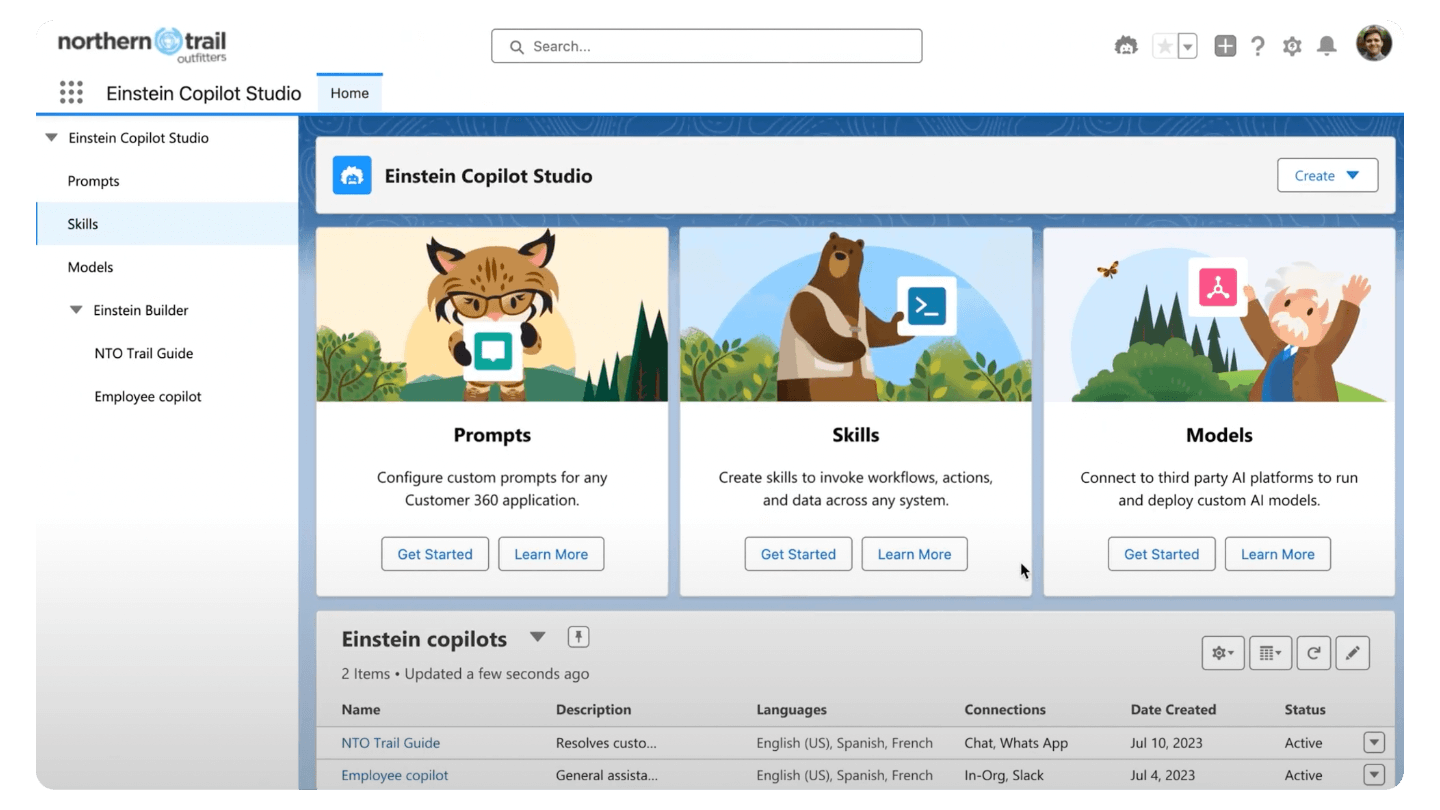
- Skills Builder. This is a low-code tool for creating automated, AI-driven procedures that carry out specific tasks. Skills Builder comes as a drag-and-drop interface that lets you connect data sources, pre-built AI models or custom code. It lets you develop AI skills (workflows, really) without writing code: lead generation, lead qualification, churn prediction, product recommendations, automating customer service tasks, creating personalized marketing campaigns, etc.
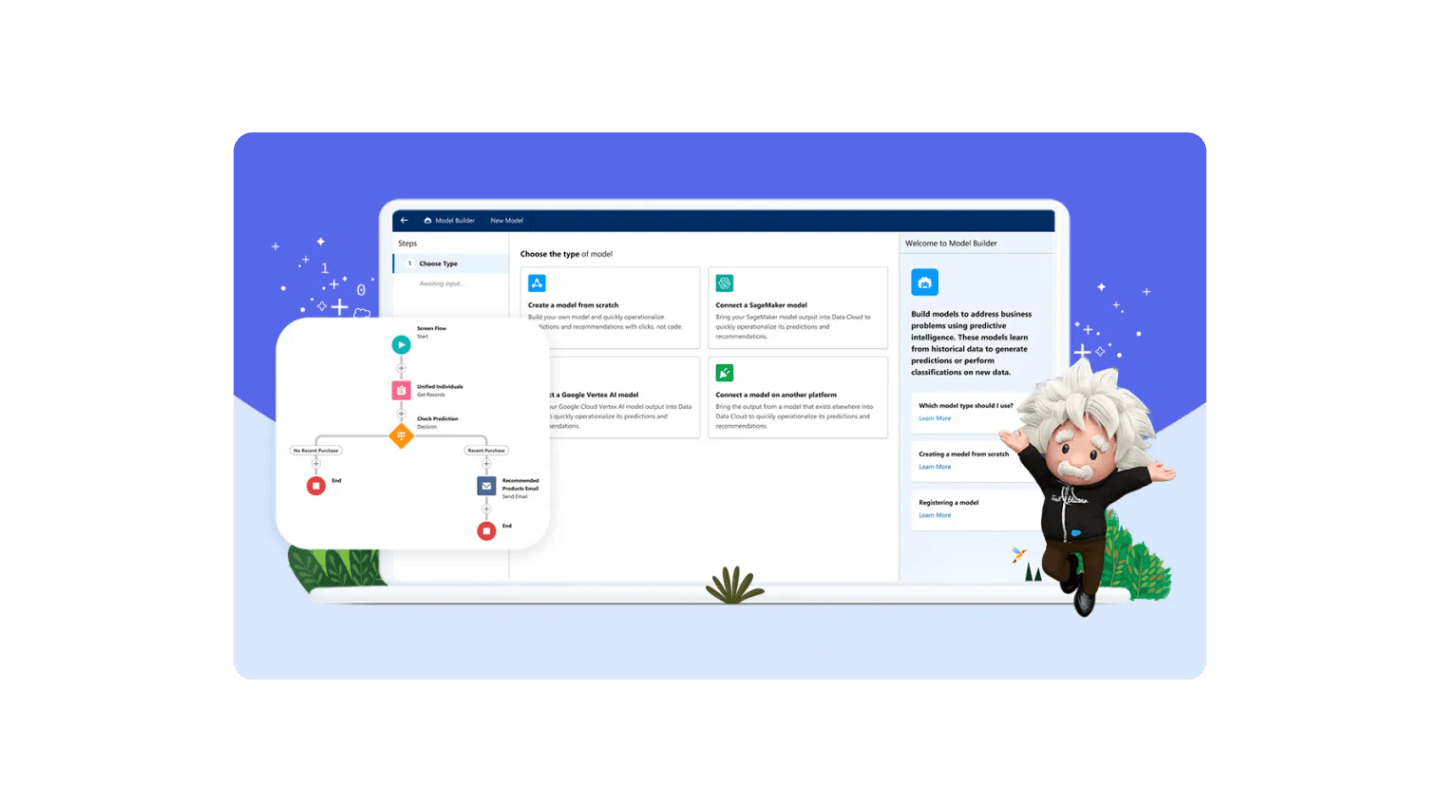
- Model Builder. This is a tool that lets companies use AI without compromising data privacy. It lets you create custom AI models so you get the power of AI while keeping control over your data and its security. Model Builder offers a “Bring Your Own Model” approach that lets data teams create and use their AI models directly in Salesforce. Custom models are trained on all the data connected to Salesforce.
Einstein Trust Layer, the infrastructure for securing sensitive data
Einstein Copilot and Einstein Copilot Studio both rely on the Einstein Trust Layer, a secure AI architecture that addresses companies’ data governance concerns. In practice, it’s a feature that prevents large language models (LLMs) from retaining sensitive customer data. It lets you take advantage of generative AI without creating a security risk. Einstein GPT Trust Layer thus ensures that the data used to feed the models (your customer data) never leaves the Salesforce cloud.
The diagram below shows how the Einstein GPT Trust Layer works:
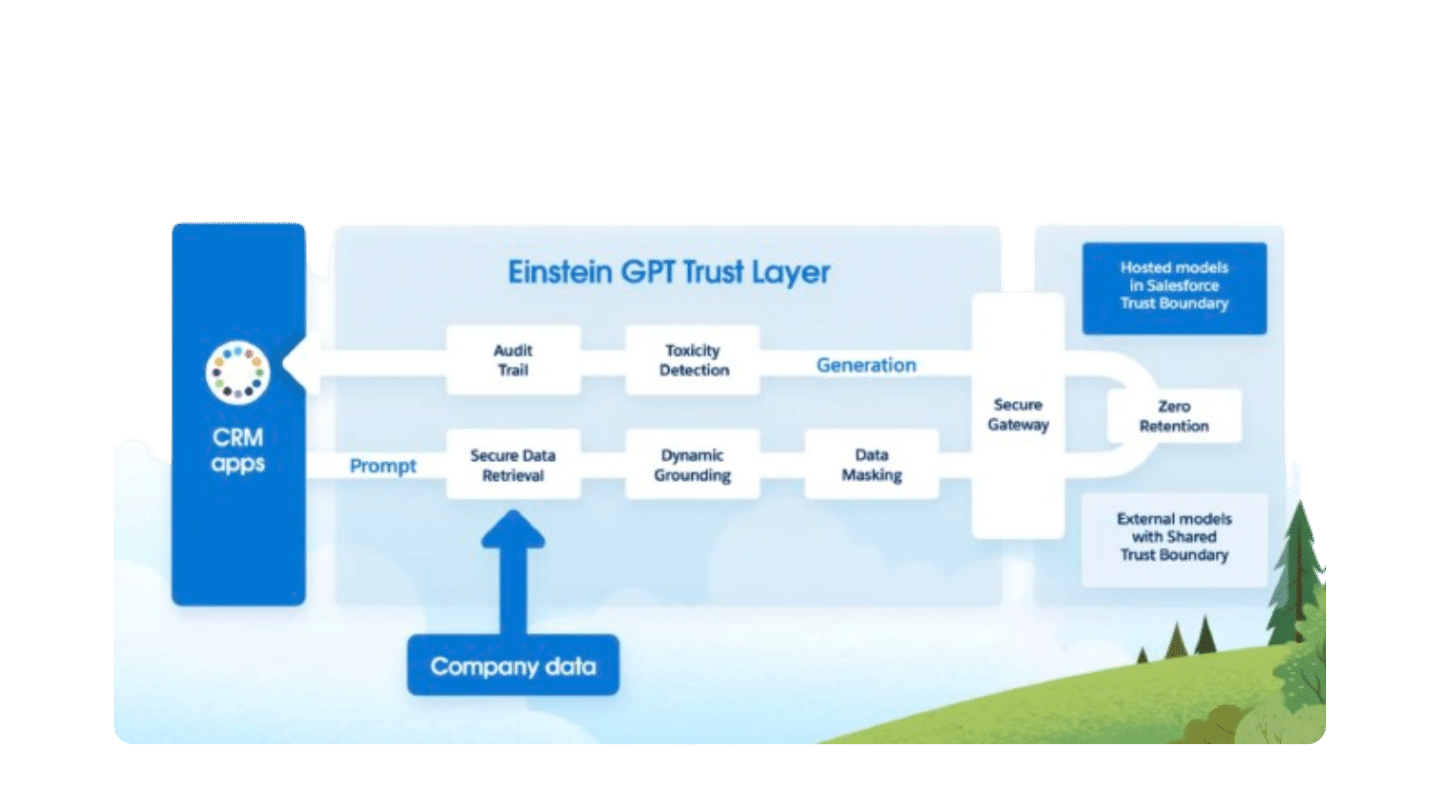
To help you understand the diagram:
- “Dynamic grounding” is a technique that lets a language model understand the context of a word or sentence by analyzing the surrounding text.
- “Data masking” is the process of replacing sensitive data with non-sensitive data, also called placeholders, to guarantee data confidentiality.
- Toxicity, in the context of generative AI, refers to the production of offensive or inappropriate content.
Here now are the main Einstein use cases for Salesforce’s main products: CRM (Sales Cloud), customer service (Service Cloud) and marketing (Marketing Cloud).
Einstein use cases for CRM (Sales Cloud)
Salesforce Sales Cloud Einstein is designed to help salespeople produce more personalized and more engaging content.
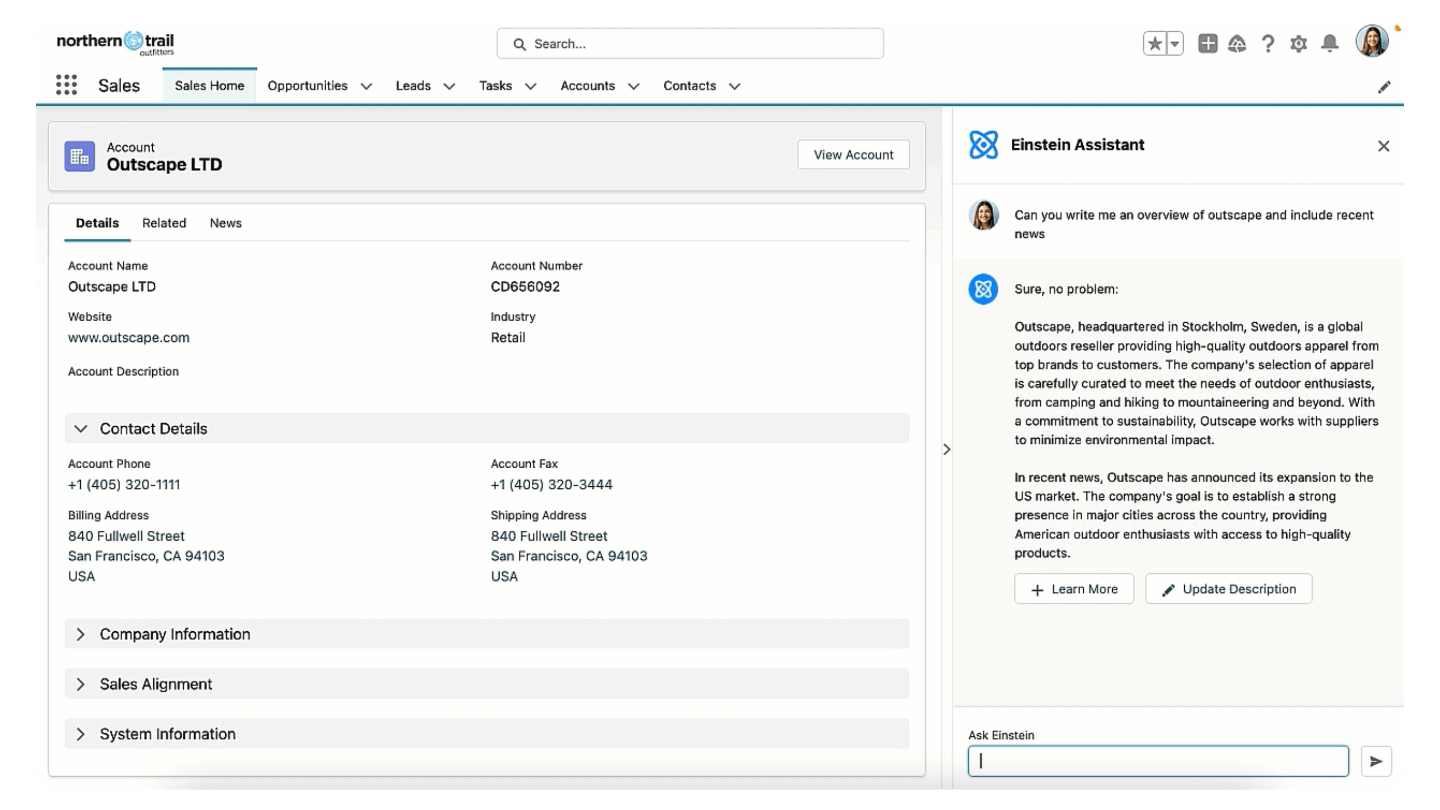
Here are 3 useful Einstein features for CRM:
- Sales assistance. This tool summarizes every stage of the sales cycle in a side panel, from prospect research and meeting preparation to drafting contract clauses. It updates the CRM automatically, so you can be sure your sales data is always accurate and up to date.
- Sales emails. The tool can automatically generate personalized emails for every customer interaction based on your CRM data: follow-up emails, reminder emails, sales emails, etc.
- Call summaries. The tool automatically transcribes and summarizes calls, then defines follow-up actions based on the transcript. This can help improve sellers’ productivity by freeing up time that would otherwise go into transcribing calls manually and defining follow-up actions.
Einstein use cases for marketing (Marketing Cloud)
Einstein can be used to gain productivity and efficiency in producing campaigns, designing audiences/segments and creating content:
- Segment creation. The tool lets you create smart segments by using prompts to query Data Cloud, Salesforce’s CDP.
- Content creation. Einstein can be used to generate email content and subject lines, among other things… but also landing pages, forms, SMS content, etc.
- Segment Intelligence. The goal of this feature is to help marketers better understand the performance of marketing campaigns, customer segment by customer segment.
Einstein use cases for customer service (Service Cloud)
Salesforce Einstein for Service can be used to improve customer service and carry out certain tasks. This can be useful to improve customer satisfaction, cut costs, boost productivity and make better decisions.
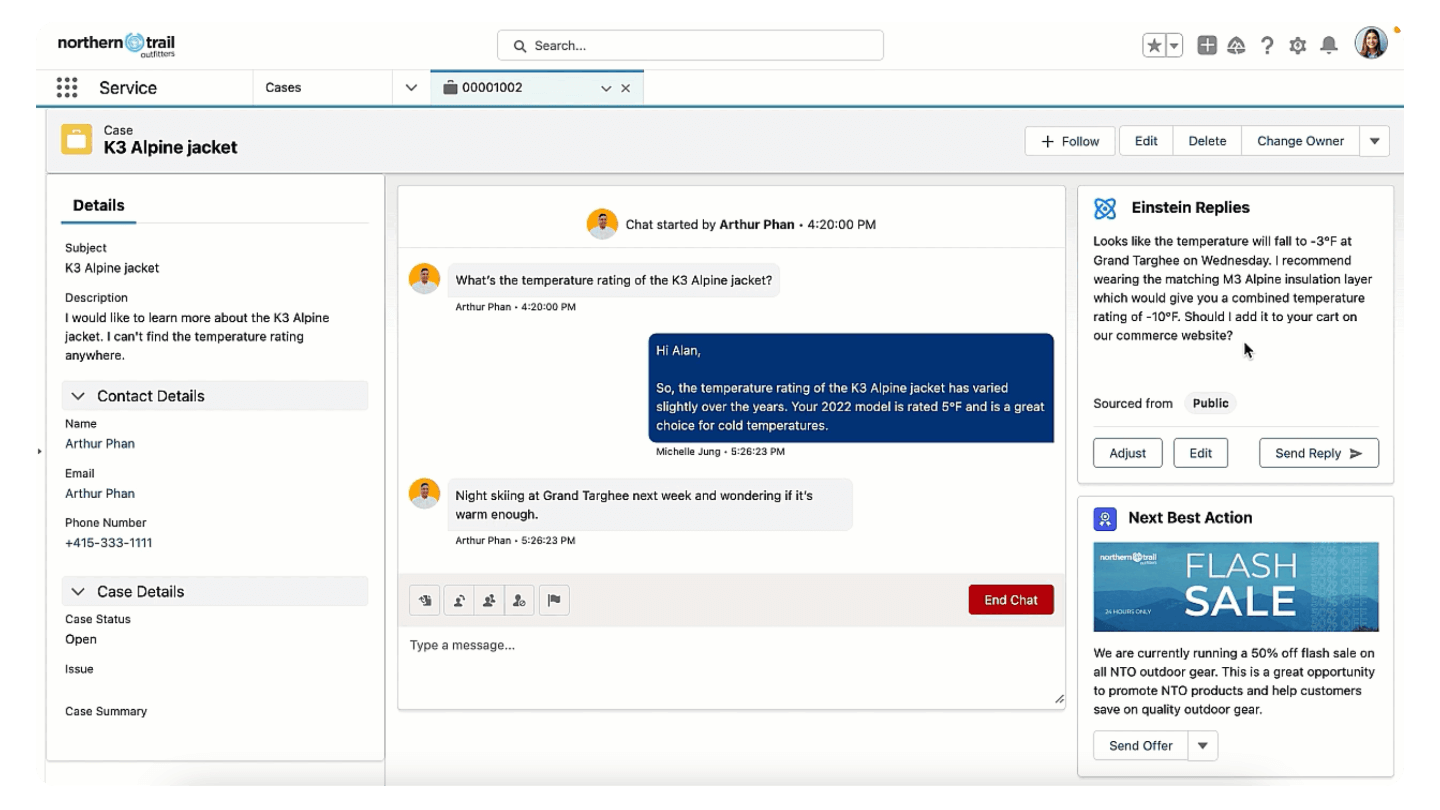
Here are Einstein’s main features for customer service:
- Service replies. The tool can automatically generate personalized replies based on real-time data sources, such as your CRM data.
- Work summaries. Einstein can produce summaries of customer requests based on the information available and the relationship history.
- Call summaries. The tool can produce call transcripts and summaries, then identify the next actions to take from the transcript. This can help improve agents’ productivity by freeing up time that would otherwise be spent transcribing calls manually and defining follow-up actions.
- Knowledge articles. The tool can automatically generate and update articles based on the latest real-time data from support interactions, and so help you feed your knowledge base.
AI features for Slack and Tableau
Salesforce has put AI into all its products, including Slack and Tableau. Slack is a collaboration platform for professionals, and Tableau one of the most advanced Business Intelligence tools on the market.
In Slack, artificial intelligence can be used to produce conversation summaries and help you write messages. Einstein GPT also lets you surface relevant customer information in Slack from the data stored in Salesforce products and Data Cloud.
Tableau AI, for its part, automates many data analysis tasks. Einstein Discovery lets you create predictive models without code. Einstein GPT gives you answers to specific questions in a few seconds, via chat. For example: “the percentage of customers who bought product X in the last 2 months”.
Salesforce has clearly pulled ahead of its competitors and manages to integrate AI in a pretty impressive way. And this is only the beginning. This article will certainly need several updates!
Discover Einstein for freeTo get to know Einstein better, Salesforce offers a free demo. It’s the best way to explore the main AI use cases in Salesforce applications in more depth.
The questions we get over and over.
What is Einstein GPT?
It is Salesforce's generative artificial intelligence. It combines the AI models Salesforce develops in-house with OpenAI's, and lets you make requests in natural language in the interface of Salesforce applications.
How much does Einstein GPT cost?
Einstein GPT is sold as an add-on, at a non-public price. It is included in the most expensive plans: in Sales Cloud, from the Unlimited plan at €330 per user per month.
What is the difference between Einstein GPT and Einstein Copilot?
Einstein Copilot is the advanced version of Einstein GPT. It doesn't stop at answering questions: it runs proactive analyses, suggests actions and makes recommendations based on your customer data. Only Data Cloud users can use it.
What is the Einstein Trust Layer for?
It prevents large language models from retaining sensitive customer data. The data that feeds the models never leaves the Salesforce cloud.
What does Einstein do in Service Cloud?
It generates personalized replies, summarizes customer requests and calls, and creates or updates knowledge base articles.



What the community says.