



- LinkedIn pre-fills the form fields using the data it holds on its users.
- The feature mostly pays off on mobile, where filling in a form is painful.
- You can ask for up to 7 pieces of information, but a lead who finds that too much can refuse to submit the form.
- The thank-you page can carry a second CTA, to your site or a landing page, to spot your best leads.
- If your own forms already convert well, Lead Gen Forms can add friction and reduce traffic to your site.
Lead Gen Forms is a very effective feature for generating leads. LinkedIn launched it in 2017 and you can use it in your LinkedIn Ads campaigns. What is it?
Collecting leads often means getting people to fill in a form. Except that, as you also know, filling in a form on mobile is a pretty painful thing, despite the real progress made in UX.
Lead Gen Forms is the solution to this problem. This feature lets your leads fill in their form almost instantly. You think that is impossible? And yet LinkedIn did it! We explain why and, above all, how to create Lead Gen Forms (lead generation forms).
What is a LinkedIn Lead Gen Form? [Definition]
In your LinkedIn advertising campaigns, LinkedIn Lead Gen Forms automates the completion of the fields in your Lead Generation forms. As you can see in the example below, the fields are pre-filled by LinkedIn, which uses the data it holds on the users of its service.
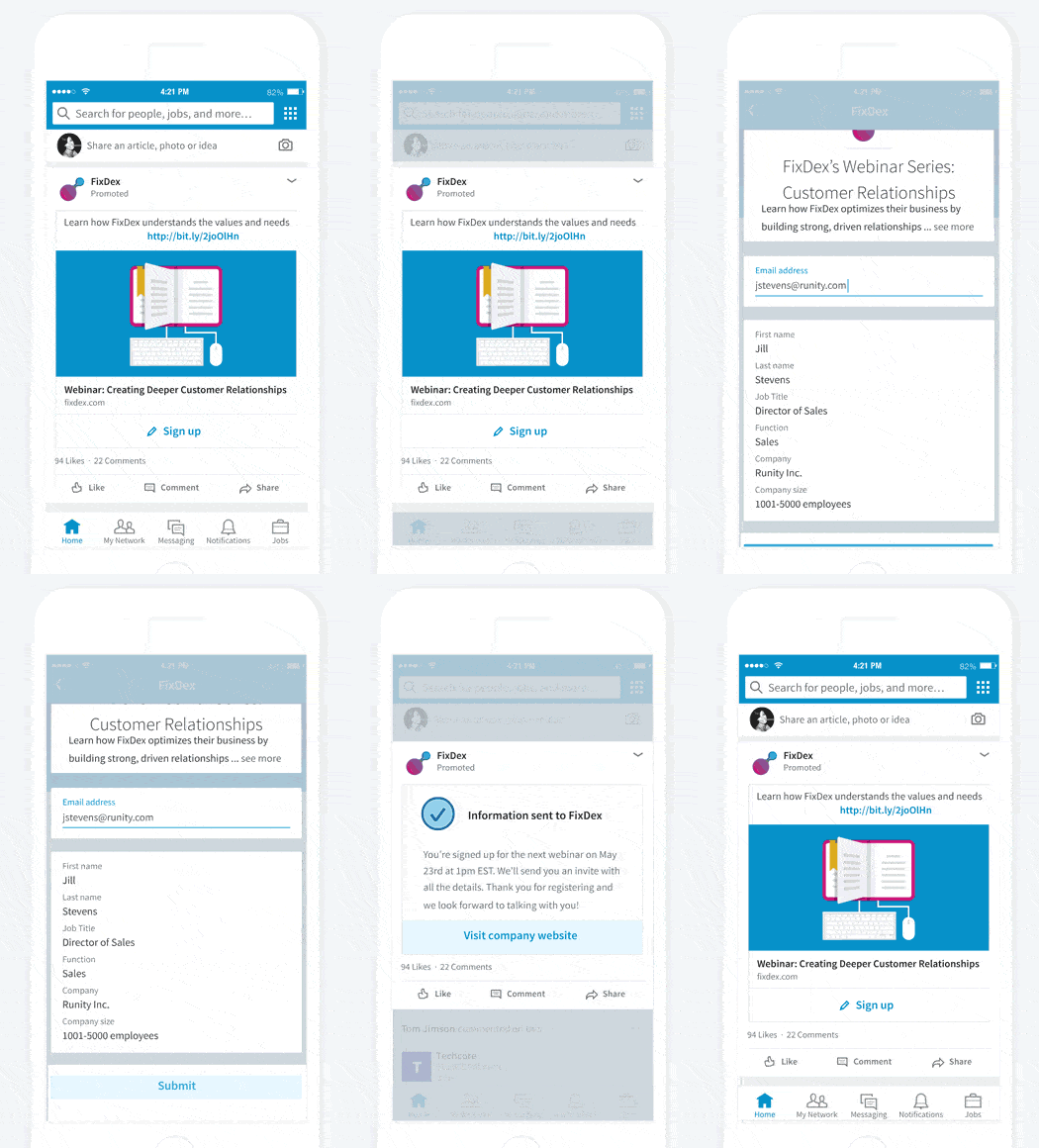
This feature is available for LinkedIn “Sponsored Content” campaigns. When you use this ad format, you can send the people who click on your ad to the Lead Gen form. It is useful if your campaign promotes a webinar, a white paper or an ebook, for example.
When you know that 80% of the people who interact with sponsored content ads do so from their mobile, you can see why this feature is so useful. Filling in the form is one of the main obstacles to conversion. Especially on mobile. LinkedIn Lead Gen Forms removes all the friction: the user no longer has to make any effort to fill in the form. Or rather, they only have to confirm their email address and tap the “submit” button. They then receive a thank-you message with a link to your website or the content of your choice.
How do you create a LinkedIn Lead Gen Form?
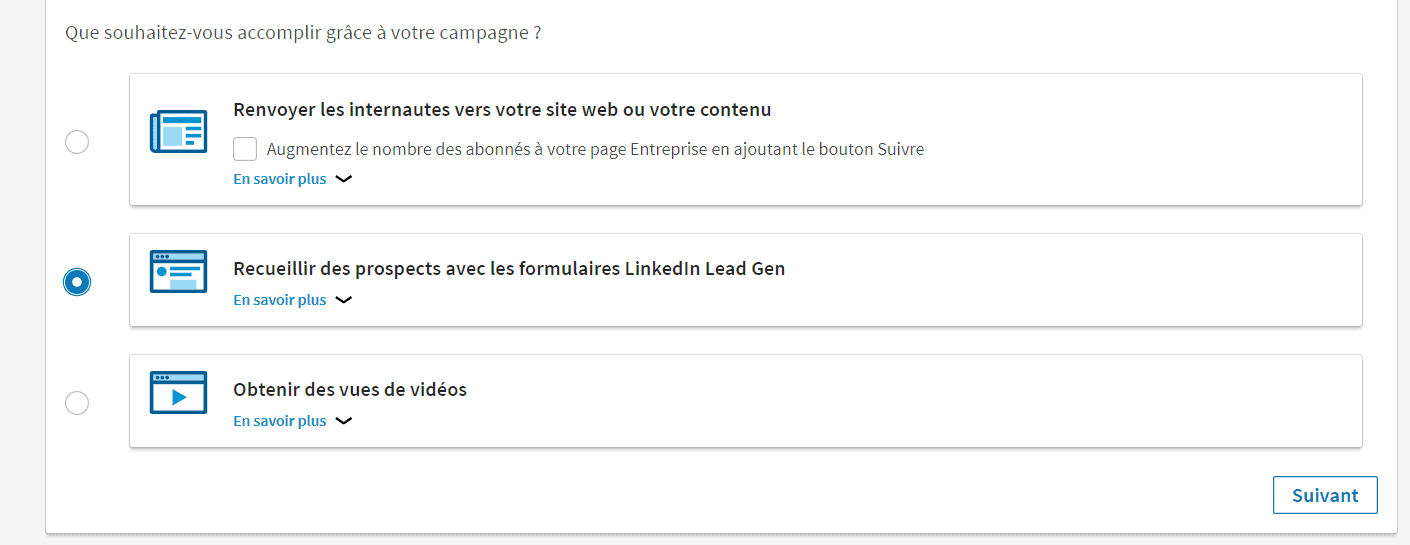
First, you need to create an ad campaign from the LinkedIn Ads Campaign Manager. LinkedIn Lead Gen Forms are only available for campaigns using the “Sponsored Content” format. When you create your campaign and have chosen the “Sponsored Content” format, you have three options. You need to pick the “Collect leads using LinkedIn Lead Gen Forms” option:
Once you have named your campaign and chosen to use a LinkedIn Lead Gen form, you will need to choose the post you want to promote, or create one from scratch. Note that you can also add a Lead Gen Form to your existing campaigns.
Also readDiscover the best tools for generating leads from LinkedIn.
Once you have chosen or created the content you want to promote, you will need to create your form template. You can pick the default template or create a fully customized one. You start by entering the form name (which your users will not see), a title and a description (which your users will see at the very top of the form), the URL of your privacy policy page (you must have one since the GDPR came into force) and the text of your privacy policy.
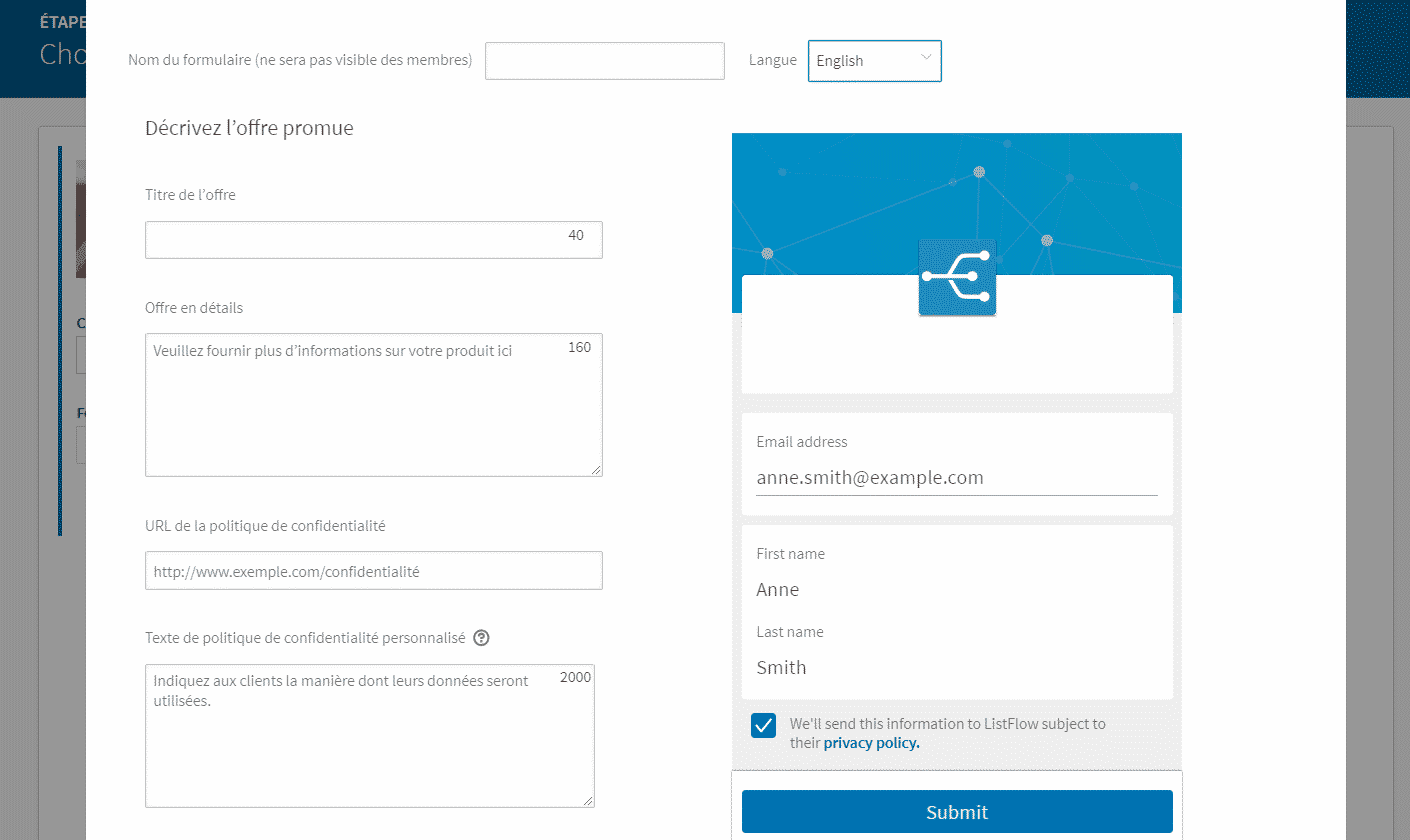
As you can see, it is not very complicated. Next, you are asked to set the fields of your form, that is, the information you want to collect from your leads. You can select up to 7: last name, first name and email address are pre-selected by default. You may think 7 fields is a lot. But once again, remember that LinkedIn will pre-fill them automatically. The lead will have nothing to do except click “Submit”. Of course, if you ask for too much information, the lead is entitled to refuse to give it by not submitting the form. That is why you need to focus on the fields that really matter to you.
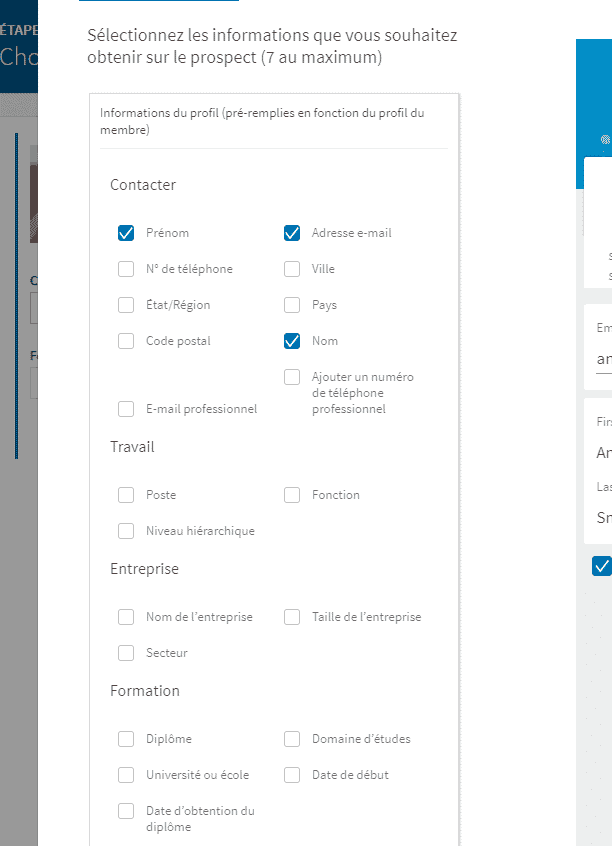
The Lead Gen Form removes the friction tied to the effort of filling in the form, but it does not remove the friction tied to people’s reluctance to share their personal data online. The last step is to edit the thank-you message.
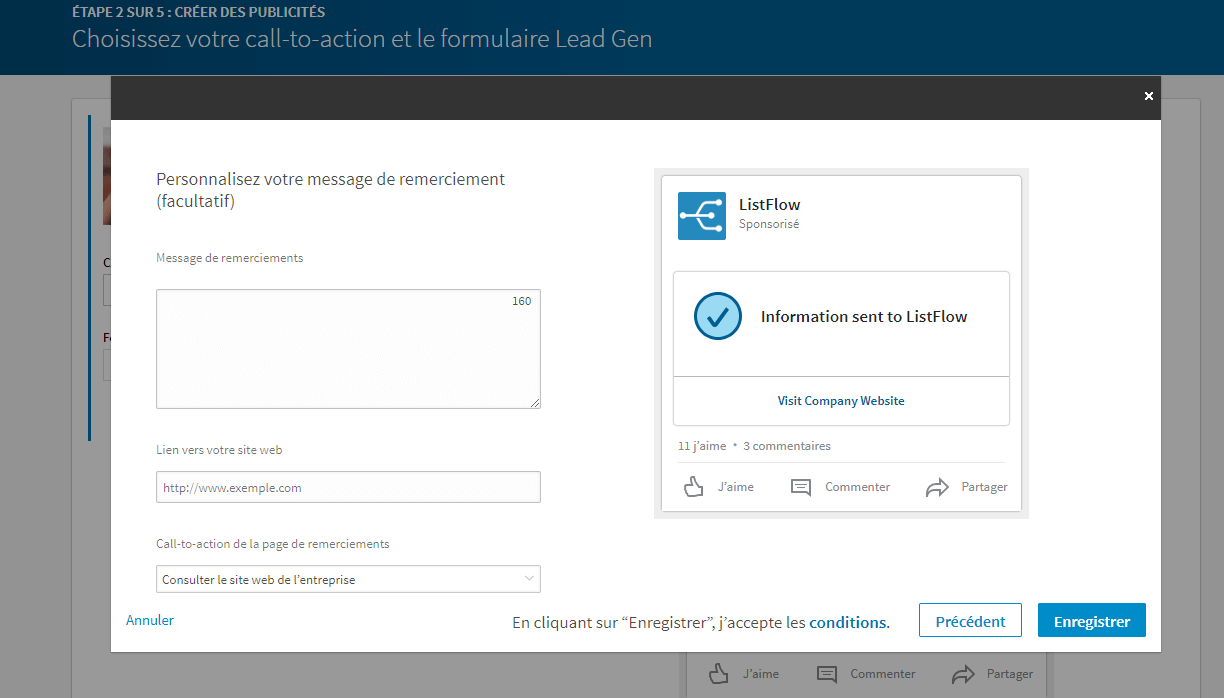
There you go, it is that simple, you have created your LinkedIn Lead Gen form. Then, as in any standard LinkedIn Ads campaign, you need to define your campaign’s target, set the budget and analyze the results from the “Campaign Manager” interface.
Also readDiscover how to boost the effectiveness of your sales funnel by tightening the link between sales and marketing teams.
Why should you really use Lead Gen Forms?
The main point of LinkedIn Lead Gen forms is that they boost the conversion rates of your lead generation campaigns. Here are a few reasons to use this feature:
- Reduce friction. Lead Gen Forms make things easier for prospects and reduce the friction tied to the effort usually needed to fill in a Lead Generation form. With this feature, the user only has to make two clicks. This form greatly improves the user experience, especially on mobile.
- Fewer steps, more information. As we know, the more fields a form has, the less it usually converts. With Lead Gen forms, you can ask for more information without hurting conversion rates.
- A potential double conversion. When a lead agrees to submit the form, they land, as we saw, on the thank-you page. On this page, you can add a new CTA, for example a link to your website or a landing page. This feature therefore lets you generate double conversions and identify, through tracking codes, your best leads (those who submitted the form and clicked the second CTA).
The three limits of LinkedIn Lead Gen Forms
LinkedIn Lead Gen Forms are clearly a valuable tool for generating qualified leads. But nothing is perfect. We have identified three small drawbacks, or three limits:
- They do not solve the general problem with forms. Just because you manage to build nice forms on LinkedIn does not mean all your problems will be solved. The big problem often comes from the poor quality of the forms used on the web, whether in design or usability. If the forms you already use on your site are well designed, good-looking and intuitive, Lead Gen Forms will add nothing: your existing forms already work very well, on every device and for all your campaigns. And what counts is optimizing the forms, but also the steps that follow: landing pages, email campaigns, etc. So this is not a “miracle” solution. Lead Gen Forms should not excuse you from working on the forms on your website and your other channels.
- They can add friction. Yes, that seems to contradict a little what we said above. But it does not. Suppose you have a very intuitive sign-up process on your website, designed to capture leads coming from LinkedIn and all your other acquisition channels. In that case, LinkedIn Lead Gen Forms can end up “adding” friction to the conversion path. Instead of clicking on the ad and landing directly on your highly effective landing page, the prospect has to go through several steps in LinkedIn: submit the form, click on the thank-you page.
- They can reduce traffic to your website. Many prospects will probably not click on the link to your website page, the one placed in the thank-you message. In that case, you have managed to collect information on your leads, you have their email, but your prospects have seen nothing of your content or your offer. And a lot of analytics data inevitably escapes you…
To conclude, we want to stress once more that, in our view, LinkedIn Lead Gen Forms are a very interesting tool, well worth testing. Clearly. We encourage you to try the feature yourself so you can form your own opinion. Analyze the performance differences with your other “sponsored content” campaigns to measure their effectiveness. And do not forget that a campaign’s performance mainly depends on the type of content, your campaign settings and the quality of your ads (copy, visuals…). Lead Gen Forms do not do everything. They will never replace the work you have to do on your side. Obviously.
The questions we get over and over.
What is a LinkedIn Lead Gen Form?
A feature of LinkedIn advertising campaigns that automates the completion of the fields in your lead generation forms. LinkedIn pre-fills the fields with the data it holds on its users.
Which LinkedIn campaigns can use Lead Gen Forms?
Campaigns using the Sponsored Content format. You can also add a Lead Gen Form to an existing campaign.
How many fields can a LinkedIn Lead Gen form have?
Seven at most. Last name, first name and email address are pre-selected by default.
How do you create a LinkedIn Lead Gen Form?
Create a Sponsored Content campaign in Campaign Manager and pick the “Collect leads using LinkedIn Lead Gen Forms” option. Choose or create the post to promote, create the form template (name, title, description, privacy policy URL and text), select the fields, then edit the thank-you message.
What are the limits of LinkedIn Lead Gen Forms?
They do not solve the general problem with forms, they can add friction if your site already has an effective sign-up process, and they can reduce traffic to your site, because many prospects do not click the link on the thank-you page.



What the community says.