


- Claim, reason why, reason to believe: the problem and the solution, then proof through figures and through examples.
- Talk about your client more than about yourself, with plenty of “you” and “your”.
- Case studies give the prospect a reason to trust you, especially with customer quotes and figures.
- A chart convinces more than a sentence, provided you keep the text that makes the data speak.
- Finish on a specific action to take after the presentation.
Your week is off to a good start. You have a potential customer who is interested in your product. You set up a presentation to show your product in more detail. “I look forward to learning more at the presentation,” he says.
To nail this presentation, you’ll need an excellent sales proposal.
A good proposal is, of course, a proposal that closes.
But we’ll try to give you slightly more precise advice to help you build your sales offer: a concise offer that presents your solution well, with examples and figures, but above all one that is tailor-made for your client.
Not forgetting an extremely clear call to action at the end of your proposal, showing your client exactly how to adopt your solution.
Since it’s always easier to take inspiration from the best, we’ve compiled examples of hard-hitting sales proposals to help you create yours. We also give you our 8 steps to build your sales offer, along with the most effective tools.
11 effective sales proposals
Salesdorado’s tipStill on PowerPoint for your proposals? No wonder you spend hours on them. Discover our selection of the best tools for building a sales proposal, to convert more, faster.
1. Zuora
A sales presentation built on a macroeconomic approach
Don’t get obsessed with the solution you want to sell. Zuora’s presentation doesn’t open the subject with its product.
The company opts for a macroeconomic angle by presenting the new subscription economy: sharing a shift in your industry lets you gain credibility in the eyes of your prospects.
Zuora Sales Deck from Ryan Gum
Zuora starts by explaining how subscriptions have changed the business plan of a number of companies. Laying out this observation gets prospects asking themselves questions about their business and the opportunities a subscription strategy could represent. Questions Zuora will be happy to answer.
Salesdorado’s tipIf you need to remember 3 things from Zuora’s presentation:
- Research the major shifts in your industry to establish your legitimacy with your client.
- Among these shifts, identify the ones that could impact your clients and present them as opportunities your services will let them exploit.
- Prompt questions from your clients to give them the impression they identified their need for your product by themselves.
2. Appsflyer
A sales offer that shows the before/after
The before: AppsFlyer, a SaaS platform for mobile marketing attribution and analytics, describes the advertising industry without its product.
The after: they then present what the world could look like and how their product helps companies join that world. This lets them further highlight their product’s capabilities as well as the number of integrated partners.
AppsFlyer Mobile App Tracking | Campaign & Engagement Analytics from AppsFlyer
Visually, what’s really striking is that AppsFlyer puts “Before” and “After” labels on its slides.
It’s the perfect setup for explaining in detail how AppsFlyer helps app developers, brands and ad agencies (AppsFlyer’s target customers) optimize their data.
Salesdorado’s tipTry applying the “before-after” technique: it helps your client picture themselves in a world where they use your solution. But above all, it also lets you make sure your presentation is centered on your client and their needs.
3. ProdPad
A sales proposal that speaks directly to the prospect
Your client doesn’t really care about your past achievements – above all, they want you to understand their needs.
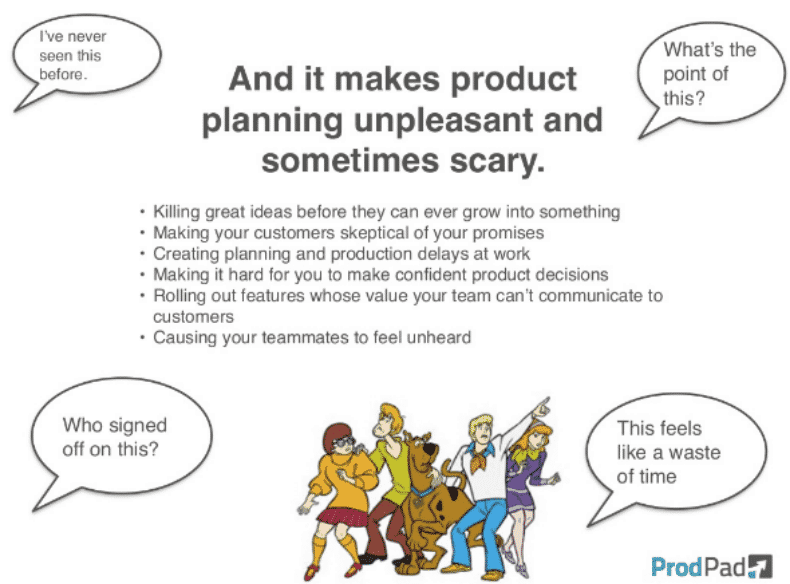
To avoid this pitfall, the product management platform ProdPad uses customer-centric language: in your sales offer, favor the words “you” and “your” as much as possible to show that you put your client at the center.
ProdPad Sales Deck – Software for Highly Effective Product Managers from ProdPad
Beyond speaking directly to its audience, ProdPad presents a series of questions its prospects usually ask themselves about product planning.
This approach makes prospects feel concerned by the issues raised (since they’ll be asking themselves these same questions later) and engages them directly in the presentation.
Salesdorado’s tipTo make sure your sales presentation is centered on your client, 2 tips:
- Prove it by using the right words, such as the pronouns “you”, “your”, etc.
- Speak to them directly to try to gather information, or even their opinion, at every stage of the proposal. At the same time, this will show them they are at the center of your concerns.
4. Contently
A proposal that demonstrates your value with concrete examples
While you should focus above all on your client’s needs during a sales presentation, don’t forget to showcase your past successes.
The content marketing solution Contently presents case studies of satisfied customers – the most notable being Coca-Cola – who used Contently to produce content before the launch of Coca-Cola Journey.
With case studies in its sales proposal, Contently gives its target audience a reason to trust them and to trust their service.
Salesdorado’s tipCase studies are clearly a plus in sales proposals:
- Clearly demonstrate the value of your solution for your current customers.
- To do this, insert quotes from these satisfied customers if you can, and state which aspects of their business you helped them improve.
- Be as precise as possible and include figures to back up your points.
5. Front
A sales offer with polished visuals
A sales proposal drowning in text is always much harder for your client to read, and therefore to follow. The idea is to make the presentation as visual as possible – charts and tables are an excellent alternative.
Take the example of the sales presentation of the shared inbox platform Front.
On slide 8, rather than just inserting the statement “MRR grew 5.4 times in the past 12 months”, Front included a chart that shows what this growth and the increase in MRR actually look like.
Front series A deck from Mathilde Collin
The value of their statement is still there, but the chart is much more convincing and visually appealing than the text. Note: the text is still there to make the raw data speak.
Salesdorado’s tipVisuals can raise retention of a sales presentation from 10 to 65%.
- Work with your design team to insert logos, interesting org charts, infographics.
- Insert text where it’s needed to describe an image, and make sure all visuals are aligned with your company’s brand.
6. Moz
A sales proposal with a clear call to action
You’ve reached the end of your presentation. Now, what do you want your audience to do with the information?
Moz, a marketing analytics company, asks the question clearly on its last slide: do you want to get involved in the company’s big ambitions?
SEOmoz Pitch Deck July 2011 from Rand Fishkin
Moz offers a simple, straightforward CTA to close its sales proposal: the audience can invest in the company or not. You can do the same by inviting your prospects to take a specific action after the presentation that will move them forward in your sales funnel.
Salesdorado’s tipYour audience shouldn’t have to wonder what you expect from them. Explain your expectations in clear terms, adding a slight sense of urgency to push them to make a decision.
7. Single Music
A sales presentation that bets on visuals
Single Music is a platform that lets artists monetize their Shopify store: in its sales offer, the brand presents its roster of artists, its placement and its features.
Their sales presentation is one of the longest on this list: offering 28 slides means taking the risk of losing your audience. But Single Music communicates effectively using lots of icons and visuals.
If you want to create a pitch this long, however, make sure you only include relevant information, and avoid useless “fluff”.
Salesdorado’s tipRemember that a picture is worth a thousand words! Your clients will remember your visuals more easily than your text, so don’t neglect them in your presentations. Make sure your images clearly reflect your message, while being striking and memorable.
8. LeadCrunch
A proposal that uses figures & statistics
LeadCrunch specializes in B2B lead generation. Their sales presentation includes statistics and charts to show companies how to prepare and personalize their sales forces and their marketing.
Here, the presentation is a bit long but rich in figures and data, which are highlighted with bold, large or bright type. The real strength of this sales proposal is that they turn this data into visuals and charts that capture your client’s attention.
Salesdorado’s tipFigures come across as both concrete and reliable to your audience.
- Highlight all your company’s relevant statistics, especially your customers’ satisfaction and loyalty.
- To make this easy for your prospects to interpret, and more pleasant to read, use charts showing how your statistics have evolved.
9. Keptify
A sales offer with a clear promise
We picked this Keptify sales presentation for several reasons: it’s clean, and doesn’t overwhelm prospects with too much text. Keptify opts for charts and visuals, quicker to understand and more dynamic for viewers.
One of this presentation’s strengths is that it opens with a catchy statistic and then explains what lies behind the data.
By offering a striking piece of information right off the bat, Keptify confronts its prospect with the problem they face, and for which they want to find a solution.
On slide 5, Keptify raises a precise question and offers an effective solution to the problem. They then detail their offer and present how they solve the problem.
Their sales presentation is therefore truly personalized, which sparks the prospect’s interest. But if you look closely, all the product presentation pages can easily be personalized and adapted to all of the brand’s potential customers.
Salesdorado’s tipPersonalization really is the key to a good sales proposal:
- Take care to qualify your prospects properly, and to identify their issues before presenting your product.
- Next, personalize your presentation with telling examples, and use cases very close, or even identical, to your contact’s situation.
- Demonstrate precisely how your offer will solve your prospect’s specific issue.
10. Kimola
A sales proposal that masters storytelling
Kimola chooses to explain a concept through a story – you can just as well do it with a use case.
The brand starts by introducing its main character, “Jane”, a potential customer of your company. It then shows how to get useful information about this character with the brand’s software.
Finally, Kimola details the main features of its software. Through this narrative method, Kimola’s prospects see precisely how the software can help them reach their target.
Salesdorado’s tipStorytelling is an opportunity to bring together several of the techniques mentioned above:
- You can illustrate your story with visuals that reflect your brand and your message, and insert charts and statistics into it.
- All while imagining a use case in which the client will recognize themselves and find a solution to their problem through your products and services.
11. DocSend
A sales presentation that tells a story
We can’t share DocSend’s sales offer directly in this article, but we selected it anyway because it offers very good storytelling.
According to DocSend, a document sharing platform, only 17.5% of prospects who view their presentation go all the way to the last slide.
The company reorganized its presentation to turn it into an interesting story around the problem DocSend solves. The company now shows that 65.4% of prospects who open the DocSend platform now click through to the last slide.
DocSend’s new presentation isn’t just visually appealing, it captures the viewer’s attention thanks to the relevance of the storytelling, which lets the company position itself as a “problem solver”.
DocSend identifies a change in the world of sales, and tells how buyers can succeed in this new world with their product.
On top of creating a story, DocSend engages viewers with conversational language, using fun expressions like “once upon a time”, which give the viewer the impression of listening to a colleague’s entertaining story.
Salesdorado’s tipStart from your research on your customers and use the data to build a story. The goal is to craft a narrative that highlights the pains your customers go through, so they feel truly understood.
How do you write a good sales proposal?
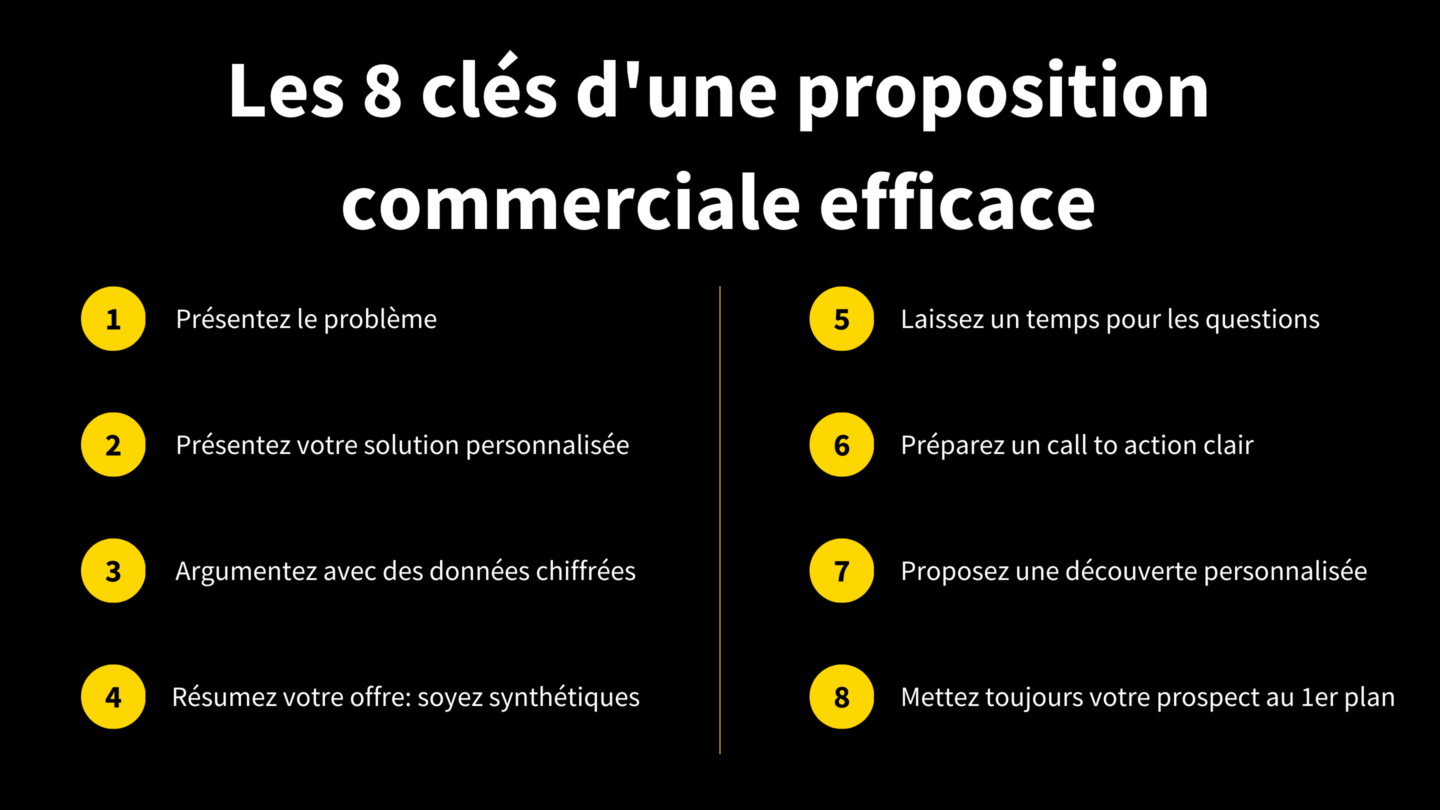
The structure of a good sales proposal is always the same:
- Claim: presentation of the problem and the solution
- Reason why: demonstration with figures
- Reason to believe: demonstration with concrete examples
And then, because the goal is still to sell, don’t forget a clear & precise call to action for the next steps.
1. “Claim”: start with solutions
The idea of the “claim” is to present your potential clients’ challenges in a way that triggers frustration and therefore their need for a solution. The more your audience thinks you understand their problems, the more likely they are to believe your solution can also fix them.
Watch outSometimes you’ll have to offer your product to a client who already knows your brand, or your offer. In that case, avoid overselling your company or your products with an overly flattering presentation.
Focus instead on the solutions you’re going to bring your potential client, to structure a tailor-made sales proposal.
2. “Reason why” and “reason to believe”: use concrete case studies
You’re now going to back up your “claim” with figures and case studies to show your prospect why your solution is the right one.
Share concrete examples with your client that can help them picture working with you by seeing the results you’ve achieved in the past: if you can, present a scenario where your product solved the main challenges of a company similar to your prospect’s.
Salesdorado’s tipFeel free to add a personal touch with anecdotes. It builds a relationship of trust with your prospect and makes your offer realistic and credible.
3. Don’t miss your call to action
Now that you clearly understand what your clients want and how you can help them, you need to show them very clearly how to get it. The call to action is usually the most important moment of your presentation: it’s the last step to encourage your prospect and steer them toward the purchase.
To do this, the best approach is to offer a trial of your solution in the form of personalized content. For example, feel free to quote everything you heard from your prospect so they can picture themselves with your solution as much as possible. All-in-one contract management tools such as Pandadoc or Proposify can also make the job easier.
You can also build a buying guide for your buyers to make sure they don’t fall back on simple, basic feature selling.
In short, the best strategy is the “Trojan horse”: try to frame the message as coming from the inside, not the outside.
Salesdorado’s tipProspects are used to seeing their logo on presentation slides. For a “wow” effect, directly reuse quotes from your client’s employees or data they’ve given you.
This makes your offer far more credible: your client is already bombarded by bad salespeople, and is used to no longer believing them. If your presentation comes from their point of view, sums up their problem and lays out all their options based on their criteria, they’re more likely to be convinced.
4. Bonus: personalization above all
A good presentation relies above all on your prospect’s data: their social networks, the articles they’ve published, their partners, etc. It’s indispensable for better understanding your target and adapting your solution to their needs.
There are so many sales proposal tools that let you personalize your presentations, such as Canva, to name just one, or Prezi Video and Touch&Sell for very specific proposals. If you want to know more, you can find our best tools for your sales offer.
Salesdorado’s tipFeel free to dig deeper in your research to find out who the decision-makers are and what the company’s potential budget is. Look into your potential competitors to see how they would approach the problem and what advantages they would have over your offer.
This gives you a better overall view, and the conversations will be all the more constructive.
Go furtherInteract. One of the pitfalls of a presentation is when it turns into a monologue led by the salesperson – nothing more boring for a prospect.
- Punctuate your presentation with questions (“Does that make sense?”, “Can you see how this could work for you?”, etc.).
- Asking questions lets you not only keep your client’s attention, but also gauge their interest in your offer, anticipate their objections, and make sure they fully understand your pitch.
- Take advantage of any interruption from your prospect (a question, a remark, a change in attitude, etc.) to open a dialogue, even if it cuts into your presentation. It’s an opportunity to gather crucial information for the negotiation stage.
What tools should you use to create hard-hitting sales proposals?
Knowing how to structure a sales proposal is one thing. But you still need to know how to put the right elements in the right place, and that depends a lot on the tools you use.
We wrote a dedicated article on this topic with our best tools for managing the whole process, from proposal to signature, in a few clicks, and with a super high level of quality.
| Tool | Function | More info |
|---|---|---|
| Canva | For simply formatting all your sales proposals, when you’re allergic to Photoshop. | Canva |
| Pandadoc | An all-in-one tool for tracking all your sales offers through to contract signature. | Pandadoc |
| Proposify | The super intuitive all-in-one tool that integrates with Salesforce. | Proposify |
In it, we recommend tools for formatting your sales proposals, like our big favorite Canva, which gives you access to lots of templates for those who are hopeless at Photoshop/Illustrator. It lets you produce super professional sales communication that you can share and edit with your colleagues.
But Canva has developed very advanced features, especially AI ones, that can really save you time. We also suggest taking a look at our selection of AI tools, which can help you with your presentations.
But we also warmly recommend tools like Prezi Video, if you need to make a sales proposal remotely, or YouSign and Screely, very handy tools we use a lot at Salesdorado.
In the end, you save time, you never again forget to replace a logo or a figure somewhere despite 14 proofreads, and above all you can quickly produce and send successful sales proposals, with an e-signature link and a payment link. Closing has never been so easy.
Go furtherStill on PowerPoint for your proposals? No wonder you spend hours on them. Discover our selection of the best tools for building a sales proposal, to convert more, faster.
The questions we get over and over.
What is the structure of a good sales proposal?
It is always the same: the claim, which presents the problem and the solution; the reason why, a demonstration with figures; the reason to believe, a demonstration with concrete examples. Add to that a clear and precise call to action for the next steps.
Should you present your product at the start of the proposal?
Not necessarily. Zuora opens its presentation on the new subscription economy before getting to its product: sharing a shift in your industry helps you gain credibility with your prospects.
Why include case studies in a proposal?
They demonstrate the value of your solution for your current customers and give the prospect a reason to trust you. If possible, insert quotes from satisfied customers and figures to back up your points.
How should you end a sales proposal?
With a simple, straightforward call to action that invites the prospect to take a specific action after the presentation. Explain your expectations in clear terms, with a slight sense of urgency to push them to decide.
What tools should you use to create a sales proposal?
Canva for formatting, Pandadoc or Proposify for tracking offers through to contract signature. The article also mentions Prezi Video for a remote proposal, as well as YouSign and Screely.



What the community says.