


- Document what you do rather than creating content: your professional experiences make for exclusive content.
- Only the first 2 sentences show in the feed: one hook, then skipped lines.
- Post your link in the first comment, a post’s reach drops when the link is in the text.
- Reply to every comment, by asking its author a question.
- Test several time slots and track each post’s statistics to know whether it reaches your target.
You have probably been there: you post content on LinkedIn and then not much happens… You only get a few likes and 2 comments. Don’t get discouraged! Even the most popular LinkedIn influencers have been through it. What are the key points to respect to write viral LinkedIn posts? We tell you everything in this article and, above all, we share relevant examples to inspire you 🙂
How do you make a LinkedIn post go viral?
Deliver value & be honest
LinkedIn is a professional network, so sharing value and expertise is key. The platform’s experts, like Neil Patel, have understood this well and publish their best tips, case studies and high value-added articles.
Don’t worry, you don’t need to be a recognized guru to share your expertise. We all have, at our own level, knowledge that can interest an audience.
As on every social network, emotion drives virality and engagement. So don’t hesitate to share your mistakes, give your opinion, be divisive, start debates. Whatever topic you tackle, be sharp in your messages to grab your audience’s attention!
Josh Fechter, a marketing specialist, racked up more than 200 million views with simple text posts that talk about his experiences in an authentic way.
Salesdorado’s tipDon’t create content, document what you do. Talk about your professional experiences, describe your day-to-day work: it is an approach that is simpler to put in place and that, by definition, produces exclusive content.
Choose the right format
You probably know the marketing adage “the right message, at the right time, in the right place”. For LinkedIn, you have to add “in the right format”.
Adapt your posts for smartphones
First, design your content for mobile. 57% of LinkedIn users access the platform from their mobile devices (Source). The goal is therefore to make your posts easy to read on a smartphone.
Here are a few tips:
- Skip lines between sentences
- Keep it as simple as possible
- Use the active voice
- Avoid “there is” and “you have to” as much as you can
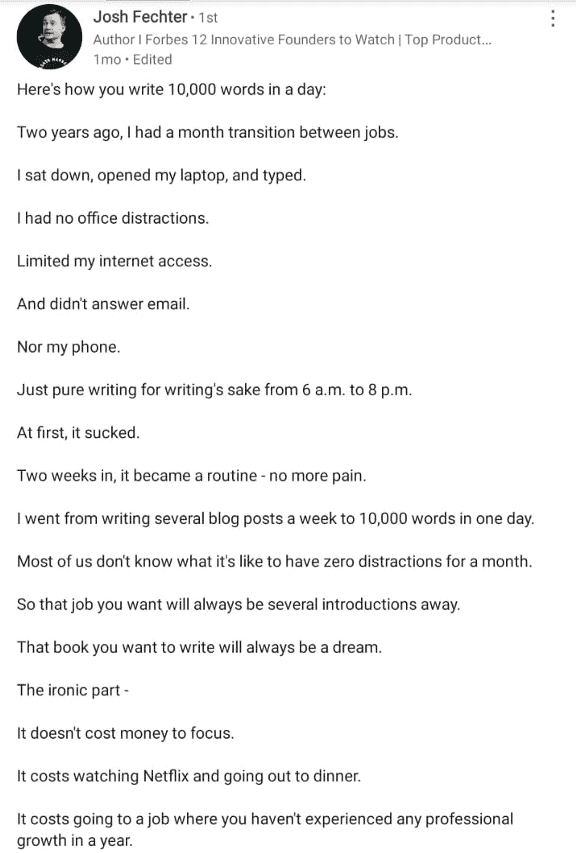 This is what your post should look like!
Only make your hook visible
On LinkedIn, only the first 2 sentences are displayed in the news feed. In other words, you have to grab your reader’s attention immediately so they click on “see more”.
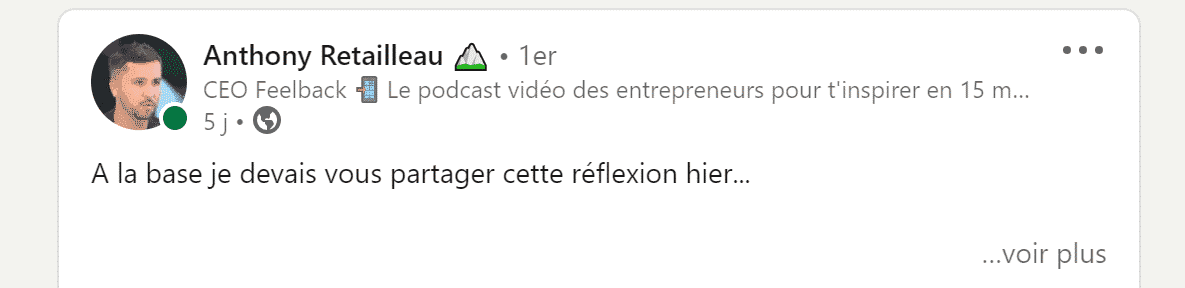
Use the “hidden text” technique: you write a single, very catchy sentence, then skip several lines so that only that sentence shows in the feed, as in the example below:
Short on inspiration? Repost someone else’s content
There is no restriction on using someone else’s content on LinkedIn: if you are not inspired, you can always spot a post that generated a lot of engagement in your field, then publish it while sharing your authentic opinion and, of course, crediting the original author.
As Josh Fechter points out in his book “The Bamf Bible”, it is not unusual to see posts using the same content go viral on LinkedIn at the same time! By building on relevant content, crediting the author but ABOVE ALL adding your authentic point of view on the topic, your posts can absolutely go viral.
Read alsoOur selection of the best copywriting agencies (top 7)
Drive engagement
Engagement is the name of the game on LinkedIn: the more you get, the more visible your post will be.
If excellent copywriting is the foundation, there are a few complementary best practices:
Post your link in the 1st comment, not in your post
Like every social network, LinkedIn wants you to spend as much time as possible on its platform. Tests have been run and the verdict is clear: your post’s reach is limited when you insert a link in the text itself. Why? LinkedIn doesn’t want its users to leave the platform through that external link.
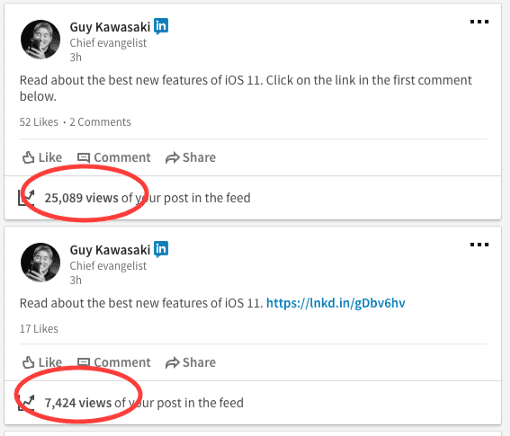
The same post, with the link in the top comment, gets far better results (Source)
Offer something in exchange for a comment
This is probably the type of post that works best right now. It is simply the lead magnet principle, LinkedIn version. Make sure you offer an “irresistible” resource that is as useful and concrete as possible.
Comments are favored much more by the LinkedIn algorithm than “likes”, so the goal of this approach is to encourage comments by sharing an exclusive study, a new ready-to-use method, a tutorial video… Once again, it is about bringing value to your audience.
Avoid “LinkedIn pods”
On LinkedIn, engagement (likes and comments) matters most in the 30 minutes to 1 hour after your post is published. Hence the temptation of pods: groups whose members, from the same line of business, commit to liking and commenting on each other’s posts to inflate this “initial” engagement.
Since March 2026, LinkedIn has explicitly banned them, whether they are manual, through Facebook or Slack groups, or automated with a third-party tool. The platform limits the reach of posts that look artificially boosted, removes groups that behave like pods and can restrict the accounts of members who take part. Today a pod costs you more reach than it brings.
Salesdorado’s tipThere is no honest shortcut to initial engagement: comment on posts in your field with a real point of view, not a “Thanks for sharing”. It is slower, but that is how you build an audience that actually reacts to what you publish.
Reply to every comment
The comment is the main engagement signal in LinkedIn’s eyes. So remember to reply as quickly as possible to every interaction. Reply by asking the commenter a question and tag them. That way, you keep the conversation going.
Tag influential people
Don’t hesitate to do it if it makes sense. You will get extra visibility, while getting on the radar of a specialist in your field.
Post at the right time and at the right frequency
According to Socialpilot, which pulled together the work of several specialized agencies, you should favor the following time slots:
- Work hours, from 10 am to 6 pm – Interaction with LinkedIn has been observed in the first half of office hours, when people browse the network looking for new research, opinions and inspiration before getting down to their own work.
- Commute hours, from 7 to 9 am and from 6 to 8 pm – Not surprisingly, people check their LinkedIn feed when they head to work early in the morning or when they wrap up their workday on the way home.
Careful, this is not a definitive answer but a set of pointers. The best approach is still to test different time slots and see what works for you.
Whatever the social network, consistency is key to becoming an integral part of the community, which means that:
- You post regularly and engage with participants in the comments: set yourself publishing goals. 1, 2 or 3 posts a week, go for a goal you can stick to.
- You have to take part in other people’s conversations if you want them to take part in yours. So like and comment, and be genuine.
- Even if you don’t post very often, keep commenting on posts, always being as authentic as possible!
Track the stats to understand the impact of your posts and your audience’s reactions
To assess the impact and effectiveness of your posts, checking the statistics is a must. For a detailed view of your numbers, open your post, then click on “[number] impressions” at the bottom left or on “View analytics” at the bottom right. You then get data on the people who viewed your content: their company, their job title and their location.
This data is crucial: it lets you assess whether certain messages reach your target audience and learn from your best-performing messages, so you can create more of them.
Two questions matter when analyzing your posts’ performance:
- Which messages get the most views?
- Which messages reach your target audience(s)?
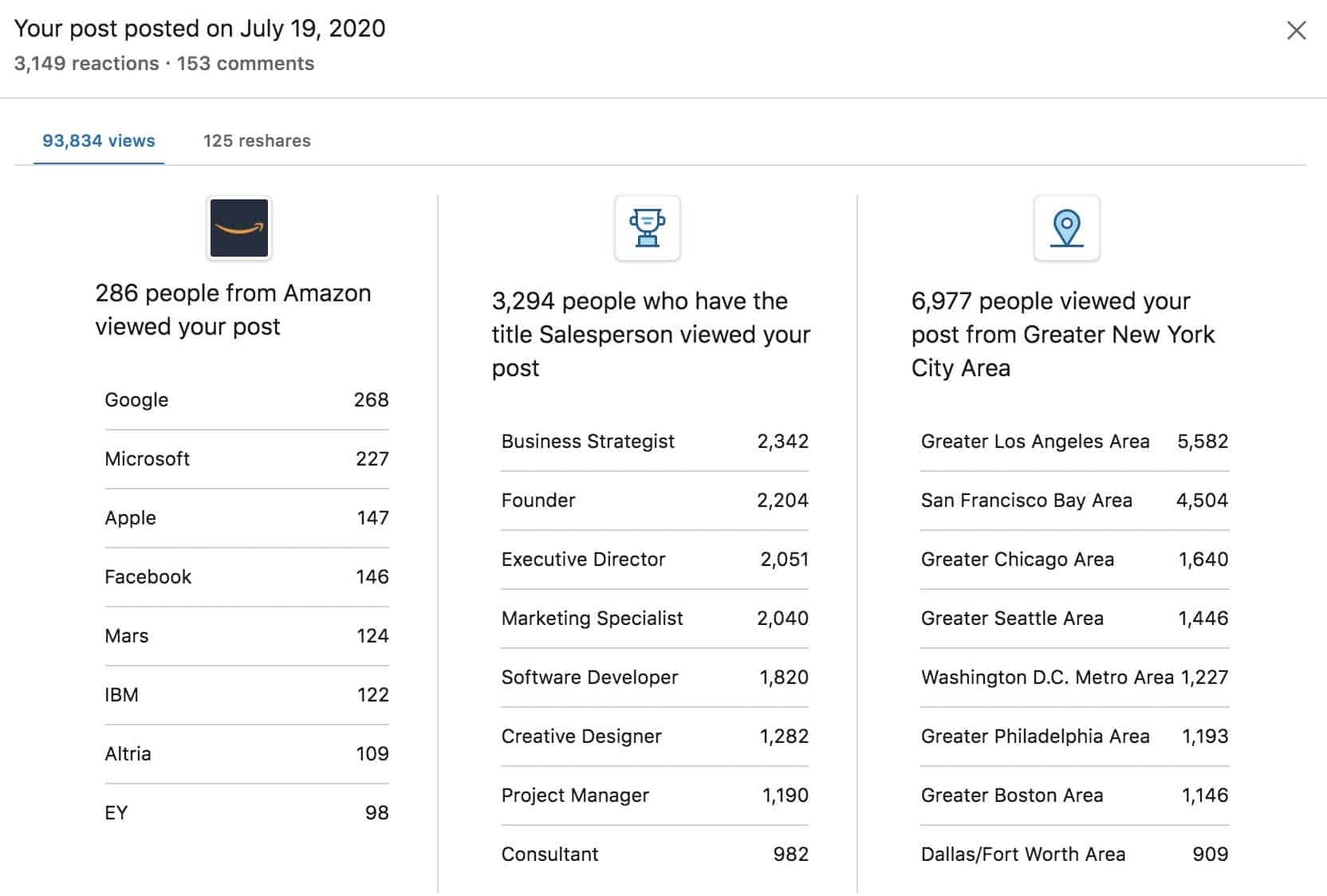
The figures above relate to a post by Jess Barron that went viral with more than 100,000 views! This particular message was seen by hundreds of employees at Amazon, Google, Microsoft, Apple and Facebook. If you are looking to reach people who work for Amazon, Microsoft or Google, take inspiration from this post!
The message also reached more than 2,204 founders and more than 2,000 executive directors and marketers, which means its format or approach appeals to this type of profile.
Just like your sales performance indicators, analyze your statistics carefully, then draw the necessary conclusions. What type of post gets the most views? The most engagement? Adapt your strategy accordingly.
8 examples of impactful LinkedIn posts, decoded
1. Tell a story people can relate to
Followed by tens of thousands of people, Grégoire Gambatto is one of the most influential people on LinkedIn and in the growth hacking ecosystem. Germinal, the training organization he is CEO of, offers among other things LinkedIn training courses.
He likes to spark debate by sharing often divisive points of view. In this post, Grégoire tackles a theme that speaks to every entrepreneur (his target!): the hardships of being an entrepreneur. The content feels very authentic, because it focuses on negative emotions. A theme that clearly resonates with his audience.
💡 Key takeaways:
- Choose themes/hooks that speak to your target
- Express a “pain point” you have experienced and that your prospects experience too
- Share a very personal experience
2. Show that you learned the lesson
Gregory Logan is the founder of the marketing agency “Dare”. He shares a lot of content through his YouTube channel and his podcast. In the following post, Gregory also relies on storytelling, with a structure widely used in copywriting: problem, agitation, solution, result. Together, it lets him unfold a story with hardships, a trigger event and a lesson to learn.
💡 Key takeaways:
- Don’t hesitate to share a failure
- Explain a journey
- Drive interaction by asking a question at the end of the post
3. Influence on LinkedIn
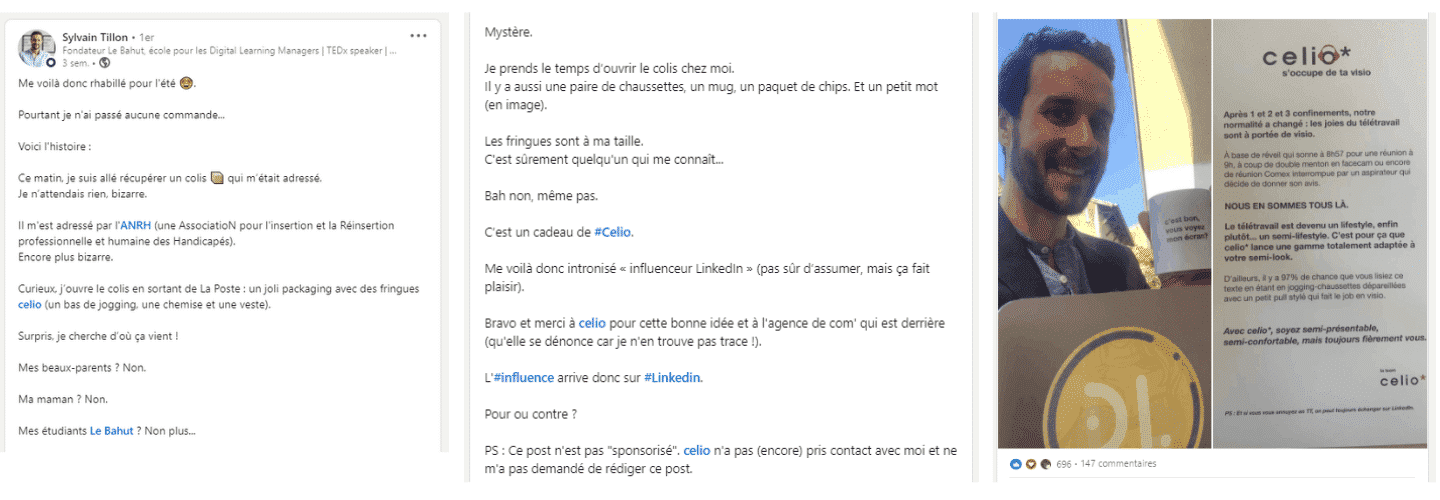
Sylvain Tillon is the founder of “Le Bahut”, a school for becoming a Digital Learning Manager, and CMO of Linkalyze, a tool for analyzing influence on LinkedIn. Sylvain often speaks up on LinkedIn with content that generates a lot of engagement. The following post generated more than a hundred comments. He goes all in on polished storytelling with a personal anecdote that, incidentally, highlights his status as an influencer.
💡 Key takeaways:
- A hook that sparks curiosity
- Personal photos to illustrate the story
- Clever tagging of his training institute and of the brand involved
4. Ask an open question/share a controversial opinion
Here is another example of a successful post from Sylvain Tillon. Here, Sylvain calls out his audience with a very targeted question. He also puts the problem in the context of the current situation and cleverly suggests a solution with his training center.
💡 Key takeaways:
- Describe a problem well before offering your “natural” solution
- Play on current events
- Use targeted hashtags
5. Bring in an expert
John Barrows is an American consultant specializing in sales. In the following post, he promotes a new podcast dedicated to cold emailing. John relies on inviting an expert, a punchy figure-based hook, very short sentences and very precise content.
💡 Key takeaways:
- A hook with a shocking statement
- Use of the video / web radio format
- Inviting a specialist to share their point of view to gain credibility
6. Use self-deprecation / humor
CopyPost is a widely followed account on LinkedIn (20,843 followers) that calls out copy-pasted posts on LinkedIn and warns against these bad practices that pollute the platform and spoil its appeal. The following example tells the behind-the-scenes story of launching a paid newsletter with Grégoire Gambatto, whom we mentioned earlier.
The dialogue format is very original and leans heavily on humor: you almost forget that the goal is to get us to subscribe to the newsletter 🙂
💡 Key takeaways:
- Very direct tone and engaging use of dialogue
- Very clever showcasing of the added value: Grégoire’s experience and the power of Linkalyze for analyzing posts
- Self-deprecation and, once again, an approach heavily based on personal experience
7. Share a hack/solution
Formerly a partner at Cartelis, the digital / data consulting firm that co-founded Salesdorado, Yassine Hamou Tahra co-founded Octolis, a SaaS dedicated to unifying customer databases, acquired by Brevo in December 2023.
The following post is a “resource post” that offers to send a template, which can be used in many lines of business, in exchange for a comment. It focuses on the problem and the solution provided by the template on offer. With almost 3,000 comments, the post is a fine example of lead generation!
💡 Key takeaways:
- Identifying a specific problem
- Offering a very concrete resource that can be used in different types of business
- Visual preview through a GIF
8. Deliver real lessons learned
Guilhem Bertholet is a B2B marketing specialist followed by more than 15,000 people. In the following post, he shares his takeaways from an experiment he ran: posting every day on LinkedIn for 2 months. The topic sparks a lot of curiosity and, in the end, concerns many of the platform’s users. The case study is an excellent way to generate engagement and prove your expertise.
💡 Key takeaways:
- Sharing the results of an almost unique experiment
- Results well presented as a carousel
- Focus on the human side of the experiment, avoiding giving only figures
How does LinkedIn decide which posts to push the most?
As with every social network, a good understanding of how the algorithm works is a must to boost your visibility. Don’t worry, you don’t need to be a data scientist to understand it 😄
What is the LinkedIn algorithm and how does it work?
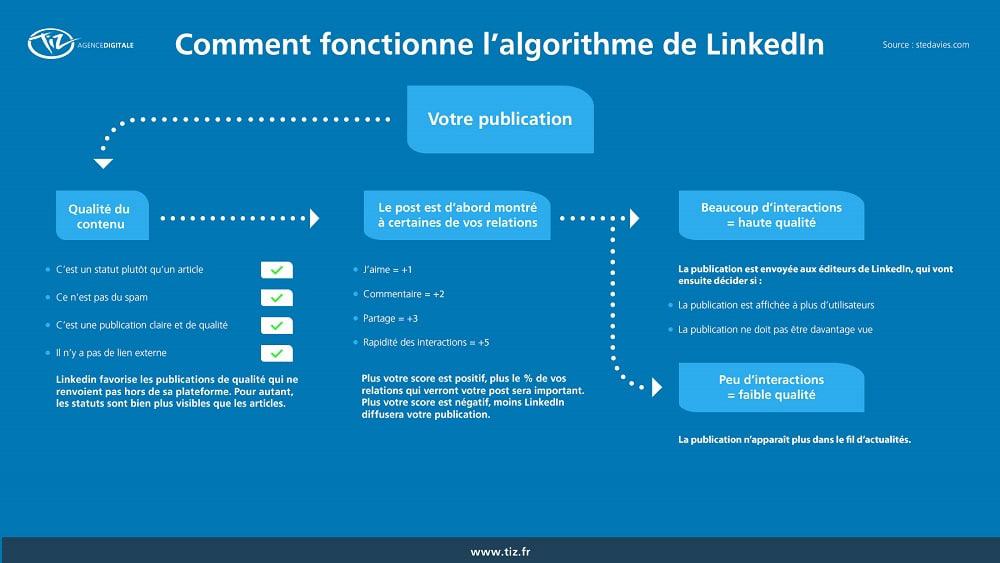
©Tiz agency – Source
Distributing relevant, quality content is the algorithm’s primary goal.
To do this, when it is created, your post goes through 4 filters:
- Filter 1: Quality level
Here the algorithm classifies your post (whatever the format) as spam, low-quality or high-quality content.
- Filter 2: Interaction level
If your post is considered quality content, it goes through an “engagement test” here. The algorithm will show your post to a fraction of your network and watch whether it sparks interaction (likes, comments…). Naturally, the higher it is, the more visibility your post will get.
- Filter 3: Your profile history
LinkedIn gives a visibility bonus if you regularly create posts that generate engagement.
- Filter 4: Human intervention
LinkedIn employees can occasionally give your content an extra visibility boost if it is considered relevant. That is why some posts published several weeks ago reappear in your feed.
Best practices for dealing with the algorithm
LinkedIn works differently from other social networks; here are a few important nuances to keep in mind:
Use LinkedIn as a “micro-blogging” platform
LinkedIn lets you share longer content than other social networks, whose post length is often limited in number of words. Make the most of this format by sharing more substantiated, documented opinions.
Host your content natively & promote it through other channels
If you have a video to share, you can always upload it to Instagram, Facebook and YouTube… But you should also upload it directly (natively) to LinkedIn.
Today, there are video content creation solutions like PlayPlay which, according to the vendor, let anyone turn any message into a video designed for LinkedIn, with no video editing skills.
Your communication plan can use the following channels:
- Sharing through your newsletter
- X (formerly Twitter)
- Facebook Ads
- 60-second teaser video on Instagram with a link to LinkedIn in my bio.
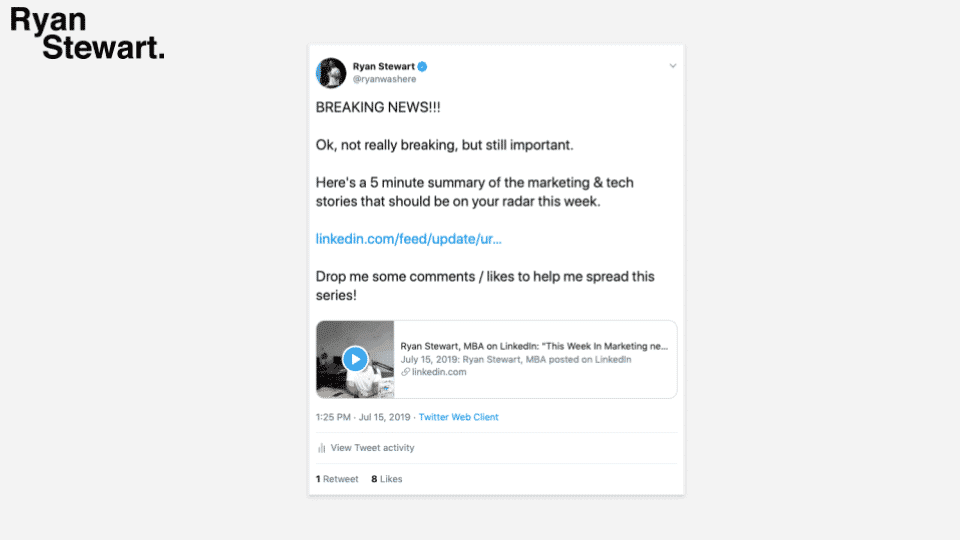
Source: Ryan Stewart
Whatever channels you use to relay your post, the key is to put your URL forward right away to drive engagement and signal to the LinkedIn algorithm that your post deserves to be seen!
LinkedIn is not a content promotion channel
LinkedIn won’t boost the visibility of your content if you are promoting your blog or other networks.
You have to build trust with the algorithm by creating content specifically for LinkedIn (aka “native content”).
Once you have built authority, you can push links from other places, but it takes time and repetition to get there.
The questions we get over and over.
Should you put a link in the text of a LinkedIn post?
Better to post it as the first comment. A post's reach is limited when the link is inserted in the text: LinkedIn doesn't want its users to leave the platform.
When should you post on LinkedIn?
According to Socialpilot, during work hours, from 10 am to 6 pm, and during commutes, from 7 to 9 am and from 6 to 8 pm. These are pointers: the best approach is still to test different time slots.
How many LinkedIn posts should you publish per week?
Set yourself a goal you can stick to: 1, 2 or 3 posts a week. Even if you don't post very often, keep commenting on other people's posts.
What is the hidden text technique?
You write a single, very catchy sentence, then skip several lines, so that only this sentence shows in the news feed and the reader clicks on "see more".
How does the LinkedIn algorithm sort posts?
Each post goes through four filters: the quality level (spam, low or high quality), the interaction level with a fraction of your network, your profile history and a human intervention, as LinkedIn employees can boost content they consider relevant.
Can you repost someone else's content on LinkedIn?
Yes. Spot a post that generated a lot of engagement in your field, then publish it while sharing your authentic opinion and crediting the original author.



What the community says.