


- Quotes, purchase orders, terms and conditions of sale: the CRM can generate these documents on its own, and stores them along the way.
- Electronic signatures complement document generation and bring decision-makers into the sales cycle earlier.
- Reports give you the conversion rate by type of opportunity or product, enough to adjust your discount policy.
- An abnormally high conversion rate betrays partial data entry: only deals that are almost won get recorded.
- Too many mandatory fields slow down adoption. A field should only be mandatory at the stage where it becomes necessary.
In 2022, 73% of French SMBs were still not using CRM software (source: HubSpot). It is worth asking why the adoption rate is so low. My conviction is that many companies do not see the value a CRM offers. The CRM is thought of as a cost item. The truth is that a CRM can save your company a lot of time and money.
CRM software is not just a customer directory. Using your CRM only to compile basic data about your customers means completely missing out on what a CRM can do. As a CRM expert since 2011, I have supported hundreds of CRM optimization projects. In this article I want to share 5 strategic tips, each of them a quick win, to turn your CRM into a powerful tool that serves your teams and your sales performance.
1. Generate documents automatically
Customer information is the raw material and the core of your CRM. It is just waiting to be put to use! How, you may ask? One of the most obvious uses, and one that can save you precious time, is automatic document generation.
Imagine being able to produce your quotes, sales proposals, purchase orders, attendance certificates, delivery notes, terms and conditions of sale or administrative forms automatically and instantly.
Well, a CRM can automate the generation of all these documents and considerably lighten the administrative workload. If you have CRM software, you hold a tool that can save your team a substantial amount of time.
Some may have reservations. Automation can be scary. What about data completeness when you hand over document production to software?
But by applying the Pareto principle, you quickly realize that the benefits far outweigh these obstacles. The initial investment (around €15 to €20 per user/month) quickly pays for itself through the efficiency gained. And automation does not prevent a human check afterwards.
You can call on a CRM integrator to make this use case easier and faster to implement if you feel the need. All you have to do is prepare your document templates, and the integrator will take care of the rest.
Expect a transformation in just a few days. At my company Cloud Girafe, a Salesforce integration specialist, I regularly help my clients roll out this kind of simple but very effective use case.
Generating your documents automatically in your CRM has another, often underestimated benefit: it stores every generated document by default. So you improve not only the document creation process but also your document management.
For Salesforce users, I generally recommend the PDF Butler tool, which costs only 12 euros per month per user. The tool is very powerful and can generate all types of documents: Word, PDF, Excel, PowerPoint, etc.

2. Introduce electronic signatures
Electronic signatures have been adopted by nearly 90% of French people (source: Ipsos), so there is no reason for companies not to use this extremely practical feature.
Integrating electronic signatures complements automatic document generation. These two quick wins work in synergy and make a powerful pair. Using electronic signatures is a given today. Among the best-known solutions is DocuSign, which stands out for its very affordable pricing, around €20 per user per month. For those looking for alternatives, I often recommend Sign Butler to my clients.

Using electronic signatures is not just about saving time. Adopting them streamlines your internal processes, for several reasons. First, electronic signatures require prior and more rigorous identification of signatories, which de facto brings decision-makers into the loop earlier. This lets your sales teams engage key decision-makers earlier in the sales cycle.
That is not all. Adopting electronic signatures also reduces discussions around contract clauses, thanks to how simple the mechanism is. It removes ambiguity, makes exchanges more transparent and lifts the reluctance that often stems from a lack of clarity. The streamlining that electronic signatures offer and their standardized mechanics ultimately make closing deals much easier, which helps increase the percentage of deals won.
So adopting electronic signatures does not only speed up the signing process: it fundamentally changes the way sales are made. It eliminates the friction usually associated with finalizing contracts and lets sales teams close deals faster and with less effort, while improving the overall customer experience.
3. Make better use of reporting tools
CRM software is not simply a place to record customer information and a tool for improving sales processes. The wealth of data the CRM records makes precise management of sales activity possible. It would be a shame to go without the analysis features that every good CRM offers. Many companies do not see the point of these features, as a Software Advice study reported by 99firms shows.

Any CRM software worthy of the name (this is obviously the case with Salesforce, which I know very well, but also with CRMs for very small businesses and SMBs) gives access to dashboards and insightful reports. These reporting features do not just give you a clear, immediate view of your sales pipeline: they also enable advanced analysis of your activity and of your relationship history with your prospects and customers.
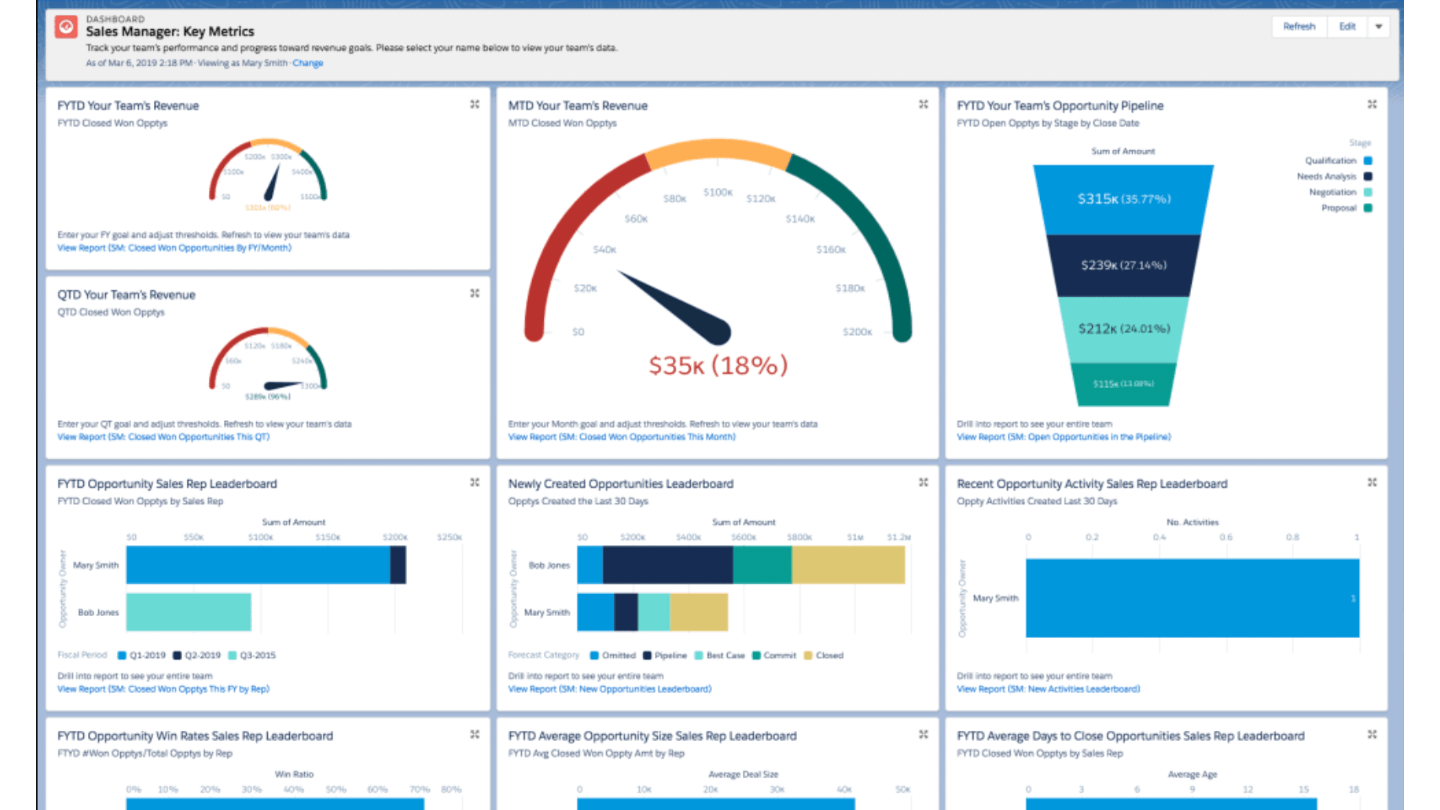
With CRM software, you can know precisely the conversion rate by type of opportunity or product sold. This information is extremely valuable. It makes fine-tuned management of your discount policies possible, for example, letting you automatically adjust the leeway granted to sales reps.
Having access to this information lets you not only boost your sales but also encourage a balanced distribution of sales across the various products in your catalog.
On that point, a major strength of Salesforce is its ability to offer granular control over data visibility. However sophisticated your reports, each user only sees the information their profile allows them to see. This level of security and customization ensures data management that is both flexible and secure, giving you invaluable peace of mind.
Creating reports in Salesforce is remarkably intuitive. After initial training, many clients not only become autonomous but reach an impressive level of expertise, often higher than mine!
This ability to empower users shows how powerful and easy to use Salesforce is, turning every member of your team into a potential analyst able to decode and use data for better performance. Contrary to popular belief, Salesforce is not only for large groups and recently launched an offer at €25 per month per user. So if you are an SMB, considering Salesforce is not heresy, quite the opposite!
But I am not just preaching for my own parish, and I know that, generally speaking, most CRMs today offer reporting features that it would be a shame not to use. You have data visualization tools in your CRM: make the most of them!
4. Be rigorous about data entry
The CRM should not be seen as a data-entry chore but as the beating heart of your sales strategy. A telltale sign that a CRM is underused? An abnormally high opportunity conversion rate. It shows that your teams only log opportunities when they are almost sure to win them, leaving out the ones they lose.
This reluctance to enter all the data related to opportunities often comes from not knowing the benefits a CRM can offer. It is because people do not see what CRM software can bring that they end up using it as little as possible.
Yet when you feed the CRM conscientiously, the benefits are many: quotes and purchase orders are generated without errors, service continuity is ensured even when a sales rep is away, mailing campaigns are easier, and so their chances of success go up.
What is more, by recording opportunities as soon as they appear, you refine your conversion rate estimate, allow strategic intervention to win the deal and ensure fine-grained management of your pipeline. This proactive approach lets you anticipate fluctuations in activity, whether slow periods or peaks in demand.
The CRM must be a collaborative space where information flows freely between all departments.
Every contribution enriches the shared knowledge base, turning the time invested in data entry into tangible added value for the whole company. By cultivating this perspective, the CRM becomes a growth lever, a strategic management tool and a catalyst for opportunities for everyone in the organization.
5. Do not restrict the CRM with too many rules
As a specialist in getting troubled CRM projects back on their feet, I have often run into a recurring pitfall: over-regulating the tool. One piece of advice I will never stop repeating: avoid making too many fields mandatory, and limit the number of rules.
Too many constraints create frustration and resistance, which very often hurts user adoption of the CRM. The key lies in how relevant the process is: a mandatory field must match a specific need in the record’s life cycle, not be a permanent obstacle.
Take information that is essential for a company, such as the SIREN number and the address, which are crucial for invoicing but not necessarily available or relevant for a sales rep early in the process. That rep would gain more by focusing on understanding the prospect’s decision-makers, needs, budget and pain points, in order to navigate the sales journey effectively.
The mistake is not having no mandatory fields, but having too many of them. This issue, often downplayed, should not be limited to a few emails between the integrator and the project manager. It deserves to be addressed in dedicated workshops bringing together key users and a range of stakeholders, for in-depth thinking about the essential fields and when they should kick in.
This collaborative approach not only defines the crucial information but also adjusts whether it is mandatory according to the phases of the process, ensuring smooth CRM use that fits all operational needs.
Conclusion: the CRM, a lever for growth and efficiency
The main idea I would like to get across in this article: the CRM is not just a customer management tool, it is a real growth catalyst for your company. By optimizing its use with the quick wins I have suggested, you can not only improve the management of your customer relationships but also significantly increase your revenue and the efficiency of your internal processes.
A well-tuned CRM, properly adopted by every team, becomes a unifying tool that fosters collaboration and innovation.
All of this goes back to the core purpose of Cloud Girafe, which is to help companies use their CRM solution productively. As a Salesforce integrator, Cloud Girafe helps you turn your customer relationship management into a real competitive advantage. I invite you to visit the Cloud Girafe website to find out more.
Which brings me to a small bonus tip: do not cut corners on the quality of your CRM. Choose a platform that can support and amplify your sales ambitions, now and in the future!
The questions we get over and over.
What documents can a CRM generate automatically?
Quotes, sales proposals, purchase orders, attendance certificates, delivery notes, terms and conditions of sale or administrative forms. When generated in the CRM, they are also stored there by default.
Why integrate electronic signatures into your CRM?
It complements automatic document generation. It requires more rigorous identification of signatories, which brings decision-makers into the sales cycle earlier, and it reduces discussions around contract clauses.
How can you tell if a CRM is underused?
An abnormally high opportunity conversion rate is one indicator: it shows that teams only log opportunities when they are almost sure to win them.
Should you make many fields mandatory in a CRM?
No. Too many constraints create frustration and resistance and hurt adoption. A mandatory field must match a specific need in the record’s life cycle: the SIREN number and the address are used for invoicing, not by the sales rep early in the process.



What the community says.