



- Start from the problems to solve, not from a list of features: otherwise you pay for useless features and miss the ones you need.
- Interview all stakeholders, the extreme users first, and observe how the software is actually used.
- A use case says who does what with the CRM and for what purpose, in six to ten steps, without talking about the interface.
- Rank your requirements with the MoSCoW method: Must have, Should have, Could have, Won’t have.
- Score vendors on their ability to meet your requirements, not on their general characteristics.
In this article, you can download our CRM requirements template for free. The article itself is there to help you fill it in, step by step, so you end up with a complete requirements document.
Here is a 4-step method to build a requirements document the right way, by identifying your organization’s needs and matching them to the features of your target CRM:
- Defining needs and goals
- Expressing the target CRM vision
- Functional specifications of the target CRM
- Evaluating the different solutions
Download our complete CRM requirements template in Notion or PDF format
CRM requirements templateWe’ve put together a complete CRM requirements template with a detailed example. The template has 6 parts:
- Context overview
- Overview of the current CRM setup
- Overview of the project goals
- Functional requirements grid
- Non-functional requirements in detail
- Project organization
It’s free, and it’s right here 👇
[Step 1] Defining needs and goals
If you start by telling yourself “I want the system to have features xyz” without knowing which needs they address and how they will address them, you will end up spending money on useless features and missing the ones you really need.
Why are you changing CRMs?
First, ask yourself why you want a new CRM system. Try to identify the problems you have with your current system and their impact on your organization.
Using a CRM requirements-gathering template or questionnaire can make your life easier. Start by looking at the business problems you are trying to solve.
Once you know the results you need, you can identify what you need to improve. What has to change? It varies from one company to another, but some points come up often:
- Efficiency: is your sales team swamped with admin tasks?
- Performance tracking: can you easily measure how effective your current methods are?
- Sales volume: do you simply need to make more sales?
- Access: does your team need access to key customer data and notes on the road? On mobile? In store?
Either way, quantify what you want to achieve as concisely as possible. It will help you define your feature requirements later on.
The importance of setting clear goals is well illustrated in this case study on British Airways’ CRM implementation after 9/11. In a crisis, every expense had to be justified. In the end, BA chose technology that is very outdated by today’s standards, but it managed to cut considerable costs and to increase the airline’s margin considerably.
How will your teams access the new system?
You need to know not only the number of users but also how and when they will access the system.
Note also that the deployment method you choose (SaaS, or sometimes still on-premise) affects the budget for the new software, the implementation services you will need and how easy the system is to access.
It’s worth asking yourself a few questions:
- For a SaaS, what is the vendor’s average downtime and what happens if connectivity is lost?
- Do you prefer a fully managed, cloud-based system or a system installed on your own servers?
- In that case, are your servers up to the job and what backup procedures need to be put in place?
- For an on-premise solution, do your employees work in a single office? Several offices? What about remote work? And work on the road?
- If they work remotely, what devices and operating systems do they use?
- Can you afford to replace existing devices, or will any new system have to fit your current devices?
How heavily will the system be used?
People often forget to take into account the load the system will be under, such as the number of people using it and the amount of data it will store.
Better to slightly oversize the system and have extra capacity than to have to upgrade it in the near future, with all the extra costs that brings.
Need help building your CRM requirements document?The quality of your requirements document directly determines the success of your CRM project. This is the document that will guide vendors in their responses and allow you to make the right decision. Needless to say, it deserves a bit of your time.
But be careful not to drown in the writing. If you’re not familiar with the exercise, you’re better off getting support from a consulting firm with solid experience of CRM requirements documents.
Go furtherTo help you see more clearly, here are a few general resources on CRMs:
[Step 2] Expressing the target CRM vision
Gathering needs from all stakeholders
1. Interview all stakeholders
An effective CRM solution has to meet the needs of both management and end users.
End users’ opinions are valuable because they are the ones who spend the most time interacting with prospects and customers. So they are very well placed to report the flaws they have seen in the systems already in place, and may even have ideas for solving these problems.
By asking the right questions, you can bring to light operational problems and customer dissatisfaction that management may not even have been aware of.
Salesdorado’s tipFocus first on the extreme users to get a realistic observation panel: for example those who use the software a lot (power users) and those who barely use it, or those who have been with the company for 20 years and those who joined only 6 months ago, etc.
All the more so because if users feel involved in the process from the start, they will be even more willing to adopt the new CRM solution once it is rolled out. So it’s worth interviewing as many people in your organization as possible.
Watch outPeople say what they think, but not always what actually is. It is often very valuable to spend a few hours just observing how the software is used, and noting down every difficulty that comes up.
2. Gather and analyze the data
Now you need to organize and analyze the information collected from participants to bring out recurring themes. You can ask additional questions to clarify both the current situation and the one you want in the future.
The features and performance levels of existing systems and processes (including manual processes) should be catalogued and described in reasonable detail, including relevant details about existing systems, from shared spreadsheets to the company’s ERP system (we explain the differences between CRM and ERP in this article), and how these systems work (or don’t).
The goal here is to gather as much of the feedback you received as possible, and to prioritize it according to how many times it came up.
How do you define good CRM use cases?
A use case identifies WHO (actor) does WHAT (interaction) with the CRM system for what PURPOSE (goal), without dealing with the system’s internal elements.
A complete set of use cases specifies all the different ways the CRM system will be used, and therefore defines everything expected of it. It should be written in clear, simple language: avoid any unnecessary jargon.
Watch outThe actor in a use case is not necessarily a person: it can simply be another IT system, such as email or accounting. Actors are those who interact with the CRM system without being part of it. The use case describes this interaction – what the actor does and how the system responds. On the other hand, it is not yet concerned with how the system is implemented or the exact interface it will have.
To help you see more clearly, we’ve listed some examples of use cases:
- Prioritize leads better
- Save time by automating low-value admin tasks
- Track sales & ongoing deals
- Spot upsell opportunities or churn risks
- etc.
And some other ideas, in no particular order: running sales meetings, automating mundane tasks, managing multiple sales and prospecting channels.
Hence the importance of writing good use cases. 8 tips:
- Describe the goal. What do you want to accomplish and how will you know you have succeeded?
- Identify your actors: one for each use case, whether we’re talking about people, groups or other systems.
- Describe the process and all the steps the actors will have to follow and the behaviors they will have to adopt to meet the system’s functional requirements.
- A use case is a story with a beginning and a sequence of events leading to the end: each step is an action. To help you, you can use action verbs when writing it.
- Each use case should have between six and ten steps. Write it clearly and simply so that users can understand it in two minutes.
- Avoid “if” statements.
- Forget the user interface – for now.
- Keep formulas and rules in a separate document.
Defining the current process
The goal is to set out precisely how your CRM processes work today. Whether you already have software or rather a collection of Excel files, this will help you clearly identify the gap with the target vision.
Salesdorado’s giftWe recommend this sample document: CRM Requirements Example Document – CRM Switch.
[Step 3] Functional specifications of the target CRM
The “Core” features of the CRM
People often think the CRM only concerns sales and marketing teams, because they are the ones with the most customer contact. But a CRM system holds essential information for the whole organization.
For example, data collected during the sales process can be vital for account managers or legal departments.
Watch outMany organizations use several CRM systems, but this can slow productivity and lose a potentially beneficial synergy between departments.
To help you, here are some must-have CRM features by team:
1. For sales management
Sales are the lifeblood of the company, and a good CRM system is often seen as one that maximizes sales above all. To do this, a CRM usually offers the following features:
- Contact management
- Sales performance management
- Sales collaboration tools
- Sales forecasting
- Lead management
- Lead assignment rules/lead routing
- Custom pipelines
- Product-level quotes
2. For customer service
Happy customers are loyal customers, who want to be listened to, understood, and have their problems solved. That is customer service’s main mission, but not the only one: it also provides valuable information to support marketing and sales teams, as well as strategic decision-making.
Watch outOrganizations are often caught off guard when a prospect becomes a customer. A salesperson may have learned a lot about the customer’s needs, but if this information is not recorded properly and passed on to the account manager who looks after them, it is useless. You need to capture this data and be able to access it systematically.
In terms of specific features, here are some basic ones to get you started:
- Case management
- Online help environments
- Prospecting automation
- Customer support automation
- Team inbox
- Service level agreement management
- Scenario automation
- Custom ticket status
3. For marketing
Marketing is one of the most important uses of any CRM: by keeping information up to date, it makes well-targeted marketing possible and so maximizes results. Matching the most relevant products or services to your customers’ needs improves engagement, increases sales and maximizes return on investment.
A few marketing-specific features:
- Marketing lead management
- Email list management
- Email list segmentation
- Campaign management
- Social media management
- Event marketing and webinars
- Tracking of lead generation
- Prospect scoring
- Integration with marketing automation software
4. For business reporting and analytics
If you don’t know where your organization stands, you can’t plan for the future. A CRM system lets you produce reports, on sales but also on workflows, to identify problems and improve planning and performance.
Charts are a great way to quickly understand current or past performance and spot trends. The possibilities are vast – the list below is only a sample of the reports available:
- Pipeline/deal regression
- Discount effectiveness
- DOA (dead on arrival)
- Leads by source
- Leads by offer
- Contacts by lifecycle stage
The “Advanced” features of the new CRM
There is currently an almost infinite number of advanced features, but here are some of the main ones offered in every case.
Planning, scheduling and collaboration
Whatever its size, an organization is a team made up of many parts. It has to work together, which means knowing who does what and when.
Automated scheduling with reminders ensures that everything in the company runs to plan, while shared access to work gives everyone the relevant information at all times.
There are many messaging tools outside the CRM, like Slack, but there can be real benefits to keeping intra-company communications in the system to help track the workflow.
VoIP
In terms of VoIP, this system can easily handle all calls, displaying the key details. This can prove very valuable for organizations that have large call volumes and need last-minute information.
Social media integration
Unless you live in a cave, you are well aware of how important and ubiquitous social media is today. Sometimes overlooked by organizations, integrating your social networks with your CRM allows more effective management of the company’s public image and engagement.
Industry-specific workflows
Every industry has its own needs, which is why many CRM systems specialize in a single industry, for example Guestware in the hotel industry or Follow Up Boss for real estate. These systems offer industry-specific features (reservation management for hotel CRMs) but also integration with their flagship software (Zillow for real estate).
Must-have & Nice to have
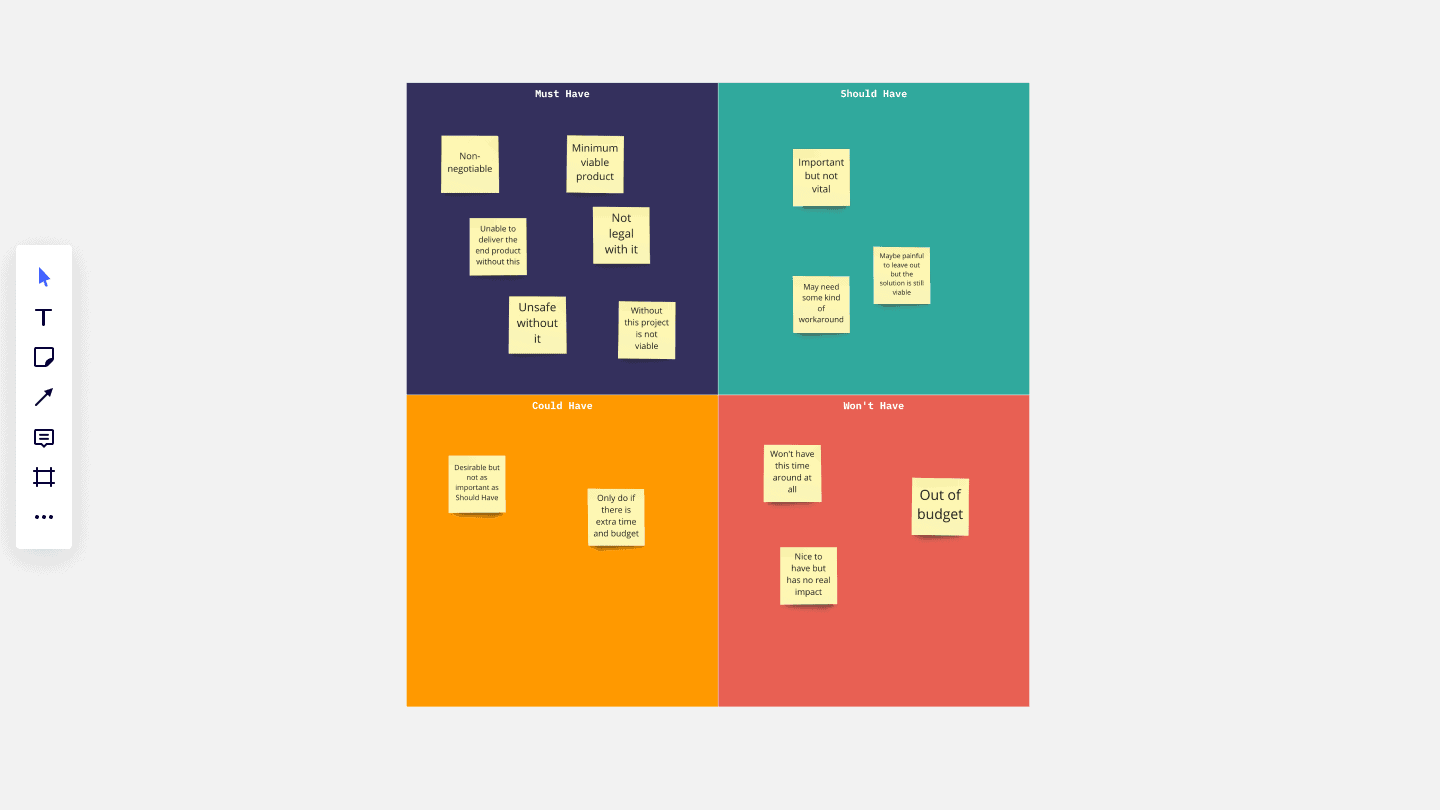
Salesdorado’s definitionThe MoSCoW method is a prioritization technique used in business to reach a shared agreement with stakeholders on how much importance they place on meeting each requirement.
Its name comes from the following acronym:
- M – Must have
These are the requirements deemed non-negotiable: if any one of them is not met, the project is considered a failure. But be careful, “Must have” requirements can change category with the agreement of all the parties involved, especially if new requirements are deemed more important.
MUST can also be read as the acronym for Minimum Usable Subset.
- S – Should have
These are requirements that are important but not essential to the project (or else there is a way to meet them temporarily and address them later).
- C – Could have
Requirements labeled “Could have” are desirable but not necessary: they can improve the user experience or customer satisfaction for minimal development cost. They will usually be included if time and resources allow.
- W – Won’t have
“Won’t have” requirements have been recognized by stakeholders as the least critical, least cost-effective or not appropriate at that time. As a result, they are not scheduled: they are either dropped or reconsidered for a later schedule.
Go furtherTo find your way around, see our various articles on CRMs:
[Step 4] Evaluating the different solutions
Build a vendor ranking system
Once you have listed and prioritized your requirements, you need to organize this information so that stakeholders can rank vendors on their ability to meet these requirements.
This ranking system can also serve as a demo guide for vendors, to make sure they address the priority requirements and cover them in a logical sequence when they present the details of their CRM platform to the team.
Salesdorado’s tipYour ranking system really needs to focus on functionality and each vendor’s ability to meet the requirements specifically, rather than on general characteristics.
Plan tailored demos
Your potential vendors should be briefed in advance on your company’s current situation but also on its future; they need to understand your company’s functional areas and the roles within them.
Ideally, each vendor’s representative gives a personalized demo of their solution. Normally, it is in their interest to give the fullest possible picture of their solution and of how it can solve your organization’s problems.
Even though you won’t have proof until you have committed to a vendor, most of them make the effort to show you as many features as possible during their CRM software demo to win you over.
Watch outOne demo is not always enough: vendors may need to research certain details, then follow up with you. A later technical deep-dive session may be needed, for example so that your team understands the integration requirements for existing systems.
Go furtherTo find the right CRM software, check out our comparisons on the subject:
Download our CRM requirements template in Notion or PDF format for free
CRM requirements templateWe’ve put together a complete CRM requirements template with a detailed example. The template has 6 parts:
- Context overview
- Overview of the current CRM setup
- Overview of the project goals
- Functional requirements grid
- Non-functional requirements in detail
- Project organization
It’s free, and it’s right here 👇
The questions we get over and over.
What are the steps to build a CRM requirements document?
Four steps: defining needs and goals, expressing the target CRM vision, the functional specifications of the target CRM and evaluating the different solutions.
What does a CRM requirements template contain?
The Salesdorado template has 6 parts: context overview, overview of the current CRM setup, overview of the project goals, functional requirements grid, non-functional requirements in detail and project organization.
What is a CRM use case?
A use case identifies who (the actor) does what (the interaction) with the CRM system and for what purpose (the goal), without dealing with the system’s internal elements. The actor is not necessarily a person: it can be another system, such as email or accounting.
What is the MoSCoW method?
A prioritization technique that sorts requirements into Must have (essential), Should have (important but not essential), Could have (desirable if time and resources allow) and Won’t have (dropped or postponed).
How do you evaluate CRM vendors?
With a ranking system focused on each vendor’s ability to meet your priority requirements, then personalized demos, possibly followed by a technical deep-dive session on integration with existing systems.



What the community says.