



- Before looking for data outside, have a flawless schema for your internal data and identify the key moments in the buying journey.
- Don’t look for contact data and company data at the same time: the sources differ, and mixing them too early gives worse results.
- Start by enriching company data, which limits false positives.
- Pass the CRM IDs in input and output: that is what lets you attach the enriched data to the right record.
- « Test » accounts skew the statistics: verify customer information.
CRM enrichment and data quality are among the most fundamental issues for strong sales performance. How do you find the right data? When should you inject it? How do you measure (and justify) the cost of all these operations? How do you use the data you get? We could spend all day on it.
So we asked our friends at Captain Data what they thought. They have built a completely crazy war machine for their own processes. Nothing was left to chance. And Marc agreed to share all his secrets with us.
In this article, we walk you through their enrichment process from A to Z.
More similar articlesThis article is part of a mini-series we put together with Captain Data. Captain Data is a tool whose mission is to make data accessible and actionable for sales & marketing teams. And they know a thing or two about B2B data. To read the other articles:
Setting up your tracking plan and studying the funnel
What is a tracking plan?
A tracking plan is a precise analysis of the sales funnel. Take the example of a SaaS whose goal is to get a lead to sign up for a special offer.
In this case, you need to define upfront the steps the user must go through to move from one stage to the next and be converted into a customer. The path is split into three levels:
- Marketing Qualified Lead (MQL): before signing up, the visitor spends time on the site. They are therefore interested in the products or the offer and the services showcased. It is essential to get as much context as possible around this visitor. That means getting data such as their identity, their company, and what they are interested in.
- Sales Qualified Lead (SQL): after sign-up, the prospect has to be qualified through human actions and actions based on data analysis. The aim is to define their needs and budget by getting in touch (email, phone). This is the sales qualification stage
- Product Qualified Lead (PQL): this last stage uses product data, data related to how the tool is used. It is traditionally reserved for SaaS, where recurring product usage largely determines LTV (Lifetime Value), but LTV and retention reasoning could, and should, apply to most B2B businesses.
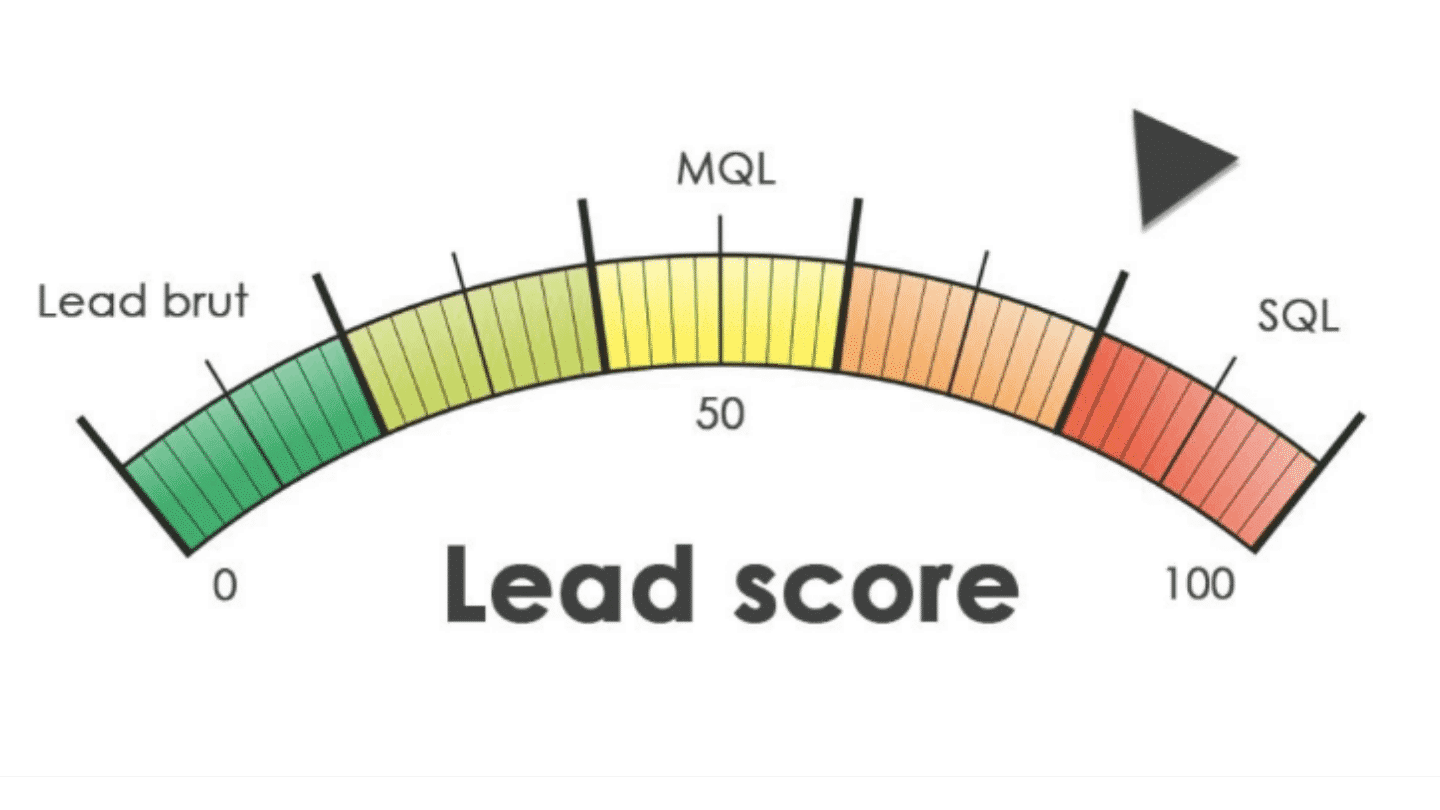
Obviously, depending on the business, the basis of the scoring and the way you calculate your leads’ scores will change. In « self-service », the SQL stage will be necessary but data collection will happen differently: for example through a form during onboarding.
Why set up a tracking plan?
The topic here is data enrichment, that is, enriching your contact & customer databases with external data.
The very first thing to do, before looking outside, is to have a flawless data schema for your internal data, and to be able to identify the key moments in the buying journey.
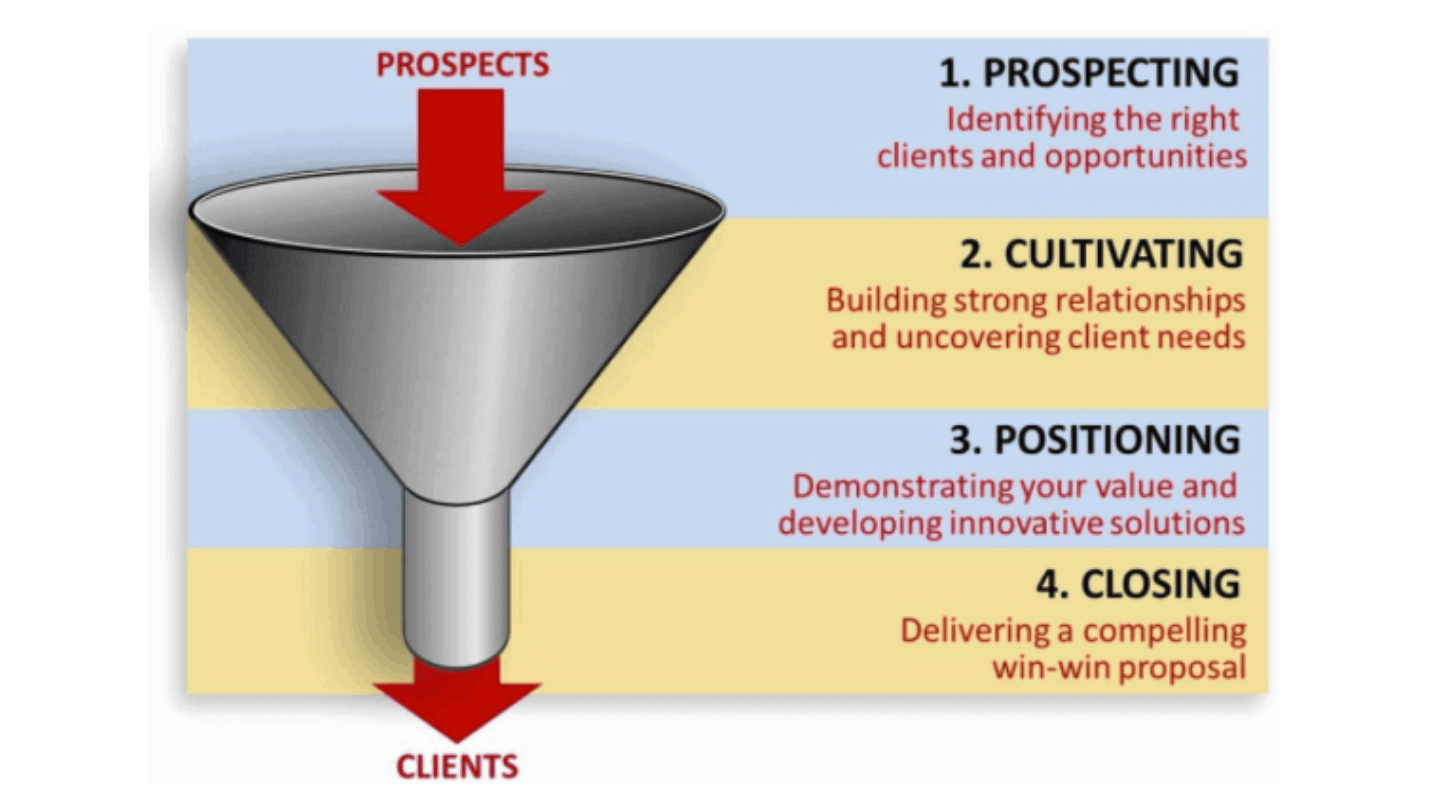
Setting up a tracking plan also ensures a degree of consistency. You need to work on your product, your service and your offer in general before focusing on data analysis.
This is the work that will let you define relevant segments, suited to the user journey and the life of the lead you are trying to convert.
In shortSetting up a tracking plan comes from thinking about how your sales funnel works and whether it is viable. Having one helps you better understand the prospect’s path and target and sell better.
Building your scoring grid & your data model
CRM requirements templateWe have prepared a complete CRM requirements template with a detailed example. The template has 6 parts:
- Context overview
- Overview of the current CRM setup
- Overview of the project goals
- Functional requirements grid
- Detail of non-functional needs
- Project organization
It’s free, and it’s right here 👇
Criteria for a scoring grid
But how do you build a good lead scoring grid?
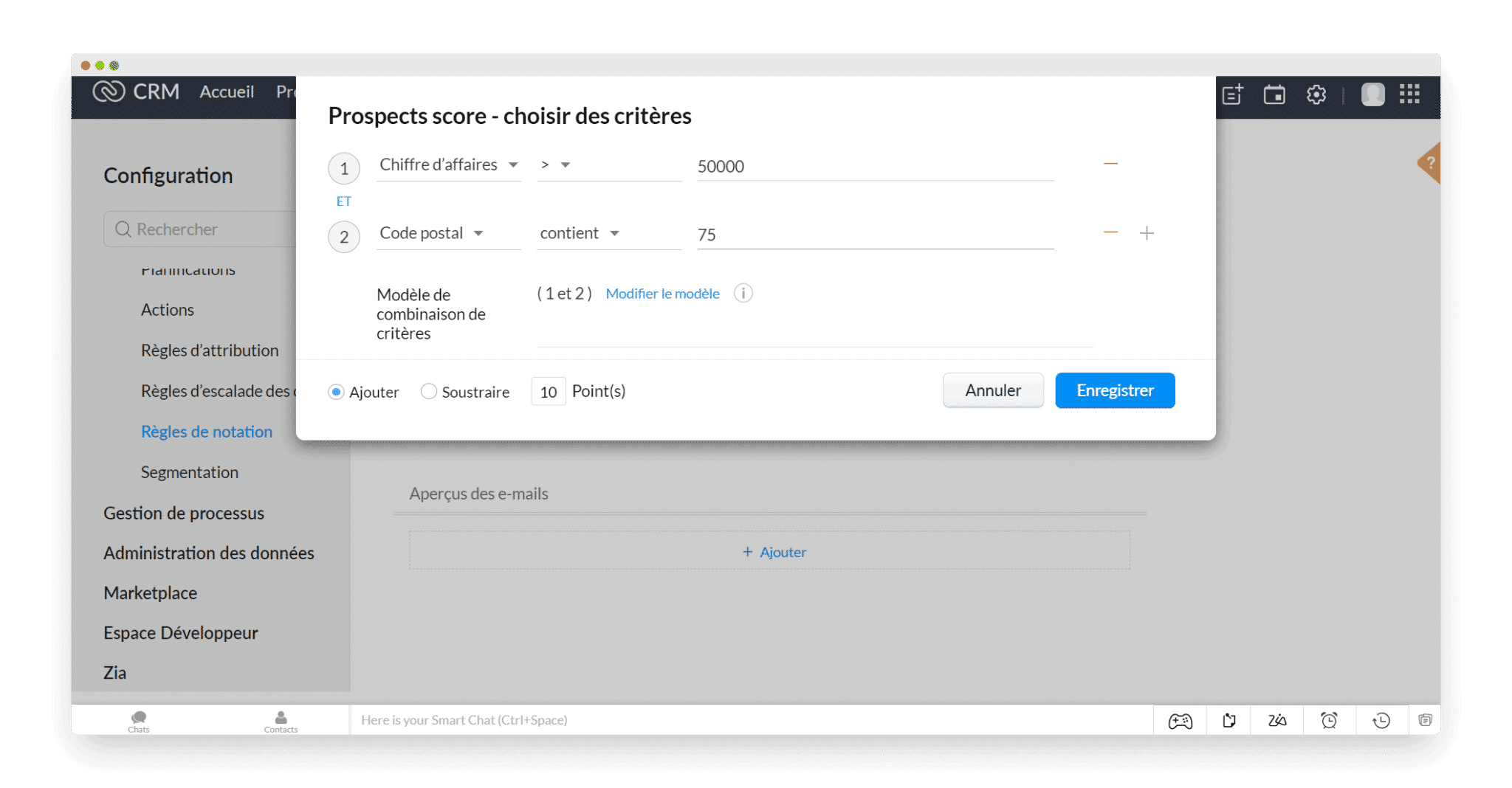
First, you need to define the scoring criteria in your CRM. This helps you qualify these leads better. In Captain Data’s case, they use:
- Cold (marketing) criteria that define the company: they describe the company from basic information such as its size, its industry or the tools it uses. This information can then be transferred into an import spreadsheet that all marketing and sales staff must use. This guarantees the level and quality of the data. Without this information, the lead cannot be moved to MQL.
- The lead’s positioning: The idea is to figure out where the prospect stands and, above all, what they want. Take the example of a company that says, after signing up, that it uses LinkedIn, Salesforce and Dropcontact. This information, provided directly by the company, has value because it shows a real need for data retrieval or automation, which pushes the score up.
- Use cases: Companies’ usage has to be taken into account. A signed-up company that uses Dropcontact and LinkedIn is more mature. Its score is higher, which moves the lead from MQL to SQL because you now know what to offer it.
Data model / enrichment
Building an enrichment model for your CRM is a highly iterative process. You identify a data point that seems relevant, set up the enrichment, use the data point commercially, and adjust a little the weight you give it based on the results.
But it can quickly take a lot of time, and money, if you multiply the data points. Let’s set aside the « test & learn at all costs » dogma for a moment: it is still better to spend some time selecting candidate data points to avoid getting it wrong.
A few tips:
Don’t look for contact data and company data at the same time
From a Sales or Marketing point of view, staff have to correlate contact data and company data: a company that meets the right criteria but has no internal resources to use the product has no value.
Likewise, if the point of contact is the right person but has no budget, there is no point in continuing. There will be no chance of converting the prospect into a customer.
But from a data retrieval point of view, you must not mix the two too early.
The fact is that data sources are quite different for people data and company data, and mixing the two too early (before you have enough join keys) gives worse results.

Reconciling contact and company data
Linking a person to a company is simple. As soon as you have an enriched list of contacts and an enriched list of companies, you just cross-reference them to get correlations.
In our example, the process is very fast. As soon as someone creates an account on Captain Data, they give their email. The contact is created and information is requested about their company.
Enrichment starts right after.
Limiting bad matching / enrichment
Automation has many advantages, but it is not infallible. If you are missing a row because your automated processes found no answer, that’s one thing. Whoever has to fix it manually will hold it against you a little, but you’ll get by.
But false positives are the most annoying error because it is a « silent » error, meaning you don’t know it is an error.
To limit false positives, we recommend starting by enriching company data. There is much less risk of ending up with bad information.
First because companies don’t change jobs, because there is no maternity/paternity leave, because they rarely move, … And second because company databases are much better documented, notably due to legal obligations. SIRENE is a real gold mine if you know a bit about how to search. Infogreffe also lets you go very far.
Once the company is qualified, the user can enter some information about themselves, which will make it even easier to identify them later.
In shortEnriching your CRM data means retrieving and analyzing relevant data. A scoring grid then lets you rank your prospects and focus on those who can bring the most value to the company, and to whom the company can bring the most value (ICP – Ideal Customer Profile).
Keeping the pipeline alive
CRM requirements templateWe have prepared a complete CRM requirements template with a detailed example. The template has 6 parts:
- Context overview
- Overview of the current CRM setup
- Overview of the project goals
- Functional requirements grid
- Detail of non-functional needs
- Project organization
It’s free, and it’s right here 👇
Enriching your CRM is good, but you need to integrate it into your sales funnel. At Captain Data, they have identified 9 stages in their sales funnel:
- 1 – MQL – Account creation (sign up)
- 2 – MQL – Project creation
- 3 – MQL – Prospect to qualify
- 4 – SQL – Trial start
- 5 – SQL – The user becomes « active »
- 6 – PQL – The user reaches their (free trial) limit
- 7 – PQL – End of the trial / test
- 8 – PQL – Feedback
- 9 – PQL – Onboarding setup
Stages 1 to 3 belong to the Marketing Qualified Lead (MQL) phase. Stages 3 to 5 belong to the Sales Qualified Lead (SQL), with the lead in the sales phase. From the 6th to the last stage, we are in the Product Qualified Lead (PQL), with a product focus and closing of the deal.
Put simply, the path goes like this:
MQL > « To qualify » > SQL > « Active user » > PQL
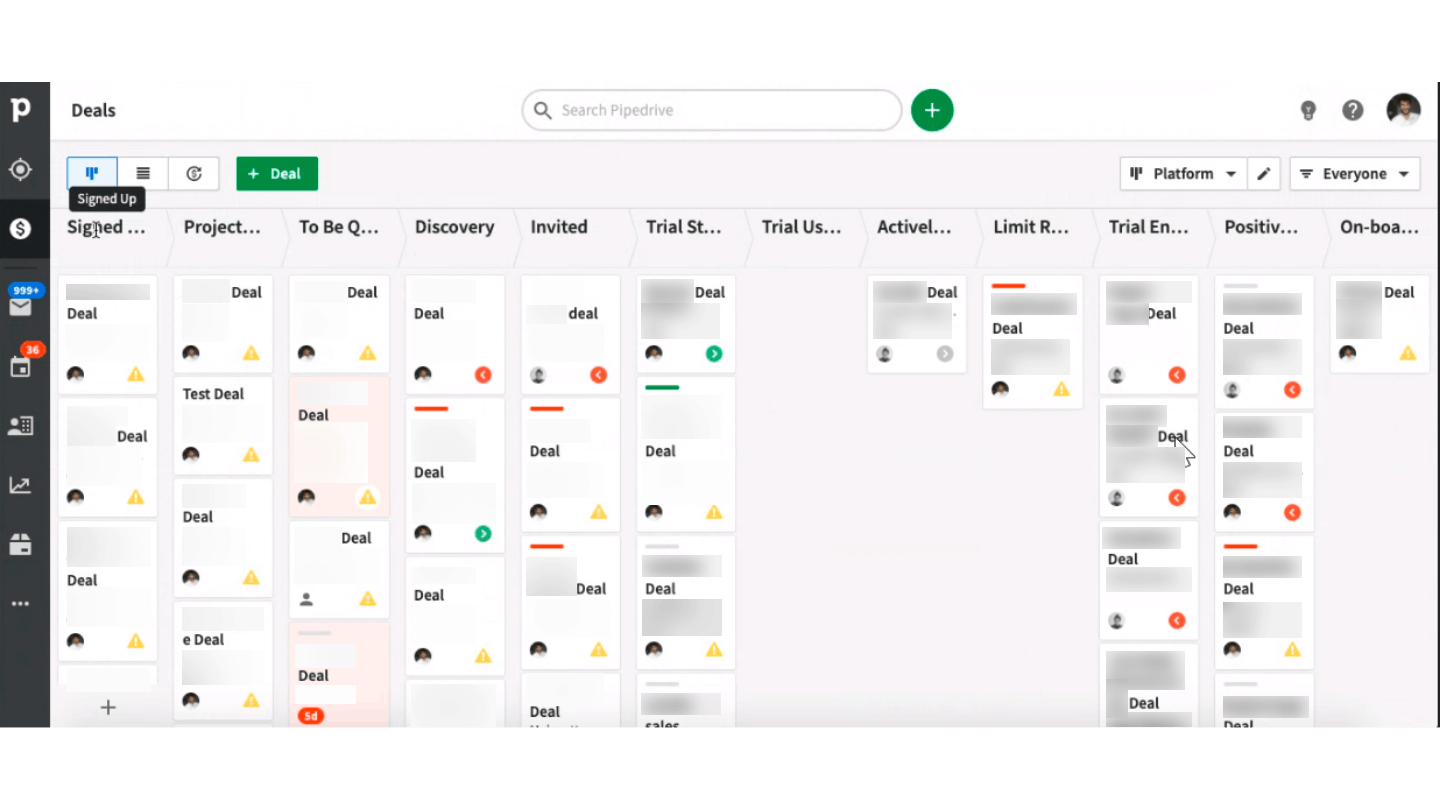
They use Integromat to push account creation information to Pipedrive, (their CRM software), which automatically creates the deal. The goal is to have visibility into what happens on the platform as well as a first score of the prospect’s maturity.
Captain Data uses this « platform » pipeline to automatically score and qualify all new users. Then, the deals with the highest potential are moved to a purely sales pipeline, more « human », so the Sales team can prioritize its efforts.
In addition to analyzing this data about the use of Captain Data’s tools, you can turn to customer journey analysis solutions (such as Hotjar, Fullstory, or keen.io), which will measure for example the time a visitor spends on a given page of your site.
Finally, this data can also be complemented with information about the target company’s strategy or momentum:
- To track a company’s overall growth: use Sales Navigator filters to track headcount growth at your main prospects.
- To track the development of a specific entity: use the « job search » section on Indeed for companies hiring in the areas you care about.
Example: a company is hiring in growth and signs up with Captain Data. It needs suitable tools for its teams, a sign of its progress in the funnel. An interesting opportunity, which earns it a good score.
In shortTo optimize your strategy and sell better, CRM enrichment is a key point. Don’t hesitate to turn to additional solutions to better understand and better target your prospects. If you need a data point, find out how to get it, or find a good proxy. We talk a bit more about this approach in the article How to generate leads with web scraping?
Automating your CRM enrichment
Now we get to the heart of the matter. Let’s start with company data enrichment. The process runs automatically, on every new account creation.
Signup: the prospect registers
At this point in the process, you only have a limited amount of data about the person, namely the information they entered themselves, such as their last name, first name and email.
First, you need to check whether the email exists in Pipedrive, which is theoretically impossible unless it was created earlier. If the contact exists, it is updated; otherwise it is created.
The user fills in their company information
The person’s data must be retrieved and transferred to Captain Data. The company data, for its part, must be verified: is it really established? If so, it must be created in the database, linked to the person, and enrichment can start.
Enriching domain names with LinkedIn
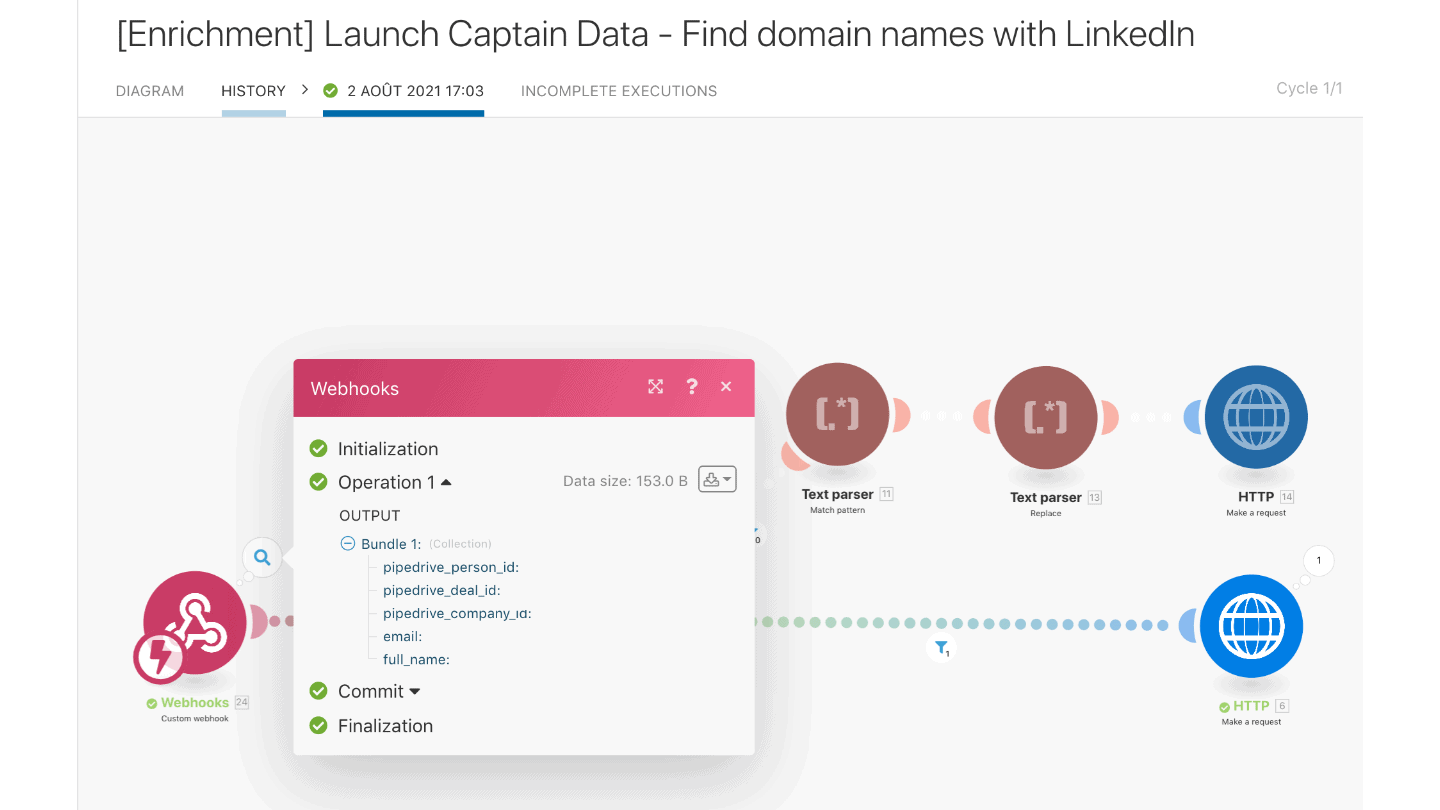
As input to this Integromat scenario, Pipedrive sends a list of data to enrich, such as:
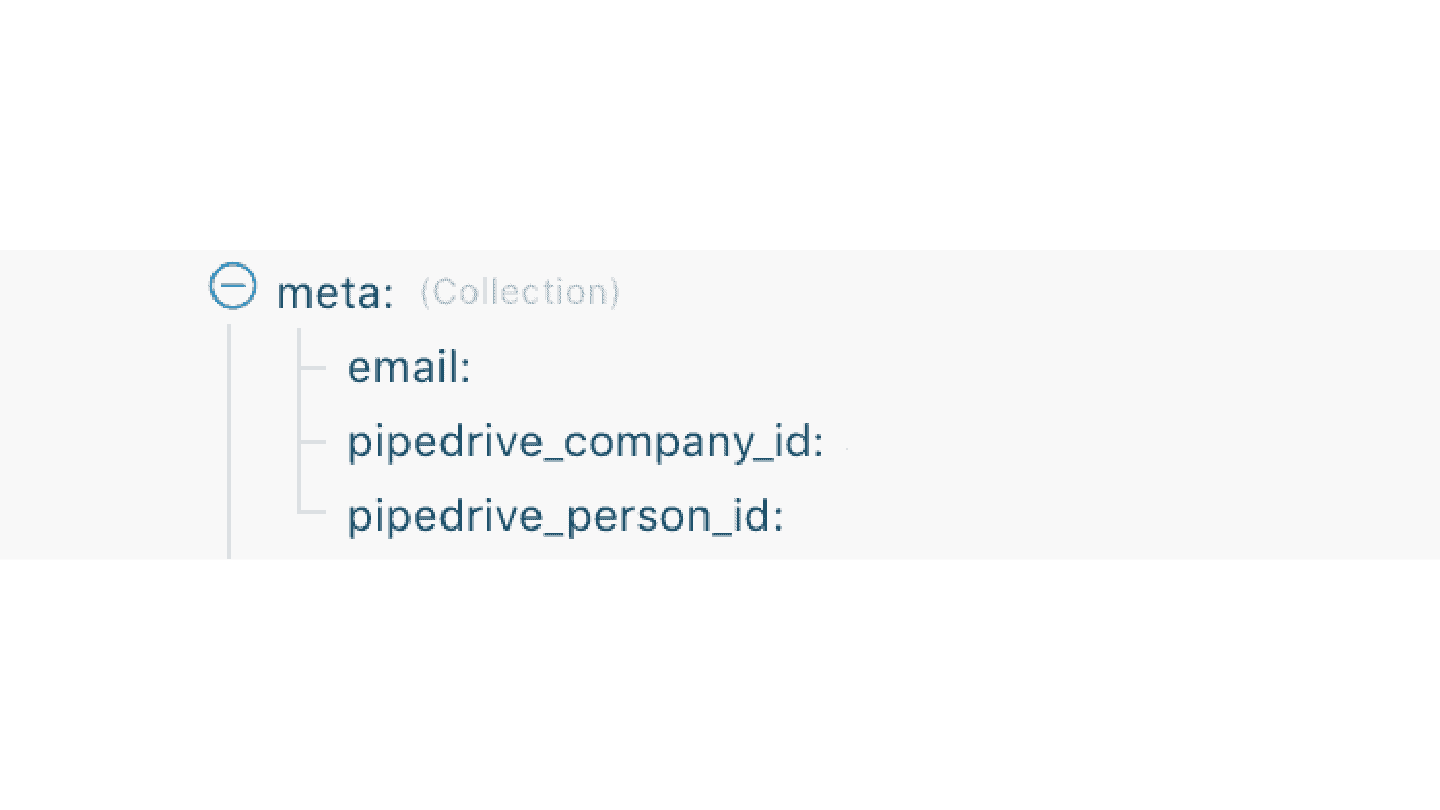
- « pipedrive_person_id »: an ID Pipedrive assigns to the prospect
- « pipedrive_deal_id »: an ID Pipedrive assigns to the current project
- « pipedrive_company_id »: an ID Pipedrive assigns to the company the prospect works for
- full name: the prospect’s first and last name
- email: the prospect’s business email
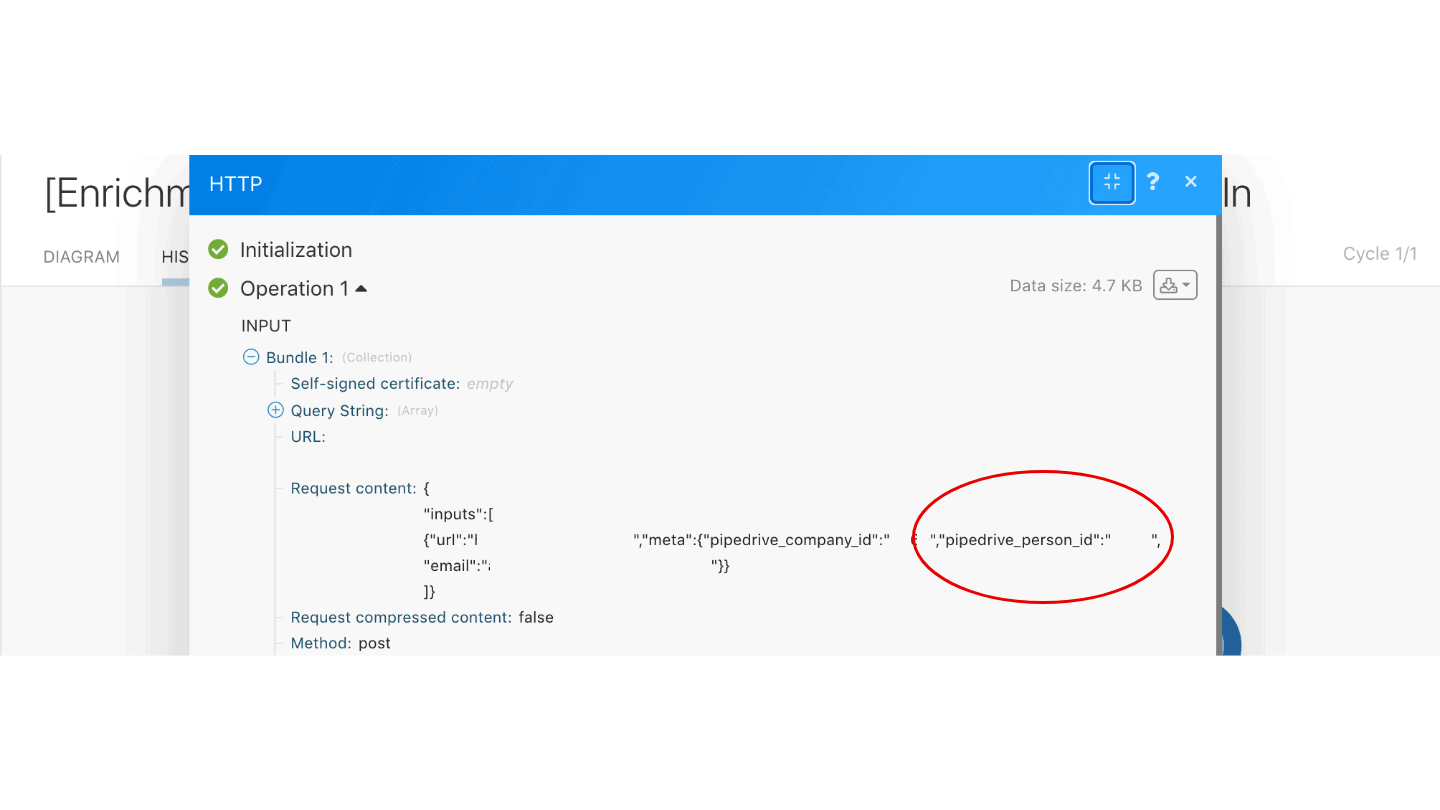
Pay very close attention to passing the IDs correctly in input and output. The process works because it relies on these IDs, which are specific and unique to the CRM:
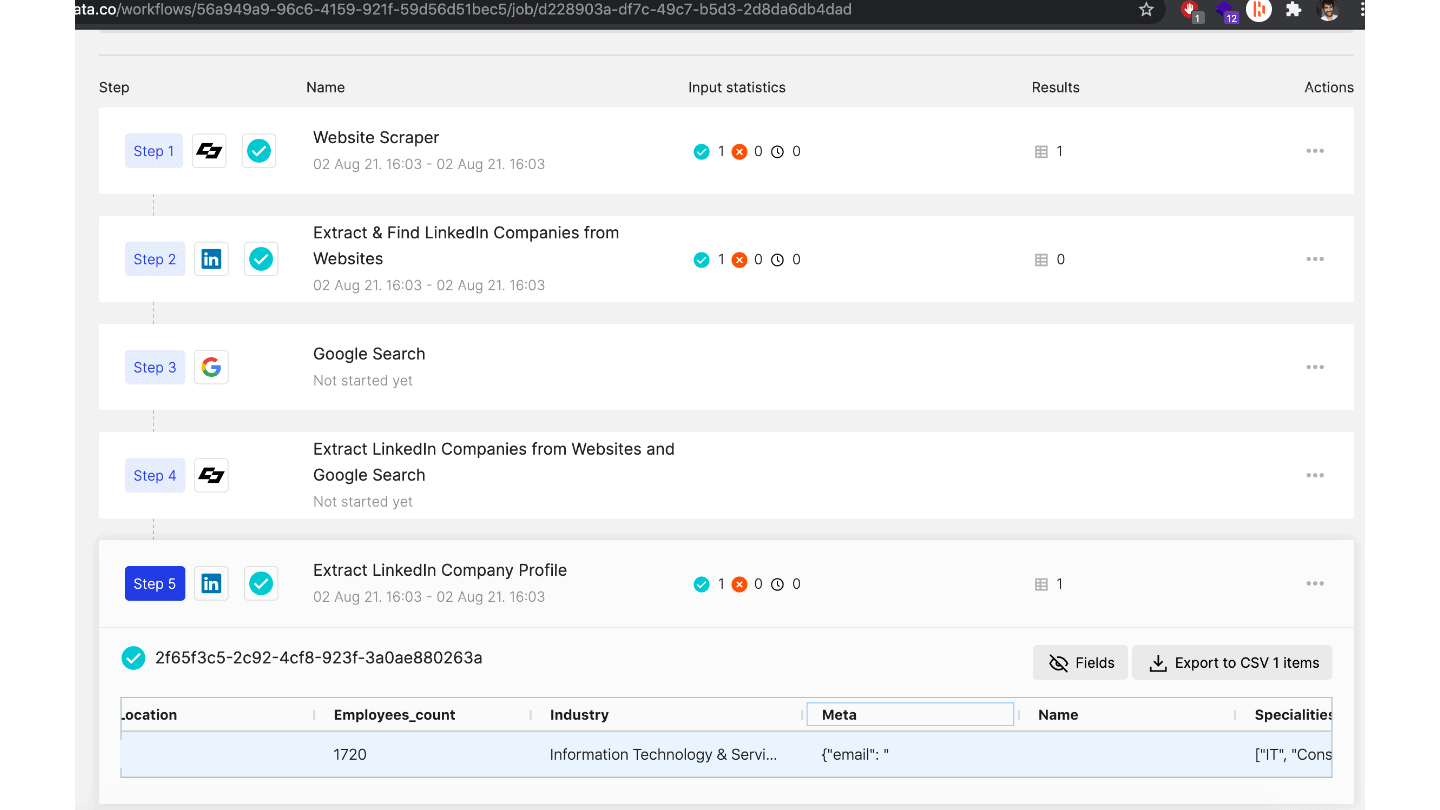
- Step 1 & 2: Extracting LinkedIn company profiles via websites: on Captain Data, the website is scraped, and the tool looks for a LinkedIn company profile URL.
- Step 3 & 4: Google search: If no LinkedIn company URL was found on the website, Captain Data runs a Google search to find the company’s LinkedIn URL. Otherwise, this step is skipped.
- Step 5: Extracting the LinkedIn page: the LinkedIn page data is extracted and saved.
Re-importing the data into the CRM
Once the LinkedIn page has been found and scraped, you need to be able to identify this data to attach it to a person or a company.
An important point, given that the problem with data enrichment is managing to link this data to the right people and companies without causing problems during re-import.
Once Captain Data has retrieved the company data, a webhook is triggered to update everything in Pipedrive via Integromat. The metadata (pipedrive_id, etc.) is there: Integromat knows which company (id) to enrich.
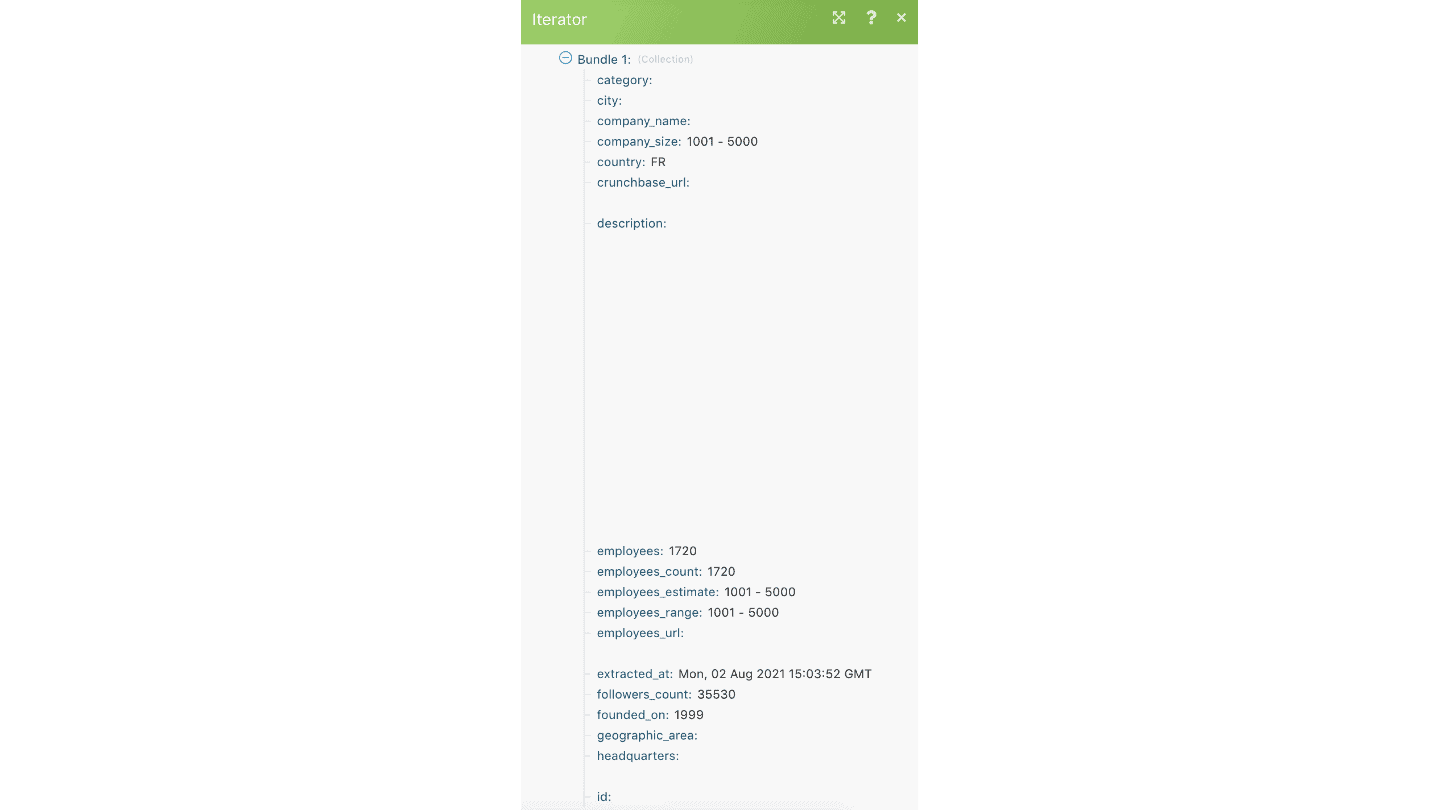
Output: the Sales team steps in
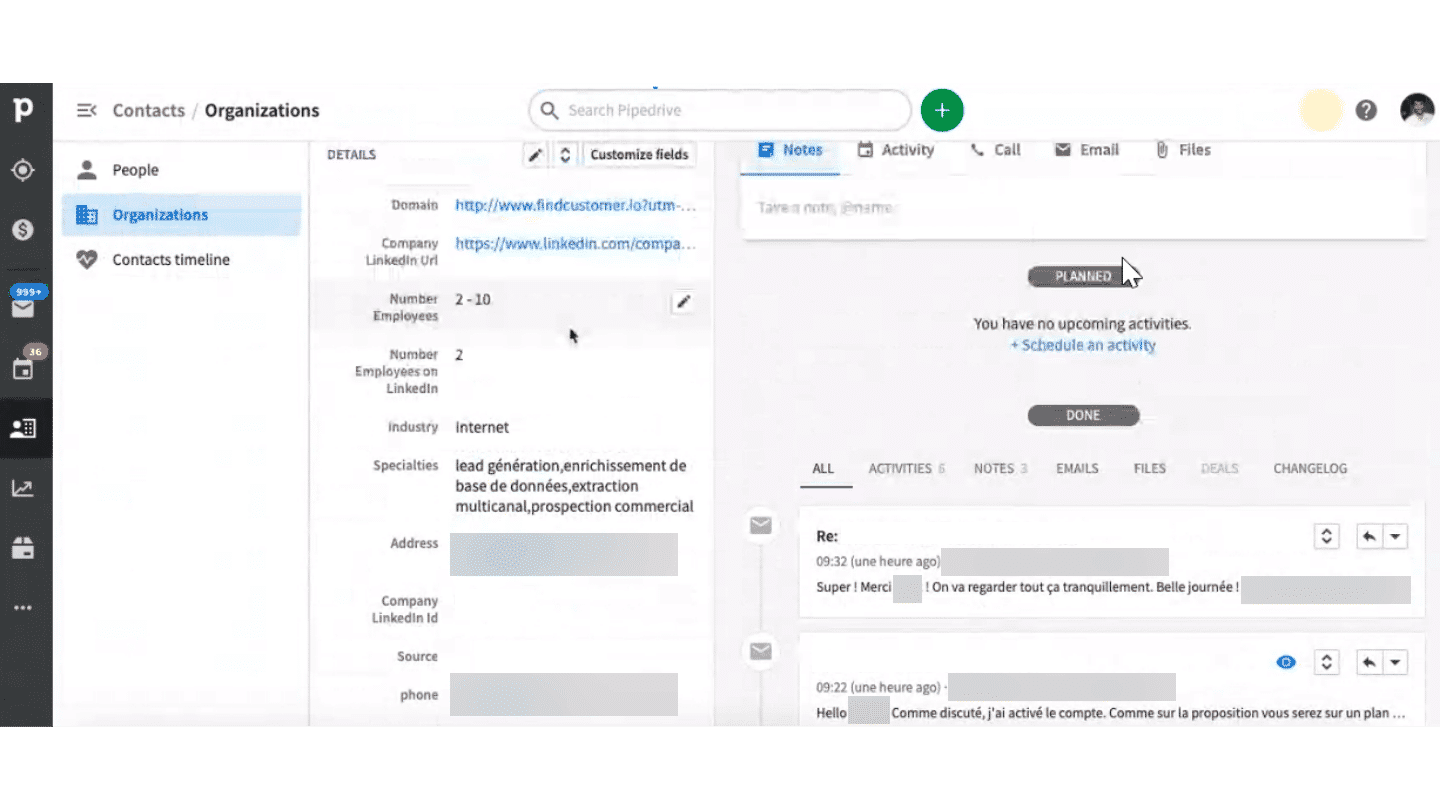
Whether it is information about their company or about the person (which tools they use or what they want to achieve with Captain Data), the marketing department has data to score the prospect.
Depending on the score assigned, the Sales department takes it from there. That means email follow-ups or sending an invitation link to a trial period.
The prospect discovers the platform and creates a first project. Depending on how it is named, « Test » or a « Company name – XXX » project, the sales department assesses how far the prospect has progressed in the funnel.
This helps optimize the sales pitch to move the lead forward in the funnel and close the sale.
Continuously updating your CRM: importing LinkedIn URLs into the CRM
Updating your CRM involves a notion of risk. The user may enter false information (name, email address), increasing the risk of « false positives ». This is one of the data quality challenges of CRM software.
This update can be complemented by a « first name last name + company » search.
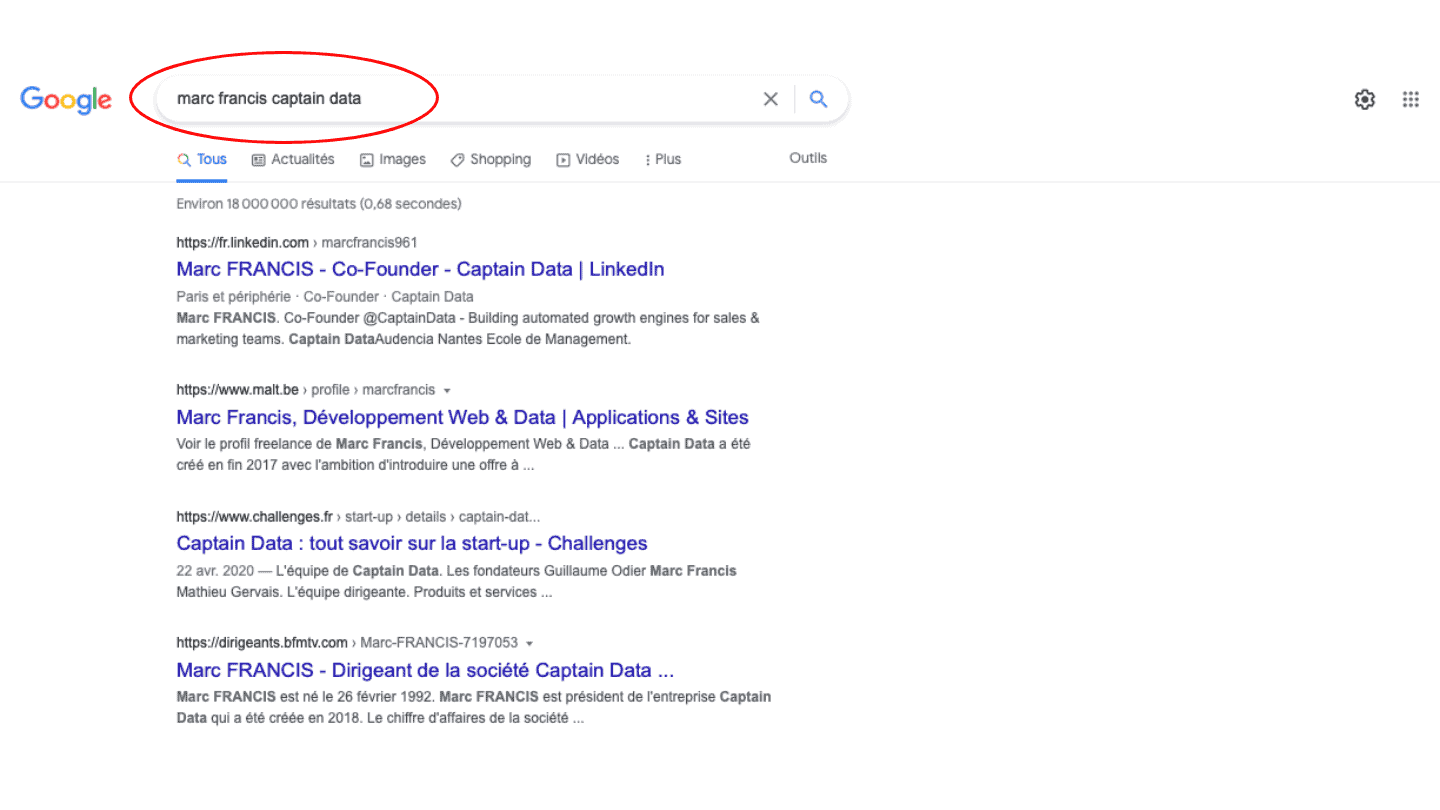
On Captain Data, customers import their data directly from their CRM. The goal is to match it with LinkedIn data in order to update the CRM automatically. The information from the Captain Data enrichment must be compared with the existing data.
If the input metadata matches the output metadata, then the information is correct. Otherwise, you need to check manually. The next update is faster.
As a reminder, the URLs of people and company profiles on LinkedIn don’t change. When they do, they are redirected. As a result, the CRM shows a 98% update success rate.
WarningBe sure to verify customer information. « Test » accounts bring no value and skew the statistics. Manual checks are time-consuming, but they give you a clearer picture when in doubt.
That’s all for today! We hope this article gives you a clearer view of B2B data enrichment processes so you can set up real lead scoring and optimize your sales funnel!
What do your enrichment processes look like? Do you use the same tools (Captain Data, Pipedrive, Dropcontact, LinkedIn, …)? Tell us everything in the comments 👇
The questions we get over and over.
What is a tracking plan?
A tracking plan is a precise analysis of the sales funnel. You define upfront the stages the user must go through to be converted into a customer, on three levels: MQL, SQL and PQL.
What criteria should you use in a lead scoring grid?
Captain Data uses cold criteria that describe the company (size, industry, tools used), the lead's positioning, meaning where they stand and what they want, and their use cases.
Should you enrich contact data or company data first?
Company data. There is much less risk of ending up with bad information: companies don't change jobs, rarely move, and company databases are better documented, notably due to legal obligations (SIRENE, Infogreffe).
How does Captain Data enrich its CRM automatically?
On every account creation, Pipedrive sends the IDs of the person, the deal and the company to an Integromat scenario. Captain Data scrapes the website, looks for the company's LinkedIn page, with a Google search if needed, and extracts its data. A webhook then updates the record in Pipedrive.
Why import LinkedIn URLs into the CRM?
The URLs of people and company profiles on LinkedIn don't change: when they do, they are redirected. They serve as a key to update the CRM, with a 98% success rate according to the article.



What the community says.