



- Technology profiling spots the companies that use a given piece of software, but only if that software is detectable on their site.
- Review authors on G2, Capterra or Trustradius are hard to identify by hand; Reviewflowz exports the review history to CSV.
- A competitor’s LinkedIn followers are rarely its customers, and often its partners.
- Bidding on a competitor’s brand is allowed, but Google blocks its name in the ad text.
- Sites that link to your competitors, agencies, media or affiliates, are partners worth approaching.
Identifying your competitors’ customers lets you find people who need the kind of solutions you offer, and therefore potential customers or prospects. You can then contact them to broaden your customer base and grow your business.
However, the methods for identifying your competitors’ customers are sometimes complex, and often require specific tools. You also need to be careful, because they can be regulated by law.
In this article, we detail 5 methods to steal customers from the competition!
1. Find companies that use a piece of software
The idea is to list the users (companies) of a particular piece of software (i.e. one of your competitors), to build yourself a file of prospects to approach later on.
How do you do it?
For that, you use technology profiling. Profiling is when you use data about a prospect to model or anticipate their behavior, and adapt the buying experience you offer them.
People often talk about hyper-personalization in marketing, and that’s also what we’re talking about here. The vast majority of what’s called “Personalization” actually relies on fairly crude segments.
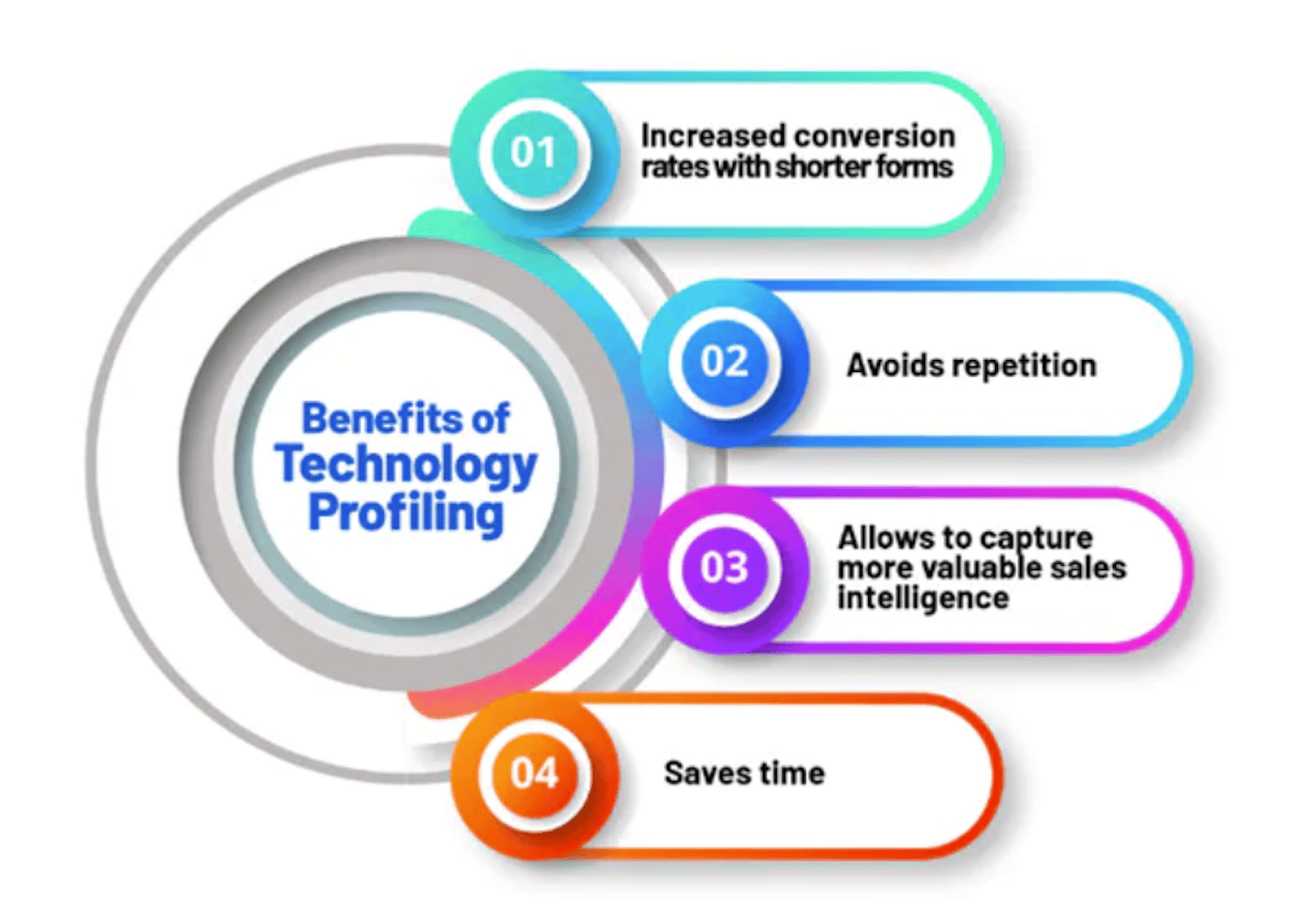
Technology profiling means using the data points related to the technologies and tools a prospect uses to define segments.
The idea is that when you know a market well, the tools a company uses say quite a lot about where they stand, and the big challenges ahead.
For example, if you sell an emailing tool for e-merchants, you know that:
- Most Shopify stores generate less than 1M in revenue. So you’ll need a way to refine your Shopify prospects.
- Stores that use open-source solutions like Prestashop or Magento almost always work with an agency and a lot of custom code. You’ll have almost as many special integration cases as customers.
- Stores that use solutions like BigCommerce or Shopify Plus generate significant revenue, but they’re relatively standard.
How does it work?
Unfortunately, you can only detect the technologies a company uses if that software is detectable on its website. If we stick with the example of emailing software, you can rely on the (public) DNS zones that are used to sign emails.
We’ll spare you the lecture on MX, SPF and DKIM records, but you’ll find plenty of information in our article on deliverability.
The problem with DNS zones is that they’re rarely updated as they should be. It’s very common to find sites with records matching 4 or 5 different pieces of software. They simply forgot to delete the previous records every time they switched.
The other solution is to detect something that’s present on the site. CMSs all have their own signatures, that’s how you recognize a Shopify, WordPress or Prestashop site. For other software, you can rely on a form, a widget, etc.
Obviously it’s fairly limited, but there are still sets of technologies that can be detected quite well.
How do you use it?
- You can target direct competitors’ customers, by building lists of those who use a competing solution. For example, web agencies can target Shopify sites that seem to be growing and reaching the limits of the solution.
- You can target users of a complementary solution. For example, if you’ve just released a Zendesk integration, you can target Zendesk users (fairly easy to detect with the live chat widget).
- You can also qualify and refine a list of prospects by adding structuring data points on the tools used.
3 technology profiling tools
Fortunately, there are established solutions that let you get this kind of data without having to manually check each prospect’s site.
BuiltWith
BuiltWith is a very powerful piece of software for identifying your competitors’ users and the technologies used on a website. It’s clearly a leader on the subject, but don’t count on it to get an exhaustive list of the users of a given technology.
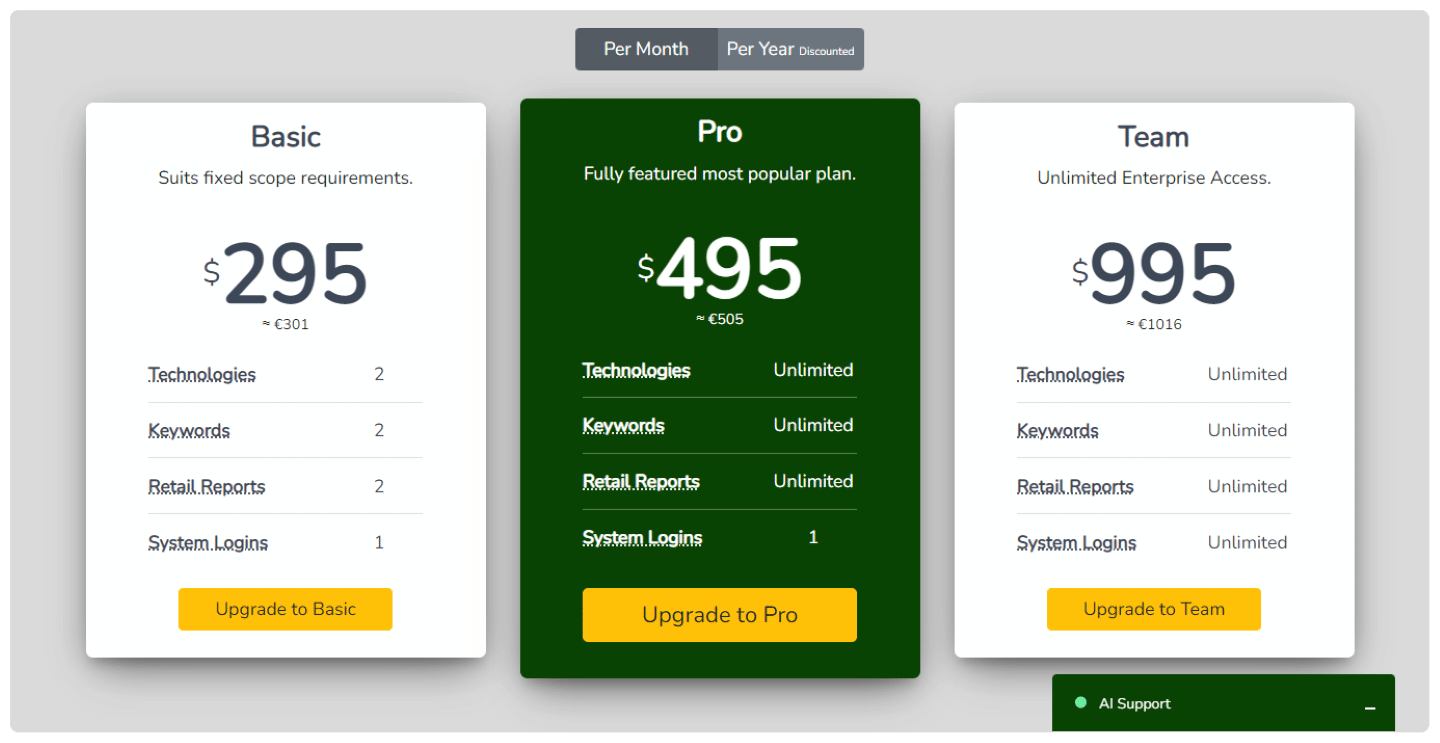
BuiltWith offers 3 plans. At $295/month, Basic lets 1 user identify 2 technologies and 2 keywords. At $495/month, Pro still lets 1 user identify an unlimited number of technologies. And the Team plan, open for $995/month to an unlimited number of users.
Discover all of BuiltWith’s features
More info on BuiltWith The best B2B data enrichment solutions
Pro tip!BuiltWith offers a discount on the prices shown above for an annual subscription. Take advantage of it!
StoreLeads
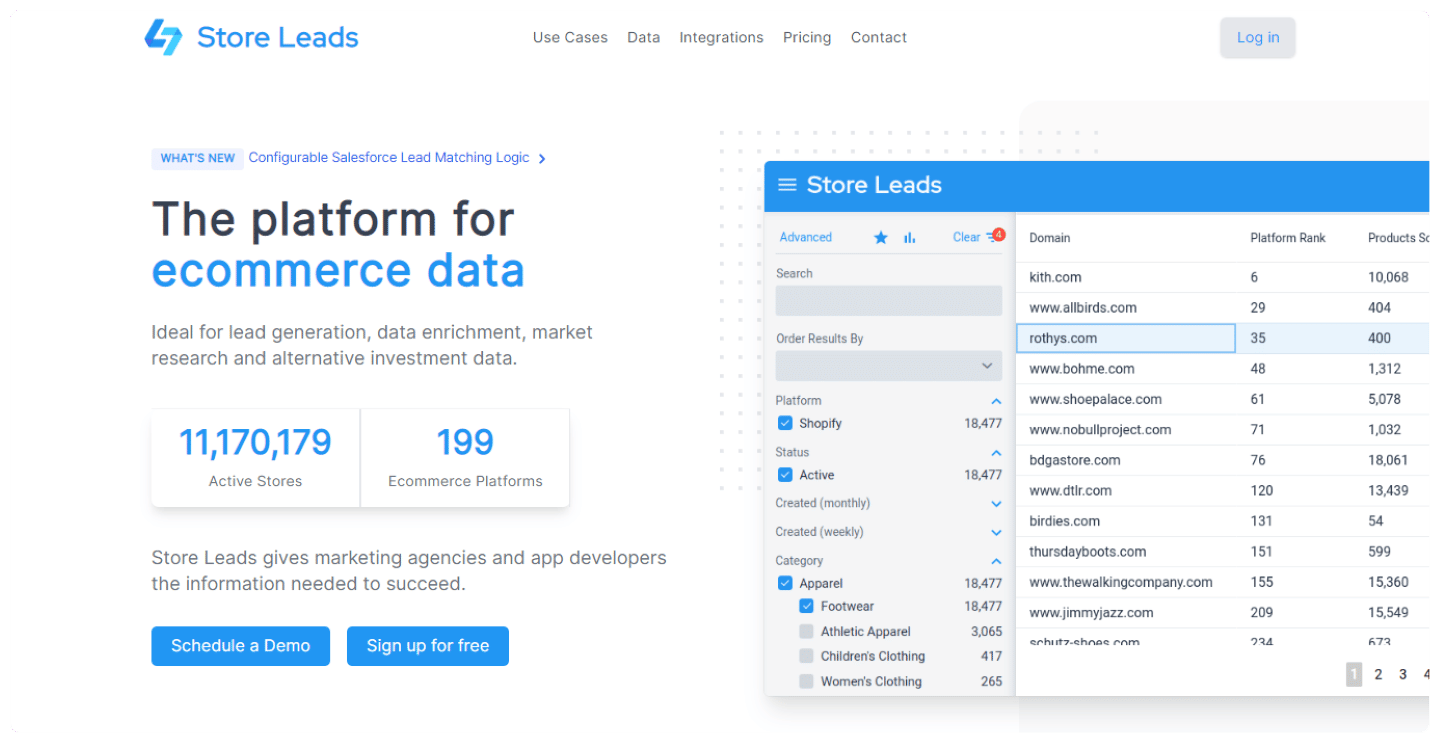
StoreLeads has very good databases, especially on e-commerce.
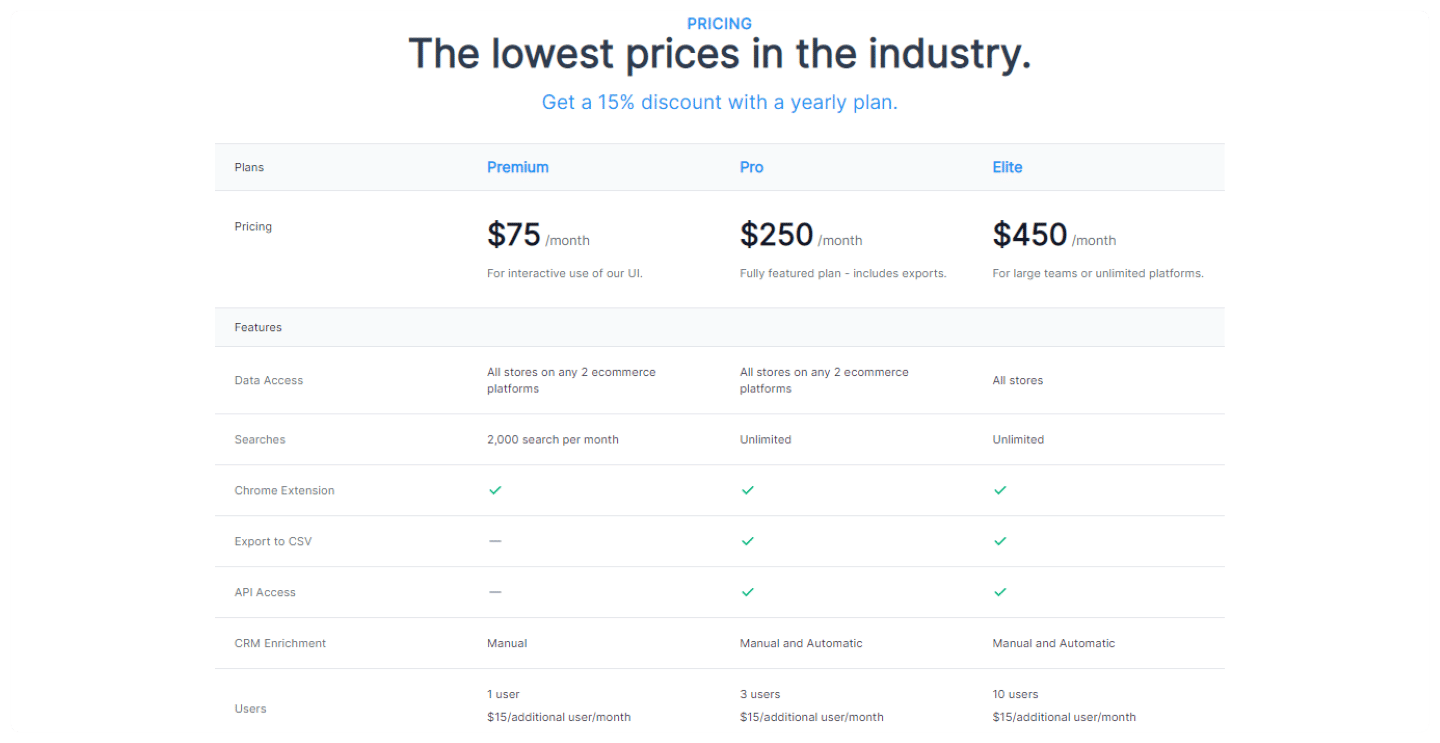
StoreLeads boasts the lowest prices on the market, with a first Premium plan at $75/month, limited to 2 e-commerce platforms and 2,000 searches. The Pro ($250/month) and Elite ($450/month) plans open up an unlimited number of searches, then an unlimited number of sites.
Pro tip!StoreLeads offers a discount on the prices shown above for an annual subscription. Take advantage of it!
Discover all of StoreLeads’ featuresStoreLeads offers a free trial: don’t hesitate to try it!
More info on StoreLeads The best B2B data enrichment solutions
Similartech
Similartech is a tool that isn’t really better than BuiltWith and is very expensive because the number of downloadable results is limited.
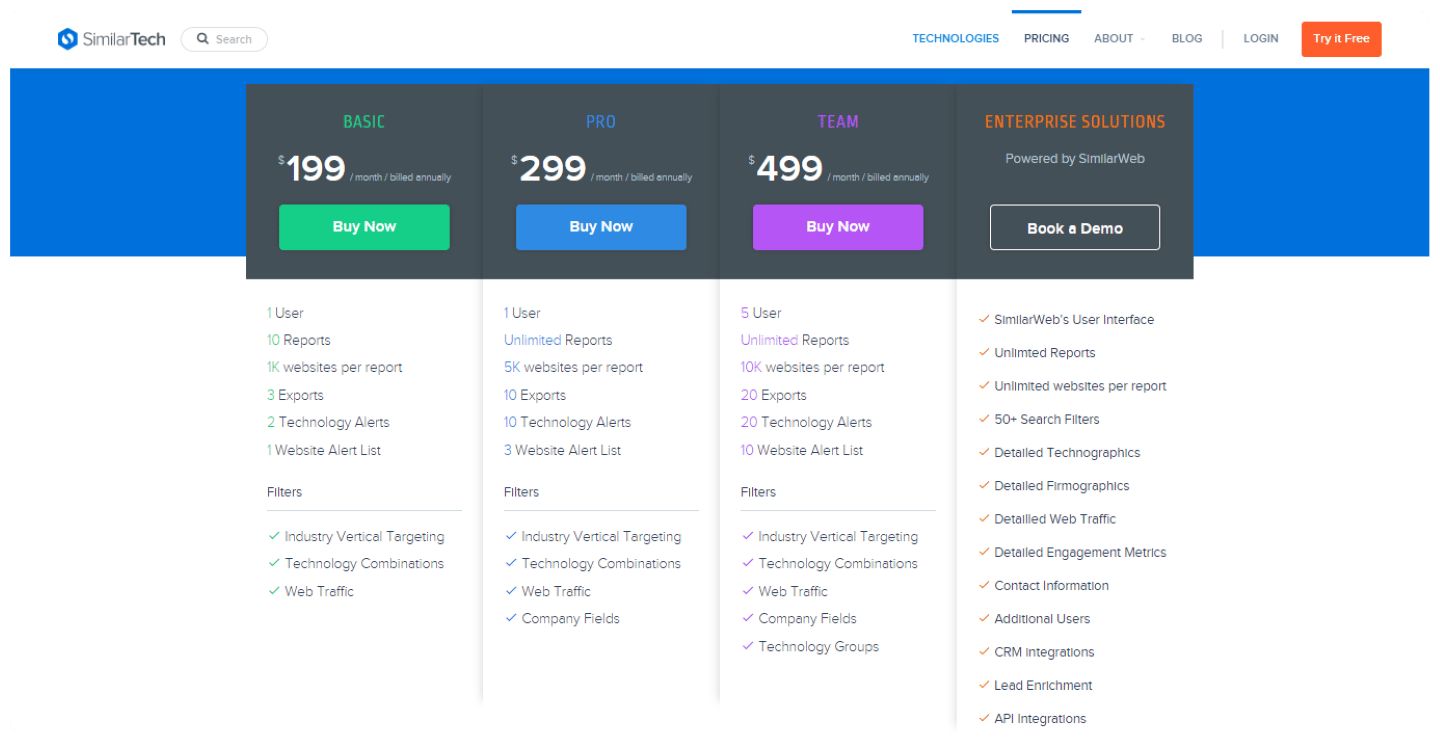
The Basic plan at $199/month is limited to 1 user, 10 reports covering 1,000 sites each, and 3 exports. The Pro plan ($299/month) is limited to 10 reports of 5,000 sites and 10 exports, and the Team plan ($499/month) offers an unlimited number of reports, but is still limited to 20 exports.
Discover all of Similartech’s featuresSimilartech offers a free trial: don’t hesitate to try it!
More info on Similartech The best B2B data enrichment solutions
Going further
2. Find the customers who left a review on your competitors
The idea of this method is to start from customers who left a review for your direct competitors (or competitors selling a complementary solution) and turn them into prospects.
When should you use it?
- Identify a direct competitor’s unhappy customers: For example, dig up a negative comment on a review platform, and reply in the comments or send a private message offering your own solution as an alternative
- Identify as many of a competitor’s customers as possible, to build a list of prospects in the sector: For example, if you offer emailing software, go through the review pages of Brevo, ActiveCampaign and Mailerlite and list the customers who left a review
- Identify as many customers of a complementary solution as possible: For example, if you want to promote a new integration with CRM software. If we take Hubspot as the example, building a list of Hubspot users lets you target an ultra-qualified audience, with a very precise (pretext) message: Are you running into this problem like all Hubspot users?
- Identify as many customers of 2 or more complementary solutions as possible, to have a solid prospect file with a broader scope: For example, if you sell a Shopify popup extension that integrates well with Brevo, it’s worth knowing the Shopify + Brevo customers. So you target the customers who left a review on the Brevo app on the Shopify app store to offer them an alternative solution.
How do you do it?
Review platforms like G2, Capterra or Trustradius are increasingly used by B2B companies. So they’re good hunting grounds. The catch is that it’s hard to get information on the name of the company or the person who leaves a review on these platforms.
Technically, it’s possible by following these steps:
- Save the profile picture of the person who left a review on the review platform
- Go to Google Lens
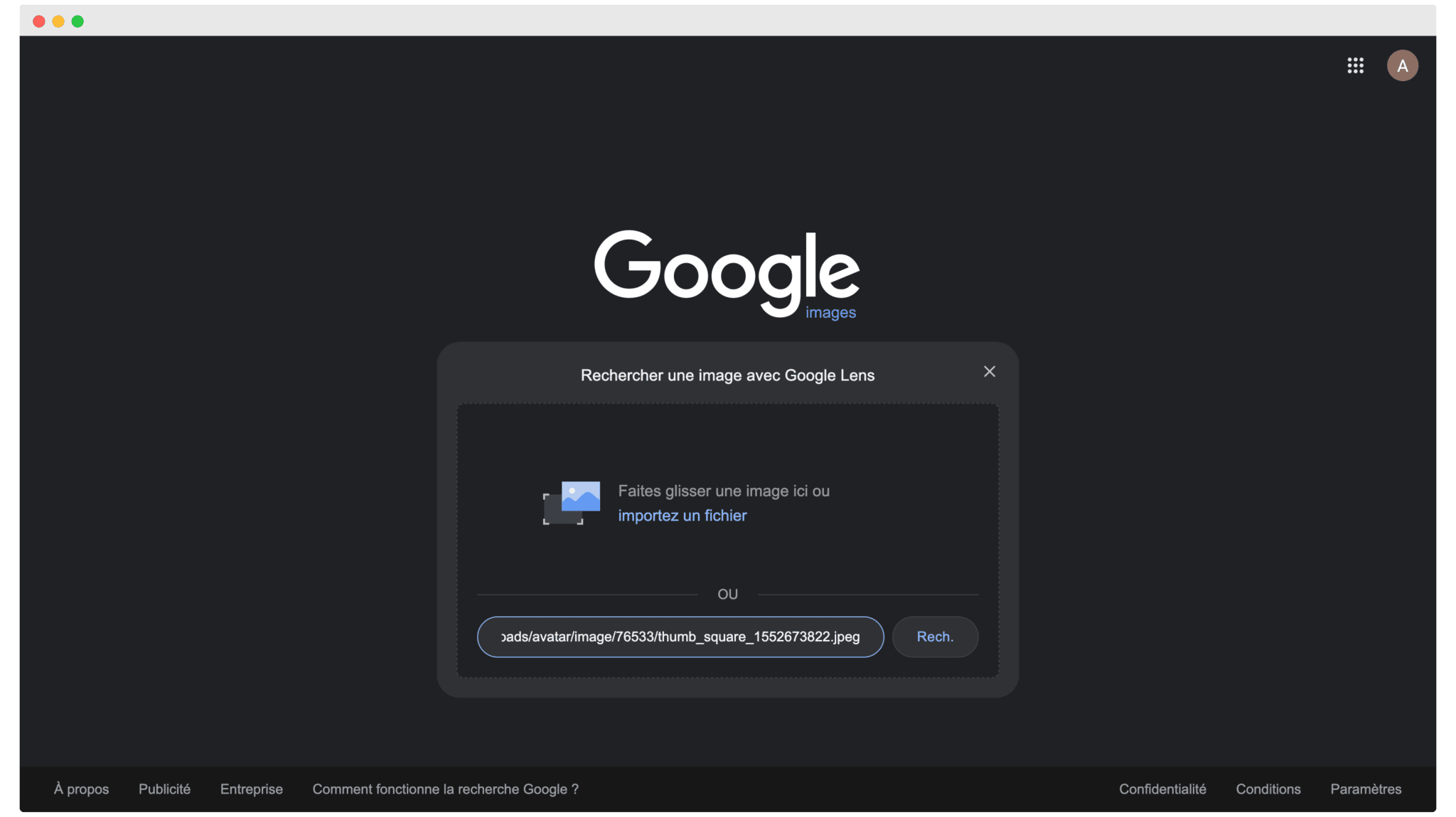
- Upload the image with a few keywords (for example the initials as they appear on G2 and the company name)
- Check the LinkedIn profiles to find the right one
It’s a method that has the merit of existing, but it’s a bit long and tedious.
The real solution
Rather than struggling, we recommend using Reviewflowz. The tool lets you track the reviews of any company on pretty much every B2B platform, and on top of that download the whole history in CSV format.
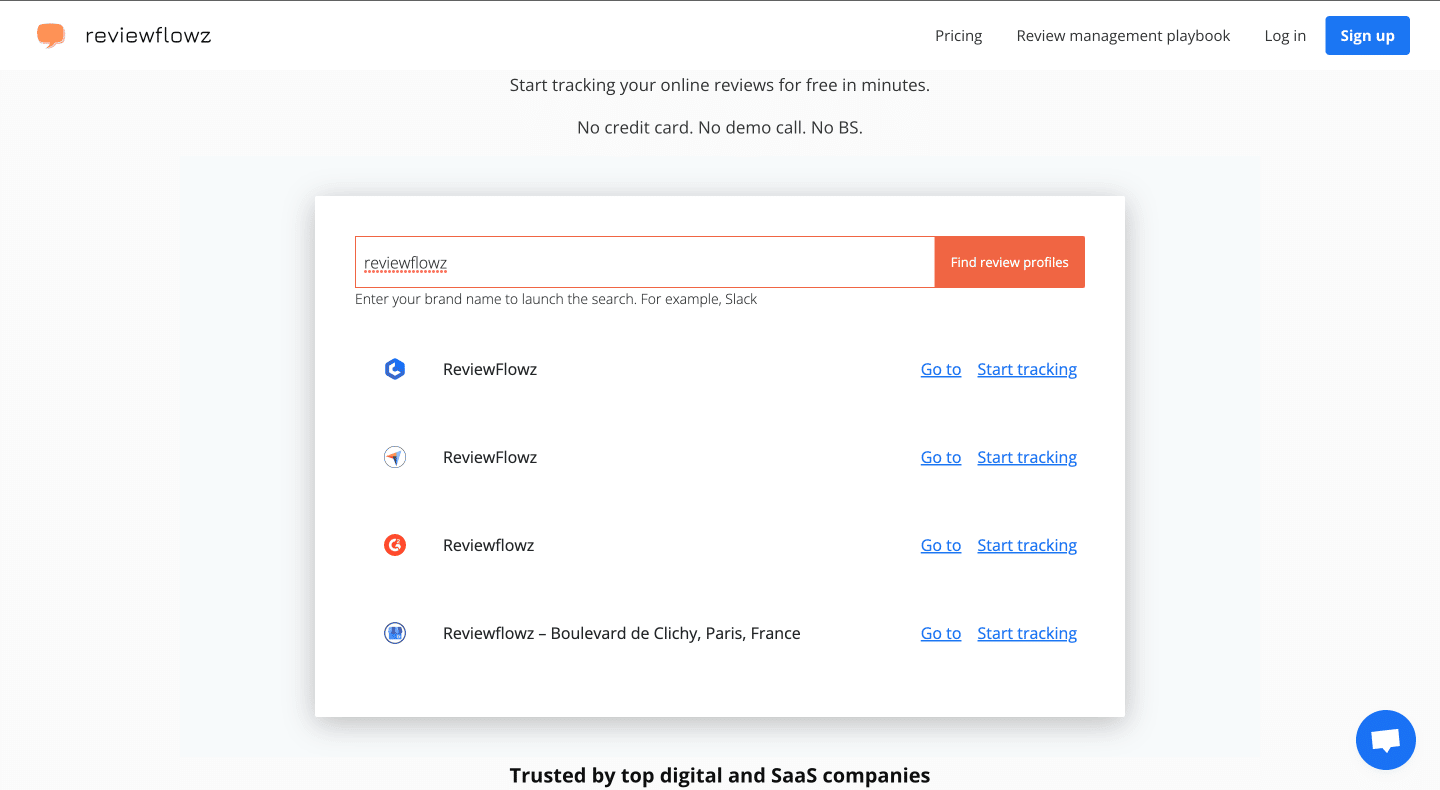
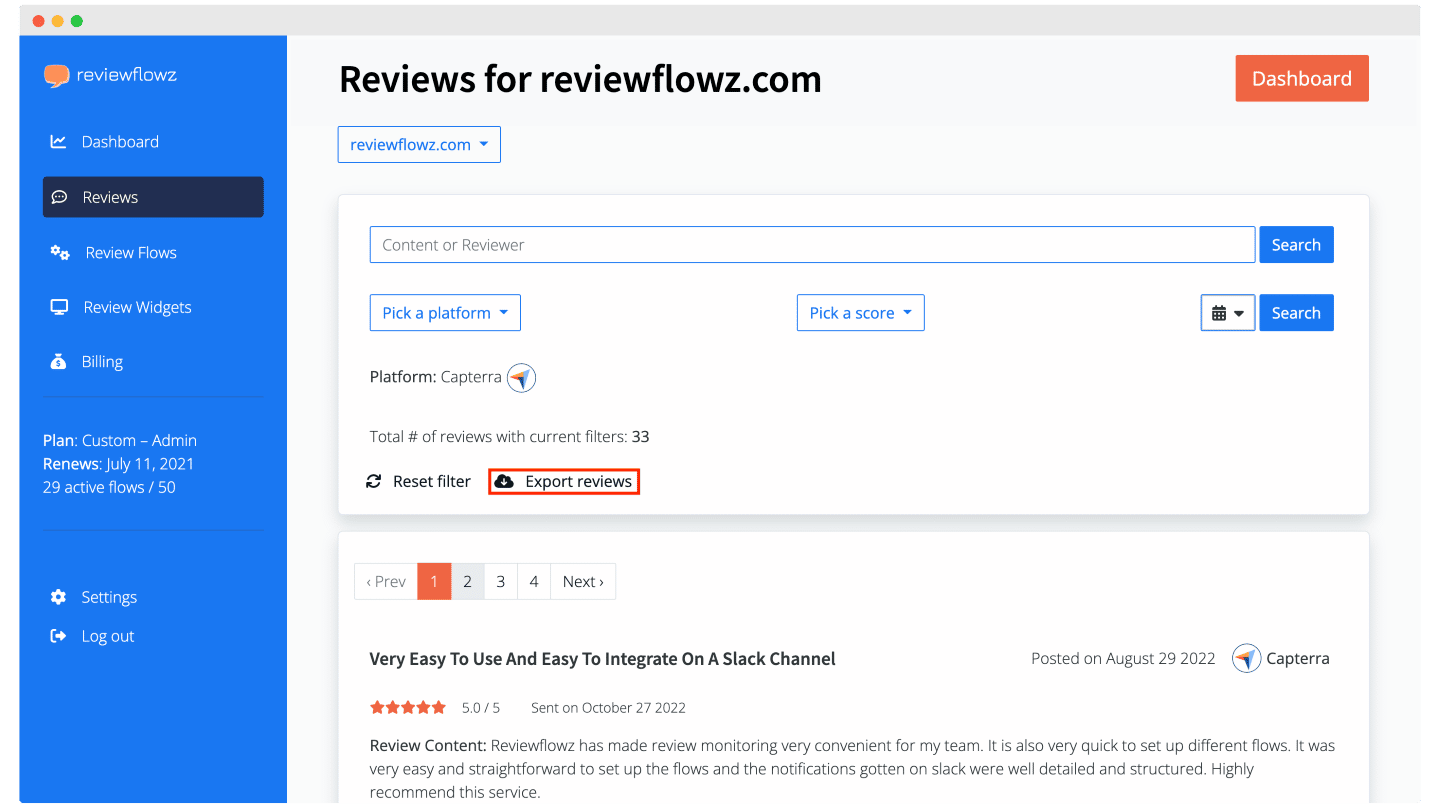
The strength of the tool is that it also lets you retrieve a lot of details about the person who left the review, which makes your job easier.
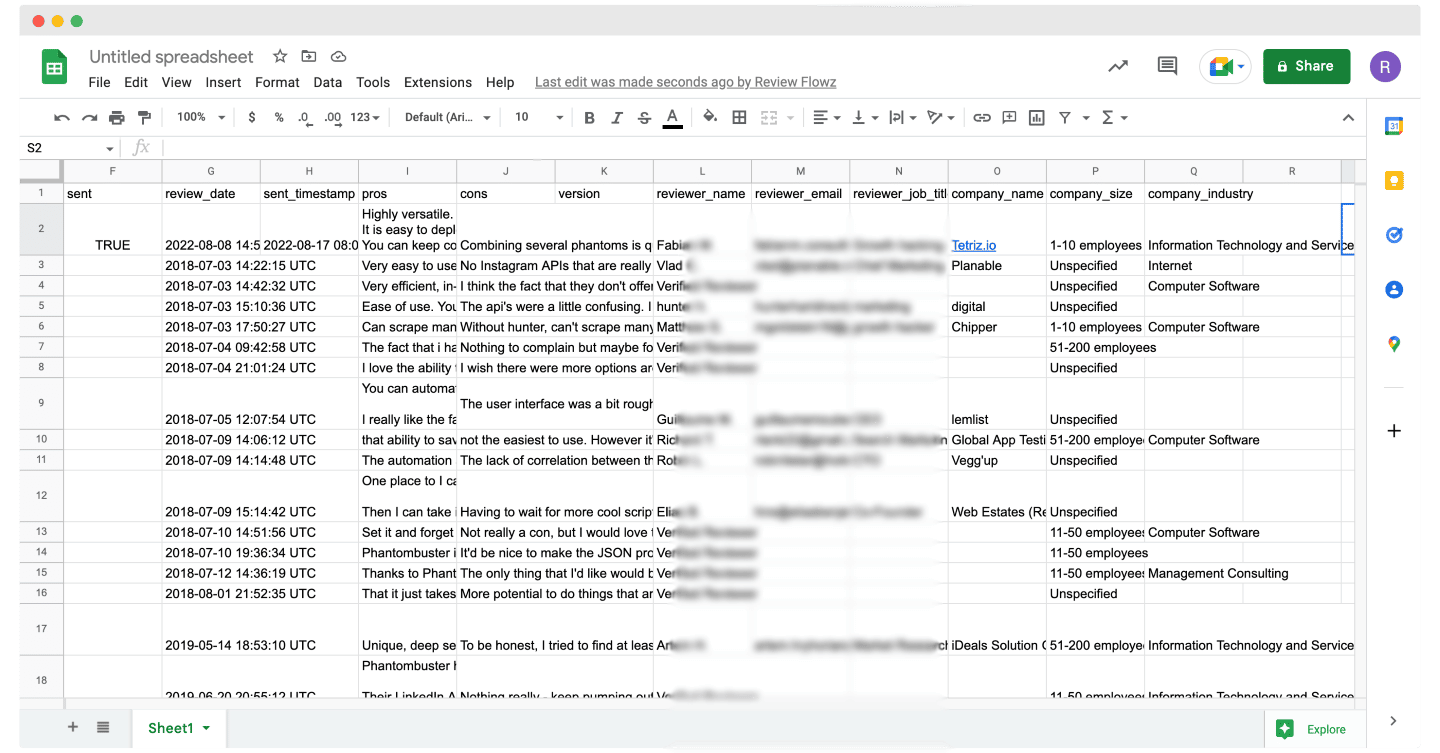
It starts at $35/month per tracked review profile to get more or less detailed info depending on the platforms, and you can try it for free to get an idea of the data you can get.
Discover all of ReviewFlowz’s featuresReviewFlowz offers a free trial: don’t hesitate to try it!
More info on ReviewFlowz Customer review management: our favorite software
3. Get your competitors’ LinkedIn followers
How do you do it?
It’s well detailed in the video, but broadly speaking, you need to follow these steps:
- Create a fake LinkedIn profile
- Use the “thispersondoesnotexist” site to generate a fake profile picture
- List the competing company as a former employer on the profile
- Choose the Sales Navigator option (there’s a one-month free trial)
- Run a keyword search (ideally choosing the “by title” filter, the most relevant here)
- On the results page, select “Leads who follow your company”.
- Export this list of prospects taken from your competitor!
When it works
The advantage is that this method works for every sector, and it can also be adapted to pretty much every platform and social network (X, Facebook, Product Hunt…). The drawback is that a follower on a social network (whichever it is) is actually quite rarely a customer. Worse, they’re often partners more or less engaged with the competitor. In practice, you run the risk of going after an audience that’s fairly hard to convert, and not necessarily very qualified.
4. Bid on your competitor’s name on Google

The idea here is to directly use a competitor’s brand name as a Google keyword (for example, Nike targets people who search for “Adidas”).
The goal is to show an ad for your own offer when your competitors’ customers run a search.
How do you do it?
Obviously you need to have studied the subject before you start, for example by relying on customer reviews of the tools on review platforms:
- Write an ad that compares your solution with the competitor’s: Avoid anything too provocative. It’s tempting, but in reality it’s better not to ruffle your competitors, and to look for a segment that interests them less and interests you more. Easier said than done, obviously. Try as much as possible to include the competitor’s brand (without being misleading, otherwise you’ll buy a lot of junk clicks), even if Google will ban it sooner or later. Click-through rates double or triple.
- Use comparison landing pages: Ideally, the landing page shows your solution’s superiority over each competitor. To save time and money, some people believe a more general market overview page can work, but it’s rather a bad idea. In reality you have a dozen eligible competitors, and clicks are very hard to get. Better to spend one hour too many to gain a Quality Score point than the other way around.
- Protect your brand: Your competitors are probably using the same strategy, and bidding on your brand to steal your traffic. In that case, you can defend yourself by also bidding on your own brand terms. That’s the “Google tax”.
A word on “brand” keywordsIt was very fashionable for a while, much less so today (fortunately), but just in case. If you ever find yourself in a meeting where someone proudly shows off great performance on Google Ads that includes the keywords related to your brand (the brand itself and all its variations), run. You obviously can’t compare “brand” traffic (which relies on your brand) with “non-brand” traffic (which relies on transactional keywords, or competing brands).
Along the same lines, many agencies are paid as a % of Ad Spend, i.e. what you spend on Google Ads. If nobody is squatting your brand, there’s no point paying the Google tax. And if someone is squatting it, a phone call to let them know you’re going to do the same in return – that it’ll make Google richer and both of you poorer – is usually enough to save you unnecessary spending.
The limits
Here, the limit isn’t about the sectors where it works, but about legal issues. And not so much with the law, more with Google.
In theory, you can bid on a competitor’s keyword, you do what you want. But in practice, Google considers that using the competitor’s brand name in the ad text is a deceptive practice (one that misleads the customer). And ads that don’t have the brand name in the body text are much less impactful, get a much lower CTR, and therefore fewer eligible impressions, and so on and so forth.
And for all the hotheads who send cease-and-desist letters to anyone who bids on their brand, comparative advertising is tightly regulated in France – especially in B2C – but it’s far from illegal.
In principle, if it affects your business, you’re too small for it to be really profitable for them, and it’s probably due to slightly overly broad targeting. A mistake, basically. It’s generally worth giving the CEO a call.
5. Find the blogs that talk about your competitors
It’s probably the most indirect way to reach your competitors’ customers, but it can be quite effective. Because if a blog talks about your competitor, it’s talking to an audience that may be interesting for you, so in principle it’s worth talking to it too.
The two types of blogs in B2B
Even though becoming a “content creator” is all the rage these days and “anyone can do it” – the ones that get traffic generally fall into one of these two categories:
- Blogs published by agencies: The agency is a prescriber when it comes to choosing the software it will put forward. In its relationship with the client, it recommends this or that solution, and it can bill for the migration. You won’t convince an agency to migrate all its clients to your solution in 3 days, but starting the conversation, encouraging them to try your product and building closeness with these prescribers means building a hugely powerful asset in the long run.
- Media blogs: The difference compared with agencies is that the business model is precisely to sell visibility and traffic, so it’s fairly easy to get mentioned, but you have to pay.
SaaS blogs that rank well on real transactional keywords are actually quite rare, and if they’re on your keywords, it’s very likely that it’s a competitor.
3 tools to get your competitors’ links
Several solutions let you get the list of all the sites that have linked to your competitors, and above all they show how many links they’ve placed. Just one can be anecdotal. Two or three seems much less like chance.
Conversely, if there are more than 10, something’s up. The site actually belongs to the competitor, or it’s been a super-partner since the dawn of time, etc. You need to dig.
SEMrush
At Salesdorado, we generally use SEMrush, which is a one-stop shop for your company’s online marketing needs. Semrush is very effective at identifying relevant competitors.
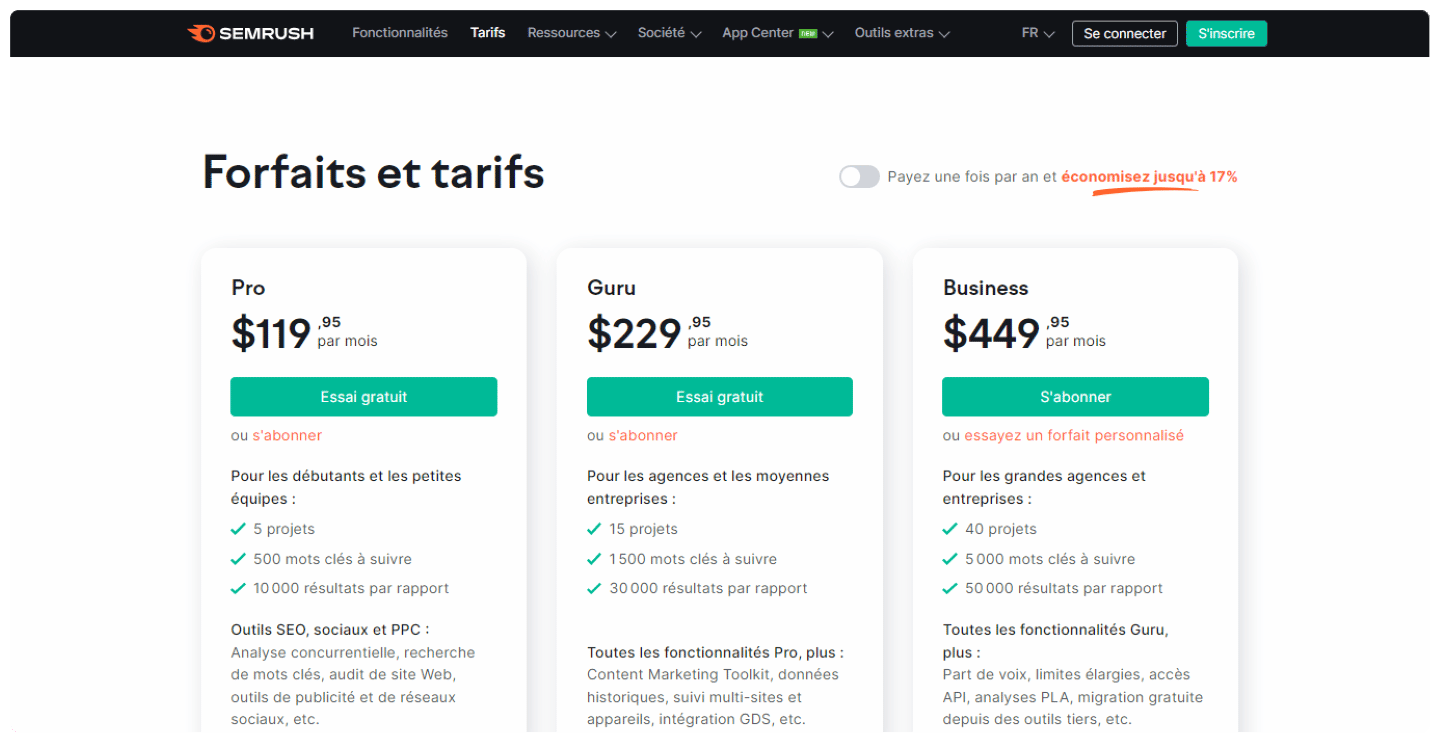
Limited in projects and keywords, the SEO option (€134/month) is recommended for freelancers and small businesses. Agencies and consultants can opt for the more complete Starter (€190/month), Pro+ (€286/month) or Advanced (custom quote) plans, depending on their needs.
Discover all of SEMrush’s featuresSEMrush offers a free trial: don’t hesitate to try it!
More info on SEMrush Our comparison of the best lead generation tools
Ahrefs
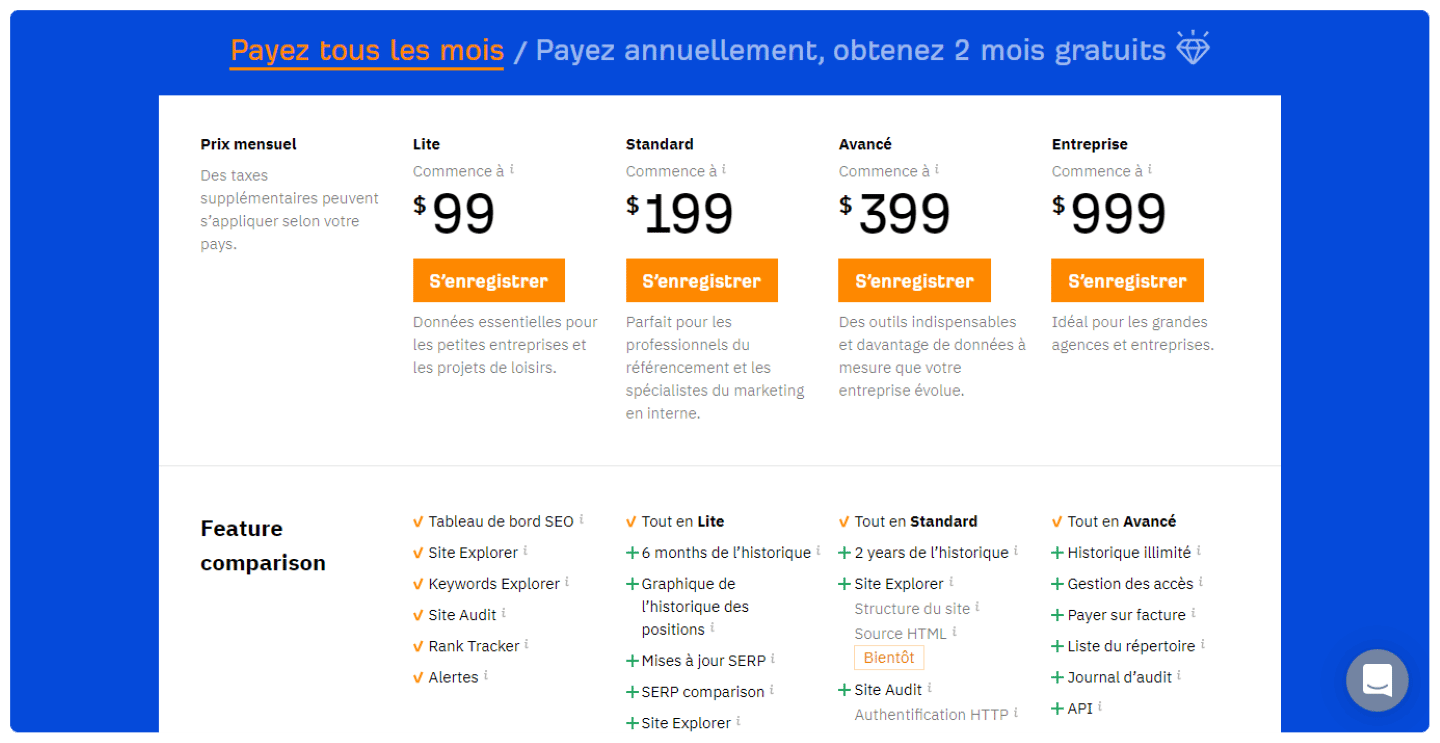
But for this particular use case, we really prefer Ahrefs, which offers tools for link building, keyword research, rank tracking and much more. Ahrefs notably prides itself on having the largest index of live backlinks in the world.
Discover all of Ahrefs’ featuresAhrefs offers a free trial: don’t hesitate to try it!
More info on Ahrefs Our comparison of the best lead generation tools
Spyfu
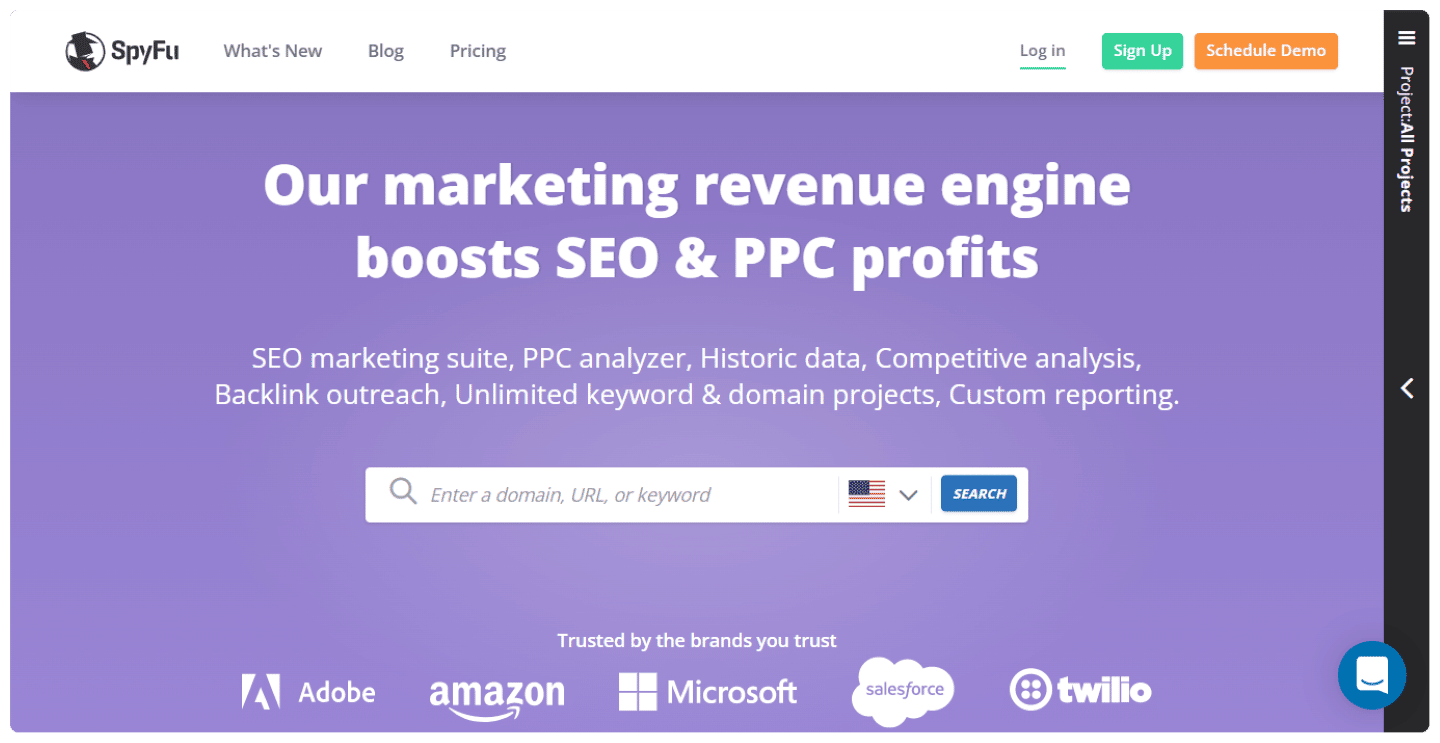
As a bonus, Spyfu lets you identify affiliate links pointing to another site. It’s a different kind of partnership, but it’s clearly a business relationship.
How do you do it?
Classify all these links to find out whether they come from an agency blog, a media outlet, or a SaaS blog (a competitor or a competitor’s partner).
Then you can contact the agencies to try to build a relationship, meet the founders, etc.
On the media side, you can be more upfront with a direct monetary offer, but you’ll need some budget to back it up.
Listicles are an excellent opportunity to build links because their format allows a quick comparison and offers independent viewpoints on specific products or services.
Appearing in a listicle offers 2 advantages:
- Create more visibility for your brand: listicles bring in a lot of organic traffic.
- Generate new backlinks: the articles are based on providing external links to other sites, so you’re almost certain to get a new backlink by being featured.
The easiest way to identify the listicles you can be included in is to look for affiliate links. If the article is already monetized, there’s no real reason for them to turn down your proposal.
You’ll have to talk money without delay, though: these blogs get contacted non-stop for backlinks, and your email mustn’t be misinterpreted. Spoiler: when the site has a bit of volume, backlink emails end up in the trash unread.
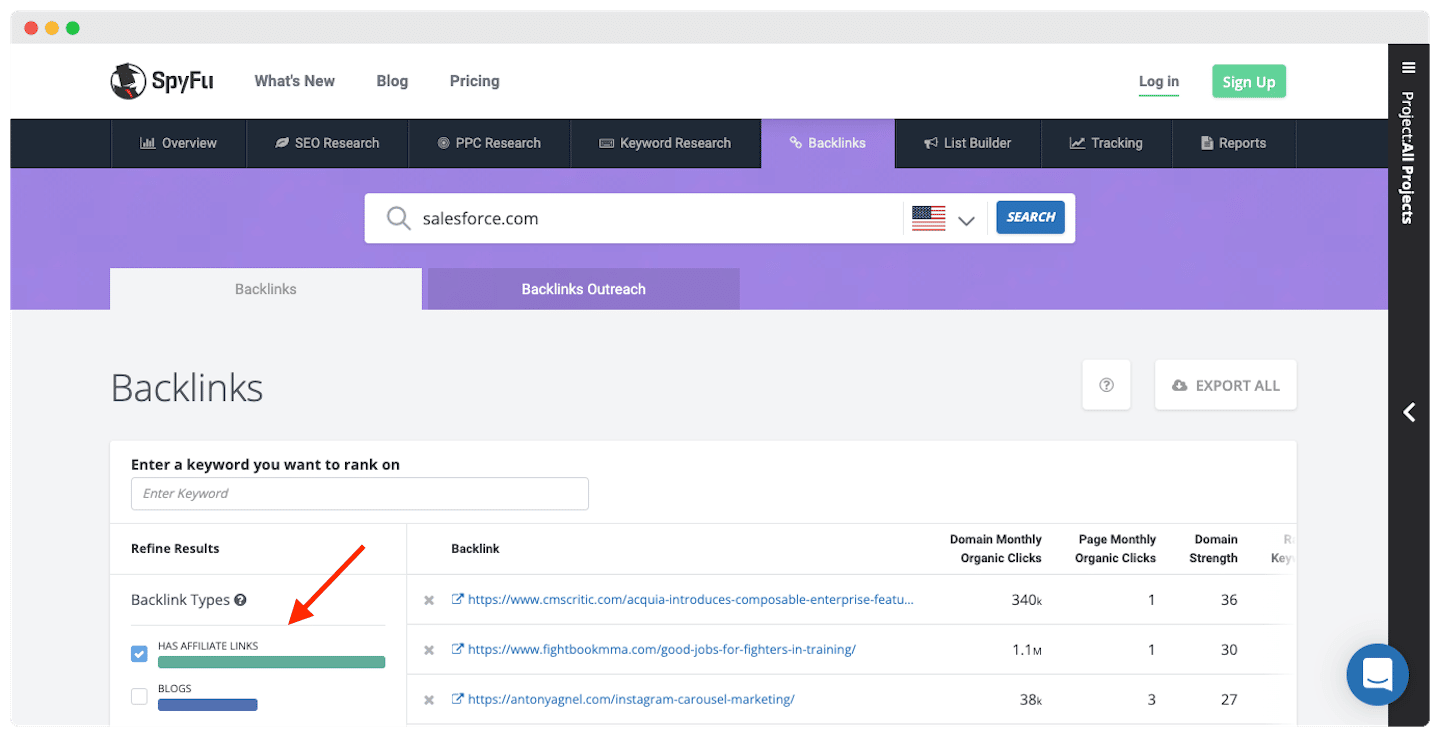
SpyFu has an affiliate links tool that lets you discover the sites where your competitors appear with affiliate parameters. With this data, you can refine your contact list even further.
Why is it useful?
Being on the same site as your competitors means being on the sites focused on your niche. If you want to buy yourself a market presence, you can contact all your competitors’ affiliates with a solid offer.
It’s a guarantee of valuable generated traffic and stronger authority in your field.
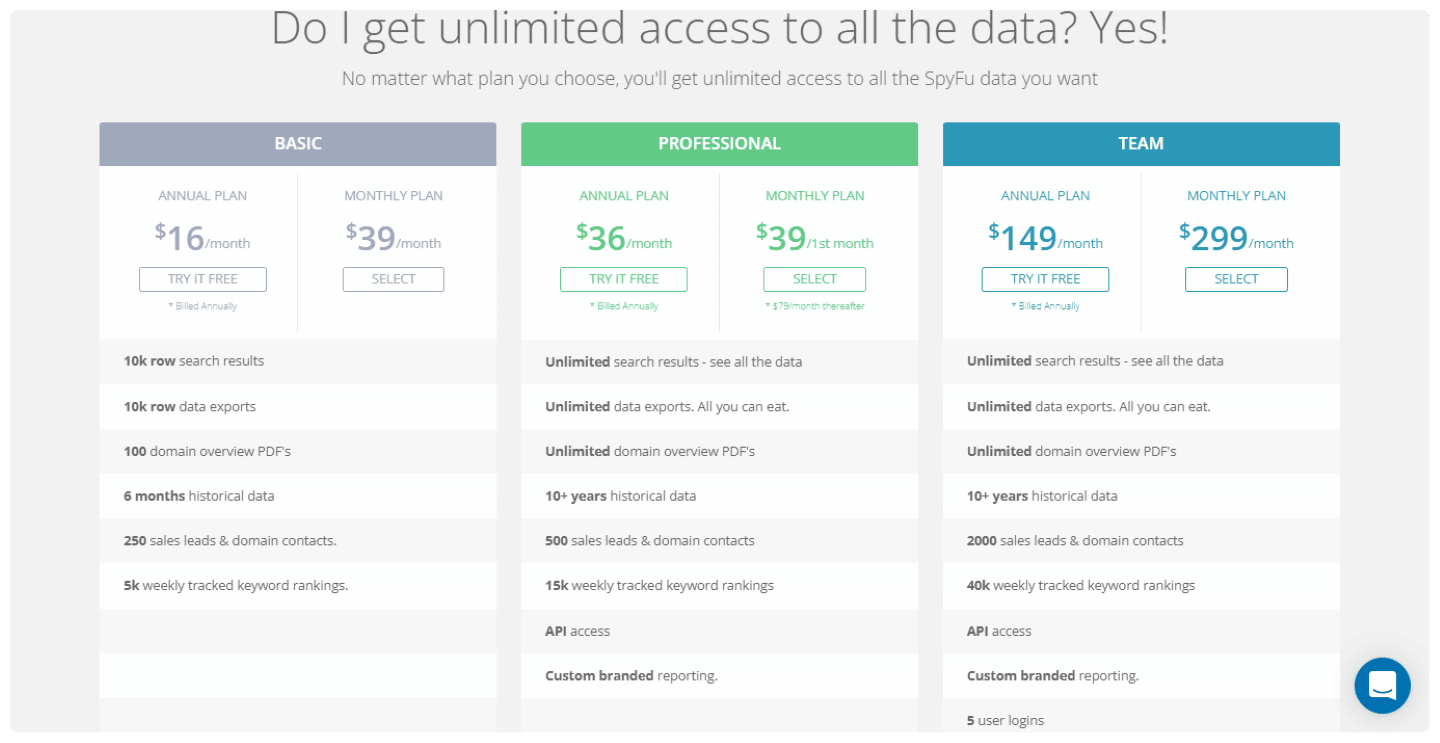
Spyfu is the most affordable resource, with subscription prices ranging from $39/month (Basic plan limited to 10k rows of search results and affiliate data exports) to $249/month (Team / Agency plan, which offers an unlimited number of search results and affiliate data exports).
Whichever plan you choose, you get unlimited access to all of Spyfu’s data.
Discover all of Spyfu’s featuresSpyfu offers a free trial: don’t hesitate to try it!
More info on Spyfu Our comparison of the best lead generation tools
Going further
The questions we get over and over.
What is technology profiling?
It means using the data points related to the technologies and tools a prospect uses to define segments. You can only detect a technology if it’s visible on the company’s site: DNS zones, CMS signature, form or widget.
How do you find the person who left a review on G2 or Capterra?
By hand: save their profile picture, run it through Google Lens with a few keywords, then check the LinkedIn profiles found. It takes a long time; Reviewflowz tracks a company’s reviews on most B2B platforms and exports the history to CSV.
Are a competitor’s LinkedIn followers good prospects?
Rarely. A follower on a social network is quite rarely a customer, and often a partner more or less engaged with the competitor: the audience is hard to convert and not always qualified.
Can you buy a competitor’s brand name on Google Ads?
Yes, bidding on a competitor’s keyword is possible. But Google considers that using its name in the ad text is a deceptive practice, and ads without the brand name get far fewer clicks. Comparative advertising is regulated in France, but not illegal.
How do you find the sites that talk about your competitors?
With a link analysis tool like SEMrush, Ahrefs or Spyfu, which lists the sites that link to your competitors and the number of those links. Spyfu also spots affiliate links.



What the community says.