


- HubSpot’s differentiator in B2B: workflows that run directly on the contact records of the CRM used by sales reps.
- Start with post-white paper nurturing; scenarios 4, 7 and 8 (lead scoring, ABM alerts, trial-to-paid) are the most differentiating.
- Most scenarios require the Pro plan, and the ABM tools require the Enterprise plan.
- Don’t score engagement alone: weight it with company size, industry and job title.
- If your need is limited to segmented newsletters, look at Brevo or ActiveCampaign before signing with HubSpot.
Search for “HubSpot Marketing Automation” and most articles serve you the same dish: a feature list, a pricing table and three lines concluding that it’s great. You close the tab without having moved an inch.
Because none of them answered the real question: what are you actually going to build with HubSpot, and how?
That is exactly the bet of this article. Rather than listing every button in Marketing Hub, we give you the 8 B2B scenarios that have proven themselves in the most advanced marketing teams:
- Post-white paper nurturing.
- Webinar follow-up.
- Progressive qualification.
- ABM alerts.
- Trial-to-paid conversion.
- …
For each scenario, we give you the exact trigger, the sequence to set up, the required HubSpot plan and the pitfalls nobody tells you to avoid.
Our take on HubSpot Marketing Automation, in short
| Scope | Score | Our take |
|---|---|---|
| Overall rating | 4.5 | HubSpot remains the benchmark for B2B marketing automation thanks to its native integration with the CRM. The platform covers the entire lifecycle: acquisition, nurturing, qualification, conversion, retention. An excellent choice for marketing teams that want to centralize, provided they accept the price jump to the Pro plan. |
| Workflow power | 4.7 | The HubSpot Workflows editor is one of the most polished on the market. If/then branches, multiple triggers, cross-team actions, goals with conversion analysis. For complex B2B scenarios (ABM, multi-criteria lead scoring), the flexibility is more than there. |
| CRM integration | 5.0 | This is the fundamental differentiator. Workflows read from and write to the same CRM the sales reps use. No sync to manage, no data drifting apart. Marketing and sales finally speak the same language. |
| Lead scoring and qualification | 4.3 | HubSpot Lead Scoring covers classic B2B needs. Behavioral scores, demographic scores, negative scoring, predictive scoring via Breeze AI on Enterprise plans. Solid, but it requires rigorous setup work to avoid bias. |
| Personalization and AI | 4.2 | Smart Content and Breeze AI allow advanced personalization by persona, industry or lifecycle stage. The AI is still evolving on some modules, but the product trajectory is clear. AI email generation is already very usable. |
| Reporting and attribution | 4.4 | HubSpot provides the tools B2B RevOps teams expect. Revenue attribution to marketing interactions is available from the Enterprise plan. |
| Value for money | 3.9 | The Starter plan at €15 is fair but limited on automation. Moving to the Pro plan at €880/month is a real financial step. It is justified for teams running marketing automation daily, much less so for occasional use. |
Try HubSpot Marketing Automation for freeHubSpot offers a 14-day free trial with no credit card, plus a freemium version that already lets you set up simple workflows. Enough to get a concrete idea before switching to a paid plan.
Why HubSpot has taken over B2B marketing automation
HubSpot became the benchmark for B2B marketing automation because the platform combines three things competitors don’t offer in the same package:
- A free HubSpot CRM natively integrated with workflows.
- A product philosophy centered on Loop Marketing that fits long B2B buying cycles.
- Breeze AI, which shows up in scoring, segmentation and content generation.
More than 288,000 companies in 135 countries use Marketing Hub today.
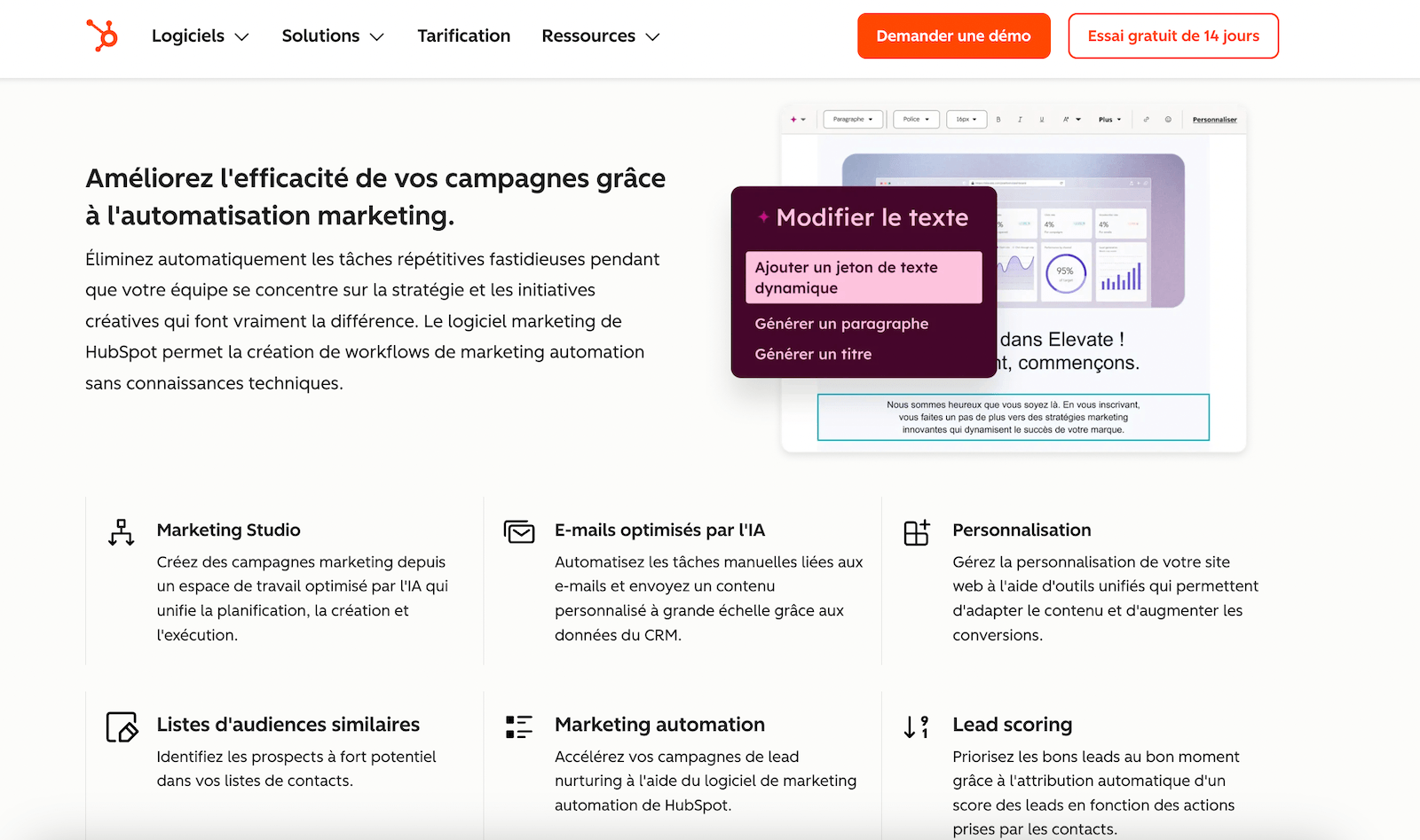
Where ActiveCampaign or Brevo ask you to connect an external CRM (with all the sync problems that implies), HubSpot runs your workflows directly on the contact records your sales reps handle.
When an SDR changes a lead’s status, the workflow detects it instantly. When a workflow assigns a score, the sales rep sees it in the same interface. This marketing-sales alignment, almost impossible to reproduce with two separate tools, is what makes the difference in B2B.
The 8 B2B marketing automation scenarios to build first in HubSpot
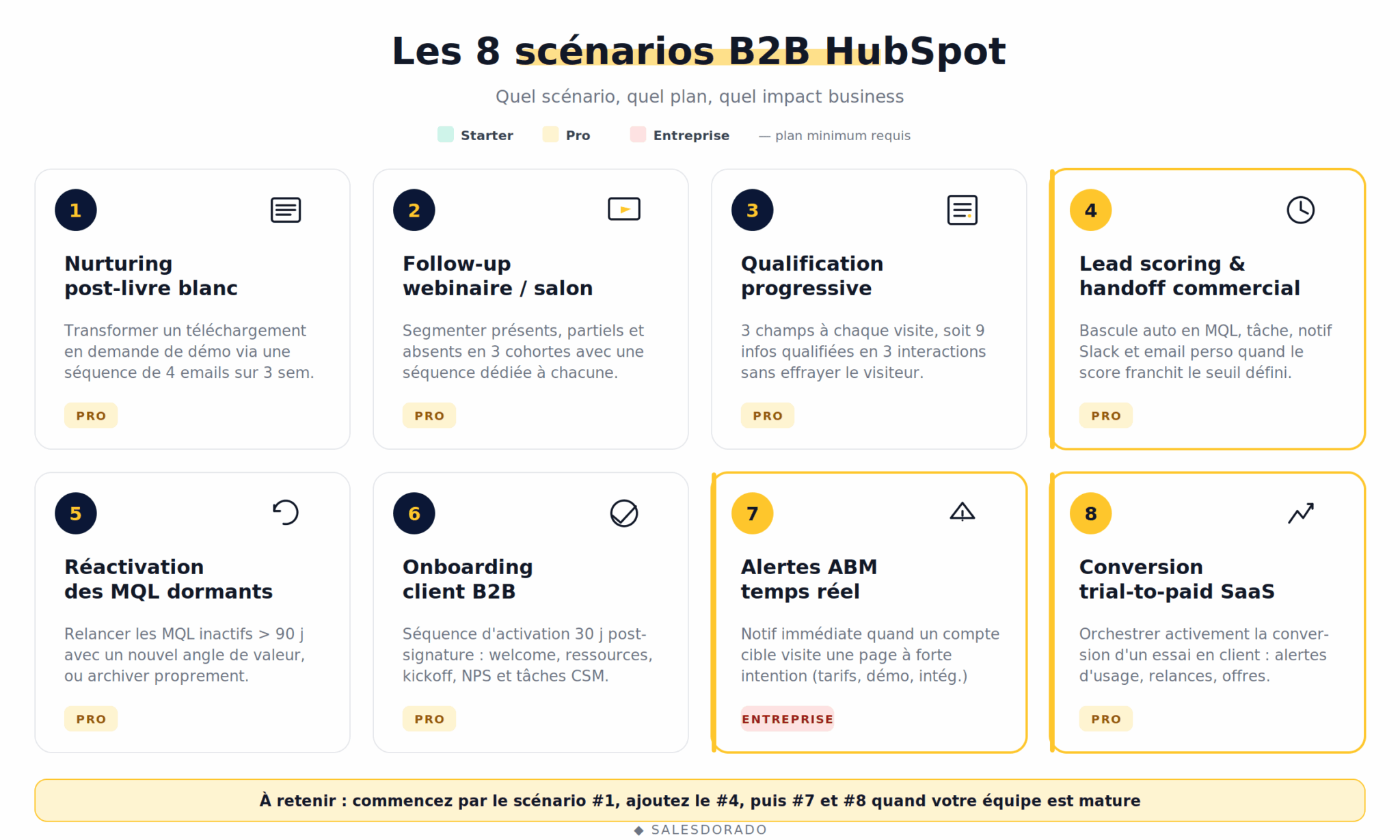
We ranked these scenarios by frequency of use and business impact in B2B marketing teams. If you are launching your automation stack, start with #1. If you are already set up, jump to scenarios #4, #7 and #8, which are the most differentiating.
1. Nurturing after a white paper download
This is the founding scenario of content-led B2B and the basis of any self-respecting lead nurturing strategy. A visitor downloads your white paper on “How to build an ABM strategy” and… nothing. You gave them a gift, you have their email, and you don’t talk to them for three weeks. Meanwhile, their memory of your brand evaporates.
The scenario: a workflow triggers as soon as a contact downloads the white paper (trigger: form submission). They immediately receive the content by email, then a sequence of 4 to 6 emails spread over three weeks that goes deeper into the topic and gradually brings them toward a demo or a call.
How to build it in HubSpot:
- Create a HubSpot form on the white paper landing page, with automatic enrollment in a dedicated list.
- Set up a workflow triggered by “Enrollment in list X”.
- Email 1, immediate: white paper delivery + thank you.
- Email 2 at D+3: related blog article on a subtopic of the white paper.
- Email 3 at D+7: customer case study on the topic.
- Email 4 at D+14: webinar invitation or demo offer.
- Workflow goal: “Demo request submitted”. If the goal is reached, the contact exits the workflow.
Required plan: Marketing Hub Starter for the basics, Pro for conditional branching by industry or company size.
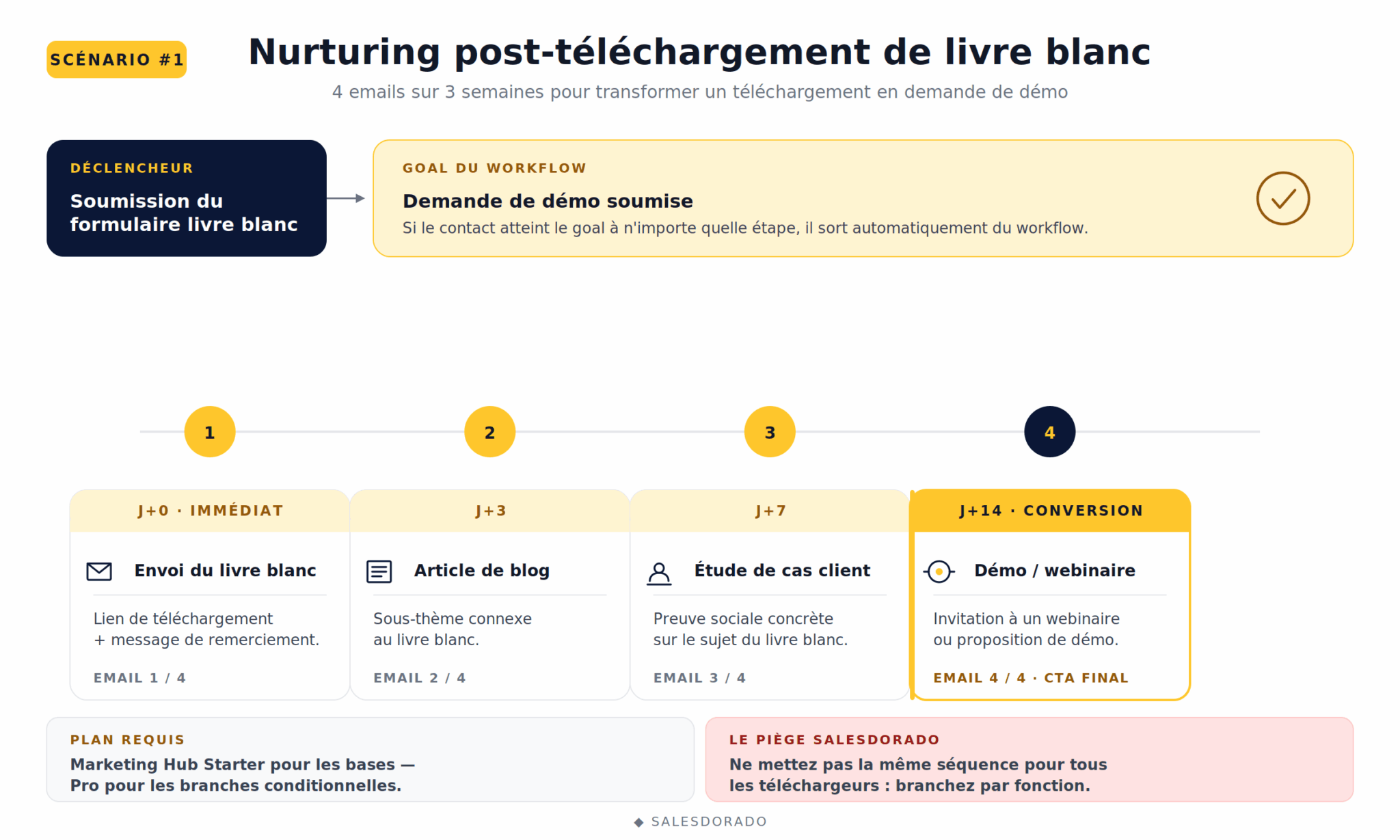
The Salesdorado pitfallNever use the same sequence for every downloader. A CTO downloading a technical white paper doesn’t expect the same thing as a marketing director. Use if/then branches on the “Job title” or “Industry” property from the second email onward to personalize what follows. The response rate easily doubles.
2. Automated follow-up after a webinar or trade show
You run a webinar with 200 registrants. On the day, 80 show up and 120 don’t. And traditionally, everyone gets the same thank-you email. A glaring mistake.
The scenario: the workflow automatically segments registrants into three cohorts: attended until the end, attended partially, absent. Each receives a different sequence. Full attendees move toward a demo offer. Absentees receive the replay with a summary. Partial attendees receive a highlight of the key moments.
How to build it in HubSpot:
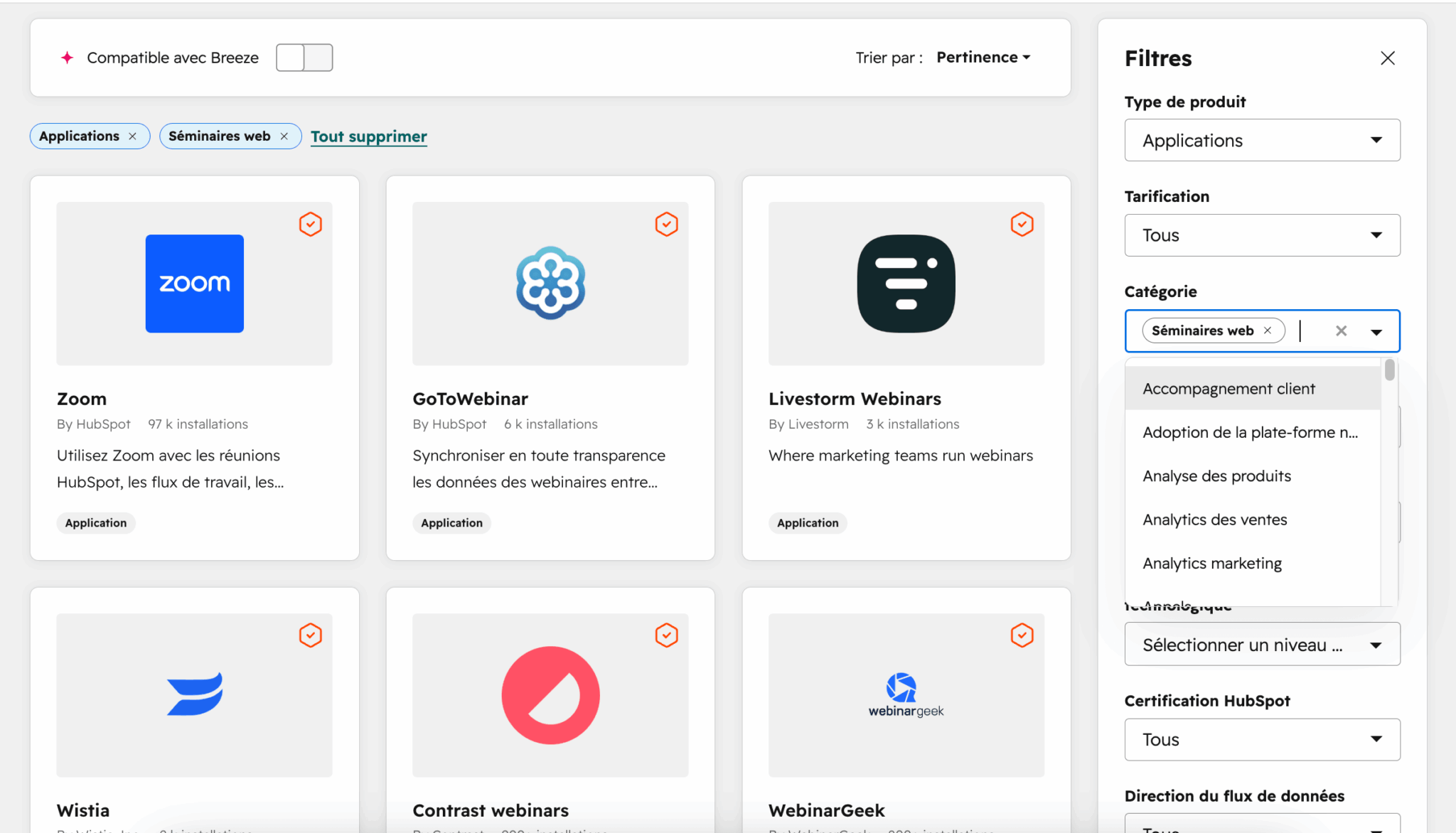
- Connect your webinar tool (Zoom, Livestorm, GoToWebinar) to HubSpot CRM through the native integrations.
- Create three Smart Lists based on the “Webinar attendance status” property.
- Launch one workflow per cohort with time-based enrollment logic (D+1, D+3, D+7).
- For the “full attendees” cohort, trigger a notification to the sales rep assigned to the account.
Required plan: Marketing Hub Pro (conditional branching on webinar status is not in Starter).
3. Progressive qualification with smart forms
The tragedy of the classic B2B form: to qualify a lead, you ask for 12 pieces of information. Nobody fills it in. To get conversions, you ask for 3. Your leads aren’t qualified. There is no compromise… except with progressive profiling.
The scenario: the form shows 3 fields on first contact (email, first name, company). On the second contact, it detects that these fields are already filled in the CRM and offers 3 new fields (company size, job title, topic of interest). On the third interaction, it asks for 3 more fields (budget, timing, main pain point). In three interactions, you have 9 qualified fields without ever scaring the visitor off.
How to build it in HubSpot:
- Turn on the Smart Forms feature on the main form.
- Define the priority order of the fields to ask for progressively.
- Set up a workflow that triggers when 7+ fields are filled: a notification goes to the sales rep with full context.
Required plan: Marketing Hub Pro.
The Salesdorado takeProgressive profiling really changes the game for MQLs in B2B. The condition is having enough recurring traffic for visitors to come back. If 95% of your visitors convert in a single visit, this scenario is useless.
4. Lead scoring and automatic handoff to sales (MQL > SQL)
This is THE scenario that reconciles marketing and sales. How many times have you seen a sales team complain about the “rotten leads” sent by marketing, while marketing accuses sales of not following up fast enough? This scenario ends the debate.
The scenario. The system assigns a score to each contact based on their actions (pricing page visit: +15 points, email open: +2, job title = “VP Sales”: +20, industry outside the ICP: -10, etc.). When the score crosses the defined threshold (often 50 or 100), the workflow triggers: lifecycle stage changes to “MQL”, a task is created for the assigned sales rep, a Slack notification goes to the rep, and a personalized introduction email is sent automatically.
How to build it in HubSpot:
- Define your lead scoring strategy with marketing and sales teams aligned.
- Set up the rules in HubSpot’s Lead Scoring tool (“HubSpot Score” property).
- Create a workflow triggered by “HubSpot Score >= threshold”.
- Workflow actions: update lifecycle stage, create a task, assign the contact via round robin, notify sales.
- Set up a mirror workflow that sends MQLs not contacted within 48h back to marketing.
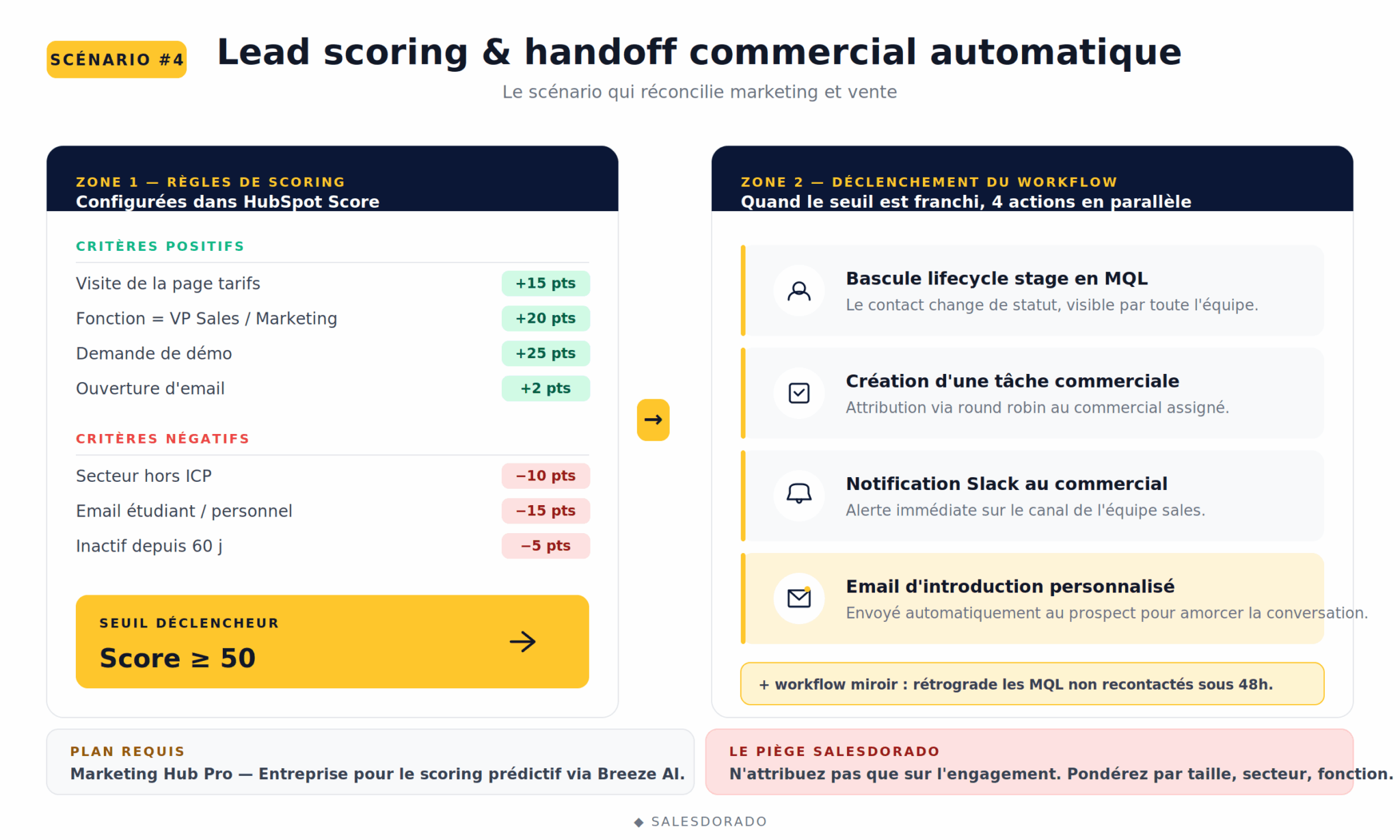
Required plan: Marketing Hub Pro for multi-criteria scoring, Enterprise for predictive scoring via Breeze AI.
The Salesdorado pitfallDon’t assign points based on engagement alone (opens, clicks). That’s the classic trap… A highly engaged lead outside the ICP is commercially useless. Always weight with demographic criteria (company size, industry, job title). Draw on our lead scoring models to build your first rules.
5. Reactivating dormant MQLs
Your MQLs don’t convert into SQLs? Either sales lets them die, or they weren’t that hot to begin with. Either way, their value erodes over time. Rather than letting them rot, trigger a reactivation workflow, part of a broader marketing-sales automation approach.
The scenario: Trigger = a contact has been in MQL status for more than 90 days without being contacted or converted. The workflow sends a reactivation sequence (3 emails over two weeks with a new value angle), removes the MQL status and, depending on the reaction, either re-qualifies them (new interaction = back to MQL with a boosted score) or archives them as a “dormant lead”.
How to build it in HubSpot:
- Create a Smart List: lifecycle stage = MQL AND last contact > 90 days.
- Workflow triggered by membership in this list, with a reactivation email sequence.
- If/then branch on “Email clicked within 14 days”: if yes, move back to MQL and notify the sales rep. If no, archive.
Required plan: Marketing Hub Pro.
6. B2B customer onboarding after signature
Marketing automation doesn’t stop at the signature. In B2B SaaS as in consulting, customer onboarding directly determines retention. A poorly onboarded customer is a customer who will churn in 6 months.
The scenario: Trigger = lifecycle stage changes to “Customer”. The workflow runs a 30-day activation email sequence: welcome email from the dedicated CSM, onboarding resources by use case, kickoff invitation, checkpoint at D+30 with NPS. In parallel, tasks are created automatically for the CSM at key stages.
How to build it in HubSpot:
- Set the trigger to “Lifecycle stage = Customer”.
- Personalize the emails with Smart Content based on the plan purchased or the customer’s industry.
- Create tasks for the CSM with the workflow’s “Create task” action.
- Add an NPS survey (Service Hub or a third-party tool) at D+30 and D+90.
Required plan: Marketing Hub Pro + ideally Service Hub for post-onboarding follow-up.
7. ABM alerts on strategic page visits
The favorite scenario of B2B teams doing account-based marketing. You target 200 strategic accounts. When someone from Carrefour or L’Oréal visits your pricing page or your integrations page, you want to know right away. Not in a weekly report, right away.
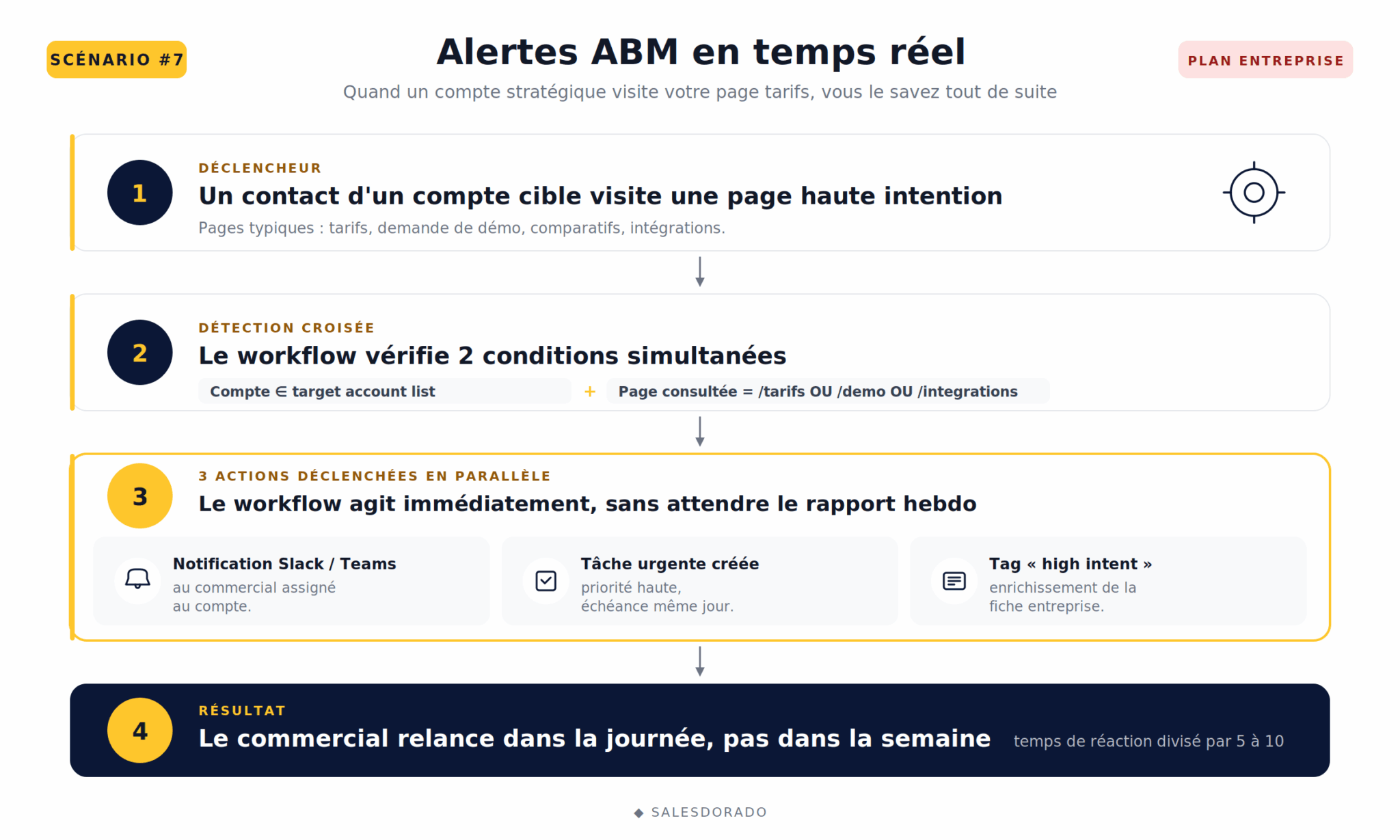
The scenario. Trigger: a contact belonging to a “target account list” visits a high-intent page (pricing, demo, comparison, integrations). Immediate action: notification to the sales rep assigned to the account (via email, Slack or Teams), creation of a high-priority task, and enrichment of the company record with a “high intent” tag.
How to build it in HubSpot:
- Create the target account list in HubSpot’s ABM feature (Enterprise plan).
- Set up a contact-based workflow with the trigger “Page viewed = /pricing OR /demo” AND “Account belongs to the target account list”.
- Action: immediate internal notification + creation of an urgent task for the sales rep.
- For accounts outside the target list, use Lookalike Lists to identify companies with a similar profile.
Required plan: Marketing Hub Enterprise (ABM tools are not available below this tier).
8. Trial-to-paid conversion in B2B SaaS
The must-have scenario for any SaaS offering a free trial or freemium:
- Without automation, your trial prospects decide on their own whether to pay or not.
- With automation, you actively orchestrate the conversion.
The scenario. Trigger: sign-up for a free trial. The sequence runs: welcome email at H+0, getting-started tutorial at D+1, alert if the contact hasn’t completed a key action within 72h, advanced use cases at D+5, automatic sales alert if the user crosses a usage threshold (strong intent signal), follow-up email at D+10 before the trial ends with a promotional offer.
How to build it in HubSpot:
- Create a custom “Trial start date” property fed by your product via API or integration.
- Workflow triggered by “Trial start date is known”.
- Use conditional branches on actions completed in the product (custom events sent to HubSpot via the tracking code).
- Automatic sales notification on a usage threshold via webhook.
Required plan: Marketing Hub Pro for the basics, Enterprise for custom event tracking at scale.
Test these scenarios on HubSpotHubSpot’s freemium plan already lets you prototype several of these scenarios (notably #1 and #5) without spending a cent. It’s the best way to test the tool before switching to Pro.
And for B2C or e-commerce, what works on HubSpot?
If you landed on this article looking for e-commerce scenarios, here is the short version. HubSpot covers the classics: abandoned cart, customer birthday, post-purchase nurturing, reactivation after prolonged inactivity…
The logic is the same as for B2B scenarios (workflows, triggers, branches), but the tool isn’t optimized for these uses.
Our honest take: for pure high-volume e-commerce, specialized tools like Klaviyo offer better value for money. HubSpot becomes relevant if you combine an e-commerce side with a B2B dimension (resale to professionals, key accounts, structured customer service). To dig deeper into tool selection, see our comparison of marketing automation software and our guide to choosing marketing automation software.
Understanding how HubSpot workflows work
All the previous scenarios rely on the same grammar: a HubSpot workflow.
Master this grammar and you become autonomous on the tool. If you want to compare HubSpot’s workflow engine with other approaches, see our comparison of workflow software.
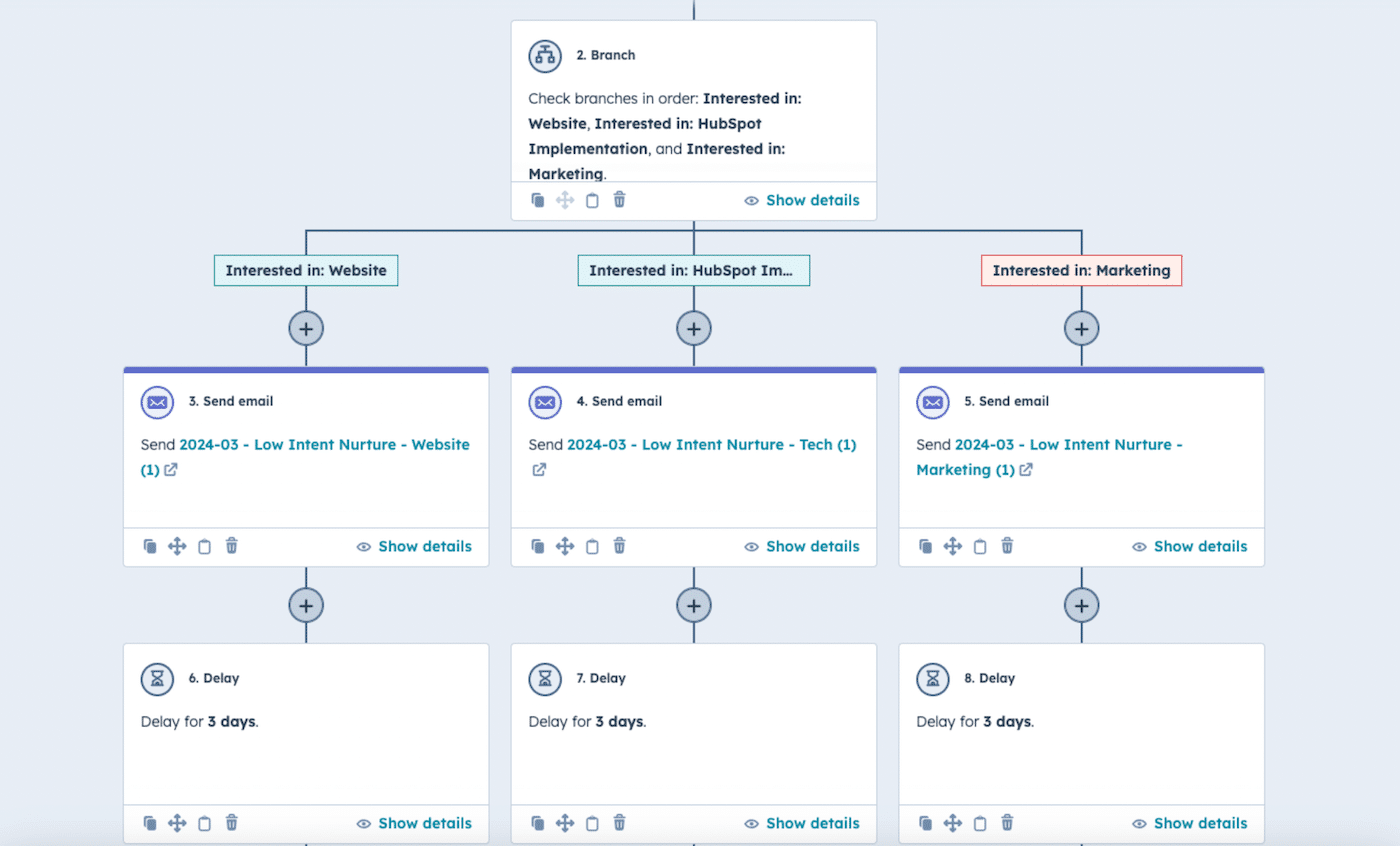
Here are the 4 building blocks of a HubSpot workflow:
- The trigger. This is the event that enrolls a contact in the workflow: form submission, list membership, property change, page visit, score reached, lifecycle stage change, etc. You can combine several triggers with AND/OR operators.
- Enrollment criteria. Beyond the trigger, you filter who actually enters the workflow. Example: trigger = “submission of form X”, enrollment criteria = “industry = tech” and “company size > 50 employees”.
- If/then branches. The heart of personalization. At each step, the workflow can fork based on a property or an action. If the contact opened the previous email, it moves on to step A. If not, to step B. This is what makes B2B scenarios truly effective.
- Actions and goals. Actions are what the workflow does: send an email, create a task, update a property, notify a user, assign a score, fire a webhook to an external tool. Goals are the event that takes the contact out of the workflow (often a conversion: demo requested, purchase made, status reached). The goal completion rate is your main KPI.
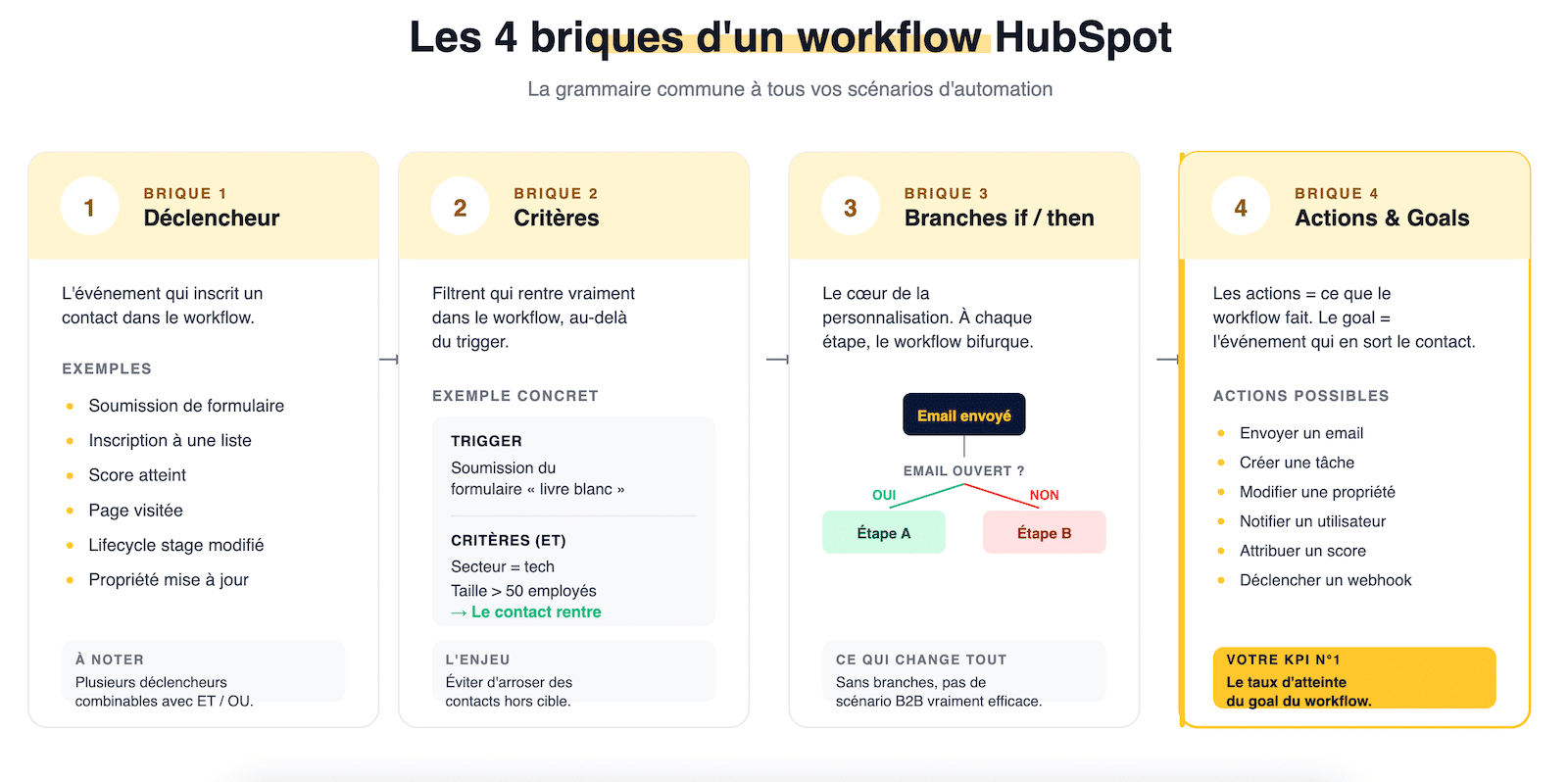
The Marketing Hub building blocks that make these scenarios possible
Beyond Workflows, Marketing Hub relies on an ecosystem of interconnected tools.
Here are the ones that really matter for B2B marketing automation:
- Workflows: the automation engine, available from the Pro plan for advanced uses.
- Lead Scoring: automatic score assignment based on rules or via Breeze AI on Enterprise plans.
- Smart Lists: dynamic lists that update in real time based on defined criteria. Indispensable for lifecycle marketing.
- Smart Content: content personalization (emails, landing pages, CTAs) by persona, industry or lifecycle stage.
- Marketing Studio: the unified, AI-optimized workspace to plan, create and run campaigns.
- Breeze AI: HubSpot’s AI, which shows up in email generation, predictive scoring, personalization and content. See our detailed analysis of Breeze AI in HubSpot CRM.
- Reporting Dashboard and Journey Reports: to measure the performance of each workflow and its impact on the pipeline. Multi-touch attribution is available on the Enterprise plan.
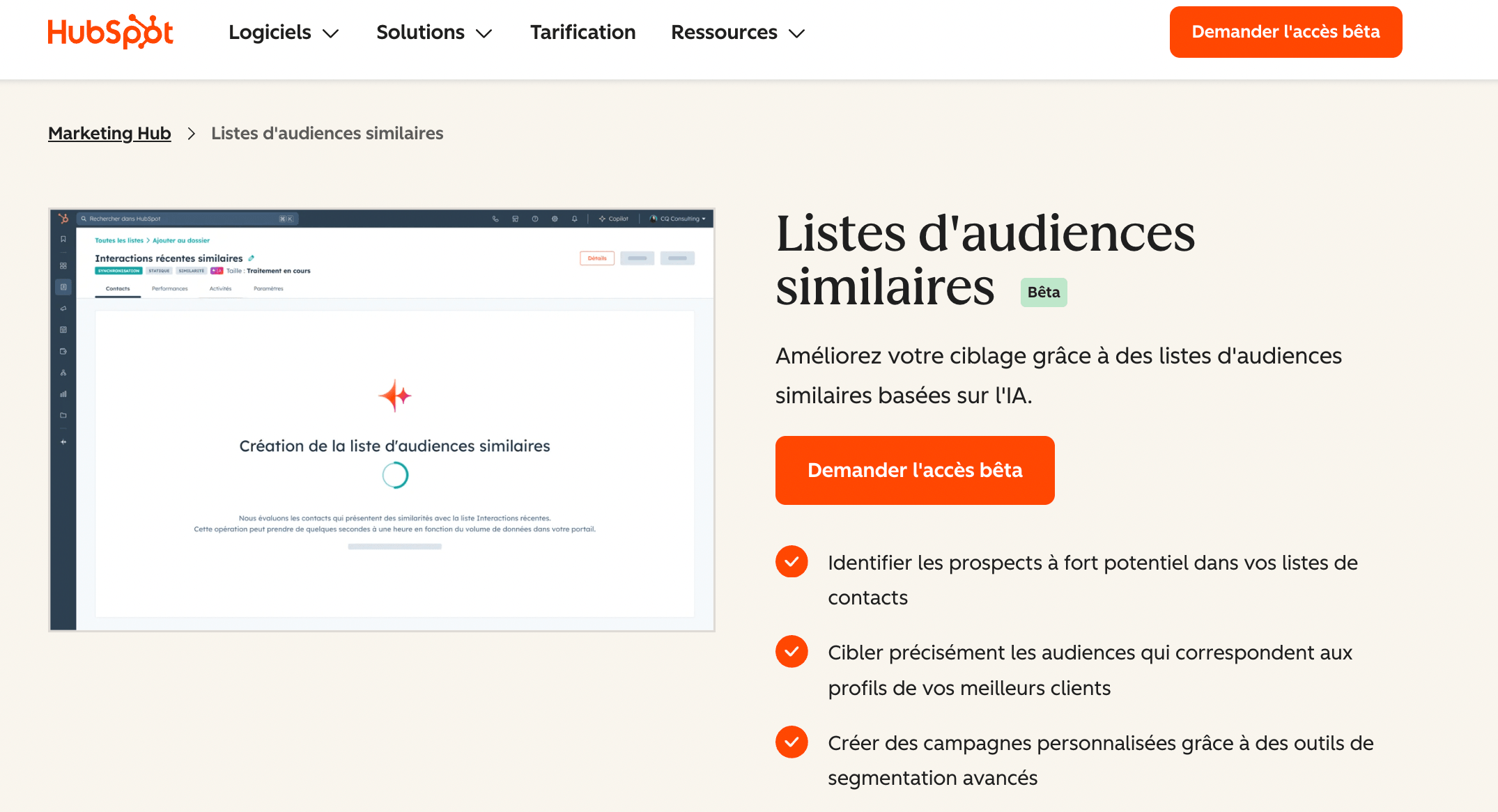
- Lookalike audience lists: audiences similar to your best existing customers, especially useful for extending ABM campaigns.
- A/B Testing: adaptive tests on emails and pages, with automatic selection of the winning version.
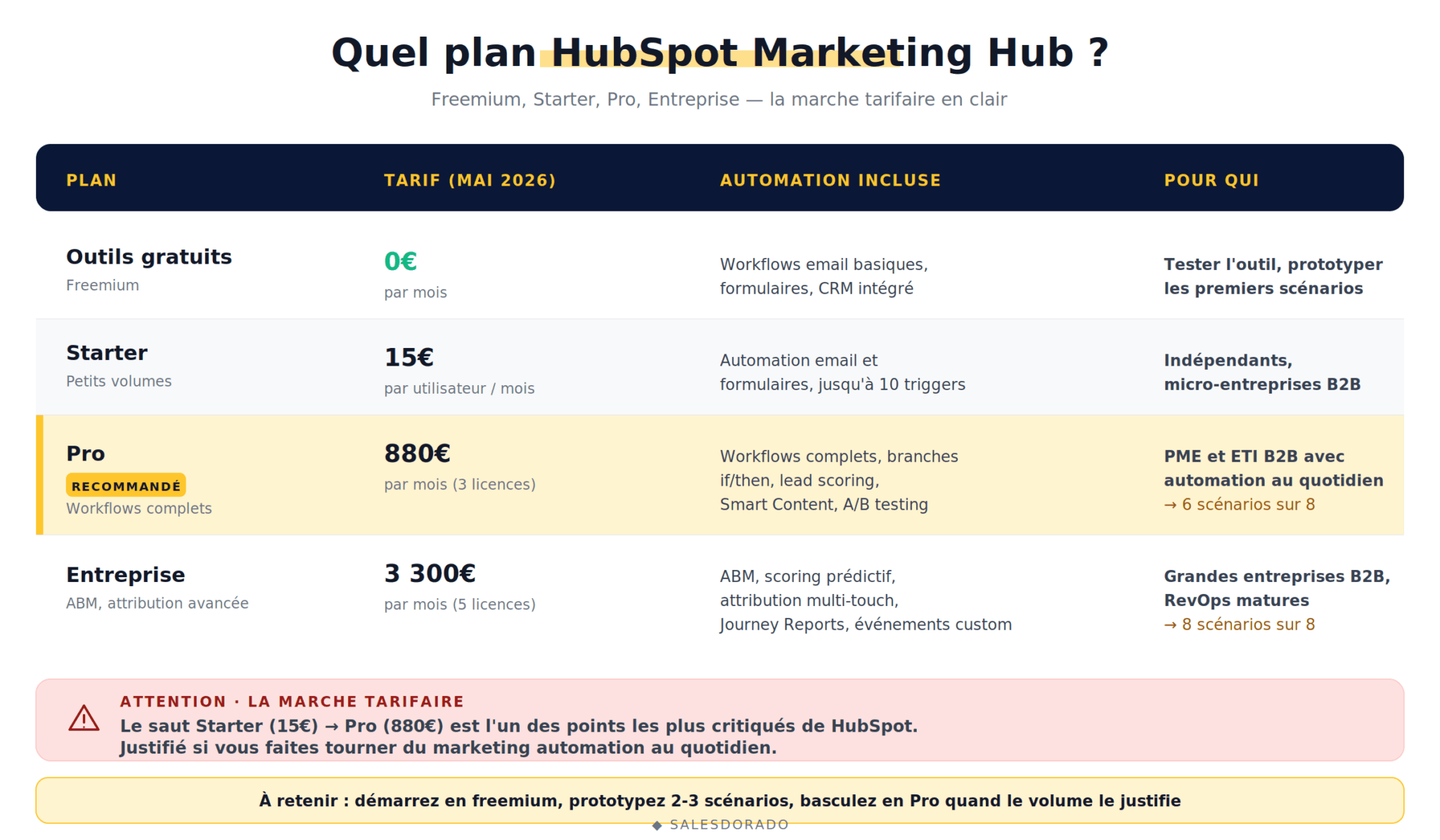
Which HubSpot Marketing Hub plan should you choose to automate your B2B marketing?
Marketing Hub pricing follows a clear B2B logic: freemium and Starter to get started, Pro to automate seriously, Enterprise for mature organizations with ABM and advanced attribution. See also our complete guide to HubSpot costs for the details.
| Plan | Price (May 2026) | Automation included | For whom |
|---|---|---|---|
| Free tools | €0 | Basic email workflows, forms, built-in CRM | Testing the tool, first simple scenarios |
| Starter | €15/month/user | Email and form automation, up to 10 triggers per workflow | Freelancers, B2B micro-businesses |
| Pro | €880/month (3 seats) | Full workflows, if/then branches, lead scoring, Smart Content, A/B testing | B2B SMEs and mid-sized companies running automation daily |
| Enterprise | €3,300/month (5 seats) | ABM, predictive scoring, multi-touch attribution, Journey Reports, custom behavioral events | Large B2B companies, mature RevOps |
The Salesdorado take on the price jumpThe jump from Starter (€15) to Pro (€880) is one of HubSpot’s most criticized points. Justified if you run serious marketing automation daily (8 scenarios in parallel, multi-criteria scoring, advanced segmentation). Much less justified if your need is still sending segmented newsletters. In that case, look at Brevo or ActiveCampaign before signing with HubSpot.
What we like (and like less) about HubSpot Marketing Automation
Pros
- Exceptional native CRM integration: marketing and sales work on the same data, with no sync to manage. This is the major differentiator in B2B.
- Visual, capable workflow editor: if/then branches, combined triggers, cross-team actions. For complex scenarios, few tools do as well.
- Solid Lead Scoring, with predictive scoring via Breeze AI on the Enterprise plan.
- Built-in Reporting Dashboard and Journey Reports, multi-touch attribution on the Enterprise plan. Enough to prove marketing ROI to your CFO.
- Smart Content and advanced personalization: content adapted by persona, industry, lifecycle stage.
- Ecosystem of 2,000+ integrations via the HubSpot marketplace, including two-way Salesforce sync.
- Free HubSpot Academy and recognized certifications, which shorten the learning curve.
Cons
- Brutal price jump from Starter to Pro: €15 to €880/month. Hard to justify for a team ramping up gradually.
- Learning curve for complex workflows: prototyping a simple scenario takes 30 minutes; building one with 5 conditional branches and webhooks requires training.
- Some AI features still in beta: Breeze AI is evolving fast, but a few modules are not yet on par with their specialized competitors.
- Heavy dependence on CRM data quality: a workflow is only as good as the data it handles. Without rigorous CRM hygiene, automations drift.
- ABM reserved for the Enterprise plan at €3,300/month, which shuts the door on B2B SMEs that would like to get into it.
Verdict: who is HubSpot Marketing Automation really for?
HubSpot Marketing Automation is the benchmark tool for B2B marketing teams that want to unify acquisition, nurturing, qualification and retention on a single platform, with real alignment between marketing and sales.
The product’s strength lies less in any single feature than in the coherence of the whole: when your workflows, your CRM, your scoring, your content and your reporting speak the same language, marketing finally becomes manageable.
If you are a growing B2B SME with a marketing team of 2 to 10 people, a medium or long sales cycle and a serious intent to industrialize your lead generation, HubSpot remains our main recommendation.
The Pro plan at €880/month is an investment, but it pays for itself quickly once your 8 scenarios are running in parallel.
For more mature B2B organizations with ABM ambitions, the Enterprise plan unlocks the features that make the difference on strategic accounts.
For smaller teams or simpler needs, start with the freemium or Starter plan, prototype 2 or 3 scenarios and move to Pro when your volume justifies it. If getting up to speed becomes a blocker, working with a certified HubSpot agency can greatly speed up deployment.
Our final verdict on HubSpot Marketing AutomationHubSpot remains the best marketing automation platform for B2B teams looking to industrialize their acquisition and nurturing while keeping friction-free marketing-sales alignment. Start with the 14-day free trial, prototype scenario #1 and scenario #4, and you’ll know in less than two weeks whether the tool is right for you.
The questions we get over and over.
What exactly is HubSpot Marketing Automation?
HubSpot Marketing Automation refers to all the Marketing Hub features that automate repetitive marketing actions: triggered email sends, lead scoring, progressive qualification, dynamic segmentation, sales alerts, nurturing scenarios. Everything relies on HubSpot Workflows, which are triggered by events (form submission, score reached, page visited) and run a sequence of personalized actions.
How much does marketing automation cost at HubSpot?
HubSpot marketing automation is available for free with basic features (simple email workflows). Advanced uses require a paid plan: Starter at €15/month/user for the basics, Pro at €880/month (3 seats included) for full workflows and lead scoring, Enterprise at €3,300/month (5 seats included) for ABM and multi-touch attribution.
Is HubSpot Marketing Automation suited to B2B SMEs?
Yes, HubSpot is particularly suited to B2B SMEs thanks to its natively integrated free CRM and the flexibility of the Pro plan. Most of HubSpot's 288,000 customers are SMEs and mid-sized companies. The critical threshold is around 5 people on the marketing team: below that, the Starter plan can be enough; above it, the Pro plan becomes almost indispensable to use advanced workflows.
What is the difference between workflows and sequences in HubSpot?
Workflows are a Marketing Hub feature: they orchestrate automated marketing scenarios at scale (nurturing, scoring, segmentation), are triggered by events and can reach thousands of contacts in parallel. Sequences are a Sales Hub feature: an individual sales rep uses them to follow up with prospects one by one; they are started manually and limited in volume. The two tools are complementary but serve different uses.
Do you need HubSpot CRM to use Marketing Hub?
HubSpot CRM is included for free with every Marketing Hub plan: you use it by default, even if you didn't explicitly choose it. That is what makes HubSpot so strong in B2B: workflows read from and write to the same CRM as your sales reps. You can also connect HubSpot to an external CRM such as Salesforce via the native two-way sync, but you then lose part of the magic of the integration.



What the community says.