

Logo Trello

Our review of Trello: the Kanban tool par excellence

The Kanban reference, with Butler automation included from the free plan.

Salesdorado
4.7 /5
1 test
G2
4.4 /5
14,063 reviews
Capterra
4.5 /5
23,635 reviews
Trustpilot
2.2 /5
226 reviews
Weighted average 4.10/5 4 combined reviews
Price
Free, then $6 per user per month

The verdict in 30 seconds

Trello is the reference tool for the Kanban method. Ideal for light, Agile projects, it is less suited to complex ones. On its own turf, it is the best on the market: every feature tied to Kanban boards is there, and the template gallery lets you create cards very quickly. Two things really set it apart. Its flexibility first: even though Kanban stays at the core of the product, the other views make it a fit for any kind of activity. Its automation next: Butler lets you define rules, buttons and calendar commands, and Trello is one of the only tools to offer it from its free plan.

The limit is clear and owned: functional depth. It is the flip side of how easy it is to set up, and it is not the solution to favor for large teams with very complex projects. The free plan, capped at 10 boards and 10 collaborators per workspace, remains cut out for non-professional use or small businesses.

+ What we liked
  • Kanban visualization: Trello is the best tool on the market in this area, with every feature tied to Kanban boards and plenty of automation tools.
  • Flexibility: even though Kanban stays at the core of Trello, the tool offers other ways to organize and visualize your workflow. So it fits any kind of activity and any size of organization.
  • A very rich template gallery that lets you create cards quickly. Very effective for a regular, easy-to-anticipate process, like IT tickets.
  • Users like how easy Trello is to use and value the features that enable shared accountability and make data easy to share and manage.
  • Every integration is available from the free plan, and so is Butler automation, which is rare in this market.
  • A 75% discount for NGOs and charities, and a mobile app that is pretty well built.
− The downsides
  • A limited free version: Trello is one of the only tools to offer automations in its free plan, but that plan stays very light, with just 10 boards and 10 collaborators per workspace, and suits non-professional use or small businesses.
  • Limited functional depth, the flip side of easy setup: the tool goes less far than Monday or Notion, and it is not the solution to favor for large teams with very complex, multiple projects.
  • Some customers find the task management system bad for complex projects, and once projects enter an operational phase.
  • Some users regret the lack of communication and collaboration features.
  • Customer service can only be reached through a contact form, which is fairly limited.
  • The Microsoft suite is poorly covered: Teams and OneDrive have their Power-Up, but the Outlook add-in has been retired.

Who it is for

★ Go for it if...

Small teams and Agile organizations that want a tool anyone understands right away, with Kanban boards and a rich template gallery. Especially well suited to regular, easy-to-anticipate processes, like IT tickets, and to teams that want to automate without bringing out the heavy artillery: Butler is included from the free plan.

⌘ Skip it if...

Skip it for complex, multiple projects with large teams: functional depth is limited, and users report that task management shows its limits as soon as the operational phase starts. Skip it too if communication and collaboration matter, or if you work in the Microsoft suite, which is poorly covered (only Teams and OneDrive have a Power-Up).

Scores per criterion

  • Overall rating 4.7
  • Ease of use 4.8
  • Ease of setup 4.7
  • Customer service 4.6
  • Functional depth 4.7
  • Integrations 4.5
  • Value for money 4.8

The tool in detail

Trello after real-world use: feature scope, integrations, pricing and concrete limits.

Developed by Atlassian around the Kanban board method, Trello is a reference tool in the project management software market.

Naturally popular with fans of Kanban software, it is also used by companies running Agile processes, who like how quickly you get the hang of it.

Trello is not limited to Kanban: it also offers many other views and project and task management features. That said, the tool quickly hits its limits for large teams or complex projects.

Trello: feature overview
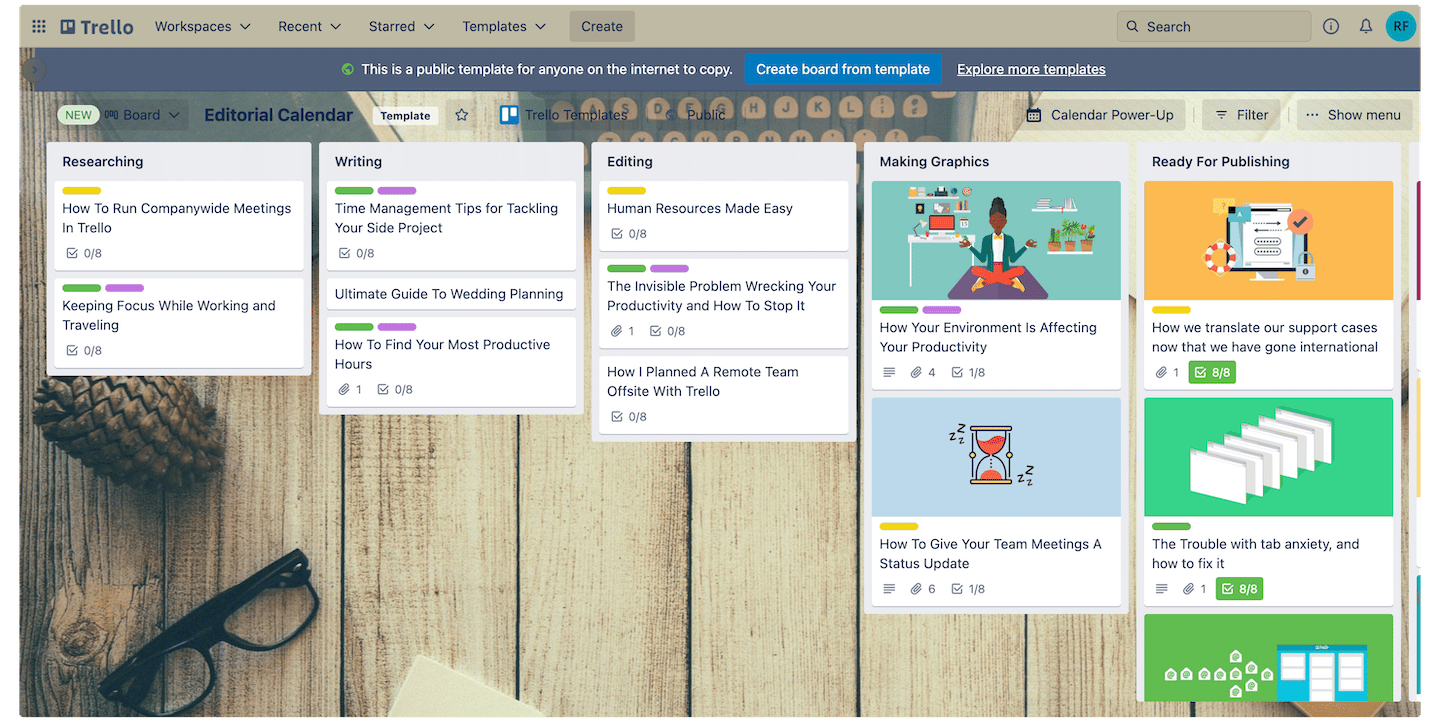
An editorial planning template in Trello

Project management and task planning

Trello cards are a direct application of the Kanban method: they let you view and manage a project’s tasks as a board, with several columns, each one marking a stage of progress in the project.
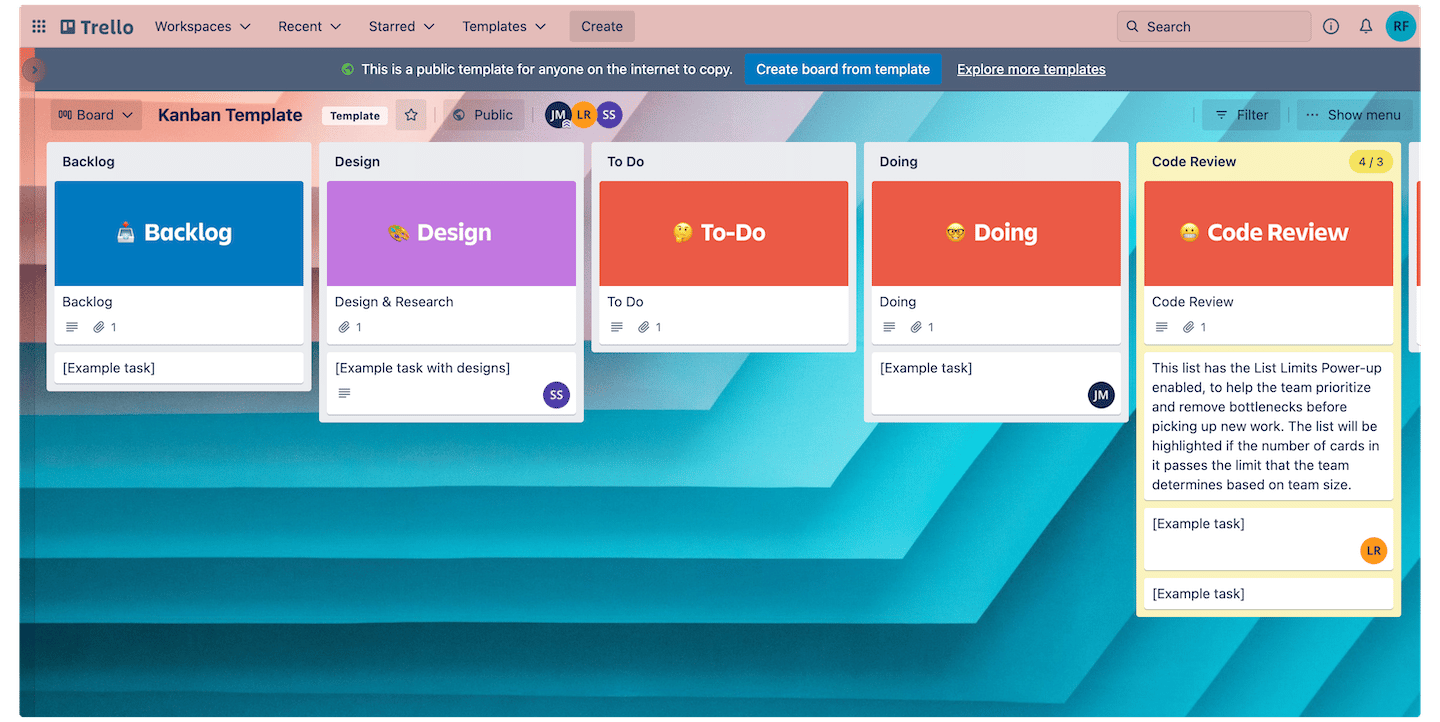
A Kanban board in Trello

Cards represent tasks to be done. They move from one column to another depending on how far along they are. The most basic version of the Kanban board has « to do », « in progress » and « done » columns, but there are more complex ones.
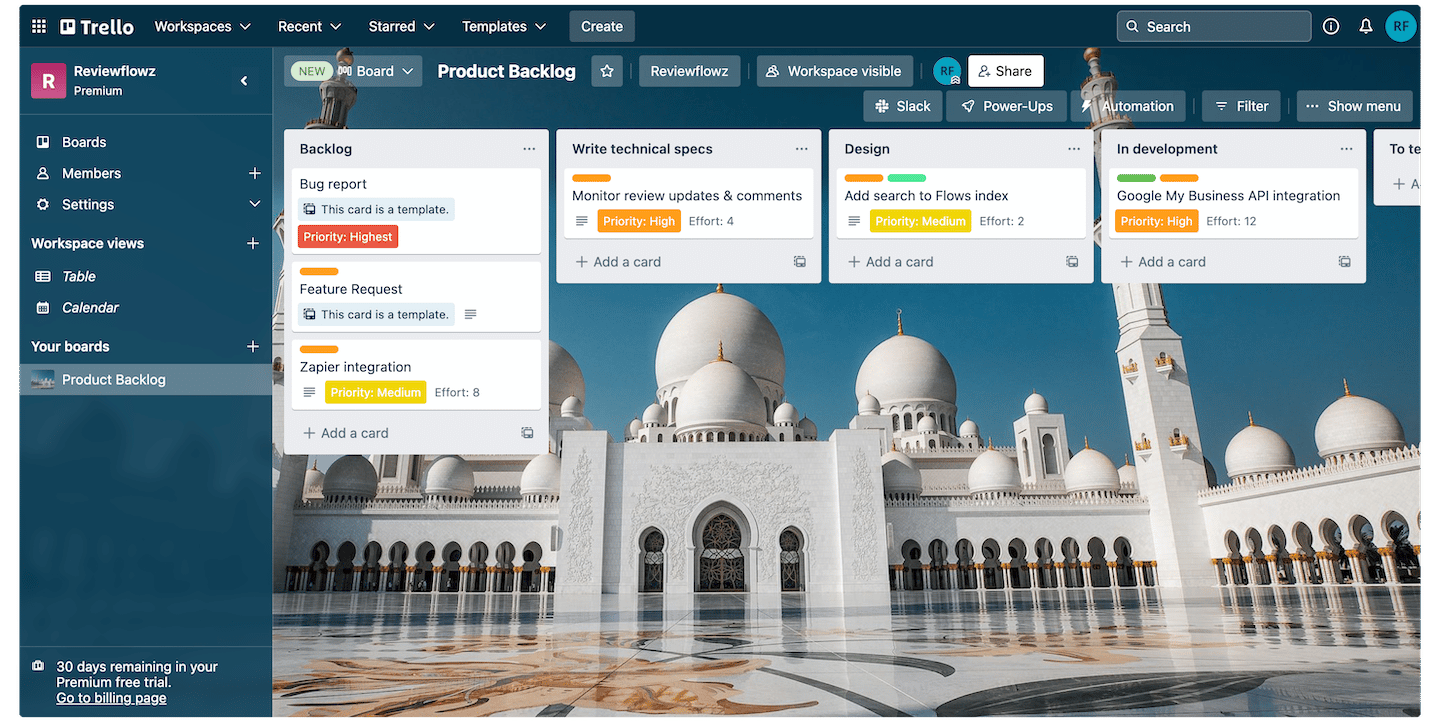
A Trello board and its progress columns

Checklists are the small items of a bigger task. Since each card represents a task, checklists sit inside the cards.

The advanced checklist feature lets you assign a due date and a person to individual checklist items.
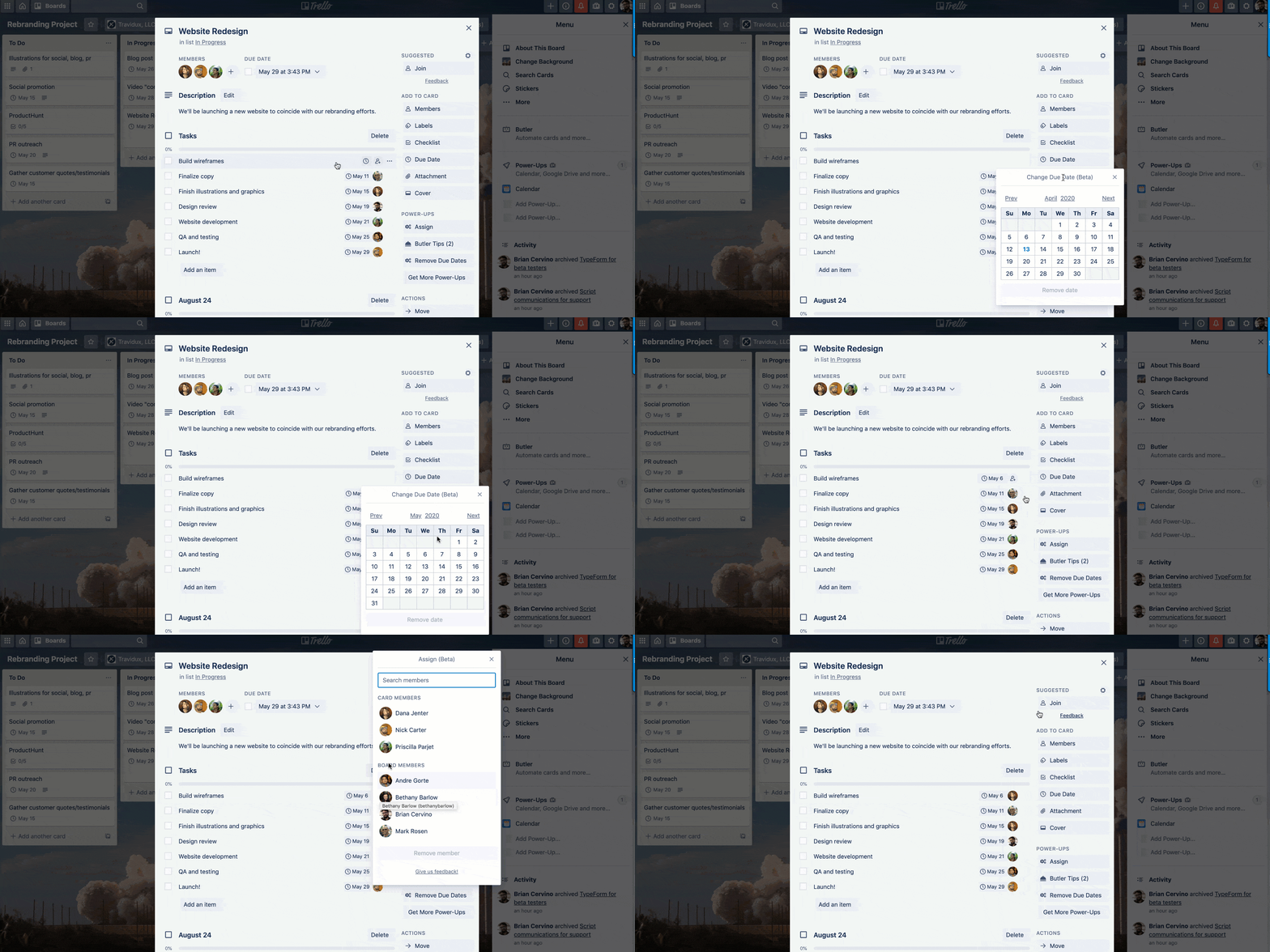
Trello advanced checklists, animated

Every checklist item you have assigned shows up on your home screen. That makes it easy for team members to see everything assigned to them across all boards, so no task slips through the cracks.

Salesdorado’s takeWe like that Trello and its features are also available in a mobile app, which is pretty well built, for that matter.

Visualization tools

Even though the Kanban board is at the heart of the Trello method, the tool gives you other ways to visualize your workflow through the Views feature, available on the paid Premium and Enterprise plans.

This ability to adapt to each team’s needs and preferences is one of Trello’s real strengths.

On top of the Kanban view, you can see your work as a timeline, a table, a calendar, a dashboard and a map.
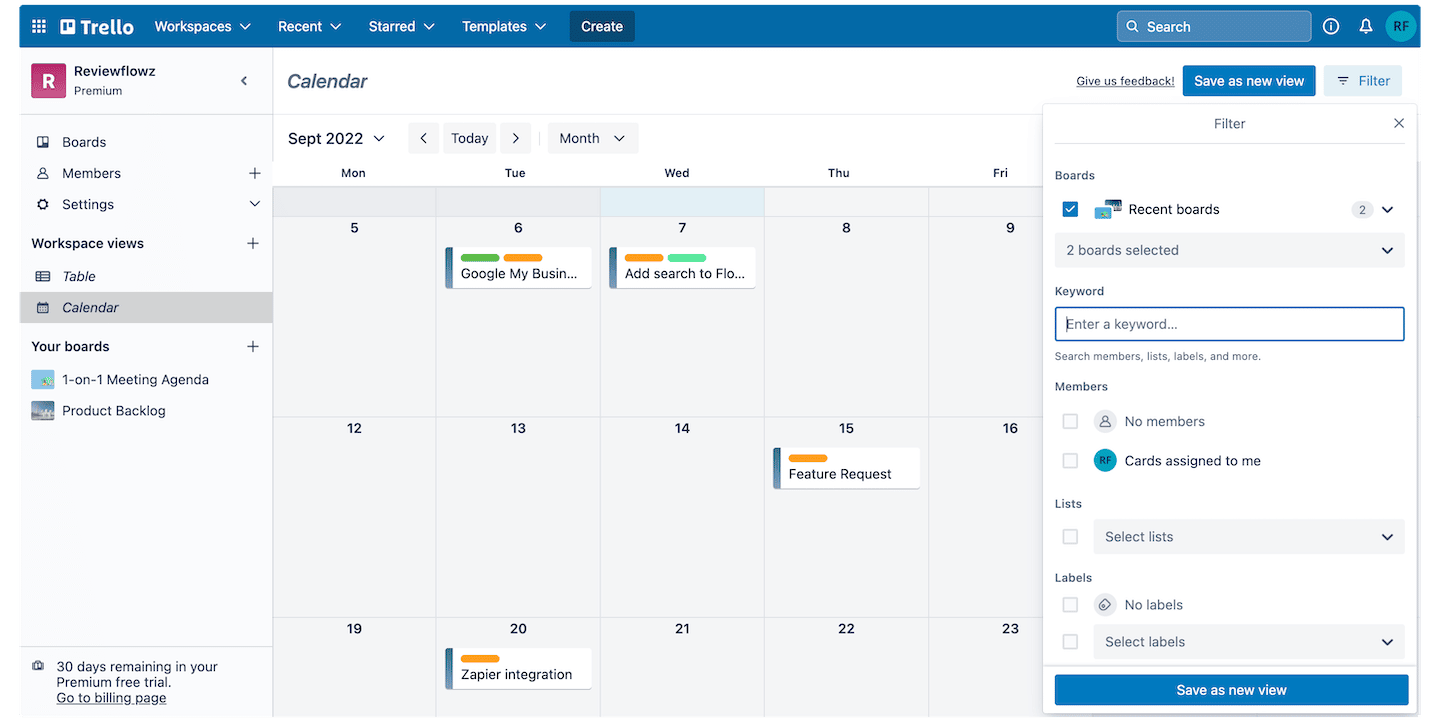
Trello calendar view

The timeline and calendar views show you how the team’s work fits together over time and help you anticipate bottlenecks. The table view gathers cards from different boards in one place for an overall picture.
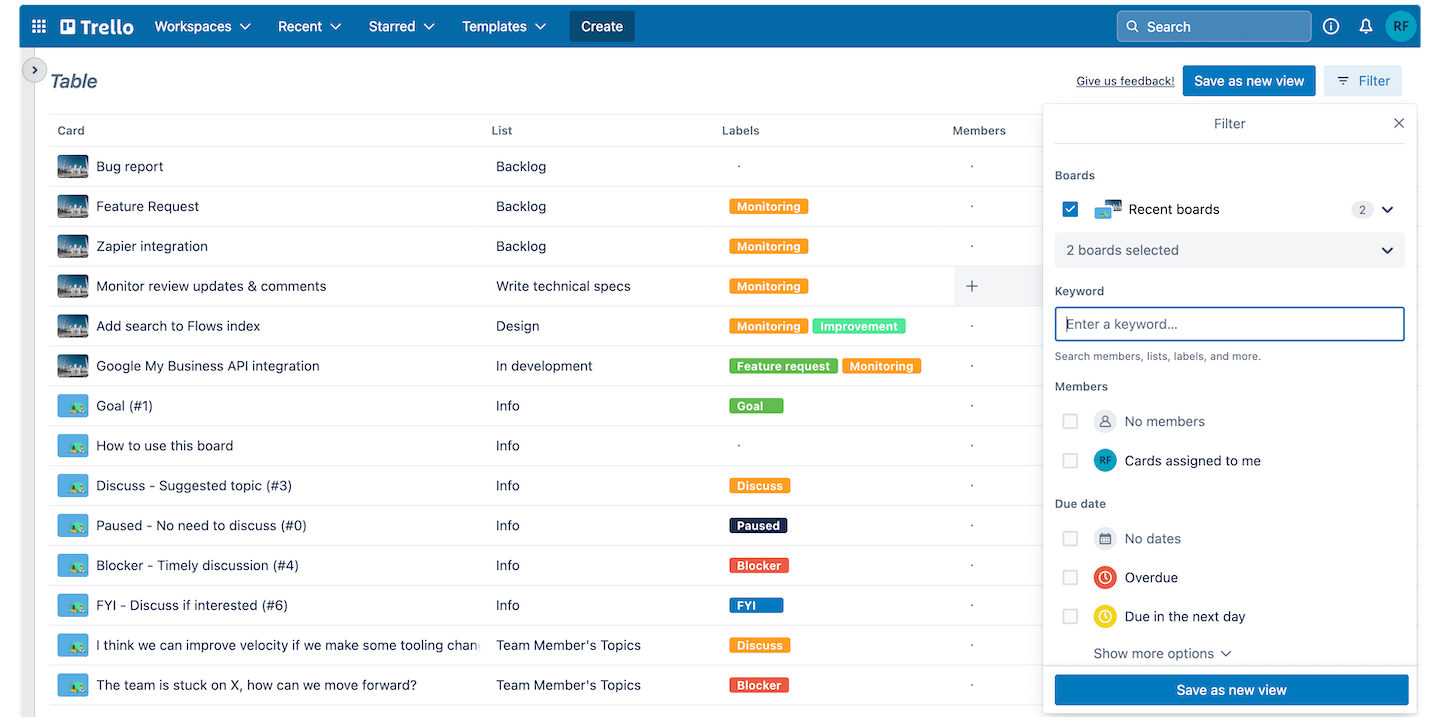
Trello table view

Automation: Trello’s real strong point

Trello has a built-in automation tool called Butler, which the interface now simply calls « Automation ». It saves time by handling repetitive tasks and lets you get more done, more efficiently.

Butler lets you set rules where one action, the trigger, is followed by another action: moving cards from one list to another, sending notifications, or syncing advanced checklists.
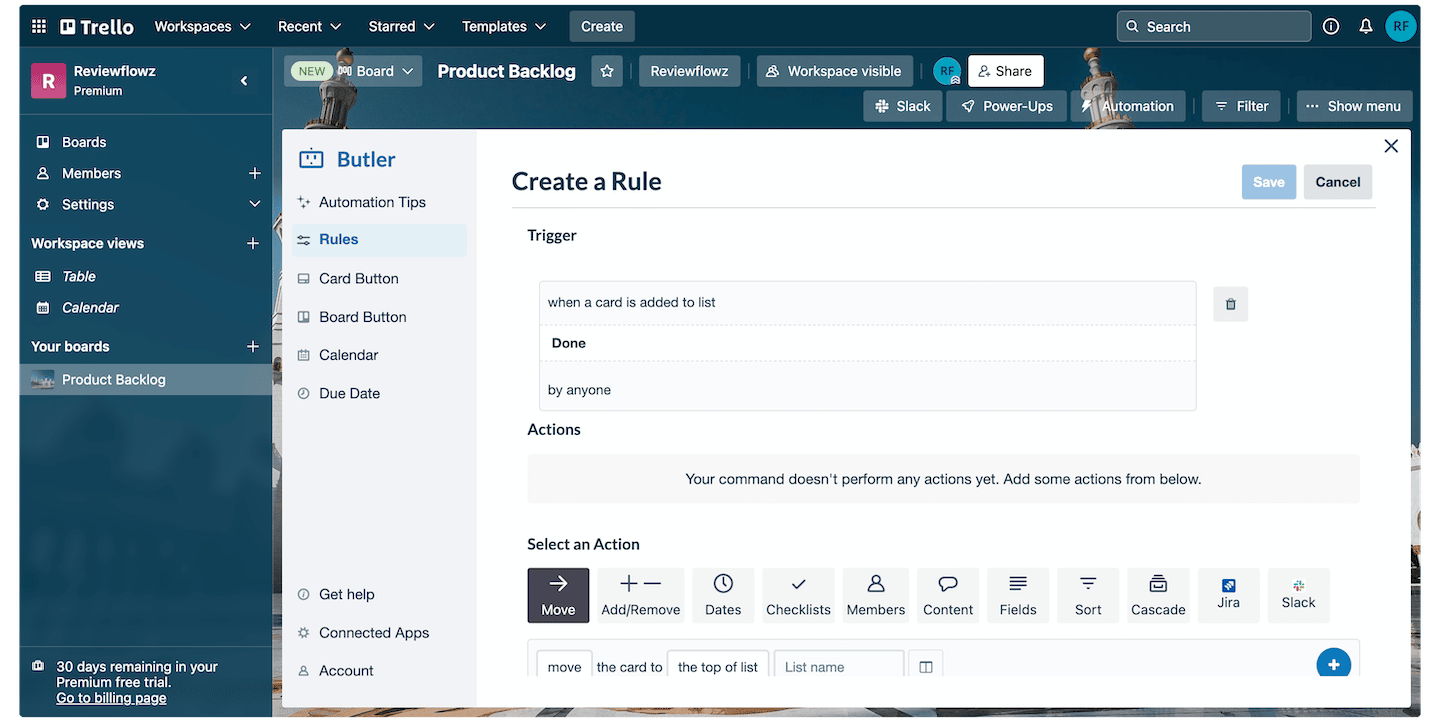
Creating a Butler rule in Trello

Automations in Trello also work through a button system. For example, you can create a button that, when clicked, moves the work to the next step of the process by sending it to the next list.
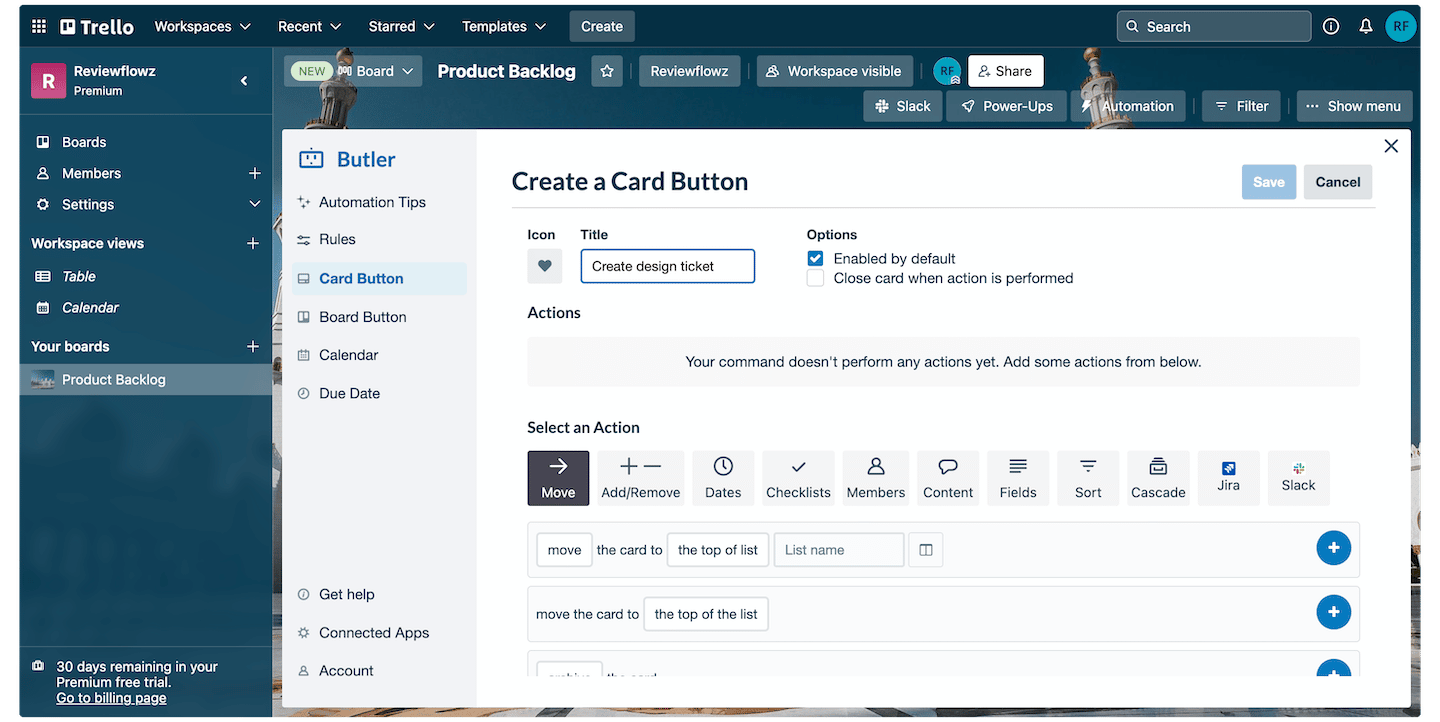
A Butler automation button in Trello

Butler also lets you set up calendar commands. For example, you can automate recurring tasks and set a command so that all cards in the « Done » list are archived every Monday at 8:00 a.m.

You can also use a card’s due date as a trigger for a series of actions. For example, you can set a command so that a card that is due moves to the top of the list.

Finally, Trello lets you create automations for emails and integrations, which come in handy if you share updates with external collaborators or clients.

For example, you can set a rule so that clients get an email telling them feedback is needed every time a card is dragged into the « Feedback needed » list.

Customer support at Trello

Trello’s helpdesk is run by Atlassian and is available on their website. It gives access to documentation, the Trello community, a page showing the real-time status of Trello’s services, and FAQs, notably on billing.
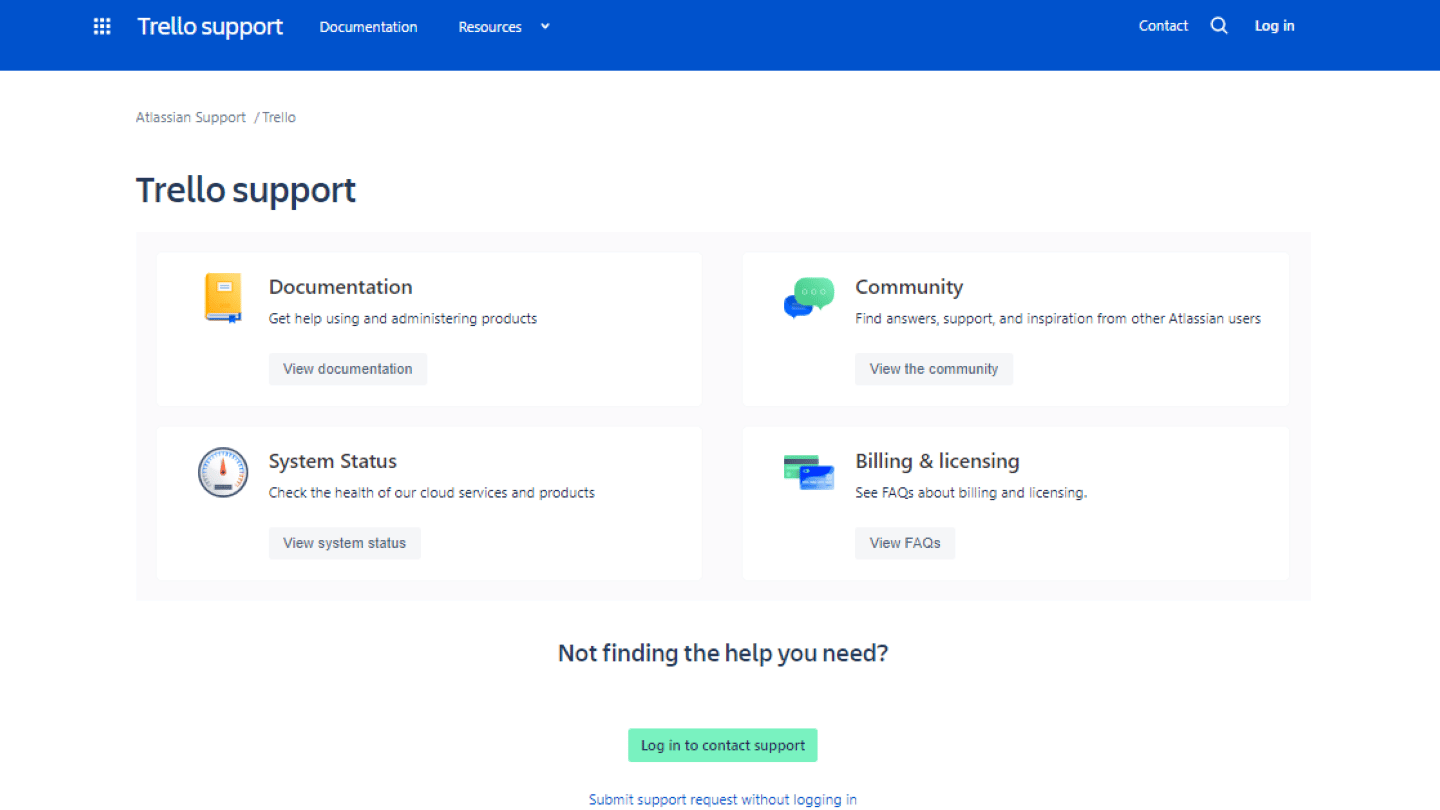
Trello support center

The resources in Trello’s help center are plentiful, well organized and easy to reach through the search bar. They are backed up by Trello’s YouTube channel, which has plenty of tutorials and explainer videos.

The community Trello runs is also a real plus, for sharing tips and best practices between users.
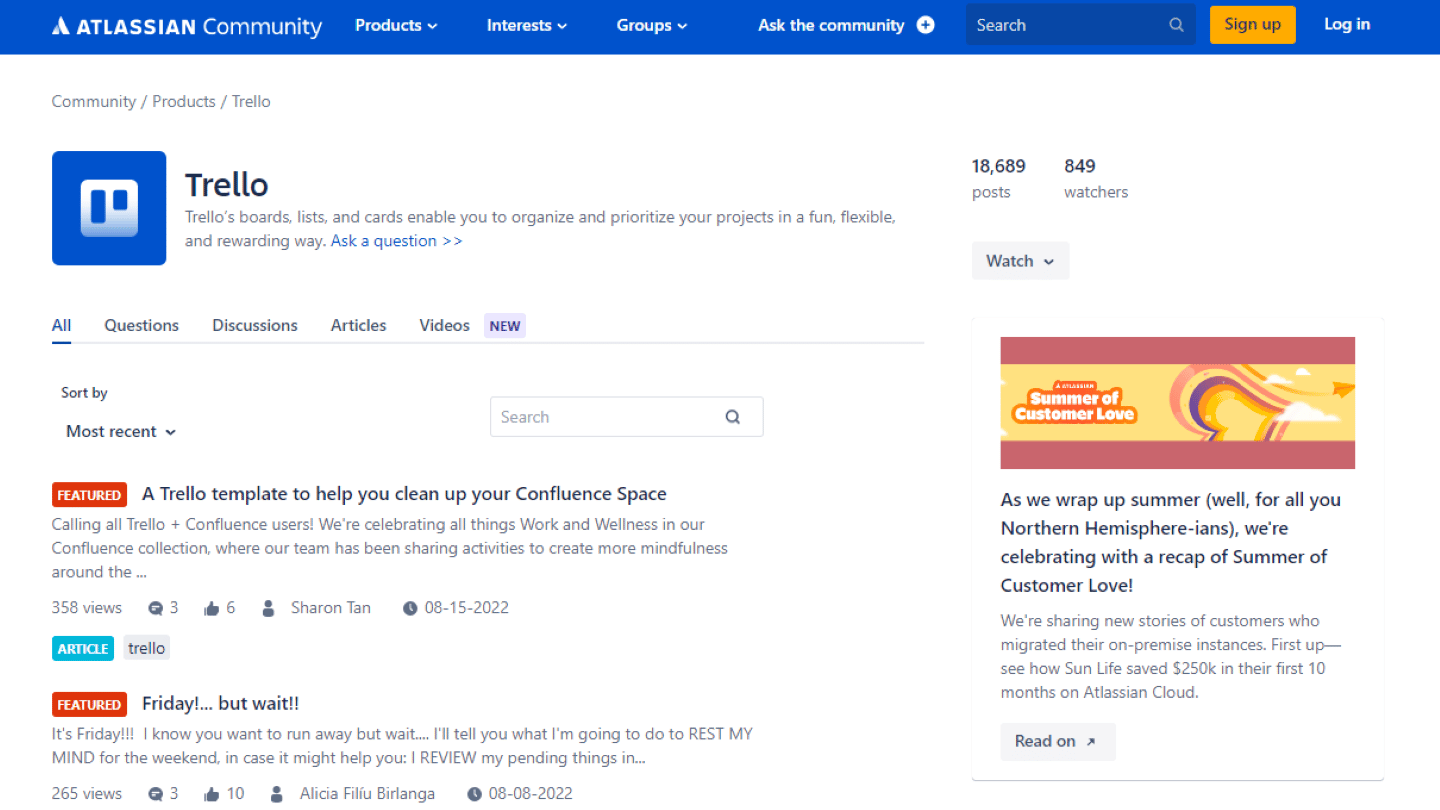
The Trello user community

Too bad, though, that Trello’s customer service can only be reached through a contact form, which is fairly limited.

The Trello integrations marketplace

Trello offers many integrations:

  • Internal and external communication: Gmail, Slack. Since Trello is not built around communication, these integrations will be very useful for anyone managing projects with a sizable team, or who needs to collaborate.
  • Automation: Focuster, Make, Autopilot, Zapier. Trello already has automation features, but these integrations are needed to go further and automate your processes across other tools.
  • Social media: X (formerly Twitter), Mailchimp, Evernote. These integrations are a real plus for any team working on projects that involve communicating or gathering information on social media.
  • Developer tools: Pegasus, Dashworks, GitHub. A real plus for anyone who wants to combine Trello’s project management strengths with those of developer tools: ideal for web projects.
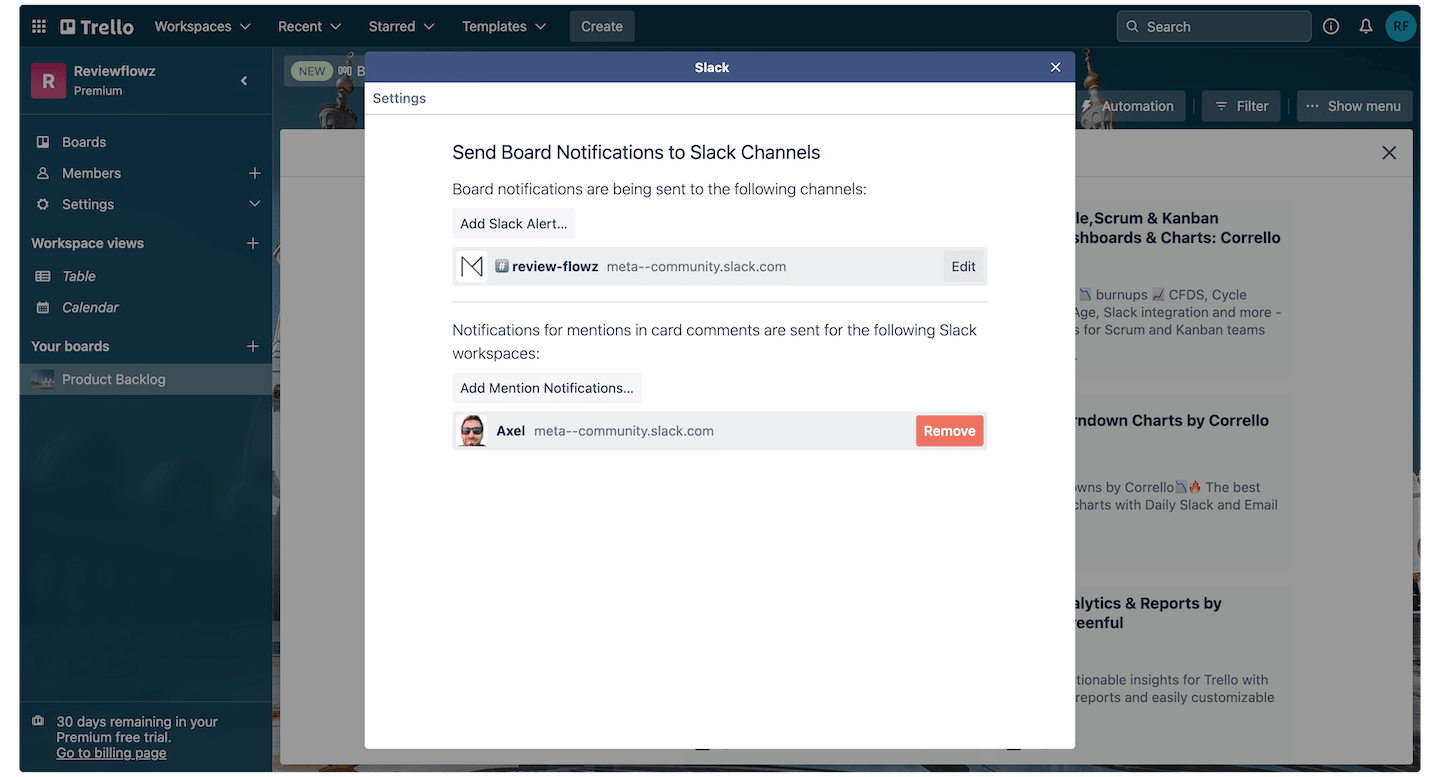
The Trello Slack Power-Up

Salesdorado’s takeWe like that every integration is available from the free plan. Too bad, though, that the Microsoft suite is poorly covered: Teams and OneDrive have their Power-Up, but the Outlook add-in has been retired.

Trello: pricing
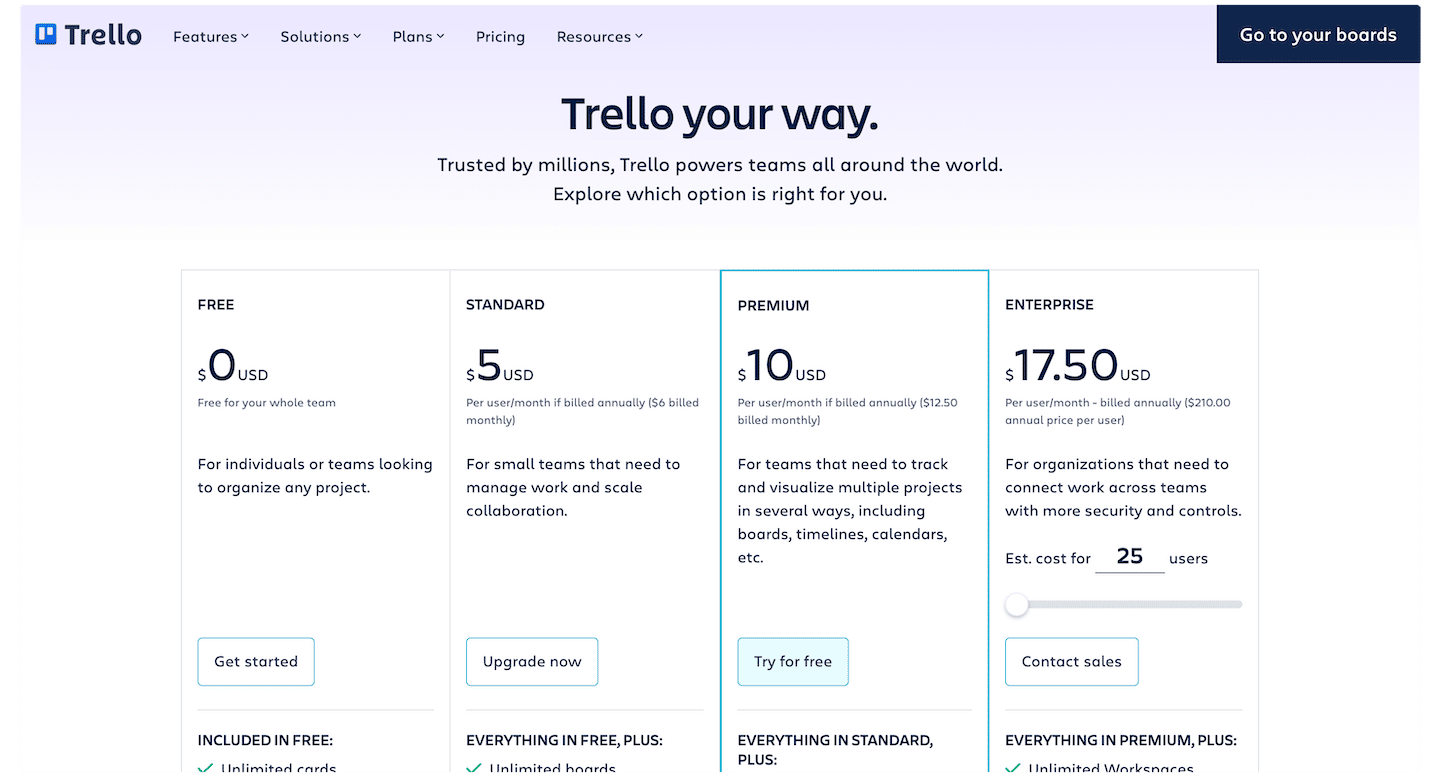
Trello pricing grid

Trello offers several plans:

  • Free: this plan gives you unlimited cards and access to automations on the web and mobile apps, but it is capped at 10 boards and 10 collaborators per workspace, and 250 automation runs per month. It is mostly meant for small teams or simple projects.
  • Standard: 6 dollars per user per month (5 dollars billed annually). Compared with the free version, this plan adds unlimited boards, more storage and more automations, and lets you invite people to boards.
  • Premium: 12.50 dollars per user per month (10 dollars billed annually). This version unlocks every view (calendar, timeline, spreadsheet, dashboard and map), admin and security features, and templates.
  • Enterprise: 17.50 dollars per user per month, billed annually only. This plan adds unlimited workspaces, plus organization-wide permission, admin, authentication and sharing features.

Salesdorado’s tipYou can get a discount on the prices above with an annual subscription, so go for it.

Given the features and the time saved, paying for the paid version is a winning bet in our view.
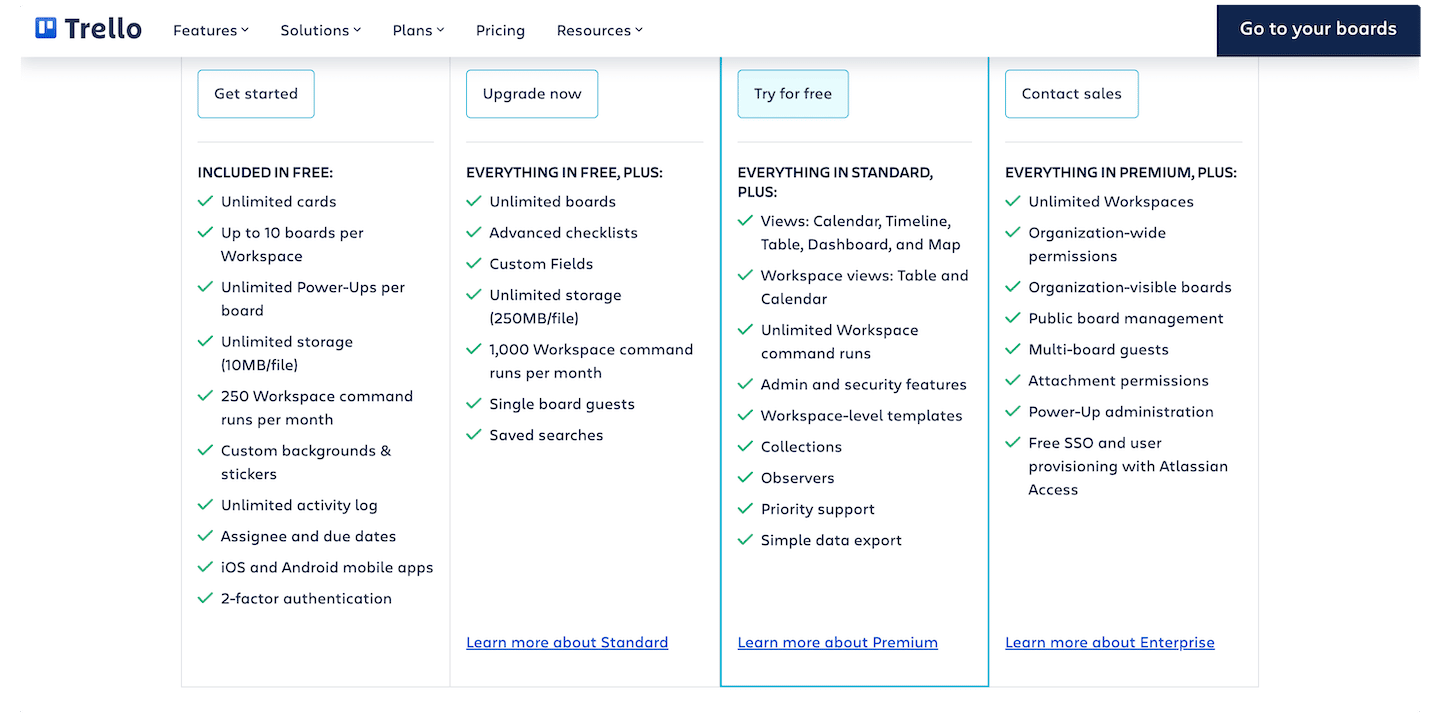
Trello plans in detail

Salesdorado’s takeWe really like that Trello offers a 75% discount on its prices to NGOs and charities.


Specs

Publisher
Atlassian
Principle
Kanban method: cards moved between progress columns on a board
Checklists
Inside cards, with a due date and owner assignable to each item in the advanced version
Views
Kanban, plus timeline, table, calendar, dashboard and map through the Views feature (Premium and Enterprise plans)
Automation
Butler, now called "Automation" in the interface: rules with trigger and action, buttons, calendar commands, email and integration automations. Available from the free plan (250 runs per month)
Integrations
Gmail, Slack, Focuster, Make, Autopilot, Zapier, X (formerly Twitter), Mailchimp, Evernote, Pegasus, Dashworks, GitHub. All available from the free plan. On the Microsoft side, only Teams and OneDrive have a Power-Up
Mobile app
Yes, with automations included from the free plan
Support
Atlassian helpdesk, documentation, active community, service status page, FAQ and YouTube channel. Contact through a form only
Plans
Free (unlimited cards, 10 boards and 10 collaborators per workspace), Standard $6, Premium $12.50 per user per month ($5 and $10 billed annually), Enterprise $17.50 per user per month billed annually
Discounts
Discount for annual subscriptions, and 75% for NGOs and charities

3 alternatives to know

If Trello isn't the right fit, here's what we'd look at if we were you.

  • Logo Monday
    Monday 4.0 From 45€/month
    The visual CRM grafted onto the Monday project management tool.
    See review
  • Logo Asana
    Asana 4.2 Free, then US$10.99 per user per month (billed annually)
    Visual project management, with a particularly generous free plan.
    See review
  • Logo ClickUp
    ClickUp 4.7 Free, then $9 per user per month billed annually
    The best value for money in project management, starting with the free plan.
    See review

Trello in our rankings and comparisons

The pages where we compare Trello with other tools.

Verified user reviews

Reviews collected through our partner program, work emails verified.

★ No reviews yet

Do you use Trello every day? Be the first to share your review with the Salesdorado community.

Share my review

Share my review of Trello

All reviews are checked and the work email verified before publishing. Just 5 minutes.

★ Work email required
Your rating *
Click to rate (0.5 step)

By submitting, you agree to publish your review (first name + initial, role). Email is never published.

Maxime Ben Bouaziz
Written by
Maxime Ben Bouaziz, CEO, Salesdorado, AI & Sales Tech

Expert in sales tools, CRM and B2B sales automation. Tests and breaks down prospecting, data enrichment and generative AI solutions to help marketing and sales teams build their stack.

Published on October 14, 2026, updated on November 16, 2026, reading 5 min