


- Forget the Essential license: it does not give access to email sync. Advanced is enough to start and can take you a long way.
- Pipedrive does not limit the number of contacts, but caps open deals, custom fields and reports depending on the license.
- Add-ons are paid monthly, regardless of the number of users. Put them up against the apps on the marketplace.
- For the same scope, a HubSpot or Salesforce integration takes up to 2 times longer than a Pipedrive integration, according to PulpMeUp.
- Plan for maintenance: one day every 3 or 4 months for a very small business, up to 10 days per month for an SME with subsidiaries.
Pipedrive is a relatively inexpensive solution in terms of licenses, around €50 per user, and it pays for itself very quickly.
Competing CRMs, Salesforce and HubSpot to name just two, offer solutions at more than €90 per user (even if their Starter plans have reshuffled the cards to some extent).
In terms of integration, on average and for the same scope, at PulpMeUp we estimate that a HubSpot or Salesforce integration takes up to 2 times longer. Mind you, their features are also richer.
We have laid out scenarios up to 20 users, but many of our clients go beyond 70, or even 100 users.
In this article, I go through the different cost items to plan for in a Pipedrive integration project, from license costs to maintenance costs, along with hidden costs, assessment and scoping, integration, configuration and training.
How much does Pipedrive cost for your type of company?
To make things clearer, I have summarized the costs in a table covering three types of companies:
- Company 1: A very small business or a B2B agency with few people using the CRM (assumption: 3).
- Company 2: A start-up / scale-up, typically a SaaS company.
- Company 3: An SME with several subsidiaries, or a business unit within a large group.
| Pricing & Budgets | Very small business / Agency | Scale-up / SaaS | SME with subsidiaries or BU within a group |
|---|---|---|---|
| Number of licenses | 3 | 10 | 20 |
| Number of contacts | 2,000 | 10,000 | 30,000 |
| Recommended license | Advanced | Professional | Power |
| License price | €44* / user / month | €64* / user / month | €79* / user / month |
| Recommended option 1 – Pipedrive Campaigns | €24 / month | €72 / month | €199 / month |
| Recommended option 2 – Lead booster / month | €39 / month | €39 / month | |
| Total licenses | €156 / month | €751 / month | €1,818 / month |
| Audit, needs scoping and recommendation | €3,000 | ||
| Implementation & Integration | From €2,500 | 10 days – From €6,000 | 25 days – From €15,000 |
| Training | 3 days – €3,000 | 10 days – €7,000 | |
| Maintenance | 0.25 day per month – €125 / month | 2 days per month – €1,000 / month | 10 days per month – €5,000 / month |
| Total service providers | €2,500 + €150 / month | €9,000 + €1,000 / month | €22,000 + €5,000 / month |
| Total year 1 | €6,172 | €30,012 | €103,816 |
| Total year 2 | €3,672 | €21,012 | €81,816 |
*The prices shown are for no-commitment plans. If you choose annual billing, you can get a discount of around 30%.
Pipedrive license prices
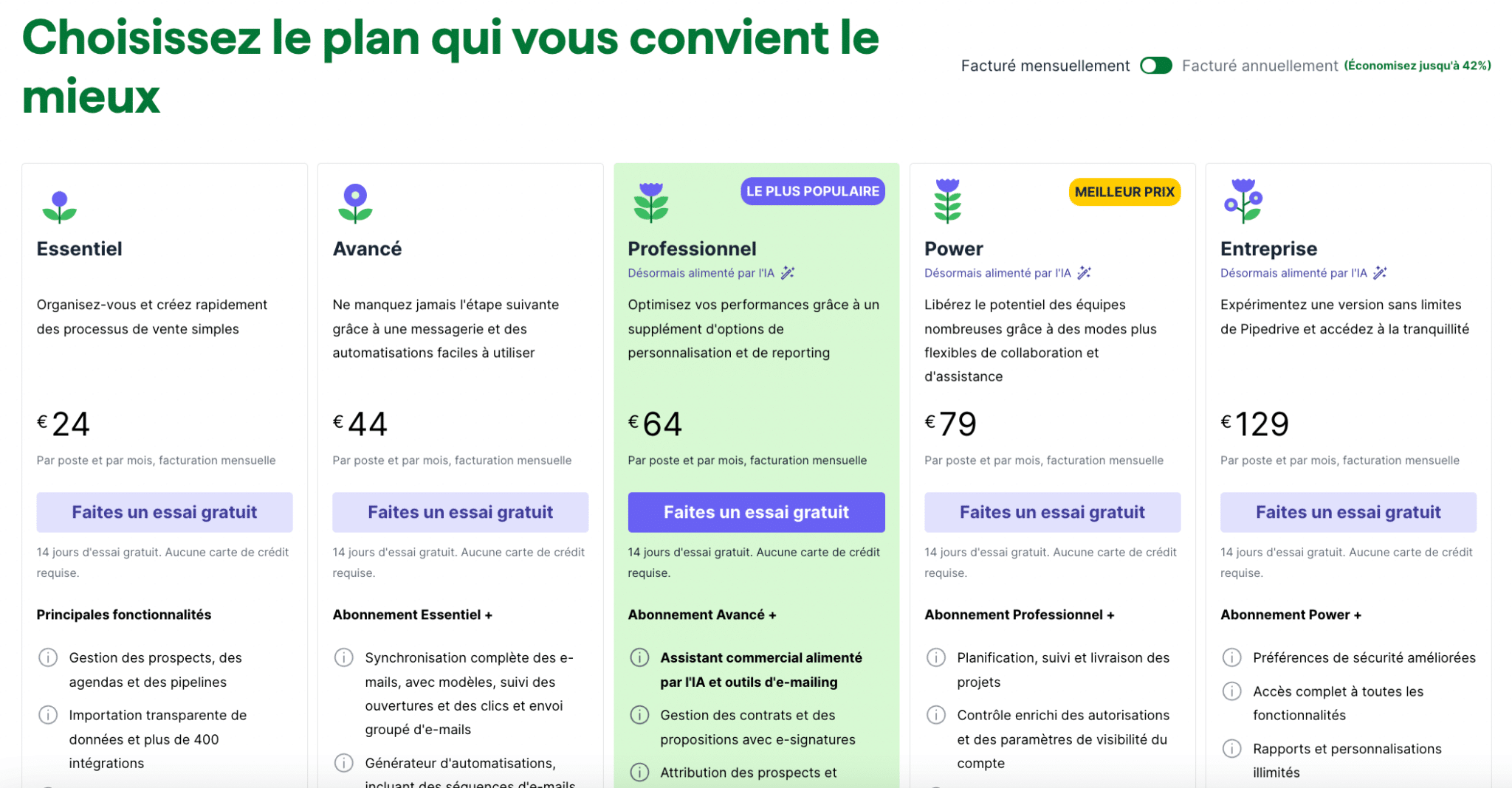
Pipedrive is one of the most complete CRMs, especially for pipeline management. This software has the advantage of very competitive pricing.
The principle is to pay for one access per user per month. Up to 3 people can log in on the same user at the same time, but do not be stingy about it: it is useful for giving access to sales admin staff, for example.
I recommend giving each salesperson their own access so that everyone can sync their emails and calendar, and so you can manage activities.
Before we talk about license tiers, note that Pipedrive is one of the only CRMs that does not limit the number of contacts! You want to import 1 million contacts with a single license at €24 per month? You can. Go for it!
On the other hand, depending on your subscription tier, Pipedrive limits the number of open deals, the number of custom fields and the reports.
| Essential | Advanced | Professional | Power | Enterprise | |
|---|---|---|---|---|---|
| Open deals (per company) | 3,000 | 10,000 | 100,000 | 200,000 | On quote |
| Custom fields (per company) | 30 | 100 | 300 | 500 | On quote |
| Reports (per user) | 15 | 30 | 150 | 250 | On quote |
| Custom visibility groups (per company) | 0 | 0 | 3 | 15 | On quote |
| Permission sets (per company) | 0 | 0 | 2 | 10 | On quote |
| Teams (per company) | 0 | 0 | 3 | 15 | On quote |
| Active automations (per company) | 0 | 30 | 60 | 90 | 180 |
As for choosing a license, you can forget the first tier, Essential, because you will not have access to email sync.
If your needs are that limited, I suggest taking a look at CRM templates on Notion or Airtable: you will get the same features, free for life!
In my view, the Advanced tier is the best license to start Pipedrive with, and it can take you a very, very long way.
If I had to give you a rule of thumb to work out your license needs, it would be based on your number of active users:
- 1 to 5 users: Advanced is ideal! Professional if you think you will need a lot of reporting.
- 5 to 10 users: Professional is ideal! You can look at the Power license, especially if you want to “partition” user views and access.
- 10 users: Power is ideal, especially if you need team management, advanced reporting, etc.
- Finally, the Enterprise license is mostly needed if you go beyond 100+ users and above all if you have an intensive API integration with your ERP. In that case, the number of API calls will be a deciding factor.
Pipedrive add-on prices and other hidden costs
Add-ons on Pipedrive are paid monthly, regardless of your number of users.
Alternatives to Pipedrive add-onsPipedrive is packed with connected apps in its marketplace, so do not hesitate to put Pipedrive’s add-ons up against the solutions offered on the marketplace. Where possible, I point out the worthwhile alternatives on the Pipedrive marketplace.
There are 5 official Pipedrive add-ons.
1. Pipedrive Campaigns
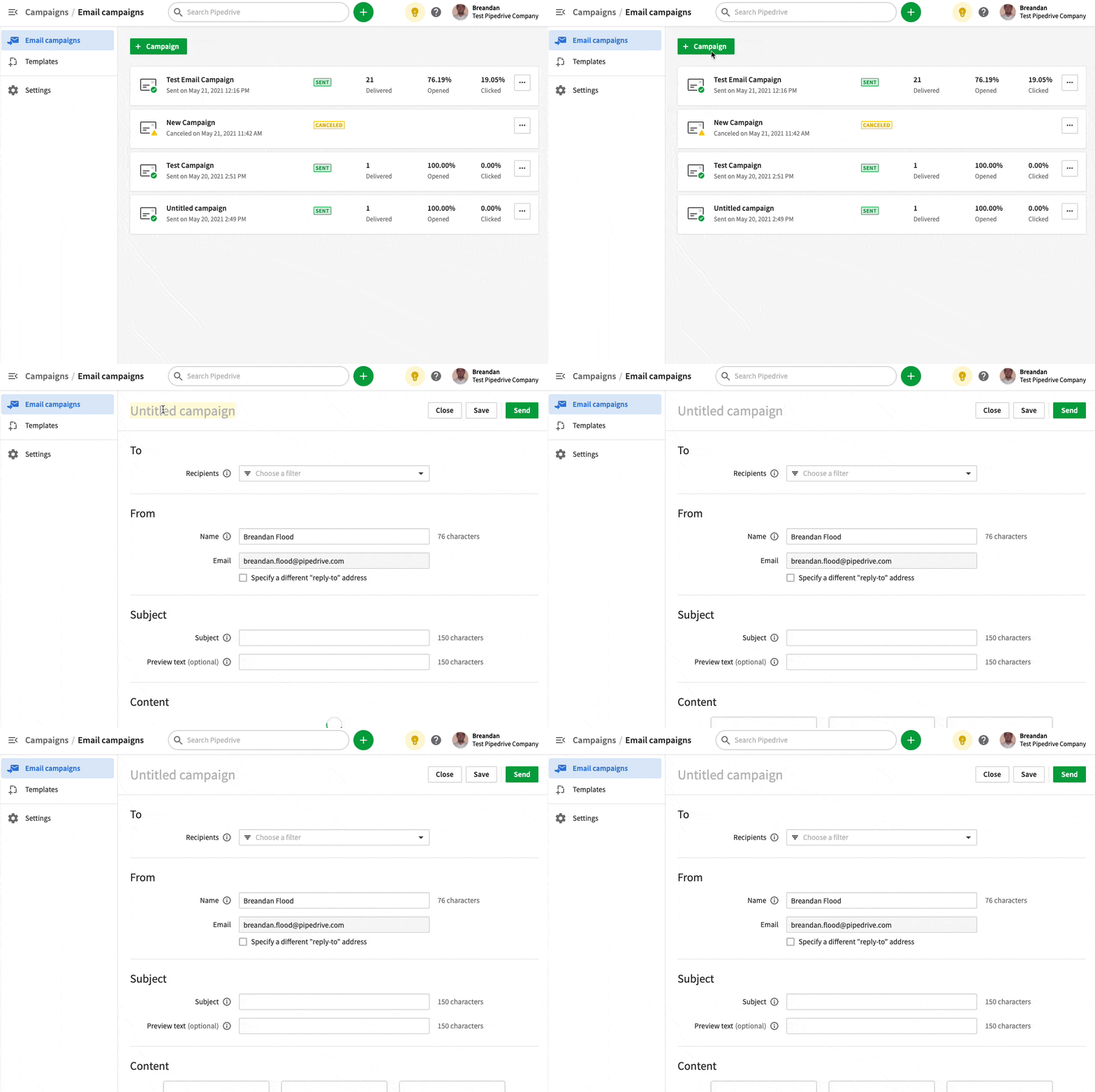
Pipedrive Campaigns is the native marketing campaign manager offered by Pipedrive (since 2022). To learn more, see my article on the subject!
From €16 per month for 1,000 eligible contacts in your Pipedrive database. You can scale your plan up or down during the month.
Overall, the prices are higher than Brevo or Mailjet, but the advantage of Pipedrive Campaigns is that it is fully integrated into your Pipedrive account. So there is no sync to manage with an external tool.
This is clearly the add-on to consider very early on, because it is a good complement to help your sales teams by setting up a nurturing tool for your cold or lukewarm leads.
The worthwhile alternatives are Mailchimp and Brevo.
Be careful: the integrations offered on the marketplace are one-way, from Pipedrive to Mailchimp or Brevo. If you want to bring the information from your emailing software back into Pipedrive (which I strongly recommend), you will need to use Zapier or its alternatives.
2. Lead booster
It is a mix of several solutions. From chat to web forms, by way of the Prospector…
There is a single price, €32.50 / month. Except for the Prospector, where you can buy extra credits. Pipedrive offers a 15-day trial.
The chat or chatbot solution is useful for centralizing your needs. Very easy to get to grips with, it offers different ways to set up automations. It is very easy to install via a snippet of code you can add to any website.
The Prospector, on the other hand, is of fairly little interest, especially since the market is full of much more convincing solutions.
The forms solution, embedded directly on your site via a code snippet, meets a basic need and is very easy to connect to the CRM.
Use it for your contact forms or lead capture forms. The really big plus of the solution is its CRM integration, whereas integrations are either limited or very complex when you use other solutions.
For me, Lead booster is worth considering if you want to keep everything in Pipedrive, but I think you will fairly quickly need to look for more specialized solutions, and as it happens the Pipedrive marketplace is full of innovative solutions.
Either way, at €39 the price is excellent for an integrated chat, chatbot and forms solution. You will not find cheaper on the market with such deep integration.
3. Web Visitors
This add-on lets you track and know who is visiting your site. More precisely, which company your visitors come from.
Pipedrive actually relies on the Leadfeeder solution.
Pricing starts at €49 per month (€0.25 per unique organization identified).
It is useful mainly if you target key accounts or customers in North America. I found it less useful for targets in Europe.
A worthwhile alternative is Outfunnel, which does not do quite the same thing, but lets you track and score your users’ journey on your website
4. Smartdoc
This is Pipedrive’s CPQ solution for creating purchase orders, contracts or quotes, automatically filling these documents with the data in your Pipedrive CRM and collecting signatures.
At €39, you get a complete solution that is easy to get to grips with and 100% compatible with Google Drive (Docs, Sheets, Slides) and the Microsoft suite (Word, Excel, PowerPoint).
Note that the solution is free on the Pro, Power and Enterprise plans.
5. Projects
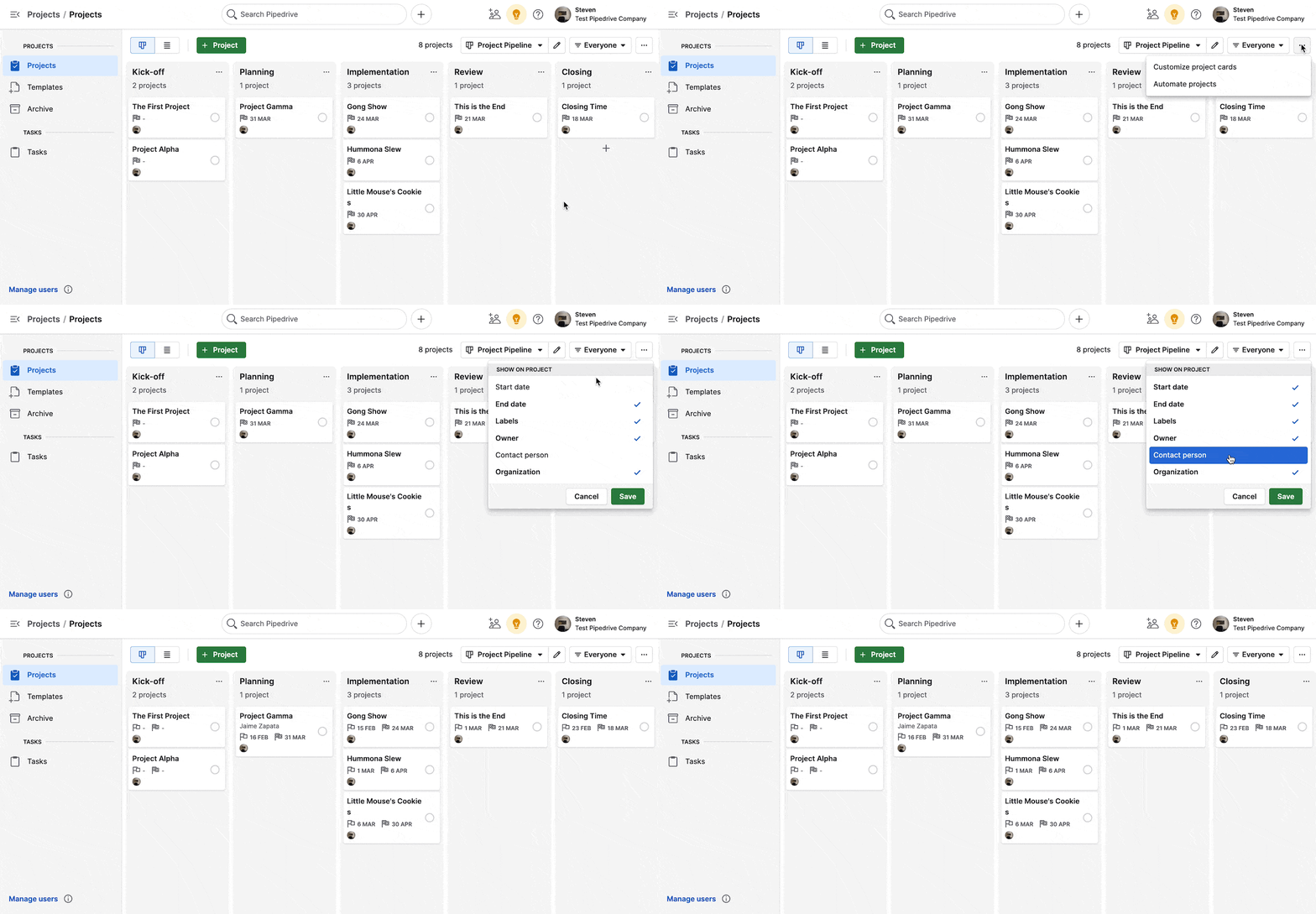
To put it simply, with Projects you get a mini Trello.
This is the solution I recommend if, after signing a client, you have a very linear process to follow.
Example: one of our clients installs green plants in offices, and it lets them coordinate their suppliers, delivery drivers and installers in a single interface.
The price is €8 per project user per month. A standard Pipedrive user can view a project but cannot act on it.
Note that Projects is included for all Power and Enterprise subscribers.
This is clearly the solution to consider if you want to keep project management in your Pipedrive, especially if your salespeople have to handle customer success tasks. The best alternatives to Projects on the marketplace are Trello or Asana.
6. Messenger
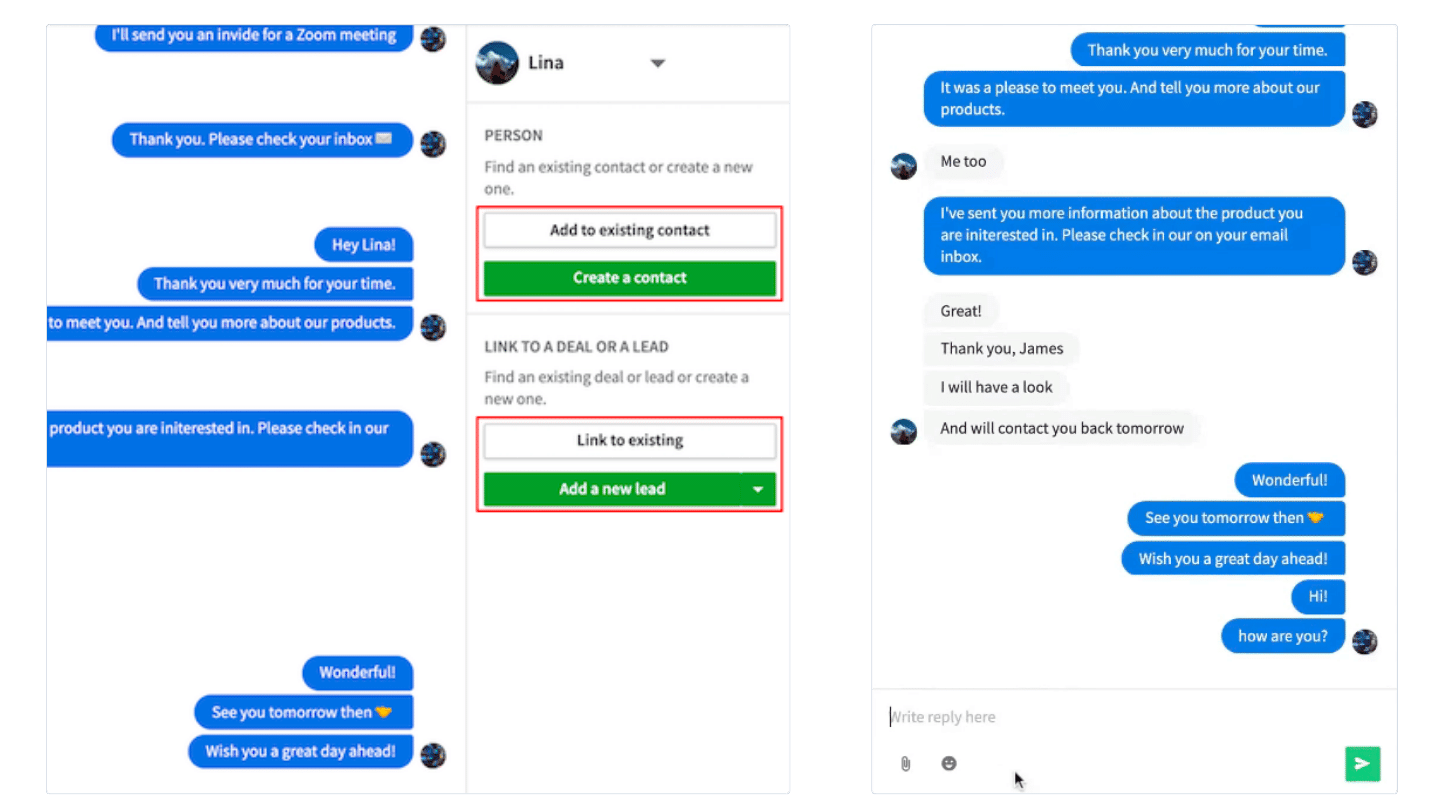
I announced 5, but there are actually 6, because there is a hidden add-on on Pipedrive.
Messenger by Pipedrive (in beta) lets you bring together your conversations with customers from Facebook Messenger and WhatsApp Business.
You can also handle replies directly, and, the really big plus, you can link the conversation to a contact or a deal.
Implementation costs of a CRM project on Pipedrive
For a Pipedrive integration, I will try to give you projections by scenario, assuming you hand the whole project over to an external agency.
As a reminder, our “typical” companies are:
- Company 1: A very small business or a B2B agency with comparatively few people on the CRM
- Company 2: A start-up / scale-up, typically a SaaS company
- Company 3: An SME with several subsidiaries, or a business unit within a large group
Company 1: Very small business or agency with up to 3 users
- Recommended license: Advanced – €44 x 3 users = €132 per month
- Recommended add-on: Pipedrive Campaigns for 1,000 contacts: €16 per month
Scoping
This is the first integration of a real CRM. There is an Excel file to import: the customer file with hot prospects.
You need to define the scenarios of the different users within the CRM: who does what, and how, day to day.
Your need is fairly common for a Pipedrive integrator, so scoping is generally included in the integration service.
Configuration & integration
Your Pipedrive instance needs to be configured on the 7 basic features:
- Leads Inbox
- Deal / Opportunity
- Email & calendar sync
- Setting up custom fields on Contacts, Organizations, Deals
- Configuring the activities screen
- A monthly management dashboard with about ten reports
- Configuring Pipedrive Campaigns with a template
About 3 to 4 days of service needed. A budget of around €2,500 for a fully operational Pipedrive in line with your usage scenarios.
Training
Training is probably not essential: you took part in the integration, you got hands-on training along the way, and you can easily train your users.
Maintenance / Sales Ops
Ideally, I recommend one day of service every 3 or 4 months to review your usage, evolve your automations, update the dashboards, optimize the deliverability of your newsletters and possibly integrate a third-party tool.
Company 2: Start-up – SaaS
You already use a structured CRM, but the data is scattered (duplicates, triplicates, inconsistent, etc.), the dashboards do not allow fine enough management of sales activity, and the integrations still need finishing, both upstream with prospecting tools and downstream with the ERP or the business application (often built in-house) and an advanced ticketing solution such as Crisp or Zendesk.
- A CRM already in place, or a migration to carry out from another solution.
- Generally, CRM processes have been built as you went along, and each user follows their own scenarios.
- The data is scattered (duplicates, triplicates, inconsistent, etc.)
- The dashboards do not allow fine management of sales activity
- The integrations still need finishing,
- Recommended license: Professional – €64 x 10 users = €640 per month
- Recommended add-ons
- Pipedrive Campaigns for 5,000 contacts: €42 per month
- Lead booster, notably for chats, chatbots and webforms: 32.50 x 12: €390 per year
- Smart doc: included with the Professional license
- Recommended integrations:
- Outfunnel to score and sync your contacts.
- Aircall, RingOver or Just call as a VoIP solution.
- A cold email solution such as Lemlist or La Growth Machine
- Sync with Slack, and a project management tool such as Trello or Asana
For the exercise, I counted 10 users:
- One head of sales
- 5 salespeople
- 2 marketers (manager + work-study student)
- 2 founders
Scoping the CRM project
Your need is fairly common for a Pipedrive integrator, unless there is API integration and / or a particularly complex sales process. It will usually be included with the integration service.
Configuration & integration
On top of the basic configuration, a few slightly more advanced elements need to be added
- Creating products with their own taxonomy
- Configuring the activities screen with separate routines for SDRs and Account Executives
- A monthly management dashboard with about ten reports
- A weekly management dashboard for the weekly meeting
- One dashboard per user type
- Creating automations
- Integrating the sales funnel(s) with a connection to the online forms
- Coaching / support for the API connection with the business database
Training
For a team of 10 people, you can count on one day to train the super administrator + two days to train all the users.
The training will mostly take the form of hands-on practice on real cases.
A tip: split your training into 3 or 4 remote sessions, in small groups of 3 or 4 people, so your users can gradually get into using the tool and adoption is maximized.
Maintenance / Sales Ops
Ideally, I recommend 2 days per month, i.e. half a day per week, for a Sales Ops assignment: making sure the CRM is up to date and usage is consistent, optimizing dashboards, rolling out new automations, managing newsletter sends, integrating new solutions, etc.
Company 3: SME with subsidiaries or BU of a large group
A CRM is already in place, with more than a million records across contacts, emails, tasks, activities, etc.
Generally, CRM processes have been built as you went along and each user follows their own scenarios; adoption is not there across the whole team.
The data is scattered (duplicates, triplicates, inconsistent, etc.), the dashboards do not allow fine management of sales or marketing activity, and the integrations still need finishing, both upstream with prospecting tools and downstream with the ERP or the business application (often built in-house) and an advanced ticketing solution such as Crisp or Zendesk
Team management is opaque in the CRM and usage is inconsistent. The need for integration with the technical ecosystem is very strong, with the business application as well as the ERP, the group’s data lake and the internal reporting tool.
- Recommended license: Power – €79 x 10 users = €790 per month
- Recommended add-ons:
- Pipedrive Campaigns for 10,000 contacts: €90 per month
- Lead booster, notably for chats, chatbots and webforms: 32.50 x 12: €390 per year
- Smart doc: included with the Professional license
- Recommended integrations:
- Outfunnel to score and sync your contacts.
- Aircall, RingOver or Just call as a VoIP solution
- A cold email solution such as Lemlist or La Growth Machine
- Sync with Slack and Trello / Asana
For the exercise, I counted 20 users:
- One head of sales
- 4 SDRs
- 11 salespeople (AEs)
- One marketing director
- 3 marketers
Scoping the CRM project
A budget of at least €3,000, i.e. 3 to 4 days for the audit, the recommendation and the rollout roadmap. This phase matters for calibrating the integration assignment properly. The teams are fully operational, so Pipedrive has to be adapted to the practices already in place and the CRM connected via API for a smooth experience.
Configuration & integration
On top of the intermediate configuration, a few more elements need to be added:
- Configuring user rights and team views
- Deals – across several pipelines
- Mapping and writing up all the usage scenarios
- API integration with the entire ecosystem
A minimum of 20 days of service needed. A budget of around €15,000 for a fully operational Pipedrive in line with your usage scenarios and your third-party integrations.
Training
For a team of 20 people, you can count on three days to train the sales & marketing super administrators + seven days to train all 15 users. The training will mostly take the form of hands-on practice on real cases.
A tip: split your training into 3 or 4 remote sessions, with user groups of 2 or 3 people, so your users can gradually get into using the tool and adoption is maximized.
Maintenance / Sales Ops
Ideally, I recommend 10 days per month, i.e. 2.5 days per week, for a Sales Operations assignment: making sure the CRM is up to date, that usage is consistent and that the reporting tools are up to date, rolling out new automations, managing newsletter sends, integrating new solutions, importing new data or challenging the API integrations, regularly cleaning / deduplicating / enriching the database, administering the tool stack, supporting new users, etc.
The questions we get over and over.
How much does a Pipedrive license cost?
Pipedrive is paid per user per month. With no commitment, the Essential license starts at €24, Advanced is €44, Professional €64 and Power €79. Annual billing gives a discount of around 30%.
Which Pipedrive license should you choose?
For 1 to 5 users, Advanced, or Professional if you need a lot of reporting. For 5 to 10 users, Professional, or Power to partition views and access. From 10 users, Power. The Enterprise license is mostly useful beyond 100 users, with an intensive API integration with an ERP.
Does Pipedrive limit the number of contacts?
No, you can import 1 million contacts with a single license. On the other hand, depending on the subscription tier, Pipedrive limits the number of open deals, custom fields and reports.
What are Pipedrive’s paid add-ons?
Pipedrive Campaigns, from €16 per month for 1,000 contacts; Lead booster, which combines chat, chatbot, forms and the Prospector; Web Visitors, from €49 per month; Smartdoc, at €39, free on the Pro, Power and Enterprise plans; and Projects, at €8 per project user per month. Messenger, in beta, comes on top.
How much does it cost to have an agency integrate Pipedrive?
From €2,500 for a very small business with 3 users, i.e. 3 to 4 days of service. From €6,000 for a scale-up with 10 users, over 10 days. For an SME with subsidiaries, count €3,000 for the audit and scoping, then around €15,000 for the integration.



What the community says.